Soft Hub WARDOGS Cheat

Working
SOFT HUB SOFT HUB
Last update 14.09.2026 This date shows when the software was last updated. An old date doesn't mean the software stopped working! Most likely the developer just had nothing new to add. If you have any doubts, you can always check the current status with our support team.
Add another cheat from this game too — to compare them.
Soft Hub WARDOGS
Steam
Windows support: 10: all builds; 11: all builds
Menu language: English
Spoofer:No
USB drive:Yes
BIOS:No

User information

The loader starts from a USB stick, so have one ready. Any drive will do, since capacity and model make no difference, and there is nothing special to format it as. You will not need to touch the BIOS: leave Secure Boot and virtualisation exactly as they are.

On the system side a current Windows 10 or Windows 11 build is enough. The game has to be a legit Steam copy: WARDOGS only runs on official servers and there is no build for anything else. The order matters: loader first, game second, with other overlays and debuggers closed before you start.

The menu is English only; Soft Hub has no Russian localisation. The names in it are standard, and the feature list on this page follows the menu item by item, so keeping this tab open for your first couple of sessions helps. The key and the loader arrive by email at the address you enter when paying. There is no account area on the site, so type that address carefully.

The game has been in early access since 10 September 2026 and gets patched often, with Easy Anti-Cheat updating alongside it. After a major update the build normally goes on hold for checks and your paid days are frozen. The current state is always shown in the product status.

SCREENSHOTS
Description

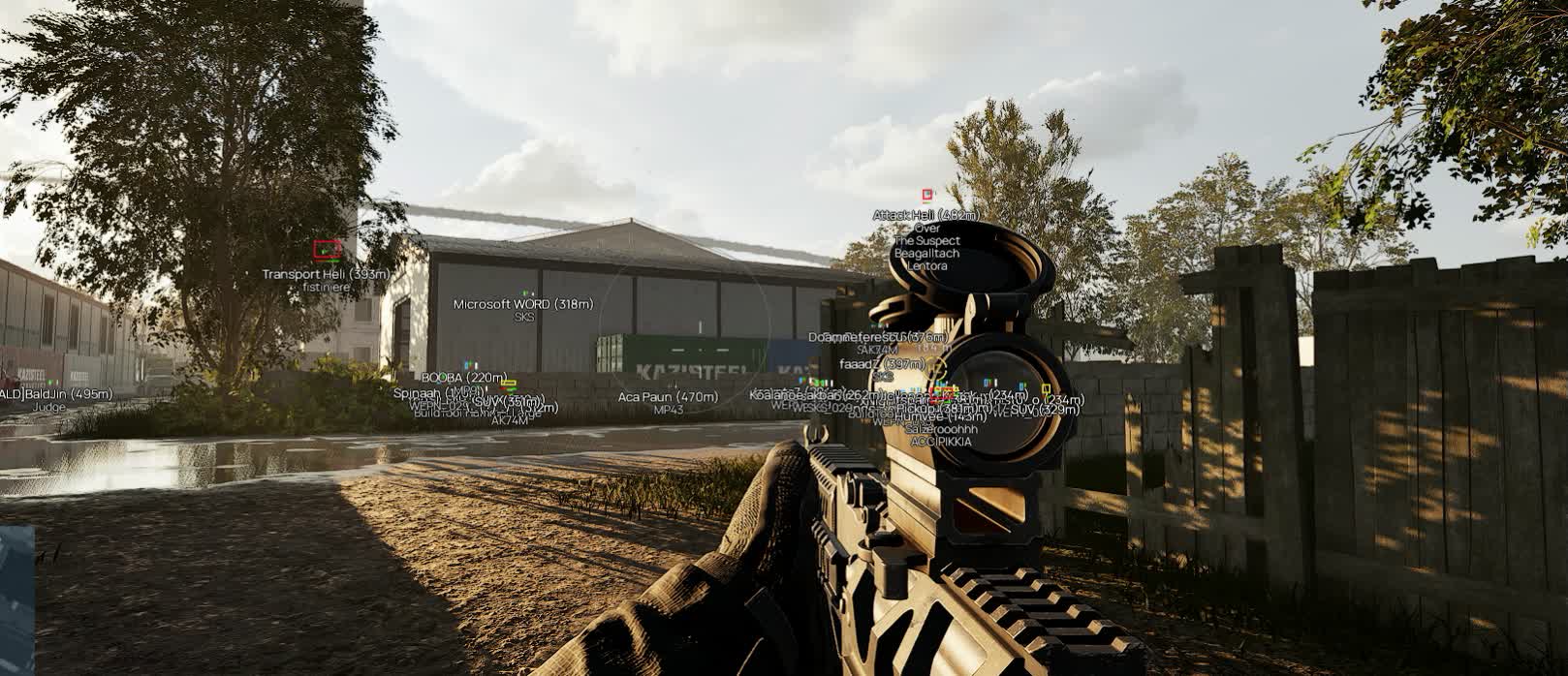
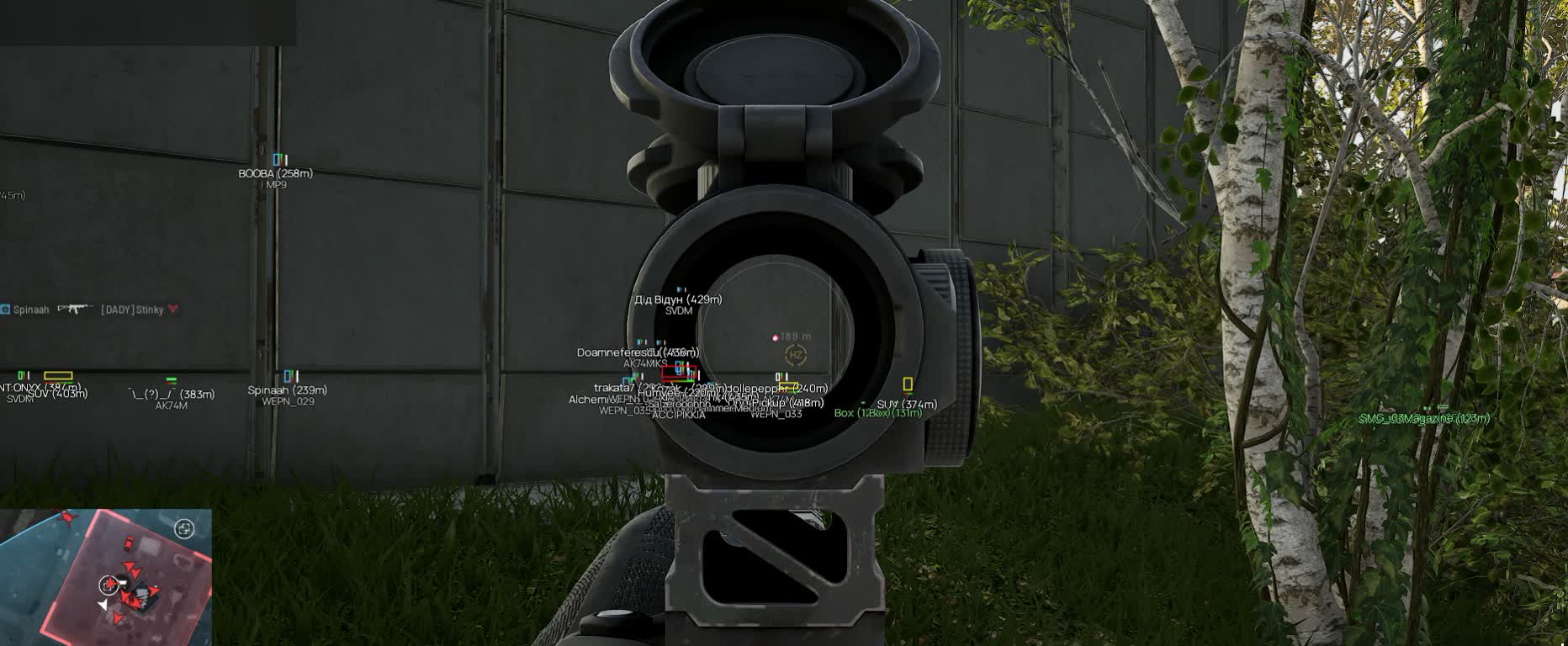
Soft Hub for WARDOGS is an external overlay built for hundred-player fights, where half your deaths come from someone you simply never spotted in the treeline. ESP draws infantry with a box and a skeleton, vehicles get labelled together with everyone sitting in them, and loot and supply crates each carry their own colour.

The menu splits into three tabs. Visuals covers everything that shows up on screen: boxes, skeletons, squad colours, health and armour bars, names, the weapon in someone's hands, distances. Aimbot pulls onto the head or the chest and can work out lead using the game's own data. Settings handles the load: how often the overlay refreshes, plus three separate ranges for players, vehicles and loot.

Product features

Players on screen

Player box

Box wraps an enemy in a rectangle. Prone and downed players are drawn as a flat box with no skeleton, and a downed one turns grey, so a body on the ground instantly tells you whether to finish it or move on.

Skeleton

Skeletons shows the pose: whether someone is crouched behind a berm, crawling, or already shouldering a rifle. It draws up to 150 metres; past that only the box stays, because the lines blur together anyway.

Squad colours

Squad colors hands every squad its own colour from a palette of eight. It kicks in when a squad has more than one member, while solo players keep their faction colour. Turn it off and the screen simply splits back into Valkyra, Lonestar and Manticore.

Labels above a target

Info is the master switch for the text block. Inside it you separately enable the health bar, the white armour bar next to it, the name (bots read as BOT), the weapon in hand and the distance in metres.

Player inside a vehicle

Name, distance and weapon are not repeated under the box: anyone who climbs into a truck or a helicopter moves into the crew column under the vehicle's own label.

Vehicles and stationaries

Vehicle label

Vehicles/Stationaries prints the name and the distance, then lists the crew by seat with the driver first. You can tell an empty hull from one carrying four men ready to dismount. Friendly and allied vehicles are not drawn at all, so the screen stays readable.

Vehicle health

Health puts the hull's condition next to the label. That is what decides whether you spend a second rocket on a smoking truck or leave it.

Separate vehicle colour

Vehicle labels get their own colour, apart from infantry, so armour in thick woodland never reads as a man on foot.

True-size boxes

Boxes outlines loot and vehicles at their real dimensions. The marker matches the object, and a crate behind a rock stops looking like a tank on the next hill.

Loot

Dropped items

Dropped items highlights whatever fell off players. After a point is cleared you can see from cover whether anything useful is still lying there.

World loot

World loot covers what the map spawns on its own. Its own colour separates it from player drops on the same patch of ground.

Containers

Containers shows crates along with a list of what is inside. No more walking over and opening one for a single bandage: the contents are visible beforehand.

Supply crates

Supply crates get a colour of their own. In a game where every respawn loadout is bought with cash, gear picked up off the ground is money kept for the next life.

Loot distance

Distance prints the range next to the marker, so you can judge whether you will reach a crate while the zone is still in your faction's hands.

Aimbot

Enabling the aim

Aimbot is flagged as a risky option in the menu, and that label is honest. Running it non-stop is a bad idea, and the whole settings block only opens once the module is on.

Aim key

Aimkey binds the correction to a held key. Release it and the software stops touching your crosshair, so the aim is simply idle during the quiet phase of a match.

Aim point

Aim bone picks the head or the chest. Chest is steadier at range and on full auto, head ends a close contact faster.

Target highlight

Highlight aiming target marks whoever the software is holding right now in a colour you choose. Without it you cannot tell if the aim is tracking the man in front of you or a silhouette behind him.

Aim settings

Capture zone

Fov value sets the radius around the crosshair where a target is picked up, and Fov circle draws that zone on screen. Tuning the radius blind is guesswork; with the circle you see the edge.

Recoil control

RCS pulls the crosshair down while the left mouse button is held. The compensation ceiling in pixels and the force per tick are set separately, so a long AK-74 burst stays in the chest instead of overshooting downwards.

Prediction

Prediction works out lead from bullet speed and bullet drop, and those numbers come from the game itself, including the sight's current zeroing. Target speed is read from how the target moves, and for someone riding in a vehicle it is read from the vehicle.

Smoothness

Smoothness stretches the correction over time. The higher the value, the slower the barrel travels to the target and the less the snap stands out on someone else's clip.

Target priority

Priority By switches the logic between closest to the crosshair and closest by distance. The first suits a scrap on the objective, the second when the man twenty metres away matters more.

General settings

Render pacing

Four modes: Eco spares the processor, Balanced sits in the middle, Performance redraws more often, Unrestricted gives the smoothest picture while loading the CPU noticeably harder.

Player range

Enemy distance cuts infantry drawing off between 1 and 500 metres. In a two-by-two-kilometre zone the far edge is not your problem anyway.

Vehicle range

Vehicles distance runs from 1 to 150 metres and leaves only the armour that can actually reach you within the next minute.

Loot range

Items distance is also 1 to 150 metres. Without it, a long fight over a point buries the screen in drop markers from all around.
TARIFFS
300
BUY What happens after payment?
Got a question? Ask before you pay

We'll help you choose and sort out any launch issue. Ask us anything before buying, we're always on your side.

Support 10:00–22:00, sometimes we reply at night too
Ask a question

Available tariffs

1 day
300
START PURCHASE
7 days
999
START PURCHASE
30 days
2999
START PURCHASE
Reviews about Soft Hub WARDOGS

No reviews yet. Be the first to leave one.

Your review

Reviews are published after moderation.

Join our gaming community chat

Discuss current cheats from developers and how to use them effectively in popular online games. Share tactics, exchange useful info and find like-minded players in our community.

1 900+Members
24/7Online
Join our gaming community chat

Technical support

Run into a technical issue? Our team of experts will help. We handle all requests in a live queue, so please be understanding if it sometimes takes a little wait. We guarantee that no request goes unanswered.

Availabilityfrom 10:00 to 23:00
Fast responseIn queue order
Get help
Technical support
PROCHEAT

PROCHEAT news channel

Follow product status changes, update history and important announcements.

Subscribe

What the Soft Hub WARDOGS cheat does

The Soft Hub menu in WARDOGS is short and free of filler: three tabs where almost every entry changes something on screen straight away. Here is what you set and how it plays out in a hundred-player fight.

Menu entryWhat you setWhat it gives you in a match
Playersbox, skeleton up to 150 m, squad colours from a palette of eightyou see not only where the enemy is but who moves as a group
Labelshealth, armour, name and BOT, weapon in hand, distancetells you who to push and who to leave alone
Prone and downedflat box with no skeleton, grey for downed playersno ammo wasted on someone who is already out of the fight
Vehicles and stationariesname, distance, crew by seat, healthyou know how many men the Little Bird on approach is carrying
True-size boxesoutlines matching the real size of items and vehiclesthe marker sits on the target instead of hovering beside it
Lootdrops, world loot, containers with contents, supply cratesyou kit up off the ground instead of buying for the next respawn
Aimbothead or chest bone, your own key, target highlightcorrection only where you want it, and you see who it holds
Predictionbullet speed and drop from game data, target speedlead at range is worked out for you, zeroing included
RCScompensation ceiling in pixels and force per ticka long burst stops climbing into the sky while suppressing
Pacing and rangesEco, Balanced, Performance, Unrestricted; 500 m and 150 myou choose between a smoother picture and a freer CPU

Infantry ESP: box, skeleton and state

The core of the ESP is the box around a player. It holds at any range the distance setting allows, and it tells you a contact exists at all. The skeleton sits on top of it and draws up to 150 metres: inside that line you read the pose, which tells you whether someone is lying behind a berm or already getting up to move.

Prone and downed players are drawn differently, as a flat box with no skeleton, and the downed one turns grey. That small detail saves ammunition: in WARDOGS teammates pick each other up, and the choice between finishing a body and saving a magazine is made in half a second by marker colour.

The label block toggles as a whole and then breaks down however you like. Health bar, the white armour bar beside it, name, weapon in hand and range in metres are all separate entries. Bots are labelled BOT, so you never confuse a live enemy with a filler body by silhouette alone.

Squad colours: seeing who moves as a group

Squad colors assigns colours from a palette of eight. A colour only goes to a group with more than one member; a solo player keeps the colour of their faction. The logic is simple and it works: painting every stray soldier serves no purpose, while a four-man core is worth seeing as one unit.

In a hundred-player match with three sides that changes how you read a fight. Three markers in a treeline is one thing; three markers of the same colour, with two more from the same squad somewhere nearby, is another. Knowing the group size tells you whether to start a firefight alone or wait for your own ride.

Switch the option off and colouring falls back to factions: Valkyra, Lonestar and Manticore each in their own colour with no internal split. That mode suits a general brawl in the contested zone, where the side matters more than squad structure.

Vehicles and crew: how many are inside

Vehicles and stationary weapons get a name and a distance, with the crew listed by seat underneath, driver first. It is the single most useful part of the ESP: one glance at a Little Bird tells you whether it is flying in empty for cargo or carrying a squad onto your position.

Players sitting in a vehicle drop out of the general list: name, distance and weapon are not repeated under their own box, and all of it moves into the column under the vehicle. The screen stays clean and nothing is lost.

Friendly and allied vehicles are not drawn at all. That only looks odd until you fight around the contested zone, where your own side has plenty of hulls moving and highlighting them would bury half your view. Vehicle health sits alongside, so you can see at once whether a smoking supply truck is worth a second hit or already out of the game.

Loot, containers and supply crates

Loot is split across four entries, each with its own colour. Dropped items covers what fell off players, World loot covers what the map placed there, Containers shows crates together with a list of their contents, and Supply crates picks out resupply boxes. The range is printed alongside, so you never have to eyeball the distance.

The container contents list saves the most time of all. Every life in WARDOGS starts with a purchase out of your own pocket, and finding out whether a crate is empty or holds the attachment you need is far nicer from cover than while standing over it in the open.

Loot range has its own slider, 1 to 150 metres. After a long fight for a point the ground is littered with drops, and without that limit the screen turns into a solid wall of markers.

Aimbot: bone, key and target highlight

The aim has its own toggle and is flagged as a risky option in the menu. That flag is not decoration: an external correction shows up on someone else's clip better than any ESP, and running it non-stop is the fastest way to collect reports. While the module is off, the settings block below it stays closed.

The aim works on a held key that you bind yourself. Release it and the software leaves your crosshair alone. The aim point is head or chest: chest holds a burst better at mid range, head ends a point-blank contact faster when there is no second to spare.

Highlight aiming target paints whoever the software is holding right now in a colour of your choice. In a crowded contact, without that marker, you cannot tell whether the correction is tracking the man in front of you or his partner behind a tree, and the first burst goes to the wrong one.

Prediction and recoil compensation

Prediction here is not an abstract multiplier but a calculation on the game's own numbers. Bullet speed and drop are read from game data, including the drop table and the sight's current zeroing, so changing weapons or zero does not break the lead. Target speed comes from how the target moves, and for a passenger it comes from the vehicle, which is obvious on trucks and helicopters.

RCS pulls the crosshair down while the left mouse button is held. There are two settings: the compensation ceiling in pixels and the force per tick. The first stops the software dragging the barrel below the target on a long burst, the second controls how sharply compensation comes in. Weapons in WARDOGS are modular, and after swapping attachments you usually have to dial those numbers in again.

Smoothness stretches the correction over time. The higher the value, the slower the crosshair arrives, and the less machine-like the movement looks. Priority By decides who gets picked first: closest to the crosshair or closest by distance. The first mode suits a brawl on the objective, the second suits the approach to the zone.

Render pacing and ranges: frames against picture

The overlay draws on top of the game, and its refresh rate has four modes. Eco puts the least load on the processor, Balanced sits in the middle, Performance redraws more often, and Unrestricted gives the smoothest picture while eating noticeably more CPU than the rest.

The choice depends on your hardware and on what is happening on screen. During a two-man firefight in the woods the difference barely shows. In an assault on the contested zone, with artillery working, helicopters overhead and buildings collapsing, the processor is busy enough already, and Eco or Balanced is more honest there than clean skeleton lines over dropped frames.

The three range sliders serve the same goal. Infantry draws from 1 to 500 metres, vehicles and loot from 1 to 150. Trimming them is not only about performance: the fewer spare markers there are, the faster your eye finds what is actually close.

Soft Hub and Easy Anti-Cheat in WARDOGS

WARDOGS ships with kernel-level Easy Anti-Cheat: it installs with the game, runs with driver privileges and checks the state of Secure Boot. The software is external and never injects into the game process, but launch order still matters: the loader comes up before the game, with spare overlays and debuggers closed beforehand.

There is no built-in spoofer in this build. If a hardware ban has already landed, the fingerprint has to be dealt with separately and before you buy, otherwise the new account follows the old one. There is no insurance against reports either: an aim on a held key with Smoothness enabled looks far calmer than a correction running non-stop at zero smoothing.

The game has only just entered early access, updates come often, and the anti-cheat updates with them. After a major patch the build goes on hold for checks and paid days are frozen. That is the normal rhythm for any private software on a fresh title, and the product status always shows where things stand.

Pricing and how the key arrives

Three terms: a day for 300 roubles, a week for 999 and a month for 2999. A day is for seeing the software with your own eyes over a couple of matches; a month is for playing regularly without going back to the checkout every week. Payment happens on this page with whichever method suits you.

The key and the loader arrive by email right after payment, with the launch instructions in the same message. There is no account area on the site, so the address in the payment form has to be one you actually read.

If the loader will not start, or the game will not come up after it, the common errors are already covered in the knowledge base and support takes the rest. Before buying it is worth checking the product status: it shows whether the build is live right now or on hold after a patch.

FAQ

Does the build include a radar?

No, there is no separate radar panel. Situational awareness comes from the ESP: infantry boxes and skeletons, vehicle labels with crew, and loot. If a radar is what you need, look at the other WARDOGS builds in this category.

Can you see how many players are in a helicopter?

Yes, that is the headline part of the vehicle ESP. The crew is listed by seat under the vehicle label, driver first. Friendly and allied vehicles are not drawn at all.

What exactly does Prediction calculate?

Bullet speed and drop are taken from the game's own data, including the drop table and the sight's current zeroing. Target speed is read from the target's movement, and for a passenger it is read from the vehicle.

Why is the aimbot flagged as risky?

The developer flags it that way, and honestly so. An external correction is visible on someone else's recording, which is why it goes on a key instead of running all match. Smoothness makes the movement less abrupt.

Are prone players really drawn differently?

They are. Prone and downed players get a flat box with no skeleton, and downed ones also turn grey. You can tell at a glance who is temporarily out and who a teammate might revive.

Will my frame rate drop?

It depends on the Render pacing mode. Unrestricted draws the smoothest and loads the CPU hardest, Eco does the opposite. In large fights it makes sense to stay on Eco or Balanced and trim the ranges.

Is a spoofer included?

No, this build has no built-in spoofer. If your hardware is already banned, the fingerprint needs separate software before you buy.

What happens after a game patch?

WARDOGS is in early access and patches often, with EAC updating alongside it. After a major update the build goes on hold for checks, paid days are frozen, and the product status changes.

from 300 ₽ Choose a plan
Ask a question


