SOFT HUB ESP for Escape From Tarkov - loot filter by price, player wallhack

Working
Top seller
SOFT HUB SOFT HUB
Last update 15.06.2026 This date shows when the software was last updated. An old date doesn't mean the software stopped working! Most likely the developer just had nothing new to add. If you have any doubts, you can always check the current status with our support team.
Add another cheat from this game too — to compare them.
SOFT HUB ESP
Steam
BSG Launcher
Windows support: 10: all builds; 11: 21h2, 22h2, 23h2, 24h2, 25h2
Spoofer:Yes
USB drive:Yes
BIOS:No

User information

Bypasses OBS recording and Discord screen share
Loot prices update automatically every day at 12:00 GMT+3 - item values shown are always current with the in-game market.

VIDEO
SCREENSHOTS
Description

You load into Customs or Reserve, grind through the loot, drag a backpack full of a Thermal and a keyed case all the way to extract, and then some random PMC around a corner you never saw just wipes you. That's where the insurance goes, along with the AP ammo and two hours of raiding. SOFT HUB's ESP for Escape From Tarkov fixes exactly that: you move through the map knowing where everyone is, how dangerous they are, and whether any detour is actually worth taking.

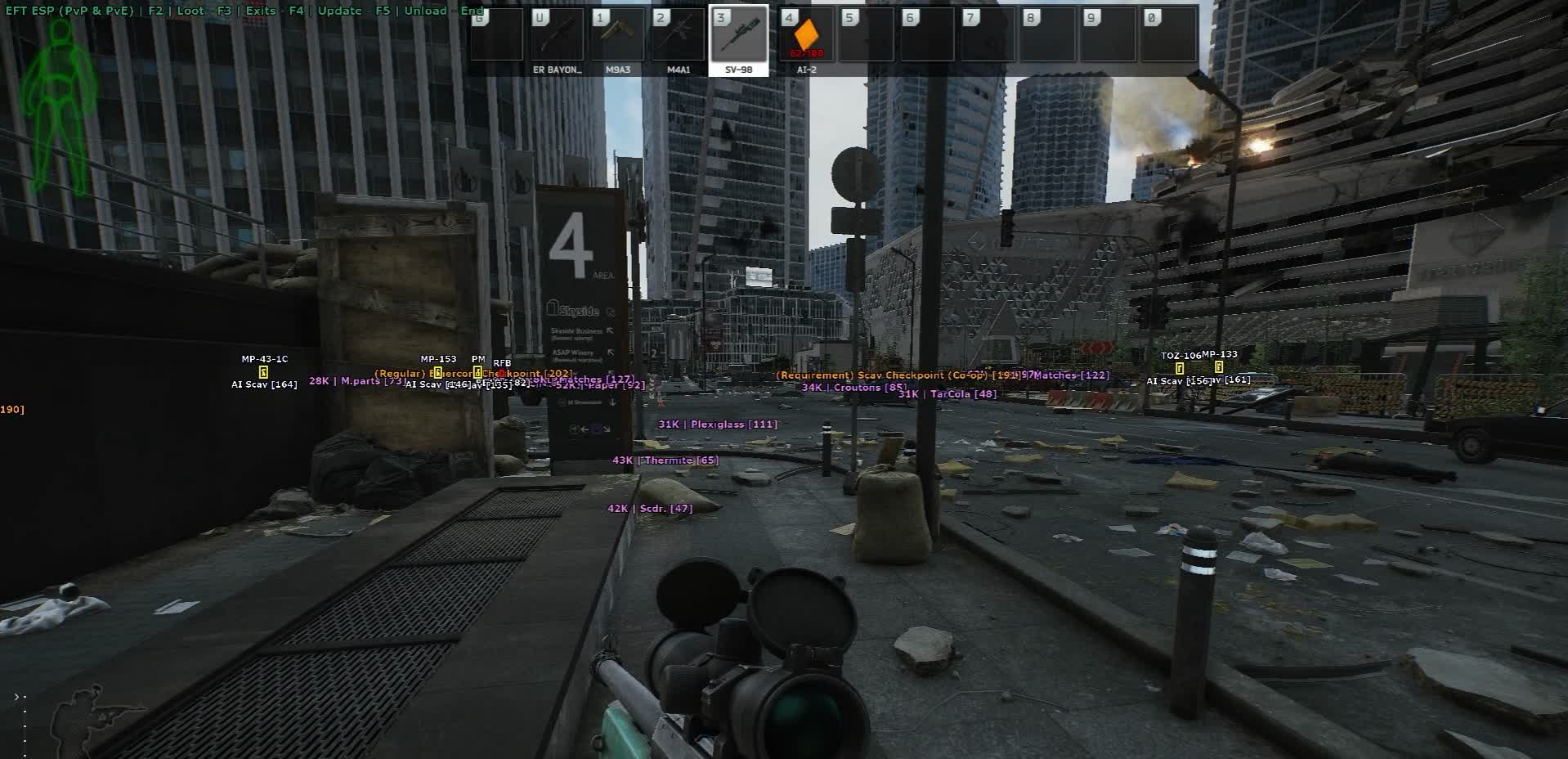
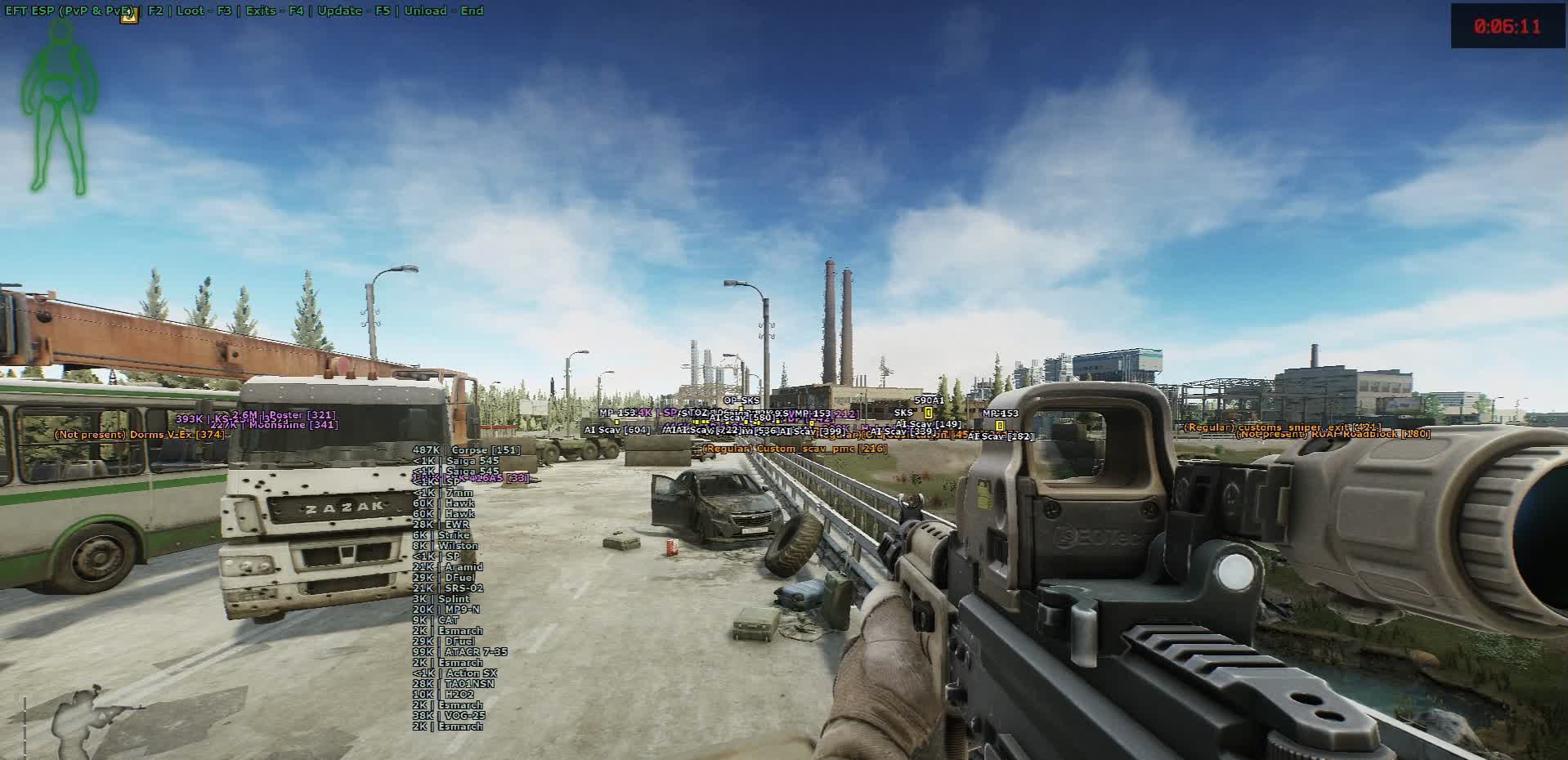
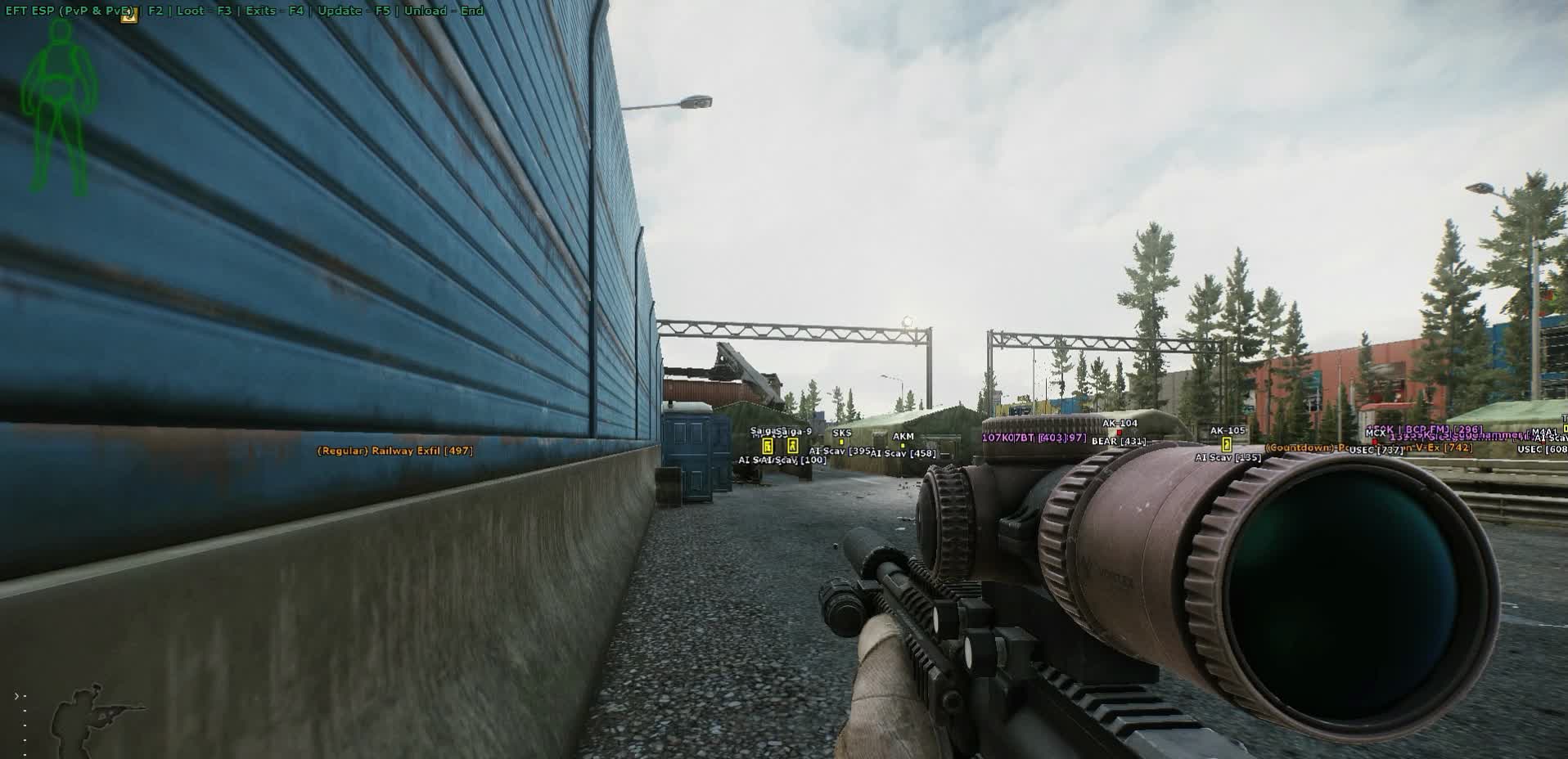
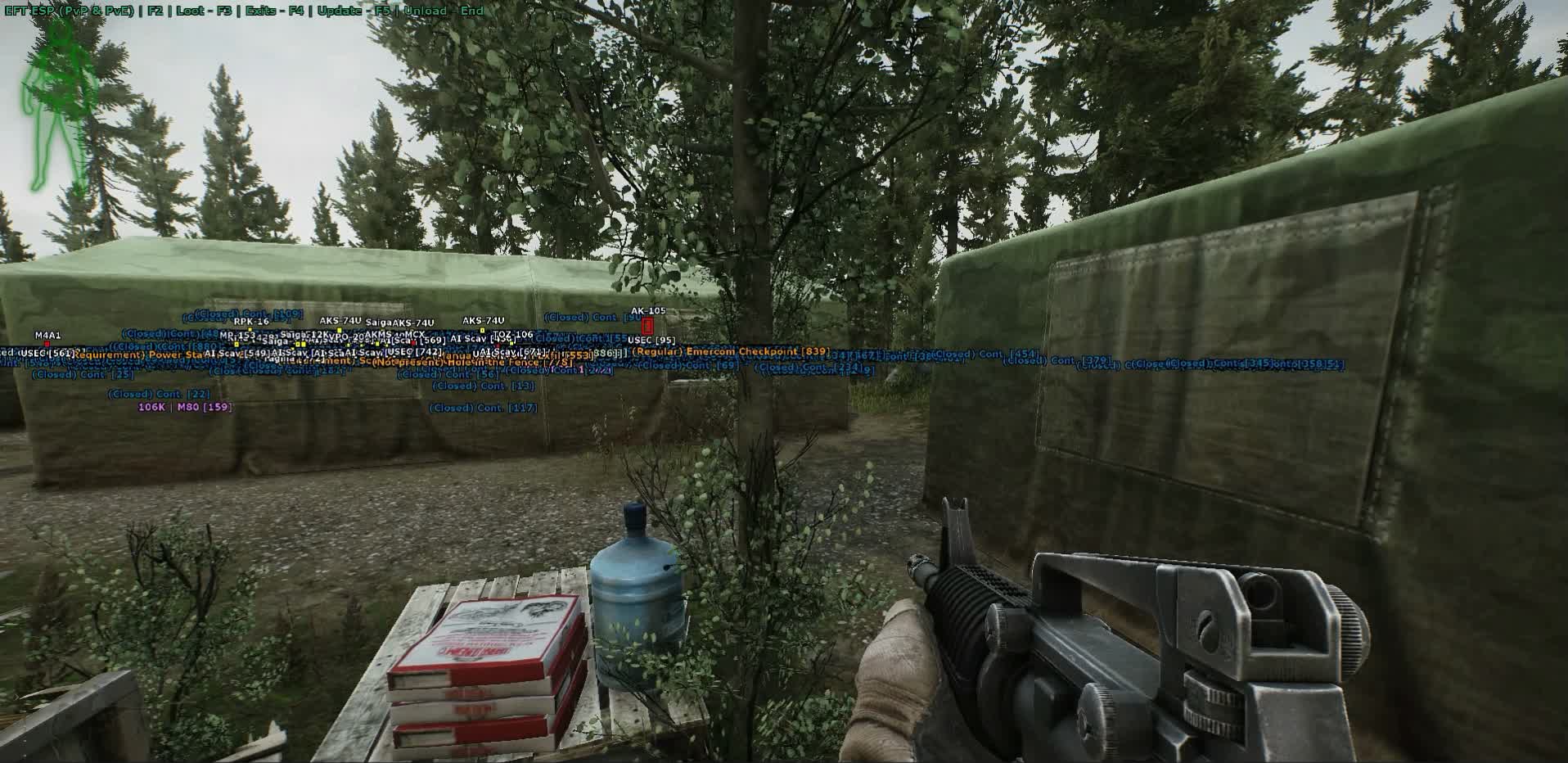
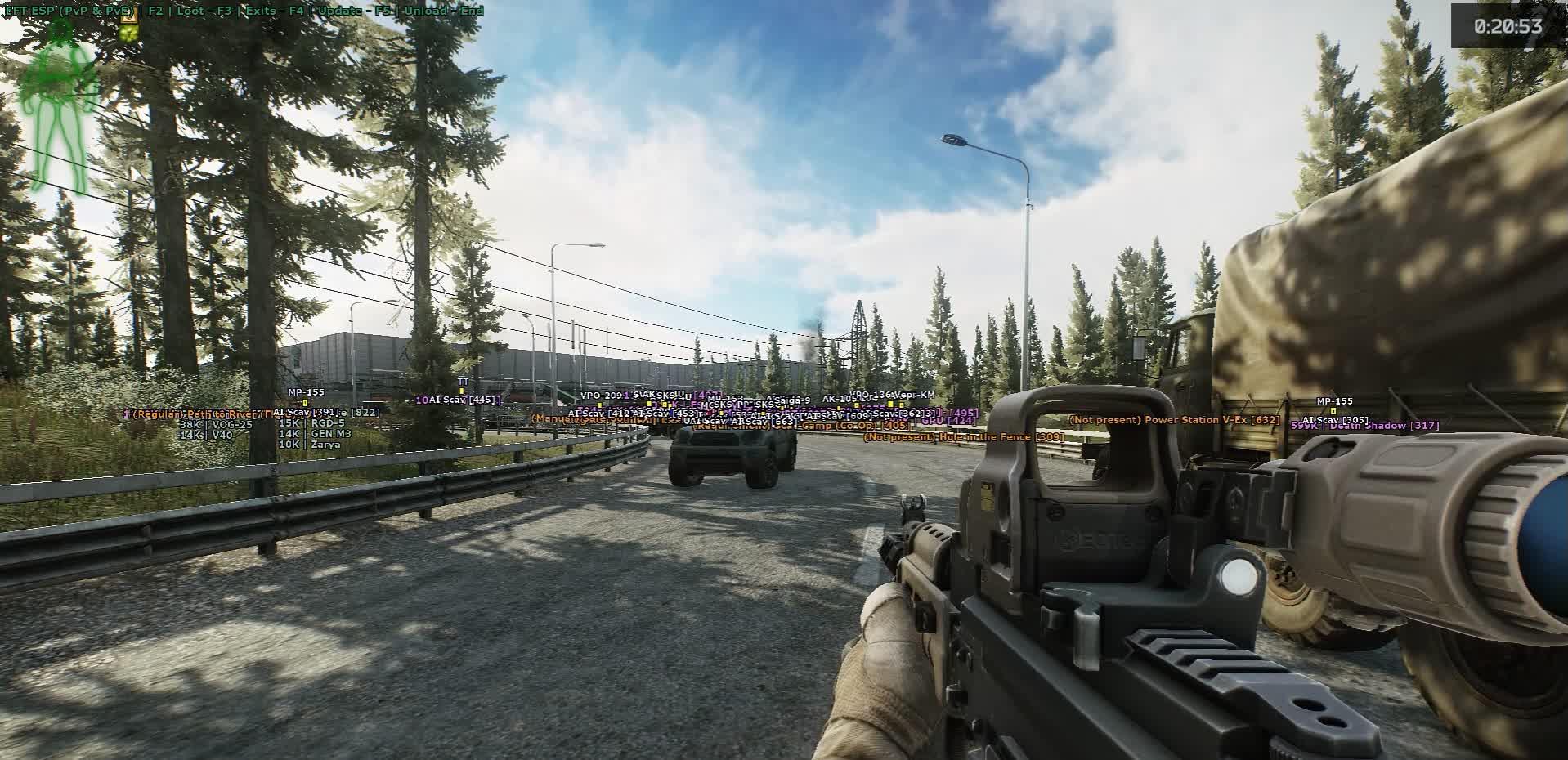
The cheat shows players and bots through walls. A 2D box with adjustable color and line thickness, a skeleton with tunable highlight, weapon in hand, name, faction (PMC or Scav), distance, and a line to the target. You can see who's running GPNVG and M995 on their rig and who you can just walk around. The skeleton lets you read pose and movement in the tight geometry of Reserve and Labs; the directional line completes the picture so you know exactly where that shot came from and where the looter went.

There's a dedicated extract module. Every exit is highlighted by type: PMC, Scav, secret. That alone cuts out half the timing deaths at extract. On a new map you don't have to memorize every ladder, staircase, and factory gate, you just see which exit is yours and what sector it's in. On maps with rotating extracts and secret exits via stash, key, or cooperative PMC+Scav, the secret ones are highlighted separately so you don't mix them up with the standard ones.

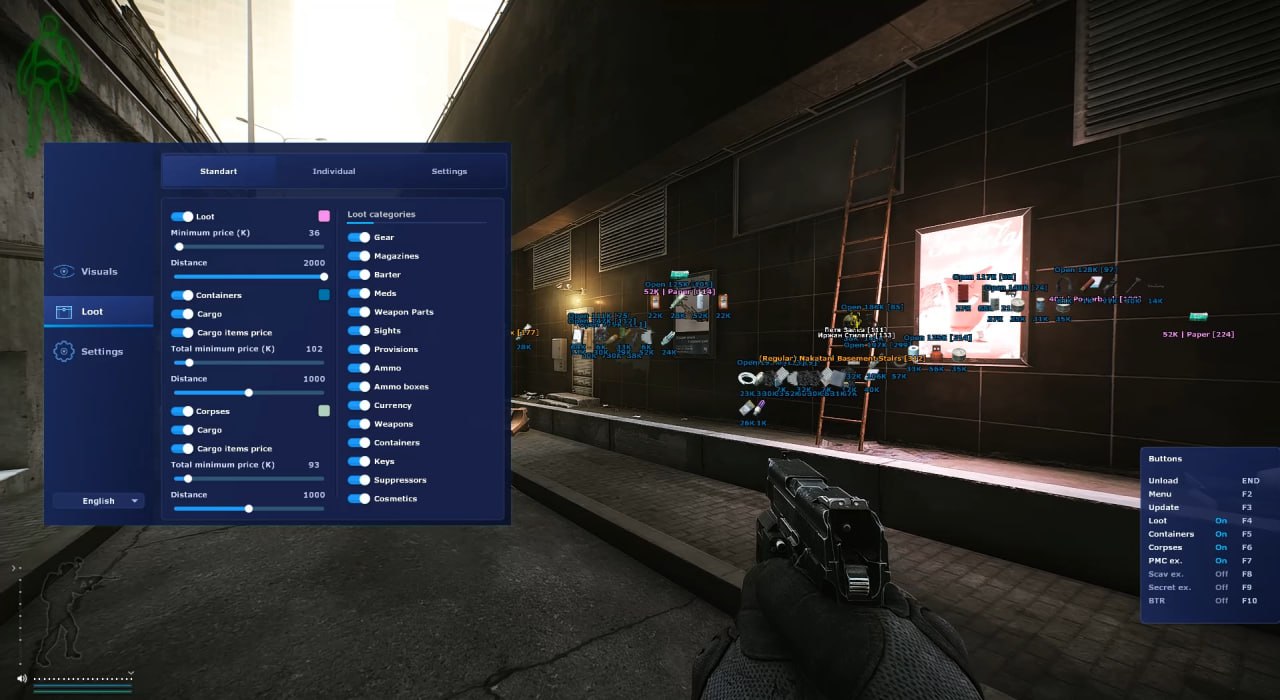
Loot is split into two layers. Containers and corpses show item contents, price per item, and the total value of the box or body. You set a minimum total price, a render distance, and a color. Empty lockers and Scav bodies with a single piece of bread get filtered out, leaving only meaningful loot points on the map. Handy for tech-room loot runs or cleaning up a map after a fight, you see instantly which body to hit first.

Spawned and dropped loot splits into 15 categories: armor, magazines, barter, meds, weapon parts, optics, provisions, ammo, ammo boxes, currency, weapons, containers, keys, suppressors, cosmetics. Each category has its own minimum price and render distance, plus a toggle for whether to show it at all. You can build a "shoreline loot run" profile around keys, currency, and meds, a "wipe-start" profile for ammo and mags, and a "late wipe" profile that only shows cases, AP ammo, and rare attachments. The map shows only what you actually came for, not the full barter table of starting junk.

This is an ESP-only build. No aimbot. The cheat does nothing for you mechanically: no aim assist, no trigger bot, no mouse movement. Pure information, which keeps your behavior profile lower in replays and BattlEye telemetry. You play with your own hands, just with a much clearer picture of the situation. It's the right pick if you already shoot confidently in Tarkov and want to kill the blind spots: knowing where a PMC looter is sitting in the Reserve tech building matters more than getting headshots auto-aimed at 200 meters.

SOFT HUB runs with the standard Escape From Tarkov launcher. Buying is simple: pick a plan, pay, enter a working email. The activation key arrives in your inbox within a few minutes, not in a profile dashboard, not in Telegram, just your email. Follow the launch guide, and if you have questions about activation, your plan, or compatibility, Procheat support is available on Telegram.

Product features

Visuals

2D Box

A rectangular box around an enemy through walls. Basic position marker: you see where a PMC or Scav is sitting before you turn the corner into them. No extra visual noise.

Box Customization

Adjust color, line thickness, and fill on the box. High-contrast orange for Reserve's and Labs' dark interiors, neutral tones for bright outdoor maps like Shoreline. Set it to match your monitor and playstyle.

Skeleton

Full body skeleton of the player model. Shows real pose: standing, crouching, prone, looting a body. Critical when shooting through doorframes - the box gives you a rectangle, the skeleton tells you the target is prone and the hitbox is shifted to the floor.

Skeleton Customization

Adjust skeleton line thickness and color. Thin lines for minimal visual clutter, thick for reading pose reliably in Shoreline's dense vegetation or Lighthouse's darkness.

Weapon

The weapon in the target's hands. See who's running an SR-25 with a thermal and who only has a Saiga, target priority is instant. Decide whether to push or stretch the engagement.

Name & Side

Player name and faction: PMC or Scav. In a Scav run you don't shoot your fellow Scavs; in a PMC raid you immediately see who is a real threat and who is a bot or a Scav player.

Distance

Distance to target in meters. Directly informs weapon choice and tactics: a pistol at 100m is useless, an SVD or Mosin at 100m is fine. Don't waste expensive AP rounds on a close-range target.

Line

A line from your position to the target. Helps you quickly orient in the dense interiors of Labs and Reserve's multi-story buildings where the geometry disorients.

Extracts

PMC Exits

Highlighted PMC exits with rotation markers and availability timers. On a new map you don't have to memorize every staircase and gate - you see which exit is yours and what sector it's in.

Scav Exits

Highlighted Scav exits. In Scav raids you don't mix up your exits with PMC exits - critical on Reserve, Lighthouse, and Labs where each side has its own extract grid.

Secret Exits

Separate highlight for secret exits via stash, key, or cooperative PMC+Scav extract. On maps with rotating exits you immediately see if today's run has the secret path available and where to go.

Containers and Corpses

Content List

List of what's inside a container or on a body, through the wall. See whether a locker has an M995 round and a key case or just empty mags. Don't waste time on empty boxes and Scav bodies with a crust of bread.

Per-item Price

Price of each item inside the container or on the body. Instantly know what to grab first when your backpack is limited and you have to choose.

Total Container Price

Total value of a box or body as a single number. Decision to approach takes a fraction of a second: 50,000 rubles - skip it, 800,000 rubles - go in even if it's risky.

Minimum Total Price

Filter by minimum total value. Containers below the threshold don't render - the map stays clean instead of turning into a Christmas tree, only meaningful loot points remain.

Render Distance

Render distance for containers and corpses. Tight radius for a loot run in a single building (only what's actually reachable), wide for route planning on an open map like Shoreline or Woods.

Color Customization

Container and corpse highlight color separate from player colors and category loot. Color-code instantly: red for a corpse, yellow for a container above your price threshold - keeps the info layers from blending together.

Loot Categories

Armor

Body armor, rigs, helmets, backpacks, tactical bags. At wipe start with no armor this is priority number one; late raid it's only tier 5-6 pieces for upgrades.

Magazines

Magazines for all calibers. Scarce at wipe start - an AP round is useless without a mag. The distance filter keeps you focused on combat instead of chasing consumables across the map.

Barter

Items for quest and trader exchanges: motor oil, nuts, wires, tools. On a targeted loot run for a specific quest, only turn on what you need - keeps the map from filling up with noise.

Meds

Medkits, painkillers, tourniquets, bandages, stims. Salewa, IFAK, Grizzly - high priority at every stage. Filter cheap bandages by price so the map doesn't light up with zero-value markers.

Weapon Parts

Barrels, receivers, handguards, grips. For gunsmith quests, collectors, and flea market sales. Toggle selectively - the category is large and clutters the HUD without filtering.

Optics

Scopes, red dots, EOTech, thermal sights. Thermals and REAP-IR are top priority; filter cheap red dots by price. See a thermal in a locker - you go in.

Provisions

Food, water, energy drinks, coffee. Critical on long raids and in hardcore mode. Turn it off on short runs to avoid distractions.

Ammo

All calibers. AP rounds are expensive, standard ammo is cheap - the price filter leaves only what's actually worth picking up on the map.

Ammo Boxes

Sealed boxes of ammo. High priority - it's a dense volume of expensive consumables in one small icon. Separate category means they don't get lost on the map.

Currency

Rubles, dollars, euros, bitcoins. Bitcoin is top priority; euros and dollars are second tier. Always enabled - best value-to-space ratio of any category.

Weapons

Firearms on the ground and in lockers. With a price filter you immediately see the top weapons (M4A1, kitted AKM, bolt-actions) while grey Saigas and starter PMs get cut.

Containers

Cases for ammo, weapons, meds, docs, keys. The most valuable category in late wipe - a top case can be worth more than everything else in the raid combined. Always enabled, no price filter needed.

Keys

Room and container keys across maps. A Marked Room key or Red Key is millions of rubles on the flea; cheap keys get filtered out. Separate category so they don't get lost among regular junk.

Suppressors

Suppressors for all calibers. A scarce category for stealth-oriented runs - keep it in its own toggle for PMC-hunting raids.

Cosmetics

Watches, headwear, face masks. Low ruble value but important for collectors and quests. Usually filtered by price, turned on only for specific quests.

Per-category Minimum Price

Minimum price per category, set independently. Set ammo at 200 rubles (AP only), armor at 30,000 (tier 5-6 only), weapons at 200,000 (M4s and bolt-actions only) - the map stays readable.

Per-category Render Distance

Render distance set per category. Cases and thermals visible across the whole map, cheap consumables only within 30 meters. No need to balance a single global setting.

Category Toggle

Choose which categories to show at all. "Shoreline loot run" profile: keys, currency, meds. "Wipe start" profile: ammo, mags, armor. "Late wipe" profile: cases, thermals, AP ammo only.

Known issues & fixes

Real questions from our support, with the fixes that worked. Based on user requests for this product.

Tarkov cheat crashes the game or causes PC reboot after injection

If the game crashes or your PC reboots after injection, start with a system diagnostic. Download the Sordum utility (archive password: sordum), run it, click Search, and wait for the scan to finish.

Take a screenshot of the results and send it to support , the developer will use this data to identify the cause and fix the launch issue for your system.

Launched SOFT HUB ESP on Tarkov , players and loot not visible through ESP

If ESP does not show players or loot, first check whether your version of Windows is supported. The current list of compatible OS versions is listed on the product page.

If your OS version is not on the list, the cheat may not function correctly. Contact support and specify your Windows version.

Cheat is frozen and not working , what happened?

The cheat may be temporarily disabled due to a game update. During this period it is undergoing maintenance by the developer and cannot be launched.

Check the product page for the current status or contact support to find out when it will be available again.

Need to transfer the key or activation to another PC

Transferring activation to another computer is done manually by support. Contact support with your login and the details of the new PC , the operator will reassign the license.

All issues & general troubleshooting
TARIFFS
400
BUY What happens after payment?
Got a question? Ask before you pay

We'll help you choose and sort out any launch issue. Ask us anything before buying, we're always on your side.

Support 10:00–22:00, sometimes we reply at night too
Ask a question

Available tariffs

1 day
400
START PURCHASE
7 days
1500
START PURCHASE
30 days
3000
START PURCHASE
Reviews about SOFT HUB ESP

This product has 3 reviews across 74 sales, only about 4.05%. Most satisfied buyers never write a review, the ones who do are usually those who ran into a question. So do not judge the product by the number or the tone of reviews alone, weigh them against how many people actually bought it.

4.4 / 5
3 reviews · 74 sales on Digiseller
How the rating is calculated

Most satisfied buyers never leave a review — people write mainly when something went wrong, so text reviews skew negative. The score is smoothed over every sale, not just the written reviews.

rating = (G + S + 10·0.9) / (N + S + 10) × 5

  • G — sum of review positivity (5★ = 1, 1★ = 0)
  • N — number of text reviews = 3
  • S = (sales − N) × 0.15 — silent satisfied buyers

3 reviews against 74 sales — only 4.05% of buyers wrote anything.

Customer Not recommended
Verified purchase · Digiseller 13.06.2026

Купил чит за 400 рублей. Чит запустить не смог, купил флешку даже для этого. По итогу мучился 2 дня, написал в поддержку. Проблему нашли, но деньги возвращать отказались, подмену в виде другого продукта тоже. Скам P.S. ПРОДАВЕЦ ПИШЕТ ЧТОБЫ Я ПРЕДОСТАВИЛ СКРИНШОТЫ ОТКАЗА ВОЗВРАТА, НО Я ИХ ПРЕДОСТАВИЛ СРАЗУ В ПЕРЕПИСКЕ. НЕДОБРОСОВЕСТНЫЙ ПРОДАВЕЦ P.S.1. Отвечаю на сообщение, продавец крайне агрессивен. Не советую покупать у него

ProCheat reply

Не отвечает на сообщения

Customer Recommends
Verified purchase · Digiseller 08.06.2026

крутой продавец

Customer Not recommended
Verified purchase · Digiseller 29.05.2026

Худший чит на тарков, не работает, поддержка помочь не может, инструкция очень плоха

ProCheat reply

Скриншоты как она не может помочь

Your review

Reviews are published after moderation.

Join our gaming community chat

Discuss current cheats from developers and how to use them effectively in popular online games. Share tactics, exchange useful info and find like-minded players in our community.

1 900+Members
24/7Online
Join our gaming community chat

Technical support

Run into a technical issue? Our team of experts will help. We handle all requests in a live queue, so please be understanding if it sometimes takes a little wait. We guarantee that no request goes unanswered.

Availabilityfrom 10:00 to 23:00
Fast responseIn queue order
Get help
Technical support
PROCHEAT

PROCHEAT news channel

Follow product status changes, update history and important announcements.

Subscribe

What ESP does for you in Escape From Tarkov

Escape From Tarkov is an extraction shooter where you lose everything you're carrying when you die. Every mistake has a real cost: insurance doesn't cover your backpack or secure container, and respawning won't bring back your thermal, your keys, or that stack of GPNVGs. ESP removes the main source of those mistakes: unexpected run-ins with a PMC you never saw coming. You see players and bots through walls from 100-plus meters before contact, read their faction and weapon, and decide yourself whether to push or peel. The result is more successful extracts, fewer insurance losses, and a raid economy that actually makes sense. You go in with a route and a risk assessment, not just hoping for the best.

How ESP differs from a full cheat with aimbot

ESP without aimbot is pure information. The cheat doesn't pull your crosshair, doesn't press the trigger, and doesn't move your mouse. Your behavioral signature in replays and BattlEye telemetry stays lower because you're shooting with your own hands - just with a better read on the situation. It's aimed at players who already shoot confidently in Tarkov and want to close the blind spots. Not knowing where a PMC is sitting in the Reserve tech building or on the second floor of the dormitory is more dangerous to them than lacking auto-aim at 200 meters. Builds with aimbot exist for aggressive, auto-aim play styles. This product is about something different: less blind risk, more deliberate gameplay.

Extract highlighting - PMC, Scav, and secret

Half the deaths in Tarkov don't happen in the first firefight. They happen on the approach to extract, when you've already relaxed and you're thinking about how to sort the loot back at base. Extract highlighting closes that gap. On every map the ESP marks exits by type: your PMC exit, Scav exits (if you're running the Scav scenario), and a separate marker for secret exits through a stash, a key, or a cooperative extract. This takes half the memory load off you at the start of a wipe when maps aren't memorized yet. No guessing which factory gates on Customs are open for PMCs today, no sprinting across the whole map to an extract that's on a timer and locked for you. On maps with rotating extracts and secret exits this matters a lot.

Loot filtering by price and category

Most ESP cheats turn the Tarkov map into a Christmas tree: everything highlighted, including starter bandages, matches, and grey AKS-74U mags. On big maps like Reserve and Lighthouse that's useless. Your container has limits, your backpack isn't bottomless, and hauling grey junk makes no sense. The filter system here handles it: minimum total price for containers and corpses, minimum price and render distance set per category across all 15 loot categories (armor, ammo, keys, currency, barter, and the rest), plus a toggle for each category. What's left on the map is only what's worth going for: cases, AP ammo, rare attachments, keys, thermals. A loot run becomes a prioritized route, not a sprint with a backpack full of garbage.

How to buy SOFT HUB ESP for Escape From Tarkov on Procheat

The whole process takes a few minutes. Pick a plan on the page, go to payment, enter a working email. After payment confirms, the activation key comes to your inbox, not to a profile page, not to Telegram, just to your email. Follow the launch guide from there - the cheat works with the standard Escape From Tarkov launcher. If you have questions about activation, your plan, or compatibility, Procheat support answers on Telegram. Refunds and renewals are handled case by case; the terms are in the store rules.

Latest updates

15.06.2026 15:55
Working
Received an update
15.06.2026 11:19
Frozen
Sent for fixes, time frozen
14.06.2026 17:23
Working
Received an update
14.06.2026 09:17
Frozen
Sent for fixes, time frozen
13.06.2026 14:07
Working
Updated, time unfrozen
Open full history
Ask a question