Neiro WARDOGS DMA Cheat with MAKCU Aim

Working
SMG SMG
Add another cheat from this game too — to compare them.
DMA WARDOGS Neiro
Steam
Don't risk your main — grab a spare account JWT →
Windows support: 10: 2004, 21h1, 22h2, 23h2, 24h4, all builds; 11: 21h2, 22h2, 23h2, 24h2, 25h2, 26h2, all builds
Menu language: Russian, English
Spoofer:No
USB drive:No
BIOS:No

User information

The subscription covers the software only. To run it you need a DMA setup: a card with firmware in the gaming computer, a second PC for the cheat, and MAKCU if you plan to use aim assist. Without MAKCU the whole ESP still works, there is just no aiming.

Windows 10 or 11 on the second computer is enough, and either an Intel or an AMD processor will do. The game is WARDOGS on Steam, in any display mode: windowed, borderless or fullscreen. No USB stick is needed and no spoofer is bundled.

If you do not have a card yet, see the page about DMA cheats: it lays out what goes into a kit and what it costs. We flash firmware for your card ourselves, details are in the DMA firmware section. The key arrives at the email you enter at checkout.

SCREENSHOTS
Description

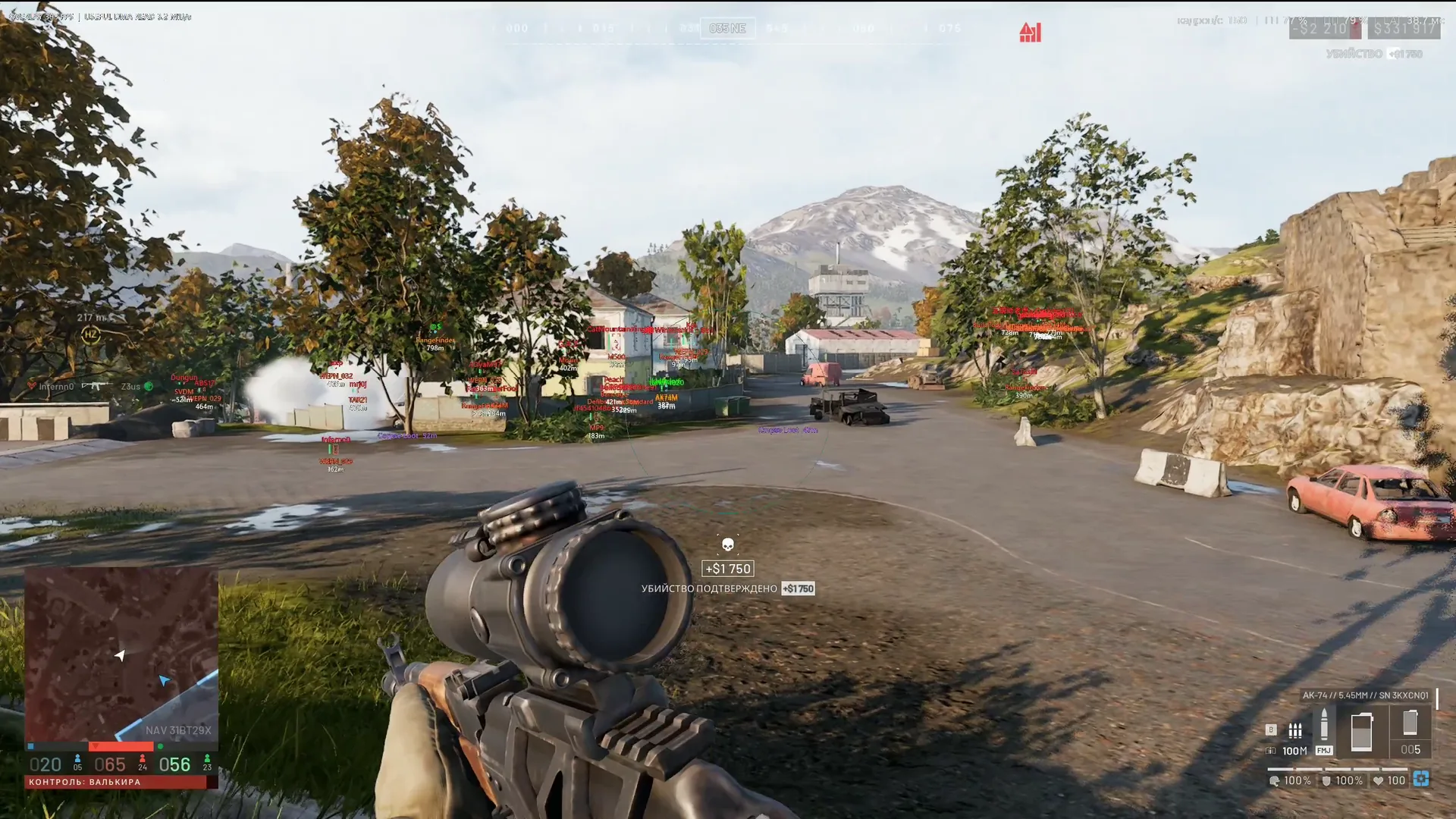
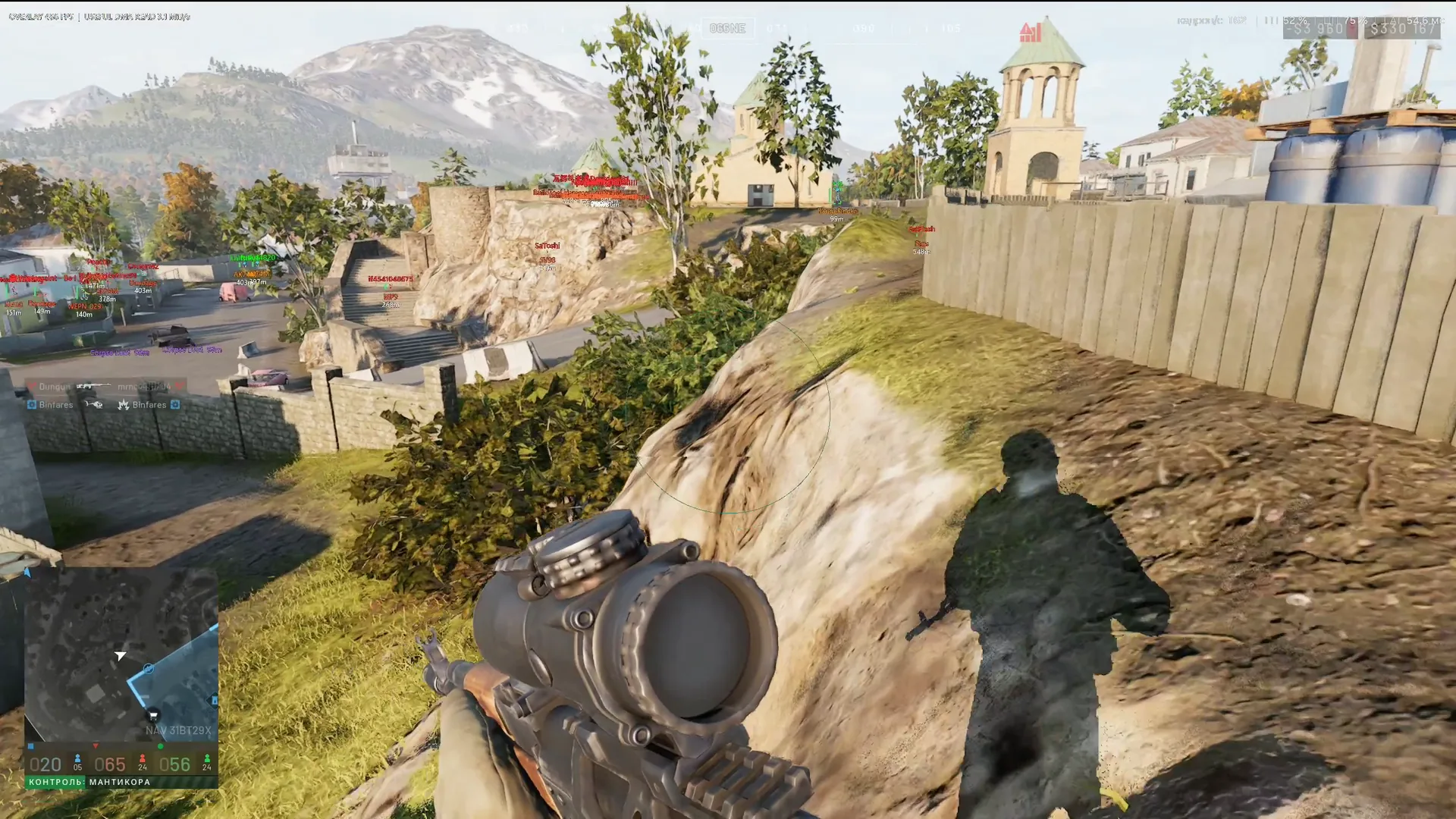
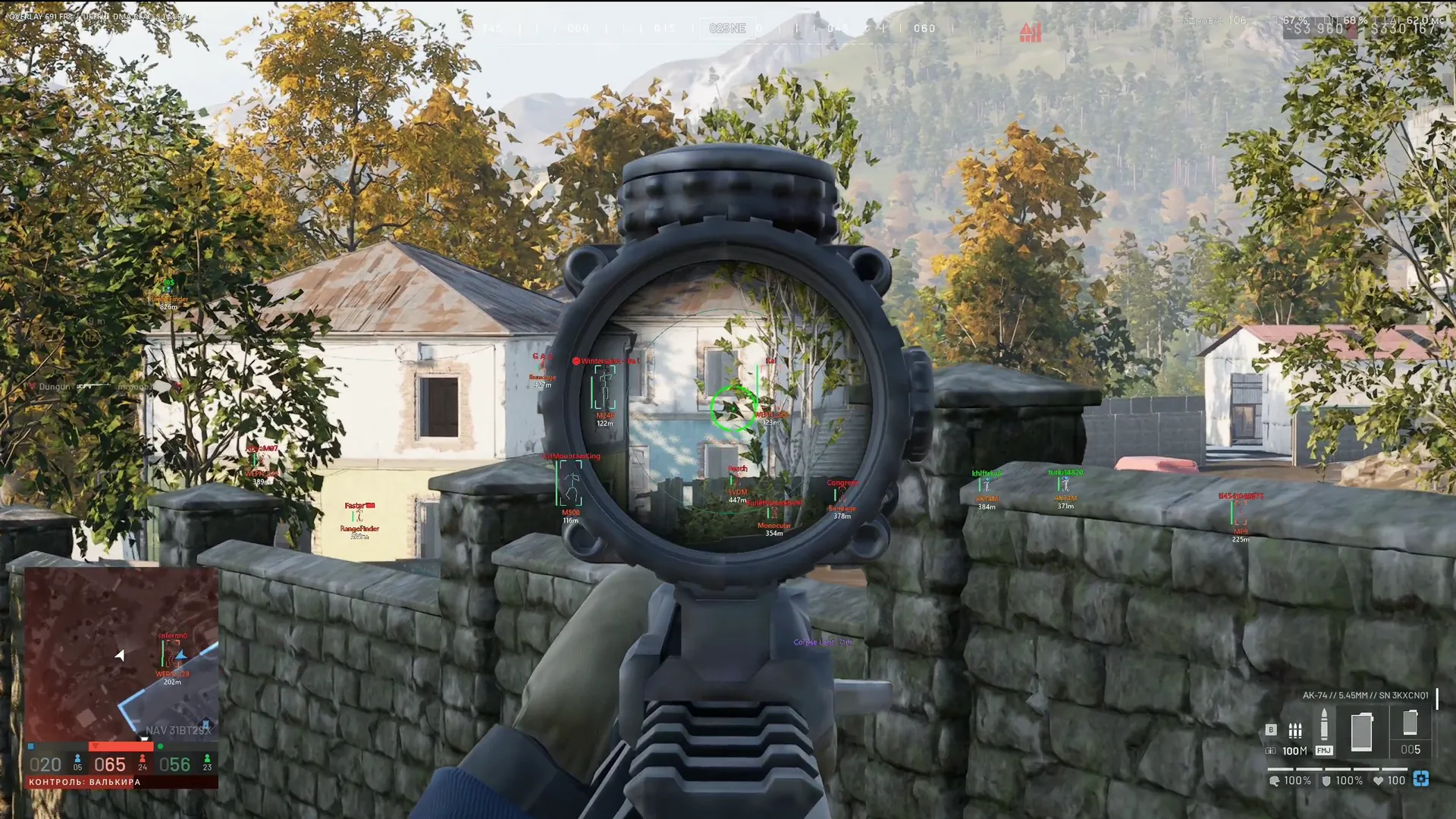
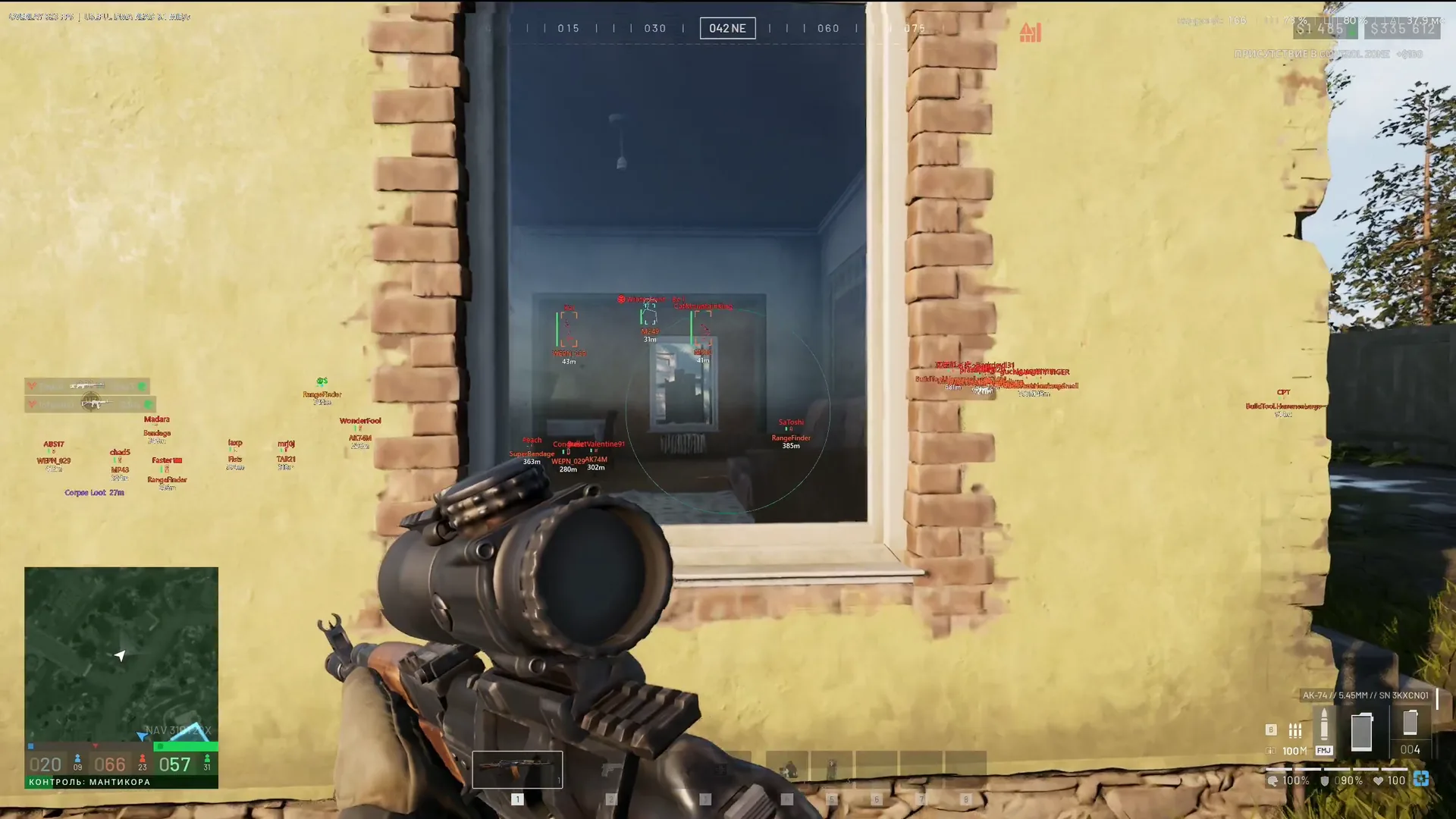
Neiro for WARDOGS is a DMA cheat. The software runs on a second computer and reads game memory through a PCIe card, while the machine running WARDOGS starts no extra process and no driver, so the anti-cheat has nothing to latch onto. The overlay goes to a second monitor or through a fuser, and MAKCU handles the aiming: the game sees it as an ordinary USB mouse.

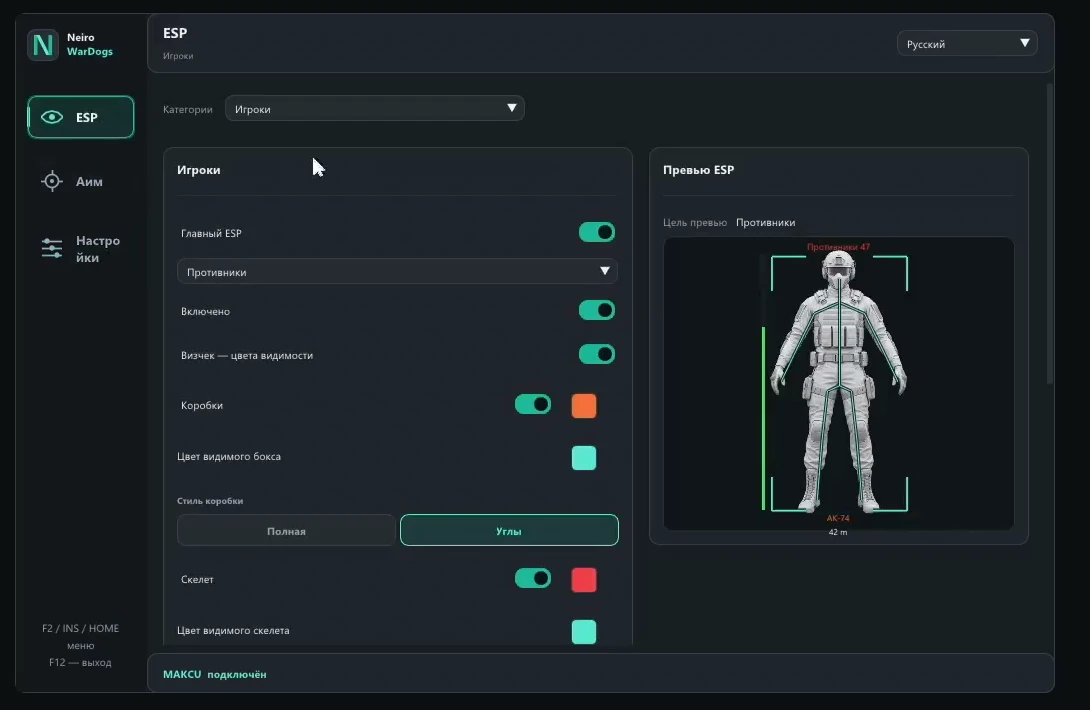
The strong side of the build is its ESP setup. Infantry, vehicles and world objects each get their own tab, teammates and enemies have separate colours and ranges, and every change shows up at once on the soldier model inside the menu. The aim is deliberately careful: without confirmed data on the target and the chosen bone, it leaves the mouse alone.

Product features

Player ESP

Teammates and enemies

Enemies and teammates are configured separately: each group has its own set of elements and its own colours.

Box and skeleton

A full box or corners only, with a skeleton on top. Line thickness is set in the settings.

Labels

Nickname, weapon in hand, distance and a health bar. Switch off whatever crowds the screen.

Head and line

A dot on the head and a line from you to the player, handy at long range.

Draw distance

One limit for the ESP and another for the skeleton, different for teammates and enemies.

Visibility check

An enemy out in the open is marked differently from one behind a wall.

Unknown side

If the player's team cannot be worked out, only a box is drawn, without the other labels.

Menu preview

Every change shows on the soldier model at once, no need to enter a match to check.

Vehicle ESP

Vehicle icons

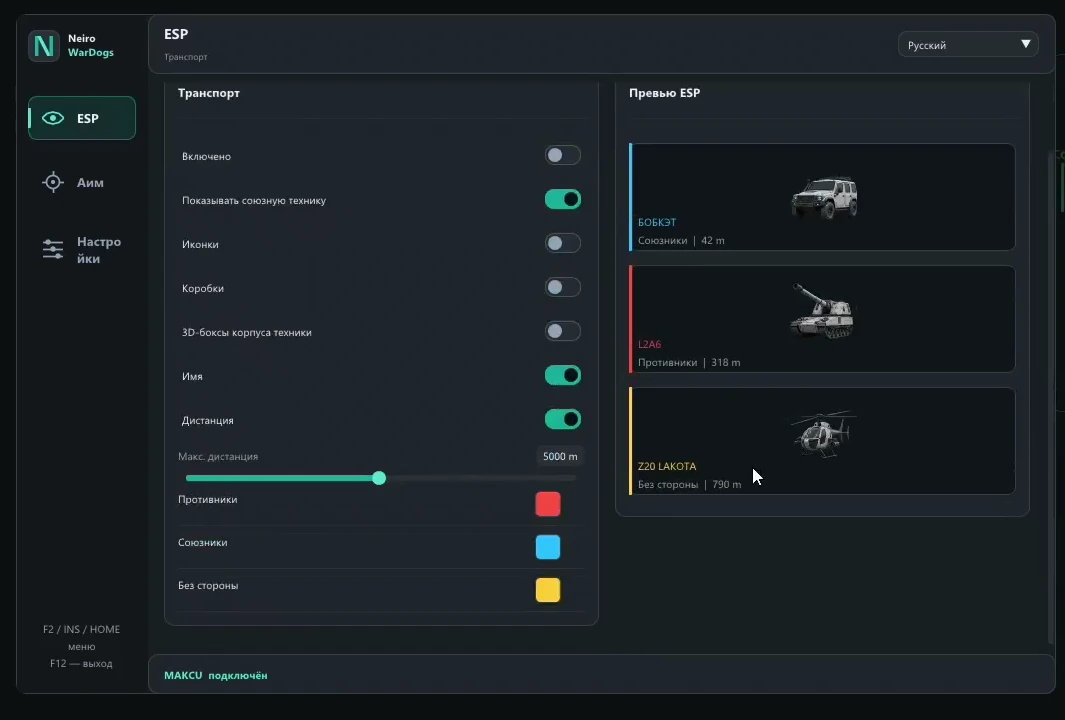
A vehicle icon with no clutter of circles around it, plus the name and distance in metres.

Side colour

A vehicle takes the colour of its side when its affiliation is known. Unidentified ones get a colour of their own.

Model catalogue

Known models are labelled from a built-in catalogue, unknown ones by a technical name from the game files.

Range limit

Past the set distance, vehicles drop off the screen.

World and loot

FOBs and structures

Forward bases, emplacements, structures and supplies, each category on its own toggle.

Spawn points

Respawn spots and mobile spawn vehicles that enemies come out of.

Artillery

Mortars and artillery pieces are visible before the first shell lands on your point.

Mines and grenades

Placed mines and thrown grenades have categories of their own.

Items and bodies

Items on the ground and containers left by the dead, with a type filter for loot.

Colours and ranges

Every category has its own colour and its own distance limit.

Aim assist via MAKCU

Input device

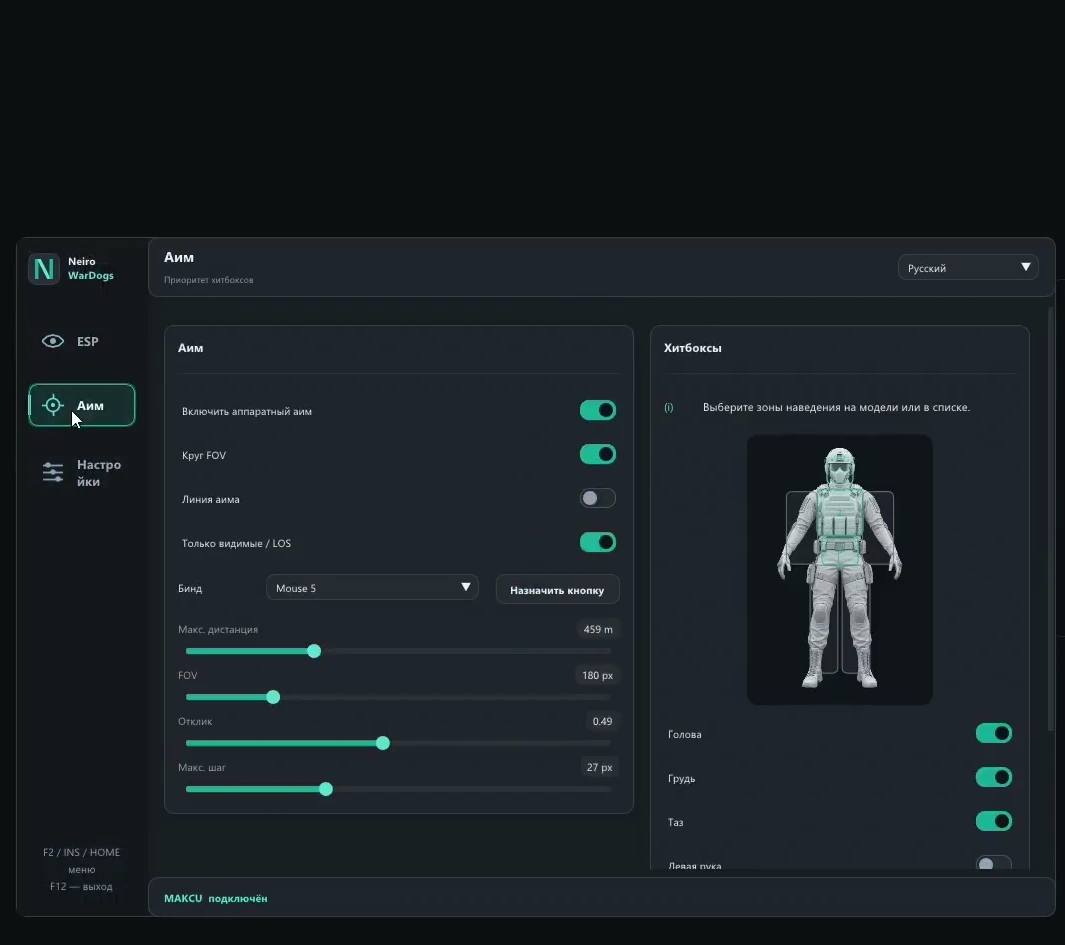
Aiming goes through MAKCU. A saved compatible device is picked up automatically on launch.

Key and FOV

Your own activation key, capture radius and maximum distance to the target.

Response and step

How fast it reacts and how long a single movement step is, from a soft pull to a sharp one.

Zones on the model

Hitboxes are toggled by clicking the model or ticking a list. The aim takes the first enabled zone.

Strict targeting

Movement is sent only on confirmed enemy data and the chosen bone. If that bone is unavailable, the mouse stays still.

Settings

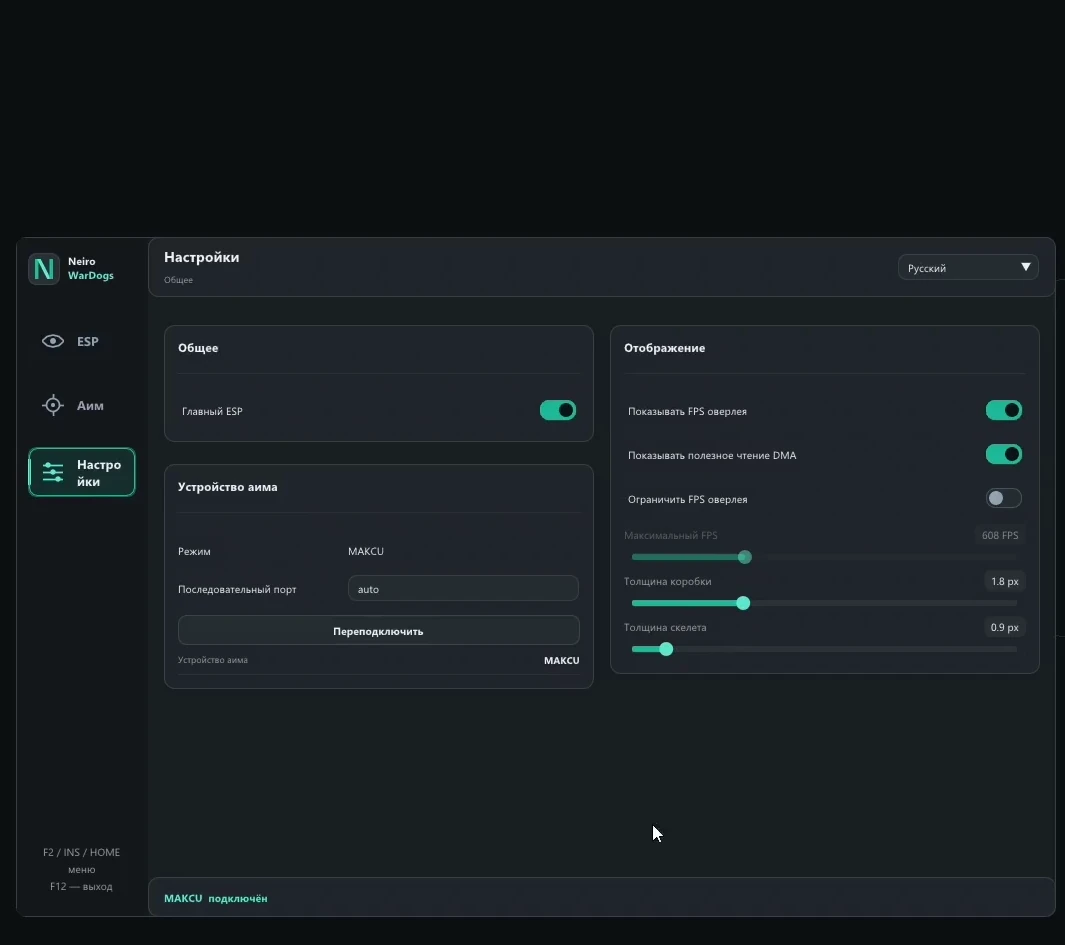
Menu language

Russian interface, other languages available too.

Vertical sync

Turn it on if the overlay tears on the second monitor.

Autosave

Settings are written to disk on their own, so everything is in place after a restart.

Waiting for the game

The software waits for the WARDOGS process and checks the active offset profile against the game version.
TARIFFS
250₽
BUY Build a kit with a card What happens after payment?
Got a question? Ask before you pay

We'll help you choose and sort out any launch issue. Ask us anything before buying, we're always on your side.

Support 10:00–22:00, sometimes we reply at night too
Ask a question

Available tariffs

Reviews about DMA WARDOGS Neiro

No reviews yet. Be the first to leave one.

Your review

Reviews are published after moderation.

Join our gaming community chat

Discuss current cheats from developers and how to use them effectively in popular online games. Share tactics, exchange useful info and find like-minded players in our community.

1 900+Members
24/7Online
Join our gaming community chat

Technical support

Run into a technical issue? Our team of experts will help. We handle all requests in a live queue, so please be understanding if it sometimes takes a little wait. We guarantee that no request goes unanswered.

Availabilityfrom 10:00 to 23:00
Fast responseIn queue order
Get help
Technical support
PROCHEAT

PROCHEAT news channel

Follow product status changes, update history and important announcements.

Subscribe

Inside the Neiro menu for WARDOGS

The Neiro menu has five sections: three for ESP, one for aim assist and the general settings. The table shows what sits in each one and where it helps in a fight for the zone.

SectionWhat you configureWhere it helps
ESP → Playersfull or corner box, skeleton, health, nickname, weapon, distance, head dot, line; teammates and enemies separatelyinfantry firefights, reading where an enemy squad sits
ESP → Vehiclesicon, name, range, side colour, model cataloguetelling whose tank just rolled up to the point and where a helicopter is coming from
ESP → World and lootFOBs, emplacements, structures, supplies, spawn points, items, bodies, artillery, mines, grenadesassaulting a fortified zone, hunting the enemy spawn
Aim → MAKCUkey, FOV, distance, response, step, hitboxes on the modelduels at medium and long range
Settingslanguage, VSync, line thickness, colours, aim device, autosavefirst setup and moving to a new patch

Plans cover one day, a week and a month. If your setup is already built, a one-day key is the cheapest way to see how the software gets along with your card, and the monthly plan brings the daily cost down the most.

Why WARDOGS players go for DMA

WARDOGS is protected by a kernel-level anti-cheat, and ordinary software lives inside the very system it inspects. DMA works differently. The card sits in a PCIe slot of the gaming computer and copies memory directly, bypassing the processor, and a second PC makes sense of that data. The gaming machine itself has no cheat on it at all.

The second advantage is the mouse. Software aim moves the cursor from inside the system, and that kind of movement is exactly what anti-cheats have learned to spot. MAKCU sits between the mouse and the computer and passes movement on as a normal USB device, so the aiming arrives the same way your hand's movement does.

Infantry ESP: teammates and enemies are set up separately

The Players tab has two identical sets of settings, one for enemies and one for teammates. That is handy when a box is enough for your squad while enemies should come with a skeleton, nickname and weapon. Every element has its own toggle and its own colour.

Box, skeleton and head dot

The box can be full or corners only. Corners clutter the screen less when there are many enemies in view. The skeleton gives away posture: prone, crouching or running. The head dot helps at long range, where a skeleton shrinks to a couple of pixels, and the line to the player tells you which way to turn.

Ranges and the visibility check

Draw distance is set separately for the ESP and for the skeleton, and each side has its own. For example, you can see enemies across the whole map and keep the skeleton for close range only, where it actually helps you aim. The visibility check marks an enemy standing in the open, so you do not empty a magazine into someone behind a concrete block.

When only a box is drawn

If the cheat cannot tell which side a soldier is on, it draws a bare box without the other labels. With a hundred players and three factions in a match, guessing is risky: taking a teammate for an enemy is worse than seeing an empty square and looking twice.

Preview on the model

The menu has a soldier model that shows any change right away: colour, set of labels, box style. You can finish the setup in the lobby instead of picking colours in the middle of a firefight.

Vehicles in the colour of their side

In WARDOGS vehicles often decide the fight for a zone: a tank holds the crossroads, a Little Bird drops troops on a roof, a supply truck hauls ammo to the point. The Vehicles tab draws the vehicle icon, its name and distance. The circles around icons that usually litter the screen are gone here.

When a vehicle's affiliation is known, it takes the colour of its side, and unidentified ones get a separate colour. Models the software knows are labelled from a built-in catalogue, the rest by a technical name from the game files. After a patch that adds new vehicles, such internal names may pop up until the catalogue catches up.

World and loot: FOBs, artillery, mines

The third tab covers everything that neither runs nor drives. There are plenty of categories: FOBs, emplacements, structures, supplies, spawn points together with mobile spawn vehicles, items on the ground, containers of the dead, artillery, mines and grenades. Each one has its own toggle, colour and range.

In an assault, FOBs and spawn points matter most: finding and wrecking the enemy spawn cuts off reinforcements across a whole sector. Mines and grenades save you at a building entrance, and artillery markers show where the shells hitting your point come from. Loot is filtered by item type, so after a firefight the screen keeps the gear you need rather than every scrap on the bodies.

Aim assist via MAKCU: how it picks a target

Aiming in Neiro works only through an external device, and MAKCU is the one supported. If it has been connected before, the software finds it on its own at launch. After that you set the activation key, FOV, maximum distance, response and movement step.

Hitboxes and the first enabled zone

Aim zones are toggled by clicking the soldier model or ticking boxes in a list. If several are on, the aim takes the first one. The logic is simple: want headshots, put the head first; want fewer misses at range, put the torso first.

Why the aim does not jump to another bone

A command goes to MAKCU only when the enemy data is confirmed and the chosen bone is available. If that bone is missing, the mouse stays put and the cheat does not switch to a neighbouring zone on its own. From outside this looks calmer than a crosshair jumping from head to shoulder, and a match recording shows fewer odd jerks.

Response and step: smooth or sharp

Response sets how quickly the aim reacts to a target, step sets how far the mouse moves in one go. A small step with slow response gives a soft pull that looks like a hand. A large step is sharper and suits short sessions. Keep the FOV small: grabbing an enemy from the edge of the screen is the first thing a recording gives away.

What you need besides the subscription

The hardware for Neiro is put together separately. The minimum kit looks like this:

  • a DMA card in a PCIe slot of the gaming computer, with working firmware and its driver installed;
  • a second computer or laptop to run the cheat;
  • MAKCU, if you want aim assist;
  • a second monitor or a fuser to see the overlay.

We make firmware for a specific card and motherboard ourselves, tiers and prices are on the DMA firmware page. If you have no hardware yet, start with the DMA card catalogue: it collects cards, input devices and fusers.

How to launch Neiro

  1. Connect the DMA card and make sure its system driver is installed. Keep the libraries that ship with the program, do not swap in versions from elsewhere.
  2. Connect MAKCU for aim assist.
  3. Start WARDOGS on the gaming computer.
  4. Start the Neiro loader on the second computer.
  5. Wait for the game version and offset check. If the loader reports an incompatible version or a profile update error, the game updated before the software did: wait for the update and message support.

F2, Insert or Home open and hide the menu, F12 closes the cheat. The loader link and a detailed guide come with the key.

Questions about the Neiro DMA cheat for WARDOGS

Do I need MAKCU if I do not want aim assist?

No. Player, vehicle and world ESP work with just the card and a second computer. MAKCU is only for aiming.

Will a KMBox work instead of MAKCU?

The build lists MAKCU, and the developer names no other devices. If you own a KMBox, check compatibility with support before paying.

Which display mode should the game use?

Any: windowed, borderless or fullscreen. The overlay is drawn by the second computer, so the game does not care.

Is there a radar?

The build has no separate radar. Positions come through the ESP: infantry, vehicles and objects are labelled along with their distance.

Do I need my own firmware?

Yes, the card will not work without firmware. You can order firmware for your card from us, and if you already have some, we check compatibility before you pay.

Which Windows do I need?

Windows 10 or 11 on the computer that runs the cheat. Intel or AMD processor, it makes no difference.

The loader will not start. What now?

Check that the game version is supported, the card is connected and its driver is installed. Close a second copy of Neiro if one is already open. If that does not help, take a screenshot of the error and send it to support.

What happens after a WARDOGS patch?

The loader checks the game version against its offset profile by itself. If it reports incompatibility after an update, the software waits for a fix, the product status on the page changes, and paid time is frozen for that period.

from 250 ₽ Choose a plan
Ask a question


