Ghost WARDOGS Cheat

Working
Ghost Ghost
Last update 22.08.2026 This date shows when the software was last updated. An old date doesn't mean the software stopped working! Most likely the developer just had nothing new to add. If you have any doubts, you can always check the current status with our support team.
Add another cheat from this game too — to compare them.
Ghost WARDOGS
Steam
Windows support: 10: all builds; 11: all builds
Menu language: English
Spoofer:No
USB drive:No
BIOS:No

User information

WARDOGS runs kernel-level Easy Anti-Cheat, so the launch order is not a formality here. The loader starts before the game, the anti-cheat expects a clean system, and stray debuggers, test-signed drivers and extra overlays are better closed in advance. A licensed Steam copy is required, because matches only run on official servers.

A current Windows 10 or 11 install is enough, and no flash drive or BIOS changes are needed to start. There is no built-in spoofer in the package, so if a hardware ban has already landed, that fingerprint needs sorting out before purchase rather than after the first launch.

The key and the loader arrive by email at the address you used for payment; there is no account area on the site, so enter it carefully. The game is in early access and patches often, and EAC updates along with it, so after a major update the build normally goes into review and your paid days are frozen. The current state is always shown by the product status.

SCREENSHOTS
Description

Ghost WARDOGS is a private cheat for the BULKHEAD tactical shooter, built around two things: seeing the whole field and hitting what you point at. In a hundred-player match with three factions running at once, whoever learns about the enemy last loses, and buying a loadout before every life makes each mistake cost money.

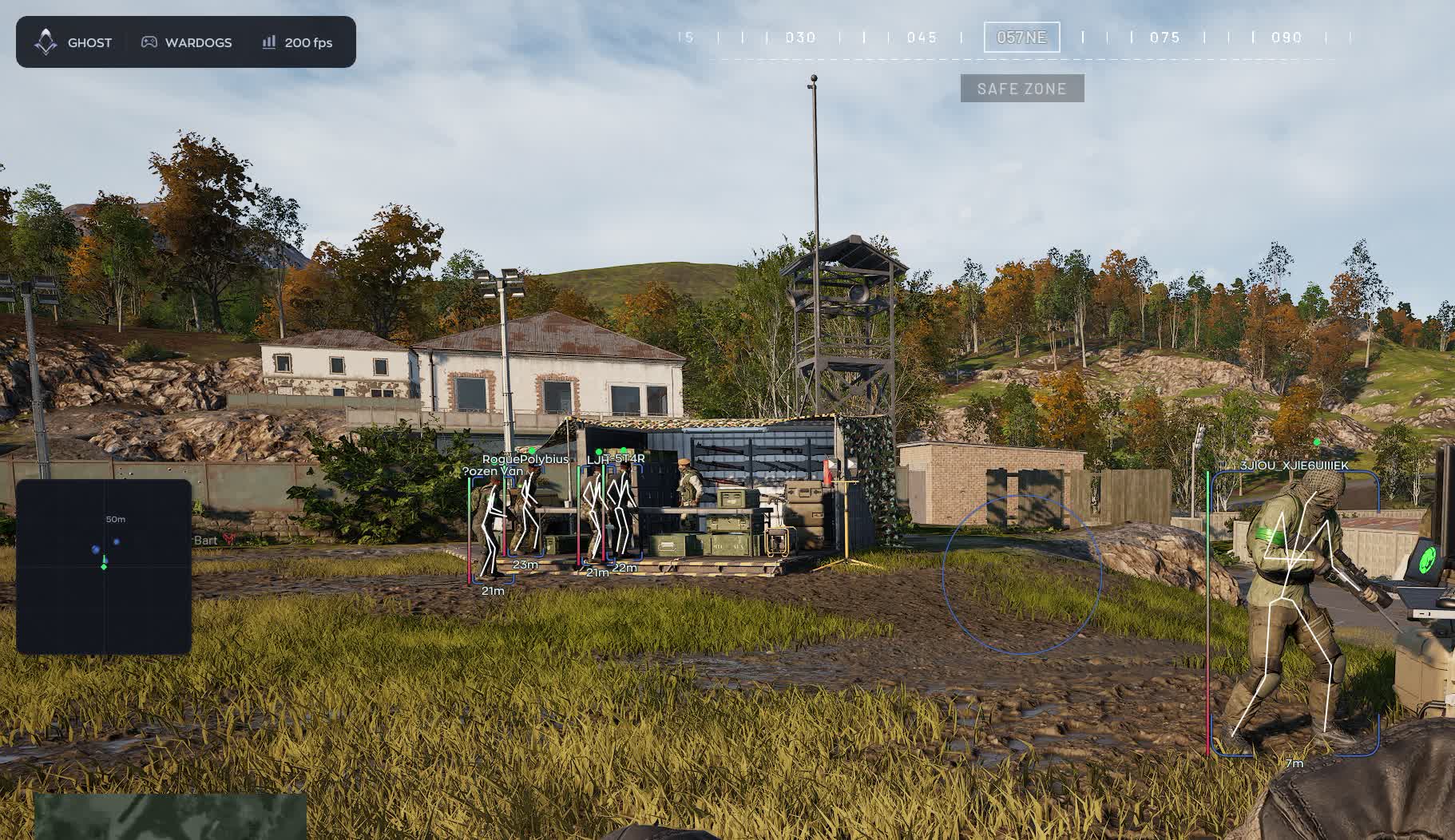
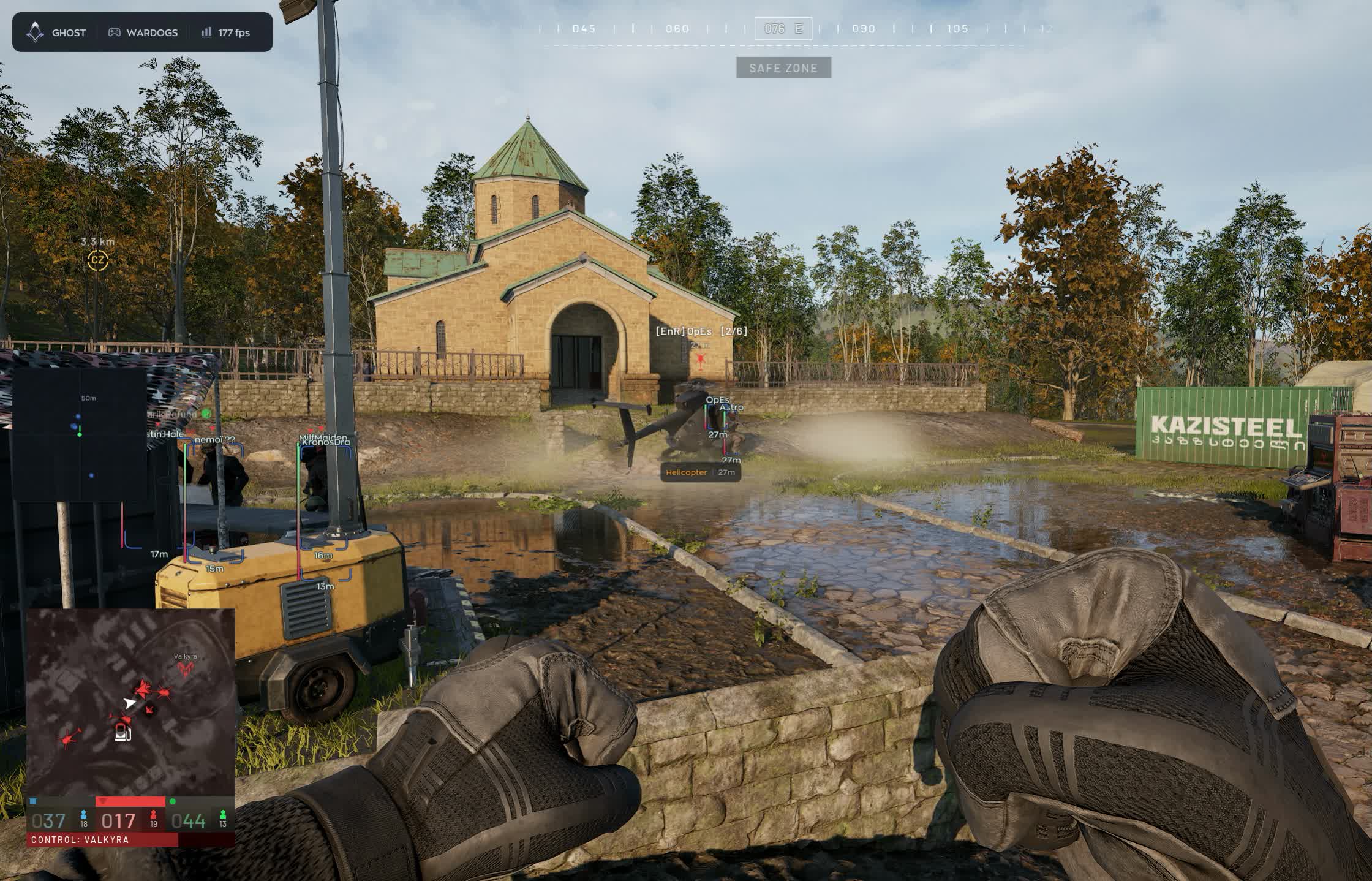
ESP tracks infantry with nickname, weapon, skeleton and health bar, and flags downed players separately. Radar holds the full circle around you, world ESP shows dropped gear, corpses and every vehicle from quad bikes up to tanks and attack helicopters. The aimbot is tuned by bone, hitbox and range, and a Humanize layer sits on top of it to break the machine-perfect tracking.

Product features

Aimbot

Key-held tracking

Enable turns the aim assist on. Ghost marks the module as raising detection risk, and that is an honest label: an aimbot is the loudest thing in any build, so leaving it on for a whole match is a bad habit.

Capture radius

Field of View sets the cone around your crosshair where the aimbot picks up a target. Narrow for the ruins, wide for open approaches to the zone.

Smoothing

A slider controls how fast the barrel travels. Soft settings read like ordinary mouse corrections, hard settings close a point-blank fight faster.

Hitbox selection

Head, neck, chest, arms or legs. Chest is steadier at range, neck and head drop armoured targets quicker.

Bone mode

Bone Mode either holds the bone you chose or snaps to the nearest one. The second option helps when a target flickers through a doorway and the head is not always exposed.

Visible only

Visible Check stops the aimbot reaching for targets behind cover. Worth having on if people are watching, because your barrel stops sliding along concrete.

Range limit

Max Distance caps working range so the aimbot does not grab a silhouette across the sector instead of the man in front of you.

Recoil control

Recoil Control damps muzzle climb on a scale from zero to a hundred. Kitted M4s and AKs stop walking into the ceiling and suppressive bursts actually land.

Humanize

Micro movement

Jitter adds slight shake while tracking. A perfectly straight crosshair path is the first thing people spot on a recording.

Dead zone

Deadzone keeps a small area where the aimbot leaves your crosshair alone. Until the target crosses that edge, you are aiming yourself.

Reaction delay

Reaction Min and Reaction Max set the window before tracking kicks in. Instant response is not a human trait, so the pause works in your favour.

Speed ceiling

Max Speed limits how quickly the crosshair reaches the target. This is the slider that removes the half-screen snap.

Player ESP

Box styles

Full box, corners only or filled. Corners keep the screen readable in a brawl, filled boxes stand out on distant silhouettes.

Name and weapon

Player nickname and the gun in their hands. You immediately know whether a sniper is watching the open flank or a shotgun is holding the corridor.

Skeleton and health

Bones show the pose, the HP bar shows what is left. A prone camper and a wounded runner call for different decisions.

Distance and snapline

Range in metres plus a line to the target. On a map where the zone stretches two kilometres, distance matters more than the box itself.

DOWNED state

Downed players get their own marker. You can see who is no longer a threat and where an enemy medic is about to run for the revive.

Off-screen arrows

Arrows point at contacts outside your view. With three factions in play, being flanked is routine rather than rare.

Visibility split

Visible Check paints targets behind cover and in the open in different colours, so you know who you can take right now.

Radar

Surrounding contacts

Enemy dots on a separate panel without turning the camera. Handy when rotating between sectors and pushing toward the zone.

Dot style

Circle, square or triangle, with adjustable dot size. Triangles read as heading, circles stay out of the way.

Size and zoom

The panel scales to your monitor and zoom widens or tightens coverage. Close in for zone fights, wide for reading the map.

Outline and background

Draw Outline and Draw Background add a frame and a backing plate. On bright industrial ground the dots vanish without one.

Display range

Max Distance cuts everything beyond a set radius so the radar does not turn into a starfield.

Loot, corpses and vehicles

Ground drops

Items with name and distance, each type on its own toggle: weapons, ammo, meds, armour, attachments and everything else. Picking up someone else's rifle is cheaper than buying a new one.

Player corpses

Corpse marks the dead. A body on the ground flags a recent fight and tells you somebody nearby has already spent ammunition.

Vehicles by class

Quad bikes, SUVs, pickups, trucks, transport and attack helicopters, tanks. Every class has its own toggle, and each marker carries a name and range.

Menu, configs and safety

Capture protection

Hide From Capture removes the cheat window from OBS and Discord. You can stream or share a screen without shutting the software down.

Battle Mode

A minimal interface mode for the fight itself: extra elements disappear and only the essentials stay.

Configs

Create, Save, Load and Delete. One layout for infantry work in the zone, another for vehicle hunting, switched between matches.

Keybind indicator

The active binds sit on screen, so you know what is running without opening the menu.

Interface options

Watermark, text shadow, vertical sync for the overlay and DPI Scale to match your system scaling.

Menu key

Menu Key is bound wherever you like, so the panel never pops open mid-firefight.
TARIFFS
300
BUY What happens after payment?
Got a question? Ask before you pay

We'll help you choose and sort out any launch issue. Ask us anything before buying, we're always on your side.

Support 10:00–22:00, sometimes we reply at night too
Ask a question
Update history
  • 22.08.2026 Working
    Received an update

Available tariffs

1 day
300
START PURCHASE
7 days
1500
START PURCHASE
30 days
3000
START PURCHASE
Reviews about Ghost WARDOGS

No reviews yet. Be the first to leave one.

Your review

Reviews are published after moderation.

Join our gaming community chat

Discuss current cheats from developers and how to use them effectively in popular online games. Share tactics, exchange useful info and find like-minded players in our community.

1 900+Members
24/7Online
Join our gaming community chat

Technical support

Run into a technical issue? Our team of experts will help. We handle all requests in a live queue, so please be understanding if it sometimes takes a little wait. We guarantee that no request goes unanswered.

Availabilityfrom 10:00 to 23:00
Fast responseIn queue order
Get help
Technical support
PROCHEAT

PROCHEAT news channel

Follow product status changes, update history and important announcements.

Subscribe

What is inside the Ghost WARDOGS cheat

Ghost for WARDOGS is split across five tabs, each covering a different blind spot. Here is what actually gets configured and how it plays out in a hundred-player match.

Module What you configure What it gives you
Aimbot FOV, smoothing, hitbox, bone mode, visible only, range limit tracking in the ruins and on the push to the zone
Recoil control compensation from 0 to 100% flat bursts from kitted M4s and AKs
Humanize jitter, dead zone, reaction delay, speed ceiling tracking that does not read as machine-made on a clip
Player ESP box, name, weapon, skeleton, HP, distance, snapline, arrows enemy strength and state before contact
DOWNED state separate marker on knocked players finish them or leave while a medic runs the revive
Radar size, zoom, dot style and size, range what is behind you without turning the camera
Loot and corpses weapons, ammo, meds, armour, attachments, bodies picking gear off the ground instead of buying it
Vehicles from quad bikes to tanks and attack helicopters never walking into a sector held by armour
Stream proof Hide From Capture, Battle Mode the cheat window stays out of OBS and Discord

Aimbot: hitbox, bone and recoil control

Ghost does not ship the aimbot as one switch but as a set of sliders, and the difference between a clean session and a ban lives exactly there. Field of View sets the capture cone, smoothing controls tracking speed, Max Distance cuts off far targets, and Visible Check forbids reaching for anyone behind concrete.

The point of impact is chosen separately. Hitbox switches between head, neck, chest, arms and legs, while Bone Mode decides whether to hold the selected bone or jump to whichever is closest to the crosshair. The second mode earns its place in industrial areas where an enemy flickers through a doorway and the head is not exposed every frame.

Recoil Control sits next to the aimbot and damps muzzle climb as a percentage. Modular M4s and AK-74s with attachments genuinely climb in WARDOGS, and while suppressing a position two hundred metres out the gap between full and half compensation is obvious. The developer flags an active aimbot as the highest detection risk in the build, so running it all match long makes little sense.

Humanize: keeping the tracking believable

The Humanize tab exists for one reason: so the aimbot cannot be read at a glance. What gives a machine away is not speed but regularity — the crosshair travels in a perfect line, starts with no delay and stops exactly on the pixel.

Jitter adds a slight shake, Deadzone leaves a small area where you steer the crosshair yourself rather than the software. Reaction Min and Reaction Max set the delay window before tracking begins, and a human-looking two hundred millisecond response builds far better from that than from zero. Max Speed caps travel speed and removes the half-screen snap.

Tuning matters more here than in the aimbot itself. A hard aim with sensible Humanize looks calmer on a recording than a soft aim without it.

Player ESP: who is in front of you and in what shape

ESP draws every soldier through the geometry: a box in full, corner or filled style, nickname, held weapon, skeleton, health bar and range in metres. A snapline runs to the target, and off-screen arrows keep the bearing on anyone already outside your view.

Two things here are shaped around WARDOGS specifically. First, Visible Check paints visible and hidden targets in different colours, because with three factions the screen fills with markers fast and colour decides who you can take now. Second, the DOWNED state on knocked players. Medics revive for cash, so an enemy knock is not just one soldier fewer but a spot somebody will run to within seconds.

Radar: the full circle without turning the camera

Radar puts contacts on a dedicated panel. Nearly everything is adjustable: panel size, zoom, dot style between circle, square and triangle, dot size, display range, outline and backing plate. On bright industrial ground the dots simply disappear without a background, so Draw Background is not decoration here.

It pays off most during rotations. The control zone in WARDOGS moves and a point ticks to whoever holds the numbers every thirty seconds, so knowing which side of a sector is already covered before you run into it matters.

Loot, corpses and vehicles on the map

World ESP splits into three groups. Loot shows ground drops with name and distance, and each type has its own toggle: weapons, ammunition, meds, armour, attachments and everything else. In a game where gear is bought with earned cash before every life, a rifle picked off the ground is a purchase you did not have to make.

Corpse marks dead players. A body on the map almost always means a fight happened nearby and someone has already spent ammunition. Vehicle tracks transport by class: quad bikes, SUVs, pickups, trucks, transport and attack helicopters, tanks. Every class toggles separately, so you can keep armour on screen and leave the quad bikes out of it.

Configs, Battle Mode and capture protection

Settings are stored as configs with Create, Save, Load and Delete. One layout for infantry fights inside the zone, another for hunting vehicles, and switching takes seconds between matches. The keybind indicator keeps active binds on screen so you never open the menu mid-firefight.

Hide From Capture removes the software window from OBS and Discord, so a stream or a shared screen gives nothing away. Battle Mode strips the interface down to the minimum while you fight. Smaller touches include a watermark, text shadow, vertical sync for the overlay, DPI Scale for system scaling and a custom menu key.

Ghost and Easy Anti-Cheat: playing without a ban

WARDOGS is protected by kernel-level Easy Anti-Cheat. It installs with the game, runs with driver privileges and inspects processes, memory and driver signatures, which is why bans usually land on hardware rather than accounts. That gives you a simple rule: a clean system before launch, no stray overlays or debuggers.

The second rule is about behaviour in the match. The aimbot module is itself flagged as raising detection risk, and most bans arrive from reports rather than from the anti-cheat: a hundred players per match, proximity chat and half of them recording. Humanize, a narrow FOV, Visible Check and switching the aim on only for contact remove exactly that problem.

Ghost for WARDOGS has no built-in spoofer. If an HWID ban has already happened, that fingerprint is a separate job and it comes before the purchase. The game is in early access and patches often, so after a major update the build goes into review and your paid days are frozen.

How to buy the Ghost WARDOGS cheat

Pick a subscription length on the product page and pay however suits you. The key and the loader arrive by email straight after payment; there is no account area on the site, so the address in the payment form has to be a working one. The same email carries the launch instructions, and they are worth reading before the first start.

If the loader will not come up or the game fails to start behind it, the common errors are already documented in the knowledge base and anything left over goes to support. The product status shows whether the build is live right now or waiting on a post-patch update.

FAQ

Will the Ghost aimbot give me away on a recording?

That is exactly what the Humanize tab is for: jitter, a dead zone, a reaction delay window and a tracking speed ceiling, plus Visible Check so the barrel never slides along walls. The developer honestly marks an active aimbot as the highest-risk module, so there is no reason to keep it on permanently.

Is a spoofer included?

No, this build has no built-in spoofer. If a hardware ban already landed, the fingerprint is dealt with separately and before purchase.

Can I stream with the cheat running?

Yes. Hide From Capture keeps the window out of OBS and Discord, and Battle Mode trims the interface during fights. Check your capture on a local recording before going live anyway.

What does the DOWNED state show?

Knocked enemies who can still be revived. It works twice over: you know who is temporarily out, and you can see where an enemy medic is about to run.

Does ESP cover vehicles?

It does, by class: quad bikes, SUVs, pickups, trucks, transport and attack helicopters, tanks. Each class has its own toggle and every marker carries a name and range.

Which Windows versions are supported?

Current Windows 10 or 11, any build. No flash drive or BIOS changes are needed, and a licensed Steam copy of the game is required.

What happens after a game patch?

WARDOGS is in early access and updates often. After a major patch the build goes into review and your paid days are frozen, then returned once the cheat runs again.

Latest updates

22.08.2026 17:40
Working
Received an update
Open full history
from 300 ₽ Choose a plan
Ask a question


