SMG WARDOGS Cheat

Working
SMG SMG
Last update 16.09.2026 This date shows when the software was last updated. An old date doesn't mean the software stopped working! Most likely the developer just had nothing new to add. If you have any doubts, you can always check the current status with our support team.
Add another cheat from this game too — to compare them.
SMG WARDOGS
Steam
Windows support: 10: 22h2; 11: 21h2, 22h2, 23h2
Menu language: Russian
Spoofer:Yes
USB drive:No
BIOS:No

User information

The list of systems is a closed one: Windows 10 builds 21H2 and 22H2, and Windows 11 from 21H2 to 23H2. Newer Windows 11 builds are not covered yet, so check your version in winver before buying. There are no hardware limits, any CPU and GPU will do. No USB stick is needed and the BIOS stays untouched, so leave Secure Boot and virtualisation exactly as they are.

A spoofer is included and built into the loader, picked at startup, with nothing extra to purchase. A cleaner sits beside it and wipes anti-cheat traces. The launch order is the usual one: loader first, game second, with other overlays and debuggers closed beforehand. The game has to be a legitimate Steam copy, as the software does not work on anything else.

SMG uses one instruction for all of its software, and the link arrives together with the key. It covers starting the loader, choosing the spoofer and running the cleaner. The key itself is emailed to the address you enter when paying. There is no account area on the site, so type that address carefully.

WARDOGS entered early access on 10 September 2026 and gets patched often, with Easy Anti-Cheat updating alongside it. After a major update the build normally goes on hold for checks and your paid days are frozen for that period. The current state is always shown in the product status, so read it before you pay.

SCREENSHOTS
Description

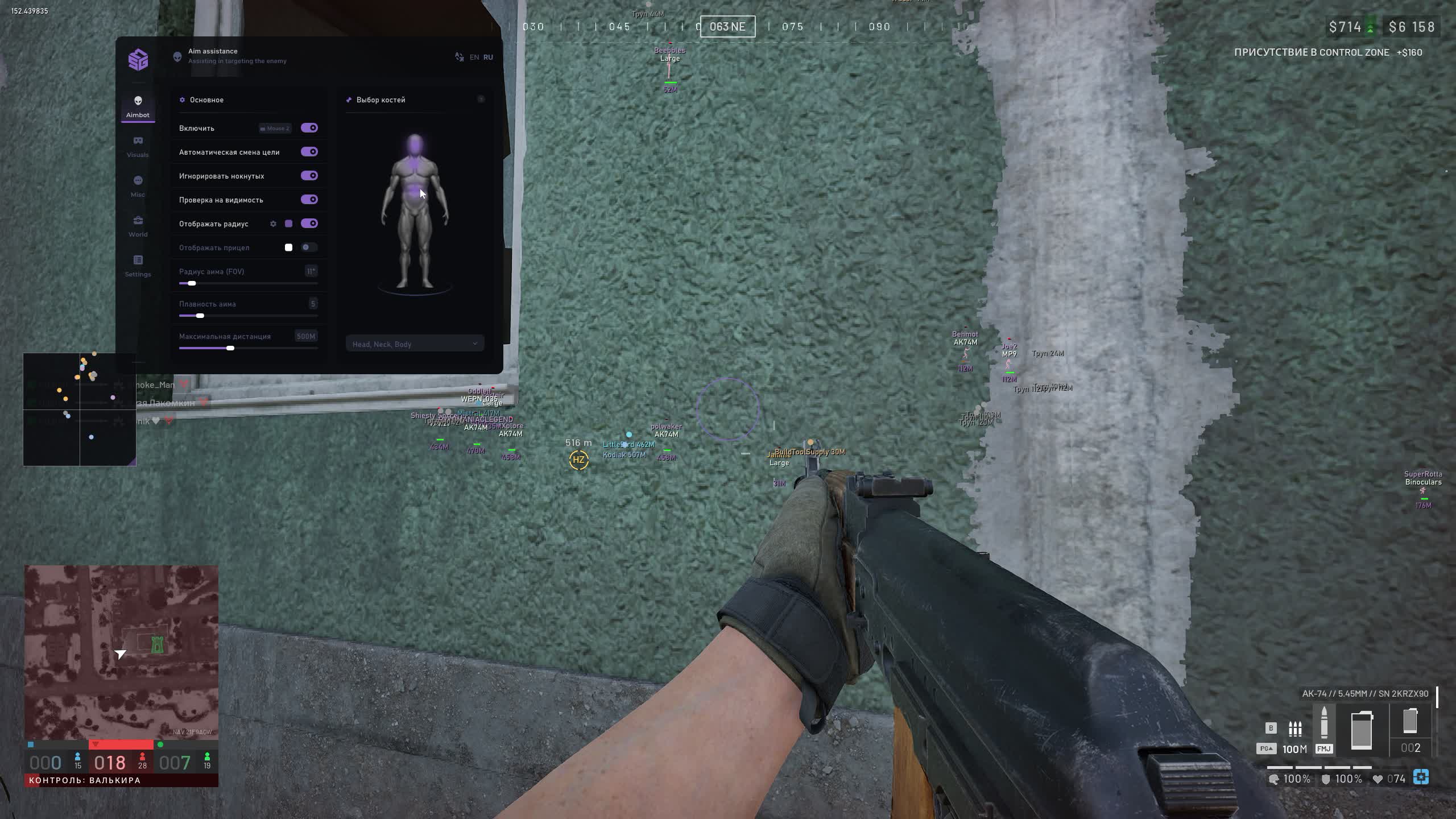
SMG for WARDOGS is built for fights where a hundred players, three factions and vehicles that appear from behind a hill all share the same map. The aimbot is not a switch you flip and forget: it sits on a key, checks whether the target is actually visible and can skip downed players. ESP tracks infantry with a box and a skeleton, and labels separately whether an enemy is in sight or standing behind a wall.

The menu is split into five tabs. Aimbot covers the correction and bone picking, Visuals handles everything drawn over the game, Misc gathers recoil, the radar, field of view and zoom, World labels vehicles and loot across the map, and Settings keeps your configs and three hotkeys. The loader ships with a spoofer you pick at startup and a cleaner that wipes anti-cheat traces.

Product features

Aimbot

Correction on a key

The aimbot runs while you hold the key; there is no always-on mode here. That is deliberate, since an external correction shows up on someone else's recording, while short taps in a firefight look like ordinary shooting.

Automatic target switching

Once the current enemy goes down or leaves the radius, the software moves to the next one inside the circle. You do not release the key and re-aim by hand.

Ignore downed players

A separate toggle drops prone bodies from the target list. In WARDOGS teammates revive each other, and without this option the aimbot would hold a body while a live enemy finishes you nearby.

Visibility check

A target behind a wall or a tank hull does not count: the aimbot only takes someone you can actually see. The same rule applies when it switches targets.

Aim radius and its circle

FOV sets the circle the software searches inside. You can draw that circle on screen and tune its segment count and line thickness, so the boundary is readable without blocking your view.

Smoothness and distance

Smoothness spreads the correction over time: the higher the value, the less abrupt the pull looks. Maximum distance cuts off far targets, beyond which the aimbot never engages.

Custom crosshair

A separate toggle draws a dot in the centre of the screen. Useful with weapons that lack a decent sight, and at the moment the in-game reticle disappears against a bright background.

Interactive bone picking

Bones are marked on a human figure instead of chosen from a dropdown. You can select several at once and set the order: head first when it is visible, chest after it.

Visuals

Box

The outline around a player comes in two shapes: a full rectangle or corners only. Highlighting visible players and filling the box are separate entries.

Name

The nickname above a target with its own font size. Downed players get a different colour for it, so a glance tells you who is already on the ground.

Weapon

The gun in the enemy's hands is labelled under the marker, with its own font size. You know in advance whether a shotgun is waiting in the stairwell or a rifle is holding the field.

Skeleton

Shows the pose: lying behind a berm, crouched, or already up and moving. You choose which bones are drawn, the line thickness and the distance past which the skeleton stops rendering.

Visibility check

Text next to the target says whether it is in sight right now. The wording and the colour are set separately for a visible and a hidden enemy, and the font size is adjustable too.

Health and distance

A health bar above the marker and the range in metres. Together they tell you whether to push the contact or break away and reload.

Live preview

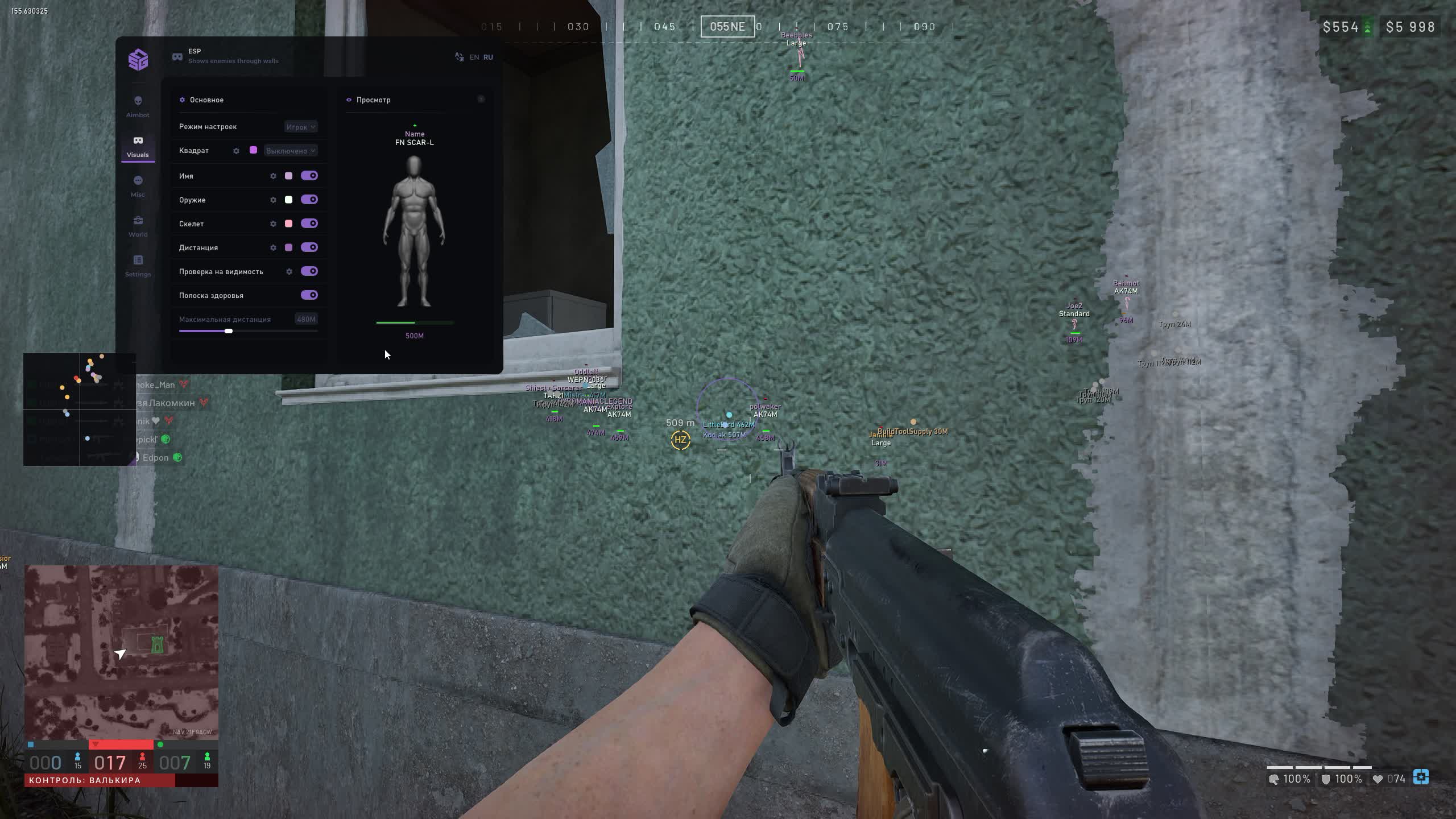
The whole ESP is arranged on a mock-up inside the menu: elements are dragged with the mouse and you see straight away how the labels will sit around a target. No need to load into a match to fit the interface.

Misc

No recoil

The barrel stops climbing during a long burst, and suppressing fire at a hundred metres turns into a tight group.

Radar

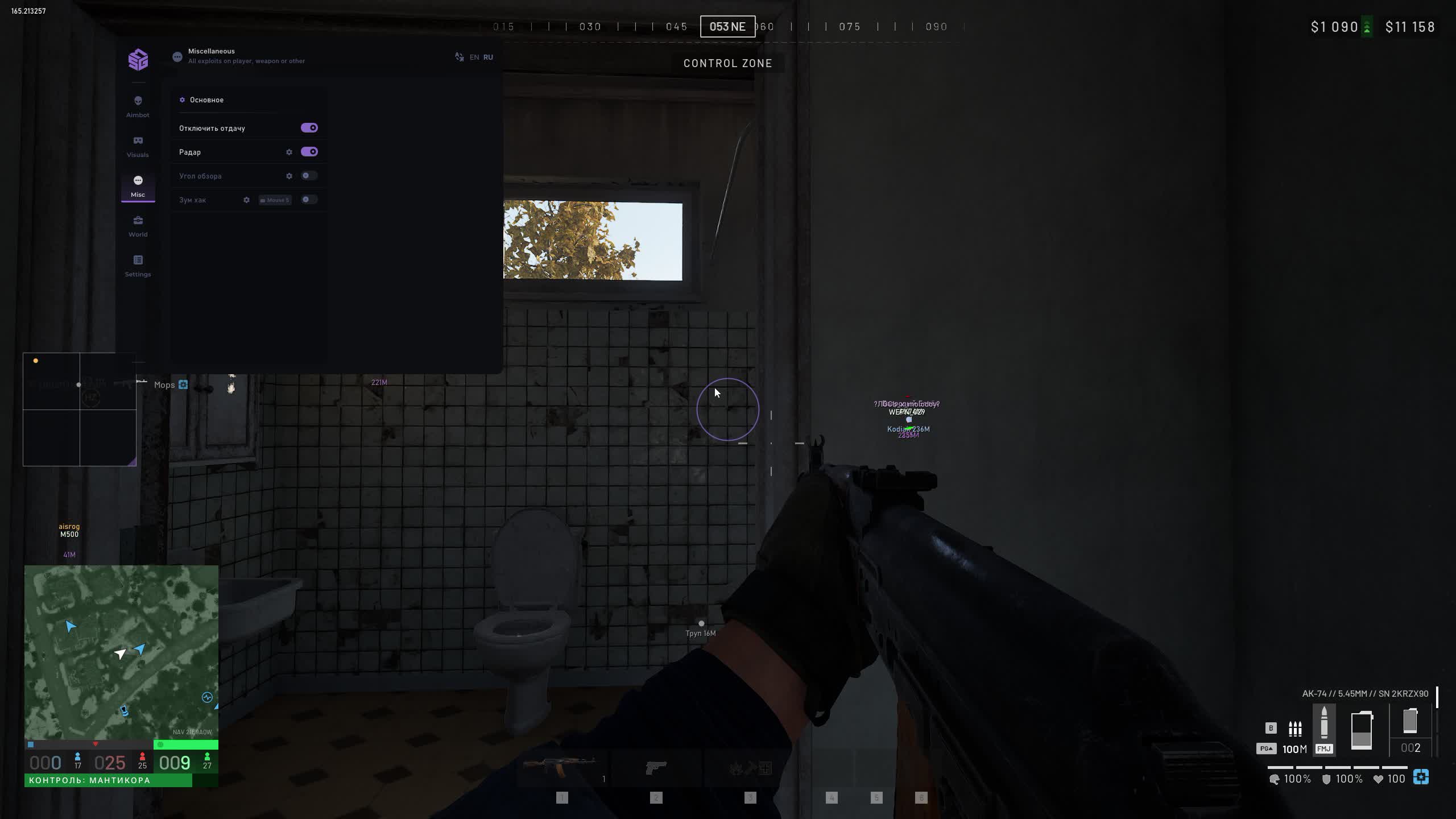
A two-dimensional panel with the situation around you. Scale, background transparency and a fixed size are configurable, and your own view cone and the enemies' view direction are drawn with adjustable length and thickness.

Radar colours

Players, visible ones, downed ones and the outline each get their own colour. On a map with three factions that is the only way to read the panel without pausing.

Field of view

The FOV value is set by hand, wider than the game allows. Your peripheral vision grows and a flanking move is spotted earlier.

Zoom hack

Magnification on a key with an adjustable factor. You can make out a marker on the far side of the contested zone without optics.

World

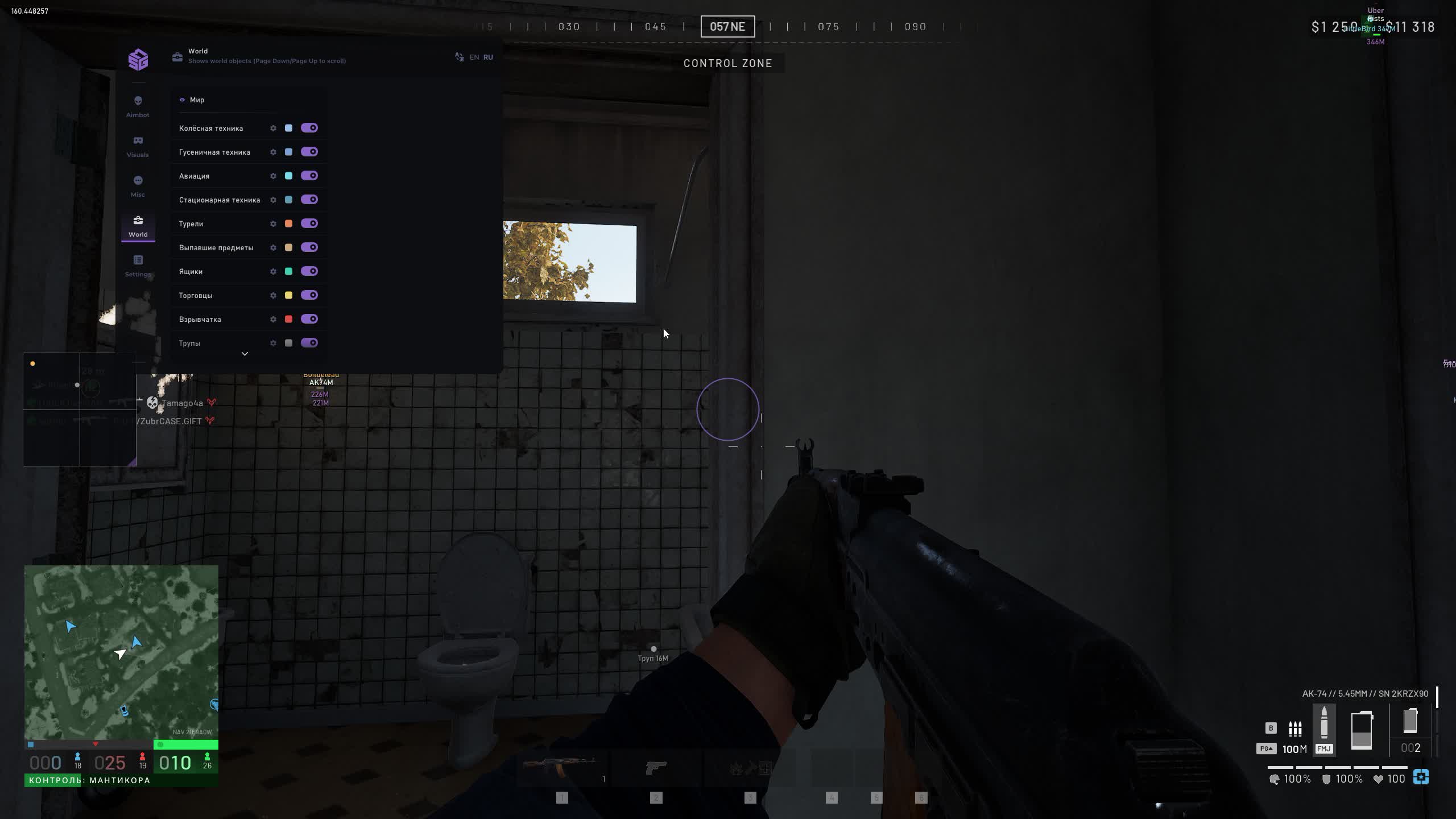
Four vehicle types

Wheeled, tracked, aircraft and stationary vehicles are handled as separate groups. Each has its own background, title, dot, distance, font and dot sizes, plus a custom title of your own.

Friendly vehicles

Showing machines from your own faction is a separate toggle with its own colour. In a brawl around the contested zone that saves seconds: no guessing whose truck is coming round the corner.

Turrets

Emplacements are labelled with a marker and a distance. Background, title, dot, font and dot sizes and the maximum draw distance are all configurable.

Crates and dropped items

Drops from kills and crates run as separate groups with their own colours. In a game where you buy your kit before every life, picking gear off the ground saves real money.

Traders and explosives

Trader points carry their own title, explosives carry another. A planted charge is visible before it goes off.

Bodies

Corpses are marked as a separate group with a distance. You can see where a fight happened and where it is worth walking in for loot.

Settings

Configs

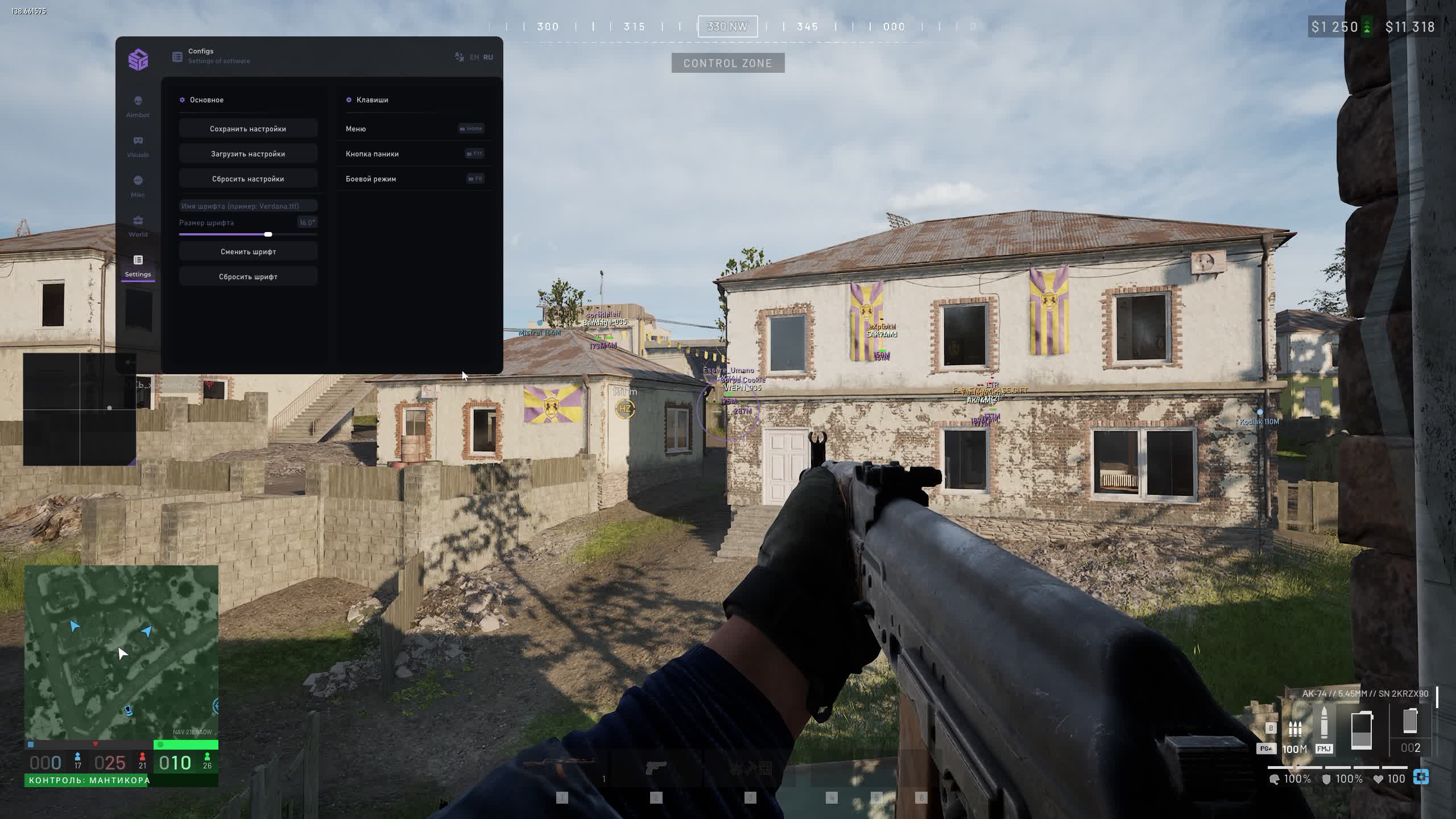
Settings are saved, loaded and reset to defaults in one click. Keep separate presets for different roles and swap them between matches.

Menu font

The font name and size are adjustable, with a reset to the standard one. On a 1440p monitor you can size the labels up instead of squinting at them.

Three hotkeys

Menu, panic button and combat mode. Panic clears the overlay with one press, and combat mode switches right there without opening the menu mid-firefight.

Spoofer and cleaner

The spoofer is built into the loader and picked at startup, with a cleaner for anti-cheat traces beside it. Nothing extra to buy.
TARIFFS
300
BUY What happens after payment?
Got a question? Ask before you pay

We'll help you choose and sort out any launch issue. Ask us anything before buying, we're always on your side.

Support 10:00–22:00, sometimes we reply at night too
Ask a question

Available tariffs

1 day
300
START PURCHASE
7 days
1500
START PURCHASE
30 days
2800
START PURCHASE
Reviews about SMG WARDOGS

No reviews yet. Be the first to leave one.

Your review

Reviews are published after moderation.

Join our gaming community chat

Discuss current cheats from developers and how to use them effectively in popular online games. Share tactics, exchange useful info and find like-minded players in our community.

1 900+Members
24/7Online
Join our gaming community chat

Technical support

Run into a technical issue? Our team of experts will help. We handle all requests in a live queue, so please be understanding if it sometimes takes a little wait. We guarantee that no request goes unanswered.

Availabilityfrom 10:00 to 23:00
Fast responseIn queue order
Get help
Technical support
PROCHEAT

PROCHEAT news channel

Follow product status changes, update history and important announcements.

Subscribe

What the SMG WARDOGS cheat does

The SMG menu in WARDOGS is laid out across five tabs, and almost every entry in them changes something on screen right away. Here is what you set and how it plays out in a hundred-player match.

Menu entryWhat you setWhat it gives you in a match
Aimbotactivation key, target switching, ignoring downed players, visibility checkcorrection engages only when you want it, and only on a live target
Bone pickinginteractive figure, multi-select and priority orderthe software decides between head and chest by what is exposed right now
Radius and smoothnessFOV with an on-screen circle, segments and thickness, smoothness, distanceyou see the line past which the aimbot stops, and the pull does not stand out
Box and labelsfull box or corners, fill, name, weapon, health, distanceyou know who to push and who to break away from
Skeletonwhich bones, line thickness, maximum distancethe pose reads clearly: lying behind a berm or already up and moving
Visibility checkyour own wording and colour for a visible and a hidden enemyyou know at once whether you are shooting a target or the wall in front of it
ESP previewa mock-up in the menu with elements dragged by mousethe interface is fitted in a minute without loading into a match
Radarscale, transparency, fixed size, view cones, four coloursthe panel reads the situation around you while you hold a sector
Miscno recoil, field of view, zoom on a keybursts group tightly, peripheral vision widens, far markers resolve without optics
Worldfour vehicle types, turrets, crates, drops, traders, explosives, bodiesthe map stops being empty: you see transport and what lies on the ground
Friendly vehiclesa separate toggle and a colour for your own factionyou stop spending a shot on your own team's supply truck
Settingssaving and loading configs, font, menu, panic, combat moderole presets swap between matches and the overlay clears with one key

Aimbot: a key, live targets and a wall that counts

The correction turns on with a key and lasts exactly as long as you hold it. There is no always-on mode in the menu, and these days that is a plus: Easy Anti-Cheat in WARDOGS runs at kernel level, yet the first complaint usually comes not from it but from someone who watched your kill on a recording. Short taps during a firefight read as ordinary shooting.

Three toggles beside it decide who counts as a target at all. Automatic switching moves the aimbot to the next enemy once the current one drops or leaves the circle. Ignoring downed players removes bodies from the list: in WARDOGS teammates revive each other, and holding your gun on a body while a live enemy finishes you nearby is a reliable way to lose the trade.

The visibility check covers the third case. A target behind a concrete wall, a tank hull or smoke does not count and the correction will not take it. The same rule applies when targets are switched, so the aimbot never drags your barrel into a wall someone just ran past.

Bone picking: a priority list instead of one point

Bones are marked on a human figure right inside the menu. It is a small thing most neighbours in this category do without: instead of a dropdown full of names you click the picture and see exactly where the correction will land.

You can tick several bones at once and put them in priority order. The software walks the list from the top and takes the first one that fits: the head when it is exposed, the chest when the head sits behind a berm. In a game where half the fight happens prone behind an embankment and armour soaks up chest hits, the order matters more than any single chosen point.

The limitation is an honest one: priority works together with the visibility check, so a covered bone is simply skipped. If only the edge of a shoulder is exposed, the aimbot takes what is available instead of firing at a hidden head.

Radius, smoothness and distance: tuned to your range

The aim radius is set in degrees and defines the circle inside which the software looks for a target. A separate toggle draws that circle on screen, with its segment count and line thickness adjustable: eight segments give a rough boundary, thirty a smooth ring that does not shimmer against a bright background.

Smoothness spreads the correction over time. At the minimum the barrel snaps across instantly and looks the part; at high values the movement resembles a quick manual pull. Maximum distance cuts off everything beyond the range you set, which on a map of 256 square kilometres saves you from chasing a point the bullet needs a full second to reach.

The crosshair is drawn separately as a dot in the centre of the screen. A simple entry, but a useful one in WARDOGS: some weapons lose their reticle against the bleached industrial zone, and hip fire without a centre mark turns into guesswork.

Infantry ESP: box, name, weapon and health

The core of the ESP is the box around a player. It draws in two shapes: a full rectangle or corners only. Corners clutter the screen less and look tidier at range, while a full box reads better in woodland. Highlighting visible targets and filling the box are separate entries.

A label block gathers above the marker, and each part switches on by itself. The nickname has its own font size, and downed players get a different colour for it, so a glance tells you who is already on the ground and who might stand back up if a teammate reaches them. The weapon in hand is labelled below, with its own size too: a shotgun in a stairwell and a rifle on a roof call for different decisions, and it is better to know before contact.

A health bar and the range in metres cover the rest. They tell you whether to push: a wounded enemy thirty metres away is a trade, a healthy one at a hundred and fifty is a reason to move. The overall maximum ESP distance is set separately so the far edge of the map does not turn into a soup of markers.

Skeleton and visibility check: pose and target state

The skeleton sits on top of the box and shows the pose. In WARDOGS that is not decoration: a soldier lying behind an embankment and one who has just got up to move demand different reactions, and a box alone cannot tell them apart. You choose which bones are drawn, the line thickness and the maximum draw distance, because past a certain range the lines merge anyway and the boundary is better set by hand.

The visibility check prints a state next to the target. Wording and colours are set separately for a visible and a hidden enemy, and the font size is its own. You can keep the default words or reduce it all to two symbols in different colours, which reads faster in a brawl than a full label.

The practical sense is simple. A marker is there but the state says hidden, which means a wall or a rise in the ground sits between you and there is nothing to shoot yet. The state flips to visible and the target has opened up, at which point the aimbot will take it too, because it works from the same signal.

Live ESP preview: the interface is built with a mouse

The Visuals tab holds a target mock-up showing the ESP exactly as it will look in a fight. Label elements are dragged with the mouse: the name can move up, the distance can sit under the box, the weapon can shift sideways so it stops overlapping the health bar.

The value is not in being able to move text around but in the fact that fitting it needs no trips into a match. On other builds interface tuning is usually done blind: change a value, quit, load in, look. Here everything shows in the menu straight away, and arranging your own layout takes a minute.

It also helps when you change monitor or resolution. A layout that suited 1080p sprawls at 1440p, and instead of fiddling with font sizes you simply lay the labels out again on the mock-up.

Radar: the situation around you while you hold a sector

The radar shows a two-dimensional panel with players around you. Scale, background transparency and a fixed size are adjustable, the last one useful if you do not want the panel resizing along with the scale. Your own view is drawn as a separate ray with adjustable length so you never lose your bearings.

The enemies' view direction is the most practical part of the panel. Ray length and thickness are set separately, and they show where someone behind a wall is currently looking. In WARDOGS, with its dashes across open ground, that decides things: flanking a man who is watching your side and one who has turned away are two different stories.

Colours are handed to four groups: players, visible ones, downed ones and the outline. On a map with three factions and a hundred players a panel without that split becomes a scatter of dots, while with it you read it out of the corner of your eye.

Misc: recoil, field of view and zoom

No recoil removes the upward climb during a long burst. Fights in WARDOGS happen at medium range with a lot of suppression, and the difference between a tight burst and a fan into the sky is direct: suppressing fire either pins a squad or simply burns ammunition you bought with in-game money.

The field of view is set by hand and goes wider than the game's limit. Peripheral vision expands and a flanking move is visible before it lands. The cost is distortion at the edges of the picture, which is why the value is usually picked once and left alone.

The zoom hack goes on a key with an adjustable factor. It is not a substitute for optics but a way to see what is happening on the far side of the contested zone without swapping weapons. It earns its place before you leave cover, when you need to know whether a turret is on that hill or it stands empty.

World: four vehicle types, with friendlies in their own colour

Vehicles are split into four groups: wheeled, tracked, aircraft and stationary. Each is configured on its own, with a marker background, title, dot, distance, font and dot sizes and a maximum draw range. The title can be rewritten with your own text, so instead of a long machine name the screen carries a short word you chose.

The split by type works on a map where vehicles decide fights. A Little Bird on approach and a tank crawling out from behind a hill call for different reactions, and when they are labelled in different colours the decision comes faster. Stationary vehicles and turrets are handled separately: their positions never change, and you want to know about them before you step into the open.

Showing friendly vehicles is a separate toggle with its own colour. The entry is done right: in a general brawl around the contested zone there are plenty of your own machines, and without a colour split half the markers would be useless. With it you can see that the supply truck coming round the corner is yours, and the shot never leaves the barrel.

Loot and map points: crates, drops, traders, explosives

The WARDOGS economy works so that you buy your kit before every life and the money carries over between matches. What you pick off the ground is therefore not a trifle but a direct saving on the next respawn. Items dropped by kills and crates run as separate groups, each with its own colour, title, dot size and maximum distance.

Bodies are marked as their own group. They show where a fight recently happened: a scatter of corpses on the approach to a point means either it is already over or someone is still holding that approach and waiting for the next arrival. Explosives are labelled separately, and a planted charge is visible before it detonates.

Traders get their own marker with a title you can rewrite by hand as well. Every one of these groups switches off independently, so the screen adapts to the job: in a brawl you keep vehicles and infantry, and in a quiet phase you turn loot on and go collecting.

Settings: configs, font and three hotkeys

Settings are saved, loaded and reset to defaults straight from the menu. Given how many separate colours, sizes and distances this build carries, keeping ready-made presets saves time: a pilot wants vehicles and the radar, an infantryman wants skeletons and labels, and swapping that between matches beats flipping fifty toggles.

The menu font changes as a whole, with a name and a size to set and a reset to the standard one. At a high resolution the labels are easy to size up instead of squinting at them, and at 1080p you can shrink them so a block of text does not cover half the target.

There are three keys. Menu opens the interface. The panic button clears the overlay in one press, which is what you want the moment someone looks over your shoulder or a recording starts. Combat mode switches from the same place, without opening the menu mid-firefight: on a key rather than four clicks away from one.

Spoofer and cleaner: both in the loader

The spoofer is built into the loader and picked right at startup, with no separate purchase. For a game with a kernel-level anti-cheat that matters: Easy Anti-Cheat sees the hardware, and if a ban has already landed on it, a clean account by itself solves nothing.

The cleaner sits beside it and wipes the anti-cheat traces left in the system by earlier sessions. There is nothing extra to buy, since it is part of the same build and starts from the same place.

What none of that changes: no USB stick and no BIOS edits are needed here, and Secure Boot and virtualisation stay untouched. The launch order is the usual one, with the loader and its spoofer first, the game second, and other overlays and debuggers closed before you start.

What to know before buying

The list of systems is closed: Windows 10 builds 21H2 and 22H2, and Windows 11 from 21H2 to 23H2. The newest builds of eleven are not covered yet, so it is worth checking your version in winver before paying rather than after. There are no hardware limits, any CPU and GPU will do. The game has to be a legitimate Steam copy.

There are three tariffs: a day for 300 roubles, a week for 1500 and a month for 2800. A day is what people take to look the software over before a longer subscription, after which a month works out cheaper. The period is chosen inside the payment card itself, with no separate page for each term.

The key and the loader arrive by email at the address you enter when paying, and there is no account area to register on the site. The SMG instruction link comes with the key. It is shared across all of their software and covers starting the loader, choosing the spoofer and running the cleaner. If it does not start the first time, write to support and we will sort it out.

FAQ

Does the build include a radar?

Yes, in the Misc tab. The panel is configurable for scale and transparency, your own view and the enemies' view direction are drawn separately, and players, visible ones, downed ones and the outline each get their own colour.

Can the aimbot stay on for a whole match?

No, it sits on an activation key and works while that key is held. The limit is deliberate: a constant correction shows on someone else's recording, while short taps in a firefight look no different from ordinary shooting.

How is interactive bone picking different from the usual kind?

Bones are marked on a human figure instead of chosen from a list, and you can tick several at once with a priority order. The software takes the first available bone: the head when it is exposed, the chest when it is not.

Does the spoofer cost extra?

No, it is built into the loader and picked at startup. The cleaner that wipes anti-cheat traces sits in the same place and is included too.

Do I need a USB stick or BIOS changes?

No. The loader starts from your drive, and Secure Boot and virtualisation stay as they are.

Which versions of Windows are supported?

Windows 10 builds 21H2 and 22H2, and Windows 11 from 21H2 to 23H2. Newer builds of eleven are not on the list yet, so check your version in winver.

Can you see who is sitting inside a vehicle?

This build does not list the crew by seat. Vehicles are labelled across four types with a title, a dot and a distance, and friendly ones show in their own colour. If you need the crew, look at the other WARDOGS builds in this category.

What happens after a game patch?

WARDOGS has been in early access since 10 September 2026 and gets patched often, with Easy Anti-Cheat updating alongside it. After a major update the build goes on hold for checks, paid days are frozen and the product status changes.

from 300 ₽ Choose a plan
Ask a question


