Rust Cheat Specter

Working
Specter Specter
Last update 22.06.2026 This date shows when the software was last updated. An old date doesn't mean the software stopped working! Most likely the developer just had nothing new to add. If you have any doubts, you can always check the current status with our support team.
Add another cheat from this game too — to compare them.
Specter RUST
Steam
Windows support: 10: 2004, 21h1, 22h2, 23h2, 24h4; 11: 21h2, 22h2, 23h2, 24h2, 25h2, 26h2
Menu language: English, Russian
Spoofer:No
USB drive:No
BIOS:No

User information

Before you buy, make sure your rig can run it:

  • Windows 10 and 11 — all current builds supported.
  • No USB-stick launch and no BIOS edits — install and play.
  • Menu in Russian and English, switched right in the cheat.

After payment the key and launcher arrive by email. Stuck on launch? Message support and we'll get the software up.

VIDEO
SCREENSHOTS
Description

Specter Rust is a private external Rust cheat: it doesn't inject into the game process. ESP shows enemies and teammates through walls, their held and belt items, skeletons and chams, while the radar keeps the whole map in view. The aimbot locks bones with a smooth pull — soft for clips, tight for a push on a sulfur farm.

The build highlights animals, resources, ground loot and structures: from the tool cupboard to airdrops and auto turrets. There are filters by type and a stream-proof record bypass for clean captures. Updates ship right after EAC patches, so downtime between builds stays short.

Product features

ESP — Players & Teammates

Through-wall highlight

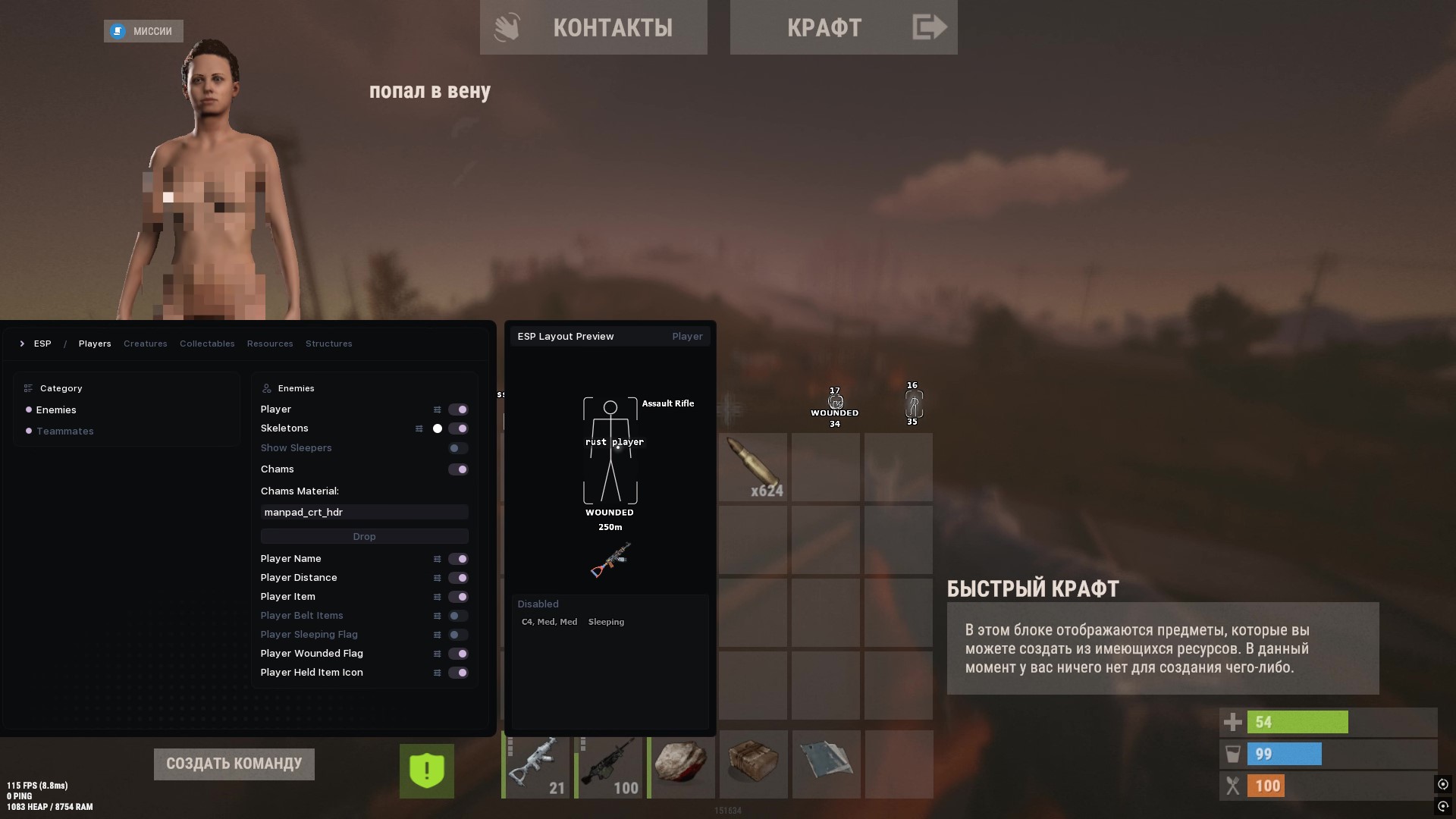
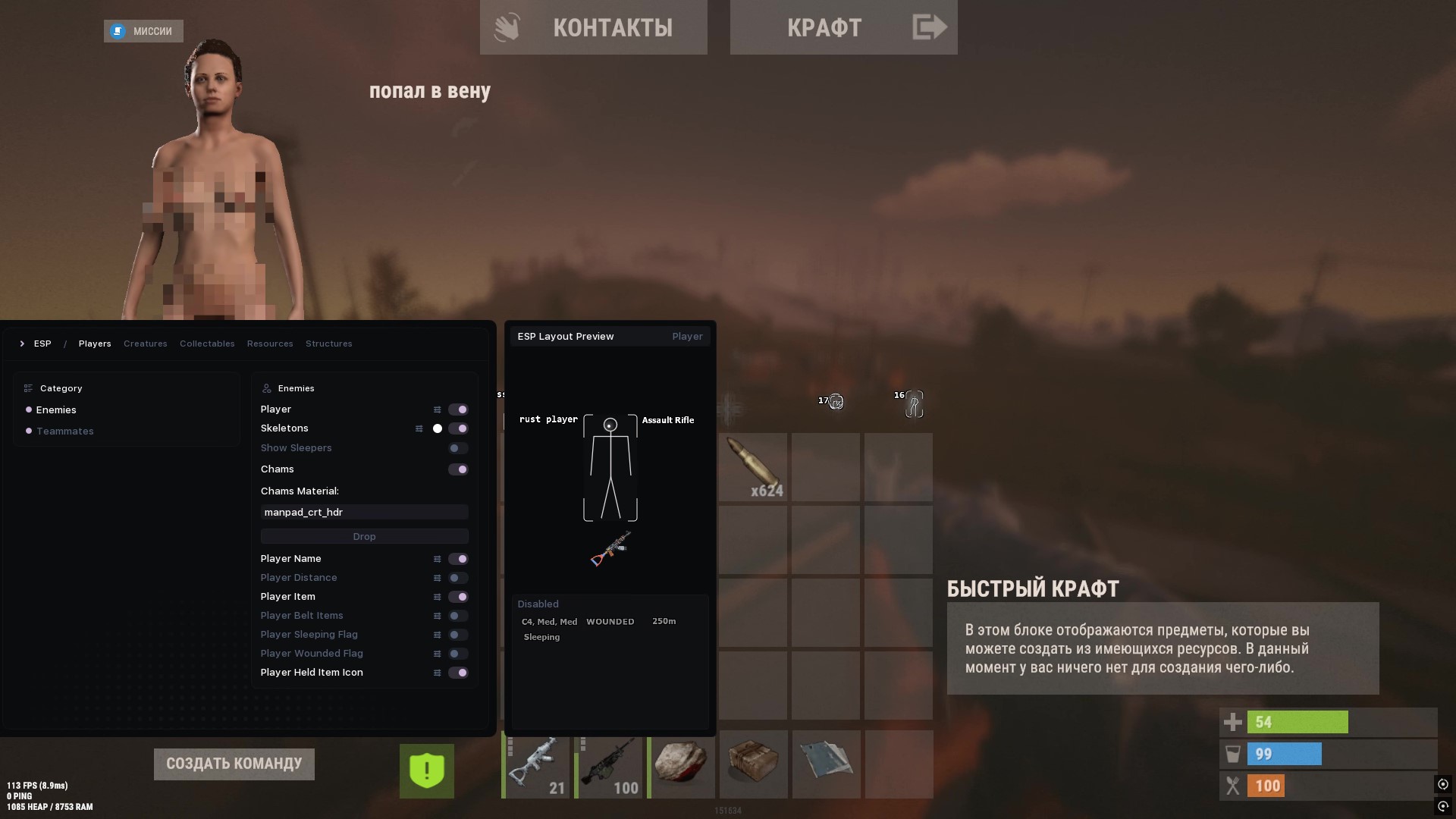
Enemies and teammates show through any wall or rock: name, distance in meters, sleeping and wounded flags. You instantly read who's asleep in the base and who's running a bow at your wall.

Skeletons & chams

Bone skeletons with a color and thickness picker plus through-wall chams with a material setting. A naked diver and a metal-geared raider stand apart at a glance.

Held & belt items

Above each player you see the held item, its icon and the belt list. You know up front whether he's holding an AK and meds or a rock and a torch.

Show sleepers

A separate sleeper toggle for both enemies and teammates. On a base clear you spot everyone in sleeping bags without opening each room.

ESP — The Rust World

Creatures

Highlights animals and NPCs: horses, bears, boars, deer, wolves, chickens, zombies and scientists. On spawn you farm meat and hide without wasting time hunting them.

Loot & gatherables

Drops, corpses, hemp, mushrooms, pumpkins, corn, berries and potatoes, plus sulfur, stone, wood and metal nodes. A far backpack or a sulfur node lights up with name and distance.

Resources & structures

Wood, metal, sulfur and stone nodes plus structures: workbenches, tool cupboards, boxes, crates, airdrops, turrets, traps and landmines. Before a raid you see where the TC and the auto turret sit.

ESP Element Tuning

Box & bars

Box ESP with render distance, rect or corner type, thickness, rounding and outline. Drop the box at long range so it stops cluttering your view.

Labels

Text labels scale with distance, with case, outline and X/Y offset. Far loot won't block the fight and stays readable on snow.

Icons (Image)

Move the held-item icon on the X/Y axes, recolor, round it and set the size. Build the screen the way you like, not the way the default forces.

Radar

Standalone radar window

A 2D radar with size, background, border and rotation with the player. Enemies, teammates, creatures, loot and structures show as dots on a mini-map.

Points & labels

Each target gets its own point type, color and size plus labels with name, distance and held-item icon. The radar shows a group flanking from behind right away.

Aimbot

Aim & bones

Aim on a key with a bone pick, a field of view and a better visible check. Tight FOV for a bolt flick, wide for close range with a tommy.

Targets & filters

Toggle targeting wounded players and scientists separately. On a monument clear the aim ignores loot and hits the right body.

Smoothing (smooth)

Smooth with radius and factor randomization, curve intensity and prediction. The higher the smooth, the more the barrel eases onto the bone — no teleport-to-head on tape.

Visualization

Field of view, target position and the predicted point draw as circles with fill and outline. You see where the lead goes on a running player.

Misc & Exploits

Recoil control

Recoil scale on X and Y plus spread scale and an always-automatic mode. The AK lands rounds on one spot even at range.

Combat exploits

Bullet thickness, instant eoka and bow, longer melee reach and layer removal for visibility. The eoka fires with no delay and the spear reaches half a step farther.

Menu & Privacy

Language & look

Menu in Russian or English, a blurred snowy backdrop and vertical sync against tearing.

Overlay & stream-proof

The menu draws on top of the game with overlay priority, and the record bypass hides it on stream and in OBS. Send a raid clip to a friend with nothing to see.

Known issues & fixes

Real questions from our support, with the fixes that worked. Based on user requests for this product.

The product loads in the launcher but no features or menu appear in the game — what to do?

If the product loads in the launcher but the features do not appear in-game, the usual cause is missing system libraries. Reinstall them.

1. Visual C++ (all versions at once):

2. DirectX:

After clicking Launch an Error window with a Fix button appeared — is something broken?

No, this is not a bug. A window titled Error with a Fix button at the bottom means the launcher detected incompatible system components — this is intended by the developer for automatic setup.

Click Fix: the launcher will disable the incompatible components and reboot your PC. After the reboot the product should start without errors.

BACKEND_TIMED_OUT / BACKEND_INTERNAL_ERROR / BACKEND_UNEXCEPTED_ERROR error in the launcher

These are backend communication errors — there may be a problem on the server side or no connection to the product server.

Fix: connect through a VPN and launch again.

FAILED_TO_LOAD_CHEAT error — how to fix it?

The program cannot be loaded.

Fix: check your antivirus and make sure the DirectX and Visual C++ libraries are installed (reinstall them if needed).

ERROR_OPENED_ANTICHEAT error — why it happens and how to fix it?

An anti-cheat was already running when the product first started.

Fix: close all games that use an anti-cheat. The product must be started before the game.

FAILED_TO_PARSE_SYMBOLS error — how to fix it?

Symbol parsing error.

Fix: restart the launcher. If it persists, check your antivirus and Windows Defender and add the product to the exclusions.

FAILED_TO_LOAD_VULN_DRIVER error — what to do?

The vulnerable driver cannot be loaded.

Fix: check your antivirus and make sure FACEIT anti-cheat is not running.

FAILED_TO_MAP_HYPERVISOR error — how to resolve it?

Not enough RAM to load the hypervisor.

Fix: reboot your PC or close unused applications, then try again.

INVALID_HWID error — what to do?

Invalid hardware ID (HWID).

Fix: reset the HWID yourself in the control panel, or request a reset from the developer.

FAILED_TO_FIND_SYMSRV_OR_DBGHELP error — how to fix it?

The required components could not be found.

Fix: check your internet connection and antivirus, and make sure FACEIT anti-cheat is not running.

FAILED_TO_INIT_SYSCALLS error — what to do?

System call initialization error.

Fix: check your antivirus and make sure the Visual C++ libraries are installed.

"CPU unsupported critical extensions" error — how to remove it?

Hyper-V / WSL / VBS / HVCI components are enabled.

Fix: the launcher should disable them automatically (the window with the Fix button). If it does not, contact the developer to add automatic disabling to the launcher.

"Virtualization disabled or unsupported" error — what to do?

Virtualization is disabled in the BIOS.

Fix: enable virtualization (Intel VT-x / AMD-V) in the BIOS settings for the product to work correctly.

"Not enough memory" error — how to fix it?

Not enough RAM to load the product.

Fix: close unused programs or reboot your PC.

"Offsets initialization failed" error — what does it mean?

Unsupported Windows version.

Fix: contact the developer and provide your full Windows version. As of writing, versions up to 26H2 are supported.

TRIAL_ALREADY_USED error — why does it appear?

You have already used another trial key — this error only occurs with Trial keys.

Fix: contact the developer.

KEY_BANNED error — the key is blocked, what to do?

The key has been banned.

Fix: contact the developer to clarify the reason for the block.

All issues & general troubleshooting
TARIFFS
329
BUY What happens after payment?
Got a question? Ask before you pay

We'll help you choose and sort out any launch issue. Ask us anything before buying, we're always on your side.

Support 10:00–22:00, sometimes we reply at night too
Ask a question

Available tariffs

1 day
329
START PURCHASE
7 days
1499
START PURCHASE
30 days
3499
START PURCHASE
Reviews about Specter RUST

No reviews yet. Be the first to leave one.

Your review

Reviews are published after moderation.

Join our gaming community chat

Discuss current cheats from developers and how to use them effectively in popular online games. Share tactics, exchange useful info and find like-minded players in our community.

1 900+Members
24/7Online
Join our gaming community chat

Technical support

Run into a technical issue? Our team of experts will help. We handle all requests in a live queue, so please be understanding if it sometimes takes a little wait. We guarantee that no request goes unanswered.

Availabilityfrom 10:00 to 23:00
Fast responseIn queue order
Get help
Technical support
PROCHEAT

PROCHEAT news channel

Follow product status changes, update history and important announcements.

Subscribe

Inside the Specter Rust private cheat

Specter is external — it doesn't inject into the game process; ESP rendering, the radar and aim logic run separately, so the picture stays clean on stream and in captures. Here's what's in the build.

Capability What it gives you in a fight
Player & teammate ESP enemies and teammates through walls: name, distance, flags, skeletons and chams
World ESP creatures, loot, resources and structures — from the tool cupboard to airdrops
Radar the whole map as dots: players, loot and structures on a mini-map
Aimbot + smooth bone aim with a smooth pull and prediction
Recoil control recoil and spread scale for a flat spray
Record bypass the menu stays invisible on stream and in OBS

Safety and the EAC anti-cheat

Rust is guarded by EAC, so the software lives on fresh updates: the moment Facepunch ships a patch, the dev rolls a fix and freezes the product until then to avoid burning accounts. It's external — it doesn't inject into the game. Basic hygiene still applies: don't dump obvious aim highlights to public and don't go overboard with stats on party-wipe servers — the account lasts longer that way.

How to buy and launch the Specter Rust cheat

Buying the Specter Rust cheat is simple: pick a plan (day, week or month), pay, and the key with the launcher arrive by email. No USB stick and no BIOS edits — open the launcher, enter the key, jump into the game. If something won't start, support is online to get the software running.

FAQ

Is there a built-in spoofer?

There's no built-in spoofer in this build. It's external software with no driver: install and play, and keep the account clean yourself — sane stats and no obvious plays.

Does the aimbot show on recordings?

A smooth aim and path randomization make it look like a real hand. For clips use a soft smooth and a tight FOV.

Does it work on Windows 11?

Yes, all current Windows 11 and 10 builds are supported.

What happens after a Rust patch?

The product goes on freeze, your subscription time is frozen, and the post-fix unfreeze returns the spent days.

Is it good for raiding?

Yes: structure ESP (tool cupboard, boxes, turrets and traps) and the radar help you plan the entry and avoid eating an auto turret point-blank.

Where does the key arrive after payment?

The key and launcher arrive at the email you used for the purchase.

Ask a question


