Aegis for ROB RUN with aimbot, loot ESP and 2D radar

Working
Lovec Lovec
Last update 14.11.2026 This date shows when the software was last updated. An old date doesn't mean the software stopped working! Most likely the developer just had nothing new to add. If you have any doubts, you can always check the current status with our support team.
Add another cheat from this game too — to compare them.
Aegis ROB RUN
Steam
Windows support: 10: 2004, 21h1, 21h2, 22h2, 23h2, 24h2, 24h4, 25h2; 11: 21h2, 22h2, 23h2, 24h2, 25h2
Menu language: Russian, English
Spoofer:No
USB drive:Yes
BIOS:No

User information

Aegis requires a PC with an Intel or AMD processor and ROB RUN from Steam. Use 64-bit Windows 10 / 11; all builds listed in the specifications are supported except 26H1 and 26H2. The menu and ESP are available in Russian and English. No built-in spoofer is listed or included.

A USB flash drive is mandatory because the loader runs from USB only. Disable Windows Defender and antivirus software first, then download the loader from your order link, move it to the flash drive and delete every copy from the PC, including the Recycle Bin. Leftover copies may cause Bad HWID. BIOS changes are not required by default; for virtualization errors, check Hyper-V and Core Isolation.

Run the loader from USB as administrator, enter your key and wait for the success message. Then open ROB RUN and wait for the server to load. INSERT opens the menu, and the language is selected in Misc. Stream Proof is a developer claim, so test it with a short recording before streaming. Working status does not remove the risk of an account ban.

SCREENSHOTS
Description

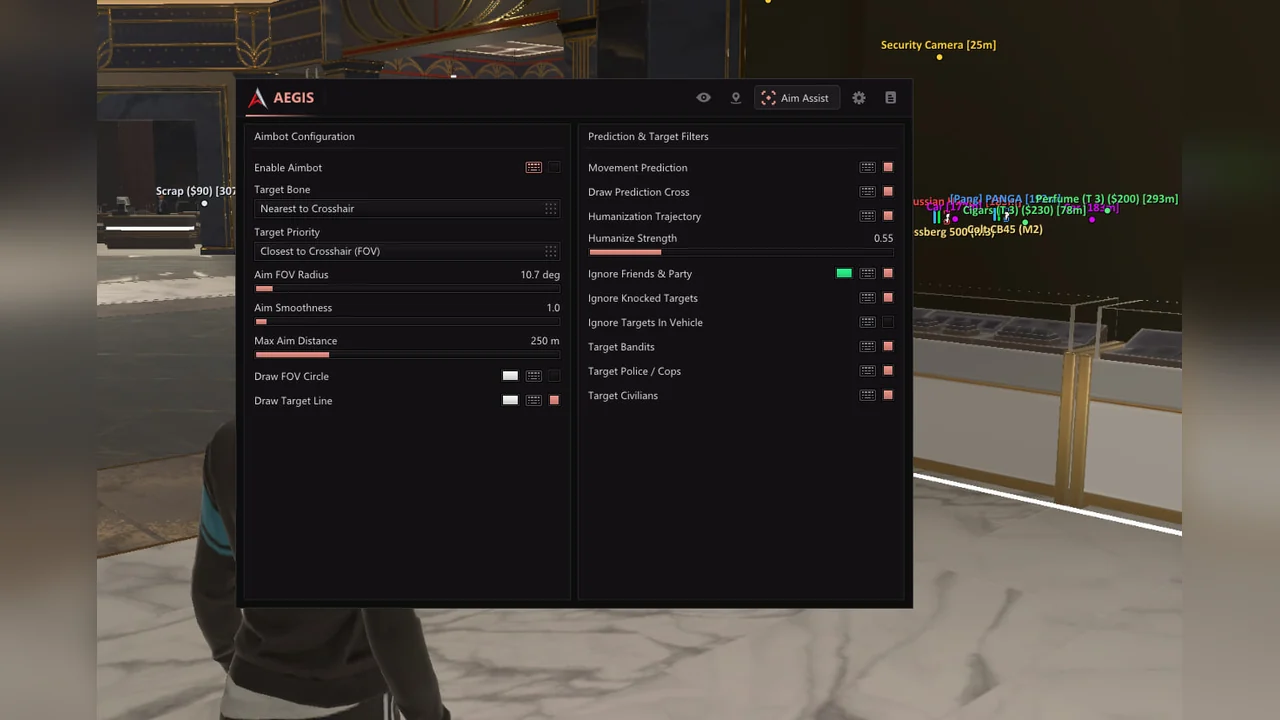
Aegis ROB RUN brings aiming, player information and valuable-loot tracking into one in-game menu. The aimbot supports bone selection, FOV, smoothing, movement prediction and humanization. Filters distinguish bandits, police and civilians while excluding friends, knocked players and vehicle occupants.

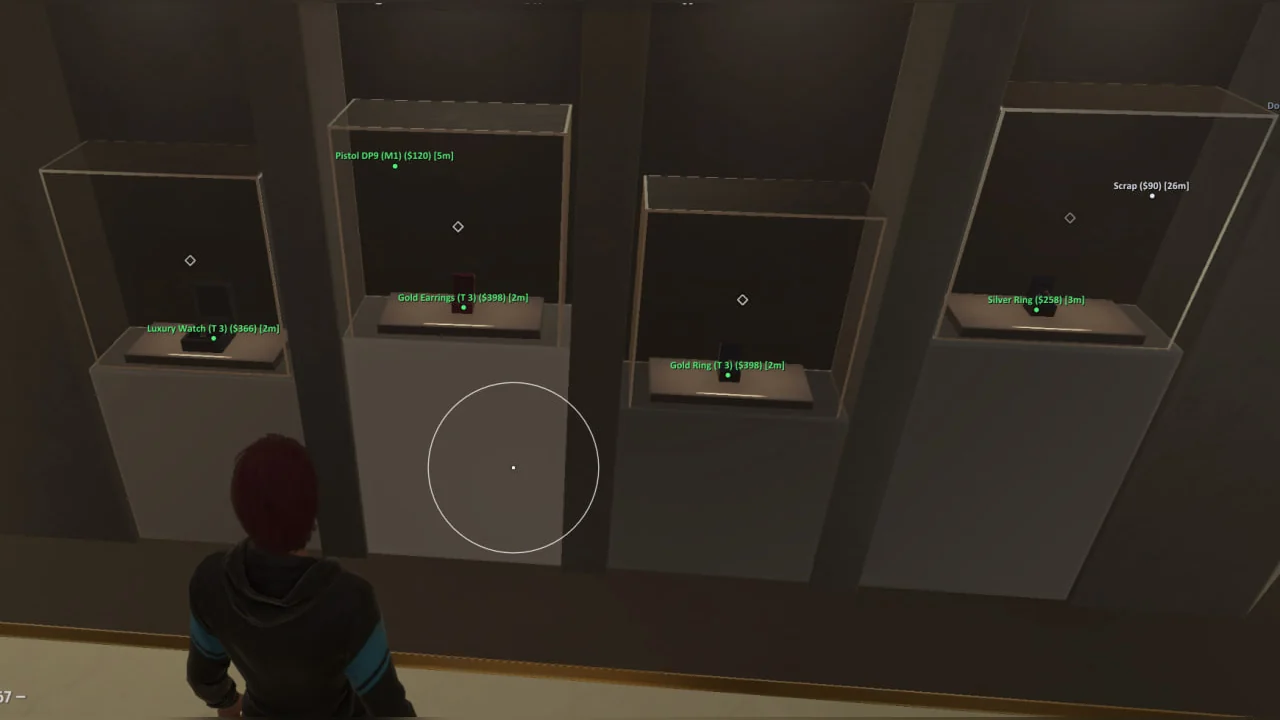
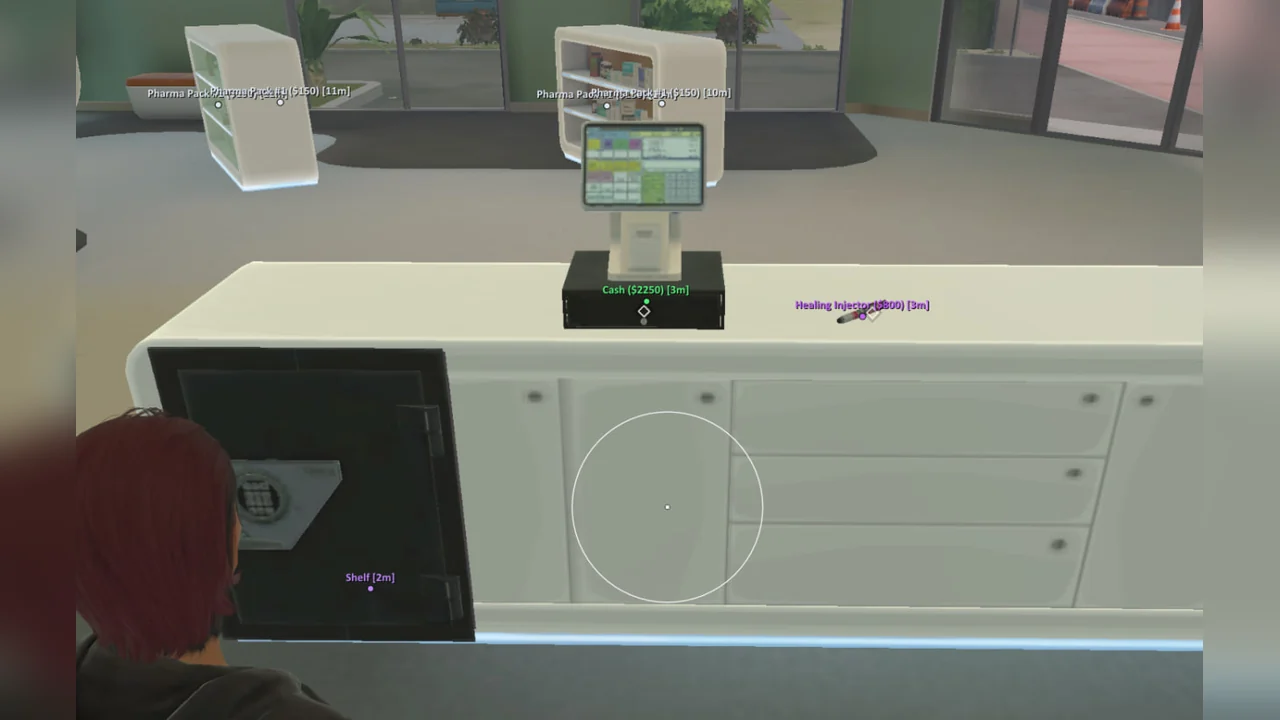
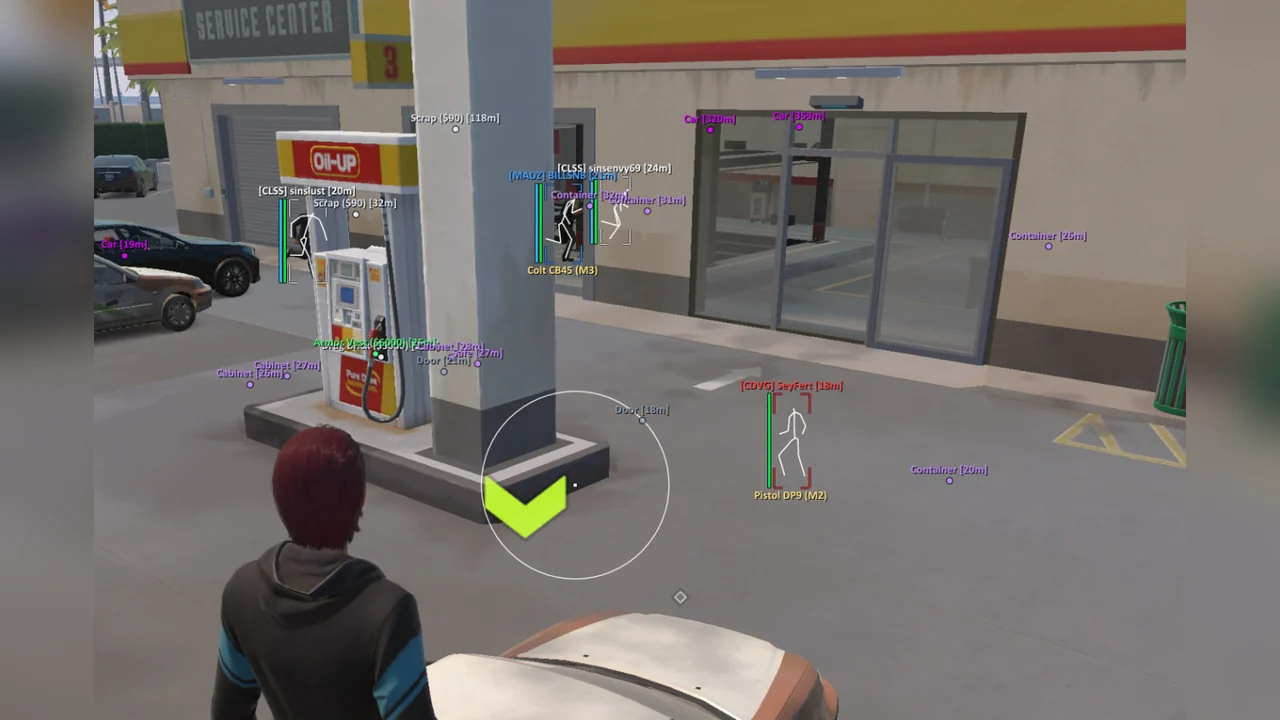
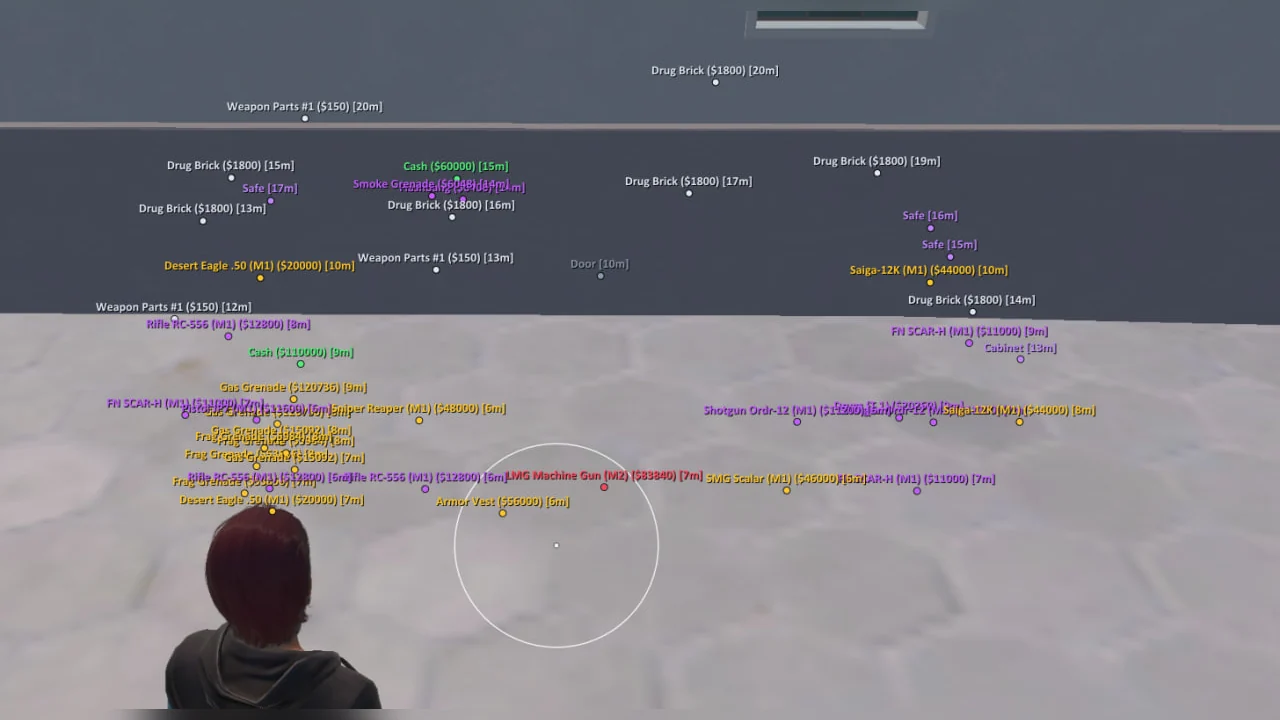
ESP displays health, armour, weapons, NPCs, off-screen arrows and a 2D radar. Loot tools include prices, five rarity tiers and separate markers for cash, cargo, safes, bags, vehicles and cameras. One day costs 399 RUB, three days 899 RUB, one week 1899 RUB and one month 3499 RUB. The key and guide arrive by email after payment.

Product features

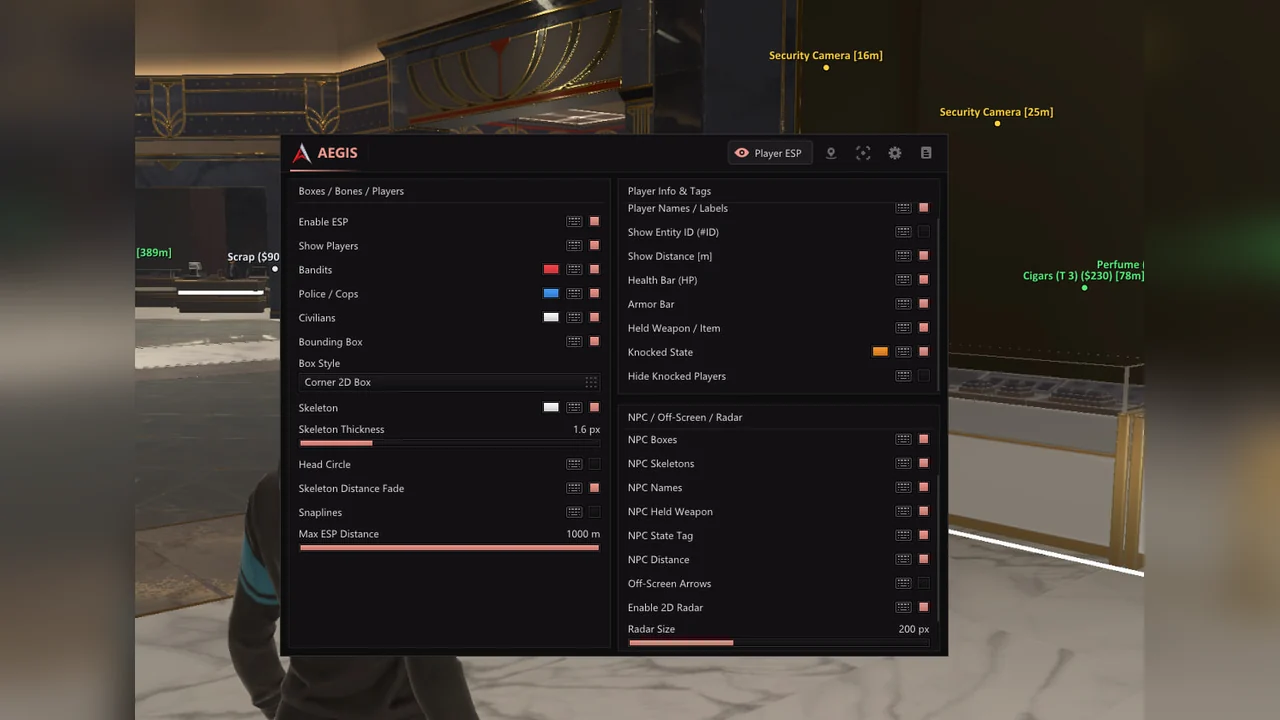
Player ESP

Enabled and bind

Enable ESP activates player visuals; its hotkey and bind mode are configured separately.

Roles and colours

Bandits, police and civilians have independent switches and custom colours.

Boxes

Bounding Box supports a hotkey and full or corner 2D box styles.

Skeleton

Skeleton offers a hotkey, custom colour, thickness, head circle and distance fade.

Snaplines

Lines can start from the bottom of the screen, the crosshair centre or the top edge.

ESP range

Max ESP Distance limits player markers to a range between 25 and 1000 metres.

Names and ID

Player Names displays nicknames, while Show Entity ID adds the entity number.

Distance

Show Distance adds the range to each character in metres.

Health and armour

Health Bar and Armor Bar display current HP and armour.

Held item

Held Weapon / Item displays the weapon or item currently held by the character.

Knocked players

Knocked State uses a separate colour, and Hide Knocked Players removes their markers.

NPC, arrows and radar

NPC ESP

Enable NPC / Bot ESP provides a separate display for bots and non-player characters.

NPC range

NPC Max Distance sets the display range from 20 to 1000 metres.

NPC markers

Boxes, skeletons, names, held weapons, state tags and distance are available for NPCs.

Off-screen arrows

Arrows indicate direction with adjustable radius, size and maximum distance.

2D radar

Enable 2D Radar displays a mini-map with configurable size and range.

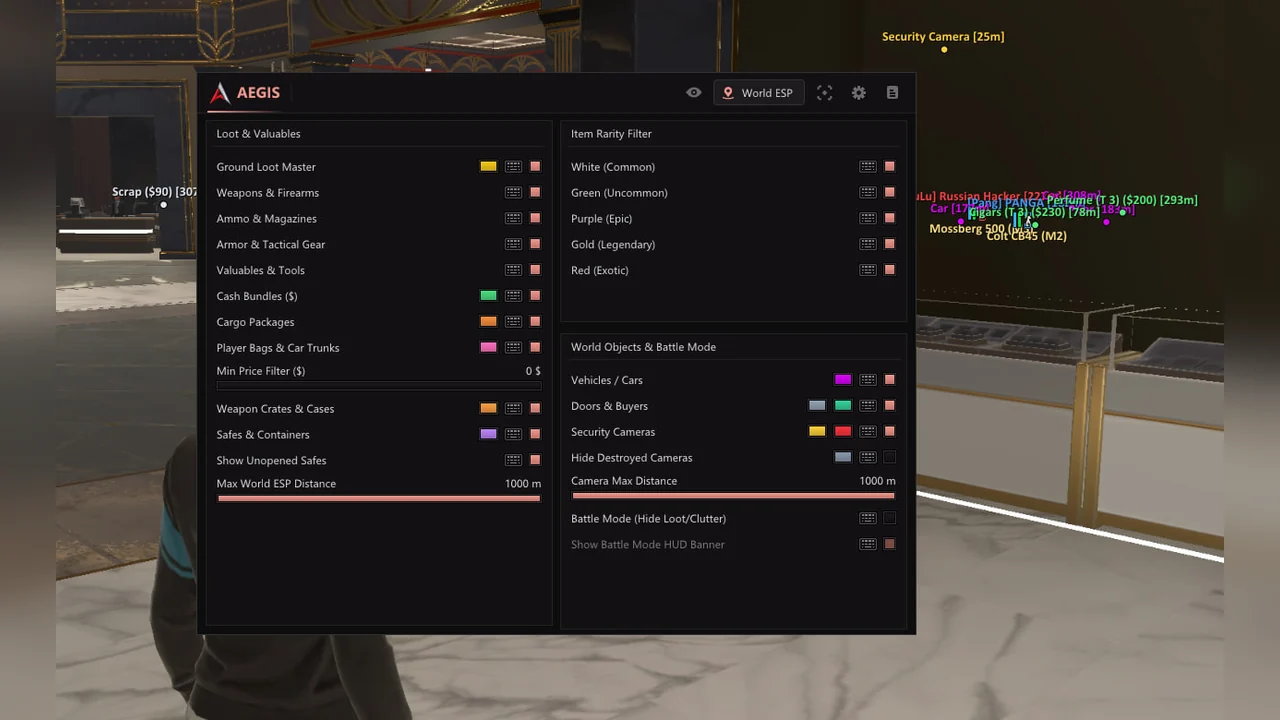
World and Loot ESP

Ground loot

Ground Loot Master controls ground items as a group and assigns their colour.

Loot categories

Weapons, ammo and magazines, armour and tactical gear, valuables and tools have separate switches.

Cash and cargo

Cash Bundles and Cargo Packages display money and cargo with custom colours.

Bags and trunks

Player Bags & Car Trunks marks player bags and vehicle storage.

Price filter

Min Price Filter hides cheap items using a threshold from 0 to 50,000 in-game dollars.

Crates and cases

Weapon Crates & Cases highlights weapon containers with a separate colour.

Safes

Safes & Containers displays storage, while Show Unopened Safes isolates unopened safes.

World range

Max World ESP Distance limits object markers between 25 and 1000 metres.

Rarity filter

Common, Uncommon, Epic, Legendary and Exotic tiers toggle independently.

Objects and Battle Mode

Vehicles

Vehicles / Cars highlights vehicles with a custom colour.

Doors and buyers

Doors & Buyers marks entrances and traders with independent colours.

Security cameras

Normal, alarm and destroyed states have separate colours; camera range is 15 to 1000 metres.

Destroyed cameras

Hide Destroyed Cameras removes cameras that are already out of action.

Battle Mode

A hotkey hides loot and clutter, while the optional HUD banner shows that the mode is active.

Aim Assist

Enabled and hotkey

The aimbot supports hold, toggle, always-on and Off Hotkey modes.

Target bone

Choose Head, Neck, Chest, Pelvis or Nearest to Crosshair.

Target priority

Select the target closest to the crosshair within FOV or closest by distance.

FOV radius

Aim FOV Radius sets the acquisition area from 1 to 180 degrees.

Smoothing

Aim Smoothness adjusts crosshair tracking from 0 to 30.

Aim range

Max Aim Distance limits target selection between 10 and 1000 metres.

Indicators

Draw FOV Circle shows the acquisition area, and Draw Target Line marks the selected target.

Prediction

Movement Prediction accounts for target motion, with an optional prediction cross.

Humanization

Trajectory and Strength settings adjust the aiming path and effect intensity.

Friends and party

Ignore Friends & Party excludes teammates and provides a custom team colour.

Target filters

Ignore knocked players and vehicle occupants; select bandits, police and civilians separately.

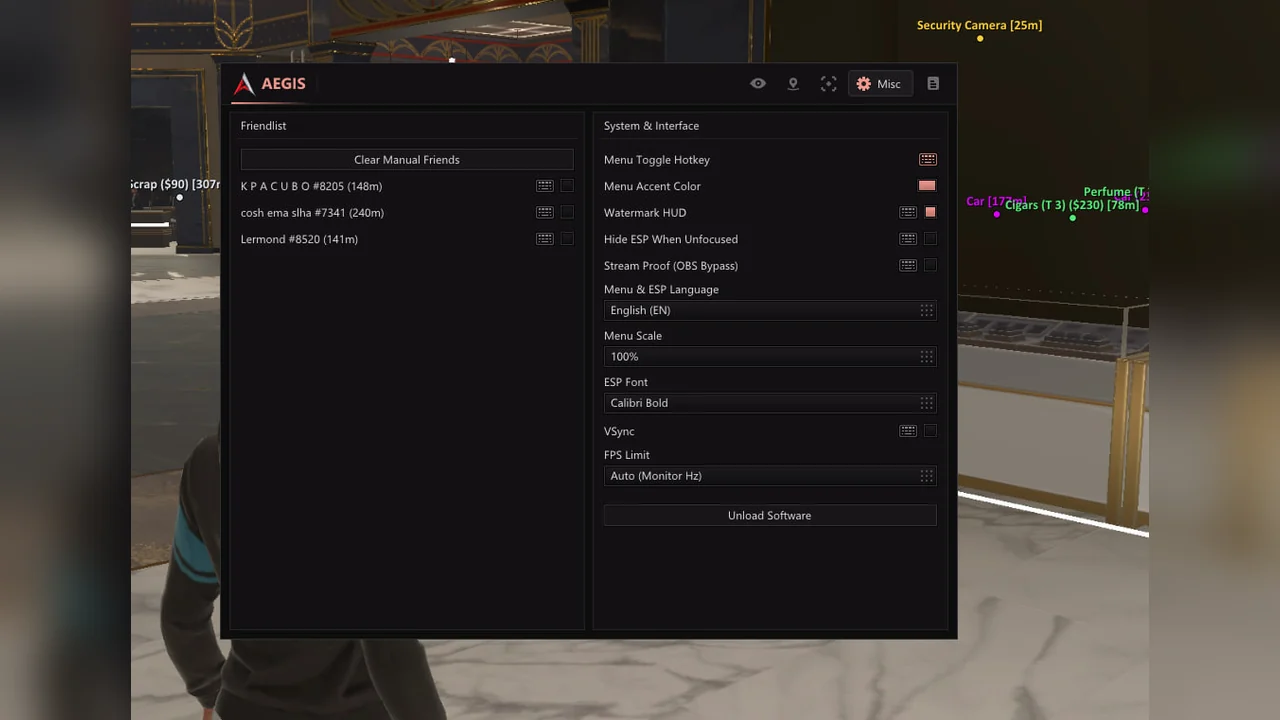
Misc and configs

Fast Loot

Fast Loot speeds up looting, while Debug Camera enables the debug camera.

Match friendlist

Add or remove players from the current-match friends list, or clear it entirely.

Menu hotkey

Menu Toggle Hotkey assigns the menu bind; INSERT is the default.

Appearance

Accent colour, watermark HUD, menu scale from 75 to 150 percent and ESP font selection.

Window behaviour

Hide ESP When Unfocused removes markers when the game window loses focus.

Stream Proof

The developer states that the menu and ESP stay out of OBS and screen capture; test with a short recording.

Language

Menu & ESP Language switches the interface and markers between Russian and English.

Overlay FPS

VSync and FPS limits include monitor refresh rate, 60, 100, 144, 180, 240, 360 or unlimited.

Unload

Unload Software disables the cheat without searching for its process.

Configs

Create, load, save, duplicate and delete complete settings profiles.

Known issues & fixes

Real questions from our support, with the fixes that worked. Based on user requests for this product.

Which Windows versions and game client does Aegis ROB RUN support?

Use an Intel or AMD PC, ROB RUN from Steam and Windows 10 / 11 x64. All builds listed in the specifications are supported except 26H1 and 26H2. The menu and ESP are available in Russian and English.

Why is a flash drive mandatory for Aegis ROB RUN?

The loader runs from a USB flash drive only. After downloading, move it to USB and delete every copy from the PC, including the Recycle Bin. A leftover copy may cause Bad HWID.

How do I launch Aegis for ROB RUN?

Disable Defender and antivirus before downloading. Run the loader from USB as administrator, enter your key and wait for success. Then open ROB RUN through Steam, wait for the server and press INSERT.

What does the Aegis ROB RUN aimbot do?

It includes bone and priority selection, 1–180 degree FOV, 0–30 smoothing, 10–1000 metre range, prediction and humanization. Friends, knocked players and vehicle occupants can be excluded. Silent Aim and No Recoil are not listed.

What does Aegis Player ESP display?

Boxes, skeletons, names, IDs, distance, health, armour and weapons. Bandits, police and civilians use separate colours, knocked players can be hidden, and NPCs have independent settings.

How does Aegis filter ROB RUN loot?

Minimum price ranges from 0 to 50,000 in-game dollars, and five rarity tiers toggle independently. Categories include weapons, ammo, armour, cash, cargo, bags, crates, safes and containers.

Does Aegis include radar and Battle Mode?

Yes. The 2D radar has size and range settings, while off-screen arrows have radius, size and distance controls. Battle Mode hides loot and clutter with a hotkey.

Does Aegis support Russian and configs?

Yes. The menu and ESP switch between Russian and English in Misc. Configs can be created, saved, loaded, duplicated and deleted from the menu.

What does Stream Proof mean in Aegis?

The developer states that the menu and ESP stay out of OBS and screen capture. Test this with a short recording on your system before streaming.

What should I do about Bad HWID or Connection error?

For Bad HWID, delete every loader copy from the PC and run from USB only. For Connection error, try a VPN. For Synchronise time, synchronize the Windows clock. Contact ProCheat support if the issue persists.

All issues & general troubleshooting
TARIFFS
399₽
BUY What happens after payment?
Got a question? Ask before you pay

We'll help you choose and sort out any launch issue. Ask us anything before buying, we're always on your side.

Support 10:00–22:00, sometimes we reply at night too
Ask a question

Available tariffs

1 day
399 ₽
399 ₽ / day
START PURCHASE
3 days
899 ₽
300 ₽ / day
START PURCHASE
7 days
1899 ₽
271 ₽ / day
START PURCHASE
lowest per day
30 days
3499 ₽
117 ₽ / day
START PURCHASE
Reviews about Aegis ROB RUN

No reviews yet. Be the first to leave one.

Your review

Reviews are published after moderation.

Join our gaming community chat

Discuss current cheats from developers and how to use them effectively in popular online games. Share tactics, exchange useful info and find like-minded players in our community.

1 900+Members
24/7Online
Join our gaming community chat

Technical support

Run into a technical issue? Our team of experts will help. We handle all requests in a live queue, so please be understanding if it sometimes takes a little wait. We guarantee that no request goes unanswered.

Availabilityfrom 10:00 to 23:00
Fast responseIn queue order
Get help
Technical support
PROCHEAT

PROCHEAT news channel

Follow product status changes, update history and important announcements.

Subscribe

Aegis ROB RUN licence plans

Every plan includes the same aimbot, player and NPC ESP, loot tools, radar, Battle Mode and interface settings. There are no Lite and Full editions. Only the key duration changes.

DurationPriceCost per day
1 day399 RUB399 RUB
3 days899 RUBAbout 299.67 RUB
7 days1899 RUBAbout 271.29 RUB
30 days3499 RUBAbout 116.63 RUB

One day is enough to test USB launch and build a config. Three days or one week covers a shorter play period. The monthly key has the lowest daily cost and needs fewer renewals.

Aimbot with prediction and practical filters

Aegis provides an acquisition radius from 1 to 180 degrees and smoothing from 0 to 30. For close contact, select the bone nearest to the crosshair; for a consistent setup, choose head, neck, chest or pelvis. Target priority can use position within FOV or actual distance.

Movement Prediction calculates a lead point for moving targets, with an optional cross marking that point. Humanization adjusts the path and its strength. The FOV circle and target line show when aiming is active. Friends and party members can be excluded, as can knocked players and vehicle occupants. Start with a modest radius and moderate smoothing, then test the behaviour on your server.

Bandits, police, civilians and NPCs

Player ESP does not merge every character into one list. Bandits, police and civilians receive distinct colours, so their role is visible before you read a name. Full or corner boxes mark the outline, skeletons show body position, and head circles plus line thickness help adapt the display to your monitor.

Nearby labels include ID, distance, HP, armour and the held item. Knocked players can use a separate colour or disappear entirely. NPC settings are independent of live players, with their own boxes, skeletons, names, weapons, states and range. Off-screen arrows indicate characters outside your view, while the 2D radar collects nearby activity in a resizable widget.

Loot search by price and rarity

World ESP separates weapons, ammo and magazines, armour and tactical gear, valuables and tools. Cash, cargo, player bags and car trunks have independent switches and colours. Weapon crates, safes and containers receive their own markers, and unopened safes can be isolated.

The minimum-price filter removes cheap clutter with a threshold from 0 to 50,000 in-game dollars. Five rarity filters retain any combination of common, uncommon, epic, legendary and exotic items. Display range is limited between 25 and 1000 metres. When markers interfere with a fight, Battle Mode hides loot and clutter with one hotkey without dismantling your config.

Vehicles, buyers and security cameras

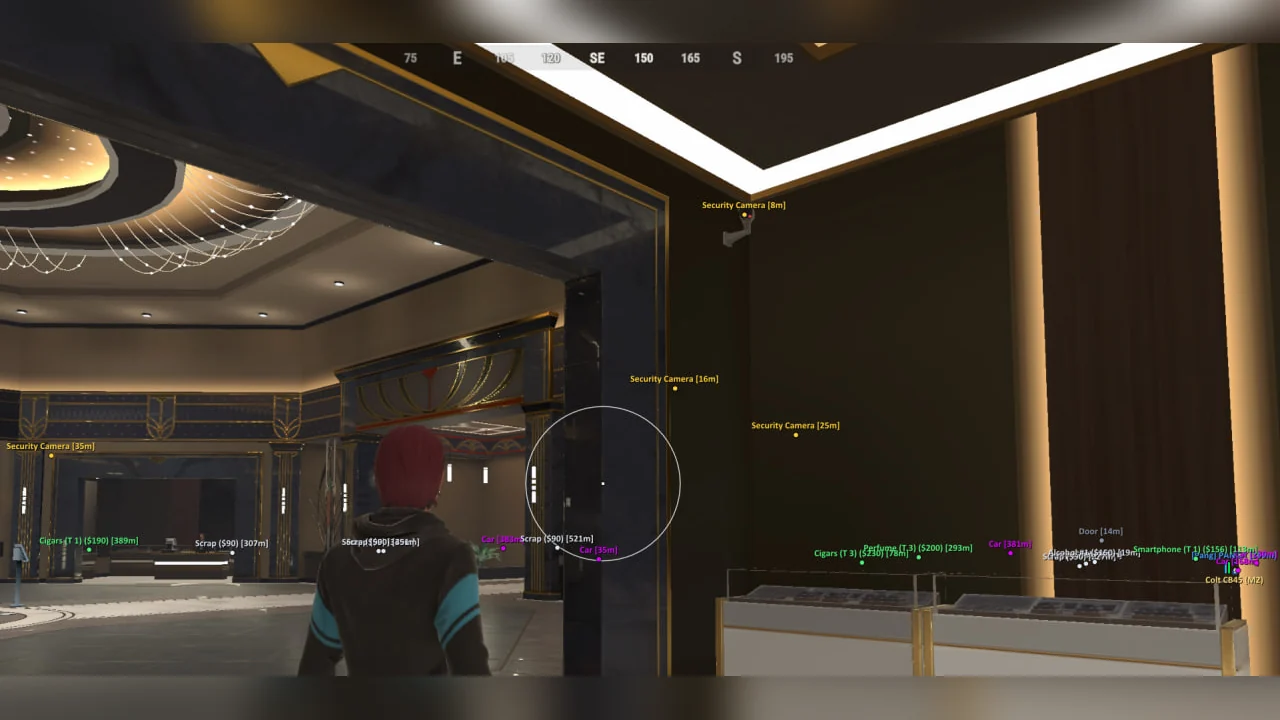
Beyond item tracking, Aegis marks vehicles, doors and buyers. These categories do not depend on the general loot filter, so you can keep a route to a vehicle or selling point visible while hiding small items. Each object type has its own colour.

Security cameras have normal, alarm and destroyed states with separate colours. Disabled cameras can be hidden with one checkbox, and display range adjusts from 15 to 1000 metres. This makes it easier to distinguish an active camera from a destroyed one and spot an object near your intended route.

Russian menu, configs and Stream Proof

The interface and ESP switch between Russian and English in Misc. Menu scale ranges from 75 to 150 percent, with a separate ESP font selector. You can set the accent colour, control the watermark and hide ESP when the game loses focus. VSync and overlay FPS limits are available for different monitor setups.

Settings can be saved, loaded, duplicated and deleted as configs. The current-match friendlist supports adding individual players or clearing the list. According to the developer, Stream Proof hides the menu and markers from OBS and screen capture. Record a short clip before streaming and inspect it: this checks your particular Windows, game and capture-software combination.

Launching Aegis from a USB flash drive

Aegis has a strict launch procedure: downloading to a hard drive alone is not enough. Disable Windows Defender, third-party antivirus and Memory Integrity before downloading. Extract the loader, move it to a USB drive and delete copies from Downloads, Desktop and the Recycle Bin. A file left on the PC may cause Bad HWID.

  1. Connect the flash drive directly to a USB port and run the loader as administrator.
  2. Enter the key from your email or order page and wait for a successful start.
  3. Open ROB RUN through Steam and wait for the server to load.
  4. Press INSERT, select the language in Misc and load your saved config.

For Synchronise time, synchronize the Windows clock. For Connection error, try a VPN. For a virtualization error, check Hyper-V and Core Isolation. BIOS changes are not needed without such an error.

How to buy Aegis for ROB RUN

Choose a 1, 3, 7 or 30-day key. The order costs 399, 899, 1899 or 3499 RUB respectively. DigiSeller displays the duration in the tariff option and updates the total accordingly. Each variant issues a key for its own duration, with the same features in all four.

After payment, the key appears on the order page and is sent by email. The instruction button beside it contains the loader link and USB launch steps. Check your Windows build, flash drive and Steam client before purchasing. If payment succeeded but no email arrived, check Spam and contact ProCheat support. Other builds are listed in the ROB RUN catalogue.

Aegis ROB RUN FAQ

Does Aegis have a Russian menu?

Yes. The menu and ESP support Russian and English, with the language selector in Misc.

Is a flash drive mandatory?

Yes. The loader runs from a USB flash drive only. Delete all copies from the PC, including the Recycle Bin, or you may encounter Bad HWID.

Which Windows versions are supported?

Windows 10 / 11 x64, including every build listed in the specifications except 26H1 and 26H2. An Intel or AMD PC and the Steam client are required.

Does it include Silent Aim or No Recoil?

No. Those functions are not listed. Aegis provides Aim Assist with bone selection, FOV, smoothing, prediction and humanization.

What does player ESP display?

Boxes, skeletons, names, IDs, distance, health, armour and weapons. Bandits, police and civilians have separate colours, and knocked players can be hidden.

Can I display only valuable loot?

Yes. Minimum price ranges from 0 to 50,000 in-game dollars, and five rarity tiers can be toggled independently.

Are a radar and off-screen arrows included?

Yes. The 2D radar has size and range settings. Arrow radius, size and maximum distance are adjustable.

What does Battle Mode do?

Its hotkey hides loot and clutter during a fight. An optional HUD banner shows that the mode is active.

Can I save my settings?

Yes. Configs can be created, saved, loaded, duplicated and deleted directly from the menu.

How much does Aegis cost per month?

Thirty days cost 3499 RUB. One day is 399 RUB, three days 899 RUB and seven days 1899 RUB.

from 399 ₽ Choose a plan
Ask a question