Phoenix Internal for ROB RUN with two aim modes, ESP and radar

Working
PHOENIX PHOENIX
Last update 10.11.2026 This date shows when the software was last updated. An old date doesn't mean the software stopped working! Most likely the developer just had nothing new to add. If you have any doubts, you can always check the current status with our support team.
Add another cheat from this game too — to compare them.
Phoenix ROB RUN Internal
Steam
Windows support: 10: 21h2, 22h2, 23h2, 24h2, 25h2, 26h1; 11: 21h2, 22h2, 23h2, 24h2, 25h2, 26h1
Menu language: Russian, English
Spoofer:No
USB drive:No
BIOS:No

User information

You need ROB RUN on Steam, an AMD or Intel processor and an NVIDIA or AMD graphics card. Supported systems are Windows 10 and Windows 11 builds 21H2, 22H2, 23H2, 24H2, 25H2 and 26H1. The Internal menu is available in Russian and English.

No flash drive or BIOS changes are required. No built-in spoofer is listed or needed to launch the cheat; an external spoofer remains an optional extra. The loader link is included in the post-purchase instruction. A working status does not guarantee immunity from enforcement for conspicuous play or rule violations.

VIDEO
SCREENSHOTS
Description

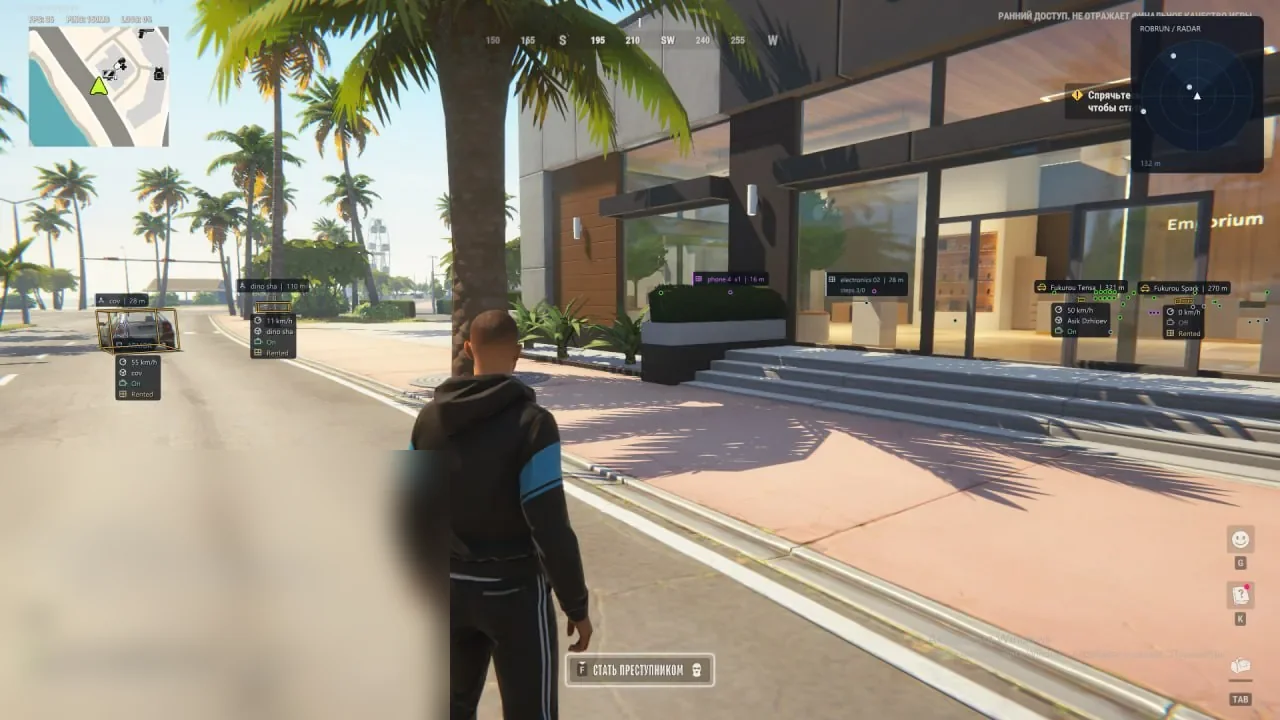
Phoenix Internal combines Memory Aim and Silent Aim with detailed ESP, radar and shooting tools. Police, robbers, citizens and other roles can have separate colours and targeting rules. Conventional tracking supports smoothing, bones and FOV, while Silent has its own radius and target priority.

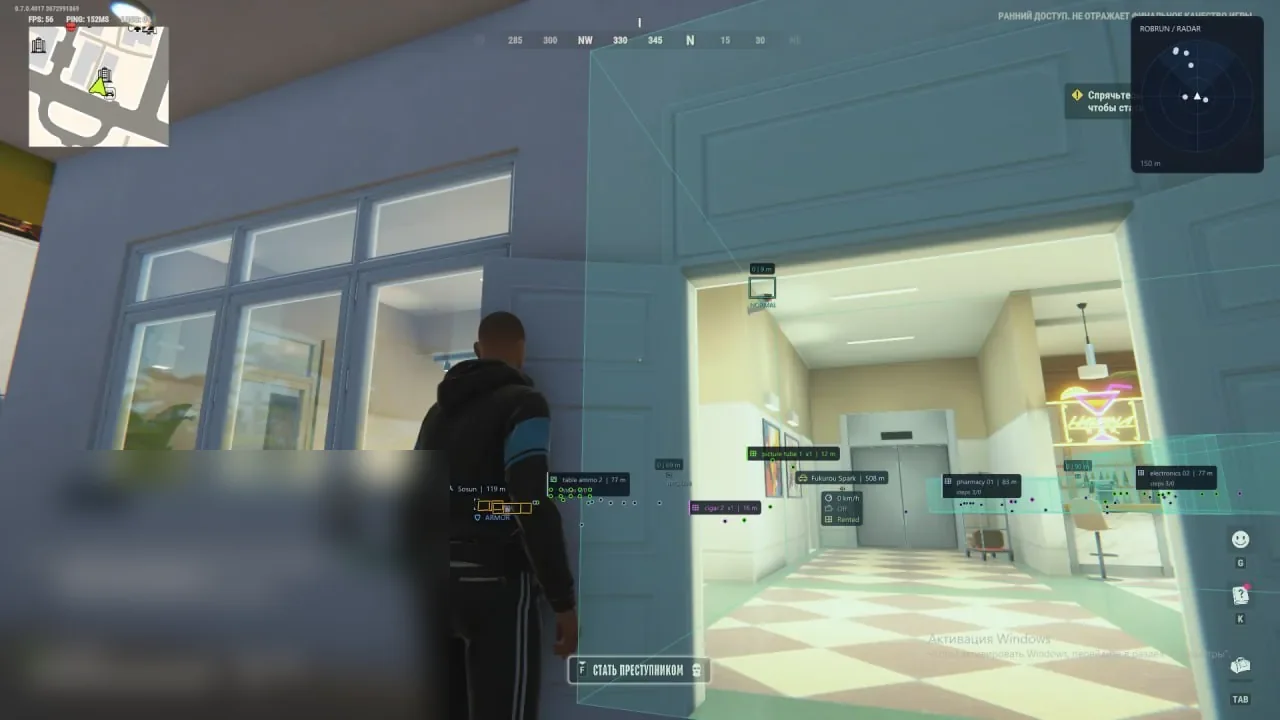
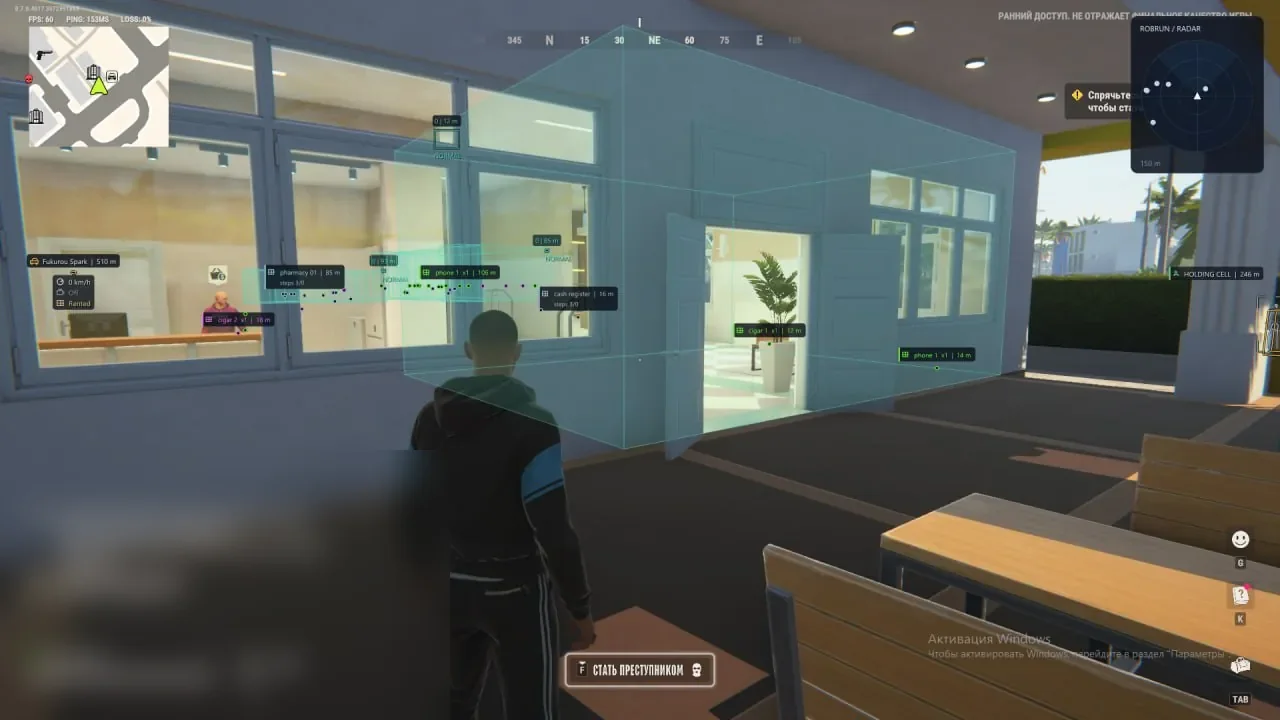
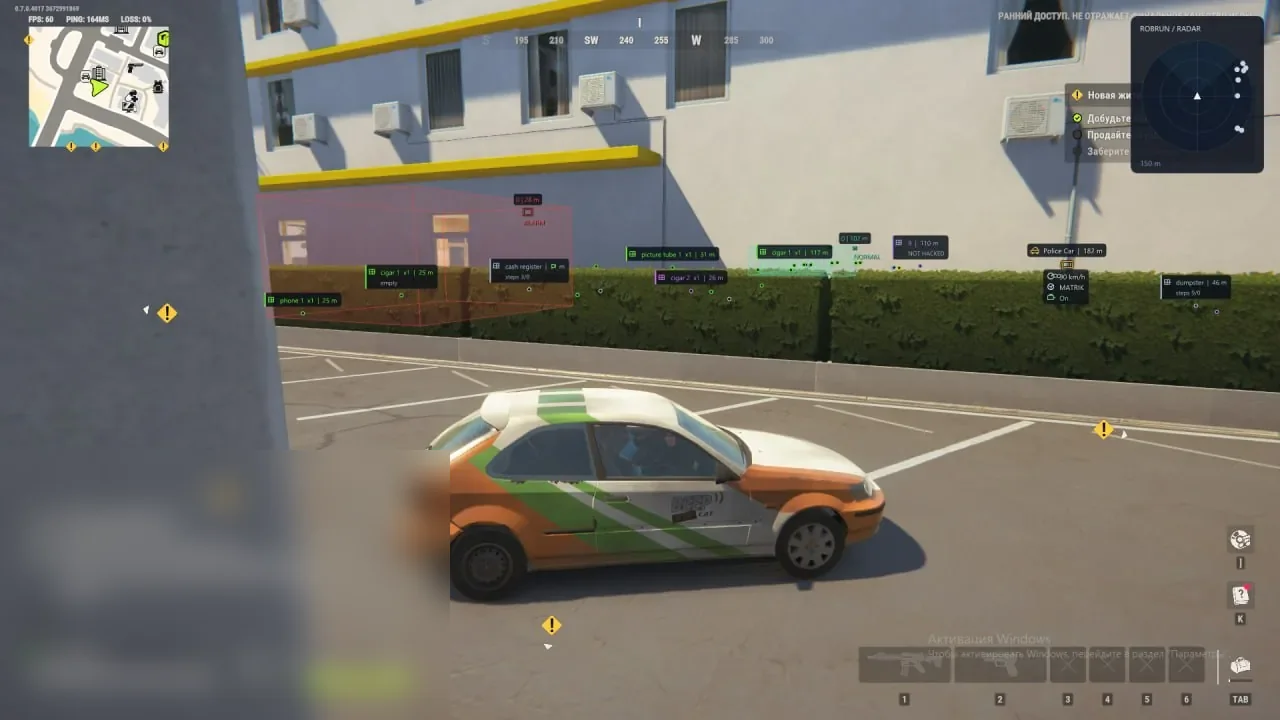
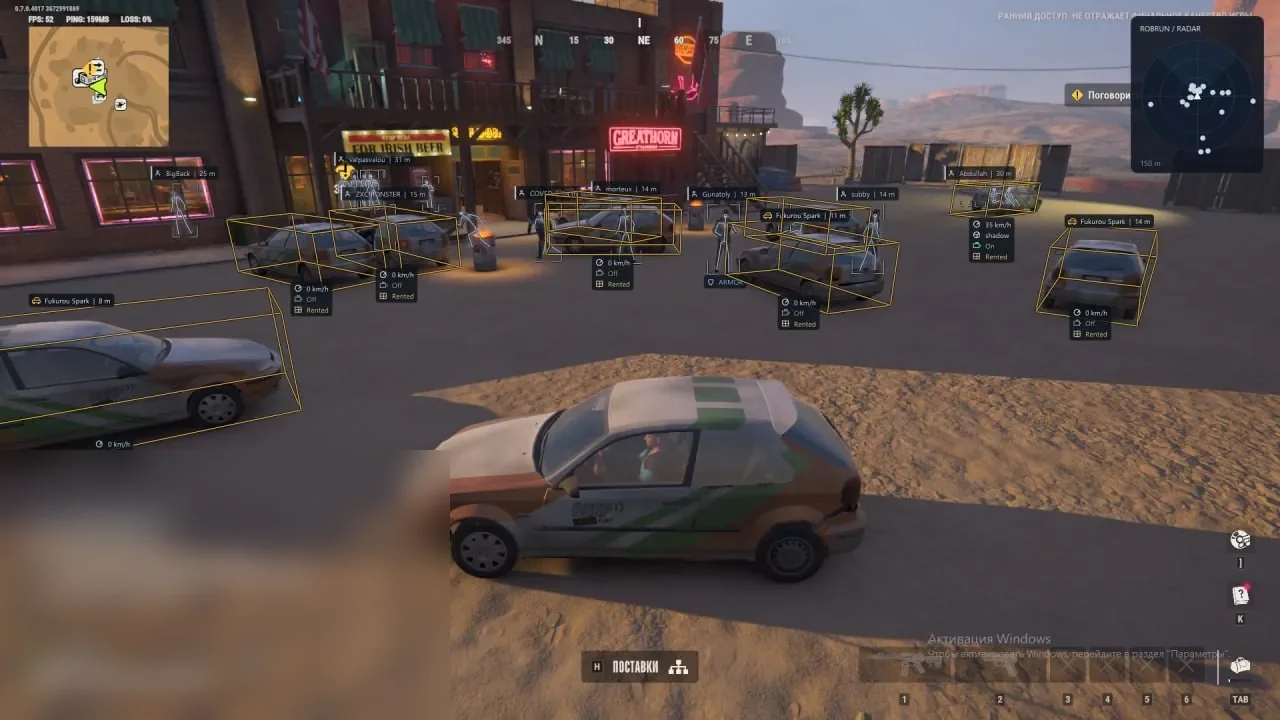
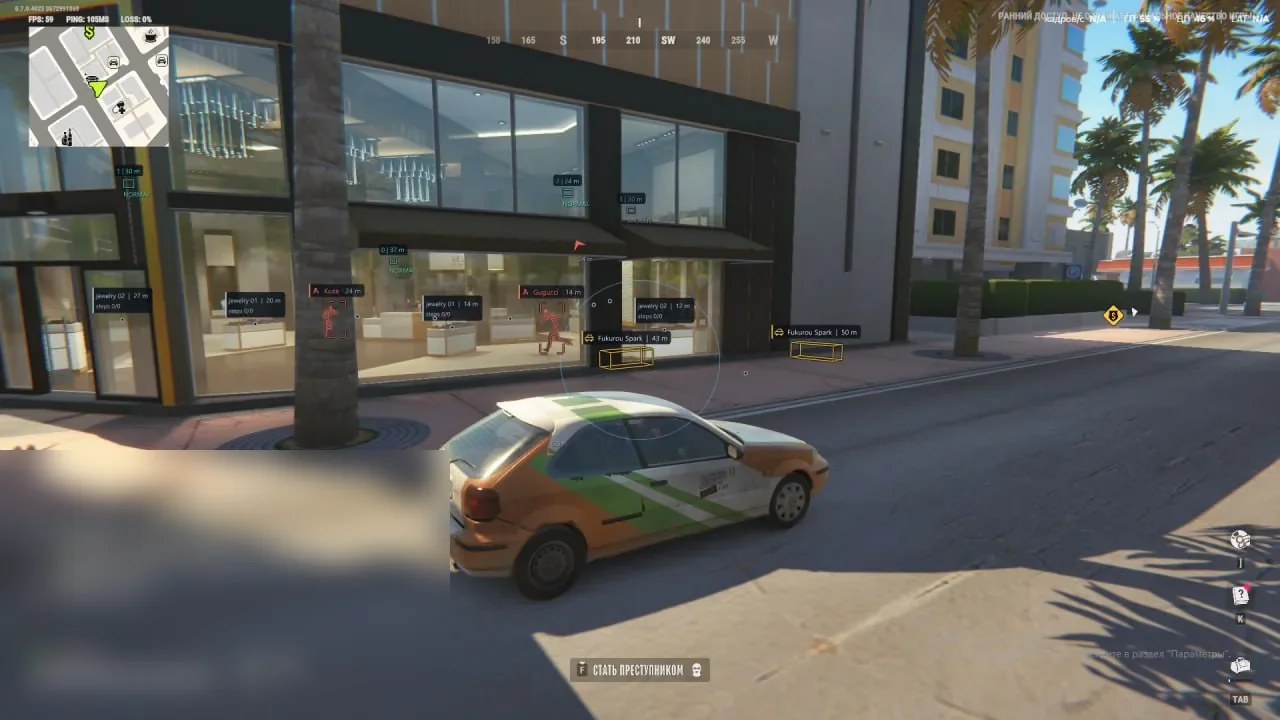
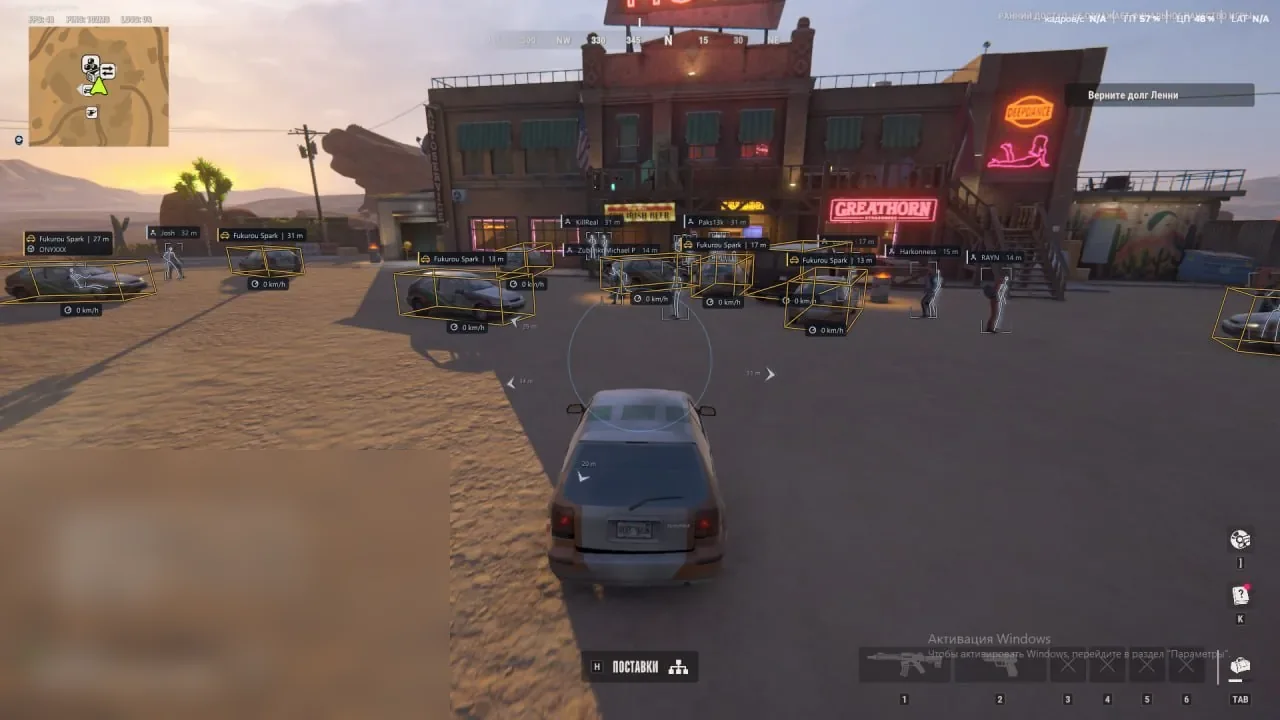
Visuals cover players, vehicles, NPCs, loot and surveillance cameras with detection zones. Radar shows the surrounding area, and the HUD warns about other factions and open doors at your base. No Recoil, No Sway, Local No Spread, Free Camera and Skin Changer are included. One day costs 299 RUB, a week 999 RUB and a month 1999 RUB. The key arrives by email after payment.

Product features

Aimbot

Mode and key

Memory Aim moves the crosshair smoothly, while Silent Aim works without visible camera movement. The activation key defaults to RMB and can be changed.

Target categories

Police, robbers, citizens and other factions are independent toggles, so aim does not acquire unwanted roles.

Bone selection

Head, neck, chest and pelvis are available. Random Bones changes the bone for each new target, while Head Chance sets the head probability.

FOV and range

FOV limits the acquisition circle and Max Distance excludes distant targets. The circle can be drawn on screen.

Smoothing and prediction

Smooth controls Memory Aim movement. Prediction accounts for target speed and Lead Time sets the prediction interval.

Target priority

Choose proximity to the crosshair or distance from the player. Target Switch Delay adds a pause before changing targets.

State filters

Team Check excludes teammates and Ignore Dead skips dead players. Readiness Check prevents aiming at knocked, recovering or vehicle occupants.

Player ESP

Factions and preview

Displayed roles are selected independently. ESP Preview shows the layout before returning to the game.

Boxes and skeletons

Standard or corner boxes can be combined with skeletons with configurable thickness, colour and range.

Markers and glow

Head Marker highlights the head, while Screen Glow adds a configurable radius and intensity around characters.

Name and distance

Name and range appear next to players. Snaplines can connect them to a chosen point on screen.

Weapon and state

Available weapon, character state and wanted-status information is displayed.

Health and armour

HP Bar shows a health bar, HP Text shows a number and Armour displays available protection data.

Display filters

Self, teammates and dead players can be hidden independently. Maximum range limits unnecessary labels.

Vehicle ESP

Name and driver

Vehicle model, driver name and available owner information are displayed.

Speed and engine

ESP reports current vehicle speed and engine state.

Cargo and trunk

Separate labels show cargo, trunk state and rental status.

Boxes and fill

Standard, corner or 3D boxes support translucent fill and Snaplines.

Vehicle filters

Show occupied or owned vehicles only, hide your own vehicle or the one currently occupied.

Distance

Max Distance limits vehicle display to the chosen radius.

NPC ESP

Name and state

NPC name, current state and distance are shown separately from real players.

Boxes and filters

Bounding Box marks NPCs, while Hide Dead removes dead characters.

Appearance and range

Text colour and size are configurable, and Max Distance limits the display radius.

Loot and object ESP

Loot sources

Items, bags, loot nodes and money nodes are included as displayable sources.

World objects

Cargo, chargers, storage units and security panels receive their own markers.

Information

Name, distance, count, state and special icons help assess an object before approaching.

Categories

Weapons, ammunition, armour, equipment, medicine, valuables and other items can be filtered by type.

Rarity colours

Game Colors uses in-game colours, while Category Colors supports custom colours for each category.

Empty and distant

Hide Empty removes confirmed empty objects, and Max Distance hides items that are too far away.

Camera ESP

Name and boxes

Surveillance cameras show their name, box and current state.

Detection zones

Detection Zones displays each camera's coverage, while Zone Fill colours its boundaries.

State colours

Working, broken and alarmed cameras use separate colours.

Filters

Broken cameras can be hidden and display range can be limited.

Radar

Categories

Selected factions, NPCs and vehicles appear on the radar.

Rotation and zoom

Rotate With Camera follows camera direction, while Auto Zoom adjusts scale automatically.

Names and distance

Names labels players, Range Rings shows distance rings and View Sector displays the camera sector.

Range and size

Radar Range sets detection distance and Radar Size changes panel dimensions.

Position and opacity

The radar can be moved with the menu open, and background opacity is adjustable.

Exploits

No Recoil

Suppresses camera recoil while firing.

No Sway

Removes weapon sway.

Local No Spread

Suppresses spread in the client-side shot calculation.

Fast looting

Fast Loot Nodes reduces client-side collection time for supported nodes. Interaction Range changes reach and Duration Multiplier adjusts collection time.

Free Camera

Moves the camera independently from the character to inspect the surroundings.

HUD and warnings

Other factions

Configurable warnings report approaching members of selected factions.

Aim Arrows

Arrows around the crosshair indicate player directions and have independent settings.

Open doors

The HUD warns about open doors and gates at your own loaded base and shows their distance.

Base direction

Base Direction points towards your base. Warning Range and Warning Limit control distance and warning count.

Additional tools

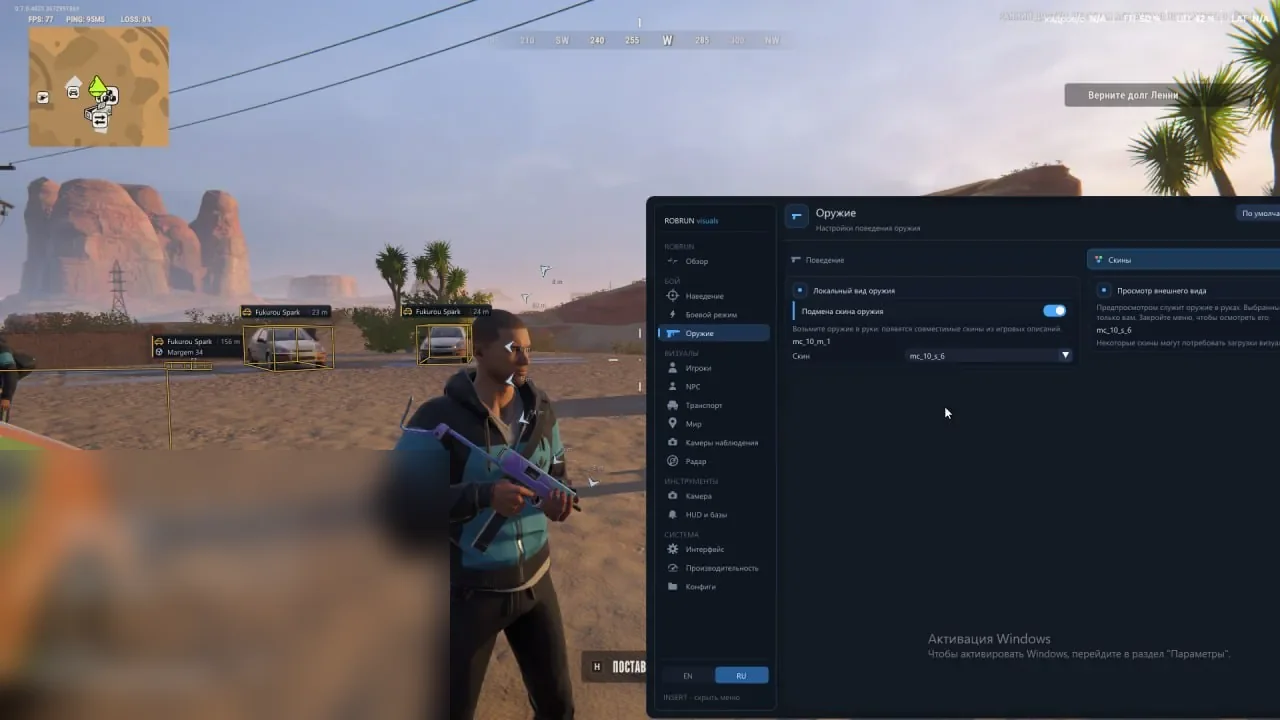
Skin Changer

Changes the active weapon skin for your local display only.

Battle Mode

Selectively hides or restores ESP elements to reduce information during combat.

Visual Presets

Calm and high-contrast presets quickly change the visual layout.

Clean Screen

Secondary text and decorative interface elements are hidden for a cleaner view.

Configs and reset

Custom setups can be created, saved, loaded and deleted. Page Defaults resets the current section.

Performance

Character and skeleton counts and visual refresh rate can be limited independently.

Menu languages

The interface is available in Russian and English.

Known issues & fixes

Real questions from our support, with the fixes that worked. Based on user requests for this product.

Which Windows builds does Phoenix Internal ROB RUN support?

Windows 10 and 11 builds 21H2, 22H2, 23H2, 24H2, 25H2 and 26H1 are supported. You need the Steam game, an AMD or Intel CPU and an NVIDIA or AMD GPU. No BIOS changes or flash drive are required.

How does Memory Aim differ from Silent Aim?

Memory Aim moves the crosshair with Smooth settings, while Silent Aim works without visible camera movement. Both support FOV, bones, factions, priority, range and target filters.

What does Phoenix Internal ESP display?

Players with factions, health and armour, vehicles with driver and state data, NPCs, categorised loot and cameras with detection zones. Appearance and distance are configurable.

Are radar and base warnings included?

Yes. Radar shows factions, NPCs and vehicles with auto zoom and rotation. The HUD warns about other factions and open doors or gates at your loaded base.

How do I receive and launch Phoenix Internal?

Your key and instruction arrive by email after payment. Open the loader using the instruction link, activate the key and follow the loader prompts. No flash drive or BIOS changes are needed.

Is a spoofer included with Internal, and does it prevent bans?

No built-in spoofer is listed or required to launch; a separate spoofer is optional. Working status and additional tools do not guarantee immunity from enforcement.

All issues & general troubleshooting
TARIFFS
299₽
BUY What happens after payment?
Got a question? Ask before you pay

We'll help you choose and sort out any launch issue. Ask us anything before buying, we're always on your side.

Support 10:00–22:00, sometimes we reply at night too
Ask a question

Available tariffs

1 day
299 ₽
299 ₽ / day
START PURCHASE
7 days
999 ₽
143 ₽ / day
START PURCHASE
lowest per day
30 days
1999 ₽
67 ₽ / day
START PURCHASE
Reviews about Phoenix ROB RUN Internal

No reviews yet. Be the first to leave one.

Your review

Reviews are published after moderation.

Join our gaming community chat

Discuss current cheats from developers and how to use them effectively in popular online games. Share tactics, exchange useful info and find like-minded players in our community.

1 900+Members
24/7Online
Join our gaming community chat

Technical support

Run into a technical issue? Our team of experts will help. We handle all requests in a live queue, so please be understanding if it sometimes takes a little wait. We guarantee that no request goes unanswered.

Availabilityfrom 10:00 to 23:00
Fast responseIn queue order
Get help
Technical support
PROCHEAT

PROCHEAT news channel

Follow product status changes, update history and important announcements.

Subscribe

Phoenix Internal package and pricing

Every plan includes the same Internal build: two aim modes, player and object ESP, radar, exploits, HUD, Skin Changer and configs. No separate module purchases are needed.

DurationPricePer day
1 day299 RUB299 RUB
7 days999 RUBAbout 142.71 RUB
30 days1999 RUBAbout 66.63 RUB

A week gives you time to explore the settings, while a month costs less per day for regular play. A one-day key is useful for compatibility checks and finding your preferred setup.

Memory Aim and Silent Aim in one menu

Memory Aim supports visible crosshair tracking. Smooth softens movement, FOV defines the working area and Bone Selection chooses head, neck, chest or pelvis. Random Bones changes the point for each new target, while Head Chance controls head selection frequency. Prediction and Lead Time account for enemy movement.

Silent Aim is switched in the same section and does not require another build. Crosshair or distance priority, target-switch delay and maximum range are independent. Team Check, Ignore Dead and Readiness Check exclude teammates, dead, knocked or recovering characters and vehicle occupants.

Factions, health and vehicles in ESP

In ROB RUN, a character's role changes the meaning of an encounter, so Internal separates factions visually and in filters. Player ESP includes boxes, skeletons, head markers, glow, names, distance, weapons, state, wanted status, HP and armour. Unnecessary elements can be disabled, and the preview shows the result before leaving the menu.

Vehicle labels cover model, driver, owner, speed, engine, cargo, trunk and rental. Boxes can be standard, corner or 3D. NPCs have independent name, state and range settings so their labels do not mix with real players.

Loot, cameras and radar for route planning

Loot ESP separates weapons, ammunition, armour, equipment, medicine and valuables. Bags, nodes, money, cargo, chargers, storage and security panels show distance, count and state. Empty objects can be hidden, while rarity colours come from the game or custom assignments.

Camera ESP shows location, detection zones, alarms and broken states. Radar completes the picture with selected factions, NPCs and vehicles, names, range rings, a view sector, automatic zoom and camera rotation. Size, range, opacity and position adapt to your screen.

Shooting, Free Camera and base monitoring

No Recoil suppresses camera recoil, No Sway removes weapon sway and Local No Spread affects spread in the client-side shot calculation. Fast Loot Nodes reduces collection time for supported nodes, with Interaction Range and Duration Multiplier for interaction settings. Free Camera detaches your view from the character for area inspection.

The HUD warns about approaching factions and displays directional arrows around the crosshair. For your loaded base, it reports open doors and gates, base direction and distance. A warning limit prevents repeated messages from filling the screen.

Skin Changer, Battle Mode and compatibility

Skin Changer changes the active weapon appearance for you only. Battle Mode controls ESP density, Visual Presets switches calm or high-contrast layouts and Clean Screen removes secondary elements. Configs store multiple setups, while Page Defaults resets only the current section. Character, skeleton and refresh limits help manage performance.

Internal supports Windows 10 and 11 builds 21H2-26H1, AMD and Intel processors and NVIDIA and AMD graphics cards. ROB RUN on Steam is required. No BIOS changes or flash drive are needed. No built-in spoofer is listed or required to launch; an external option can be used if desired. The menu is available in Russian and English.

How to buy Phoenix Internal for ROB RUN

Choose 1, 7 or 30 days and pay through DigiSeller. The price is 299, 999 or 1999 RUB. Select the required duration in the tariff option on the payment page. Your key and instruction with the loader link are sent to the order email.

Check your Windows build and Steam game version before buying. If activation produces an error, save its text and contact ProCheat support. Other products from this team are listed on the Phoenix page, while all options for this game are in the ROB RUN catalogue.

Phoenix Internal FAQ

Does Internal include Silent Aim?

Yes, both Memory Aim and Silent Aim are available in the shared aimbot section.

Can I select aimbot factions?

Yes, police, robbers, citizens and other categories can be enabled independently.

What does player ESP show?

Boxes, skeletons, names, distance, weapons, state, wanted status, HP, armour, head markers and glow.

Are loot and cameras included?

Yes, items and objects have category filters, while cameras show state and detection zones.

How does the radar work?

It displays selected factions, NPCs and vehicles with auto zoom, rotation, names, range rings and a view sector.

What does Skin Changer do?

It changes the active weapon skin for your local display only; other players do not see it.

Is Russian supported?

Yes, the Internal menu is available in Russian and English.

Which Windows builds are supported?

Windows 10 and 11 builds 21H2, 22H2, 23H2, 24H2, 25H2 and 26H1.

Is a spoofer included?

No built-in spoofer is listed. It is not required to launch, and a separate spoofer remains an optional extra.

How much does Internal cost?

299 RUB for one day, 999 RUB for a week and 1999 RUB for 30 days. All plans have the same features.

from 299 ₽ Choose a plan
Ask a question