Arcane ROB RUN cheat: aimbot, ESP, loot and radar

Working
Arcane Arcane
Last update 06.11.2026 This date shows when the software was last updated. An old date doesn't mean the software stopped working! Most likely the developer just had nothing new to add. If you have any doubts, you can always check the current status with our support team.
Add another cheat from this game too — to compare them.
Arcane ROB RUN
Steam
Windows support: 10: all builds; 11: all builds
Menu language: English, Russian, Chinese
Spoofer:No
USB drive:No
BIOS:No

User information

Check your PC against the general Arcane guide before buying: Windows 10 or 11, at least 12 GB RAM, an AES-capable processor and an NVIDIA or AMD graphics card are required. The menu is displayed through the graphics overlay. NVIDIA needs the NVIDIA App with an authenticated session and its overlay enabled; AMD needs the regular Adrenalin Edition rather than PRO.

Remove third-party antivirus, FACEIT and Riot Vanguard, and disable Windows Defender and SmartScreen. The game must be installed through Steam. No USB flash drive is needed. The loader link, two mirrors and the full guide are available under the key on the order page.

ROB RUN runs Easy Anti-Cheat, so an Online status is not a guarantee against bans. Avoid rage settings on an account you are not prepared to lose. If you have questions about requirements or launching before payment, ask in the support chat.

VIDEO
SCREENSHOTS
Description

Arcane ROB RUN combines an aimbot, city ESP and a radar in one menu. Aim settings are split by weapon class, so a pistol and a rifle can have different keys, bones, distances, prediction and smoothing. Filters exclude dead and knocked targets, people in vehicles and selected NPC categories.

ESP covers players, their health, armour, role and held item, plus vehicles, cameras and items. The radar watches directions outside the current view. No recoil, no sway and no spread are included, while battle mode clears the screen quickly. The key and Arcane guide arrive by email after payment, with no USB drive required.

Product features

Aimbot

Weapon classes

Separate settings for all weapons, pistols, rifles and other types.

Activation

Hold or always-on mode, a main bind, force aim and an in-scope-only option.

Targets and bones

Police, robbers, civilians and NPCs. Head, neck, body, pelvis, selected or nearest bones.

Aiming

Target lock, Shift to head, prediction, smoothing, adaptive FOV and humanization.

Filters

Distance, target switch delay, and ignoring dead, knocked or vehicle occupants.

Indicators

FOV border and background, locked target and a prediction cross.

Player ESP

Model

2D/3D, full or corner box, custom dimensions, solid or gradient fill.

Skeleton and lines

Skeleton, head circle, distance fade and a line to the enemy.

Information

Name, clan, role, held item, armour, state, health, distance and ID.

States

Separate colours for teammates, knocked targets and vehicle occupants; dead and knocked targets can be hidden.

NPC and vehicle ESP

NPCs

Box, name, state and distance with an ESP style preview.

Vehicles

Name, owner, driver, speed, status and distance. Box, front face, fill and lines.

Vehicle filters

Occupied vehicles only, plus hiding your own vehicle and the one you are inside.

Camera and item ESP

Cameras

Distance, hiding broken cameras, separate normal, broken and alarm colours, and a filled view zone.

Loot

Items, loot points, cargo, cash chargers and other objects with a distance cap.

Categories

Weapons, ammo, armour, equipment and hiding empty objects.

Radar and pointers

Radar

Distance rings, view cone, marker scaling, zoom, size and opacity.

Entities

Police, robbers, civilians and NPCs with a distance cap and markers on the rim.

Off-screen

Arrows to targets outside the view with range, size and distance settings.

Shooting and menu

Weapons

No recoil, no sway and no spread.

Battle mode

A separate key hides selected labels, the radar and pointers while retaining compact information.

Settings

English, Russian or Chinese, 100–150% scaling, dark or light theme, VSync, FPS and a watermark.

Configs

Create, load, save, rename and delete custom presets.

Known issues & fixes

Real questions from our support, with the fixes that worked. Based on user requests for this product.

The loader can't connect to the activation servers and shows no available servers

In most cases this happens because your internet provider blocks access to the activation servers — it isn't related to the software itself. Try the following:

  • Turn on a VPN and start the loader again.
  • Once it launches successfully, you can usually turn the VPN back off.
  • If the error comes back next time, enable the VPN again before each launch.
Cheat shows FROZEN or loader says frozen — how to run?

This means the product is temporarily frozen for a scheduled update. No action is needed on your part — simply wait for the update to complete.

Your paid subscription time does not expire during a freeze: subscription days are not counted while the loader is unavailable. Monitor the product page for status changes — access will resume automatically once the update is released.

PC reboots automatically after launching the loader / system shuts down

A forced reboot or shutdown on loader start is most often caused by antivirus software or incorrect Windows security settings.

  • If Kaspersky is installed, remove it completely using the official removal tool (Kavremover) rather than the standard "Programs and Features" uninstall. Reboot your PC afterwards.
  • Make sure the following are disabled: Windows Defender real-time protection, Core Isolation, User Account Control (UAC), and the Vulnerable Driver Blocklist.
  • Download the Sordum utility (available from technical support; archive password: sordum), run it, click Search, and send a screenshot of the results to support — this helps identify the conflicting component.
  • After making changes, restart your PC and try again.
Antivirus blocks loader files or loader download stalls at zero speed

Windows Defender or a third-party antivirus is blocking the loader download or launch. Use the Defender Control utility (archive password: sordum): download it, run it, click Search, wait for the scan to finish, then click Disable.

After disabling protection, re-download and run the loader. You can re-enable protection through the same tool after your gaming session.

Loader freezes, slider does not move, cheat does not start

Try connecting via VPN — the issue may be caused by activation server restrictions in your region. If VPN does not help, run the Sordum utility (available from technical support; archive password: sordum), click Search, and send the screenshot to support. The developer will use this information to assist you.

What are the requirements for Arcane ROB RUN?

Use Windows 10 or 11, at least 12 GB RAM, an AES-capable CPU and an NVIDIA or AMD graphics card with a working overlay. The game must be installed through Steam.

Does Arcane ROB RUN require a USB flash drive?

No. Unlike Lovec for this game, the Arcane loader runs from the computer. Prepare Windows and the graphics overlay using the guide under your key.

Does Arcane ROB RUN include Silent Aim?

The vendor function export does not list Silent Aim. The aimbot includes prediction, FOV, smoothing, humanization and weapon-class settings. Lovec ROB RUN specifically lists Silent Aim.

What does camera ESP show in Arcane ROB RUN?

Cameras show distance and a state colour: normal, broken or alarm. A filled zone displays their view sector, and broken cameras can be hidden.

How does Arcane ROB RUN differ from Lovec?

Arcane adds a radar, cameras, battle mode and no recoil, and needs no flash drive. Lovec lists Vector and Silent Aim, Legit/Full profiles and closed safes, but its loader runs only from USB.

Can Arcane get you banned in ROB RUN?

Yes. The game uses Easy Anti-Cheat, and other players can report you. Working status reflects build functionality and does not guarantee freedom from bans.

Launching the loader as administrator but nothing happens

Make sure you have read the included instructions carefully — the launch sequence is strict. The loader must be run as Administrator, and your antivirus must be fully disabled before starting.

If you followed every step and the loader still does nothing, contact support and describe exactly which step the process gets stuck on.

The Arcane menu does not show up or cannot be clicked. What does the GPU overlay have to do with it?

Arcane draws its menu and markers through the GPU overlay, so you need an NVIDIA or AMD card.

  • NVIDIA: install NVIDIA App, sign in, update the driver and turn the overlay on.
  • AMD: you need AMD Software: Adrenalin Edition (the PRO edition will not work), a fresh driver, the in-game overlay enabled and the metrics display switched on under Performance.
  • Menu visible but the mouse does not catch it: start Steam without admin rights and close third-party overlays (Discord, MSI Afterburner and so on), leaving only NVIDIA or AMD.

If the game has just been patched and the menu is gone, wait for the build update: the status is shown on the product page.

The Arcane loader says "Please make sure PIN is not set in Windows sign-in options and manually disable Hyper-V". What now?

The loader is blocked by the Windows sign-in PIN and the hypervisor. The Arcane developer fixes it in this order:

  1. Remove the PIN and password from Windows sign-in (Settings, Accounts, Sign-in options).
  2. Temporarily disable CPU virtualization in BIOS.
  3. Run the PowerShell commands from the guide behind the instruction button under your key, as administrator. They take ownership of two hypervisor system files and delete them.
  4. Turn virtualization back on in BIOS and start the loader again.

If you would rather not run the commands yourself, message support and we will walk you through it.

Arcane shows "Failed to map memory" on launch. What causes it?

Most often the PC is short on RAM: Arcane needs at least 12 GB. With less memory the build will not start, so message support about a refund.

If you have enough RAM, remove every program from startup and reboot. Still failing? Get the AutoRuns utility, disable everything listed under CurrentVersion\Run, reboot again and start the loader.

Can I use one license key on more than one computer

No, a key is bound to a single computer based on its hardware ID. You can't activate the same key on multiple devices at once — trying it on another PC won't work.

If you need to move your license to a different device, contact support.

Do I need to redownload the cheat after a game update

No, you don't need to download it again. After a game update the loader automatically pulls the current version the next time you start it.

The protection or spoofer module won't start, what should I do

This error is often related to CPU virtualization being disabled. Go into your BIOS and enable virtualization (VT-x for Intel or AMD-V for AMD), save the settings, and restart the loader.

If the error still appears, contact support for further diagnostics.

After starting the cheat my internet connection stops working

This can happen because of the built-in protection module (spoofer). Try disabling the spoofer in the loader settings and start the program again — your internet access should come back.

If you need the spoofer feature enabled, ask support about an alternative configuration.

All issues & general troubleshooting
TARIFFS
$4.00
BUY What happens after payment?
Got a question? Ask before you pay

We'll help you choose and sort out any launch issue. Ask us anything before buying, we're always on your side.

Support 10:00–22:00, sometimes we reply at night too
Ask a question

Available tariffs

1 day
$4.00
$4 / day
START PURCHASE
3 days
$8.00
$2.67 / day
START PURCHASE
7 days
$18.00
$2.57 / day
START PURCHASE
lowest per day
30 days
$35.00
$1.17 / day
START PURCHASE
Reviews about Arcane ROB RUN

No reviews yet. Be the first to leave one.

Your review

Reviews are published after moderation.

Join our gaming community chat

Discuss current cheats from developers and how to use them effectively in popular online games. Share tactics, exchange useful info and find like-minded players in our community.

1 900+Members
24/7Online
Join our gaming community chat

Technical support

Run into a technical issue? Our team of experts will help. We handle all requests in a live queue, so please be understanding if it sometimes takes a little wait. We guarantee that no request goes unanswered.

Availabilityfrom 10:00 to 23:00
Fast responseIn queue order
Get help
Technical support
PROCHEAT

PROCHEAT news channel

Follow product status changes, update history and important announcements.

Subscribe

Arcane ROB RUN menu and key pricing

Features are grouped by purpose: aiming stays separate from the overlay, while loot and cameras do not interfere with player settings.

SectionWhat it controlsWhere it helps
AimbotWeapon class, keys, targets, bones, prediction, FOV and smoothing.A street fight or a shootout from a vehicle.
Players / NPCBoxes, skeletons, HP, armour, role, item and state.Assessing a target before contact.
Vehicles / CamerasOwner, driver, speed, cameras and their view zones.Chases, getaways and avoiding surveillance.
ItemsLoot, loot points, cargo, cash and item categories.Finding valuable objects while skipping empty ones.
Radar / Off-screenA circular radar and pointers beyond the current view.Tracking directions outside your field of view.
Misc / SettingsRecoil, battle mode, language, FPS, theme and configs.Shooting and tailoring the overlay to your style.

One day costs $4, three days $8, a week $18 and a month $35. Per day, the three-day key is about $2.67, the week about $2.57 and the month about $1.17. All keys include the same features and differ only in duration.

Aim settings for different weapon classes

A ROB RUN firefight changes distance quickly: one opponent uses a pistol up close, while another pulls out a rifle and stays behind a vehicle. Arcane separates general, pistol, rifle and other settings, so you do not need one compromise for the entire arsenal.

The main key works on hold or continuously. Force aim, in-scope-only operation and Shift to head are configured separately. Target lock keeps the selected target, while switch delay stops the crosshair jumping between several people.

Prediction, FOV and humanization

Prediction leads a moving target, and the cross marks the estimated point to shoot at. FOV limits the acquisition area, with an adaptive mode changing it during operation. Smoothing softens movement, while humanization adds the irregularity of a human hand.

For subtle play, start with a narrow FOV, moderate smoothing and hold activation. Maximum distance, instant lock and constant head targeting are obvious not only to an anti-cheat but also to a real opponent.

Player ESP: role, armour and held item

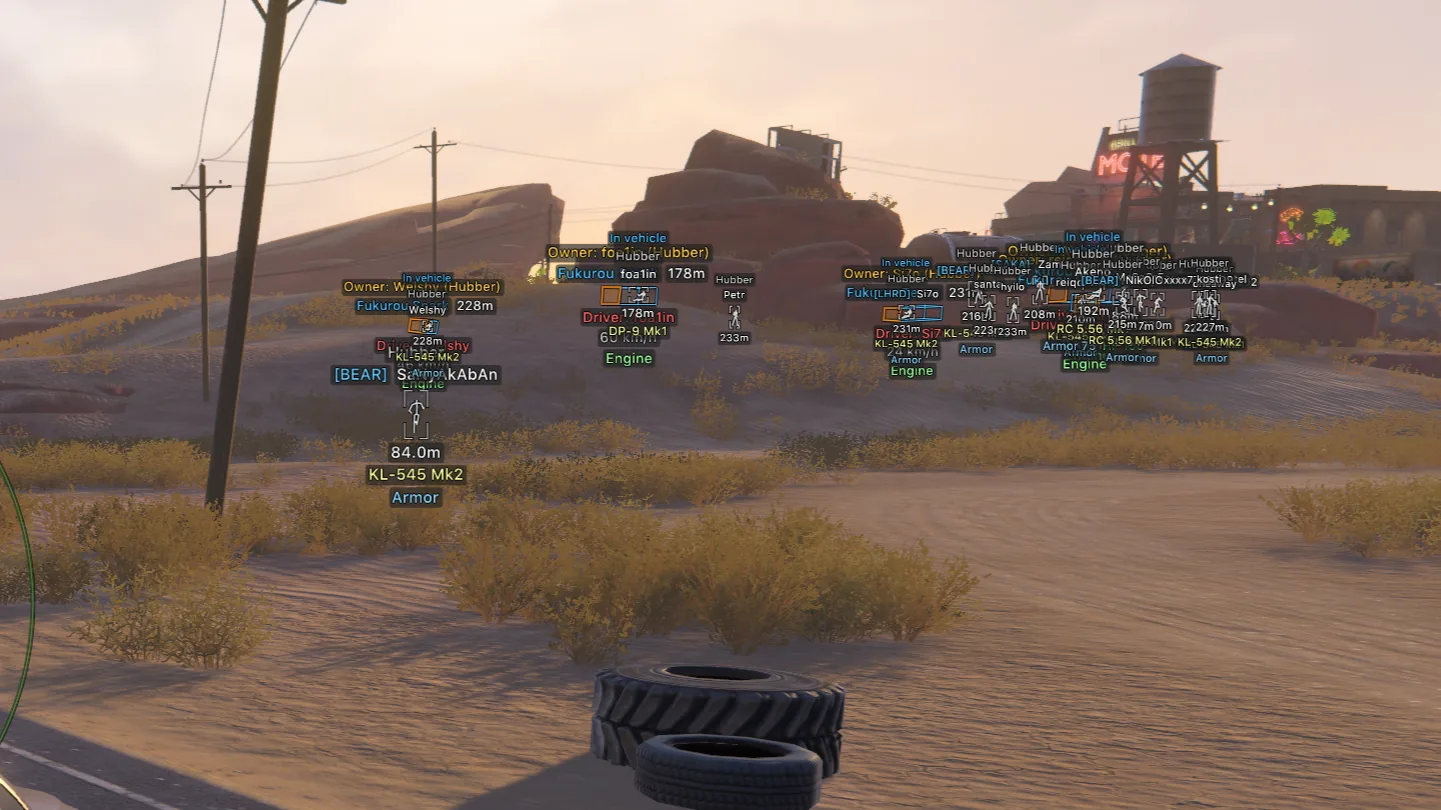
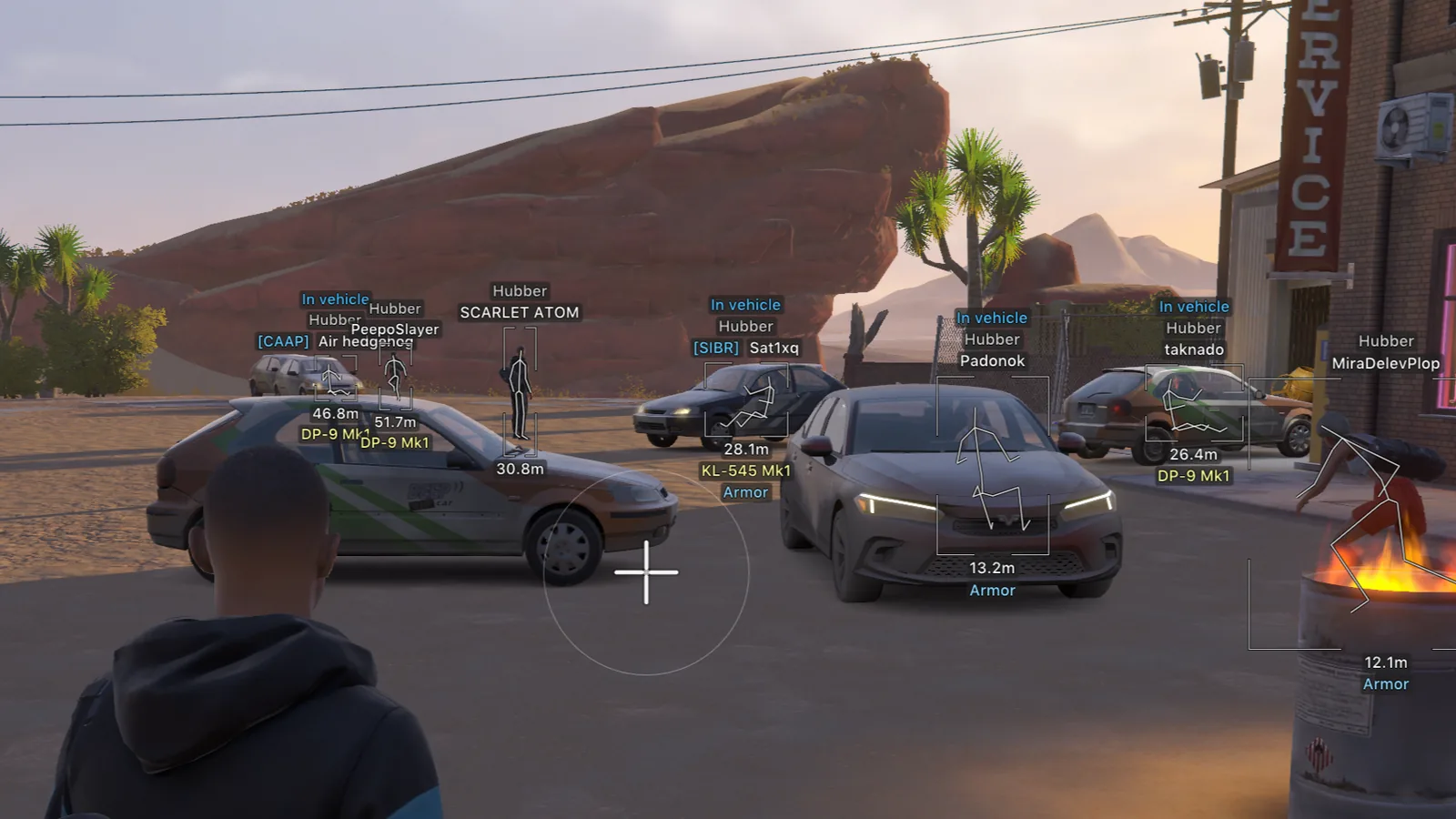
Arcane's screenshots show player names, clan tags, roles, distance, weapons and armour. A box outlines the model, the skeleton conveys its pose, and In vehicle distinguishes an occupant from someone on foot. That is useful in a city where police, robbers and civilians share the same streets.

The display adapts to your monitor: 2D or 3D, corner boxes, fill, lines, head circles and skeleton distance fade. Teammates, knocked targets and vehicle occupants can have separate colours, while dead targets can be hidden. NPCs have a simpler set of labels so they do not compete with players for screen space.

Vehicles and cameras with view zones

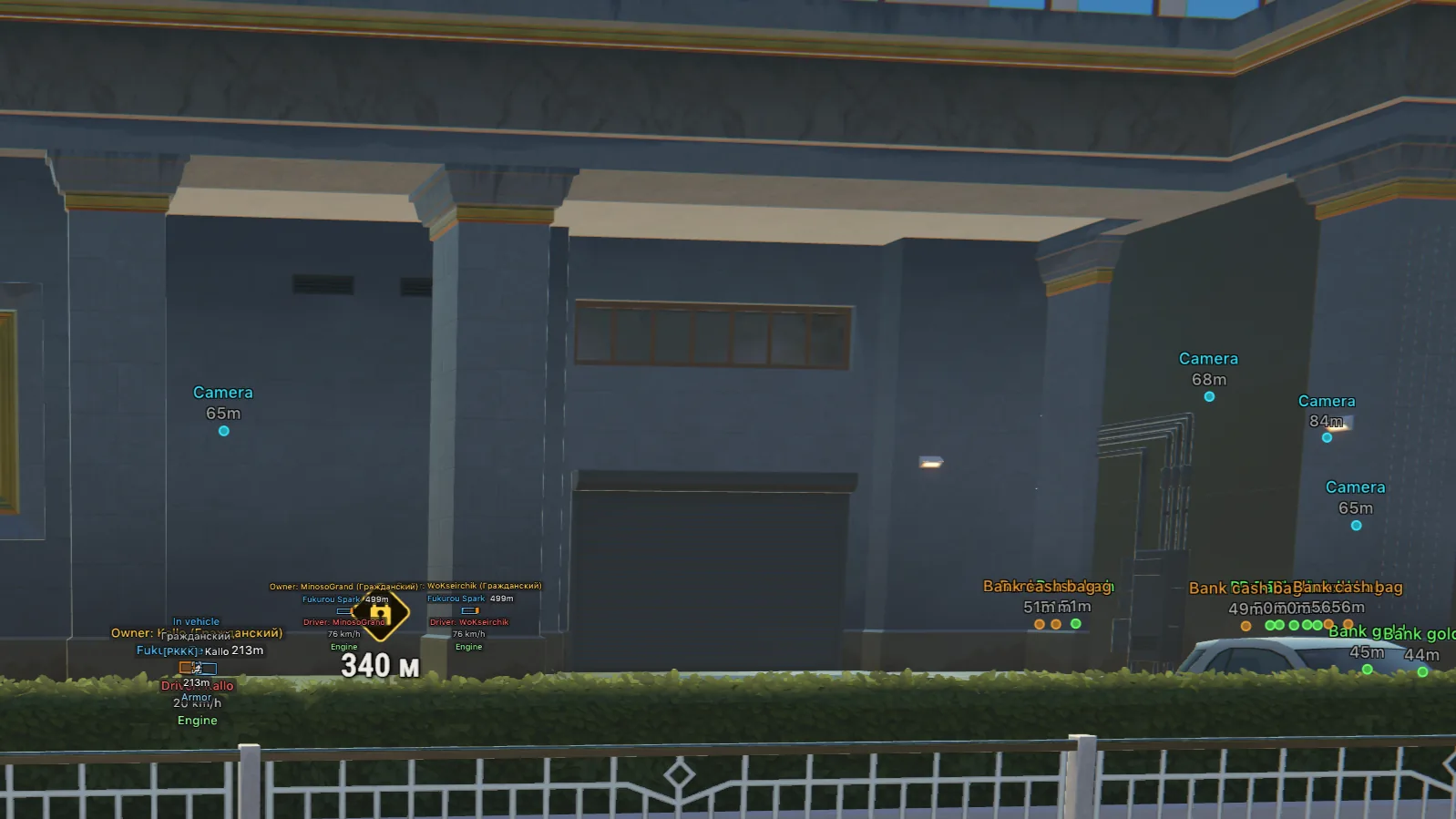
Vehicle ESP labels the name, owner, driver, speed and status. You can show occupied vehicles only and hide your own or the one you are sitting in. A line leads to the vehicle, while its box and front face show its direction behind cover.

Cameras show distance and a state colour: normal, broken or alarm. A filled view zone displays the surveillance sector. Broken cameras can be hidden separately so they do not clutter the working ones.

Loot, radar and off-screen arrows

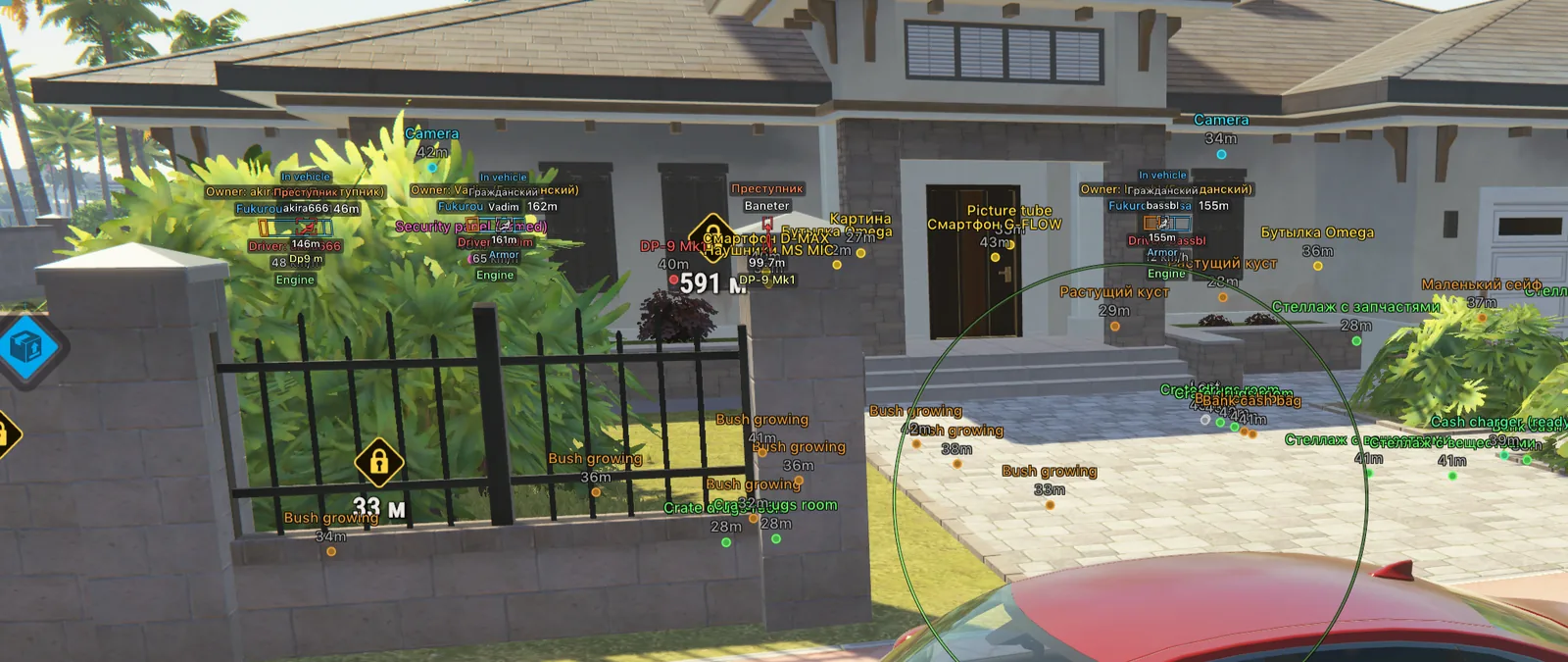
Items covers objects, loot points, cargo and cash chargers. Categories separate weapons, ammo, armour and equipment, while empty objects can be hidden. The vendor's first frame shows cash bags, crates, plants and items inside a house together with their distances.

The radar complements ESP when an opponent is behind you. Rings estimate distance, the view cone shows facing direction, and distant markers stay on the rim. Off-screen arrows cover targets outside the radar, with adjustable size, range and maximum distance.

No recoil and battle mode

No recoil removes recoil, no sway removes weapon sway, and no spread removes spread. These are conspicuous shooting modifications rather than cosmetic settings. For subtler play, ESP and cautious aiming are a more reasonable choice than keeping the entire set enabled.

Battle mode has its own key and removes clutter during contact: selected categories, dead targets, the radar and off-screen pointers. Compact information remains. Settings cover language, scale, theme, layout, FPS and the watermark, while configs store different setups.

Arcane or Lovec for ROB RUN

The ROB RUN category already includes Lovec, so the choice depends on the features you need. Lovec offers Vector and Silent Aim, ready-made Legit/Full profiles, loot and closed-safe ESP, but its loader only runs from a USB flash drive. Arcane needs no flash drive and adds a radar, cameras, battle mode, no recoil and separate weapon-class settings.

Pricing differs too: Lovec is sold in roubles, while Arcane uses dollars. Both have four durations, with Arcane costing $4, $8, $18 and $35 for 1, 3, 7 and 30 days. Compare more than price: check the PC requirements and choose the overlay you actually need. The full list is in the ROB RUN cheats category.

Preparing and launching Arcane

Before launching, remove third-party antivirus, FACEIT and Riot Vanguard, and disable Defender and SmartScreen. Install the libraries from the general guide. On NVIDIA, sign in to the NVIDIA App and enable its overlay; on AMD, install Adrenalin Edition and enable the in-game overlay and metrics. Reboot the PC.

  1. Download the loader from the link under your key and run it as administrator. Open it again after the update.
  2. Paste the key into the console with a right-click and press Enter. Regular Ctrl+V may not work there.
  3. Answer the loader prompts about trace cleaning and the spoofer, then wait for the window to close.
  4. Launch ROB RUN through Steam. Home or Insert opens the menu, and END unloads the build after confirmation.

If the menu is visible but clicks fall through to the game, run Steam without administrator rights and disable extra overlays, leaving NVIDIA or AMD only.

Loader errors and ban risk

The PIN and Hyper-V error is handled in the general guide: disable PIN sign-in, temporarily disable virtualization and run the specified commands. An Intel VT-X or AMD-V message asks you to enable virtualization, while Secure Boot is disabled in the BIOS for the corresponding error. Failed to map memory often relates to insufficient RAM; at least 12 GB is required.

We do not promise freedom from bans: ROB RUN uses Easy Anti-Cheat, and opponents can report suspicious play. The site status only reflects whether the build currently works. After a game patch, check the product status and verify the Steam files. If an error appears, send its full text to ProCheat support.

How to buy Arcane ROB RUN

Choose a duration above and pay through Digiseller. The key appears on the order page and arrives by email. The instruction button beneath it contains the loader link, two mirrors and the full Arcane guide. No ProCheat registration is required.

Prepare Windows and the graphics overlay before entering the key. If anything fails to launch, save the error text and write to the ProCheat chat. Other games from this developer are listed on the Arcane page.

Arcane ROB RUN FAQ

Does Arcane for ROB RUN have a radar?

Yes. The radar supports distance rings, a view cone, scaling, opacity, different target types and markers on the rim.

Is a USB drive required?

No. Arcane runs from the computer but requires Windows preparation and a working NVIDIA or AMD overlay.

Can pistols and rifles be configured separately?

Yes. The aimbot has sections for general settings, pistols, rifles and other weapons.

What does camera ESP show?

Distance, state and view zone. Normal, broken and alarm cameras have separate colours.

Is Silent Aim included?

The vendor's function export does not list that mode. If you specifically need Silent Aim, see the Lovec ROB RUN card in the same category.

When will the key arrive?

After payment it appears on the order page and arrives by email. Check spam if the message does not arrive within a few minutes.

Is the menu in English?

Yes, English, Russian and Chinese are available. Scale and layout can be changed in Settings.

How does Arcane differ from Lovec?

Arcane adds a radar, cameras, battle mode and no recoil, and needs no flash drive. Lovec lists Vector/Silent Aim, Legit/Full profiles and closed safes, but launches from USB.

Can I play without being banned?

There is no guarantee. The game uses EAC, and player reports remain possible. A working build status does not insure your account.

from $4.00 Choose a plan
Ask a question