Lovec ROB RUN cheat: silent aim, player and loot ESP

Working
Lovec Lovec
Last update 06.11.2026 This date shows when the software was last updated. An old date doesn't mean the software stopped working! Most likely the developer just had nothing new to add. If you have any doubts, you can always check the current status with our support team.
Lovec ROB RUN
Steam
Windows support: 10: all builds; 11: 21h2, 22h2, 23h2, 24h2, 25h2
Menu language: Russian, English
Spoofer:No
USB drive:Yes
BIOS:No

User information

Check three things before buying: ROB RUN must be installed through Steam, your PC needs Windows 10 or 11 except 26H1 and 26H2, and the loader requires a spare USB flash drive. Intel and AMD processors are supported. BIOS changes are not normally needed.

The key appears on the order page and arrives by email together with the loader link. Keep the file on the USB drive only and remove every copy from the computer, Downloads, Desktop and Recycle Bin, otherwise Bad HWID may occur. Start the loader as administrator first and launch the game second.

ROB RUN uses Easy Anti-Cheat, and the developer can ban accounts, including after player reports. We do not promise a ban-free experience. Refunds are not provided for bans or detections. If the product will not launch despite meeting the requirements, we offer a 100% refund within 24 hours or a replacement. Pre-purchase questions are welcome in the support chat.

SCREENSHOTS
Description

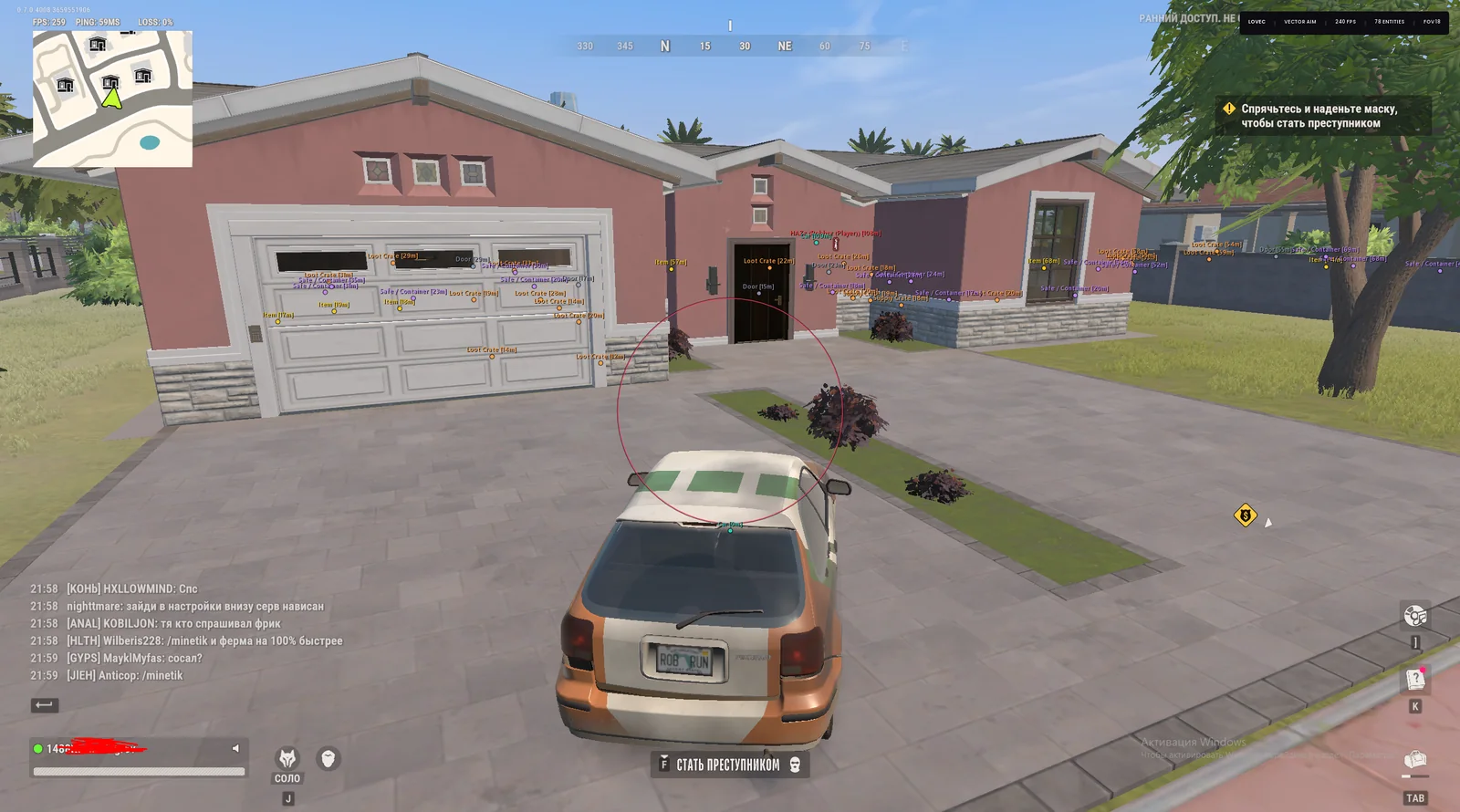
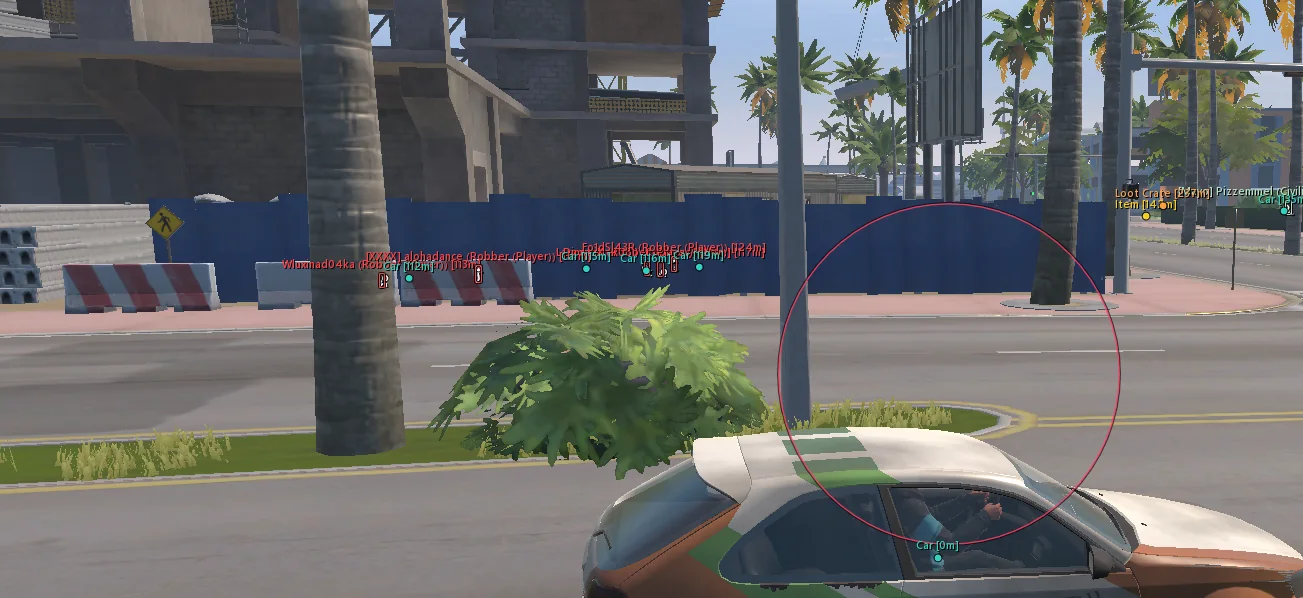
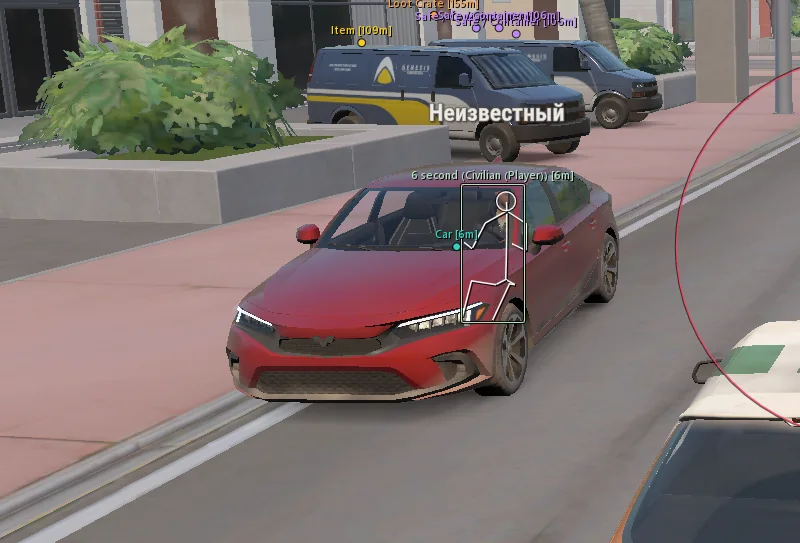
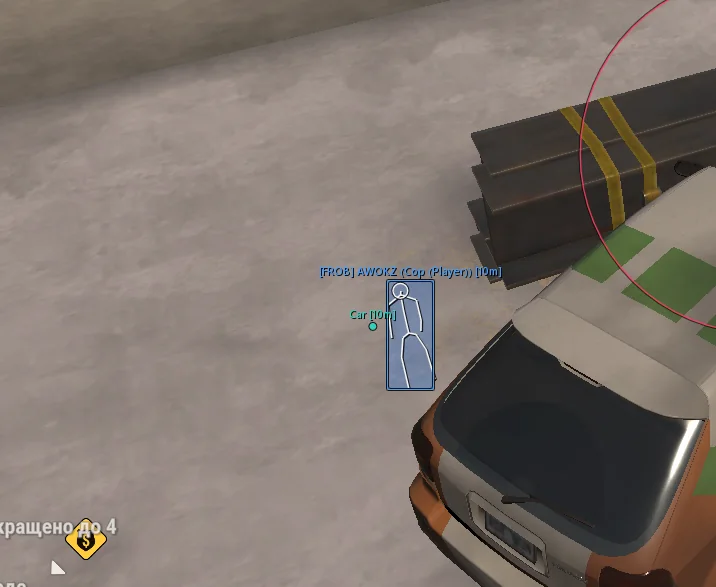
Lovec ROB RUN is a cheat for Kefir's crime sandbox, where cops, bandits and civilians constantly cross paths in one city. Vector and silent aim lead moving targets, while filters keep the software off friends and random NPCs. ESP shows role, name, clan tag, skeleton and distance.

Separate markers cover ground loot, bags, cash bundles, cargo, weapon cases, closed safes, vehicles, doors and buyers. Ready-made Lovec Legit and Lovec Full profiles offer a 45° FOV or a 140° FOV with head targeting. The loader runs from a USB flash drive, and the key with instructions arrives by email after payment.

Product features

Aimbot

Mode and activation

Vector Aim or Silent Aim. Always on, on left-click fire, right-click aim, either button or a separate keybind.

Aiming

Smoothing, hit chance, movement prediction, FOV size and maximum distance.

Bone and priority

Head, neck, chest, pelvis or nearest bone. Target priority by crosshair or distance.

Targets and friends

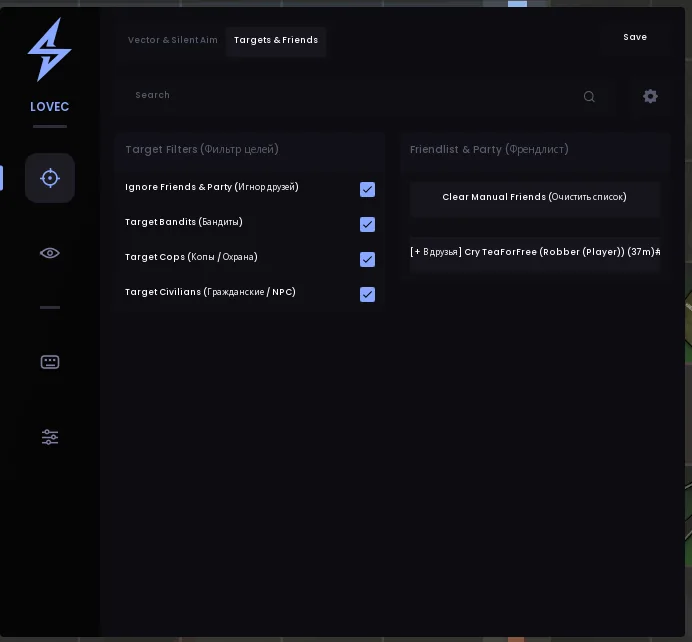
Bandits, police, civilians and NPCs. Ignore party and use a manual friend list.

Aim indicators

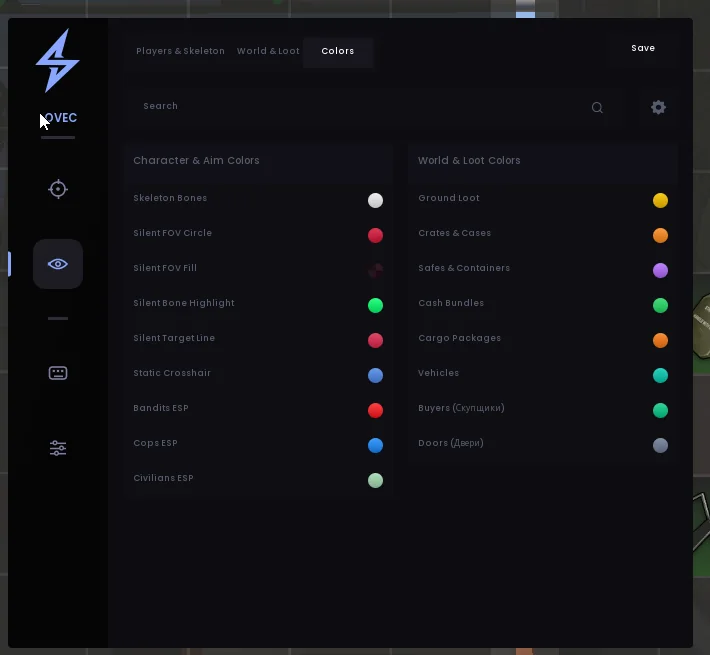
FOV border and background, bone highlight, target line and static crosshair with individual colours.

Player and NPC ESP

Categories

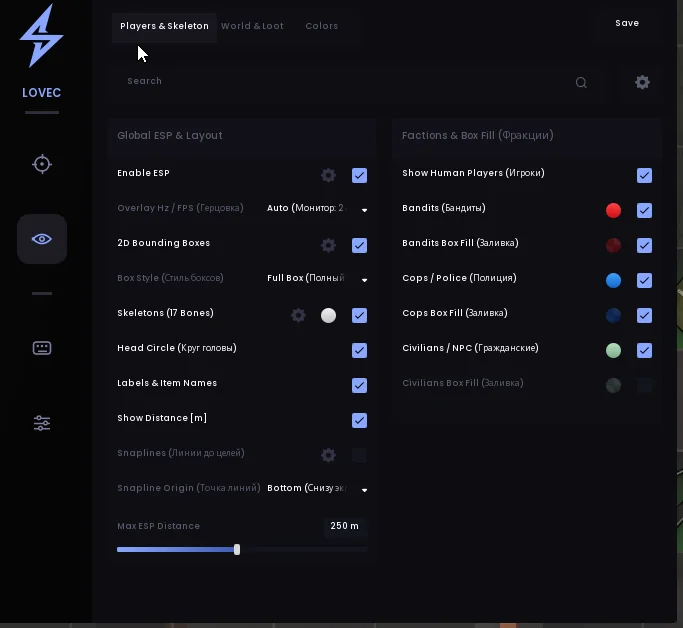
Players, bandits, police, civilians and NPCs with a distance limit.

Box and skeleton

Full or corner box, faction fill, skeleton and head circle.

Labels

Name, clan tag, role and distance to the target.

Snaplines

A line to the target from the bottom or top of the screen, or from the crosshair.

World and item ESP

Loot and cash

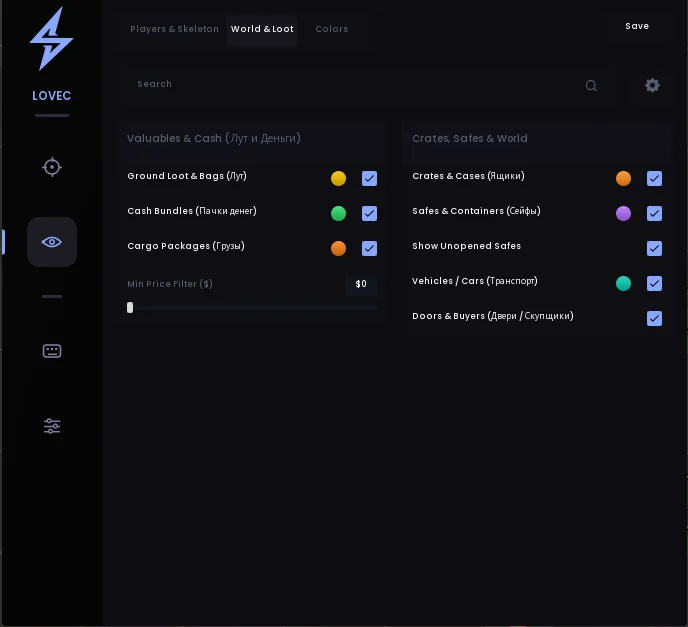
Ground loot, bags, cash bundles and cargo with individual colours and a minimum price filter.

Cases and safes

Crates, weapon cases, safes and containers, including closed safes.

City objects

Vehicles, doors and buyers with separate colours.

Hotkeys

Quick controls

Separate binds for the aimbot, all ESP, boxes, skeletons, snaplines and the menu.

Settings and configs

Interface

FPS limit from 60 to 360 Hz or unlimited, automatic monitor matching, watermark and a 75–175% menu scale.

Profiles

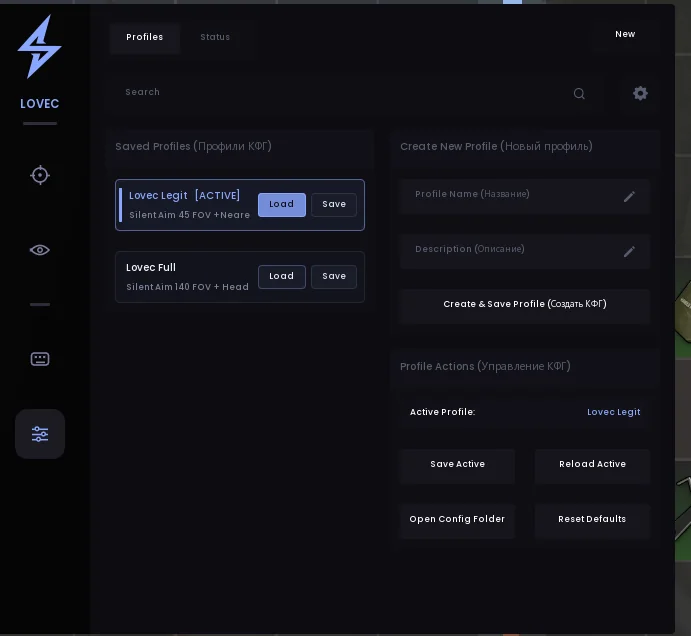
Lovec Legit, Lovec Full and custom configs: create, load, save, remove and reset.

Known issues & fixes

Real questions from our support, with the fixes that worked. Based on user requests for this product.

Antivirus or Windows blocks, deletes, or flags the loader as a virus — what should I do?

This is a false positive: antivirus software often flags the protection technologies used in programs like this as a threat.

  • Add the loader's folder to your antivirus and Windows Defender exclusions, then download the file again.
  • It's best to fully close third-party antivirus software (such as Kaspersky) while using the program, or remove it with its own uninstaller — muting notifications alone is often not enough.
  • Run the loader as administrator and restart your computer after changing the settings.
  • If the file is still blocked, contact support — they can point you to the current version and a system compatibility check utility.
The program hangs while connecting, gets stuck on a waiting status, or shows a network error — what should I do?

This is usually caused by an unstable or blocked connection on your side.

  • Connect through a VPN and launch the program again; if the VPN makes it worse, turn it off and retry without it.
  • Check your internet stability and switch networks if you can — if the connection keeps dropping, the program can't receive data.
  • Make sure the program is added to your antivirus and firewall exclusions.
  • Restart your computer; if that doesn't help, fully remove and re-download the loader.
  • If the error keeps happening, contact support with a screenshot.
The key is tied to one computer — can I move it to another device?

On first activation the key is bound to the hardware of one specific computer and works on a single device only — the rule is one PC per key. So activate the key right away on the computer you plan to play on regularly.

Rebinding to another device is generally not done. If you had to change computers, contact support and describe the situation — in some cases the hardware lock can be reset manually, but don't count on repeated transfers.

After a game update the program stopped launching or says it's unavailable — what should I do?

After a major patch the developer usually pauses the program until a version for the current game update is released — this isn't a problem on your end.

  • Wait for an update announcement: once the program is adapted, access is restored automatically, with nothing to redownload or reactivate.
  • In the meantime you can try restarting your computer and launching the program through a VPN — sometimes this helps temporarily.
The program won't start or the PC blue-screens: Windows reports a blocked vulnerable driver or memory integrity issue — what should I do?

This error means built-in Windows protection features (Secure Boot, Core Isolation, vulnerable driver blocklist) are preventing the program's driver from loading, treating it as potentially unsafe.

Contact support — they'll tell you which protection features are conflicting with the program on your system and help check the compatibility of your hardware and Windows version.

Does Lovec ROB RUN require a USB flash drive?

Yes. The loader only runs from a USB flash drive as administrator. Remove every copy from the computer and Recycle Bin to avoid Bad HWID.

Which Windows versions support Lovec ROB RUN?

Use Windows 10 or 11 except builds 26H1 and 26H2. Intel and AMD processors are supported, and the game must be installed through Steam.

How do I launch Lovec ROB RUN after purchase?

Disable Defender and antivirus, copy the loader to a USB drive and run it as administrator. Enter the key, wait for a successful start, then open ROB RUN through Steam and wait for the server to load.

Why does Lovec ROB RUN show Bad HWID?

Usually a loader copy remains on the PC. Remove files from Downloads, Desktop and the Recycle Bin, then run it from the USB drive letter. If there are no copies, ask support to check the key binding.

Which Lovec profile should I use for ROB RUN?

Start with Lovec Legit: silent aim with a 45° FOV and nearest-bone targeting. Lovec Full uses a 140° FOV and head targeting, making it more obvious. Load applies a profile and Save stores changes.

What if the LOVEC menu does not appear in ROB RUN?

Wait for the server to load fully and confirm the loader reported success. Switch the game to borderless windowed mode and check the menu key on the hotkeys tab.

How do I fix Connection error and Synchronise time in the loader?

For Connection error, try launching the loader with a VPN. For Synchronise time, enable automatic time in Windows settings and press Synchronise.

Why does the aimbot ignore a player in ROB RUN?

Check Targets & Friends: the required faction must be enabled and the player must not be on the friend list. Also check activation mode, FOV and maximum distance.

Does Lovec show cash and closed safes in ROB RUN?

Yes. World & Loot highlights cash bundles, ground loot, bags, cargo, cases and containers. A separate option shows closed safes. This is ESP, not a way to add money or items to an account.

Can I get a refund for a ROB RUN ban?

No, refunds are not provided for bans or detections. The game uses Easy Anti-Cheat and the developer can ban accounts after reports. If the software will not launch despite meeting the requirements, a 100% refund within 24 hours or a replacement applies.

Payment went through and money was charged, but access wasn't activated — what should I do?

After payment, the payment system doesn't confirm the transaction instantly — usually you just need to wait a bit.

  • Check the purchases section on the site and attach a screenshot of the payment to your support request.
  • If confirmation takes too long, contact the support of the payment service you paid through — contact details are usually at the bottom of the payment page.
How can I check how much time is left on my key?

The remaining time on your key is shown right in the loader window after you log in. Rely on that number rather than the purchase date — it reflects the exact time left.

Activation says the key is already activated even though I haven't used it — what should I do?

If the key was already bound earlier, you don't need to activate it again — try going straight to selecting the program and launching it without re-entering the key. If the error persists, contact support so they can check the key's status.

The program window pops up for a second after launch and then disappears — how do I fix it?

This usually happens due to a conflict with the game's fullscreen mode. Switch the game to windowed or borderless windowed mode and launch the program again — that resolves it in most cases.

The loader window opens only partially and can't be resized — what should I do?

This usually happens because of display scaling in Windows or a conflict with other protection software installed on the system (for example, an anti-cheat from a different game).

  • Set Windows display scaling to 100%.
  • Remove or temporarily disable unrelated protection or anti-cheat software.
All issues & general troubleshooting
TARIFFS
300₽
BUY What happens after payment?
Got a question? Ask before you pay

We'll help you choose and sort out any launch issue. Ask us anything before buying, we're always on your side.

Support 10:00–22:00, sometimes we reply at night too
Ask a question

Available tariffs

1 day
300 ₽
300 ₽ / day
START PURCHASE
3 days
600 ₽
200 ₽ / day
START PURCHASE
7 days
1250 ₽
179 ₽ / day
START PURCHASE
lowest per day
30 days
2500 ₽
83 ₽ / day
START PURCHASE
Reviews about Lovec ROB RUN

No reviews yet. Be the first to leave one.

Your review

Reviews are published after moderation.

Join our gaming community chat

Discuss current cheats from developers and how to use them effectively in popular online games. Share tactics, exchange useful info and find like-minded players in our community.

1 900+Members
24/7Online
Join our gaming community chat

Technical support

Run into a technical issue? Our team of experts will help. We handle all requests in a live queue, so please be understanding if it sometimes takes a little wait. We guarantee that no request goes unanswered.

Availabilityfrom 10:00 to 23:00
Fast responseIn queue order
Get help
Technical support
PROCHEAT

PROCHEAT news channel

Follow product status changes, update history and important announcements.

Subscribe

Lovec ROB RUN menu and pricing

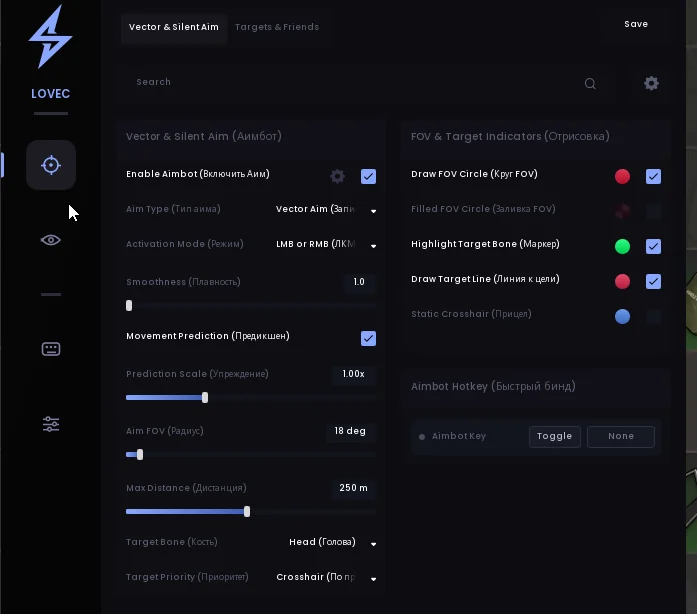
The menu has four main icons: crosshair, eye, keyboard and settings. Aim and ESP contain their own tabs, so the city overlay and target filters are configured separately.

SectionWhat it controlsWhere it helps
Vector & Silent AimMode, activation, smoothing, prediction, FOV and bones.A firefight with cops or another clan.
Targets & FriendsFactions, party ignore and the friend list.Joint raids and temporary alliances.
Players & SkeletonBoxes, fills, skeletons, roles and distance.Assessing an opponent behind cover.
World & LootLoot, cash, cargo, cases, safes, vehicles and buyers.Finding loot and places to sell it.
HotkeysAim, ESP, boxes, skeletons, snaplines and menu.Changing the overlay quickly in combat.
ProfilesLegit, Full and custom configs.Subtle or conspicuous play.

One day costs 300 RUB, three days cost 600, a week costs 1,250 and a month costs 2,500. Per day, the three-day plan is 200 RUB, the week is roughly 178.57 and the month is about 83.33. Every tariff includes the same features; only the key duration changes.

Vector and silent aim in ROB RUN

Vector Aim suits players who prefer to see their own crosshair move and control the aim. Silent Aim does not move the crosshair as visibly, but that does not make play immune to reports: consistent hits without misses are still obvious to an opponent.

Activation adapts to the situation. Always-on keeps the aimbot enabled, LMB activates it while firing, RMB while aiming, and the combined option covers both. A separate hotkey toggles the feature quickly.

FOV, prediction and hit chance

FOV sets the acquisition area in degrees, while maximum distance cuts off faraway targets. Smoothing softens movement, hit chance varies perfect accuracy, and prediction leads target movement with adjustable strength. For subtle play, start with a narrow FOV and moderate smoothing.

Bone options are head, neck, chest, pelvis and nearest point. Crosshair priority helps when several people are nearby, while distance priority focuses on the closest threat. The FOV circle, background, target line and bone marker show the current acquisition on screen.

ESP for cops, bandits and civilians

Factions are coloured independently: bandits, police and civilians get different box and fill colours. That is particularly useful in ROB RUN, where appearance does not always explain a person's intentions. Name, clan tag and role add the remaining context.

A skeleton with a head circle shows body position, and a snapline leads to the target from a chosen point on screen. A distance limit keeps faraway objects from obscuring close combat. Separate hotkeys disable boxes, skeletons or lines without turning off all ESP.

Loot ESP: cash, safes and buyers

Ground items and bags, cash bundles and cargo are marked in different colours. Crates and weapon cases are separate from safes and containers, and the closed-safe option helps you pick a target before opening it. A minimum price filter removes low-value loot.

Vehicle markers make it easier to find a getaway car, doors help you navigate inside a location, and buyers show where to sell your haul. These are informational features: Lovec does not add money or items to your account.

Lovec Legit and Lovec Full

Legit is a ready-made profile with silent aim, a 45° FOV and nearest-bone targeting. It suits a first launch and subtler play. Full uses silent aim with a 140° FOV and head targeting: coverage is wider, but this kind of shooting is far more obvious to real opponents.

Load applies a profile and Save stores your changes. You can create a custom config, load it later, delete it or restore defaults. Menu scale ranges from 75 to 175%, the FPS limit can match a 60–360 Hz monitor, and the LOVEC watermark can be disabled.

Launching Lovec from a USB drive

Start by disabling Windows Defender, third-party antivirus, core isolation and memory integrity before downloading the loader from the link in your email. Copy the file to a USB flash drive. Remove every other copy from the PC, including the archive in Downloads and the Recycle Bin.

  1. Plug the USB drive directly into a USB port and run the loader as administrator.
  2. Enter the key from the email or order page and wait for the success message.
  3. Open ROB RUN through Steam and wait for the server to load.
  4. Check for the LOVEC watermark in the top-right corner, open the menu with its assigned key and load Legit.

If the blue Windows prompt blocks the unsigned file, choose More info and Run anyway. Use borderless windowed mode if the menu does not appear.

Bad HWID, Connection error and other fixes

Bad HWID usually means a copy of the loader remains on the computer. Delete files from the drive, empty the Recycle Bin and run the program specifically from the USB drive letter. If there are no copies, contact support to check the binding and key duration.

Connection error is usually resolved by launching with a VPN, while Synchronise time is fixed by enabling automatic time and synchronising it in Windows settings. If the loader closes immediately, check Visual C++, DirectX, Defender and antivirus. When the aimbot does not acquire targets, check selected factions, the friend list, activation, FOV and distance.

EAC and the risks of using Lovec

ROB RUN runs kernel-level Easy Anti-Cheat. The game developer can also issue bans following reports. Neither silent aim nor a narrow FOV makes an account immune, and a working build status is not a promise of no bans.

The least conspicuous setup is ESP and cautious aiming with a small acquisition area. Full with a 140° FOV, constant head targeting and shooting at everyone leaves a clear pattern for opponents. Choose settings with that risk in mind and do not use the software on an account you are not prepared to lose.

How to buy Lovec ROB RUN

Choose a tariff above and pay through Digiseller. The key appears on the order page, and an email arrives with the key and loader link. No ProCheat registration is required.

Prepare a USB flash drive and Windows according to the guide before activation. If anything fails to launch, write to the ProCheat chat and include the error text. Other builds from this developer are listed on the Lovec page, and all software for the game is in the ROB RUN cheats category.

Lovec ROB RUN FAQ

What is the difference between Vector Aim and Silent Aim?

Vector Aim moves the crosshair onto a target, while Silent Aim registers hits without such visible movement. Both support FOV, bone, distance and activation settings.

Which profile should I start with?

Start with Lovec Legit: silent aim, a 45° FOV and nearest-bone targeting. Full with a 140° FOV and head targeting is more obvious to other players.

Is a USB flash drive mandatory?

Yes. The loader only runs from a USB drive, and copies on the PC must be removed to avoid Bad HWID.

When will the key arrive?

Immediately after payment, on the order page and by email. The loader link comes with the key. Check spam if the email does not arrive within a few minutes.

Is Windows 11 26H2 supported?

No. The vendor excludes 26H1 and 26H2. Windows 10 and supported earlier Windows 11 builds are compatible.

Why does Bad HWID appear?

Usually because loader copies remain on the computer. Remove them from Downloads, Desktop and the Recycle Bin, then run the file from the USB drive. If that fails, the key binding needs checking.

Can ESP show closed safes?

Yes, safes and containers have a separate closed-safe option. Their colour is configured independently from other loot.

Can friends be excluded from the aimbot?

Yes. Friends and party members can be ignored, and a manual list lets you add or remove individual players.

Does Lovec add money to an account?

No. It only displays cash bundles and other items already present on the server.

Is there a refund for a ban?

No, refunds are not provided for bans or detections. If the software will not launch despite meeting the requirements, a 100% refund within 24 hours or a replacement applies.

from 300 ₽ Choose a plan
Ask a question