Lovec Web Radar for Arena Breakout Infinite

Working
Lovec Lovec
Last update 23.07.2026 This date shows when the software was last updated. An old date doesn't mean the software stopped working! Most likely the developer just had nothing new to add. If you have any doubts, you can always check the current status with our support team.
Add another cheat from this game too — to compare them.
Lovec Radar for Arena Breakout Infinite
Steam
Windows support: 10: all builds; 11: all builds
Menu language: Russian, English
Spoofer:No
USB drive:No
BIOS:No

User information

There's no heavy software here: the radar is a page in a browser, so it opens on your gaming PC and on a phone alike. Any recent browser on Windows 10 or 11 is enough, no install and no admin rights. Access is tied to your account and the owner's nickname sits in the header, so handing the link to friends gets you nowhere.

For phones there are two layouts, portrait and landscape, and the panels adapt to the screen width. Positions refresh constantly while the radar barely touches your bandwidth, so mobile data carries it fine. Russian and English swap with a button in the interface. If something breaks or you come up with a feature idea, there's a feedback form inside: category, title, text, and the message goes straight to the developers.

The key and the radar link arrive at the email you enter at checkout: there's no account area on the site, so type the address carefully. The rule for ABI patches is simple: while Lovec adjusts the software to an update, your subscription time is frozen and paid days don't burn.

SCREENSHOTS
Description

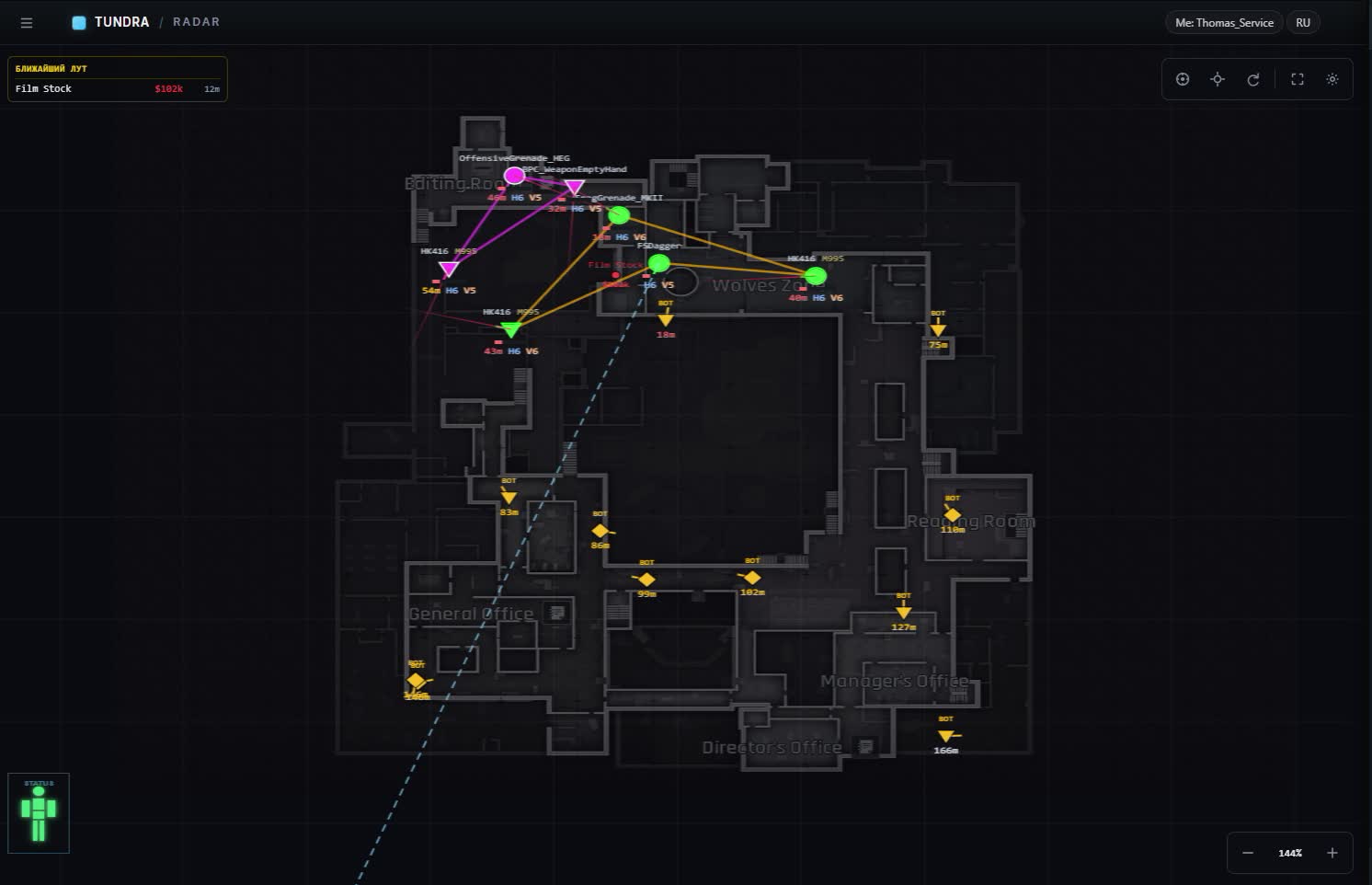
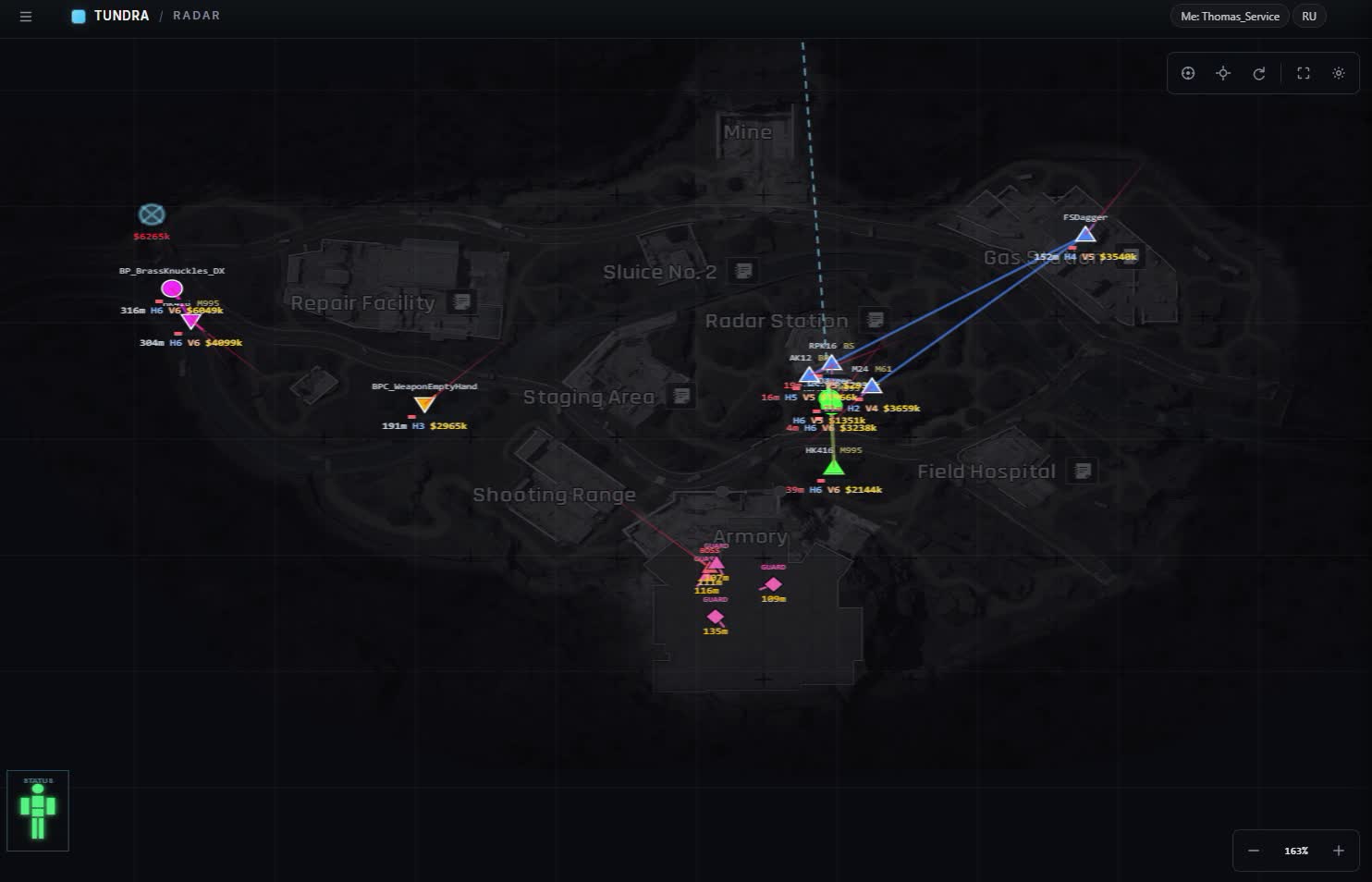
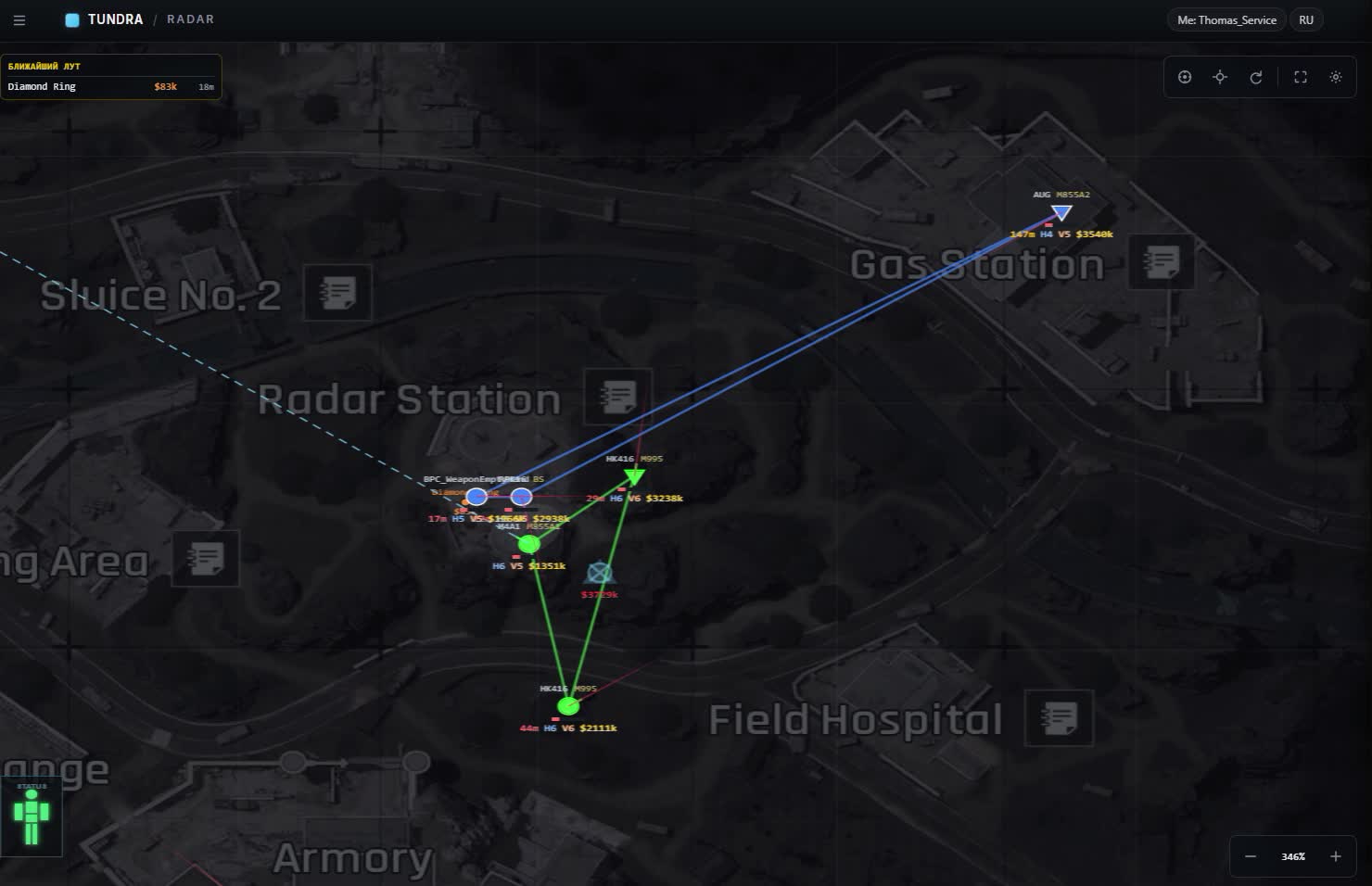
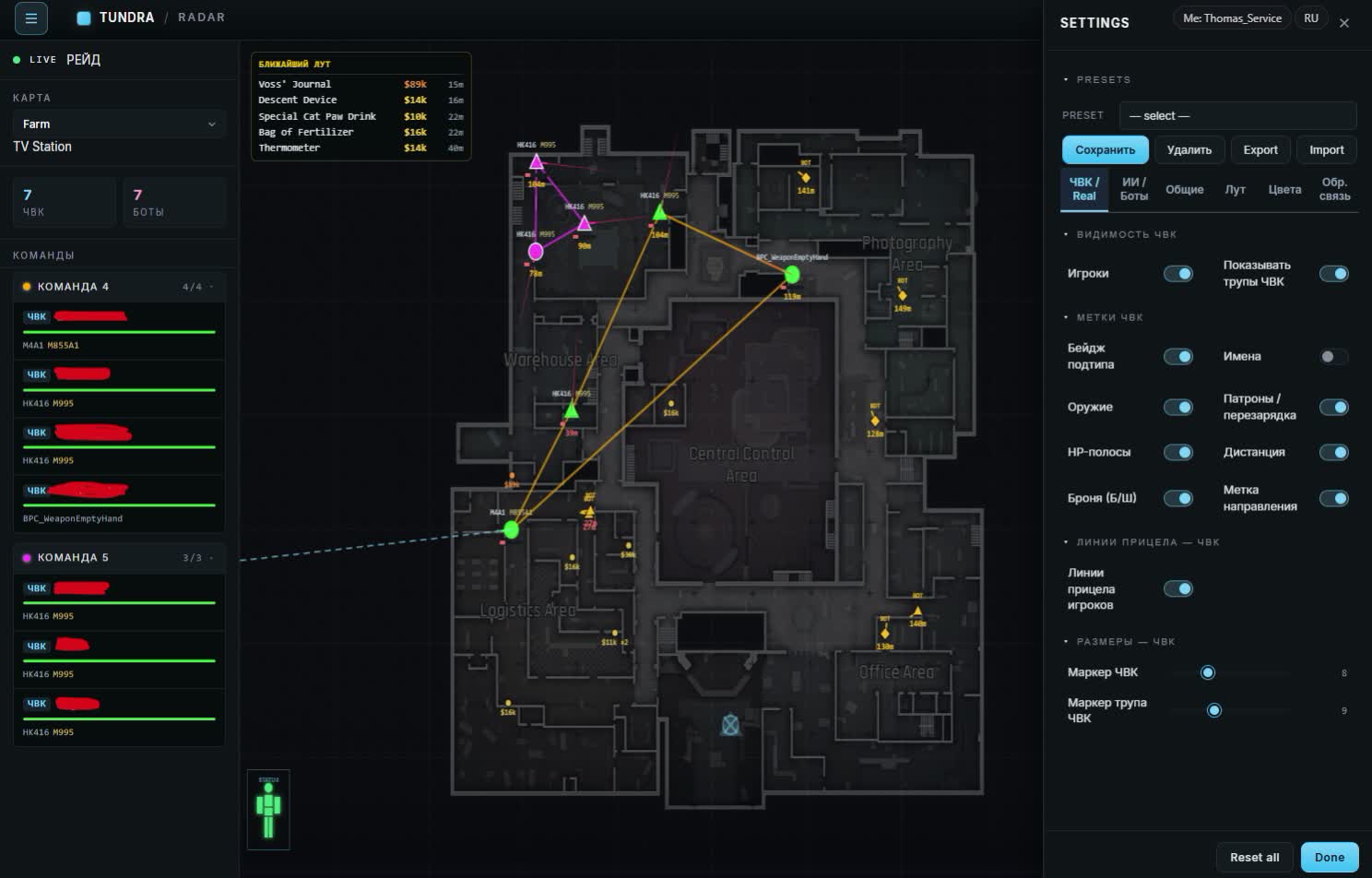
The Lovec web radar for Arena Breakout Infinite opens right in a browser. You log in with your account, your nickname sits in the header, and the map of the location updates as the raid goes on. PMCs and scavs come with HP, weapon and ammo type, armor, helmet and distance, next to them bots, actors, bosses with their entourage and elites. Loot is labeled with a price, and grenades and claymores get their own layer.

The radar lives apart from the game: keep it on a second monitor or on the phone next to your keyboard, and switch the interface between Russian and English on the fly. The map is detected automatically, all six ABI locations are covered, and the TV Station is split by floors. Below we go through players and AI, loot filters, marker colors and presets.

Product features

Players

PMC and scav markers

Every player on the map with nickname, team, level and distance. You read at once who that is and whether it's worth pushing.

Gear on the marker

Weapon with ammo type, armor and helmet. You know what's coming your way before the first shot.

HP silhouette

A silhouette overlay shows how much health a target has left and where it already took hits.

Facing arrow

An arrow by the marker tells you where the enemy is looking. You see whether they clocked you or walked past.

Your own aim line

A separate line from your character so you can check on the map where you're pointing right now.

Movement trail

The trail behind a player: where they came from, where they're headed and whether cutting them off makes sense.

AI and bosses

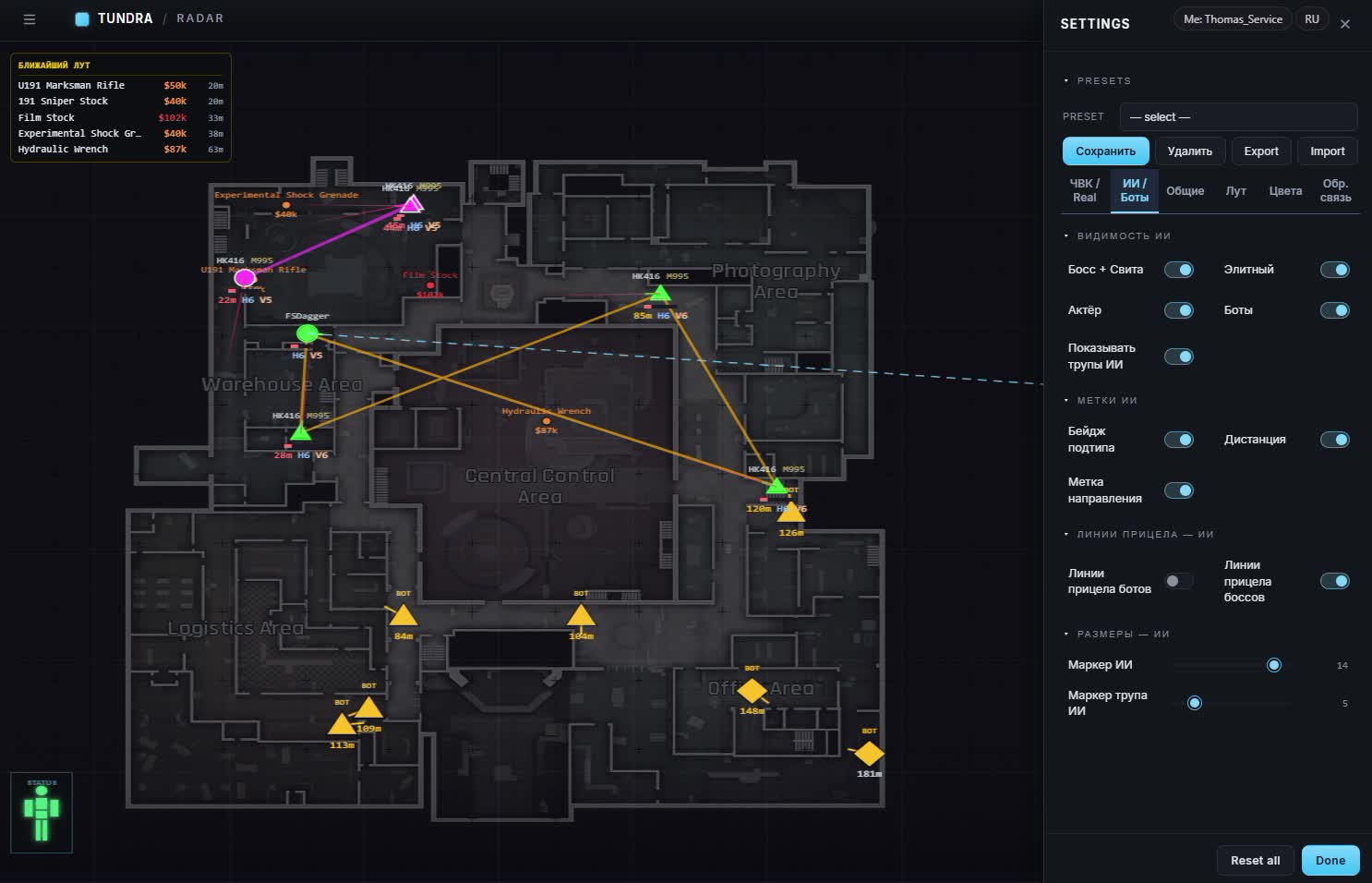
AI toggles

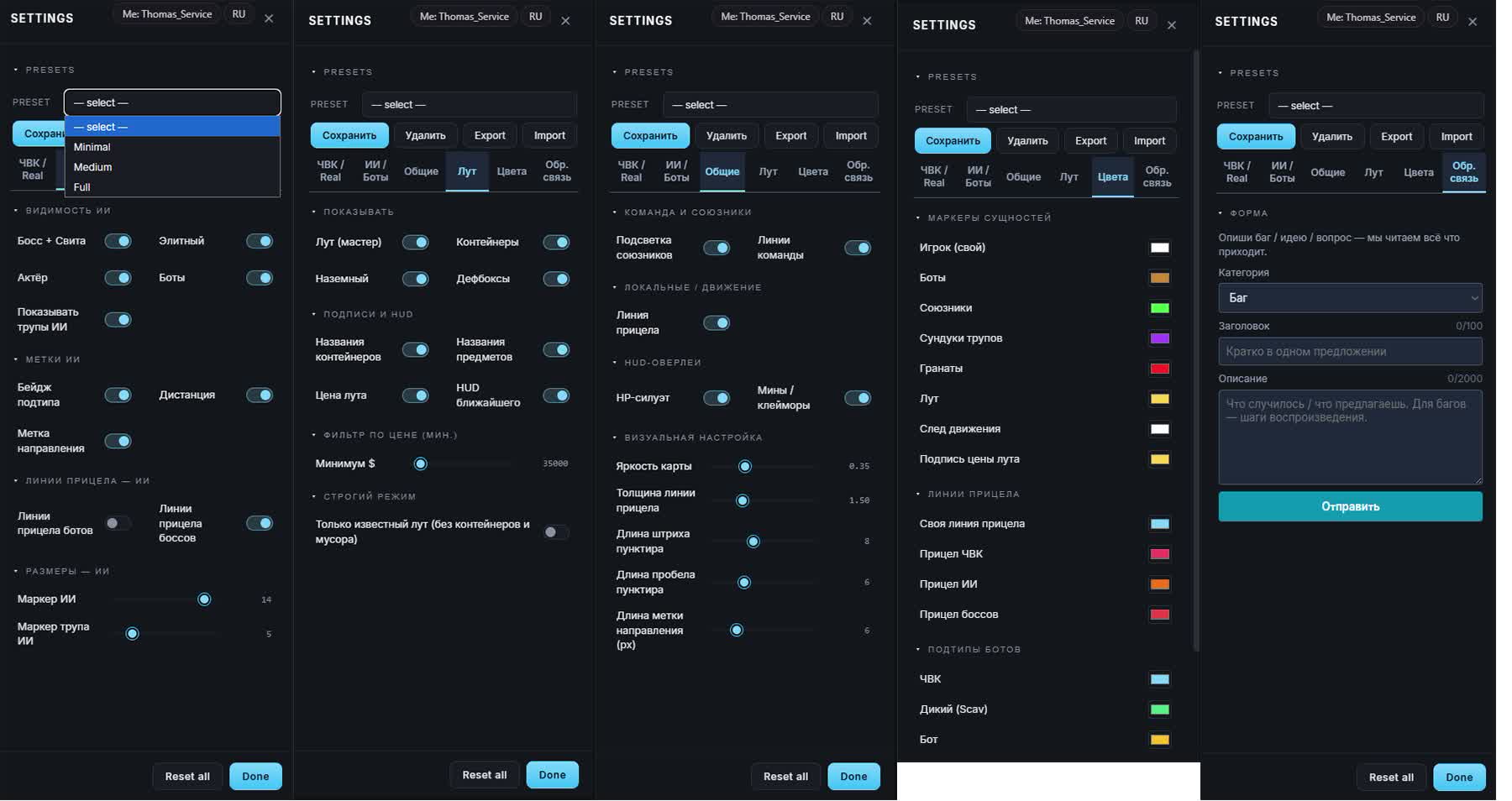
Bots, actors, bosses with their entourage and elites switch on separately. Don't need the small fry, turn it off and watch the dangerous ones.

Subtype badge

Every AI carries a label of what it is, plus distance and a facing arrow.

AI corpses

Dead bots show up apart from players, so you don't mix them with the living.

AI aim lines

Where bosses look and where regular bots look, toggled independently.

Subtype colors

PMC, scav and bot each get their own color, you tell them apart with peripheral vision.

Marker size

Sliders for AI and corpse marker size so a crowded map doesn't turn into mush.

Squad

Teammate highlight

Your own are colored, so you don't shoot a teammate in a messy fight.

Lines between allies

Squad links are drawn as lines: you see who fell behind and who went around.

Loot

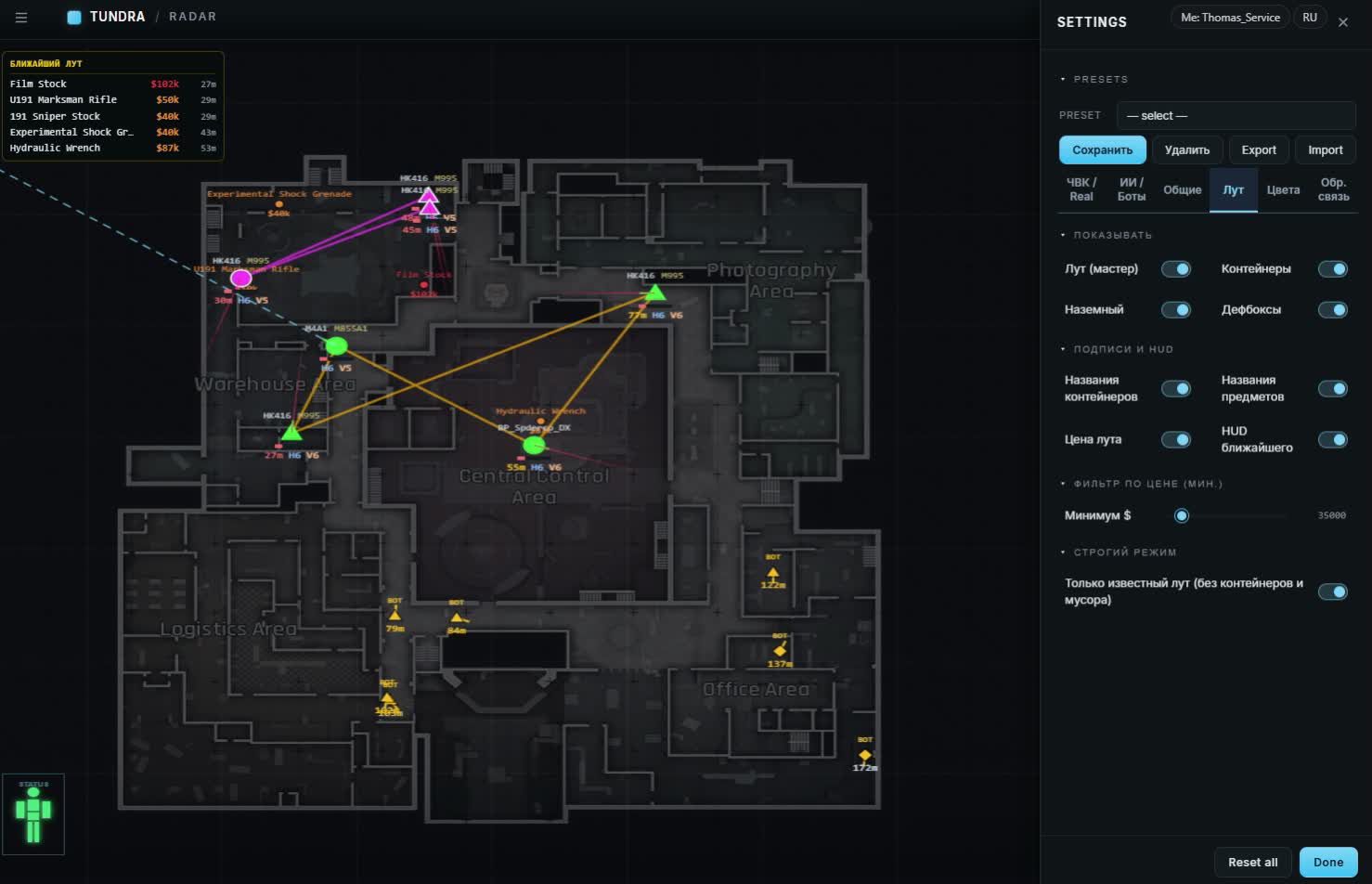
Loot master toggle

One switch kills all loot when you want a clean screen for a fight.

Containers and defboxes

Crates, ground loot and defboxes switch on one by one.

Price filter

A slider plus manual dollar input, 35,000 by default. Cheap junk simply never reaches the map.

Loot labels

Container names, item names and price, each label toggled on its own.

Nearby loot HUD

A panel with the closest haul: what's lying around and what it pays.

Strict mode

Keeps known loot only, without containers and floor junk.

PMC corpse chests

Player bodies with an estimate of what's inside. You decide on the spot whether to loot or move on.

Hazards

Grenades on radar

An incoming grenade is marked on the map, so you step away instead of guessing by sound.

Mines and claymores

Tripwires and mines are visible early, on the way to a point.

Maps

Auto map detection

The radar figures out where you dropped in, no picking the location by hand.

All six locations

Farm, Valley, Northridge, Armory, TV Station and Airport.

TV Station floors

The TV Station is laid out by floors, markers from different levels don't pile up together.

Look and feel

Map brightness

A slider for the underlay to match your lighting and monitor, no glare at night.

Line tuning

Aim line thickness, dash and gap length for the dotted style, and facing marker length.

Marker colors

Your own colors for players, bots, allies, corpse chests, grenades, loot, the movement trail and the price label.

Aim line colors

Four lines are colored separately: yours, PMC, AI and bosses.

Presets and settings

Built-in presets

Minimal, Medium and Full: from an almost empty map to the whole set of markers.

Custom presets

Save your own layout and swap between them in a couple of clicks.

Settings export

Export and Import carry the config between PC and phone, nothing to set up twice.

Reset all

Reset all puts everything back to default if you overdid the tuning.

Mobile and contact

Portrait and landscape

Two phone layouts, panels adapt to the screen width.

Light on traffic

Positions run in real time while the radar barely loads the channel, mobile data is enough.

Feedback form

A bug, an idea or a question goes to the developers straight from the interface: category, title, description.
TARIFFS
400
BUY What happens after payment?
Got a question? Ask before you pay

We'll help you choose and sort out any launch issue. Ask us anything before buying, we're always on your side.

Support 10:00–22:00, sometimes we reply at night too
Ask a question

Available tariffs

1 day
400
START PURCHASE
3 days
800
START PURCHASE
7 days
2000
START PURCHASE
30 days
4000
START PURCHASE
Reviews about Lovec Radar for Arena Breakout Infinite

No reviews yet. Be the first to leave one.

Your review

Reviews are published after moderation.

Join our gaming community chat

Discuss current cheats from developers and how to use them effectively in popular online games. Share tactics, exchange useful info and find like-minded players in our community.

1 900+Members
24/7Online
Join our gaming community chat

Technical support

Run into a technical issue? Our team of experts will help. We handle all requests in a live queue, so please be understanding if it sometimes takes a little wait. We guarantee that no request goes unanswered.

Availabilityfrom 10:00 to 23:00
Fast responseIn queue order
Get help
Technical support
PROCHEAT

PROCHEAT news channel

Follow product status changes, update history and important announcements.

Subscribe

What the Lovec Radar Shows on the Arena Breakout Infinite Map

The radar builds a raid out of several layers, and each one toggles on its own. Here's what lands on the map and why it matters in a fight.

Layer What's on the map What it gives you
Players PMCs and scavs with HP, weapon, armor, helmet and nickname size up an enemy before contact
AI bots, actors, bosses with entourage, elites, bot corpses separate small fry from a real threat
Loot containers, ground loot, defboxes, item prices go for the expensive stuff instead of every crate
Hazards grenades, mines, claymores don't walk into a tripwire on approach
Squad ally highlight and lines between teammates hold formation and never confuse your own
Location all six ABI maps, TV Station by floors the map adapts to the raid on its own

Players, Bots and Bosses on the Map

A player marker in ABI gives you more than a dot. Next to a PMC or a scav you get HP, weapon with ammo type, armor and helmet, nickname, team, level and range to you. That's enough to decide on approach: shotgun and a light plate means he's no match for you at mid range. The facing arrow and movement trail fill in his intentions, and the HP silhouette tells you the target is already beaten up.

AI is split by type: regular bots, actors, bosses with entourage and elites, each with its own toggle and color. Want a clean screen, keep bosses and elites and mute the rest. Bot corpses sit on their own layer, so you tell dead from alive without squinting. Aim lines toggle separately for bosses and ordinary bots, which pays off in the tight TV Station corridors where a boss and his crew hold a hallway.

Loot: Price Filter, Containers and Corpse Chests

Loot decides a raid in ABI, so the filter is the main tool here. Move the price threshold with a slider or type it in dollars by hand, the default is 35,000, and anything cheaper simply isn't drawn. Containers, ground loot and defboxes toggle separately, while strict mode keeps only known items, without crates and junk. Labels are yours to set: sometimes the container name helps, sometimes just the price.

PMC corpse chests are tagged with a rough value of what's inside, so you know whether a body is worth a detour across half the map. The nearby loot HUD keeps whatever is lying around in front of you while you sweep a building. When a fight breaks out, the master toggle kills all loot at once and the map stays clean, players and hazards only.

ABI Maps, Presets and the Phone

The location is detected automatically: drop into Farm and the radar opens Farm. All six maps are covered: Farm, Valley, Northridge, Armory, TV Station and Airport. The TV Station is split by floors, so markers from different levels don't stack on each other. The view adapts to each map: underlay brightness, marker size, aim line thickness, dash length for the dotted style. Colors are configurable for almost everything, from players and allies to grenades, the movement trail and the price label.

You won't be redoing all that every time. There are three built-in presets, Minimal, Medium and Full, plus your own saved layouts on top. Export and Import move settings between devices, so your phone looks exactly like your PC. Got carried away with the sliders, Reset all brings back the default. The mobile version works in portrait and landscape, panels fit themselves to the screen, and the radar is light on traffic, so the map holds together on mobile data.

The Radar and the ACE Anti-Cheat

Arena Breakout Infinite is covered by the ACE anti-cheat, and that's worth keeping in mind. A web radar is built differently from an overlay on top of the game: the map sits in a separate tab and nothing is drawn on the game screen, so screen sharing and streaming stay clean. Lovec ships updates right after ABI patches, and the software goes on freeze while the work is done so nobody gets burned.

The rest depends on how you play. If every raid you run straight at an enemy squad across half the map and open chests without a single miss, it shows without any footage. Live players will start asking questions before the anti-cheat does. A calm account with a radar lasts a lot longer.

How to Buy the Lovec Radar for Arena Breakout Infinite

Terms and prices are listed in the tariff block on this page: take a short one just to see how it looks on your own map, or a longer one if you farm ABI regularly. After payment the key and the radar link arrive at the email you entered at checkout. There's no account area on the site, mail is the only channel, so check the address before you pay.

Look at the status on the card before buying. If the product is frozen after an ABI patch you won't get in right now, but your paid days aren't spent during that time. Any questions left about launching, the account or the mobile version, message support before paying, they'll answer faster than you'll dig it up yourself.

FAQ

What do I need to run the radar?

A browser and an account. The radar opens as a page on a PC or a phone, with nothing to install. The owner's nickname shows in the header and access is tied to your account.

Is there an aimbot here?

No. This is a radar: the map, players, AI, loot and hazards. The shooting is entirely on you, there's no auto-aim in the software.

Which Arena Breakout Infinite maps are supported?

All six: Farm, Valley, Northridge, Armory, TV Station and Airport. The TV Station is split by floors, and the right map is detected automatically when you enter a raid.

Can I watch the radar on a phone?

Yes, there are portrait and landscape layouts with adaptive panels. The radar is light on traffic, so mobile data is usually enough.

How does the loot filter work?

Set the price threshold with a slider or type the amount in dollars, the default is 35,000. Items below the threshold aren't shown, and strict mode also drops containers and junk.

Does it show grenades and mines?

Yes, grenades and claymores get their own layer on the map. You spot a tripwire on approach instead of after you step on it.

What happens to my subscription after an ABI patch?

While Lovec adjusts the radar to the update, time is frozen and paid days don't burn. The countdown resumes after the fix.

Where do I get the key and the radar link?

Both come by email after payment, to the address you enter at checkout. There's no account area on the site, so check your inbox, spam folder included.

Ask a question


