Lovec Browser Radar for Escape From Tarkov

Working
Lovec Lovec
Last update 16.07.2026 This date shows when the software was last updated. An old date doesn't mean the software stopped working! Most likely the developer just had nothing new to add. If you have any doubts, you can always check the current status with our support team.
Add another cheat from this game too — to compare them.
Lovec Radar for Escape From Tarkov
BSG Launcher
Steam
Windows support: 10: all builds; 11: all builds
Menu language: English, Russian
Spoofer:No
USB drive:Yes
BIOS:No

User information

The main difference from a regular cheat: there's nothing to inject into the game. Lovec opens as an ordinary page in a browser, so you don't need a beefy rig, whatever already runs Tarkov is enough. A current Windows 10 or 11 and a modern browser will do, and the interface switches between English and Russian right inside the radar window.

It works as two roles: a collector runs the data feed, and you watch the map on your side, including on a phone or a second monitor. Playing with teammates? Send them a session link and everyone sees the same map with their own filters. The key arrives at the email you enter at checkout, there's no account on the site, so type the address without mistakes. If the software goes down for an update after a BSG patch, your subscription days freeze until the fix and nothing burns. Something won't connect? Message support.

SCREENSHOTS
Description

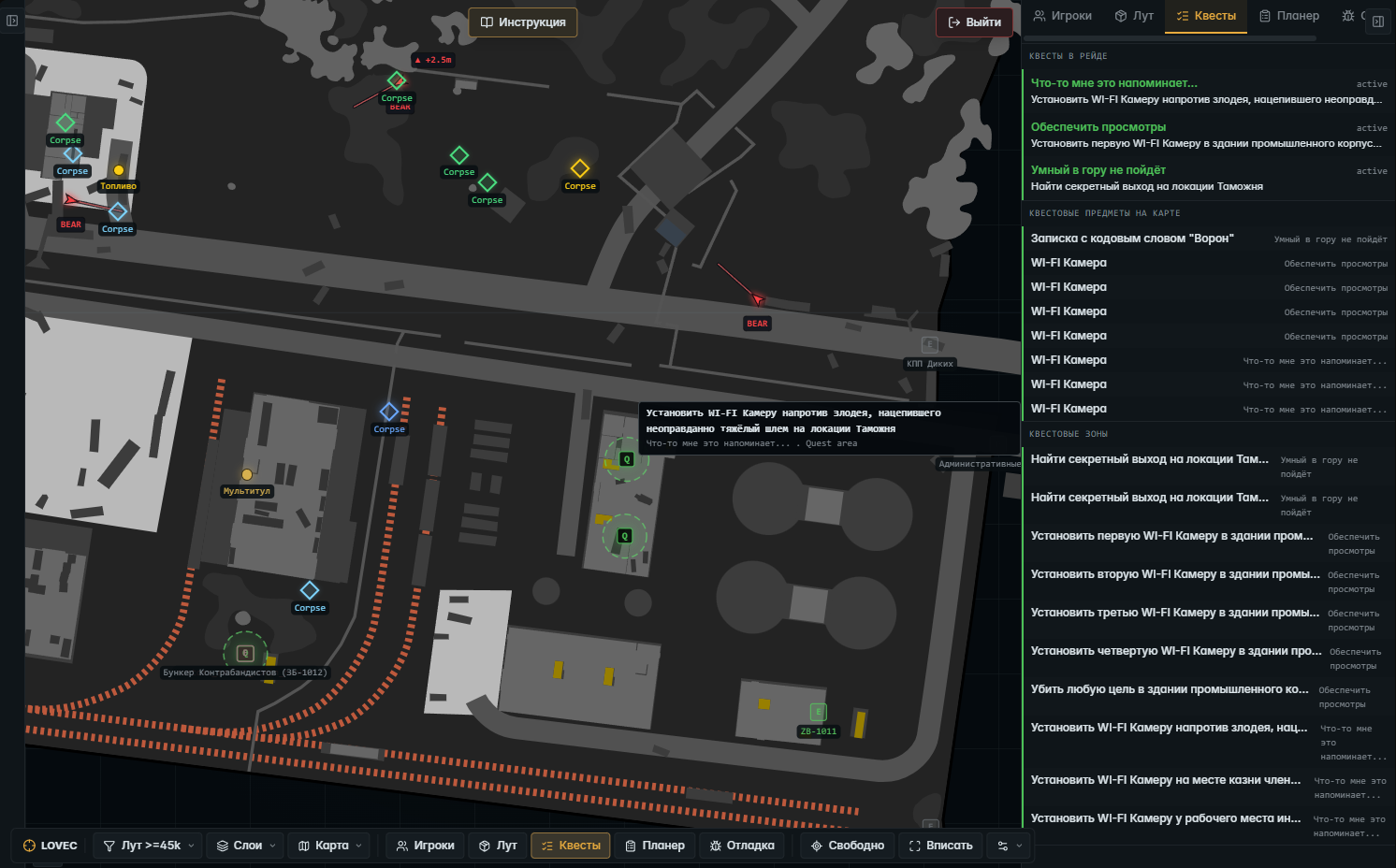
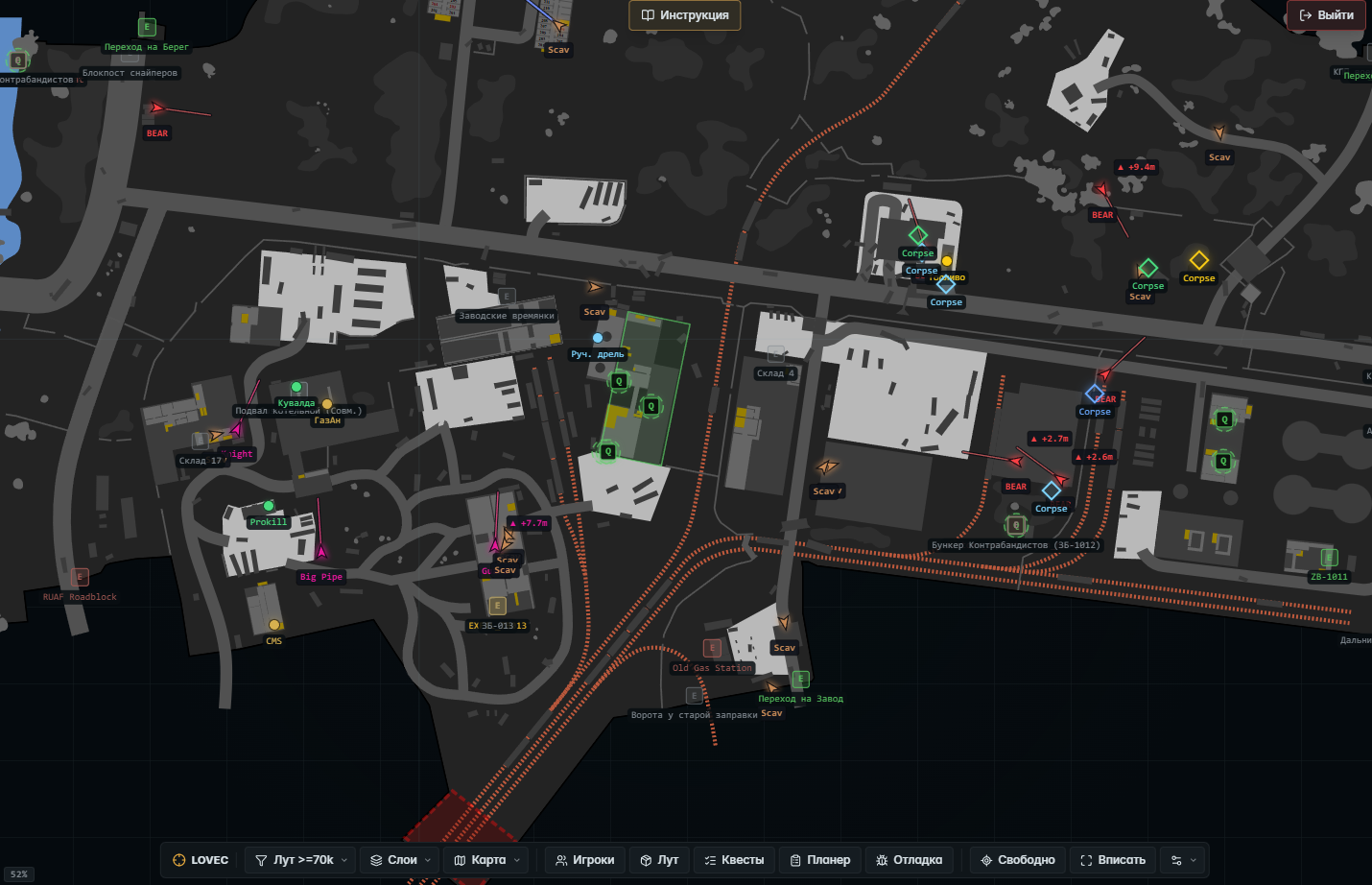
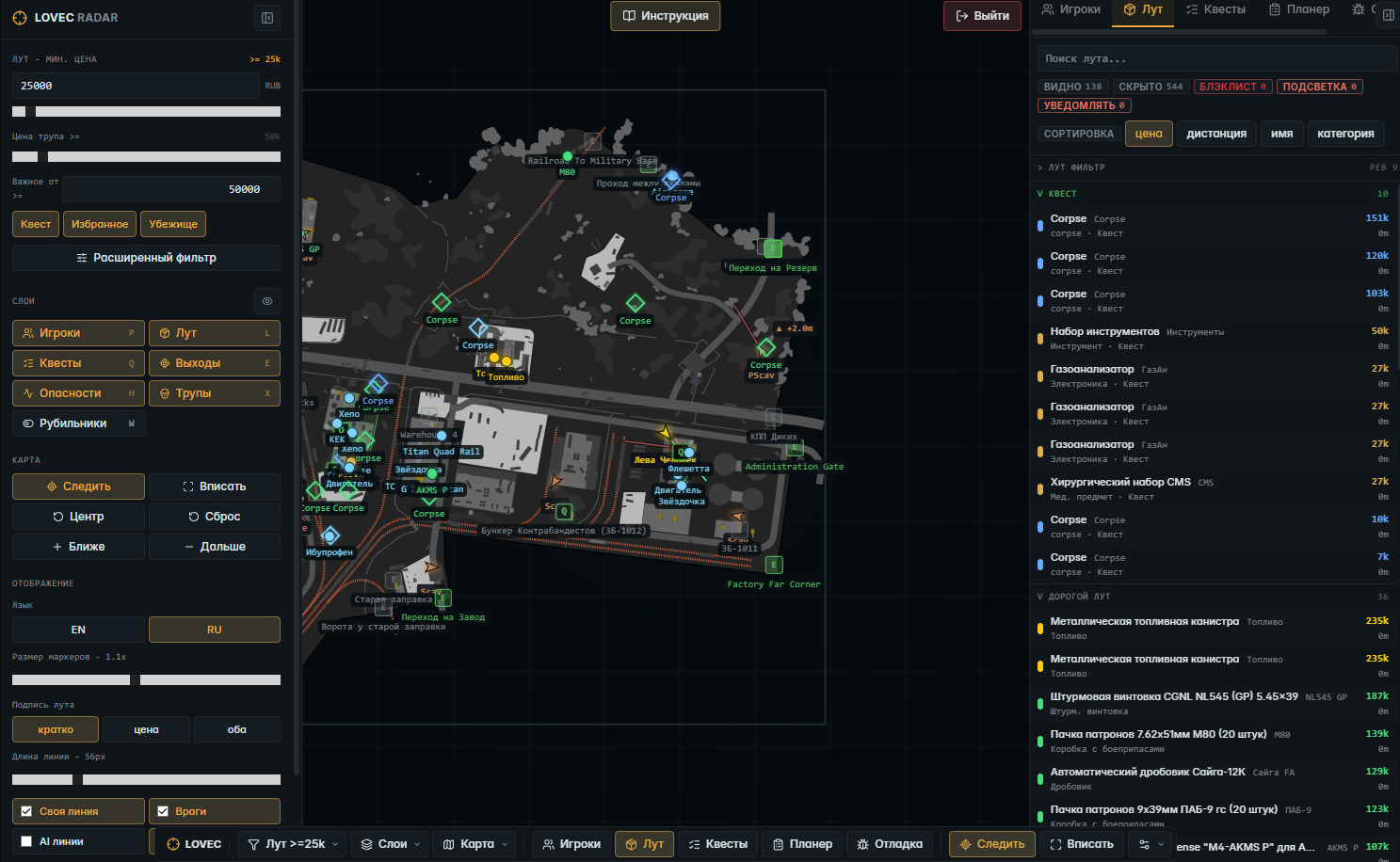
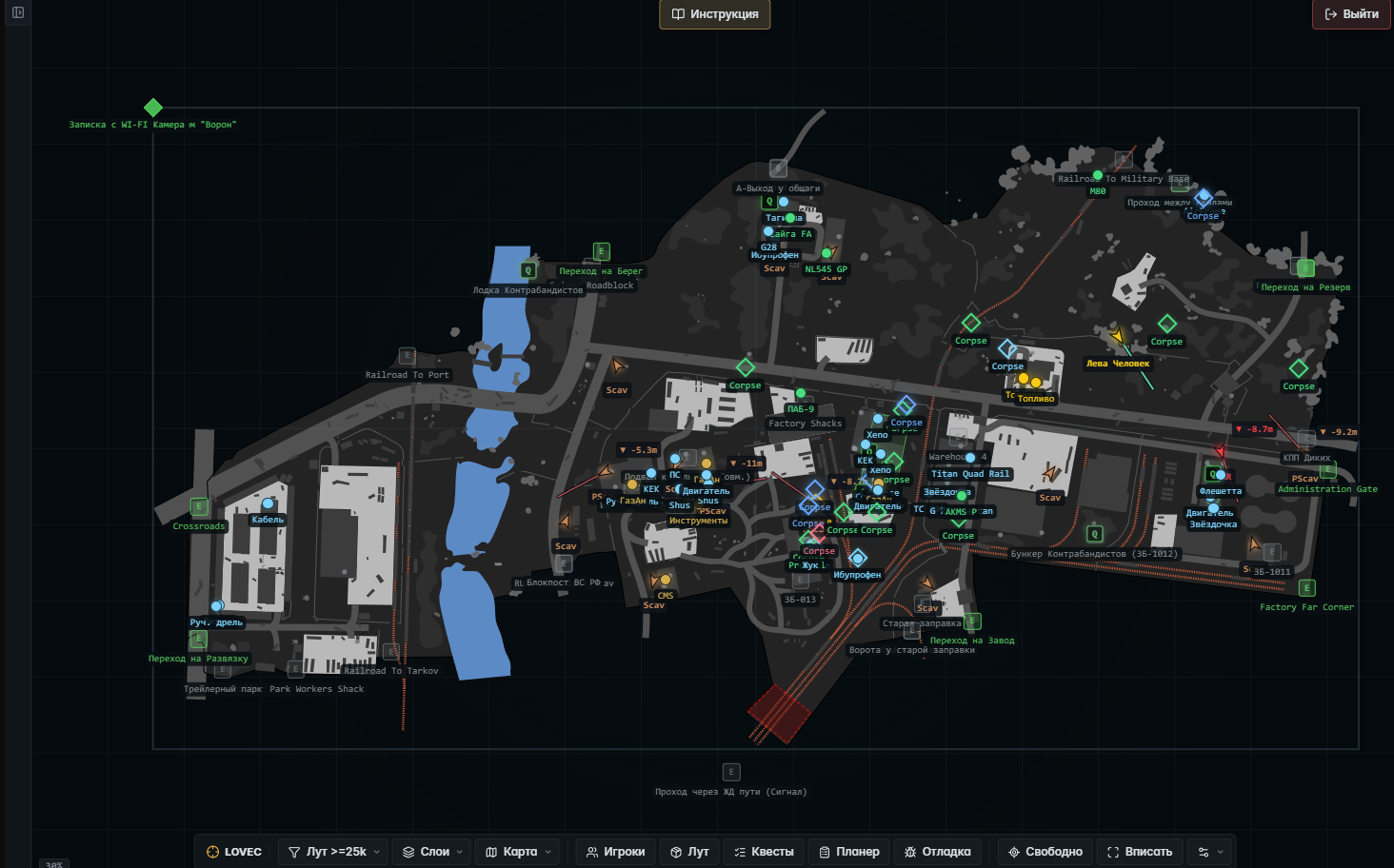
Lovec for Escape From Tarkov is a browser radar: a live 2D raid map you open in a browser, not on top of the game. It shows players, loot, quests, exfils and map objects in real time. PMCs, scavs, bosses and AI, each with its own marker, with direction arrows and aim lines, plus a player list sorted by threat.

The radar pulls its data through a collector, and you can watch the map alone or as a squad: share a session link and a teammate opens the same radar on their side. Since it all lives in the browser, nothing is drawn on the game itself, so your screen stays clean on stream and in recordings. Below we break down the map, loot and quests, exfils and shared viewing.

Product features

Map and view

Live raid map

The location in real time: players, loot, quests and objects update as the raid goes on.

Multi-floor layers

Multi-floor shows the right floor or layer by height on its own. On Reserve and Labs it's a lifesaver.

Height markers

A hint whether a player, loot or object is above, below or on your level.

Follow mode

The map stays on your PMC or a chosen target, no dragging it around by hand.

Free camera

Drag the map with the mouse and zoom with the wheel when you want a look at a far corner.

Fit and center

One button fits the map to the screen, another snaps the camera back to your character.

Focus mode

A compact view with no side panels, just the map.

Players and combat

Player markers

Local player, teammates, PMCs, scavs and AI, each in its own color.

Bosses and raiders

Dangerous NPCs are flagged separately, you spot bosses at once.

Direction arrows

Where a player looks and where they run, shown by an arrow.

Aim lines

Aim lines for you, enemies and AI, so you read intentions on the approach.

High alert

High alert lights up when an enemy is looking your way.

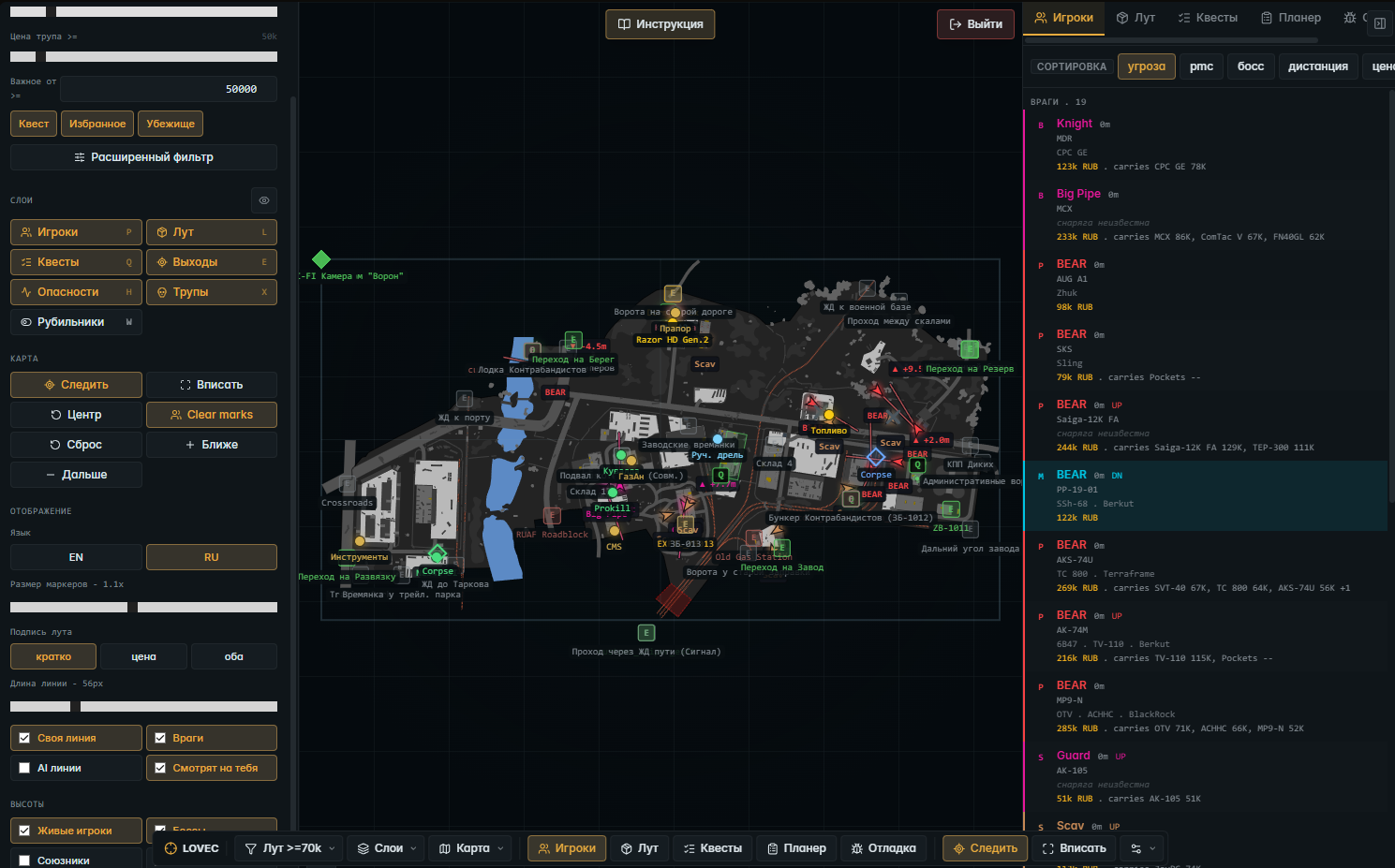
Player list

A panel sorted by threat, PMC, boss, distance, value and name.

Player marking

A click colors a player, a double click makes them your follow target.

Streamer highlight

A watchlist by account ID: a separate color and name for the players you pick.

Corpse markers

Downed players and valuable corpses stay on the map.

Loot and containers

Loot markers

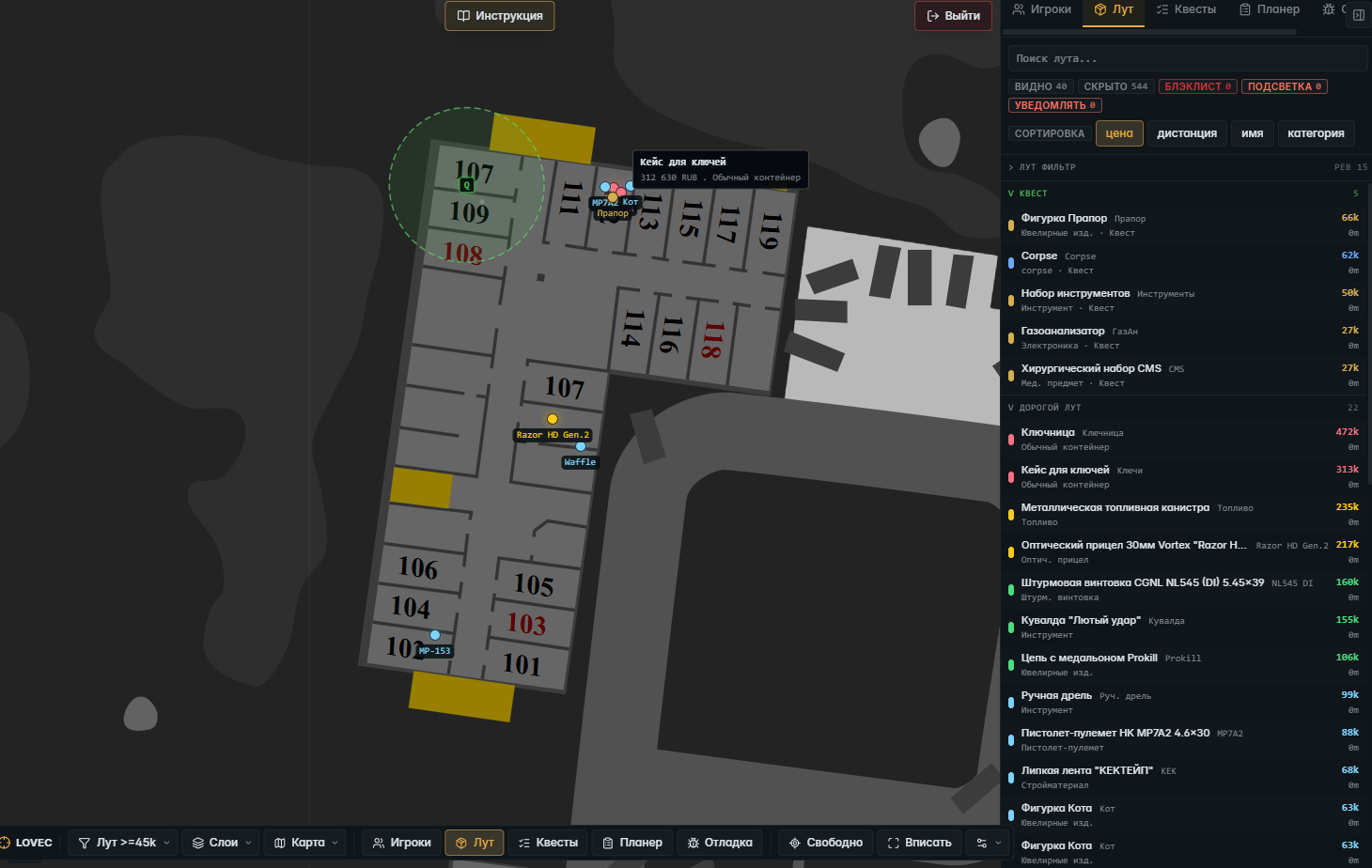
Items on the map by price, category and importance.

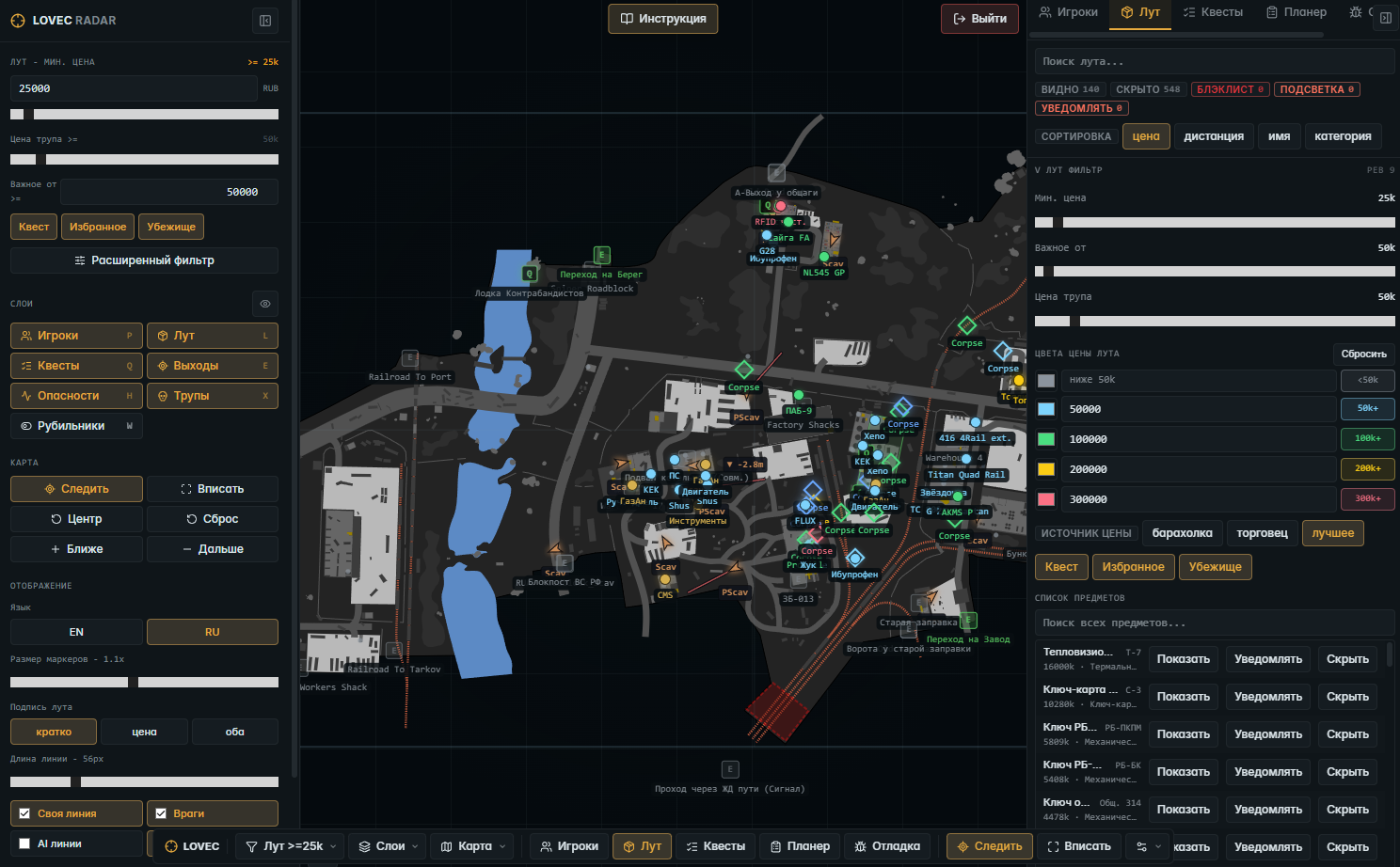
Loot filter

Set a minimum price, important loot, quest items, wishlist and hideout items.

Price source

Filter by flea, trader or the best available price.

Loot labels

Short name, price, or name together with price, your call.

Value colors

Your own colors per price tier, the expensive stuff reads from far away.

Custom item rules

Per item, set show, notify or hide separately.

Container list

Search the containers and choose which crates to show or hide.

Container colors

A separate marker color for the containers you pick.

Corpse loot value

Its own threshold for showing loot on corpses.

Loot panel

Lists: custom highlighted, quest, important, high value, containers and corpse loot.

Quests and objectives

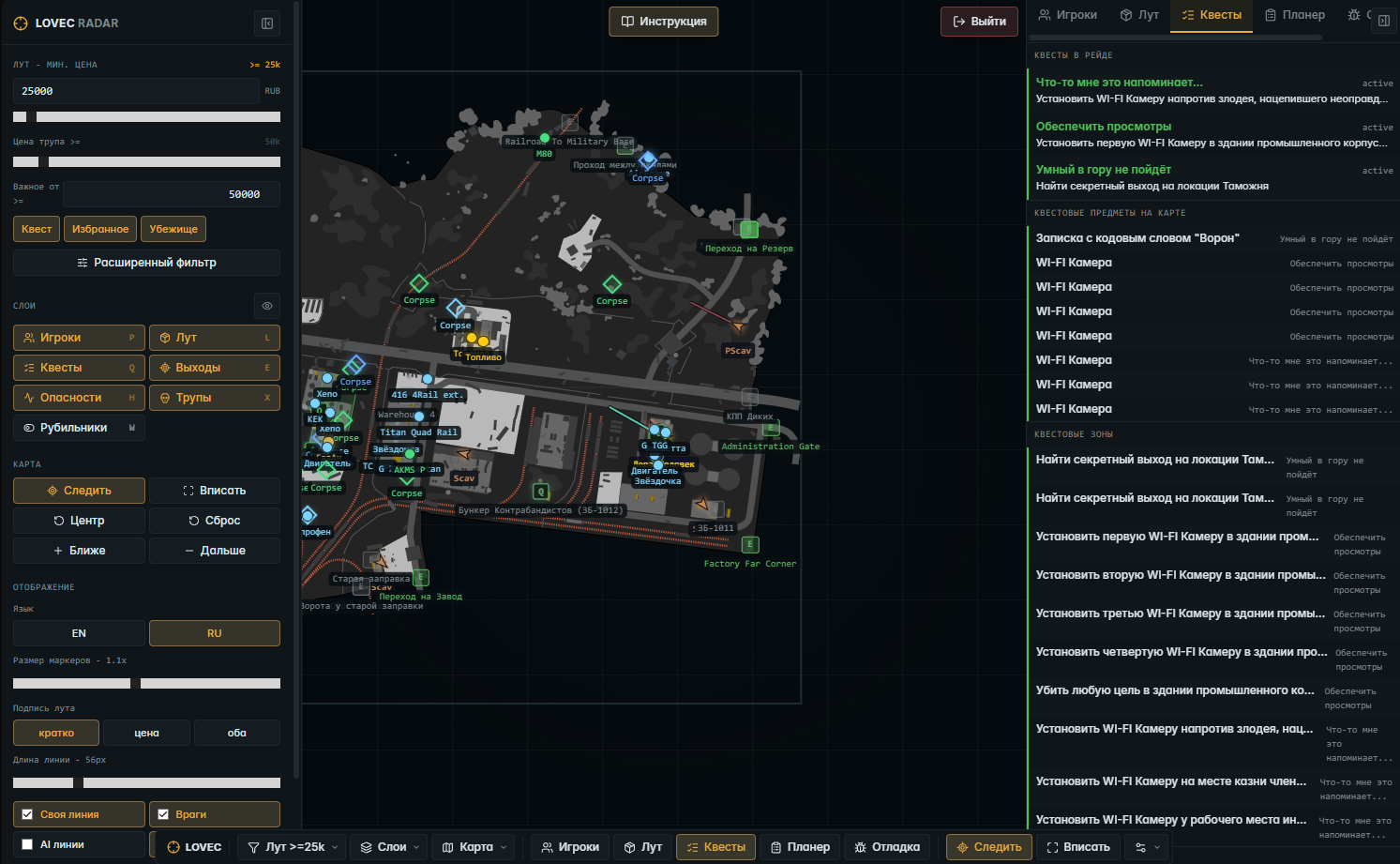
Active tasks

The current tasks that matter for this raid and map.

Quest items

The items you need for quests marked on the map.

Quest zones

Zones, points and areas where quests are completed.

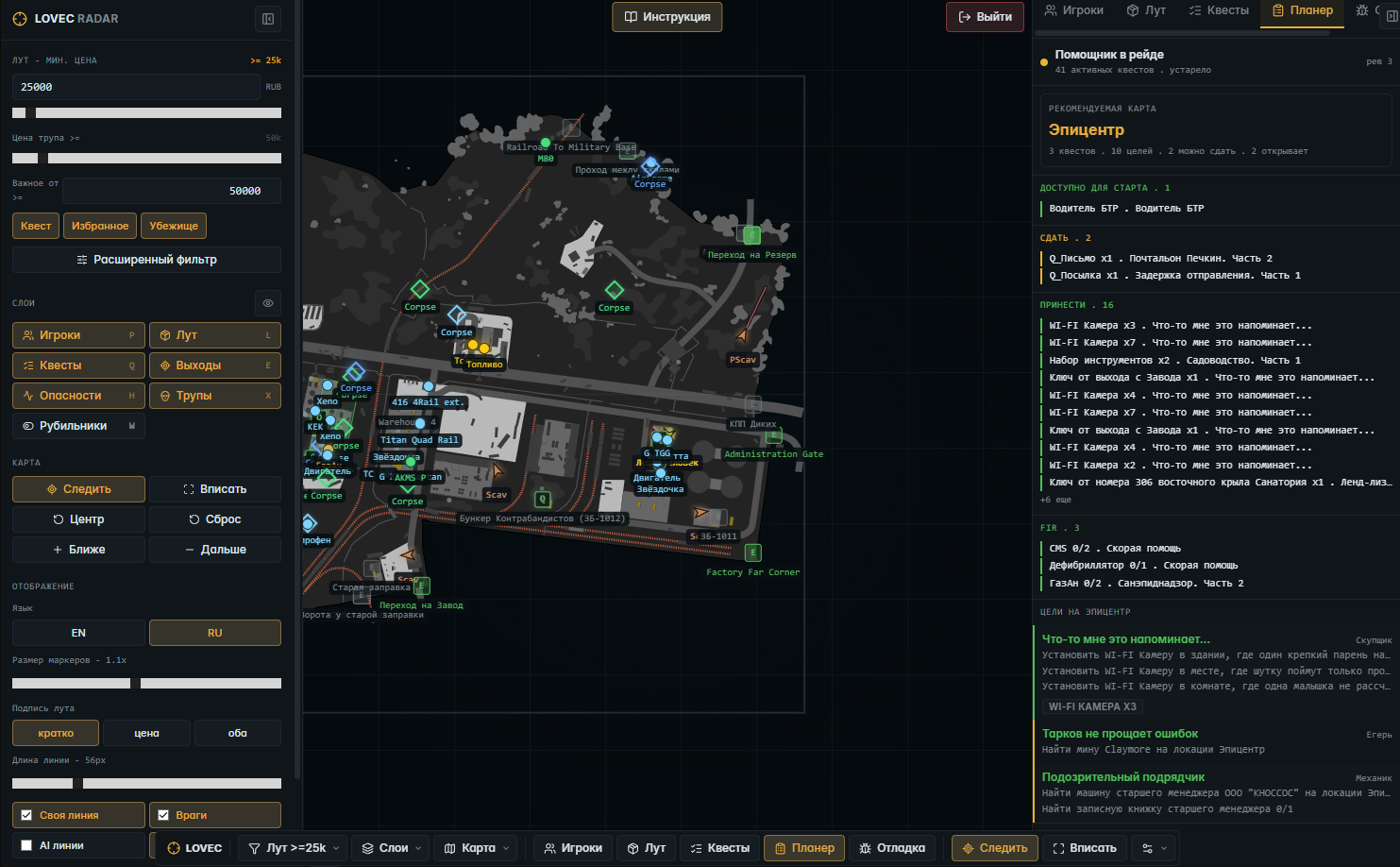
Quest planner

Hints on maps, what to hand in, bring and FIR, and which quests you can close.

Quest progress

Needed tasks and items in short, without the extra technical noise.

Exfils and map objects

Exfil markers

Exfils with open, conditional, closed, inactive and transit states.

Switches

Important levers and switches on the map.

Hazards

Grenades and traps when that data is in frame.

Overlay toggles

Flip players, loot, quests, exfils, hazards, corpses and switches on and off fast.

Sessions and viewing

Session link

Give a friend the link and they open the same radar in a browser.

Viewer login

Connect by the nickname the collector created.

Logout button

A separate logout from the current session.

Personal settings

Each viewer's filters and view are their own, stored locally, no stepping on each other.

Follow another player

A viewer can watch the map relative to a different player.

Display and usability

Interface language

English and Russian to choose from.

Marker size

Control the size and density of the markers.

Collapsible panels

Side panels tuck away when they get in the way.

Searchable lists

Search across loot, items and containers.

Compact mode

A denser interface.

Built-in instructions

A short help window right over the map.
TARIFFS
400
BUY What happens after payment?
Got a question? Ask before you pay

We'll help you choose and sort out any launch issue. Ask us anything before buying, we're always on your side.

Support 10:00–22:00, sometimes we reply at night too
Ask a question

Available tariffs

1 day
400
START PURCHASE
3 days
1000
START PURCHASE
7 days
2000
START PURCHASE
30 days
4000
START PURCHASE
Reviews about Lovec Radar for Escape From Tarkov

No reviews yet. Be the first to leave one.

Your review

Reviews are published after moderation.

Join our gaming community chat

Discuss current cheats from developers and how to use them effectively in popular online games. Share tactics, exchange useful info and find like-minded players in our community.

1 900+Members
24/7Online
Join our gaming community chat

Technical support

Run into a technical issue? Our team of experts will help. We handle all requests in a live queue, so please be understanding if it sometimes takes a little wait. We guarantee that no request goes unanswered.

Availabilityfrom 10:00 to 23:00
Fast responseIn queue order
Get help
Technical support
PROCHEAT

PROCHEAT news channel

Follow product status changes, update history and important announcements.

Subscribe

What the Lovec Radar Shows in a Tarkov Raid

The radar covers the whole raid at a glance, not one feature at a time. What you see and why it matters is in the table.

Layer What you see Why it matters
Players PMCs, scavs, bosses, AI, view arrows you know who's near and where they look
Loot items with price, flea and trader filter head straight for the valuable and needed
Quests tasks, items, zones, planner close quests without guides
Exfils exfils with open, closed, transit states spot a working exit early
Shared viewing a session link for teammates the whole squad watches one map
Stream everything runs in the browser nothing is drawn on the game screen

The Map, Players and What's Going On in the Raid

The radar draws the location from above and fills it with live markers. Players are split by type: your character, teammates, PMCs, scavs, bosses and raiders, each in its own color, so you tell a real enemy from AI instantly. Arrows show facing and movement, while aim lines and High alert warn you when someone has turned your way, before you ever meet point-blank.

The player list is easy to steer mid-fight: sort by threat, distance or value, color-mark with one click, and a double click pins the camera to a player and holds the map relative to them. On multi-floor locations like Reserve and Labs the map switches layer by height on its own, and height markers tell you who's above you and who's a floor below.

Loot and Quests: Filters, Prices and the Planner

Loot on the map is sorted by meaning, not dumped in a pile. Set a minimum price, turn on important, quest, wishlist or hideout items, and pick the price source yourself: flea, trader or the best available. Colors per price tier make the expensive stuff stand out from far away, and custom item rules let you set show, notify or hide for a specific item. Corpse loot and container lists tune separately: search for a crate and keep only that one on the map.

For quests the radar works like a built-in guide. Active tasks are pulled for the current map, the items and zones you need are marked, and the planner tells you what to hand in, where to look and what to bring with the FIR tag. Progress is shown in short, without a wall of technical data, so you see the point: what's left before turn-in.

Exfils, Sessions and Shared Viewing

Exfils are marked with states: open, conditional, closed, inactive and transit, so you don't run to a shut exit in the last minutes. Alongside them are switch markers and, when that data is in frame, hazards like grenades and traps. Overlay toggles flip on and off on the fly: don't need loot, hide loot, keep players and exits.

You can watch the radar in a pair or a full squad. The collector creates a session, you hand a teammate the link or they log in by nickname, and everyone sees one map. Yet each person's filters and view are their own, local in the browser, nobody knocks anybody's settings around. A viewer can even follow the map relative to a different player. And since it's all open in a browser, nothing shows up on the game screen, clean for stream and recording.

The Radar and BattlEye: What to Keep in Mind

Escape From Tarkov runs BattlEye, and that's worth keeping in mind. Lovec is built as a browser radar: the map opens as a separate page and draws nothing on the game client. That's exactly why it's handy for streaming and screen sharing, it isn't in the game frame.

As with any third-party software for Tarkov, the risk comes not only from the tool but from how you carry yourself in a raid. Don't play all-knowing out in the open: if you run dead straight at every player or every expensive piece of loot, it shows without any footage. Check the current status and supported build on the product card, and support handles launch questions.

How to Buy the Lovec Radar for Escape From Tarkov

The card lists four terms: 1, 3, 7 and 30 days, prices in rubles. Take a day to try it or a month if you farm Tarkov regularly, pay however suits you, and the access with a key arrives at the email you entered at checkout. There's no account on the site, everything goes by mail, so check the address first.

Before paying, look at the status on the card: if the software went down for an update after a BSG patch, the subscription time is frozen and paid days don't burn, but you won't get in right now. Unsure about the build or connecting? Ask support before buying, it's faster than sorting it out yourself.

FAQ

What is a browser radar and how is it different from a regular cheat?

It's a live 2D raid map you open in a browser, not on top of the game. Nothing is drawn on the game screen, which is why it's handy for streaming. There's no aim or overlay in the game frame here, the whole point is the map with players, loot and quests.

What do I need to run it?

A collector runs the data feed, and you open the map in a browser, even on a phone or a second monitor. No separate beefy rig required. The interface is in Russian and English, and the key arrives by email after payment.

Can two people or a squad watch the radar?

Yes. Give a teammate the session link or they log in by nickname, and everyone sees one map. Each person's filters and view are their own and don't interfere.

Will I get banned for the radar?

Tarkov runs BattlEye, which you should factor in. The radar itself works in a browser and draws nothing on the game client. The risk depends more on how you behave in a raid than on the map: don't run openly and dead straight at everyone.

Does the radar show bosses, quests and loot prices?

Yes. Bosses and raiders are flagged separately, quest items and zones are marked, and loot is sorted by price with a source choice: flea or trader.

Where does access arrive after payment?

At the email you entered at checkout, together with the key. There's no account on the site, so mail is the only channel, so check the address.

What happens to my subscription after a game patch?

If the software goes down for an update after a BSG patch, the time is frozen and returned after the fix. Your paid days aren't lost.

Ask a question


