Tundra Web Radar for Arena Breakout Infinite

Working
T Tundra
Last update 21.09.2026 This date shows when the software was last updated. An old date doesn't mean the software stopped working! Most likely the developer just had nothing new to add. If you have any doubts, you can always check the current status with our support team.
Add another cheat from this game too — to compare them.
Tundra Web Radar
Steam
Windows support: 10: all builds; 11: all builds
Menu language: Russian, English
Spoofer:No
USB drive:No
BIOS:No

User information

What you need: the PC version of Arena Breakout Infinite on Steam, Windows 10 or 11 for the loader, and any current browser wherever the map will be open. Any phone works, the map has a portrait and a landscape layout and uses very little data, so mobile internet is fine.

Antivirus and Windows Defender dislike the loader: the file can get wiped right after download. Before launching, add it to exclusions or switch protection off for a while, otherwise there is nowhere to enter the key.

The key and the radar link come by email to the address from your payment, there is no account area on the site. If Tundra goes down for an update after an ABI patch, your subscription days pause for that time.

VIDEO
SCREENSHOTS
Description

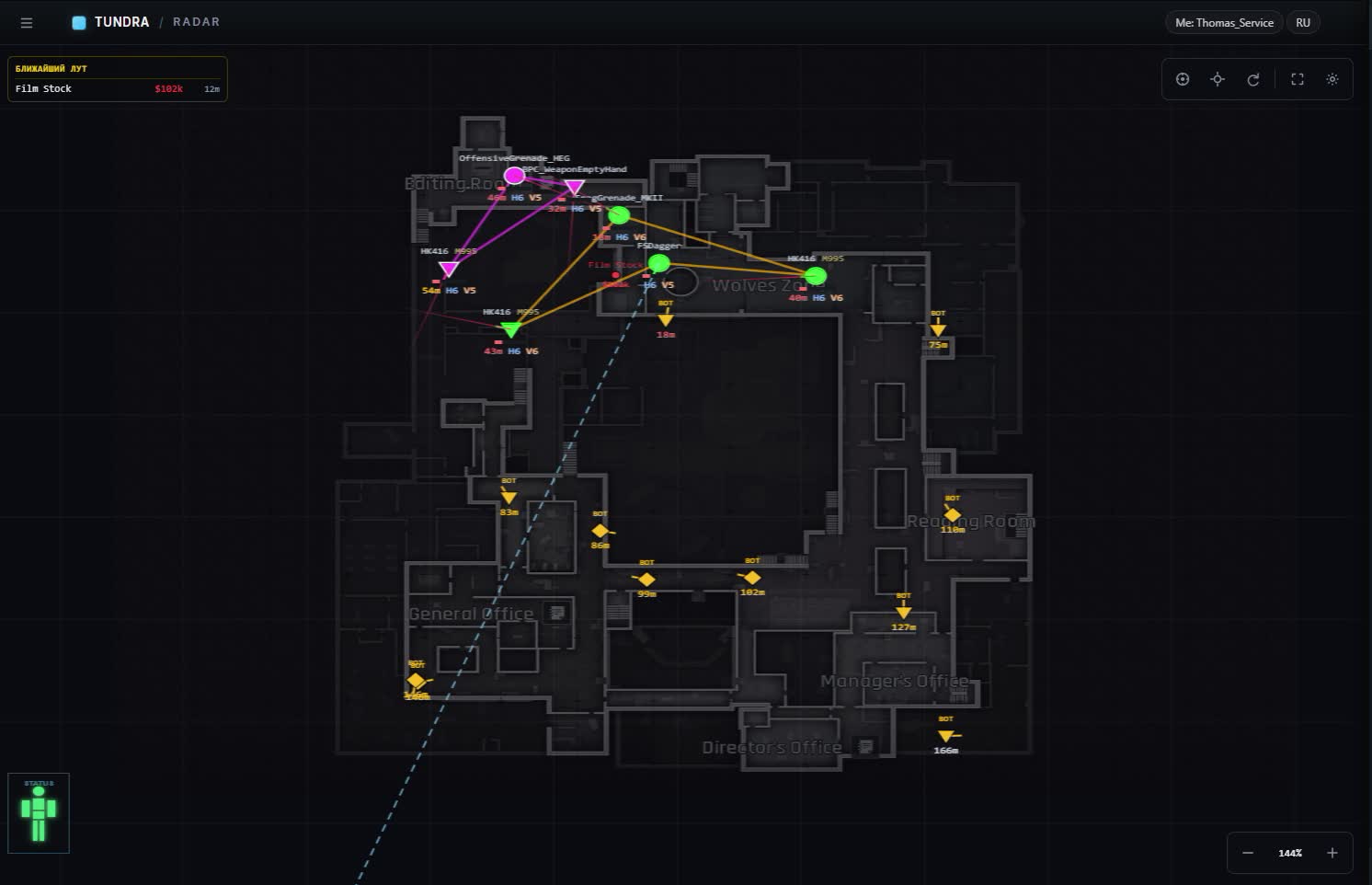
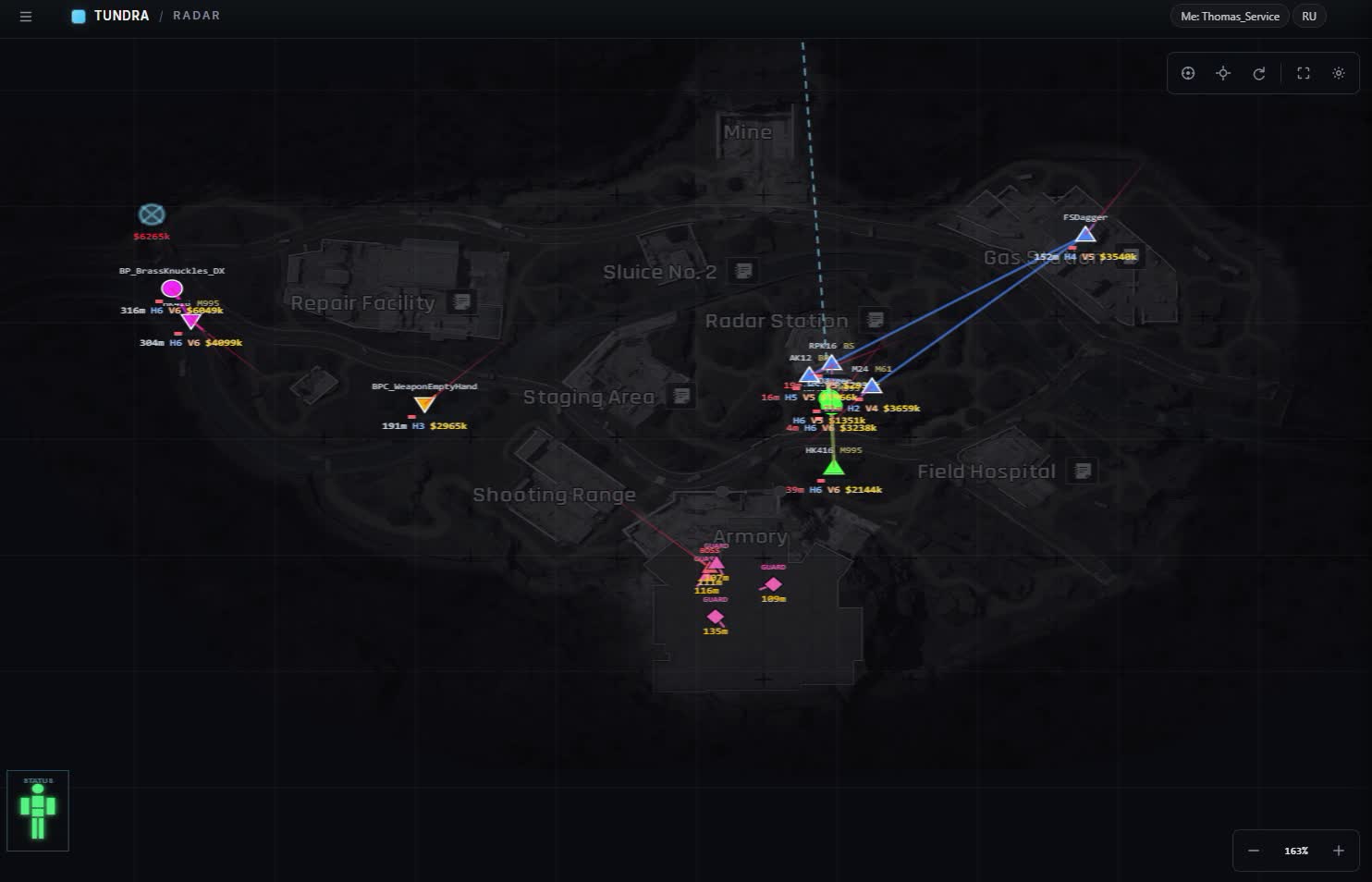
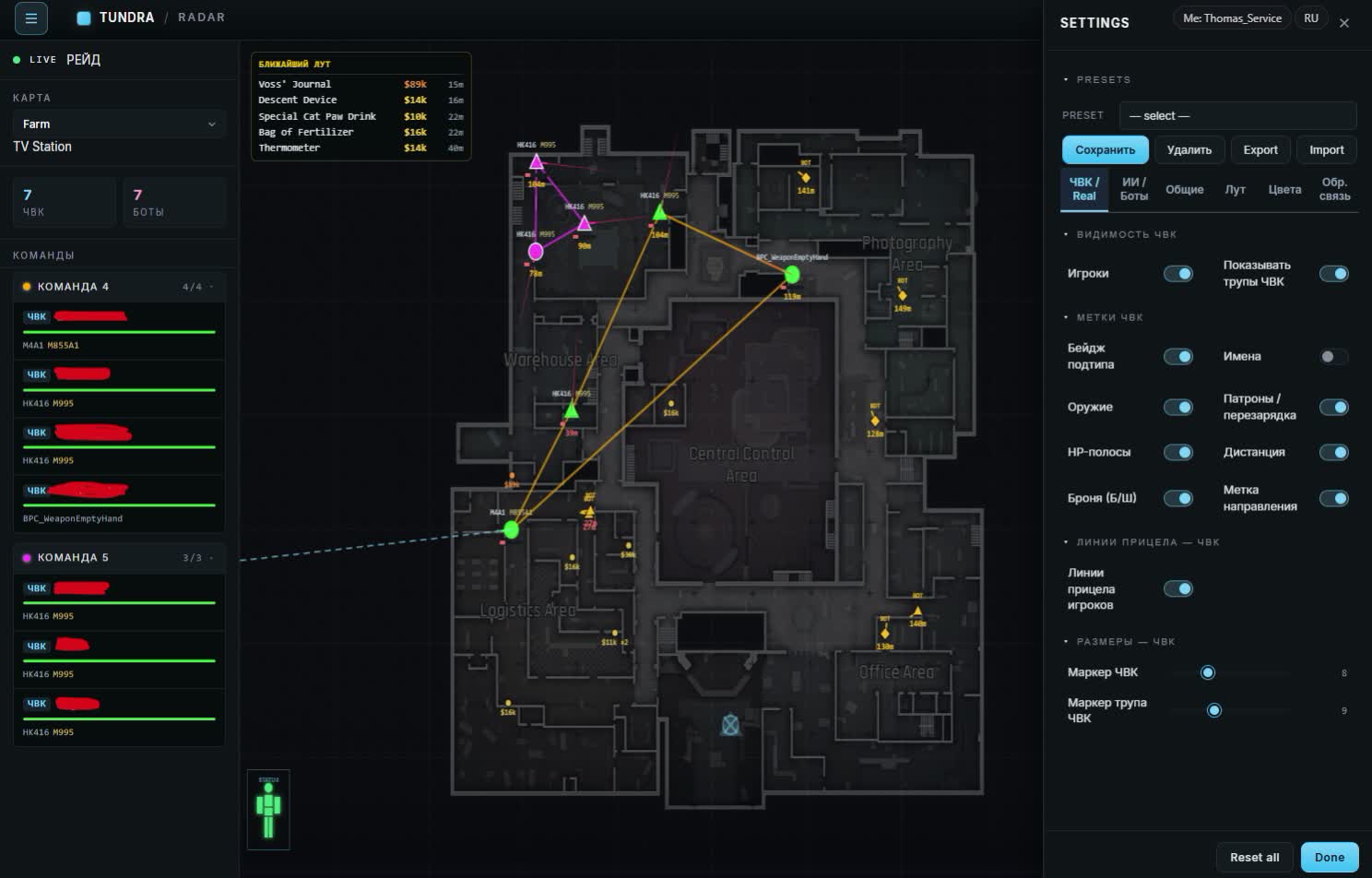
Tundra Web Radar is the ABI radar people keep asking about in Arena Breakout Infinite chats. The raid map lives in a browser: open the link on a second monitor or on your phone, load into a raid, and the map fills with PMCs showing health and weapon, scavs, bosses with their guards, crates with a price tag and the grenade already flying your way. Nothing is drawn over the game, the screen stays exactly what your stream sees.

Only a small loader goes on the gaming PC. It reads the match state and hands it to the map. Inside you get all six ABI locations, TV Station with floors, three ready presets and a Russian/English switch on one button. Below: how to launch it, the usual reasons it won't start, what shows up on the map and what it costs.

Product features

Player markers

PMCs and scavs

A dot on the map with nickname, squad, level and meters to the target. In a couple of seconds you know who is around the corner.

Weapon, armor, helmet

The label shows the gun with its ammo type and the armor class. A shotgun in light armor at eighty meters is no threat, you walk around it.

Target health

A silhouette with remaining HP and damage already taken. You finish the wounded one and leave the healthy one alone.

Look direction

An arrow on every marker. You can tell whether someone has their back to you or has already turned.

Your aim line

A segment from your own marker to check on the map that you are facing the right way.

Movement trail

A trail behind each player: where they came from and where they are running. You intercept on the road instead of chasing.

Bots and bosses

Separate toggles

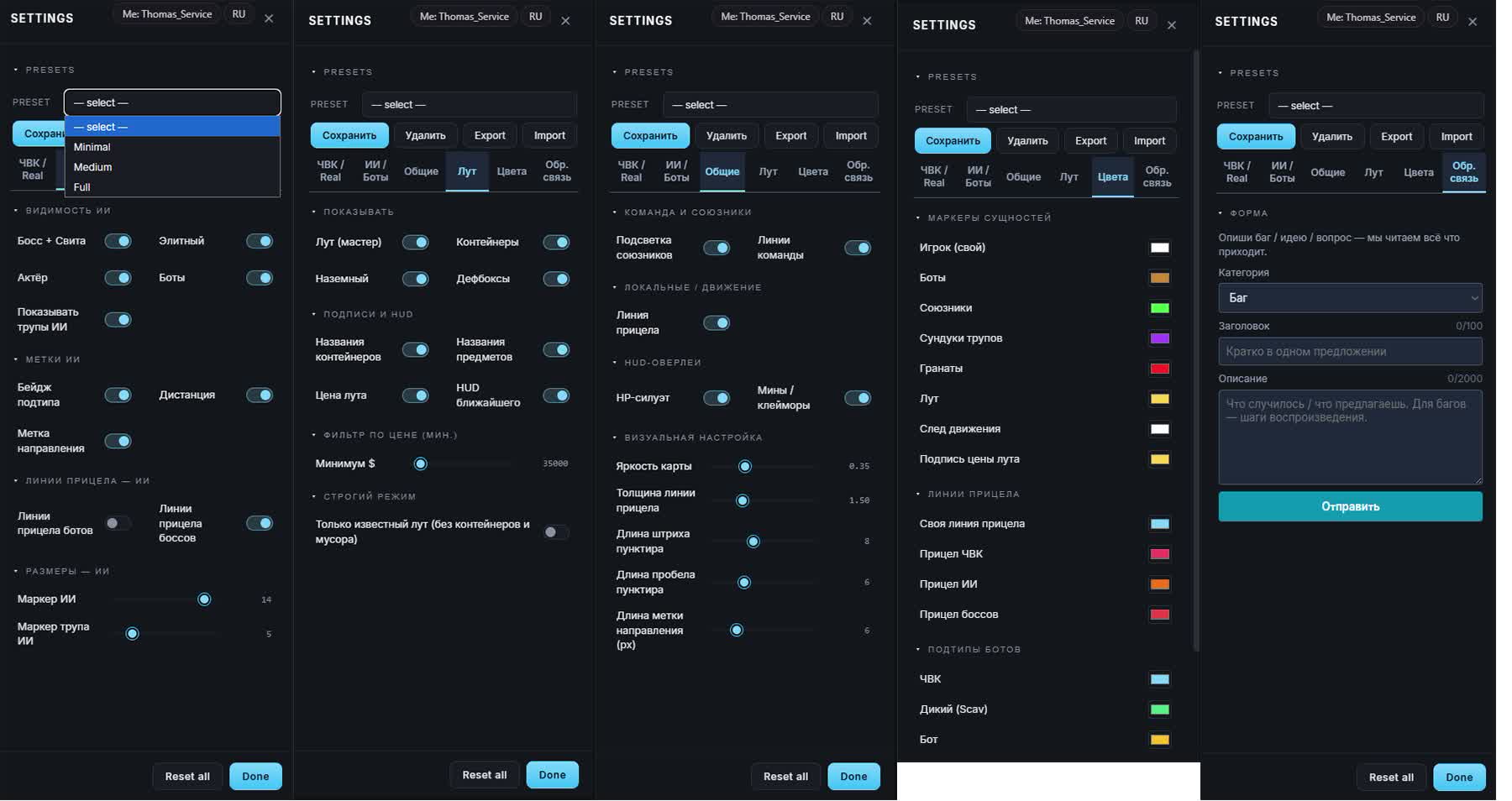
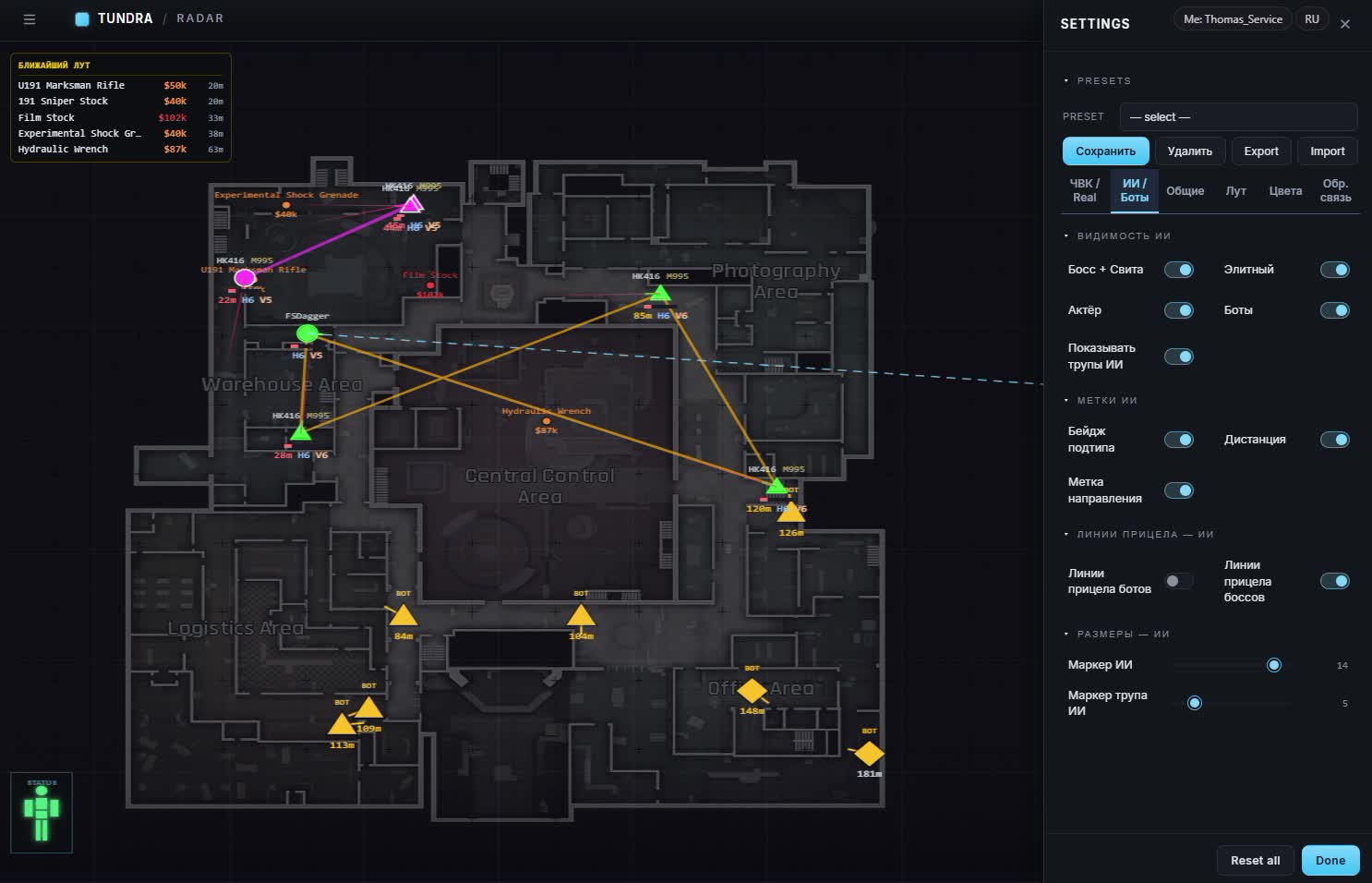
Bots, actors, bosses with guards and elites each have their own switch. Mute the ones you don't need.

Type badge

Every AI carries a badge with its subtype, distance and a look arrow.

AI corpses

Dead ones sit on their own layer and never mix with the living.

Where bosses aim

Aim lines for bosses and for regular bots switch on separately.

A color per type

PMC, scav and bot are painted differently, you tell them apart with peripheral vision.

AI marker size

Sliders for marker and corpse size so a crowd of bots doesn't blur into one blob.

Your squad

Teammates in color

Your own people get a separate color, no mix-ups in a fight.

Lines between teammates

Squad links are drawn as lines: you see who fell behind and who went around.

Loot

Master switch

One key hides all loot when the shooting starts.

Crates, floor, deathboxes

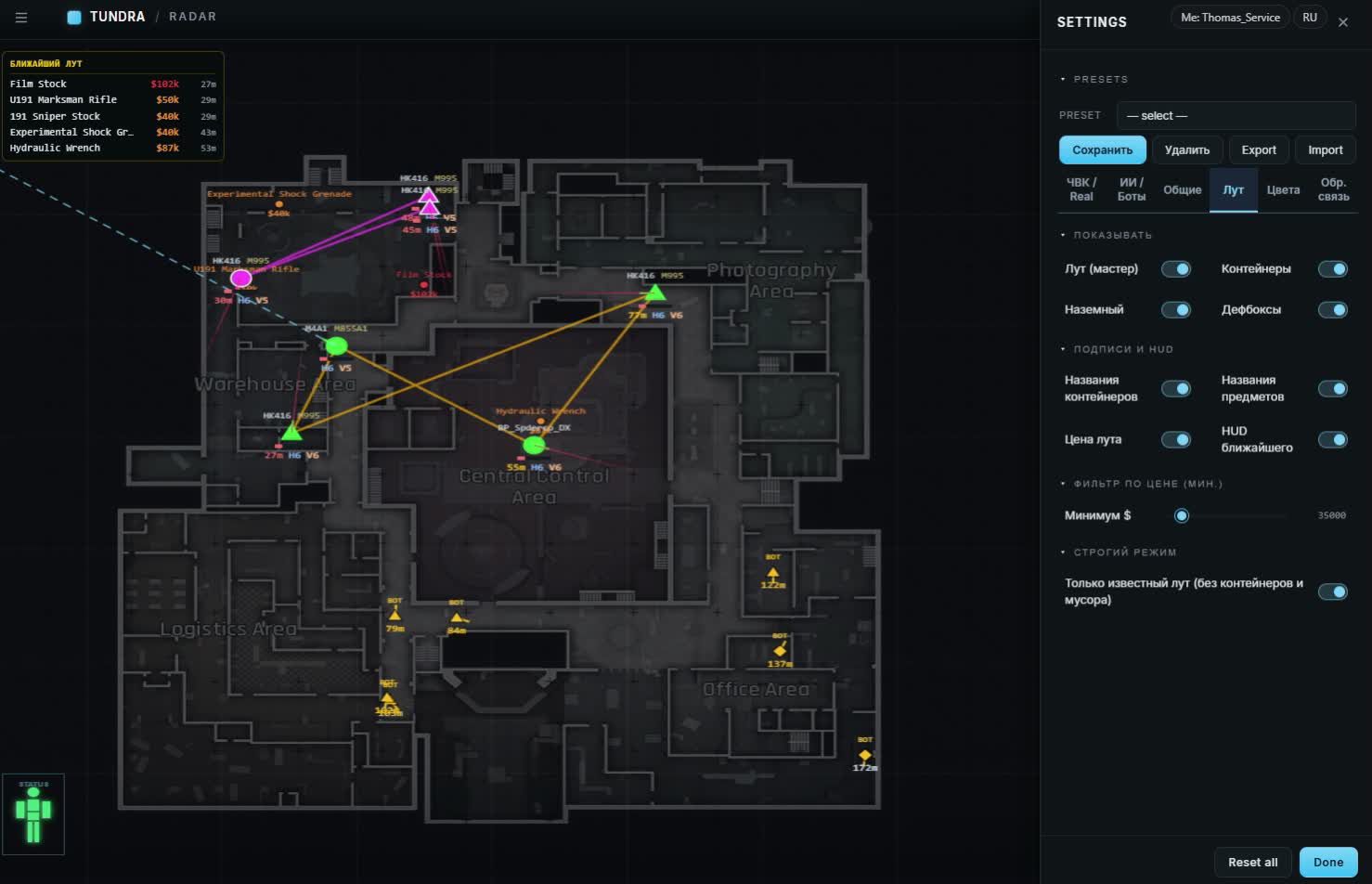
Three loot layers, each toggled on its own.

Price threshold

A slider or manual input in dollars, starting value 35,000. Cheap stuff never reaches the map.

Loot labels

Container name, item and price each switch on separately.

Nearest loot

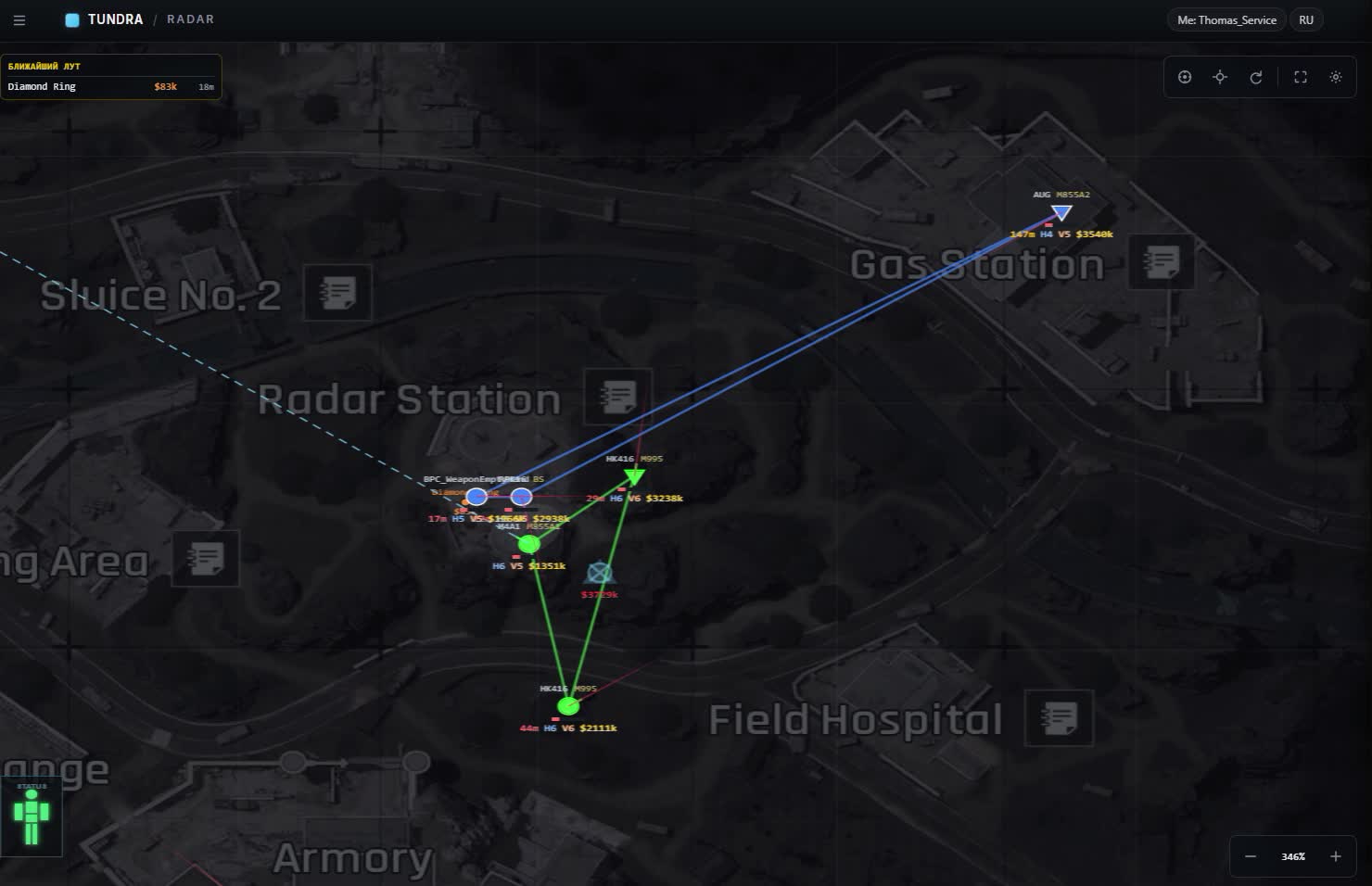
A panel with what is lying next to you right now.

Strict mode

Known items only, no crates and no junk underfoot.

PMC backpacks

Player bodies with an estimate of what their gear is worth.

Hazards

Grenades

A thrown grenade shows up on the map, you move away by the marker, not by the sound.

Mines and claymores

Tripwires are visible in advance, on the approach to the spot.

Maps

Auto map select

The loader knows which location you loaded into, nothing to pick by hand.

Six maps

Farm, Valley, Northridge, Armory, TV Station and Airport.

TV Station floors

Levels are split apart, markers from different floors don't overlap.

Map look

Background brightness

A slider for your monitor and lighting, the map won't hurt your eyes at night.

Lines

Aim line thickness, dash and gap length for the dotted line, look arrow length.

Marker colors

Custom colors for players, bots, teammates, backpacks, grenades, loot, the movement trail and the price tag.

Aim line colors

Four lines painted separately: yours, PMCs, AI and bosses.

Presets

Minimal, Medium, Full

Three ready sets: from an almost empty map to everything at once.

Custom presets

Save your own layout and switch between them in two clicks.

Export and import

Move the config between PC and phone, nothing to tune twice.

Reset

Reset all brings back factory settings if you overdid it.

Phone

Portrait and landscape

Two layouts, panels adapt to the screen width.

Low data use

Positions stream in real time, but the connection barely gets loaded.

Feedback form

A form inside the interface: a bug or an idea goes straight to the developers.

Gear and thermal scopes

Thermal scopes

The marker shows who runs a thermal: a T7 on the head or a thermal scope on the gun. Don't bother hiding in a bush against that one.

Player gear

Hover the cursor over a marker and it unfolds everything the player wears and holds.

Gear durability

Green numbers like 45/45 show armor and helmet durability. Battered armor holds worse than its class promises.

Gear value

The value of what a player carries is now counted correctly, the old price errors are gone.

Safes

Safes on the map

Every safe on the location is marked apart from the rest of the loot.

Safe status

An orange marker means an open safe, green means closed. A closed one is waiting for you, an open one has already been cleaned out.

Known issues & fixes

Real questions from our support, with the fixes that worked. Based on user requests for this product.

The Tundra Web Radar loader disappeared right after download

The file was removed by your antivirus or Windows Defender, which is routine for loaders. Add the folder you download the loader to into the protection exclusions (Windows Defender → Virus and threat protection → Exclusions) or turn real-time protection off for the launch. Then download the loader again through the link in the email and run it as administrator.

The Tundra map opened but it is empty, no markers

Markers only appear inside a raid: in the main menu and on the loading screen the map is always empty. If you are already on the location and the map stays blank, make sure you are running the loader downloaded from the panel after the latest ABI patch rather than an old file, and that the map tab was not closed and reopened without the loader. Another cause is the product being in "updating" status: wait for the fresh loader, your subscription days are not spent meanwhile.

The Tundra loader starts and closes immediately

Most often the cause is core isolation and memory integrity in Windows. Open Settings → Privacy and security → Windows Security → Device security → Core isolation and turn off "Memory integrity", then restart the PC. Run the loader as administrator with the antivirus switched off. If that does not help, message support with a screenshot of the error.

All issues & general troubleshooting
TARIFFS
$4.75
BUY What happens after payment?
Got a question? Ask before you pay

We'll help you choose and sort out any launch issue. Ask us anything before buying, we're always on your side.

Support 10:00–22:00, sometimes we reply at night too
Ask a question

Available tariffs

1 day
$4.75
START PURCHASE
3 days
$9.50
START PURCHASE
7 days
$23.75
START PURCHASE
30 days
$47.50
START PURCHASE
Reviews about Tundra Web Radar

No reviews yet. Be the first to leave one.

Your review

Reviews are published after moderation.

Join our gaming community chat

Discuss current cheats from developers and how to use them effectively in popular online games. Share tactics, exchange useful info and find like-minded players in our community.

1 900+Members
24/7Online
Join our gaming community chat

Technical support

Run into a technical issue? Our team of experts will help. We handle all requests in a live queue, so please be understanding if it sometimes takes a little wait. We guarantee that no request goes unanswered.

Availabilityfrom 10:00 to 23:00
Fast responseIn queue order
Get help
Technical support
PROCHEAT

PROCHEAT news channel

Follow product status changes, update history and important announcements.

Subscribe

Tundra Web Radar versus a radar inside a cheat

Most ABI cheats bolt a radar onto an aimbot and draw it in a corner of the game screen. Tundra is built differently: the map lives on its own and only a loader runs on the PC. Small differences decide what ends up on a stream recording and whether your teammate can see the map from a phone.

What we compareTundra Web RadarRadar inside a cheat
Where the map isa separate browser tab, any deviceover the game window
Stream and screen recordingclean, nothing on the recordingmarkers end up in the recording
Phone and second monitoryes, one link for everythingno
What you seeplayers, AI, priced loot, grenades and mines, teammatesusually players only
Aimbotnone, pure informationusually included
Load on the PCa loader plus a tabinjection into the game process

If what you need is aim, Tundra is not your pick. If you need a map the whole squad plays by while the game screen stays clean, this is it.

How to launch Tundra Web Radar

The order is simple, but people skip a couple of steps and then message support. Do it like this:

  1. After payment open the email: it holds the key and the link to the radar panel.
  2. Download the loader from the panel to the gaming PC. Turn off the antivirus for that moment, otherwise the file disappears before you can run it.
  3. Run the loader as administrator and enter the key.
  4. The loader opens the map link in the browser. The same link works on a phone or a second monitor.
  5. Load into a raid. In the main menu and on the loading screen the map is empty, markers appear once you are on the location.

Keep the map tab open during the raid. Keep the loader running while you play, you can close it after leaving the game.

Tundra Web Radar won't start: what to check

Nine cases out of ten are closed by this list, top to bottom:

  • The loader file vanished after download. That is the antivirus or Windows Defender, download again and add the folder to exclusions.
  • The loader starts and closes right away. Check Windows settings, the Device security section: core isolation and memory integrity must be off.
  • The key is rejected. Check the product status on this page: if Tundra is down for an update after an ABI patch, access is closed and your subscription days are paused.
  • The map opened but stays empty. You are not in a raid, or an old loader from the previous patch is running. Grab a fresh one from the panel.
  • Markers were there and disappeared. Make sure the tab is still open and the VPN, if you use one, has not dropped.
  • Nothing on the list helped. Message support with a screenshot of the error, they will answer and walk you through it.

What the map shows: players, AI and loot

A live player's marker reads in a second: nickname, squad, level, weapon with ammo, body armor and helmet, distance. Next to it a look arrow and a movement trail, they tell you whether the person is coming at you or passing by. The HP silhouette shows how much damage has already landed. With that set you decide before contact: fight, go around, or wait until they leave for the extract.

AI is split by type with separate switches. On Farm you can turn regular bots off entirely and keep only the boss with guards and the elites. In TV Station the boss aim lines come in handy: you see at once which passage they hold. AI corpses sit on their own layer.

Loot is cut by a price threshold, 35,000 dollars by default, anything below is not drawn. Strict mode also removes containers, so only items with a known price stay. Backpacks of dead PMCs are labeled with an estimated value, so you cross half the map for a body only when it is worth it.

The September update added gear to the marker: hover over a player and you see what they wear, with armor and helmet durability as green numbers like 45/45, plus a thermal if they have one, a T7 or a scope. Safes came in as a separate layer: orange is open, green is still closed, so you won't cross the whole location for an empty safe.

The radar on a phone and a second monitor

The most convenient setup, going by buyer feedback, is a phone on a stand next to the keyboard. In portrait layout the map fits whole, panels slide out of the way, and data use is so low that mobile internet is enough. A second monitor works too: same link, same account, markers update on every screen at the same time.

You won't tune settings twice. Build a preset on the PC, hit Export, then Import on the phone, and colors and filters match. The interface switches between Russian and English with a button in the header, no page reload needed.

Tundra and the ACE anti-cheat

Arena Breakout Infinite is protected by Tencent's ACE anti-cheat, and it watches what happens inside the game process. Tundra injects nothing into that process and draws nothing over the window, the whole picture goes to the browser. That is no free pass, just fewer reasons for a check. After ABI patches the team ships a fresh loader and sells it marked as updating while the fix is in progress, and during that window you should not run the old loader.

The rest depends on you. A player who sprints across half the map straight to the enemy squad every raid and opens exactly the crates with expensive loot raises questions with people before the anti-cheat notices. Use the map as recon, not as a GPS to every enemy, and it will serve you for a long time.

Tundra Web Radar price and how to buy

A day costs 400 rubles, three days 800, a week 2,000, a month 4,000. For a first try take a day: one evening tells you whether playing by the map suits you. If you farm ABI regularly, a month is the cheapest per raid.

Payment goes through Digiseller, the key and the panel link come by email to the address you entered at checkout. There is no account area on the site, the email is the only channel, so double-check the address before you hit the button. Questions about launching, your account or the phone are best asked to support before paying, they answer fast.

Tundra and Lovec: the same radar

For a while this product was sold on ProCheat under the Lovec brand name, and the Lovec radar page for ABI is still up. They are not two different tools: same six maps, same presets, same loader and same key. You can buy from either page, access and price are identical. Here the product sits under the name people actually search for, so nobody gets confused.

FAQ

Is Tundra Web Radar available for free?

No. Anything handed out on forums as a free key or a "tundra radar exe" usually turns out to be a stealer. The working loader only comes through the link in the email after payment.

Where can I read Tundra reviews?

Further down this page you will find buyer reviews pulled from Digiseller, left after real purchases.

Does it work on a phone?

Yes. Open the same link on the phone, the map adapts to a vertical or horizontal screen. The loader keeps running on the gaming PC meanwhile.

Is there an aimbot inside?

No. Tundra shows a map with players, AI, loot and hazards, the shooting is entirely on you.

Which maps are supported?

All six ABI locations: Farm, Valley, Northridge, Armory, TV Station with floors and Airport. The right one is picked automatically when you enter a raid.

What happens after an ABI patch?

The product goes down for an update and your subscription days are not spent during that time. Once the new loader is out, the countdown resumes.

My antivirus flags the loader, is that normal?

Yes, for this kind of software it is routine. Download the loader only through the link in the email and add its folder to exclusions, and never run anything with a similar name found elsewhere.

from $4.75 Choose a plan
Ask a question


