Bleak PUBG Lite: a lightweight PUBG ESP

Working
Bleak Bleak
Add another cheat from this game too — to compare them.
Bleak PUBG Lite
Steam
Windows support: 10: 2004, 21h1, 22h2, 23h2, 24h4, all builds; 11: 21h2, 22h2, 23h2, 24h2, 25h2
Menu language: Russian, English
Spoofer:No
USB drive:No
BIOS:No

User information

Lite will not work without Discord: the menu and the ESP come through its in-game overlay, and Discord itself has to be started as administrator before every session. You need a legitimate copy of PUBG: BATTLEGROUNDS on Steam. Supported systems are Windows 10 from version 2004 and Windows 11 up to 26H1, and the drive type or BIOS version does not matter.

You will not need to touch the BIOS: the build runs with Secure Boot enabled, TPM stays as it is, and no USB stick is needed. What you do have to switch off is Windows Defender with real-time protection, VBS and Core Isolation (Memory Integrity). The vendor asks you to uninstall other antiviruses and anti-cheats such as FaceIT, Vanguard, 360 or Avast.

The key arrives by email right after payment, and the same message contains the instructions. No spoofer is included. If a PUBG patch sends the build in for an update, the product status changes and your paid time is frozen for that period.

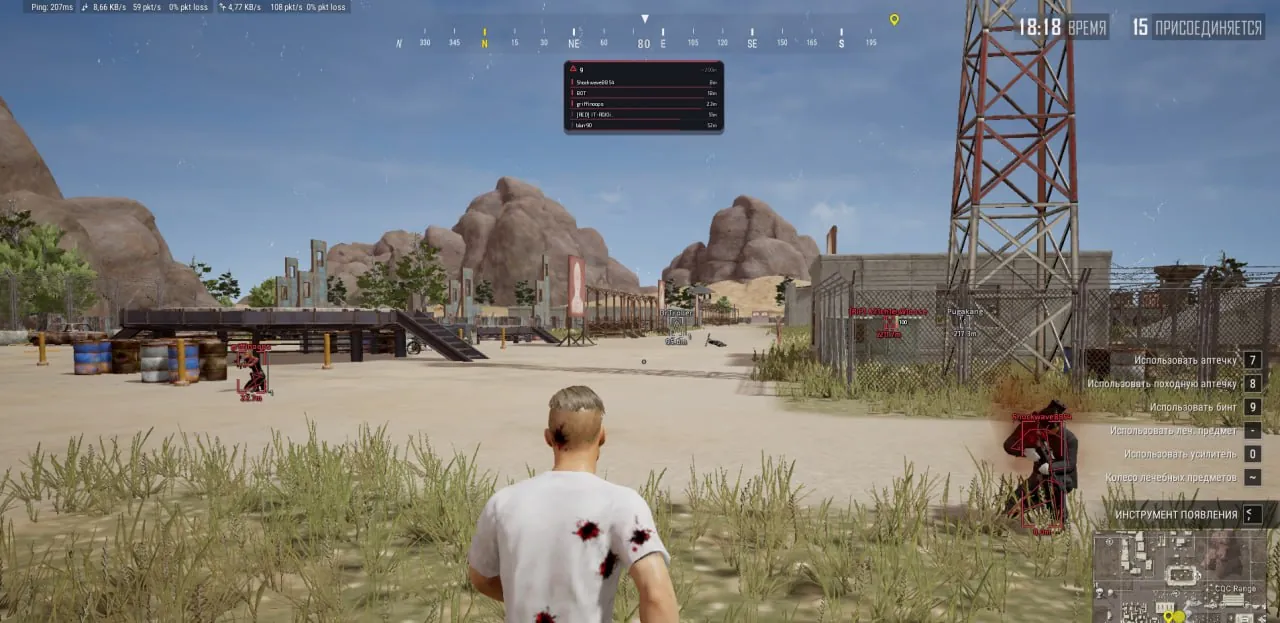
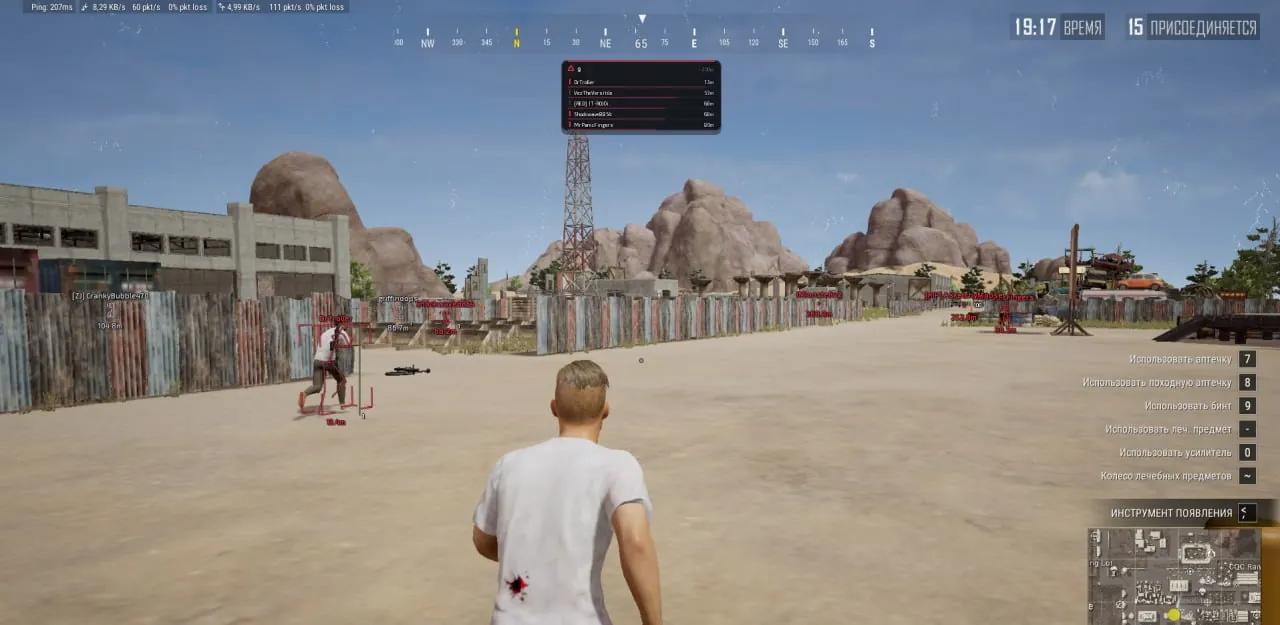
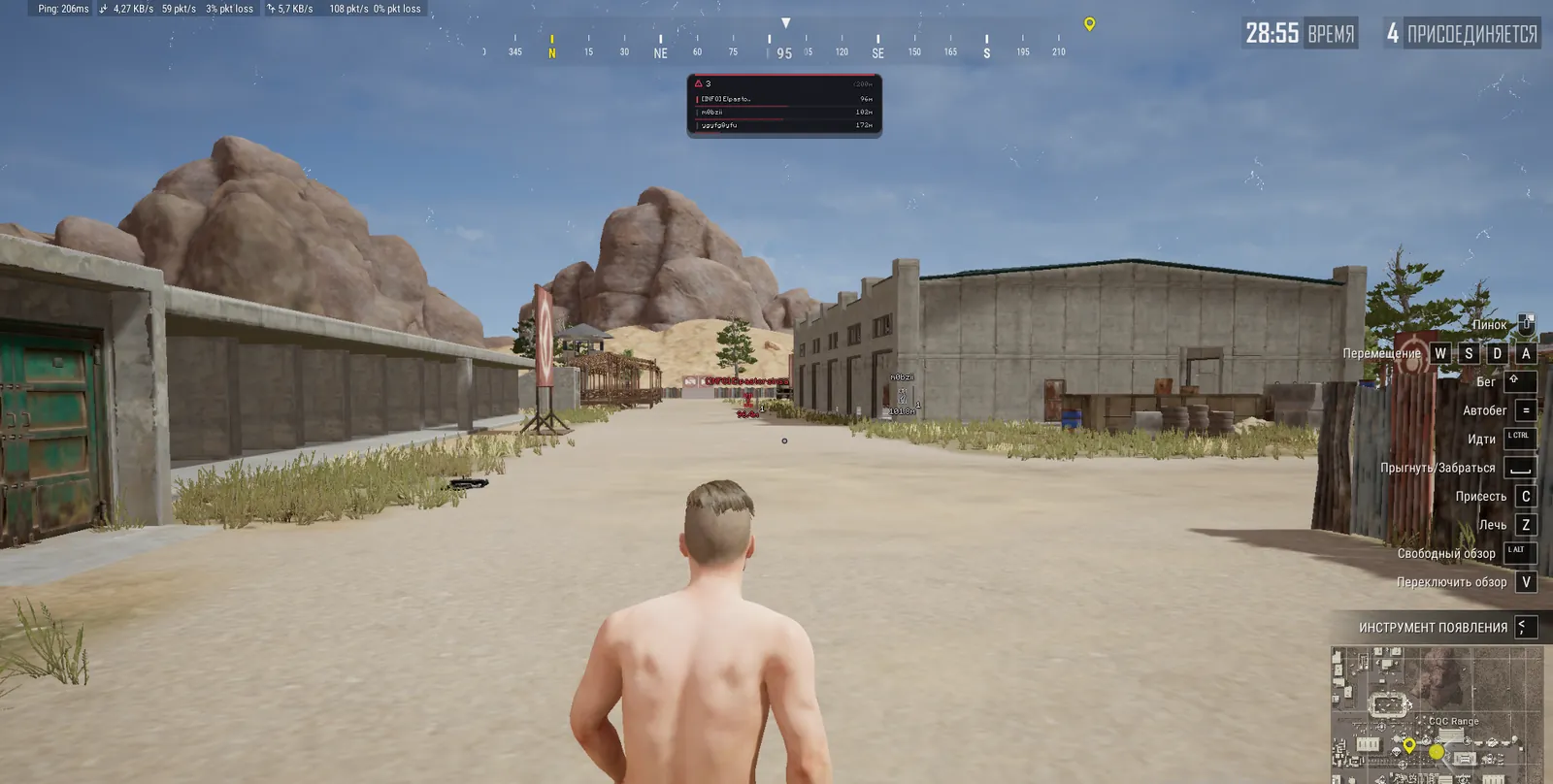
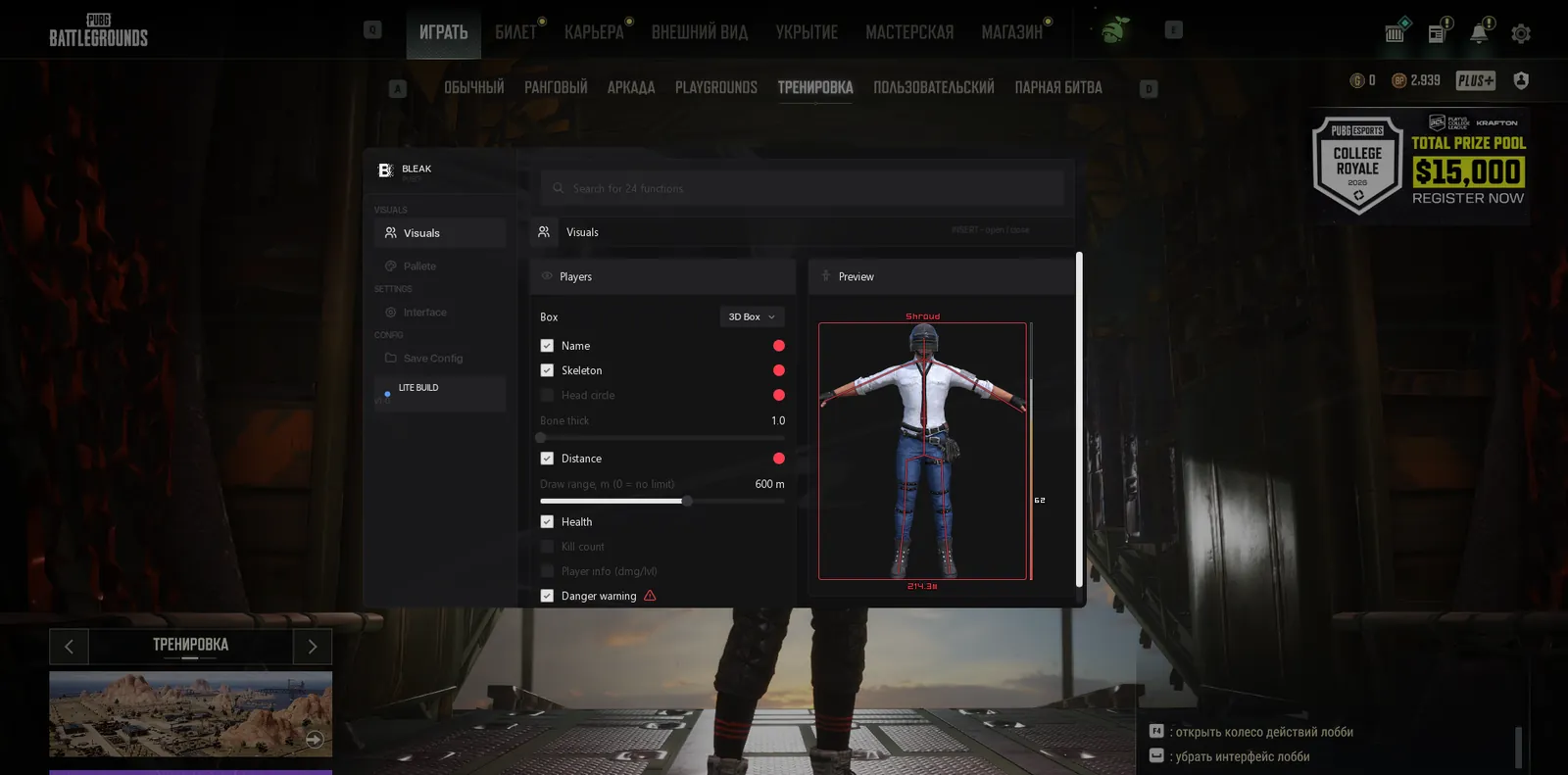
SCREENSHOTS
Description

Bleak PUBG Lite is a stripped-down PUBG ESP from the developer Bleak that keeps only what you need to read players. You get a box, skeleton, name, distance, an HP bar with a white damage ghost, and K, DMG and LV counters for every enemy. There is less on your screen and fewer reads from game memory, and a day costs $3, the cheapest way to try Bleak in PUBG.

The build is external: the menu and the ESP are drawn over the game through the Discord overlay. Two settings are worth knowing from the start. Auto-exit, found only in Lite, shuts everything down with the game: once TslGame.exe closes, the overlay and Discord go with it, and none of the software keeps running on your PC. Draw range caps the distance, so far enemies are neither drawn nor read, and near the border the picture fades out smoothly.

Product features

Players

Box type

Full outlines the whole enemy, Corner draws only the corners, 3D Box draws a 3D frame. None turns the box off if the skeleton is enough for you.

Names

The nickname sits above the head, so in a squad match you do not mix up which of the four you already hit.

Skeleton

Bones over the model show whether someone is prone, crouching or running. Line thickness goes from 1 to 5 (Bone Thick).

Distance

Metres to the target, so you know whether your gun reaches or you need to close in first.

Draw range

From 0 to 1000 m, where zero means no limit. Near the border the ESP fades out and the text shrinks, and anyone beyond it is neither drawn nor read.

HP bar

A vertical bar to the right of the box. A white ghost marks the last hit, so you see exactly how much you just took off.

Kills (K)

How many people this player has killed in the current match, shown next to the box.

Damage and level

Player info adds damage dealt (DMG) beside the box and survival level (LV) under the nickname.

Danger warning

A panel at the top centre of the screen: how many enemies are within 200 m, plus the five closest with name, distance bar and K/DMG.

Knocked

Downed players get their own colour across every ESP element, so you instantly see who to finish.

Preview

A live sample of your ESP right in the menu: box, skeleton, name, level, distance and HP.

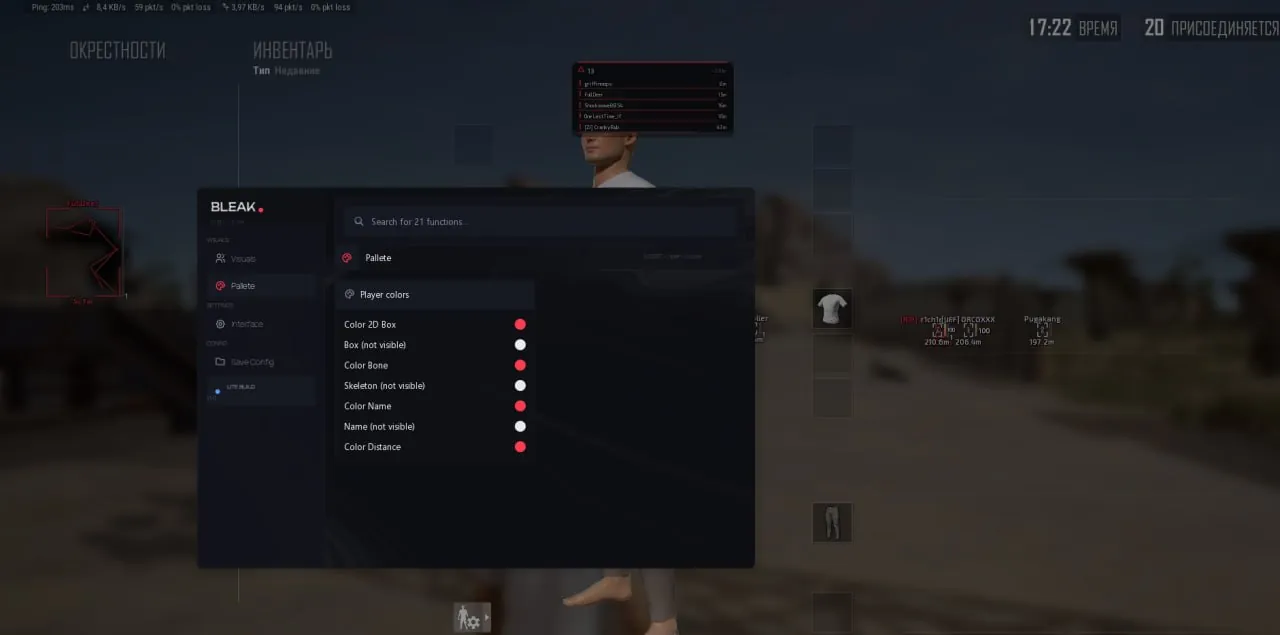
Colours

Box colour

One colour for a visible enemy and a second one for the "not visible" variant.

Skeleton colour

Bones are coloured in two versions as well: visible and "not visible".

Name and distance

Nickname colour with its own "not visible" shade, plus a separate colour for the distance text.

Interface

Auto-exit

When the game (TslGame.exe) closes, the software closes too: the overlay disappears and the Discord process ends. No active traces stay on the PC.

Overlay FPS

A limit from 0 to 360. The higher the value, the smoother the boxes move.

Language and search

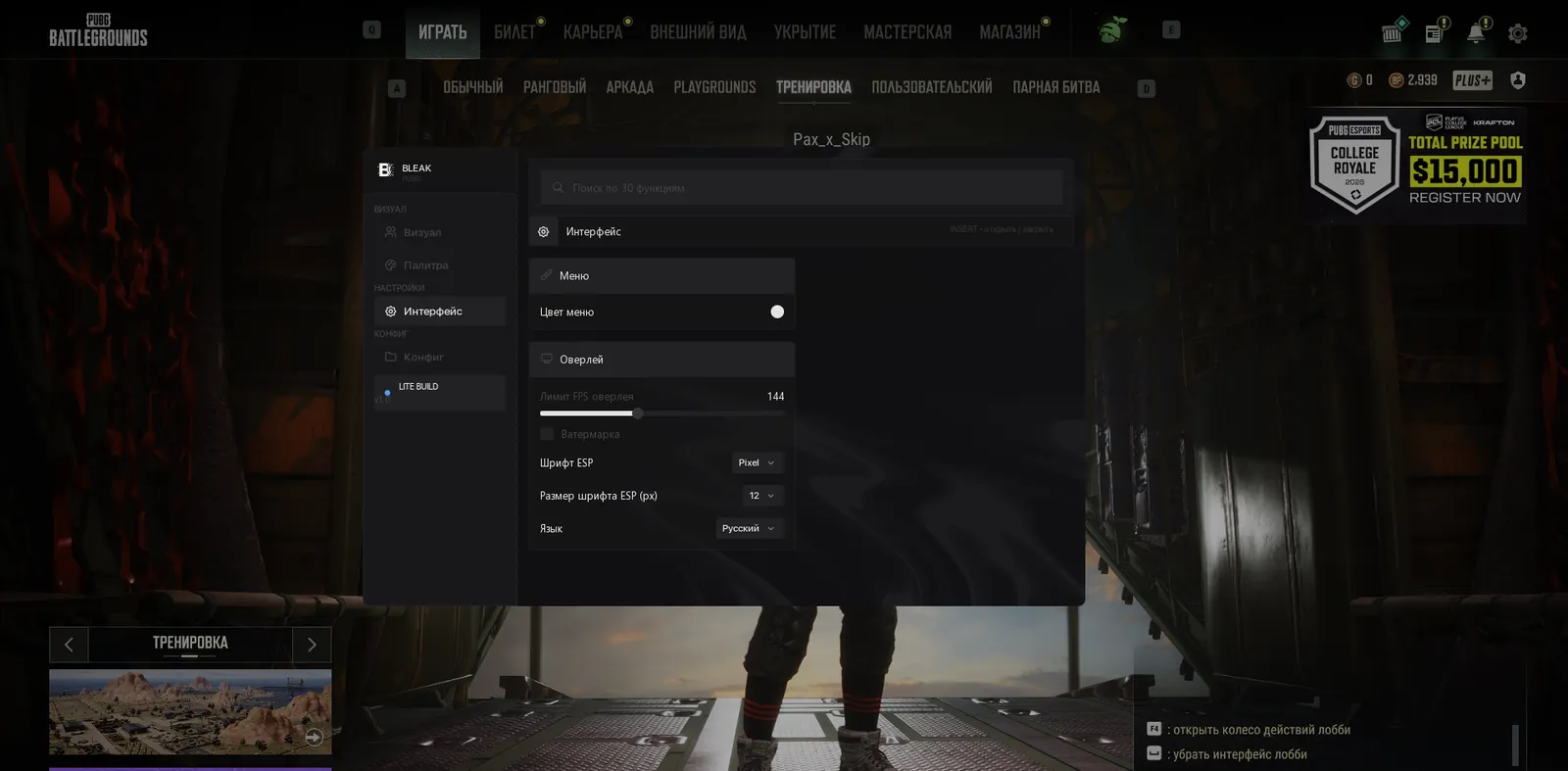
The menu runs in English or Russian with every item translated. A search bar in the header finds any setting.

Menu look

Accent colour and an on-screen watermark. Insert or Home opens and hides the menu.

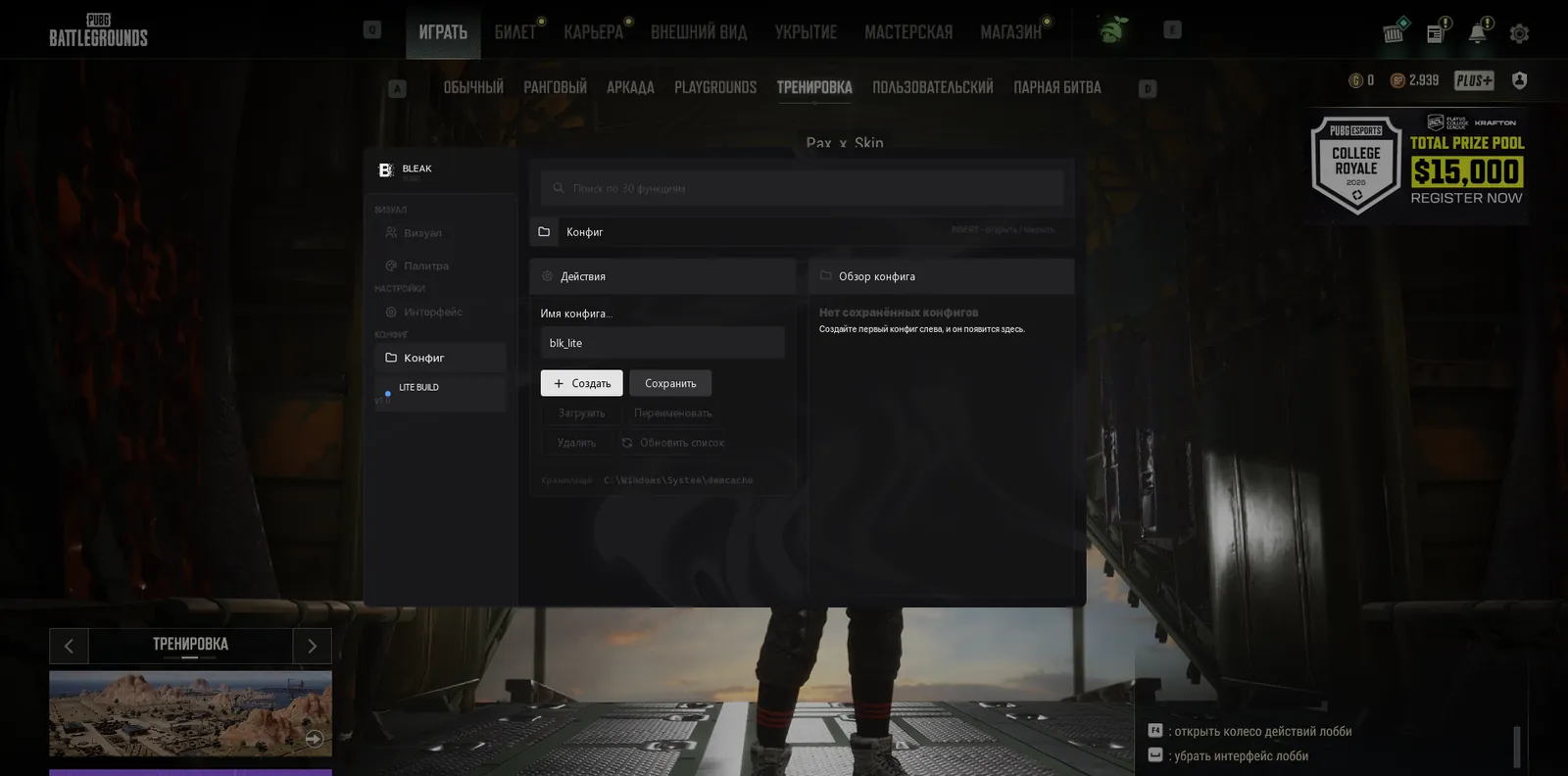
Configs

Create and save

Type a name in Input Name, where the Lite build name is already filled in. Create New saves a new config, Save Selected overwrites the config with that name using your current settings.

Load and manage

Load Selected applies the chosen config, Rename renames it, Delete removes it for good, Refresh List rereads the folder if you moved files by hand.

Config list

The applied config wears an ACTIVE badge, and a double click on a row loads it. The last active one is picked up on the next launch.

Known issues & fixes

Real questions from our support, with the fixes that worked. Based on user requests for this product.

The loader freezes or keeps asking me to restart my computer and never actually starts

This is usually caused by a conflict with third-party antivirus or security software on your computer. Disable or temporarily remove other antivirus programs and overlays, and add the program's folder to your antivirus exceptions.

  • Contact support — they can give you a utility to check what exactly is blocking the launch.
  • Check whether virtualization is enabled in your BIOS settings and try turning it on.
  • If that doesn't help, try connecting through a VPN.
The Bleak menu does not appear after F4. What should I check?

This build draws its menu and ESP through the Discord overlay, so the cause is almost always there. Check in this order:

  • Discord is running as administrator and you are logged in. The loader is also started as administrator.
  • In Discord settings, Game Overlay: Enable Overlay is on, Enable Legacy Overlay and Compatibility Mode are off.
  • The game runs in borderless window mode, which the new Discord overlay needs.
  • In the game main menu you can see the overlay frame in the top left corner. Until it shows up, pressing F4 is too early.

After F4 the menu appears in 5-10 seconds, and from then on Insert or Home opens and closes it. If the frame is still missing after these steps, send a screenshot of your overlay settings to support.

I can't download the loader — the page keeps loading forever or gives a 502 error

This is usually caused by the browser. Try opening the download page in a different browser — for example, if you're using Edge, switch to Chrome or Firefox.

If the issue persists, try connecting through a VPN.

All issues & general troubleshooting
TARIFFS
$3.00
BUY What happens after payment?
Got a question? Ask before you pay

We'll help you choose and sort out any launch issue. Ask us anything before buying, we're always on your side.

Support 10:00–22:00, sometimes we reply at night too
Ask a question

Available tariffs

1 day
$3.00
START PURCHASE
7 days
$15.00
START PURCHASE
30 days
$30.00
START PURCHASE
Reviews about Bleak PUBG Lite

No reviews yet. Be the first to leave one.

Your review

Reviews are published after moderation.

Join our gaming community chat

Discuss current cheats from developers and how to use them effectively in popular online games. Share tactics, exchange useful info and find like-minded players in our community.

1 900+Members
24/7Online
Join our gaming community chat

Technical support

Run into a technical issue? Our team of experts will help. We handle all requests in a live queue, so please be understanding if it sometimes takes a little wait. We guarantee that no request goes unanswered.

Availabilityfrom 10:00 to 23:00
Fast responseIn queue order
Get help
Technical support
PROCHEAT

PROCHEAT news channel

Follow product status changes, update history and important announcements.

Subscribe

What is inside the Bleak PUBG Lite menu

The Lite menu is short, just four tabs. Everything about enemies lives in Visuals, and the other three handle colours, the menu itself and saved settings.

TabWhat is insideWhen it helps
VisualsFull, Corner or 3D box, skeleton, name, distance, HP with a damage ghost, K, DMG, LV, knocked players, Danger warning, draw range, previewevery match, from the plane jump to the final circle
Palettebox, skeleton and name colours for visible and hidden enemies, distance colourtelling an exposed target from one behind cover at a glance
InterfaceAuto-exit, overlay FPS limit, language, search, menu colour, watermarkfirst setup and matching the smoothness to your monitor
Configcreate, save, load, rename and delete configs, ACTIVE badgeseparate presets for solo and squad games

Prices are in US dollars. One day is $3, a week $15 and a month $30. On the weekly plan a day comes to about $2.14, and on the monthly plan to exactly $1, a third of what a single day costs. A single day is enough to get to know it: one evening shows whether this kind of wallhack suits the way you play.

Player ESP: box, name and distance

Everything in Lite revolves around players, and the basic set is a familiar one. The box shows where an enemy stands, the nickname is written above the head, and you can see how many metres away they are. In a solo match that is often enough: you spot one guy lying on the next hill and decide whether to push him or go around.

The picture is easy to tune. Some people want the bare minimum of corner boxes and distance, others want the full set with skeletons and counters. The preview in the menu shows the result straight away, so you do not have to test each change in a live match.

Box: Full, Corner, 3D or none

Full draws a rectangle around the whole model. Corner draws only the corners, and in Los Leones on Miramar, where somebody is behind every window, that keeps your view uncluttered. 3D Box draws a 3D frame for those used to it from other cheats. None removes the box entirely, leaving the skeleton, the name and the numbers.

Skeleton and line thickness

The skeleton gives away the pose at once: an enemy prone in the grass, crouched behind a rock or running to the next cover. Against a prone target the skeleton beats the box: a rectangle around it turns into a flat strip, while the bones show where the head is and which way the enemy faces. Bone Thick sets the line thickness from 1 to 5. Thin lines do not cover a distant target, thick ones are easier to spot against bright sand.

HP, K, DMG and LV: who you are dealing with

The health bar runs vertically to the right of the box. Its best part is the white ghost of the last hit. You land a DMR shot, the bar drops, and the white tail shows exactly how much you took off. That tells you whether one more hit will do it or whether the enemy will have time to heal behind cover.

Next to the box you see K, the number of kills this player has in the current match. Player info adds DMG, the damage they have dealt, and LV under the nickname, their survival level. Together these numbers tell you who you are up against. Someone with five kills and a thousand damage by mid game is unlikely to be a beginner, and taking them head on is a bad idea.

Knocked players in their own colour

In squads you knock an enemy first, and until he is finished a teammate can revive him behind a wall. Lite paints downed players in a separate colour across every ESP element. You see who is already crawling and who is still on his feet, so your shot goes where it matters most: into the knocked player before he is picked up, or into the one reaching over to revive him.

Draw range: far enemies are neither drawn nor read

Draw range sets how many metres ahead Lite draws players: from 0 to 1000, where zero removes the limit. At the border the ESP does not cut off abruptly. It fades out smoothly while the text gets smaller. You do not get a string of labels stretching to the horizon, and nearby enemies are easier to read.

There is a practical side as well. Enemies beyond the range are not drawn and do not load the read channel, so the build has less work to do every frame. For city fights 300 to 400 metres is enough, while on open maps like Miramar people usually set it higher.

Danger warning: a squad on the way

The Danger warning panel counts enemies within 200 metres and lists the five closest: name, distance bar, K and DMG. In Lite it sits at the top centre of the screen. While you fill your backpack inside a house, the number on the panel jumps from zero to four, and you know another squad is driving your way. That is a big reason people pick Lite: you learn about visitors before you hear their engine.

The list helps in late circles too. When the blue zone squeezes everyone into a tiny patch, the panel shows which neighbours are closest and who has the most kills. All that is left is to decide who to take first and whom to leave to other squads.

Palette: visible enemies and those behind cover

On the Palette tab the box, skeleton and name each get two colours: a normal one and one for the "not visible" variant. An enemy in your line of sight gets one colour, an enemy behind a wall or a hill gets the other. You check a house in Pochinki before going in and know right away whether the guy is standing at a window or sitting behind a partition your bullets will not go through.

The distance text has its own colour setting. White text reads well on green Erangel but gets lost on the pale sand of Miramar, so keeping a separate config for each map is handy.

Auto-exit: Bleak leaves together with PUBG

This setting kicks in when you quit the game. As soon as TslGame.exe exits, the software shuts down completely: the overlay disappears and the Discord process closes. No active traces of Bleak stay on the PC after the game, and nothing sits in the background until your next evening session.

One detail is better known in advance. Discord closes together with the game, so your voice channel with the squad drops too. Before the next match you start Discord again as administrator, just as the instructions say.

Menu, preview and configs

The menu opens with Insert or Home. The Language switch turns it fully Russian or English, and the search bar in the header finds a checkbox faster than flipping through tabs. Overlay FPS limit sets the overlay frame rate from 0 to 360: the higher it is, the smoother the boxes follow a running enemy. Accent colour and the watermark are up to you.

Configs have a tab of their own, where you create, overwrite, rename and delete them. The applied config carries an ACTIVE badge, a double click loads it instantly, and on the next launch Lite brings back the last active one. A couple of presets work well: a minimal one for solo and a detailed one with K and DMG for squads.

What Lite leaves out and when to get the full Bleak PUBG

Lite is built to stay light, so everything except player ESP has been cut. There is no aimbot, no ESP for loot or vehicles, no radar, no arrows pointing at enemies off screen and no spectator list. If you need all of that, get the full Bleak PUBG for $5 a day: same developer, same Discord launch, more tabs.

Windows prep and launching through Discord

Lite runs with Secure Boot enabled, so there is no reason to enter the BIOS. Before the first launch, turn off Windows Defender, VBS and Core Isolation (the Memory Integrity setting under Device Security), and uninstall third party antiviruses and other anti-cheats. Then set up Discord:

  1. Install Discord, close it and start it as administrator. You will have to do this before every session.
  2. In Discord settings open Game Overlay: Enable Overlay on, Enable Legacy Overlay and Compatibility Mode off. The new overlay only works with a borderless window, so set the PUBG display mode to Fullscreen (Windowed) in the graphics settings.
  3. Run the Bleak loader as administrator, enter your key and press Inject. Discord must be running at that moment, and PUBG starts by itself.
  4. In the game's main menu an overlay frame appears in the top left corner. Press F4 and wait 5 to 10 seconds, and the menu opens on its own.

If the frame never shows up, send a screenshot to the support chat and they will help with the settings.

Bleak PUBG Lite FAQ

Why does Discord close together with the game?

That is Auto-exit at work. When TslGame.exe closes, Lite shuts down and takes the overlay and the Discord process with it, so nothing is left running on your PC after the game. If you were in a voice channel, you will have to open Discord again, as administrator once more.

Is Lite enough for squad games?

For reading enemy squads, yes. Danger warning shows how many enemies are within 200 metres, K and DMG hint at which of the four is the most dangerous, and knocked players stand out in their own colour, so you see who to finish before he gets revived.

What draw range should I set?

It depends on the map. On Erangel and Taego 400 to 500 metres is plenty for most people, while on open Miramar they go higher. Zero removes the limit entirely, but then the screen fills up with labels.

How do I move my configs to another PC?

Copy the config files into the config folder on the new PC and press Refresh List. Then double click the row you want, and the settings are applied.

Which Windows versions and which PUBG client are supported?

Windows 10 from version 2004 and Windows 11 up to 26H1. The game is PUBG: BATTLEGROUNDS on Steam. Drive type and BIOS do not matter.

Is there ban protection or a spoofer?

No software can guarantee you will not be banned, and Lite is no exception. PUBG is protected by BattlEye, and Bleak works from outside the game through the Discord overlay. No spoofer is included: if your hardware has already been banned, you will need to get one separately.

What happens to my subscription after a PUBG patch?

If a game update breaks the build, Bleak takes it in for rework. The status on the product page changes, and your paid time is frozen until the build is back.

from $3.00 Choose a plan
Ask a question


