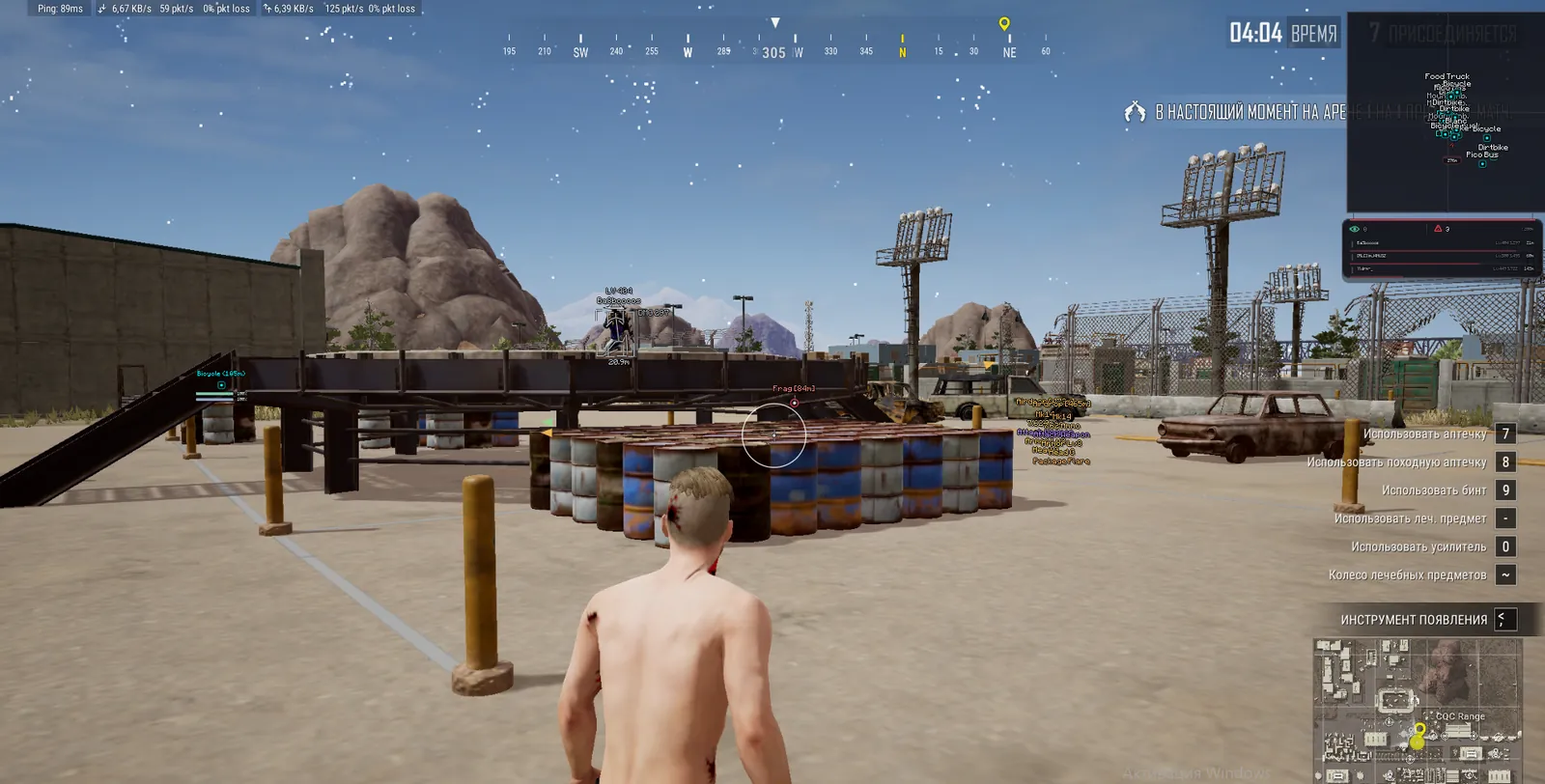
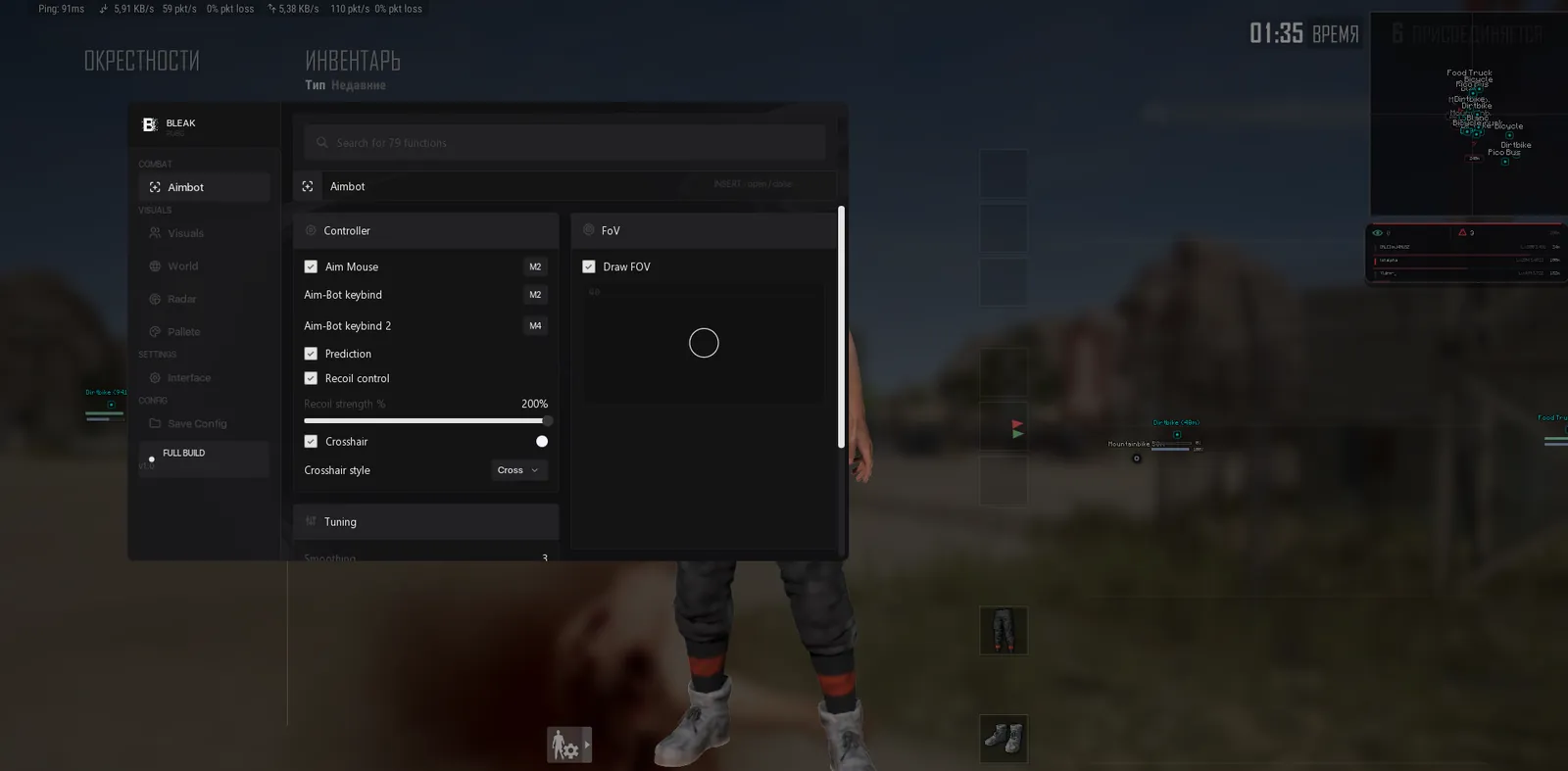
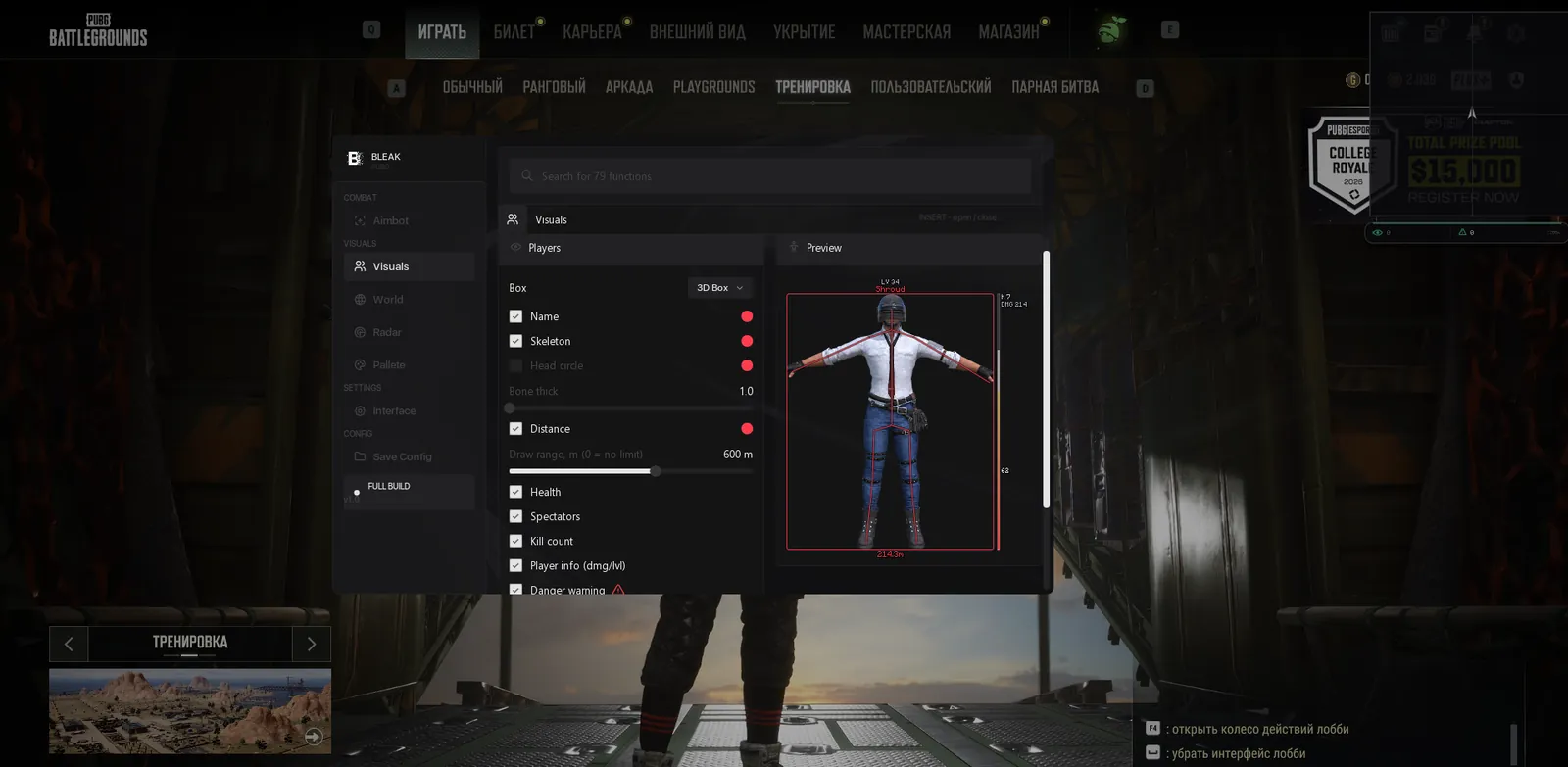
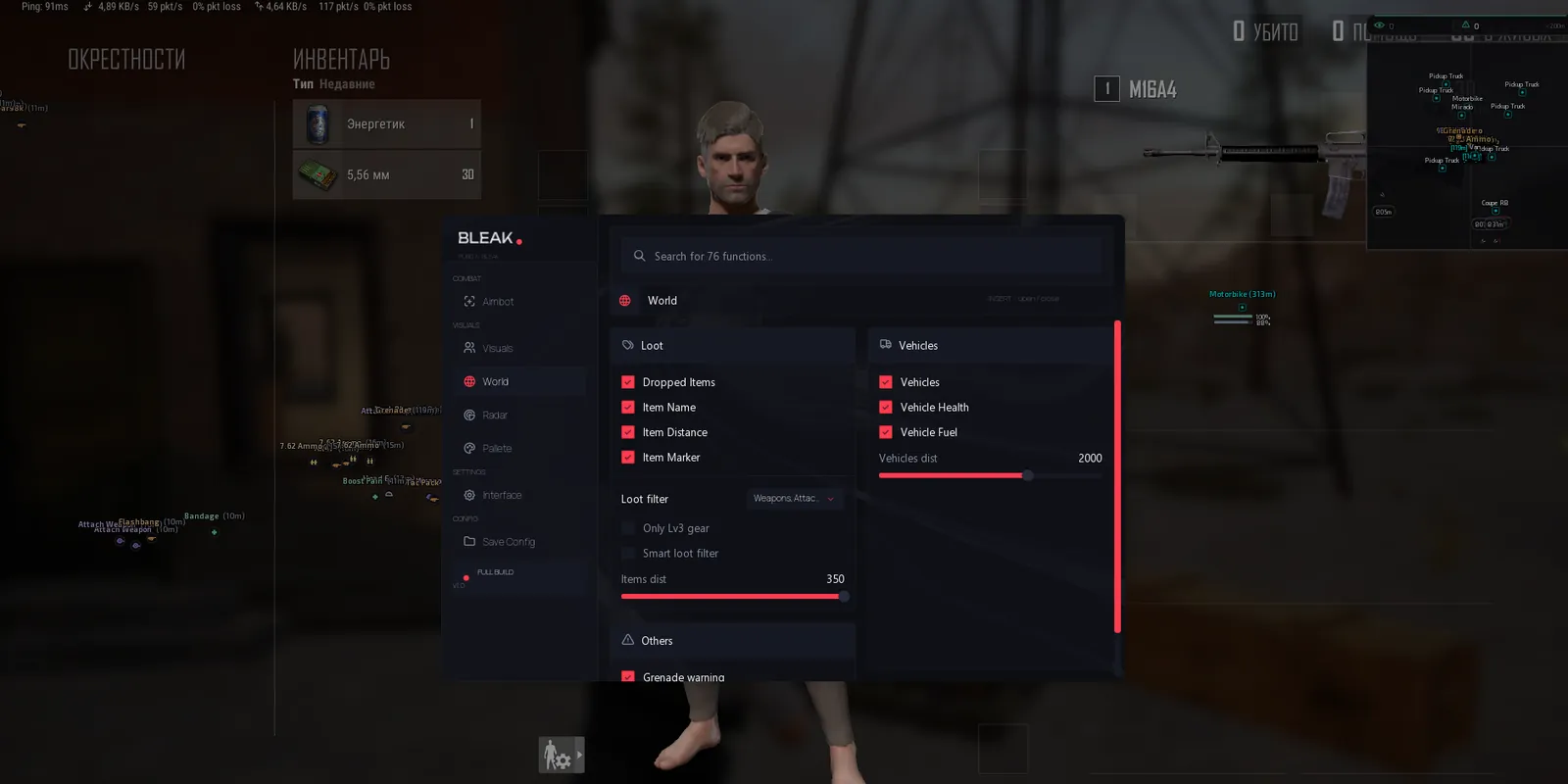
Bleak Cheat for PUBG

Working
Bleak Bleak
Add another cheat from this game too — to compare them.
Bleak PUBG
Steam
Windows support: 10: 2004, 21h1, 22h2, 23h2, 24h4, all builds; 11: 21h2, 22h2, 23h2, 24h2, 25h2
Menu language: Russian, English
Spoofer:No
USB drive:No
BIOS:No

User information

This cheat does not work without Discord: the menu and everything on screen are drawn through its in-game overlay. Discord has to be started as administrator, and you do that before every session. In its settings the regular overlay is on, while the legacy overlay and compatibility mode are off. PUBG itself goes into the Fullscreen (Windowed) display mode.

You will not need the BIOS. Secure Boot and TPM stay as they are, no USB stick is needed, and any drive type or BIOS mode works. What you do turn off is Windows Defender, VBS and Core Isolation (the Memory Integrity toggle). The vendor asks you to uninstall third-party antivirus software and anti-cheats such as FACEIT, Vanguard, 360 or Avast; closing them is not enough.

System-wise: Windows 10 from 2004 onwards and Windows 11 up to 26H1, PUBG on Steam. There is no spoofer in the bundle. Right after payment on Digiseller, the key and an instruction with the loader link arrive by email. If a PUBG patch sends the build in for an update, the product status changes and your paid time is frozen for that period.

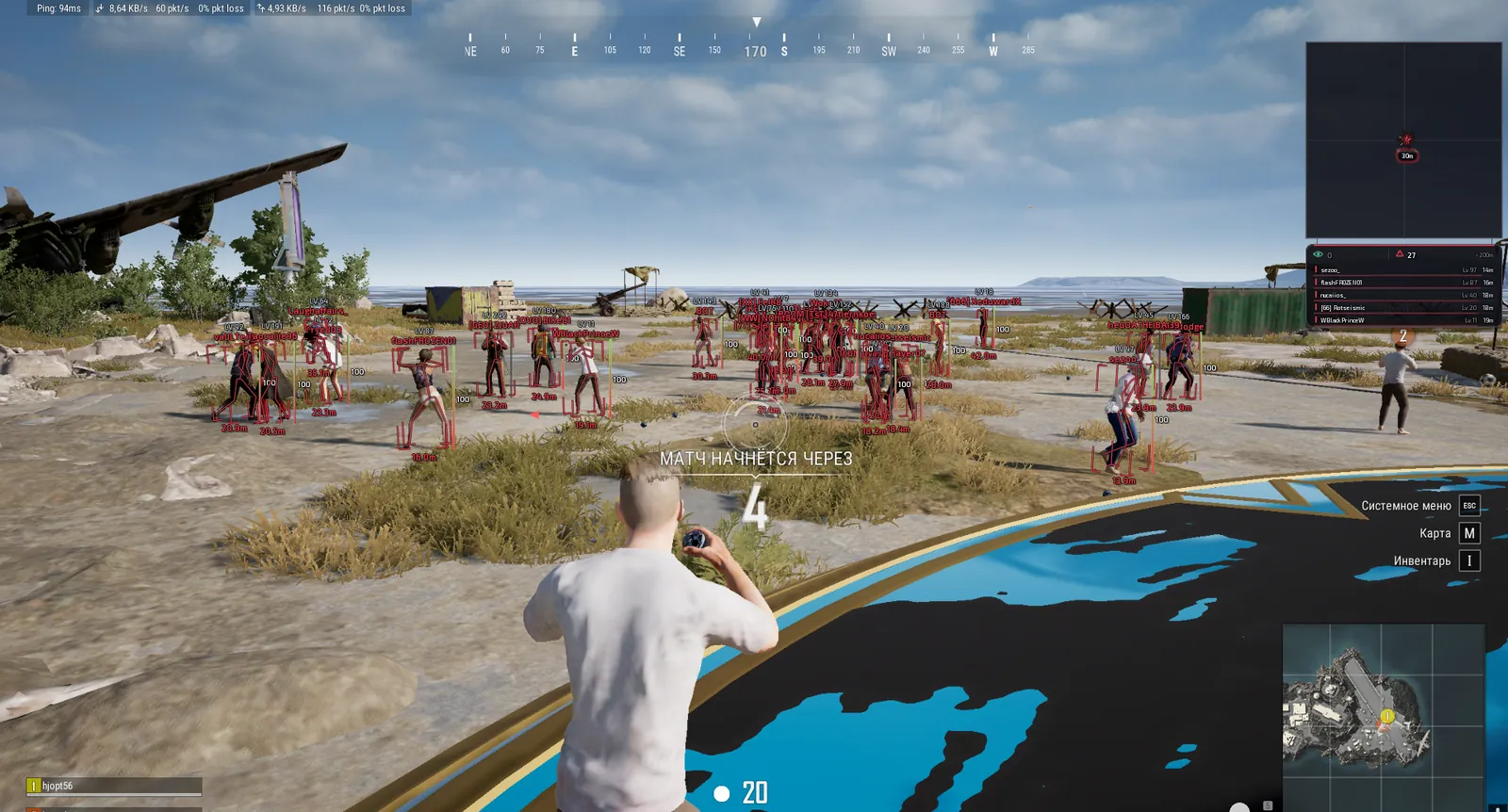
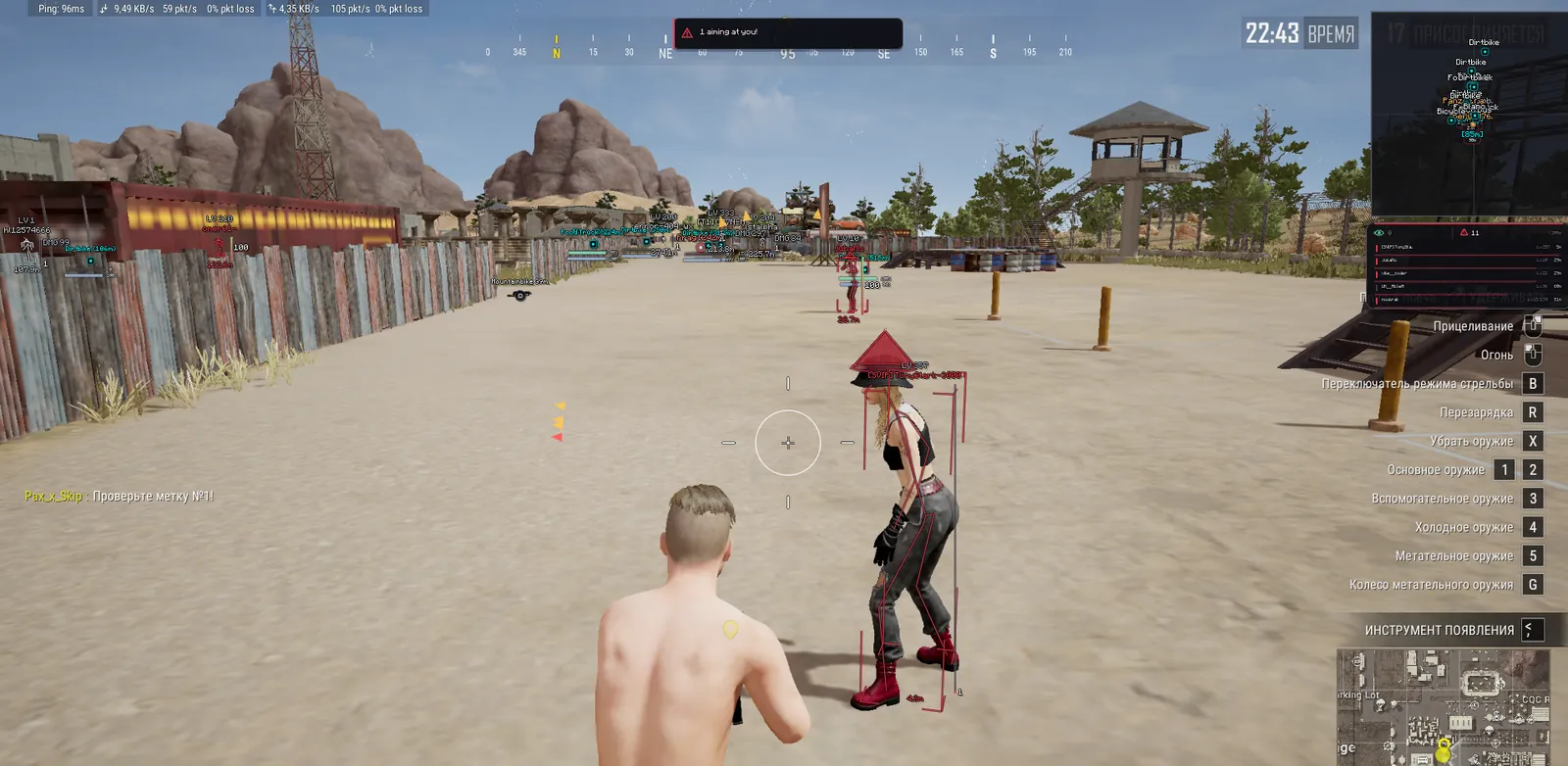
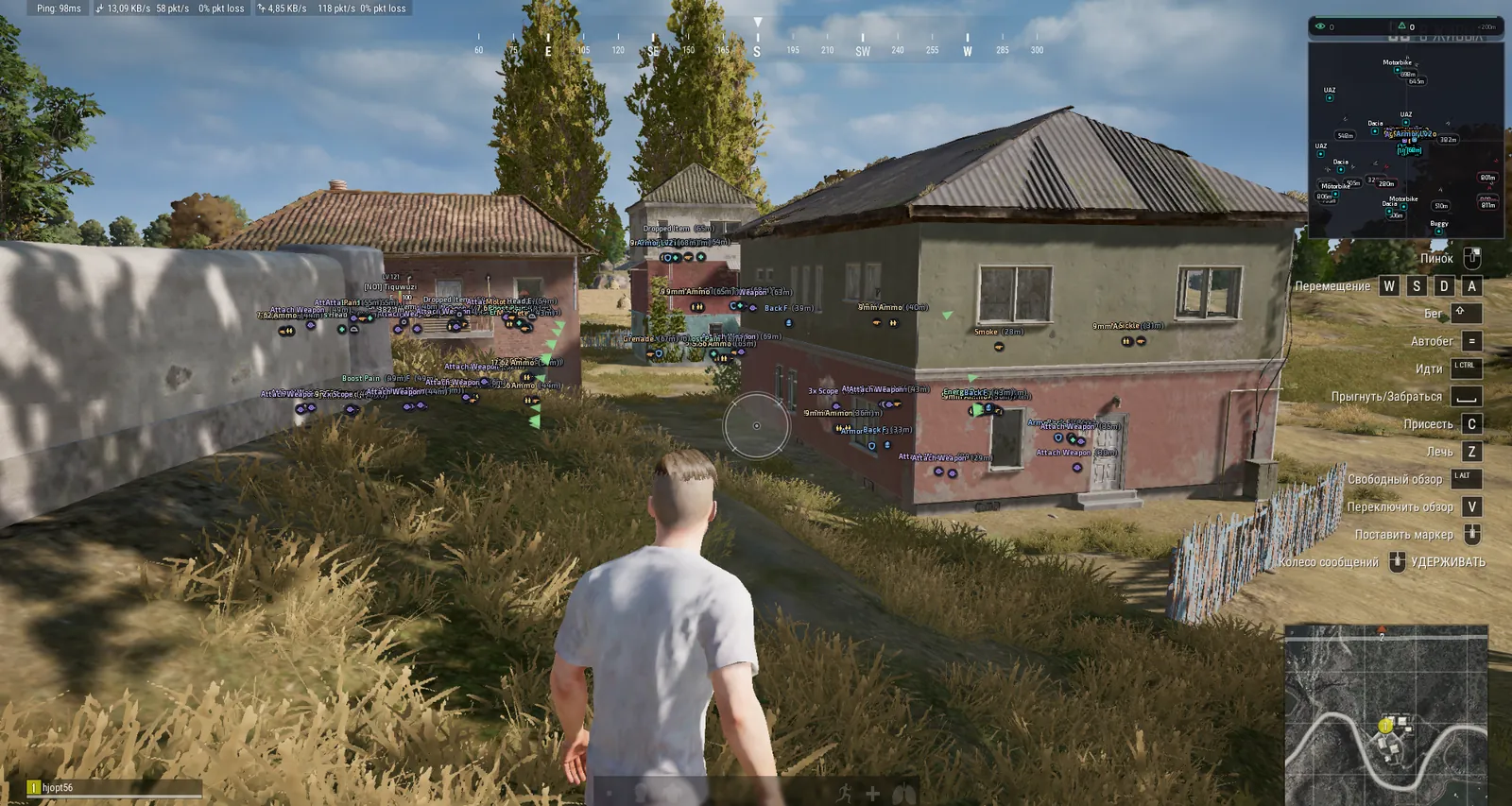
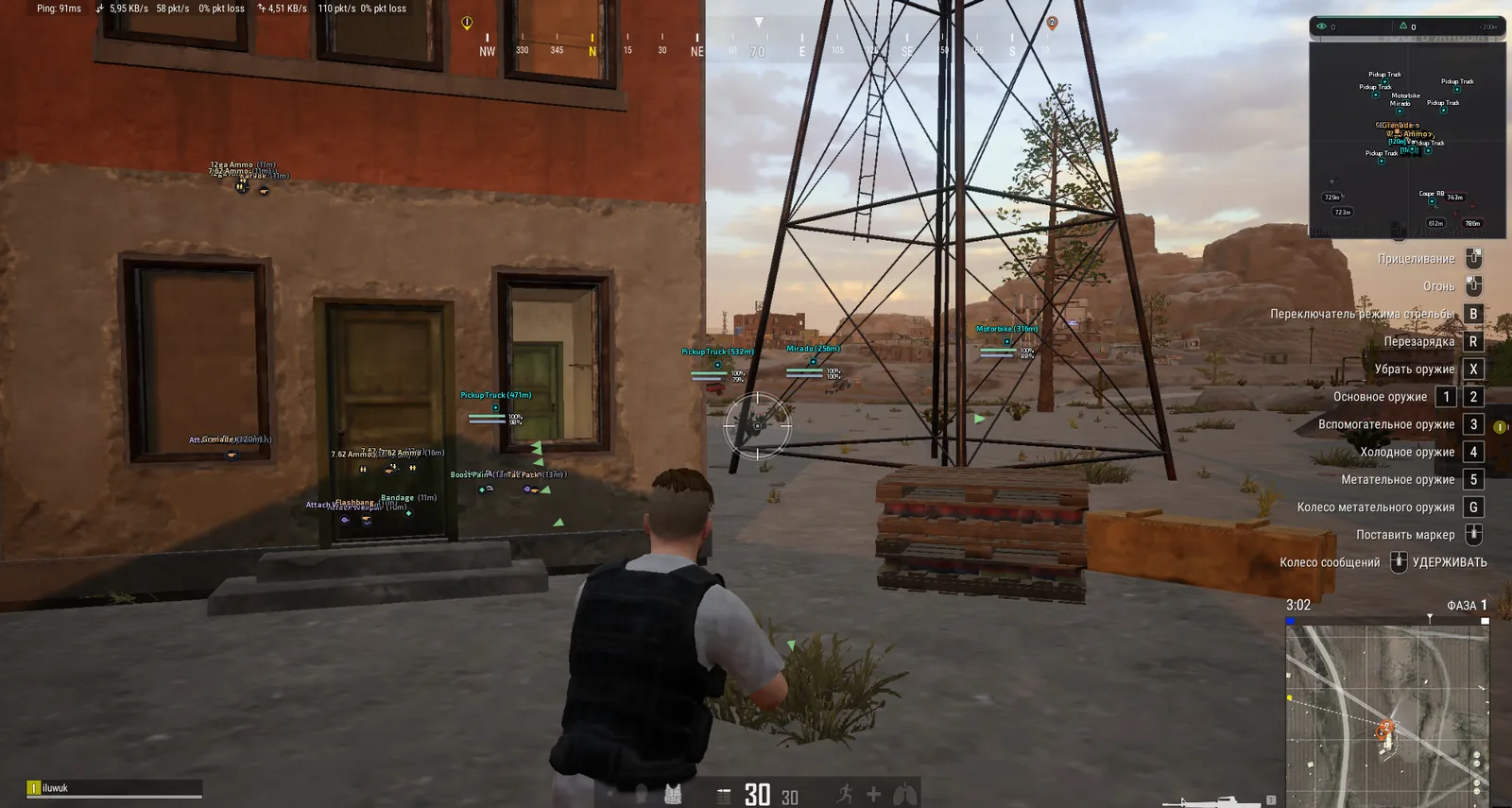
SCREENSHOTS
Description

Bleak PUBG is an external PUBG cheat that draws its menu and ESP over the game through the Discord overlay. The aimbot is its strongest part: while you aim, a marker shows where the bullet will actually land. The software works out the lead on a running target and the bullet drop over distance from the ballistics of the gun in your hands, so the point sits differently for an M416 and a Kar98k.

The ESP is built for battle royale. Next to the box you see how many kills an enemy has this match and how much damage they have dealt, and knocked players get their own color, so you can finish them before a teammate picks them up. Loot is filtered across nine categories, and you can strip the screen down to level 3 helmets, vests and backpacks. Vehicles show durability and fuel from three kilometers away. Secure Boot and TPM can stay on, but Defender, VBS and Core Isolation have to be turned off before launch.

Product features

Aimbot

Two aim keys

Aim works only while you hold the key. The second one fits nicely on a mouse side button.

Bullet prediction

A marker shows where the bullet will really land, with lead on a moving target and drop over distance. Ballistics come from the weapon in your hands.

Aim bone

Head, neck or chest. Head deals the most damage, chest forgives mistakes and holds the target steadier.

Smoothing

From 1 to 10. The higher it is, the more gently the crosshair settles on the target, with no snaps in a replay.

FOV zone

Radius of 0 to 300 pixels, circle, triangle or diamond, your own color and a live preview in the menu.

Visible check

The aimbot only takes visible enemies and never drags the crosshair into a wall.

Recoil and crosshair

Recoil control

When you fire while aiming (LMB and RMB), the mouse is pulled down smoothly. The base strength adapts to the weapon type: AR, SMG, DMR or sniper rifle.

Pull-down strength

Manual setting of 0 to 200%, default 200. With the menu open the pull-down is off.

Static crosshair

Dot, cross, T, ring or chevron in the center of the screen, in your own color.

Player ESP

Box and skeleton

Full, corner or 3D box, or none at all. Skeleton thickness from 1 to 5.

Name and distance

Nickname above the head and meters to the target. When an enemy is behind cover, the box, skeleton and name switch to a separate color.

Health bar

A vertical bar to the right of the box. After a hit a white ghost stays on it, showing how much you took off.

Kills, damage, LV

How many kills the player has this match (K), how much damage they have dealt (DMG) and their survival level under the name.

Knocked players

Downed enemies get their own color on every ESP element. You see who to finish before their squad picks them up.

Render distance

Up to 1000 meters or unlimited. Near the edge the ESP fades smoothly and the text shrinks.

Warnings

Danger warning

A count of enemies within 200 meters and the five closest with name, distance, K and DMG.

Aiming at me

An alert when someone aims straight at you.

Off-screen arrows

Show which side an unseen enemy is on. Circle radius 100 to 600.

Spectators

A list of who is watching you, with the counter shown in the danger panel.

Loot ESP

Items on the ground

Name, distance and an icon marker, visible out to 350 meters.

Category filter

Weapons, attachments, ammo, meds and boosts, armor, helmets, backpacks, grenades and other. Each category has its own color.

Level 3 only

Leaves level 3 helmets, vests and backpacks on screen and hides the rest.

Smart filter

Looks at what is already in your backpack and hides the excess, like meds and grenades once you have enough.

Grenades and airdrop

A marker on a thrown grenade and on the falling airdrop crate.

Vehicles

Cars and boats

A marker with the name and distance, visible out to 3000 meters. Ground vehicles and boats use different colors.

Durability and fuel

Under the marker sit a durability bar (green, amber, red) and a blue fuel bar, both with percentages.

Radar

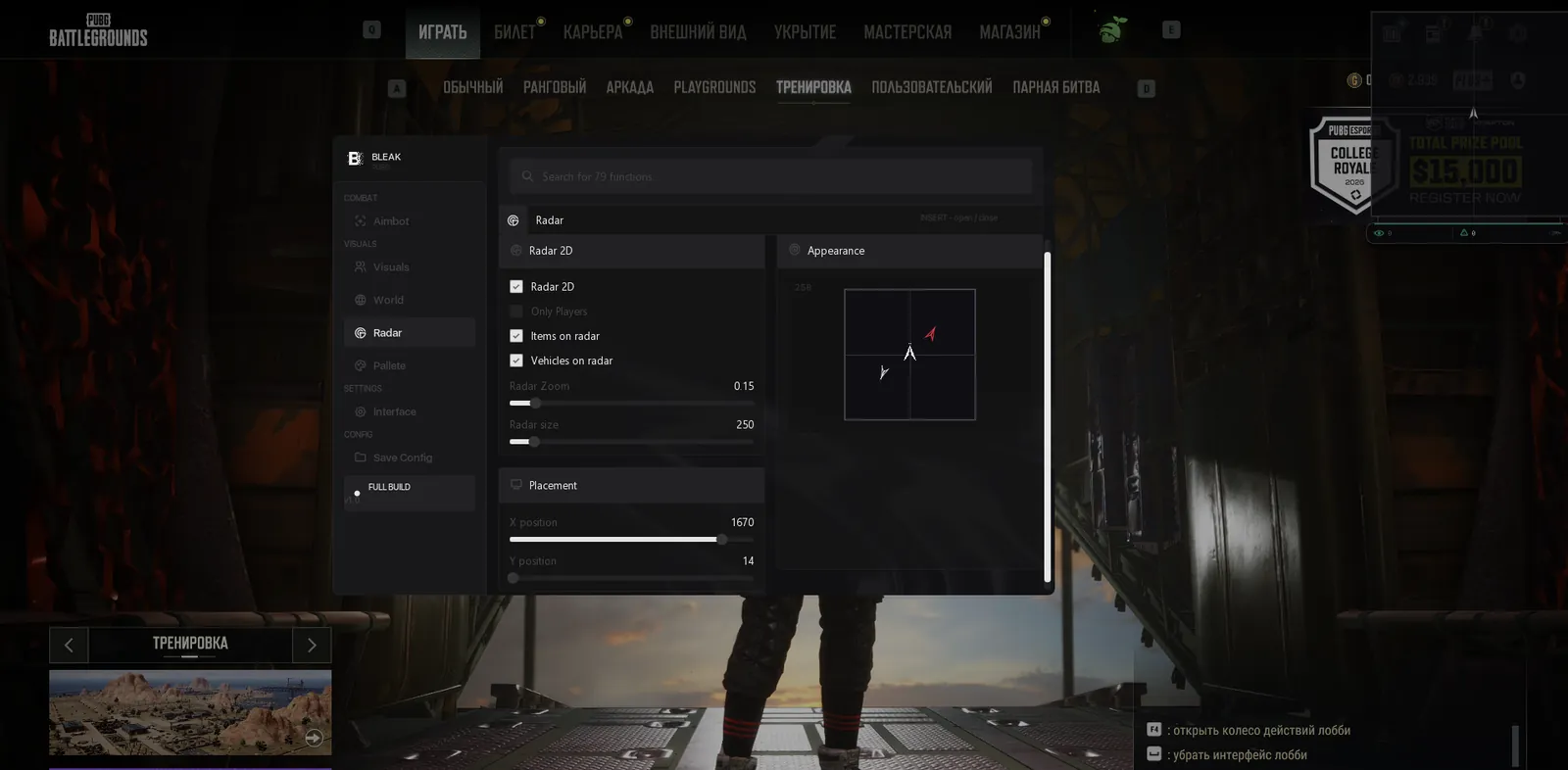
2D radar

A square with a grid, enemies as chevrons pointing where they move, your camera as a white arrow in the middle. It does not rotate and stays oriented to the cardinal directions.

Radar filters

Players only, or with loot and vehicles too. Anything beyond the radius disappears instead of piling up at the edge.

Zoom and position

Zoom in pixels per meter, window size from 200 to 700, exact X and Y position. With the menu open you can drag the radar with the mouse.

Menu

Language and search

English or Russian, with both menu items and item names translated. The search bar in the header finds any setting.

Configs

Create, save, load, rename, delete. The active one carries an ACTIVE badge and is picked up on the next launch.

Overlay

Overlay FPS limit from 0 to 360, watermark, menu accent color. The menu opens with Insert or Home.

Known issues & fixes

Real questions from our support, with the fixes that worked. Based on user requests for this product.

The loader freezes or keeps asking me to restart my computer and never actually starts

This is usually caused by a conflict with third-party antivirus or security software on your computer. Disable or temporarily remove other antivirus programs and overlays, and add the program's folder to your antivirus exceptions.

  • Contact support — they can give you a utility to check what exactly is blocking the launch.
  • Check whether virtualization is enabled in your BIOS settings and try turning it on.
  • If that doesn't help, try connecting through a VPN.
The Bleak menu does not appear after F4. What should I check?

This build draws its menu and ESP through the Discord overlay, so the cause is almost always there. Check in this order:

  • Discord is running as administrator and you are logged in. The loader is also started as administrator.
  • In Discord settings, Game Overlay: Enable Overlay is on, Enable Legacy Overlay and Compatibility Mode are off.
  • The game runs in borderless window mode, which the new Discord overlay needs.
  • In the game main menu you can see the overlay frame in the top left corner. Until it shows up, pressing F4 is too early.

After F4 the menu appears in 5-10 seconds, and from then on Insert or Home opens and closes it. If the frame is still missing after these steps, send a screenshot of your overlay settings to support.

I can't download the loader — the page keeps loading forever or gives a 502 error

This is usually caused by the browser. Try opening the download page in a different browser — for example, if you're using Edge, switch to Chrome or Firefox.

If the issue persists, try connecting through a VPN.

All issues & general troubleshooting
TARIFFS
$5.00
BUY What happens after payment?
Got a question? Ask before you pay

We'll help you choose and sort out any launch issue. Ask us anything before buying, we're always on your side.

Support 10:00–22:00, sometimes we reply at night too
Ask a question

Available tariffs

1 day
$5.00
START PURCHASE
7 days
$20.00
START PURCHASE
30 days
$40.00
START PURCHASE
Reviews about Bleak PUBG

No reviews yet. Be the first to leave one.

Your review

Reviews are published after moderation.

Join our gaming community chat

Discuss current cheats from developers and how to use them effectively in popular online games. Share tactics, exchange useful info and find like-minded players in our community.

1 900+Members
24/7Online
Join our gaming community chat

Technical support

Run into a technical issue? Our team of experts will help. We handle all requests in a live queue, so please be understanding if it sometimes takes a little wait. We guarantee that no request goes unanswered.

Availabilityfrom 10:00 to 23:00
Fast responseIn queue order
Get help
Technical support
PROCHEAT

PROCHEAT news channel

Follow product status changes, update history and important announcements.

Subscribe

Bleak PUBG menu: seven tabs and prices

The Bleak PUBG menu has seven tabs and a search bar across every option in the header. Aim, ESP and radar each come with a live preview, so you see the box or the FOV zone before you even queue for a match.

TabWhat is insideWhen it helps
Aimbottwo keys, bullet prediction, recoil control, Smoothing, bone, FOV in three shapes, static crosshairduels at any range and AR spray
Visualsbox, skeleton, name, HP with a damage ghost, K, DMG, LV, knocked players, Danger warning, off-screen arrowsfinal circles and pushing a house with a squad inside
Worldloot in nine categories, level 3 only, smart filter, grenades, airdrop, cars and boats with durability and fuelthe first minutes after landing and rotating away from the blue zone
Radar2D radar fixed to the compass, filters for players, loot and vehicles, zoom, size, positionwatching your flanks while you look down the scope
Palettecolors for visible and hidden enemies, for each loot category, for cars and boatstelling at a glance whether an enemy is in the open or behind cover
Interfacelanguage, menu color, overlay FPS limit up to 360, watermarkmatching your monitor and its refresh rate
Configcreate, save, load, rename, delete, ACTIVE badgeseparate presets for solo and squad, or for Erangel and Sanhok

Prices are in dollars: $5 for a day, $20 for a week, $40 for a month. Per day, the week comes to about $2.86 and the month to about $1.33, roughly a quarter of the one-day price. A single day is a cheap way to check how the Discord overlay gets along with your system.

Aimbot: keys, bone and smoothing

The aimbot is switched on with the main Aim Mouse toggle and only works while the key is held. The second key can go on a mouse side button, so you never reach for the keyboard mid-fight. Let go and the crosshair is all yours again.

You pick one of three bones. Head gives the most damage and draws the most suspicion, especially if someone reviews your kills in a replay. Neck sits between the two. Chest is forgiving: the area is bigger, the lock is steadier, and long duels on Miramar feel calmer with it. Smoothing from 1 to 10 sets how soft the pull is: at high values the motion looks like a hand on a mouse rather than a robotic snap.

Bullet prediction and the impact marker

Bullet prediction draws a marker where the bullet will really hit. It reads the ballistics of the weapon in your hands and accounts for two things: how far ahead of a moving target you need to aim and how much the bullet drops at that range. In PUBG this is exactly what separates DMR and SR shooting from close-range spraying. A player on a motorbike two hundred meters out, or someone running between rocks on Miramar, stops being a coin flip.

You feel it most with snipers and DMRs. A Kar98k and a Mini14 need different holdover at 300 meters, and there is no time to work that out in your head mid-fight.

FOV zone and Visible check

The capture zone radius is set in pixels, from 0 to 300, and the shape is up to you: circle, triangle or diamond. Which one suits you is easier to judge by eye, so a mini-preview sits right next to the settings. The zone can be drawn on screen in its own color or kept hidden.

Visible check leaves the aimbot only the enemies you can actually see. Someone behind a warehouse wall on Erangel or behind a hill on Taego never becomes a target, and the crosshair will not stick to cover.

How recoil control works

Recoil control in Bleak pulls the mouse down the way your own hand would. It does not touch game memory and does not change the weapon's recoil itself. It kicks in when both LMB and RMB are held, that is, when you fire while aiming, and smoothly drags the crosshair down against the muzzle climb. Hip fire with LMB alone does not engage it.

The base strength is picked automatically from the weapon type in your hands, and it differs for AR, SMG, DMR and sniper rifles. On top of that there is a manual slider from 0 to 200%, set to 200 by default. If your sight drifts down on a Beryl or an AKM, lower it; if the barrel still climbs, raise it. While the menu is open, recoil control is off, so clicking through settings never moves the camera.

Player ESP: kills, damage and knocked enemies

The box can be full, corner or 3D, or you can drop it and keep just the skeleton. The nickname sits above the head with the distance in meters next to it. Box, skeleton and name each get two colors: one when the enemy is in plain sight and another when they are behind cover.

For battle royale the numbers next to the box matter most. K is how many kills the player has this match, DMG is the damage they have dealt, and LV under the name is their survival level. A guy with six kills in the final circle and a newcomer with none call for different plays, and now you know which is which before the first shot. Knocked players are highlighted in their own color across every element, so in a squad-on-squad fight you know right away who to finish.

Render distance goes up to 1000 meters or no limit at all. Near the edge of that range the ESP fades out smoothly and the text shrinks, so far-off labels do not clutter the screen. If you only need ESP, without aim, loot or radar, the Bleak PUBG Lite build in the same catalog costs $3 a day.

Health bar with a damage ghost

The health bar stands vertically to the right of the box. After you land a hit, a white ghost of the chunk you took off stays on it, so you see exactly how much damage went in. Tagged someone in a level 3 helmet with a Kar98k and they are still standing? The ghost tells you whether an SMG burst will finish them or whether it is time to reposition.

Who is close and who is aiming at you

Danger warning is a panel with the number of enemies within 200 meters and a list of the five closest: name, distance bar, K and DMG. It docks to the radar, and with the radar off it sits at the top center of the screen. In the last blue zone circles, when squads are holed up in neighboring houses, this panel tells you more than footsteps in your headset.

The Aiming at me warning alerts you when someone is aiming straight at you, and arrows on the screen edges tell you where an unseen enemy is coming from. The same danger panel carries the Spectators counter: how many people are watching you right now.

Loot ESP: level 3 gear and a smart filter

Items on the ground are labeled with a name, distance and an icon, out to 350 meters. The filter splits loot into nine categories: weapons, attachments, ammo, meds and boosts, armor, helmets, backpacks, grenades and other. Each category can have its own color, so an energy drink and an AR mag do not blend together.

Loot 3LVL+ keeps only level 3 gear on screen: helmet, vest and backpack. Handy when you are already kitted out and sweeping School on Erangel for a level 3 helmet. The smart filter checks your backpack and hides what you already have enough of, such as meds or grenades. The screen stays readable even when a hundred items are lying around after the drop.

Vehicles, boats and airdrops

Vehicles are visible out to 3000 meters. Each gets a marker with its name and distance, and under it two bars with percentages: durability, which goes from green to amber to red, and a blue fuel tank. When the blue zone closes in and you have to drive to the far side of Miramar, you know at a glance which UAZ will make it and which will die in the desert on an empty tank.

Ground vehicles and boats use different colors, so on Sanhok or along the Erangel rivers a boat is easy to tell from a buggy on the shore. Thrown grenades and the falling airdrop crate get their own markers too. A grenade is marked while it is still in the air, and you see where the crate is coming down before half the lobby runs to it.

2D radar fixed to the compass

The radar is a separate square drawn over the game: dark background, a cross grid and a white arrow for your camera in the middle. Enemies show as chevrons pointing where the player is moving, so you can tell straight away whether someone is coming for you or leaving. The radar does not spin with your camera. It is oriented to the cardinal directions like the world map, which makes it easy to match one against the other.

The Only Players filter strips everything but players, and loot and vehicles can be added back with their own checkboxes. Anything beyond the radius disappears instead of piling up on the edge. The window scales from 200 to 700, and with the menu open it is easier to drag it into a free corner with the mouse than to fiddle with the X and Y sliders.

What to turn off in Windows before launch

Supported systems are Windows 10 from version 2004 and Windows 11 up to 26H1. You can check yours under Settings, System, About. Before the first launch, turn off Windows Defender along with real-time protection. Then in Windows Security open Device security, go to Core isolation and switch off Memory integrity. VBS, virtualization-based security, has to be off as well. You can check it in System Information (msinfo32) on the line of the same name.

Leave Secure Boot and TPM as they are: Bleak runs with them, so there is no need to enter the BIOS. The vendor asks you to uninstall third-party antivirus software and anti-cheats. That includes the FACEIT client if you play PUBG tournaments there, Vanguard from Valorant, and antivirus suites like 360 or Avast. PUBG is protected by BattlEye, and no cheat can promise you will never be banned. Visible check, high Smoothing and aiming at the neck or chest instead of the head lower the odds.

Launching through the Discord overlay

The order matters, especially the first time:

  1. Install Discord, close it and start it again as administrator. You will do this before every session.
  2. In Discord settings open Game Overlay: Enable overlay is on, Enable legacy overlay and Compatibility mode are off.
  3. In PUBG graphics settings set the display mode to Fullscreen (Windowed). The new Discord overlay does not draw without a borderless window.
  4. Run the Bleak loader as administrator, enter your key and press Inject. Discord must be running at this point.
  5. PUBG starts by itself. In the game's main menu an overlay frame appears in the top left corner.
  6. Press F4 and wait 5 to 10 seconds, and the menu opens on its own. After that, Insert or Home opens and closes it.

If the frame never shows up, check steps 1 to 3 first: administrator rights for Discord and the overlay settings. If that does not help, message our support chat.

Bleak PUBG questions

Can I play without Discord?

No. The menu and ESP are drawn through the Discord in-game overlay, so Discord has to be installed and running as administrator before you press Inject.

Do I have to turn off Secure Boot?

No, Bleak PUBG works with Secure Boot on, and TPM can stay as it is too. Only Windows Defender, VBS and Core Isolation with Memory Integrity get switched off.

Why does recoil control do nothing when I hip fire?

Recoil control kicks in when LMB and RMB are both held, that is, when you fire while aiming. It also sits idle while the cheat menu is open. If the pull is too strong or too weak, adjust the strength slider anywhere between 0 and 200%.

Will it work with PUBG from the Epic Games Store?

The vendor only lists the Steam client, so we do not recommend buying it for the Epic version.

Is a spoofer included?

No, Bleak PUBG has no spoofer. If your hardware has already caught a BattlEye HWID ban, you will need a spoofer separately.

What happens to my subscription after a PUBG update?

PUBG gets patched regularly. If a patch sends the build in for an update, the status on the product page changes, and your paid time is frozen for that period instead of running out.

The menu does not open after Inject. What now?

Wait for the PUBG main menu and the overlay frame in the top left corner, then press F4 and give it 5 to 10 seconds. If there is no frame, make sure Discord is running as administrator and that the legacy overlay and compatibility mode are off in its settings.

from $5.00 Choose a plan
Ask a question


