Neiro DMA Rob RUN

Working
SMG SMG
Last update 27.11.2026 This date shows when the software was last updated. An old date doesn't mean the software stopped working! Most likely the developer just had nothing new to add. If you have any doubts, you can always check the current status with our support team.
Add another cheat from this game too — to compare them.
Neiro DMA Rob RUN
Steam
Windows support: 10: all builds; 11: all builds
Menu language: Russian, English

Aggressiveness

6 / 10
  • Aimbot
  • Loot
  • ESP / Wallhack
  • Radar

Feature score, not ban probability.

How this is calculated
  • Aimbot 5
  • Loot, ESP / Wallhack, Radar +1

5 + 1 = 6 / 10

The strongest feature sets the base. Each other gameplay group adds 1 point, up to 2 extra. Overlapping features share a group; cosmetics add no bonus. Maximum: 10.

Our editorial scale of available features. It does not measure ban probability or which settings you use.

Spoofer:No
USB drive:No
BIOS:No

User information

For a two-PC setup, SMG lists a compatible DMA/FPGA device, 64-bit Windows on the second PC and DirectX 11. Named profiles are stored on the DMA computer.

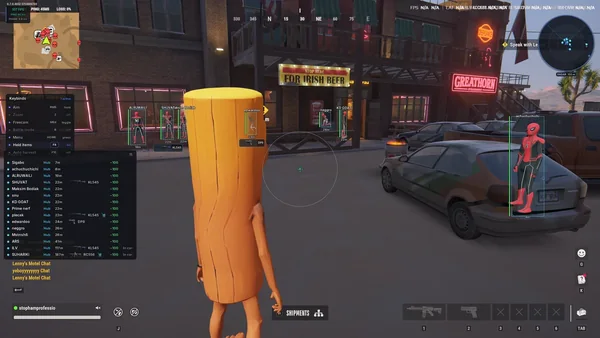
SCREENSHOTS
Description

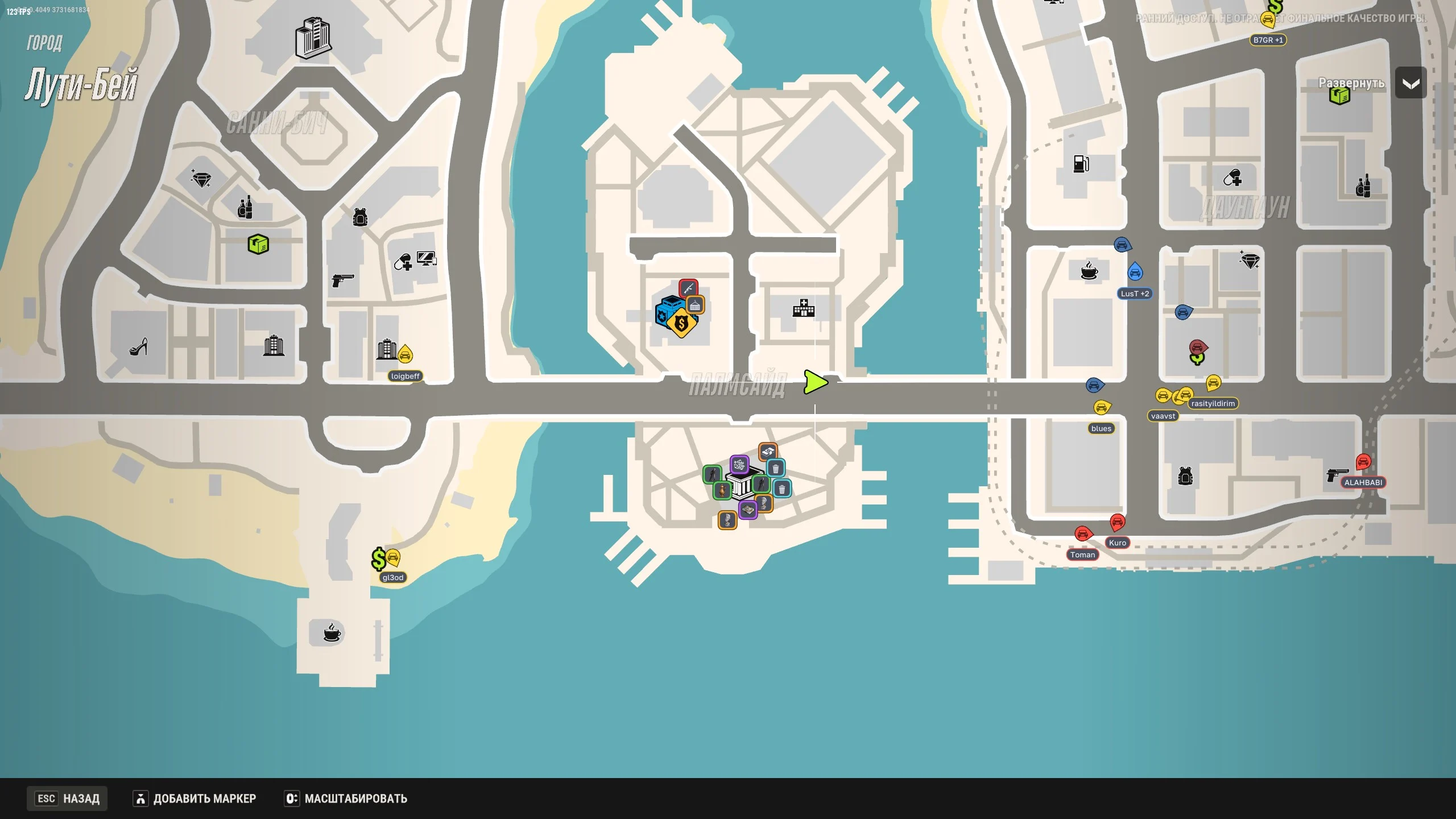
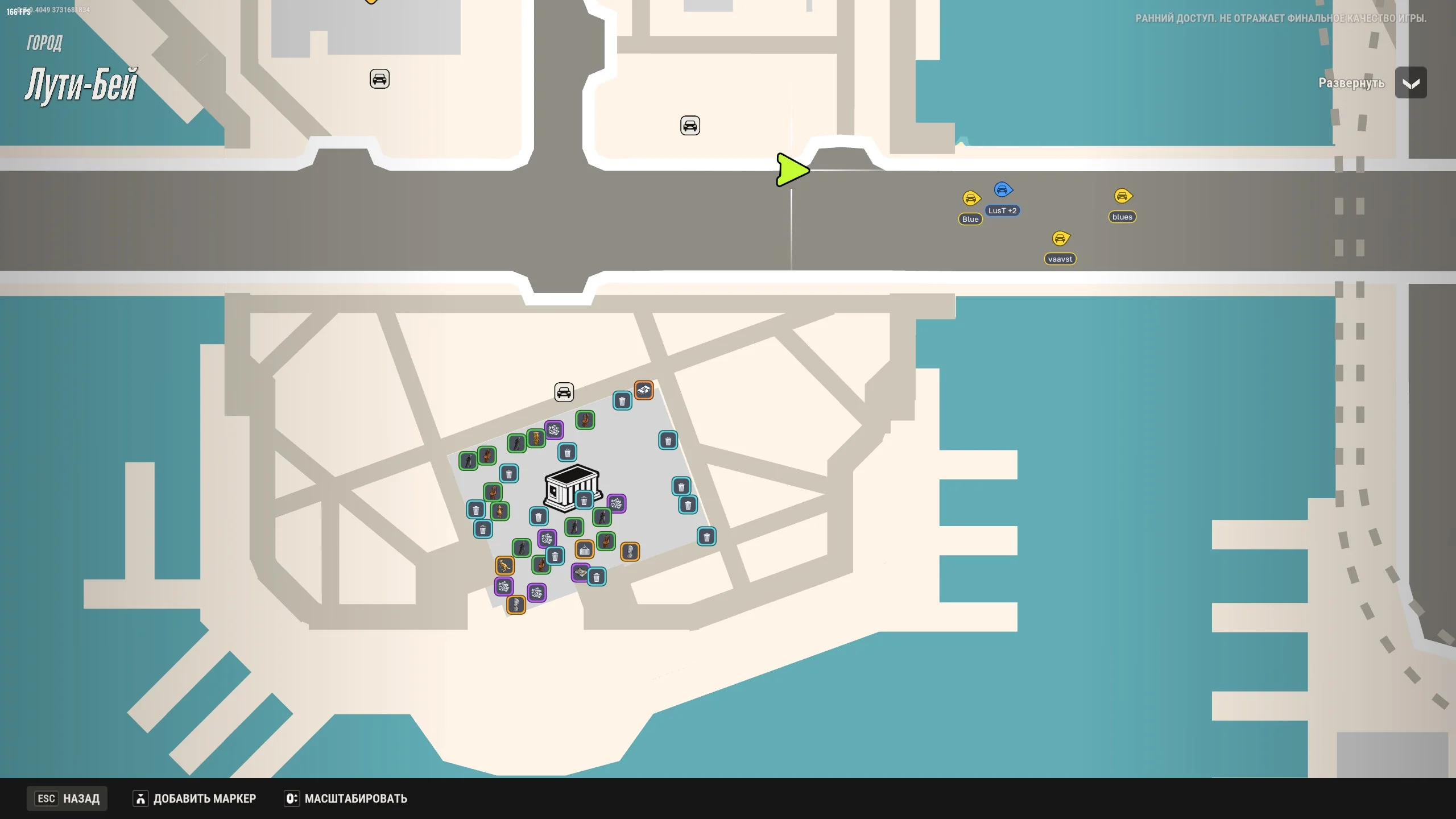
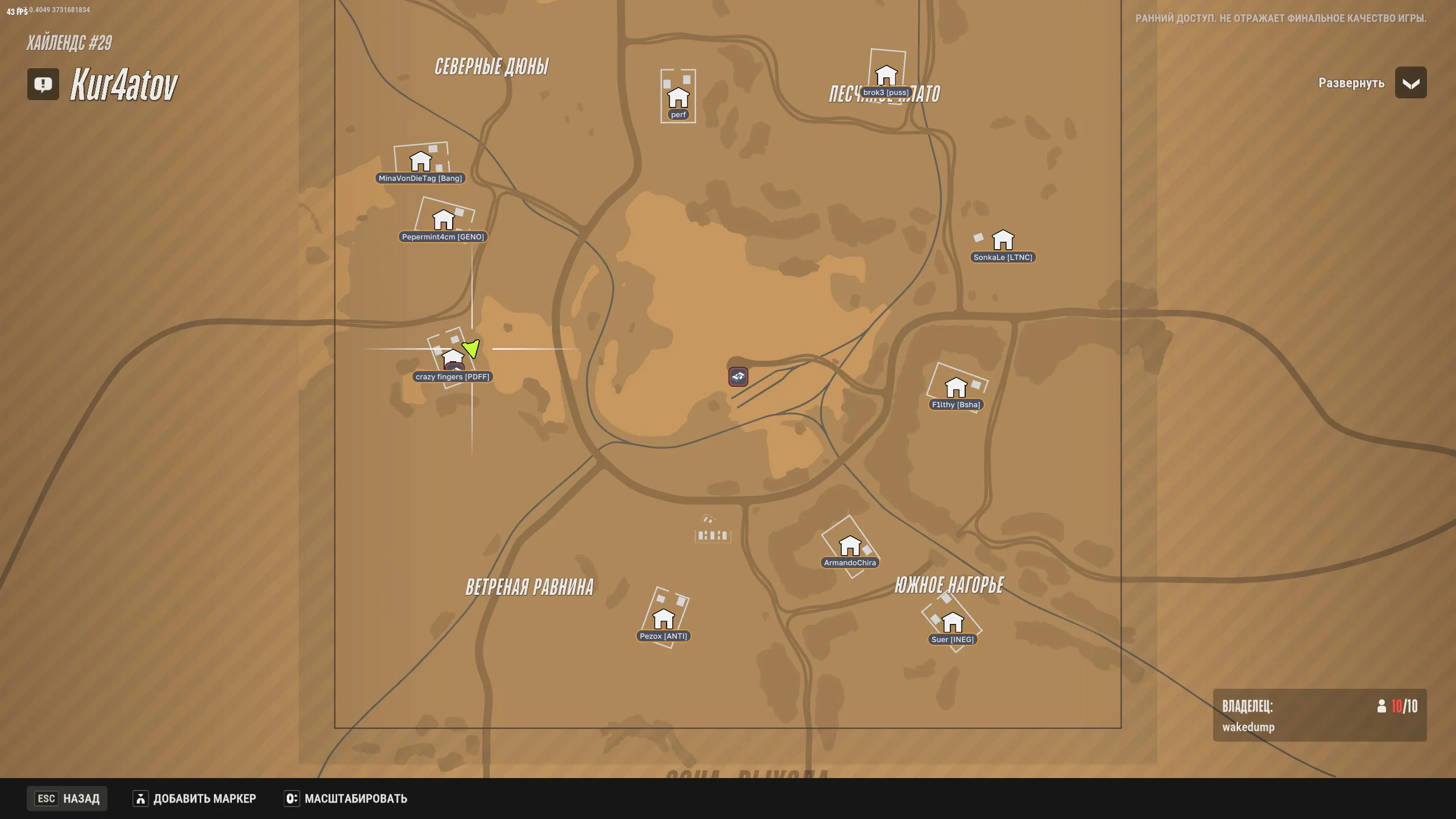
On the Neiro world map you can see who is riding in a vehicle and which way it is heading. Plots carry their owners’ names. Hover over a base to check open entrances, the remaining raid lock and stored cargo. Safes and crates have tier labels from T1 to T5.

Product features

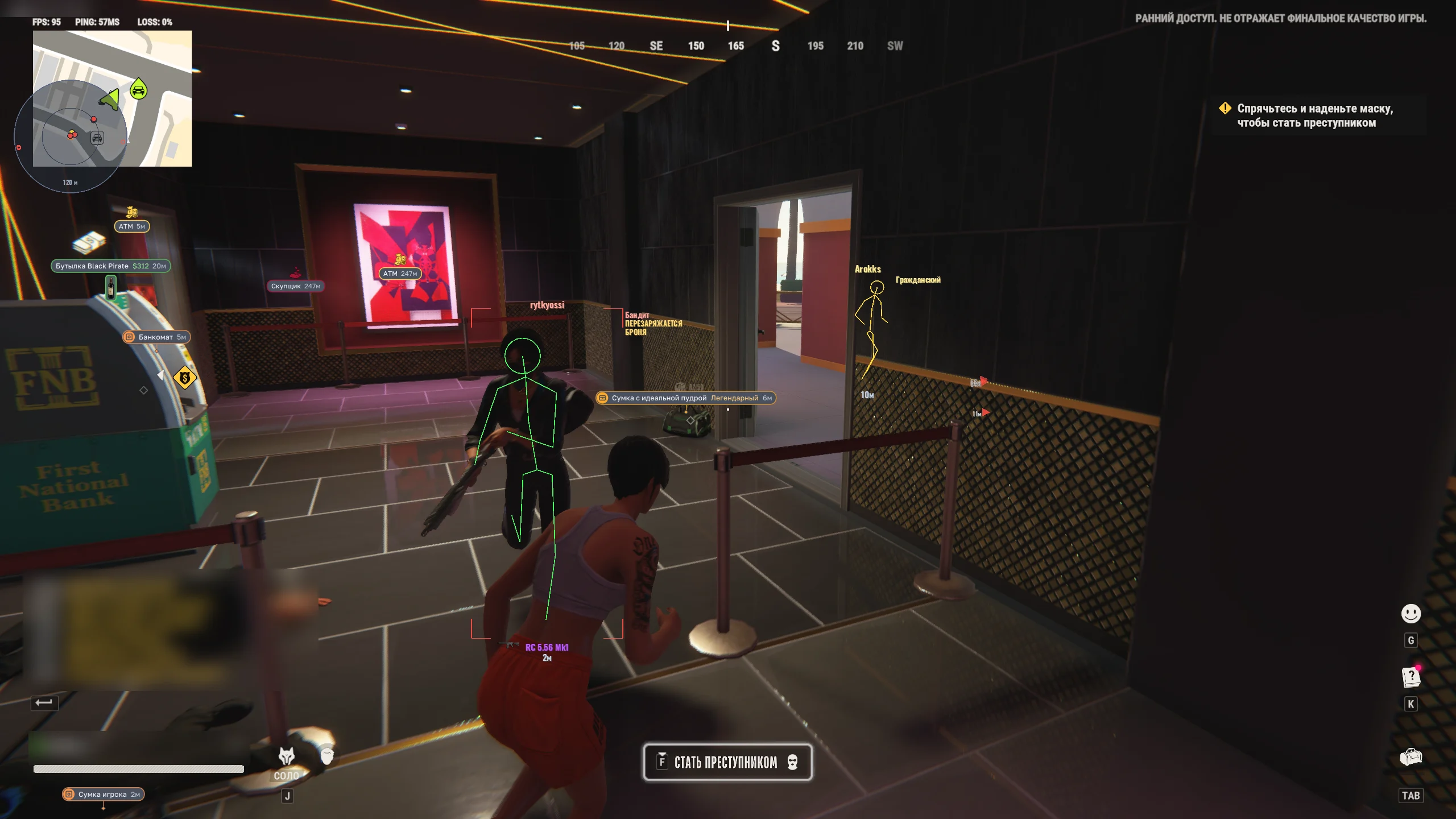
Player ESP

Player roles

Separate settings per role: cops, robbers, citizens, settlers, others

Role colours

Every role has its own color (citizens are yellow); green is the color of visible bones

Player markers

Full or corner boxes, skeleton, nickname, weapon (the game's own picture), distance, role

Player states

Player states: in a car or helicopter, hiding, knocked out, arrested, handcuffed, surrendered, searching / looting / at a trader, carrying cargo, reloading, using an item, armor

Bone visibility

Visibility check: bones the camera sees directly are drawn green, bones behind cover in the role's color. Walls, terrain and vehicles count as cover; bars and glass do not

Vehicle occupants

A player in a vehicle: its doors, bonnet, boot and roof hide him, the windows do not

Allies

Teammates and clan members can be hidden

ESP styling

Separate color, size and position for every element, separate ESP and skeleton distances (up to 200 m - as far as the game loads players)

Layout preview

Interactive ESP preview in the menu: drag the name, weapon, distance and role - the ESP places them just as the preview does

Marker priority

Players are always drawn on top of loot marks and world icons

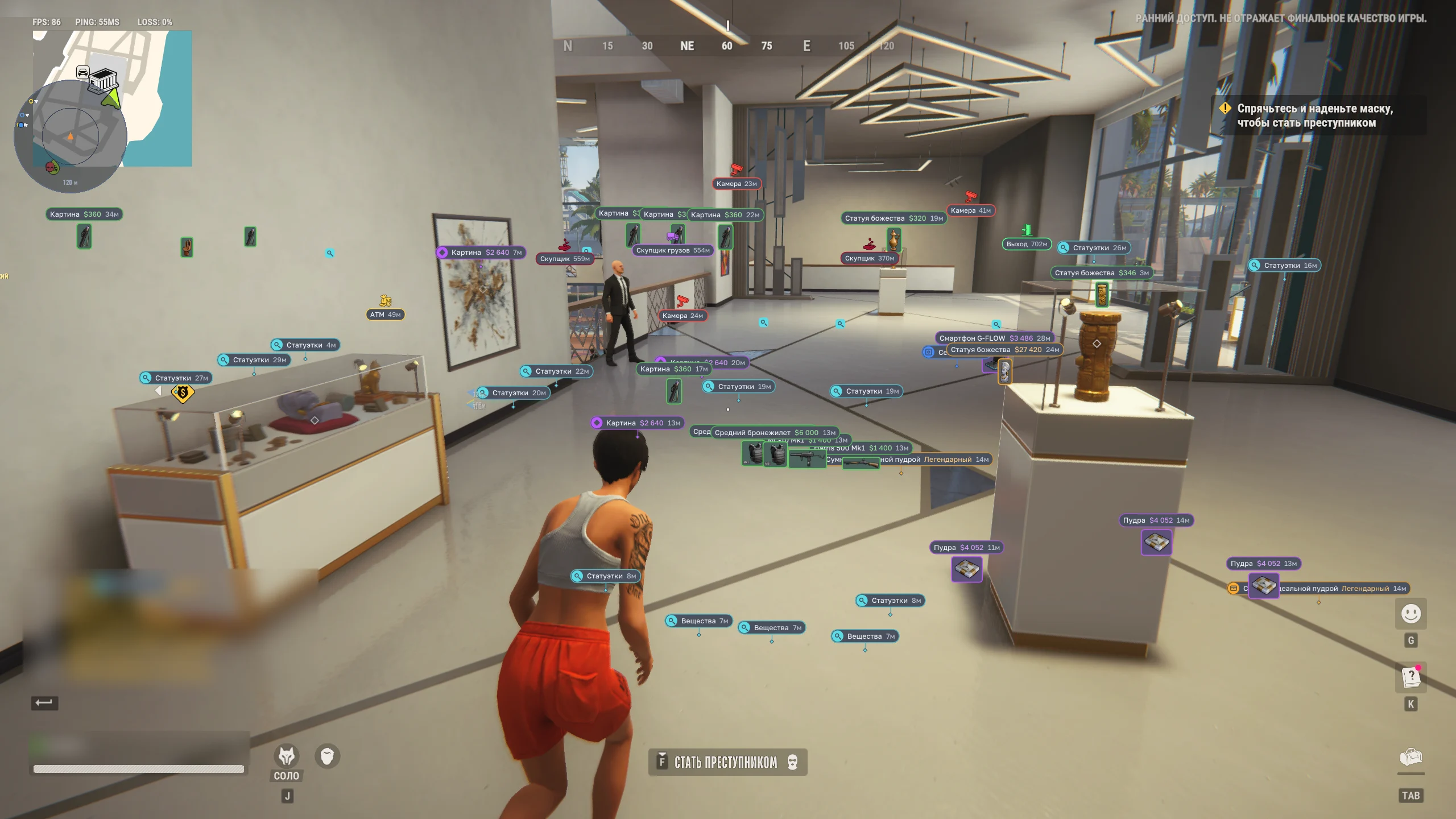
Loot ESP

Ground items

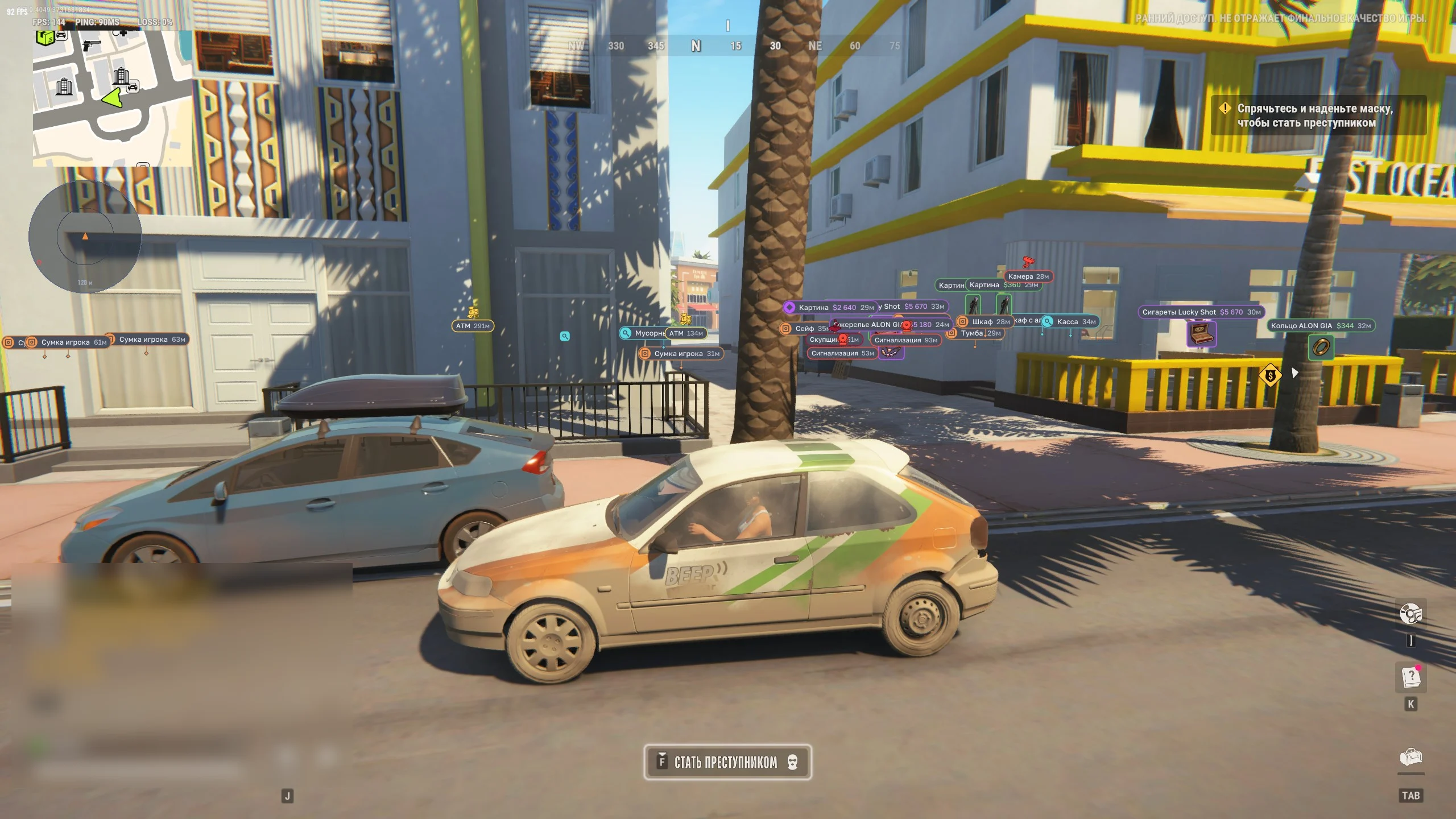
Ground items with the game's own item pictures

Item rarity

Exotic quality - the rarest items - in red

Item labels

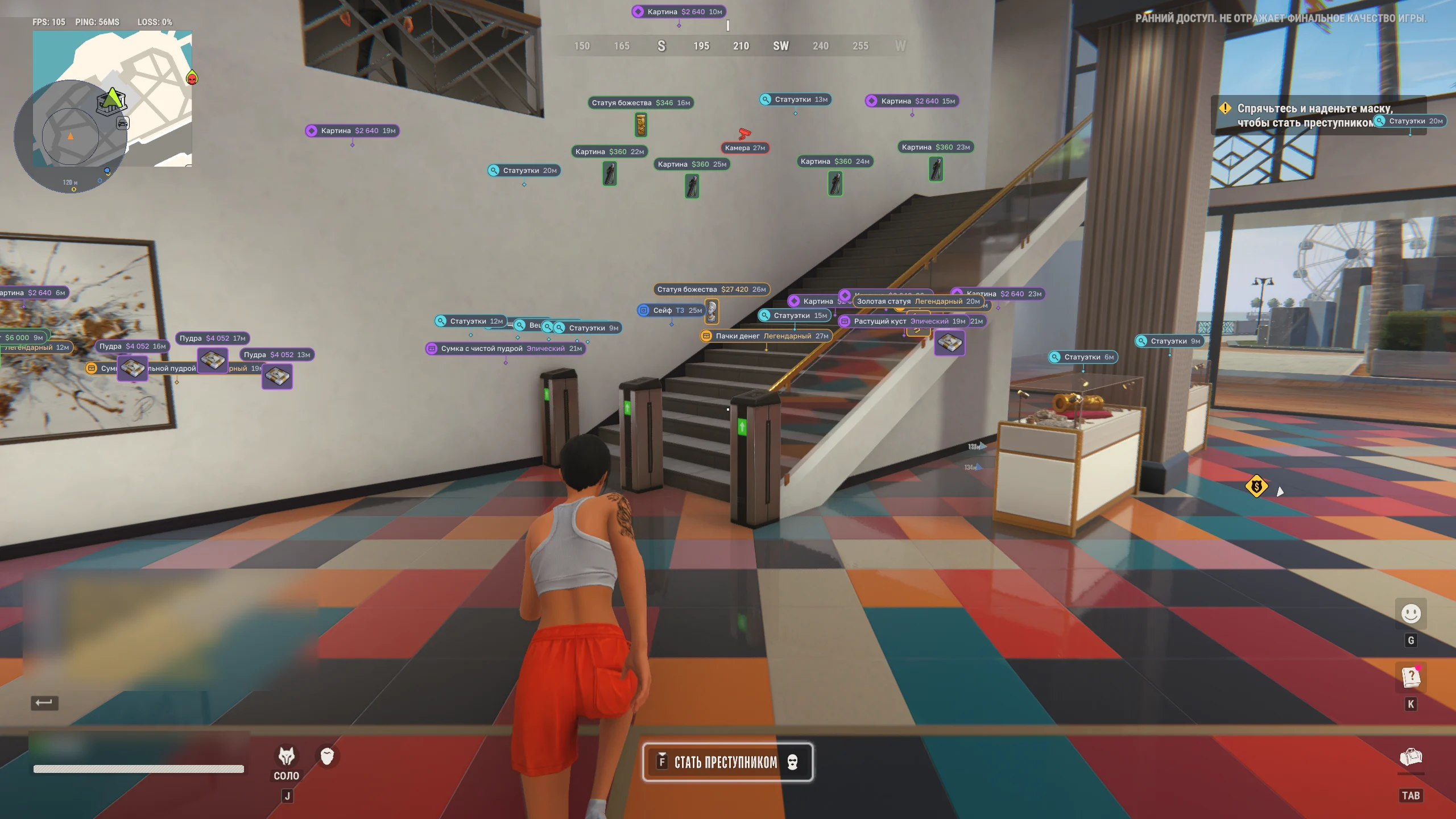
Clean labels: icon, name, price, distance; labels never overlap, far loot is shown as a compact icon

Loot filters

Filters: minimum price, rarity, categories (weapons, gear, medical, valuables, keys & tools, vehicles, building, other) with a choice of individual item classes

Searchable objects

Searchables: dumpsters, registers, lockers, shelves, crates, safes, ATMs

Tiers T1–T5

Tier of safes and lootable boxes (T1-T5) by color and label

Cargo

Cargo in buildings and on the floor, rarity by color and name

Bags and vehicles

Bags dropped by players and loot from vehicles (separate toggle)

Empty containers

Looted spots disappear by themselves - after you or after other players; empty spots can optionally be shown dimmed

Marker range

Separate distances for items, searchables, safes and cargo (up to 200 m)

Money

Cash amounts

Shown as soon as it loads in, at any distance and always with the amount; its labels are never hidden by other marks

Deposited cash

A cash pile turned in by another player - a red mark with the amount

Settlement till

Settlement cash with the amount (the distance is adjustable)

Money laundering

Laundering: how much dirty money is in work and how much is clean - both amounts are always on the mark

Bases (settlements)

Plot owner

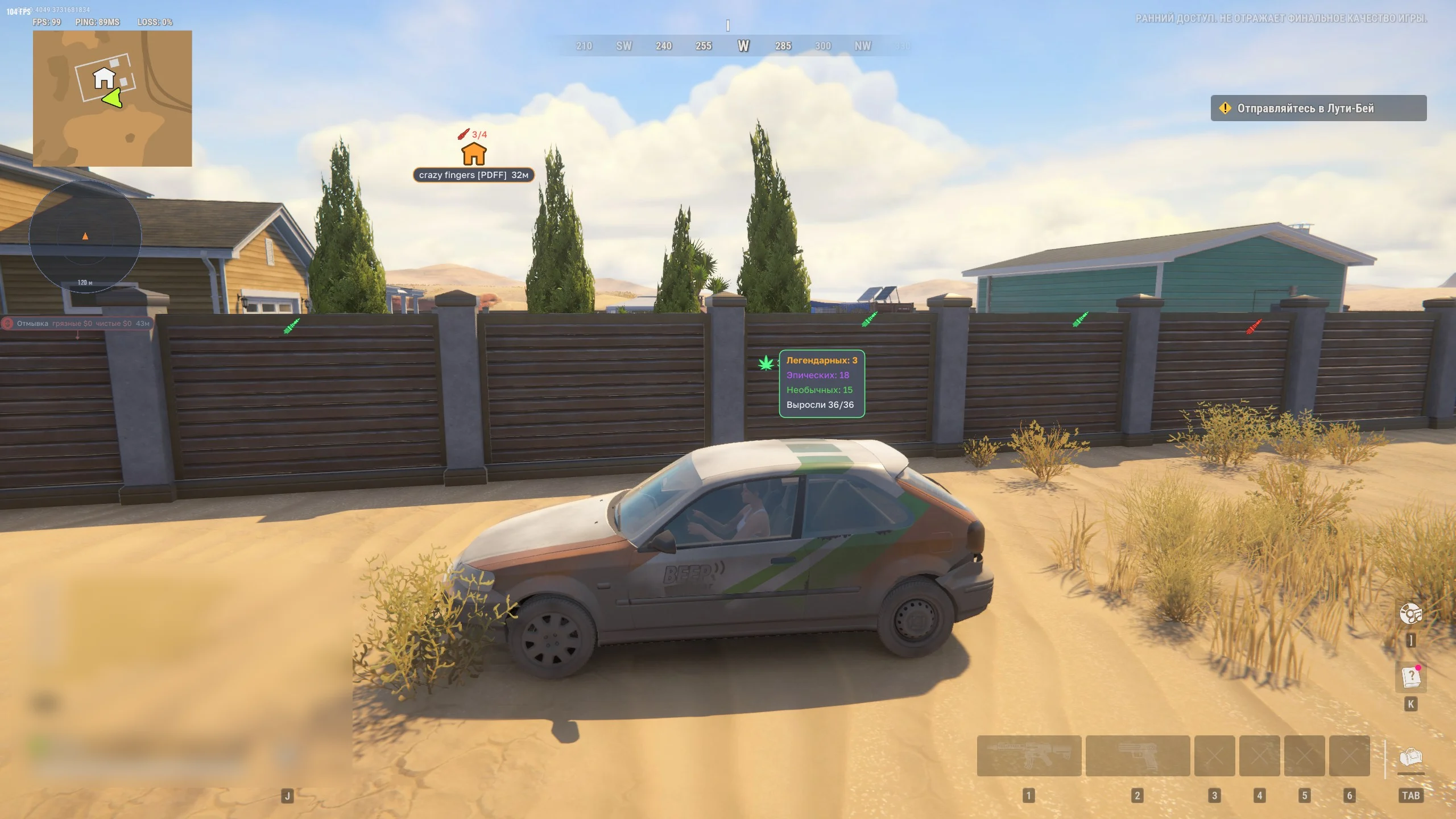
A mark over every plot: the game's own house in the owner's color (yours and your clan's - green, others - orange, raid - red), the owner's name, clan tag and distance; from afar it is compact, owner only

Open entrances

"OPEN: house / garage / window" - a red plate and ring when a door into the house (not an inner one), a garage door or a window you can climb through is open; seen from afar

Entrance markers

A mark at every open door, garage door and window

Access panels

Access panels: a spark plug on every panel - green with fuses in, red with empty slots; the base mark shows how many panels have fuses (3/4)

Raid timer

Raid going on - a siren; raid lock - a lock with the time left

Plantation

Plantation: every farm has a hemp mark with "grown N/M"; look at it - a column with how many bushes of each rarity (legendary, epic...)

Players on plot

How many players are on the plot now

Base details

Base card on hover: its state (raid, what is open, raid lock, all closed), panels without fuses, money being laundered, cargo on the shelves and in the freezers by rarity, cargo left, loot lying out, VIP

Base list

A list of the settlement's bases at the side: nearest or most open first

Plot filters

Filters: yours, your clan's, others'; only with loot outside, only with a way in open; hide raid-locked bases and free plots

Raid alert

A "Plot under raid" mark across the location while a raid is going on

World map

Map zoom

Everything is drawn right on the game's big map, following its zoom and pan

Vehicles

Vehicles of the whole location - the game's own vehicle mark in the owner's role color (cops, robbers, citizens), its point shows where it heads; dull - engine off; a crate - carrying cargo

Passengers

Who sits in a vehicle - names seen all over the map

Nearby players

Players near you - the game's player mark in the role color with an arrow where they look

Last known position

A player who left your area stays as a faded "here N ago" mark; one who drove off is marked where he got out

Houses on map

Plot owners - names next to the houses on the map; a red "open" when a way into the house or garage is open

Loot on map

Loot on the map - tiles with the game's item pictures framed in the rarity color, by your loot filters; safes, boxes and dumpsters - where something is left

Map overlay

While the map is open the ESP stays out of its way

World ESP

Trade locations

Trade: traders, fences, barter, cargo buyers and sellers, ATM

Security systems

Security: cameras, alarm panels, metal detectors

Exits and cash

Location exits, cash, the nearest map edge

Icon labels

Icon labels in the same plate style

Icon settings

Every icon kind has its own toggle, color and distance

Radar and arrows

Mini radar

Mini radar with players and above/below indicators

Size and range

Radar size and range; drag it with the mouse while the menu is open

Off-screen arrows

Arrows to players outside the screen, with distance

Aim assist

Input devices

Through an external device: MAKCU, KMBox B+ Pro, KMBox Net, Ferrum (COM and NET), Arduino

Activation keys

Activation from the device or from the gaming PC keyboard/mouse, two binds

Aim presets

Presets: Human, Legit, Semirage, Rage

Target zones

Hitboxes: head, neck, chest, pelvis (one or several)

Aim settings

FOV, distance, speed, smoothness, stick strength, humanizer

Auto calibration

Aim measures the game's sensitivity and the device delay by itself - no jerks or overshoots, nothing to tune

Selection rate

The target is picked 500 times a second from the newest data, with no lag behind the player model

Target tracking

Lead on moving targets, keeps the selected target

Visible targets

"Visible only": targets behind cover are skipped

Target exclusions

Never aims at teammates and clan members; your own role, knocked out and surrendered players can be excluded

Memory Write

Aim modes

Vector turns the camera toward the target. Silent Aim keeps the camera still and offers hit-zone and miss-chance settings. SMG includes an account ban warning in the menu.

Weapons and camera

Recoil, spread and camera shake have separate settings. Field of view can be adjusted for both the normal view and sights.

Smoke, flashes and grass

Separate switches control smoke, flash effects and grass rendering. Gas remains visible.

Model colours

Chams lets you choose which characters to highlight. Enemies in sight and behind cover can have different colours.

Skins

Outfits, masks and weapon finishes change on your screen. Other players see the original appearance.

Container search and free camera

Fast search reveals the entire contents of a crate at once. Freecam lets the camera move while the character stays in place.

Battle mode

Mode key

Assignable key: loot and world icons are hidden, players and location exits stay

Mode indicator

While the mode is on, a "BATTLE MODE" plate is shown at the top centre

Program status

Connection status

A plate at the top of the screen tells why the ESP is not drawing yet: looking for the DMA device, game not running, game loading, game menu, location loading

Settings

Menu language

English and Russian; item names come from the game itself in the menu language

Tooltips

A "?" hint on every function of the menu

Fuser colours

No black and no transparency in the ESP - made for fuser output

Saved profiles

Automatic saving and named configs

Profile import

Someone else's config loads without re-setup: it does not change the devices, monitor or synchronization

ESP sync

Automatic ESP-to-picture synchronization with nothing to set up: on the second PC the delay follows the game's FPS and the PC load by itself; when the game and the program run on one PC, the program checks the camera against the game's picture during a match

Game frame rate

Follow the game's FPS (on by default); without it the overlay draws at its own FPS, set in the menu

Overlay FPS limit

Overlay FPS limit

Text and monitor

ESP text size, monitor selection

Menu controls

Menu control from the keyboard and mouse of either PC

Display output

Output to a second monitor or through a fuser; on a single PC, a transparent overlay on top of the game

Match detection

Automatically waits for the game and the match
TARIFFS
360₽
BUY What happens after payment?
Got a question? Ask before you pay

We'll help you choose and sort out any launch issue. Ask us anything before buying, we're always on your side.

Support 10:00–22:00, sometimes we reply at night too
Ask a question

Available tariffs

1 day
360 ₽
360 ₽ / day
START PURCHASE
7 days
1350 ₽
193 ₽ / day
START PURCHASE
lowest per day
30 days
2100 ₽
70 ₽ / day
START PURCHASE
Reviews about Neiro DMA Rob RUN

No reviews yet. Be the first to leave one.

Your review

Reviews are published after moderation.

Join our gaming community chat

Discuss current cheats from developers and how to use them effectively in popular online games. Share tactics, exchange useful info and find like-minded players in our community.

1 900+Members
24/7Online
Join our gaming community chat

Technical support

Run into a technical issue? Our team of experts will help. We handle all requests in a live queue, so please be understanding if it sometimes takes a little wait. We guarantee that no request goes unanswered.

Availabilityfrom 10:00 to 23:00
Fast responseIn queue order
Get help
Technical support
PROCHEAT

PROCHEAT news channel

Follow product status changes, update history and important announcements.

Subscribe

What appears on the ROB RUN map

The tip of a vehicle icon shows its direction of travel. When the engine is off, the icon dims. Passenger names appear next to vehicles, and houses carry the names of their owners. The markers follow the game map as you pan and zoom.

Loot labels and cash amounts

Each ground item has an in-game icon, a price and a distance label. Distant items appear as small icons. Safes and crates carry tier labels from T1 to T5. A settlement till shows its balance. At a laundering station, separate figures show how much cash is being processed and how much is ready to collect.

Neiro DMA Rob RUN FAQ

Which languages are available for item names?

Neiro uses the names from the game in the selected menu language. Both English and Russian are available.

Where are my settings saved?

Named profiles stay on the DMA PC across updates. Loading another profile keeps your monitor and device selections.

What happens to a container marker after a search?

Once a container is empty, its marker disappears. You can also keep a dim marker on screen to see which spots have already been searched.

from 360 ₽ Choose a plan
Ask a question