FOCUS Internal for ROB RUN: aim, loot and maps

Working
FOCUS FOCUS
Last update 23.11.2026 This date shows when the software was last updated. An old date doesn't mean the software stopped working! Most likely the developer just had nothing new to add. If you have any doubts, you can always check the current status with our support team.
Add another cheat from this game too — to compare them.
FOCUS Internal ROB RUN
Steam
Windows support: 10: all builds; 11: 25h2, 23h2, 24h2, 22h2, 21h2
Menu language: Russian, English

Aggressiveness

8 / 10
  • Triggerbot
  • No Recoil
  • Aimbot
  • Silent Aim
  • Loot
  • ESP / Wallhack
  • Radar
  • Chams
  • Skin Changer

Feature score, not ban probability.

How this is calculated
  • Triggerbot, No Recoil, Aimbot, Silent Aim 7
  • Loot, ESP / Wallhack, Radar, Chams +1
  • Skin Changer +0

7 + 1 + 0 = 8 / 10

The strongest feature sets the base. Each other gameplay group adds 1 point, up to 2 extra. Overlapping features share a group; cosmetics add no bonus. Maximum: 10.

Our editorial scale of available features. It does not measure ban probability or which settings you use.

Spoofer:No
USB drive:No
BIOS:No

User information

Confirmed support covers Windows 10 22H2 and Windows 11 25H2, AMD and Intel CPUs, and the Steam version of ROB RUN. The game uses EAC. The menu is available in Russian and English; its opening key is configurable and provided in the post-purchase guide. End disables the overlay. BIOS and USB requirements are not specified in the supplied materials. A spoofer is not included.

Keep your order details and follow the guide for FOCUS Internal specifically. If something fails, send support the launch stage and error text. Third party software carries a risk of an account ban; aim settings, visibility checks and menu hiding do not guarantee that you will avoid one.

SCREENSHOTS
Description

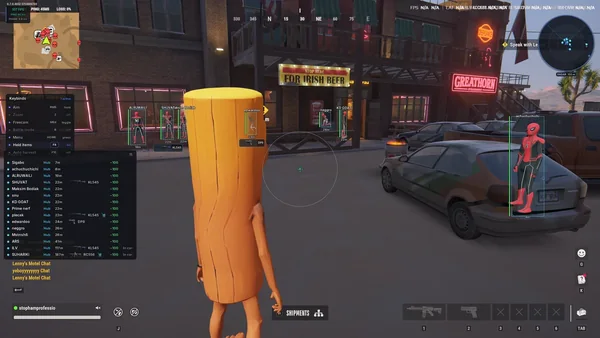
FOCUS Internal is a separate FOCUS edition for ROB RUN, not an update to the previous product. Its menu combines Aimbot, Silent Aim and Triggerbot with role selection, hitboxes and firing conditions. ESP covers players, equipment, vehicles, loot, bases and robbery objects. Character models support Chams with several styles and separate colors for visible and hidden parts.

Loot search connects to automatic actions: filter items by rarity, type and price, limit supplies, and sell selected items with a key or at a trader. Radar, the minimap and the big map have their own layers. Skins and replacement models are visible only to you. The feature list applies only to Internal and does not reuse settings from the old FOCUS product.

Product features

Aimbot

Activation

Enable aimbot and assign its activation key.

Main controls

FOV, aim smoothing and maximum distance.

Hitbox

Head, neck, chest or automatic selection.

Priority

Prioritize proximity to the crosshair, distance or lowest HP.

Target roles

Police, robbers, civilians and NPCs.

Exclusions

Ignore your party, friends, knocked players and players in vehicles.

Obstacles

Work on visible targets or targets behind obstacles.

Line of fire

Check whether a shot is possible before aiming.

Prediction

Movement prediction with strength and additional time controls.

Indicators

FOV circle, fill, fill density and aim line.

Colors

Configure aimbot element colors.

Silent Aim

Enable

Enable Silent Aim.

Area and range

FOV and maximum distance.

Target

Select the hitbox and target priority.

Lowest HP

Prioritize the target with the lowest HP.

Obstacles

Work behind obstacles and check line of fire.

Roles

Select police, robbers, civilians and NPCs.

Exclusions

Ignore your party, friends, knocked players and players in vehicles.

Prediction

Predict target movement.

Indicators

FOV circle, fill and aim line with color controls.

Triggerbot

Automatic fire

Fire automatically when aiming at an allowed target.

Operating mode

Hold, toggle or continuous operation.

Targets and weapons

Select targets, hitboxes and weapon types.

Reaction

Reaction delay and shot hold duration.

Hitbox and range

Hitbox scale and maximum distance.

Visibility

Check visibility and the absence of a wall.

Exclusions

Ignore dead and knocked players, teammates, clan, party and friends.

Fire blocking

Block firing in vehicles and while the menu or game windows are open.

Player ESP

Enable

Enable player display.

Roles

Choose which roles and categories to display.

Box type

Corner, full or filled full boxes.

Box styling

Box thickness, fill, padding and opacity.

Labels

Names, roles and distance.

Visibility

Visibility checks and separate colors behind cover.

Skeleton

Skeleton style, color and animation.

Head

Head dot.

Lines

Lines to players with starting position, style and thickness controls.

Health and armor

Approximate health and armor with bars and numbers.

Reload

Reload indicator with remaining time.

Equipment

Player weapon, armor and carried cargo.

Weapon display

Weapon icon, name or both.

Rarity and MK

Weapon rarity and MK designation.

Layout

Horizontal or vertical equipment layout.

Equipment panel

Equipment panel size, position, opacity and range.

Role colors

Colors based on player roles.

Distance

Maximum display distance.

Hiding spots

Players hidden in hiding spots.

Off-screen arrows

Arrows pointing to players outside the screen.

Arrow controls

Arrow style, radius, size, color and range.

Arrow labels

Weapon and distance next to the arrow.

Friends

Friends list with a separate color.

Quick add

Quickly add nearby players to friends.

Player list

Player list with selectable columns, sorting and row count.

Chams

Models through walls

Color player models through walls.

Visible and hidden parts

Separate colors for visible and hidden model parts.

Roles

Choose which roles Chams apply to.

Role colors

Use role colors.

Styles

Solid, Glass, Neon, Ghost, Pulse, Rainbow and Glow.

Model part

Display only the visible or only the hidden part.

Color

Adjust brightness, opacity and color blending.

Pulse

Pulse speed and minimum brightness.

Rainbow

Rainbow color transition speed.

Faces

Choose which model faces to display.

Weapons

Chams for player weapons or your own weapon.

Distance

Maximum display distance.

Loot and containers

Enable

Enable loot display.

Labels

Label range, size and opacity controls.

Styling

Background, outline, rarity stripe and text color.

Empty containers

Hide empty containers.

Overlap

Hide overlapping labels.

Filters

Minimum rarity and price filters.

Rare loot

Rare loot highlight and highlight ring.

Rare loot range

Extended highlight range for rare items.

Weapons and cargo

Show weapons and cargo independently of the rarity filter.

Lines

Lines to valuable loot with rarity and price thresholds.

Object types

Ground items, cargo, loot points and containers.

Cash and bags

Cash, dropped bags and vehicle loot.

Cash amount

Cash amount for money piles and the smuggler van.

Opened container

Contents of a previously opened container.

Item details

Name, type, distance, rarity, value, condition and price.

Despawn time

Time until a bag or loot disappears.

Compact view

Compact labels at long distances.

Markers

Markers at the item location.

Icons

Instant icon display in opened containers.

Slot price

Price of each item in an inventory slot.

Total value

Total value of an opened inventory or container.

Vehicle ESP

Enable

Enable vehicle display.

Boxes

2D or 3D boxes with color selection.

Labels

Name and distance.

Occupied vehicles

Display occupied vehicles only.

Colors

Separate colors for police and occupied vehicles.

Range

Maximum display distance.

Robbery objects

Security

Security panels and metal detectors.

Safes and alarms

Safe doors and alarms.

NPCs

Alert NPCs.

Cameras

Security cameras with state and distance.

Broken cameras

Hide broken cameras.

Camera colors

Separate colors for normal, broken and alarmed cameras.

States

Object states and timers.

Distance

Maximum display distance.

World places and objects

Traders and police

Trader and police station markers.

Hiding spots

Hiding spots and detection of hidden players.

Stations and cash

Charging stations and cash locations.

Doors

Doors with state and required key.

Death markers

Player death markers with display time control.

Colors

Separate colors for each object type.

Text and range

Range and text size.

Bases

Owner and structures

Owner, clan and structures.

Defense

Defense, doors and safes.

Production

Money laundering and production.

Storage

Containers and workstations.

Plants

Plant bed and crop maturity information.

Base card

Base card with full information.

Base list

List of all detected bases.

Open door

Warning about an open door at your base.

Colors

Separate colors for your base and clan bases.

Range

Maximum display distance.

Radar

Enable

Enable radar.

Size and range

Position, size and range.

Contacts

Display players and vehicles.

Game map

Markers on the game map.

Objects

Choose which objects to display.

Map

Minimap

Minimap size, range and opacity controls.

Shape

Round or square shape.

Rotation

Rotate the minimap with camera direction.

Main layers

Players, vehicles, loot, bases and robberies.

Places and vehicles

Game locations, vehicle spawn points and traders.

Icons and text

Icon and text size controls.

Overlap

Hide overlapping labels.

Game windows

Hide the minimap in game windows.

Big map

Big map with player, vehicle, loot and base ESP.

Detailed labels

Detailed player, vehicle and item labels.

Cards

Hover cards for players and loot.

Map filters

Choose displayed information and minimum rarity.

Distance and opacity

Distance and opacity of big map elements.

Bullet tracers

Shots

Your shots, enemy shots and teammate shots.

Colors

Separate colors for each category.

Hits

Hit points.

Time

Display duration.

Thickness

Line thickness.

Distance

Maximum distance.

Grenades

Your throw

Trajectory of your throw.

Thrown grenades

Trajectory of grenades already thrown.

Landing

Landing point.

Colors

Separate trajectory colors.

Thickness and range

Thickness and maximum range.

HUD

Police approach

Warning about approaching police.

Police direction

Direction arrow toward the police officer.

Aimed at

Warning that someone is aiming at you.

Armed players

Display armed players only.

New criminal

Notification when a new criminal appears.

Notifications

Pop-up notifications with duration control.

Vehicle exit

Damage from exiting a vehicle at the current speed.

Player list

Player list with selectable columns and sorting.

Panels

Panel position, scale and opacity.

Dragging

Drag panels while the menu is open.

Combat mode

Activation

Activate by holding or toggling a key.

Indicator

Active combat mode indicator.

Compact labels

Compact player labels.

Skeletons only

Skeletons only mode.

Distance

Separate combat distance limit.

Players

Hide knocked players and teammates.

Player elements

Hide boxes, names, skeletons, equipment and health bars.

Lines and arrows

Hide lines and off-screen arrows.

World

Hide loot, vehicles, bases, robberies and tracers.

Interface

Hide radar, minimap, HUD and player list.

Camera

FOV

FOV control.

Zoom

Zoom with an activation key and separate FOV.

Freecam

Freecam with an activation key and speed control.

Stretch

Stretch the game image.

Game camera

Automatically detect the game camera.

Synchronization

Precisely synchronize the overlay with game frames.

Crosshairs

Custom crosshair

Custom crosshair over the game.

Styles

Cross, dot, circle, cross with circle or T.

Styling

Color, length, gap, thickness and outline.

Center dot

Dot in the center.

Game crosshair

Change game crosshair color and size.

Sky and image

Sky options

Ready-made sky options.

Custom sky

Custom sky color and brightness.

Fog

Remove fog.

Presets

Ready-made image presets.

Main controls

Brightness, contrast, saturation and gamma.

Temperature and tint

Image warmth and tint.

Bloom

Bloom and intensity control.

Anti-aliasing

Edge smoothing.

Grain and fringing

Film grain and color fringing.

Vignette and sharpness

Vignette and sharpness.

Toning

Separate shadow and highlight tinting.

Weapons

No Recoil

Disable recoil.

No Spread

Disable spread.

Chams

Weapon Chams and coloring.

Rarity and MK

Display weapon rarity and MK.

Actions

Search

Instantly search containers.

Police

Automatically join the police.

Plant harvesting

Automatically harvest mature plants.

Waiting

Wait for the next crop to mature.

Stop harvesting

Stop automatic harvesting with the same key or by moving.

Take all

Take all with a key.

Filtered pickup

Separate key for filtered pickup.

Pickup filter

Filter by rarity, type and price.

Broken items

Skip broken items.

Equipment replacement

Replace equipment with better items before pickup.

Slots

Choose equipment slots to replace.

Supply limits

Limit ammo, plates, healing and grenades.

Item limits

Separate limits for specific items.

Automatic selling

Sell automatically with a key or when opening a trader.

Sale filter

Sale filter by rarity, type and minimum value.

Confirmation

Automatically confirm sales.

Pause

Pause between sold items.

Effects

No Flash

Disable the white flash screen.

No Smoke

Disable the smoke screen.

Skins

Character

Character clothes, bags, masks and keychains.

Weapons

Weapon skins.

Vehicles

Vehicle paint.

Your vehicle

Select and replace your vehicle with its tuning.

Vehicle application

Apply the vehicle when called, respawning and changing location.

Model set 1

Homelander, TV Man, Freddy Fazbear, Spider-Man and Cameraman.

Model set 2

Brr Brr Patapim, Siren Head, Gigachad, Huggy Wuggy and Tung Tung Sahur.

Model roles

Choose a model for yourself, police, robbers and other players.

Model selection

Fixed or random model from the selected set.

Preview

Skin and model previews.

Original model

Hide the original game model.

Behind walls

Disable model replacement behind walls.

Game windows

Hide the replaced model in game windows.

Local display

Skins and replacements are visible only to you.

Menu and configs

Menu key

Configurable menu key.

Search

Search all functions with Ctrl+F.

Language

Russian and English.

Scale

Interface scale.

Animations

Enable and disable animations.

Accent

Ready-made accents and custom colors.

Window and cards

Window and card color controls.

Reset colors

Reset interface colors.

Reset menu

Reset menu settings.

Configs

Create, save, load and delete configurations.

Fonts and text

Font

Global font and weight.

Smoothing

Letter smoothing.

Outline and shadow

Text outline and shadow.

Global size

Global text size.

Section sizes

Separate sizes for world, HUD, maps and radar.

Player and loot styles

Separate styles for names, health, weapons, loot and bases.

Notification and map styles

Separate styles for notifications, prices, minimap and big map.

Panels and binds

Metrics

FPS, ping and frame time.

FPS panel

FPS panel position and size.

Active keys

List of active keys.

Disabled functions

Display disabled functions.

Bind list

Bind list scale and opacity.

Panel position

Lock or drag panels.

Saving

Save panel positions in the configuration.

Internal operation

Game detection

Automatically detect the game and camera.

Hide menu

Hide the menu without stopping operation.

Keys

Configurable function keys.

Second press

Disable a function by pressing its key again.

Disable overlay

Disable the overlay with End.

Saved settings

Preserve settings between launches.

Known issues & fixes

Real questions from our support, with the fixes that worked. Based on user requests for this product.

Which system does FOCUS Internal for ROB RUN support?

Confirmed support includes Windows 10 22H2 and Windows 11 25H2, AMD and Intel CPUs, and the Steam version of ROB RUN with EAC. BIOS and USB requirements are not specified. Do not carry over the old FOCUS virtualization setting; it is not confirmed for Internal.

Why is Triggerbot not firing at a player?

Check Triggerbot's allowed roles, hitbox, weapon type, distance and operating mode. The target may be excluded as a teammate, clan, party or friend. Also review visibility and wall checks. Firing is blocked in vehicles and while the menu or game windows are open.

Which key opens the FOCUS Internal menu?

Use the exact key from the post-purchase guide; you can change it in the menu. Press Ctrl+F to search settings. Internal can hide the menu without stopping, and End disables the overlay. If launch fails, tell support the stage and error text.

How can I avoid excess supplies and sell only selected loot?

Configure pickup by rarity, type and price, skip broken items, and set limits for ammo, plates, healing, grenades or specific items. In automatic selling, choose separate rarity, type and minimum value filters. The pause between items and automatic confirmation have separate controls.

All issues & general troubleshooting
TARIFFS
275₽
BUY What happens after payment?
Got a question? Ask before you pay

We'll help you choose and sort out any launch issue. Ask us anything before buying, we're always on your side.

Support 10:00–22:00, sometimes we reply at night too
Ask a question

Available tariffs

1 day
275 ₽
275 ₽ / day
START PURCHASE
7 days
1199 ₽
171 ₽ / day
START PURCHASE
lowest per day
30 days
2099 ₽
70 ₽ / day
START PURCHASE
Reviews about FOCUS Internal ROB RUN

No reviews yet. Be the first to leave one.

Your review

Reviews are published after moderation.

Join our gaming community chat

Discuss current cheats from developers and how to use them effectively in popular online games. Share tactics, exchange useful info and find like-minded players in our community.

1 900+Members
24/7Online
Join our gaming community chat

Technical support

Run into a technical issue? Our team of experts will help. We handle all requests in a live queue, so please be understanding if it sometimes takes a little wait. We guarantee that no request goes unanswered.

Availabilityfrom 10:00 to 23:00
Fast responseIn queue order
Get help
Technical support
PROCHEAT

PROCHEAT news channel

Follow product status changes, update history and important announcements.

Subscribe

FOCUS Internal access for 1, 7 or 30 days

One day costs 275 RUB, seven days cost 1199 RUB, and 30 days cost 2099 RUB. All three plans apply to FOCUS Internal for ROB RUN and differ only in duration. The feature set does not change with plan length; this page describes one Internal package.

Check the selected period and amount in the payment form before paying. Keep your key and order details for activation and support requests.

Aimbot, Silent Aim and Triggerbot

Standard Aimbot moves the crosshair toward a selected hitbox: head, neck, chest or an automatically chosen zone. FOV limits the search area, smoothing changes tracking, and maximum distance excludes far targets. Priority can use crosshair proximity, distance or lowest HP. Prediction accounts for movement with strength and additional time controls. The FOV circle, its fill and the aim line show which area and target the function is using.

Silent Aim has its own FOV, range, hitbox, priority and prediction. Both modes can separate police, robbers, civilians and NPCs while excluding your party, friends, knocked players and vehicle occupants. Behind-obstacle operation and line-of-fire checks are separate controls. If aim selects the wrong player, review these conditions before changing every slider at once.

Triggerbot does not track with the crosshair; it fires when you aim at an allowed target. It supports hold, toggle and continuous modes, reaction delay, shot hold duration, hitbox scaling and weapon type selection. Visibility and wall checks work alongside filters for dead players, teammates, clan, party and friends. Firing is blocked in vehicles and while the menu or game windows are open.

Players, Chams and city objects

Player ESP separates roles and categories. Boxes can be corner, full or filled, with independent thickness, padding and opacity controls. Name, role, distance, skeleton and head dot show position and identity. Bars and numbers provide approximate health and armor, while the reload indicator shows remaining time. Equipment includes weapon, armor and cargo, weapon rarity and MK, and a horizontal or vertical panel. Off-screen arrows have their own radius, size, style and range.

Chams color models through walls and distinguish visible from hidden parts. You can use role colors or custom ones and select Solid, Glass, Neon, Ghost, Pulse, Rainbow or Glow. Brightness, opacity, blending, pulse and Rainbow speed have separate controls. Additional settings cover model faces, player weapons, your own weapon and display range.

City ESP extends beyond people. Vehicles have 2D and 3D boxes, names, distance, an occupied-only filter and police colors. Robberies include security panels, metal detectors, safes, alarms, alert NPCs and cameras with state information. Bases show owner, clan, defense, production, workstations and plant beds. A base card and detected-base list gather the details, and an open door at your base triggers a warning.

Loot filters, limits and selling

Loot and container labels include name, type, distance, rarity, value, condition and price. Minimum rarity and price remove unwanted items, while hiding empty and overlapping labels clears the screen. Rare items have a separate highlight, ring and extended range. Lines to valuable loot use rarity and price thresholds. Weapons and cargo can bypass the rarity filter, so useful equipment does not disappear with cheap items.

Objects include ground items, cargo, loot points, containers, cash, dropped bags and vehicle loot. Money piles and the smuggler van show cash amounts. Opened containers support contents, instant icons, per-slot prices and total inventory value. Bags and loot display time until they disappear, and distant labels can use a compact format.

Actions include instant searching and key-based Take All. A separate bind picks up items by rarity, type and price, skips broken items and can replace equipment with better items in selected slots. Limits cover ammo, plates, healing, grenades and specific items. Automatic selling works with a key or when opening a trader, uses its own filters, confirms transactions and pauses between items. Plant tools harvest mature crops, wait for the next maturity cycle and stop when you press the key again or move.

Maps, HUD and a clear combat screen

Radar displays players and vehicles, adjusts position, size and range, and places selected markers on the game map. The minimap can be round or square, rotates with camera direction and hides in game windows. Its layers include players, vehicles, loot, bases, robberies, locations, vehicle spawns and traders. Icon and text sizes are configurable, and overlapping labels can be hidden.

The big map uses player, vehicle, loot and base ESP. Detailed labels and hover cards reveal object information. You can choose the information shown, minimum rarity, distance and opacity. It is a separate view and does not require every minimap and radar layer to be enabled at once.

The HUD warns about approaching police and shows the officer's direction, reports when someone aims at you, and can consider armed players only. It includes new-criminal notifications, estimated damage when exiting a vehicle at its current speed and a sortable player list. Combat mode works by hold or toggle, limits distance and removes selected elements: loot, bases, robberies, tracers, radar, map, HUD, boxes, names, equipment and lines. Skeletons only leaves a minimal player model.

Camera, skins and Internal controls

Camera controls include FOV, Zoom with its own FOV and Freecam with speed adjustment. Image tools cover stretching, sky options, fog removal, presets, brightness, contrast, saturation, gamma, bloom, edge smoothing, grain, vignette and separate shadow and highlight tinting. The custom crosshair offers cross, dot, circle, cross with circle or T; the game crosshair can be recolored and resized. No Recoil, No Spread, No Flash and No Smoke have separate categories.

Skins change clothes, bags, masks, keychains, weapons and vehicle paint. Your vehicle can be replaced with its tuning and applied when called, respawning or changing location. Models include Homelander, TV Man, Freddy Fazbear, Spider-Man, Cameraman, Brr Brr Patapim, Siren Head, Gigachad, Huggy Wuggy and Tung Tung Sahur. Assign a fixed or random model to yourself, police, robbers or other players. Every skin and replacement is local; other players do not see them.

The menu is available in Russian and English, searches functions with Ctrl+F and adjusts scale, animations and colors. Configs can be created, saved, loaded and deleted, with panel positions preserved. Font, outline, shadow and text sizes are separate for world, HUD, maps, radar, prices and notifications. Internal automatically detects the game and camera, hides the menu without stopping and preserves settings between launches. Functions have configurable keys, a second press disables the selected function, and End disables the overlay.

FOCUS Internal for ROB RUN questions

Is this an update to the previous FOCUS ROB RUN?

No. FOCUS Internal is a separate product with its own feature list and plans. The previous edition retains its own product page and launch conditions. The previous FOCUS requirement to disable virtualization does not carry over.

Which Windows versions and CPUs are supported?

Windows 10 22H2, Windows 11 25H2 and AMD or Intel CPUs are confirmed. You need the Steam version of ROB RUN, which uses EAC. Other Windows builds are not included in the support list.

Are BIOS changes, USB or a spoofer required?

The Internal materials do not specify BIOS or USB requirements, so do not copy them from other editions. A spoofer is not included. Use this product's own guide for system preparation.

How does Triggerbot differ from Aimbot?

Aimbot tracks a selected hitbox, while Triggerbot fires automatically when your crosshair is already on an allowed target. Triggerbot includes reaction delay, operating modes, weapon types, wall checks and firing blocks in game windows or vehicles.

Which Chams styles are available?

Solid, Glass, Neon, Ghost, Pulse, Rainbow and Glow are available. You can separate visible and hidden model colors and choose roles, faces, brightness, opacity and blending. Chams also cover player weapons or your own weapon.

Can I limit pickup and sell loot automatically?

Yes. Filtered pickup uses rarity, type and price, skips broken items and can replace equipment. Limits apply to ammo, plates, healing, grenades and specific items. Automatic selling starts with a key or at a trader and includes filters, confirmation and a pause.

How does the minimap differ from the big map?

The minimap stays on the game screen, rotates with the camera and shows selected layers. The big map provides a more detailed view with ESP, labels and hover cards. Distance, opacity, rarity and displayed information are configurable.

Which models can I use, and who sees them?

The list includes Homelander, TV Man, Freddy Fazbear, Spider-Man, Cameraman, Brr Brr Patapim, Siren Head, Gigachad, Huggy Wuggy and Tung Tung Sahur. Choose a fixed or random model for different roles. Skins and replacements are visible only to you.

How do I open the menu and disable the overlay?

The menu key is configurable and provided in the post-purchase guide. The menu supports Russian, English, Ctrl+F search and configs. You can hide the menu without stopping operation, while End disables the overlay.

What does access cost, and is a ban impossible?

One day costs 275 RUB, seven days cost 1199 RUB, and 30 days cost 2099 RUB. There is no guarantee against bans. EAC and the risk of account suspension remain regardless of aim smoothing, visibility checks and other settings.

from 275 ₽ Choose a plan
Ask a question