Absolute for ROB RUN with aim assist, ESP and radar

Working
Absolute Absolute
Last update 16.11.2026 This date shows when the software was last updated. An old date doesn't mean the software stopped working! Most likely the developer just had nothing new to add. If you have any doubts, you can always check the current status with our support team.
Add another cheat from this game too — to compare them.
Absolute ROB RUN
Steam
Windows support: 10: all builds; 11: all builds
Menu language: Russian
Spoofer:No
USB drive:No
BIOS:No

User information

Absolute is intended for a PC with ROB RUN installed. The supplied materials do not list exact supported Windows builds or game clients: Absolute Loader checks the Windows version and system settings before activation. The menu and item names are in Russian. A spoofer is not included and is not required for launch.

No USB flash drive or BIOS changes are needed. Run the loader as administrator, sign in and enter your key. Wait for the compatibility results: if HVCI, VBS or the vulnerable driver blocklist prevents launch, use the offered disable option and restart the PC. Microsoft Edge WebView2 Runtime is required for the menu.

After a successful check, launch ROB RUN and join a server. HOME opens the menu, Alt holds aim assist by default and B controls Battle Mode. Settings are saved automatically. Working status does not remove the risk of an account ban.

SCREENSHOTS
Description

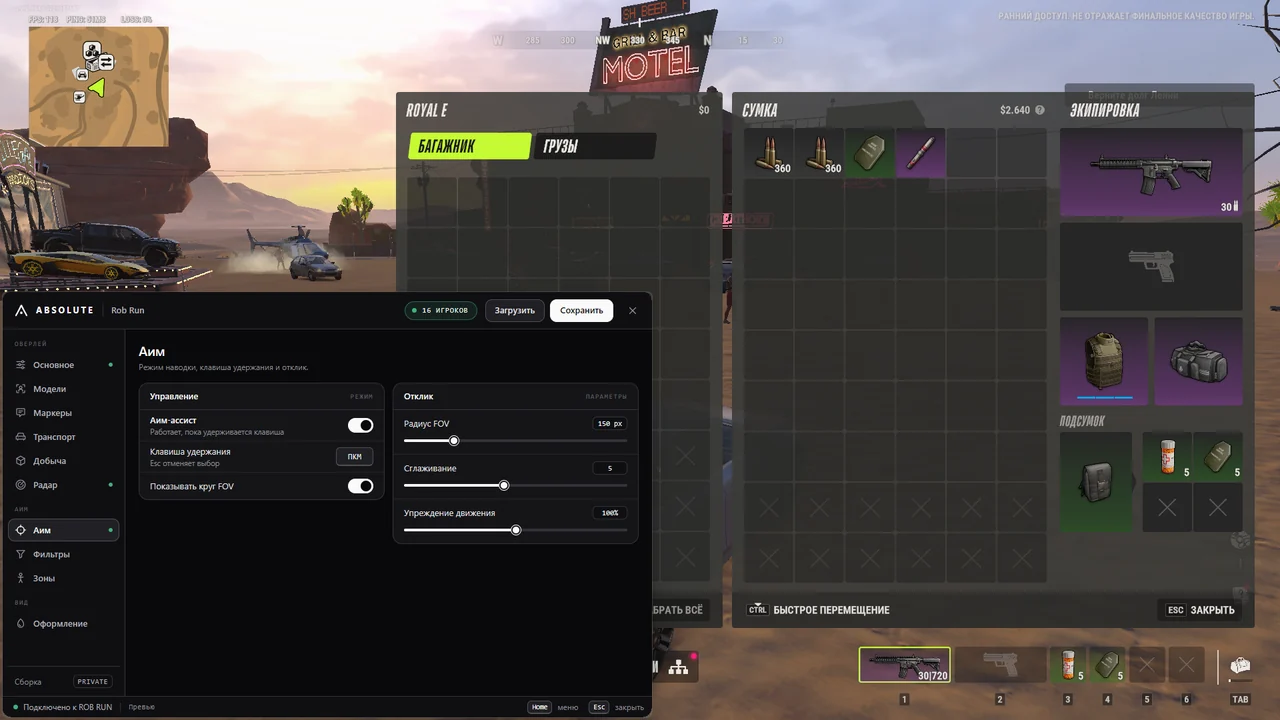
Absolute ROB RUN combines aiming, player information, vehicle tracking and loot search in a Russian-language menu. Aim assist works while Alt or another assigned key is held. FOV, smoothing, range, prediction and target-zone selection support different setups, while the visibility filter avoids targets behind obstacles.

ESP provides boxes, skeletons, Glow, health, armour, weapons, roles and vehicle occupants. Loot tools include clear Russian names, rarity colours and filters, door states and a separate radar. One day costs 200 RUB, three days 500 RUB, one week 1200 RUB and one month 2500 RUB. The key and guide arrive by email after payment.

Product features

Players

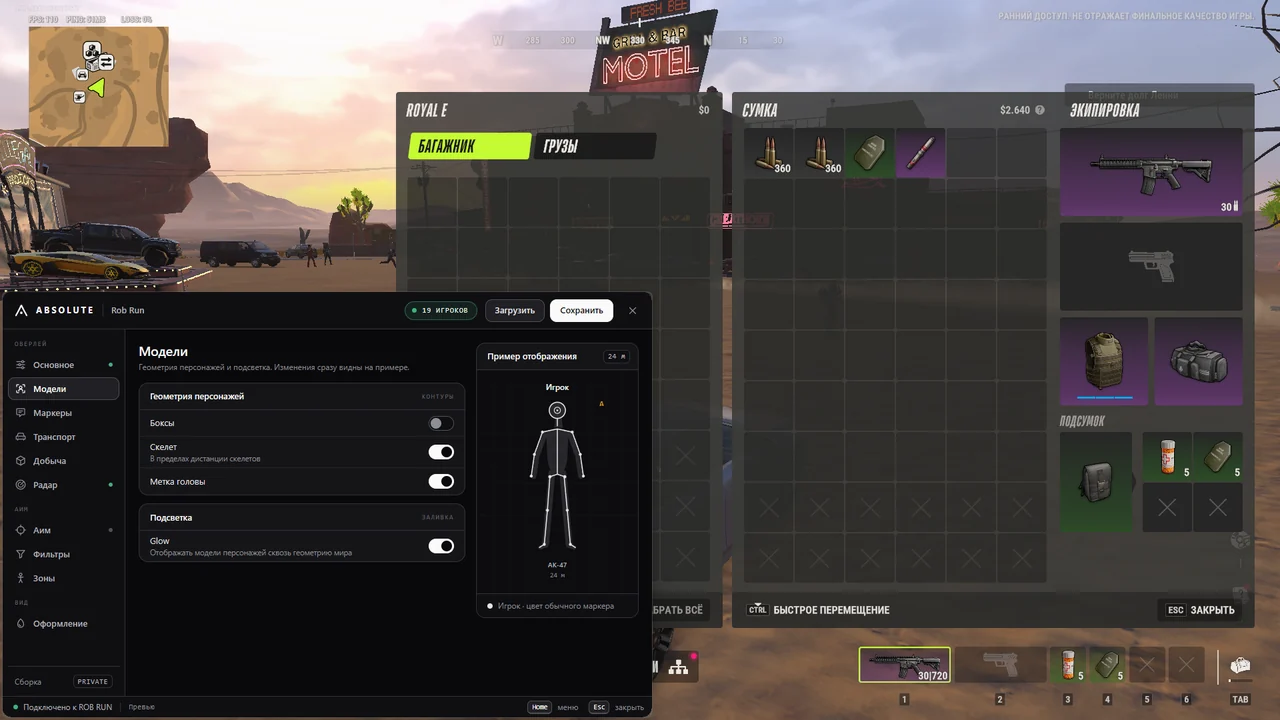
Boxes

Boxes mark player positions and help distinguish characters from world objects.

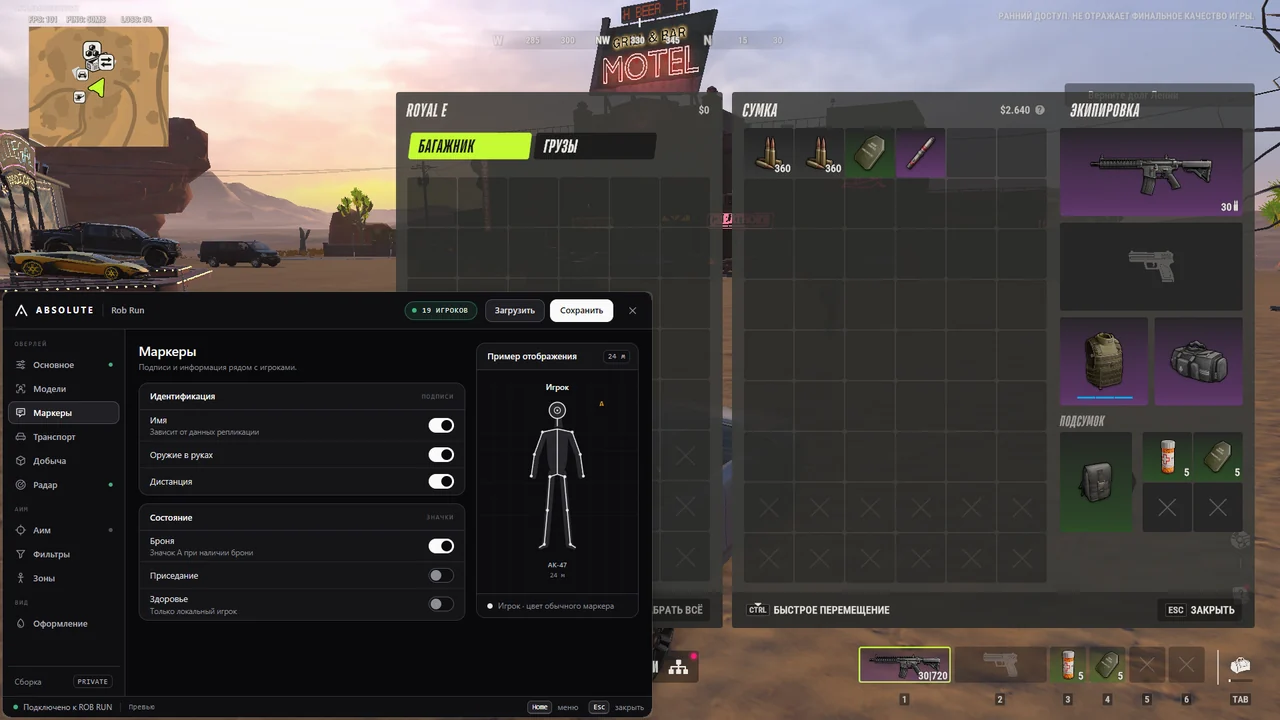
Skeleton and head

Skeletons show body posture, while a separate marker indicates the head.

Glow

Model highlighting makes players more visible, with a configurable colour.

Name, HP and armour

Labels display the player's name, current health and armour.

Held weapon

A marker shows the weapon currently held by the character.

Distance

A label shows the distance to the selected character.

Crouch and knocked

Crouching and knocked states have their own indicators.

Hidden player

A separate sign marks a player who may be hiding.

Player in a vehicle

See occupants of cars, helicopters and other vehicles.

Role colours

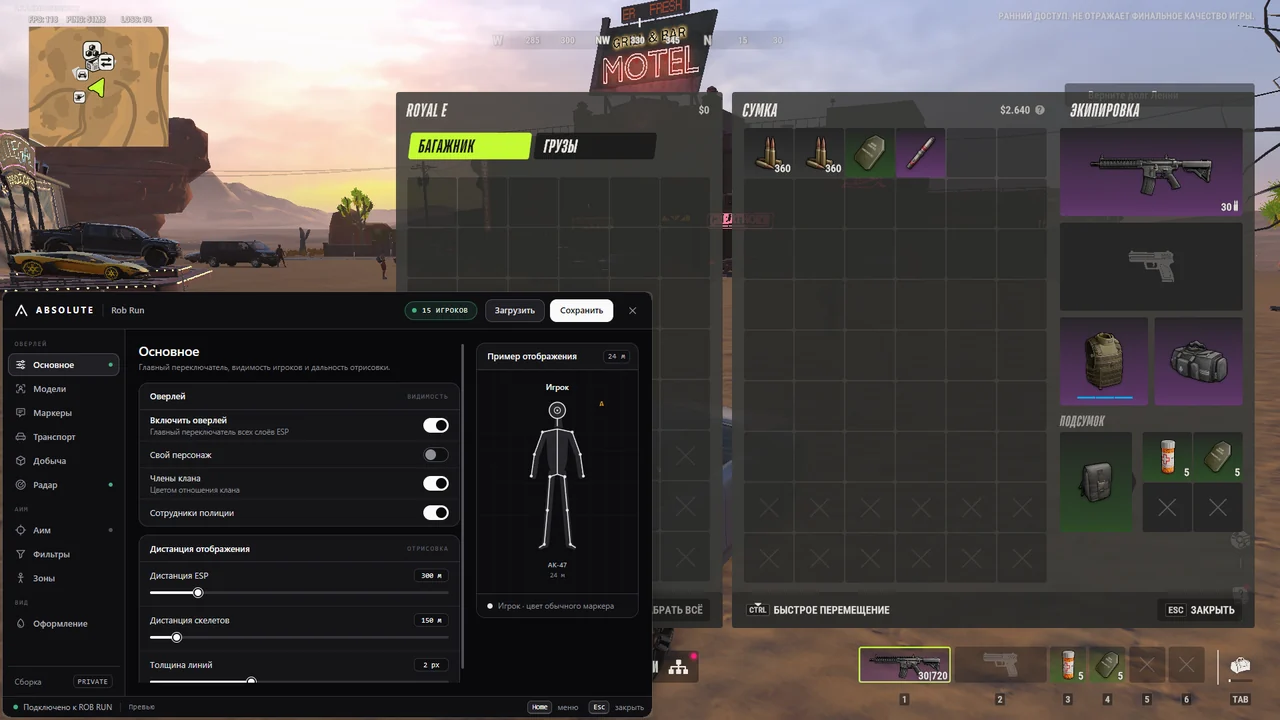
Regular players, clan members and police officers use different colours.

Range and lines

ESP range, skeleton range and line thickness are adjustable.

Own character

The overlay can optionally display your own model.

Vehicles

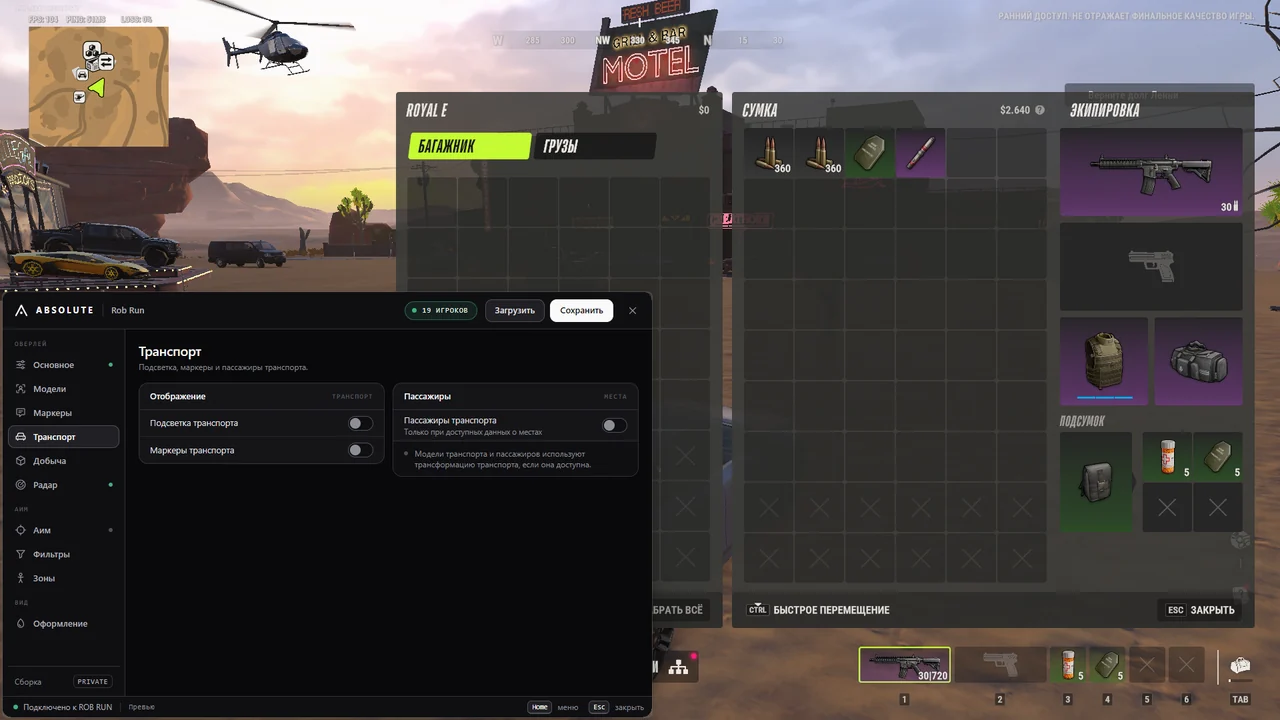
Cars and helicopters

Markers indicate cars and helicopters around you.

Name and distance

Vehicle labels include the model name and distance.

Vehicle Glow

Outline highlighting helps you keep track of a car or helicopter.

Passengers

When the data is available, Absolute displays the number of occupants.

Own vehicle

Your current vehicle receives no unnecessary marker or highlight.

Loot

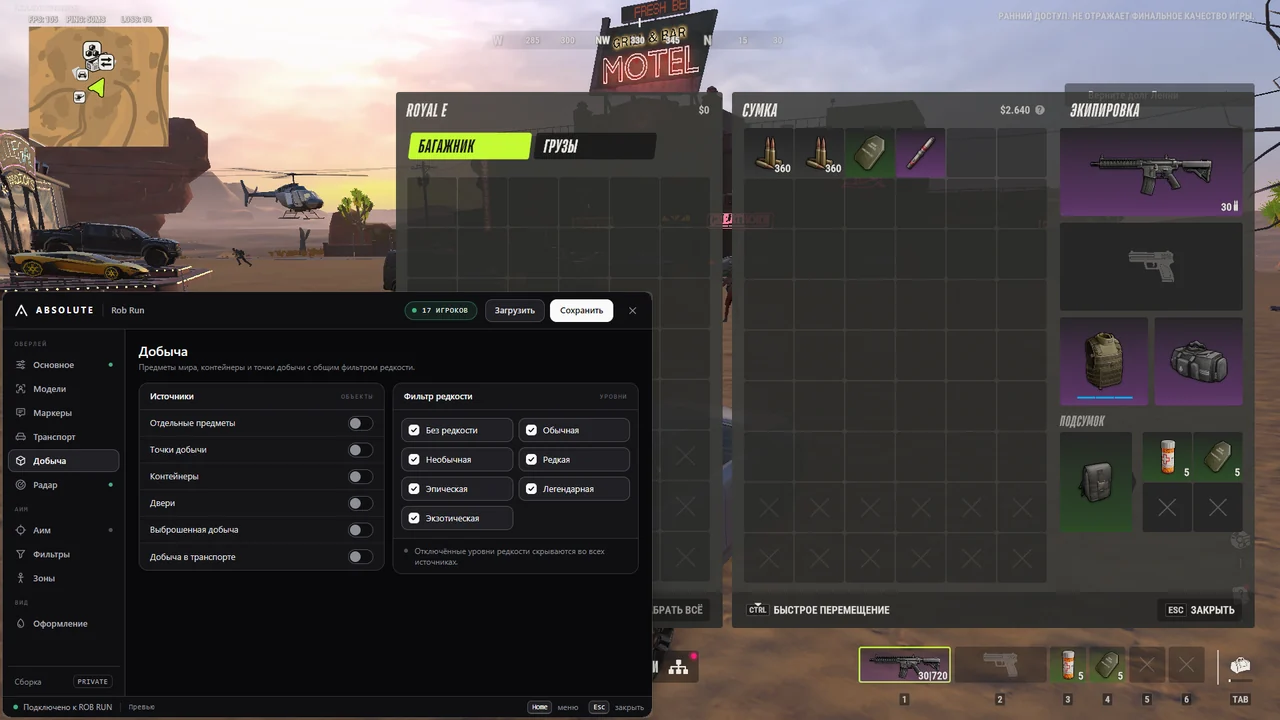
Items and points

Individual items and loot locations appear directly on screen.

Containers

Containers receive their own markers and rarity colours.

Door states

Door labels indicate whether they are open, closed or locked.

Dropped items

Ground drops remain separate from regular loot locations.

Loot in vehicles

Items stored inside vehicles can be enabled separately.

Russian item names

Names appear in Russian without internal numbers or unnecessary suffixes.

Rarity colours

Marker and text colours correspond to the item's rarity tier.

Rarity filter

Disable unwanted tiers to leave only the selected loot visible.

Loot range

A shared setting limits the display distance for loot markers.

Radar

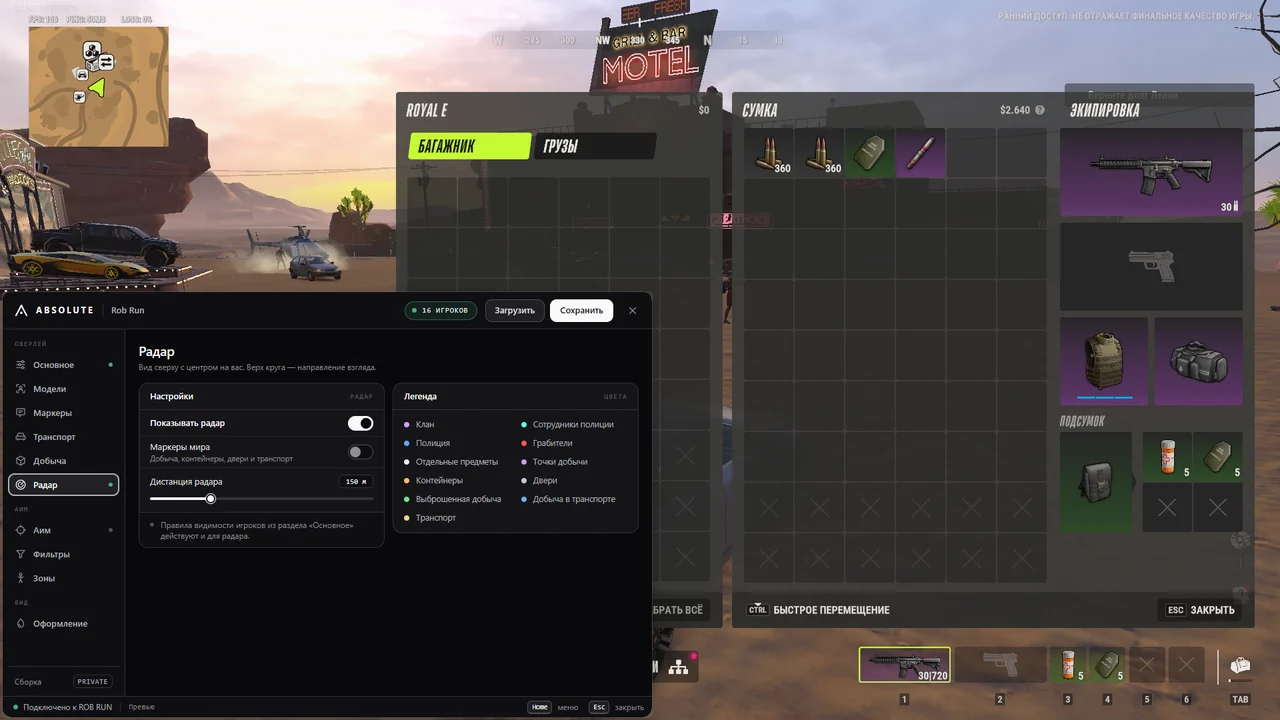
Players and vehicles

The top-down display marks characters, cars and helicopters.

Objects and loot

World markers show objects and items along your route.

Radar range

A separate slider adjusts the radar's coverage.

Roles and colours

Colours distinguish clans, police and other object categories.

Relative positions

The radar shows target direction and position relative to your character.

Aim assist

Hold hotkey

Aiming works while the assigned key is held; Alt is the default.

Mouse button

A mouse button can replace the keyboard hotkey.

FOV radius

The target acquisition area is limited by an adjustable radius around the crosshair.

FOV circle

An on-screen circle shows the actual aiming area.

Smoothing and range

Tracking speed and target distance are configured independently.

Prediction

Absolute accounts for target movement and aims with a lead.

Hard mode

A separate mode applies more abrupt aiming correction.

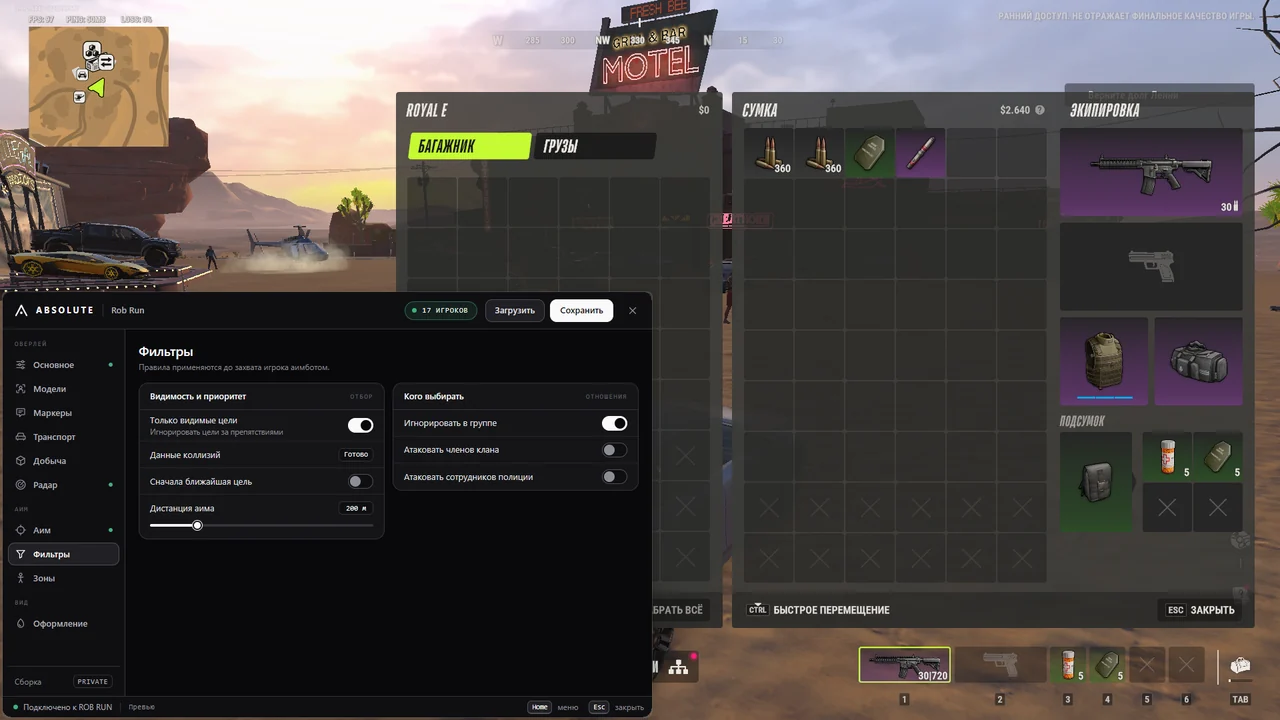
Closest target

Priority can be given to the closest available opponent.

Visible targets only

This filter avoids selecting players behind walls and other obstacles.

Own group

Members of your group are excluded from target acquisition.

Clan and police

Aiming at clan members and police officers is controlled separately.

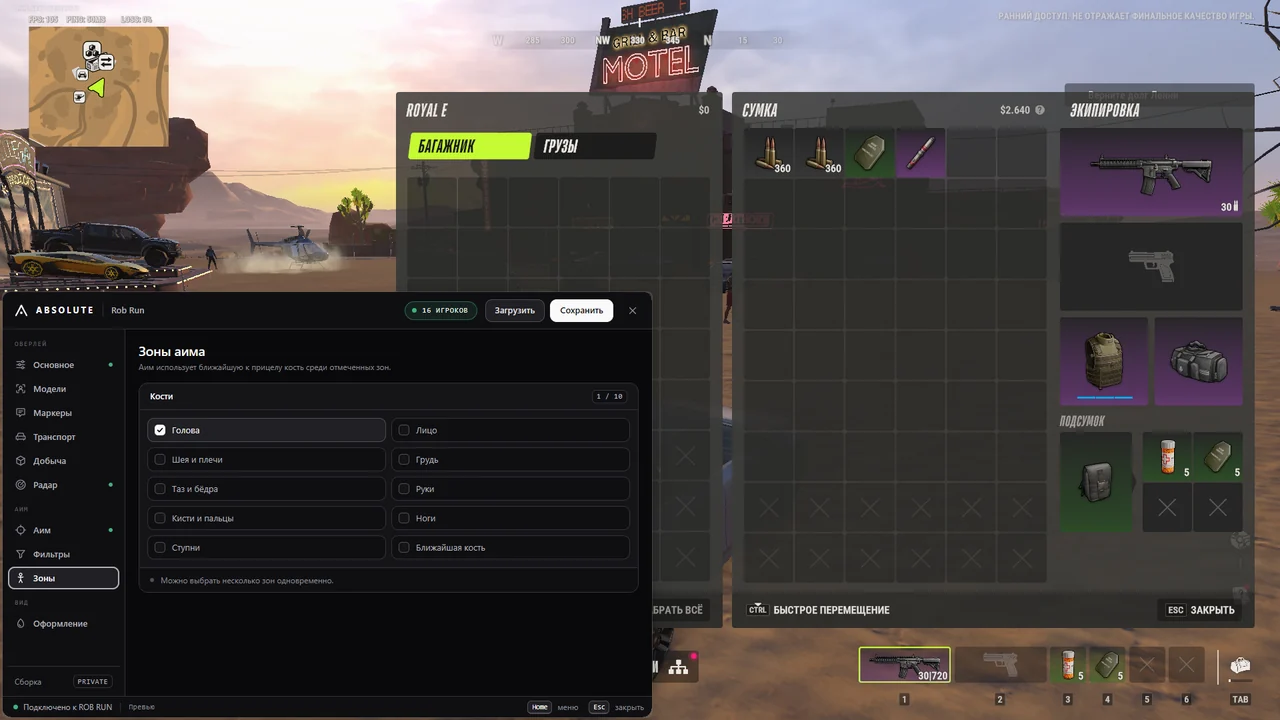
Target zones

Choose head, face, neck and shoulders, chest, pelvis, arms, hands, legs or feet.

Nearest zone

Select the available body zone closest to the current crosshair position.

Paused in menu

Automatic aiming pauses while the settings window is open.

Battle Mode

Hide loot

One hotkey temporarily hides loot and all associated markers.

Clear the screen

Items, points, containers, doors, drops and vehicle loot disappear.

Players stay visible

Characters, vehicles and other enabled ESP elements remain on screen.

Hold or toggle

Use hold or one-press toggle mode; B is assigned by default.

Appearance and controls

Russian language

Menu sections, settings and item names are displayed in Russian.

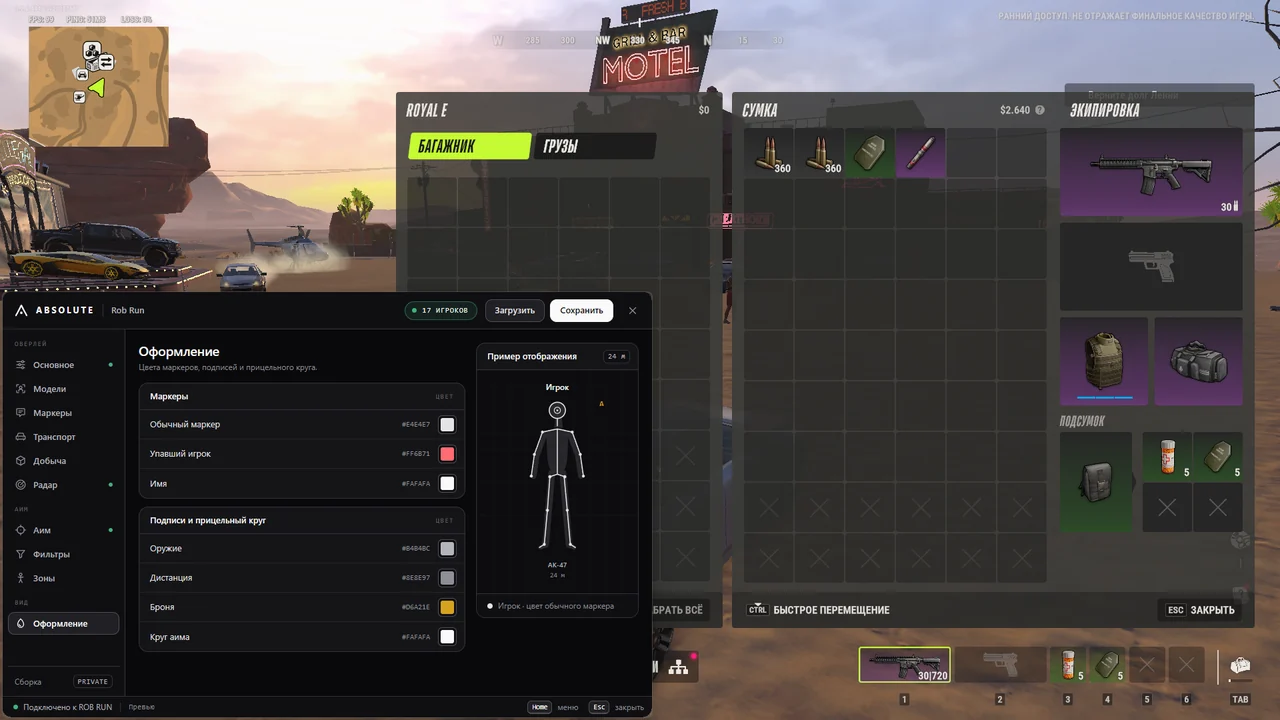
Element colours

Change colours for players, markers, loot, vehicles and the FOV circle.

Character preview

The model in the menu immediately reflects your selected settings.

HOME key

A short HOME press opens or closes the settings window.

Esc key

Esc closes the menu or cancels assignment of a new hotkey.

Autosave

Changes are saved automatically and retained after a restart.

Save and load

Top-menu buttons save the current config or restore the saved one.

Known issues & fixes

Real questions from our support, with the fixes that worked. Based on user requests for this product.

How do I check Absolute ROB RUN compatibility?

The supplied materials do not list exact Windows builds or game clients. Absolute Loader checks the Windows version, HVCI, VBS, Vulnerable Driver Blocklist, administrator rights, Hyper-V and conflicting drivers before launch.

How do I launch Absolute for ROB RUN?

Run Absolute Loader as administrator, sign in and enter your key. Wait for compatibility checks, then launch ROB RUN and join a server. HOME opens the menu. No flash drive or BIOS changes are required.

What does Absolute ROB RUN aim assist do?

Aim works while Alt or an assigned mouse button is held. It includes FOV and a visible circle, smoothing, range, prediction, hard mode, closest-target priority, visibility filtering and body-zone selection.

What does Absolute player ESP display?

Boxes, skeletons, head markers, Glow, name, health, armour, weapon, distance, crouching, knocked, absolute and vehicle-occupant states. Regular players, clan members and police use different colours.

How does Absolute display vehicles?

Markers indicate cars and helicopters with names and distance. Glow and passenger counts are available when data exists. Your own vehicle receives no unnecessary marker.

Which loot filters does Absolute include?

Items, points, containers, doors, drops and vehicle loot toggle separately. Rarity has colours and tier filters. Names are Russian, and display range is adjustable.

Does Absolute include radar and Battle Mode?

Yes. Radar displays players, vehicles, objects and loot with adjustable range. Battle Mode on B hides loot and its markers while retaining players and vehicles. Hold and toggle modes are available.

Which hotkeys does Absolute ROB RUN use?

HOME opens and closes the menu, while Esc closes it or cancels hotkey selection. Alt holds aim and B controls Battle Mode by default. Aim and mode binds can be changed.

Are Absolute settings saved?

Yes. Changes are saved automatically in the Absolute Vision profile. Save writes the current config immediately, while Load restores the last saved set.

What should I do about WebView2 or compatibility errors?

For a black or transparent menu, restart the loader and activate ROB RUN again; if it persists, repair WebView2 Runtime. If compatibility fails, send diagnostics from the loader and give the request number to support.

All issues & general troubleshooting
TARIFFS
200₽
BUY What happens after payment?
Got a question? Ask before you pay

We'll help you choose and sort out any launch issue. Ask us anything before buying, we're always on your side.

Support 10:00–22:00, sometimes we reply at night too
Ask a question

Available tariffs

1 day
200 ₽
200 ₽ / day
START PURCHASE
3 days
500 ₽
167 ₽ / day
START PURCHASE
7 days
1200 ₽
171 ₽ / day
START PURCHASE
lowest per day
30 days
2500 ₽
83 ₽ / day
START PURCHASE
Reviews about Absolute ROB RUN

No reviews yet. Be the first to leave one.

Your review

Reviews are published after moderation.

Join our gaming community chat

Discuss current cheats from developers and how to use them effectively in popular online games. Share tactics, exchange useful info and find like-minded players in our community.

1 900+Members
24/7Online
Join our gaming community chat

Technical support

Run into a technical issue? Our team of experts will help. We handle all requests in a live queue, so please be understanding if it sometimes takes a little wait. We guarantee that no request goes unanswered.

Availabilityfrom 10:00 to 23:00
Fast responseIn queue order
Get help
Technical support
PROCHEAT

PROCHEAT news channel

Follow product status changes, update history and important announcements.

Subscribe

Absolute ROB RUN plans and features

All four keys include the same aim assist, player and vehicle ESP, loot tools, radar, Battle Mode and colour settings. There are no separate Lite and Full editions. Only the licence duration changes.

DurationPriceCost per day
1 day200 RUB200 RUB
3 days500 RUBAbout 166.67 RUB
7 days1200 RUBAbout 171.43 RUB
30 days2500 RUBAbout 83.33 RUB

One day is enough to check compatibility and build your first config. Three days lowers the daily cost, while one week covers a longer play period. The monthly option has the lowest daily price and needs fewer renewals.

Aim assist with visibility and zone controls

Absolute aims only while the assigned keyboard or mouse button is held. Alt is the default, and the bind can be changed in the Aim section. FOV radius defines how far a target may be from the crosshair, while the visible circle shows that area before a fight. Smoothing and range are independent, so one adjustment does not require rebuilding the whole config.

Prediction accounts for enemy movement, and hard mode applies stronger correction. Target zones include head, face, neck and shoulders, chest, pelvis, arms, hands, legs and feet. Select several zones or the one nearest to the crosshair. Visible-target filtering excludes players behind walls; your group is ignored, while clan and police targeting have separate switches. Aiming pauses when the menu opens.

Player ESP with roles, states and weapons

Absolute provides more than a simple box. The box marks the outline, the skeleton shows posture, a head marker indicates body position and Glow highlights the model. Nearby labels include name, HP, armour, weapon and distance. Crouching, knocked and potentially hidden states have their own indicators.

Colours distinguish regular players, clan members and police, making roles visible before you read a name on a busy server. Vehicle occupants are marked as well. ESP range, skeleton range and line thickness are adjustable, and your own character is optional. The menu's character preview shows the result without returning to a fight after every change.

Cars, helicopters and passengers

Vehicles have a dedicated section. Absolute marks cars and helicopters, displays their names and distance, and uses Glow to keep the required object visible. When the game provides occupant data, the passenger count appears nearby. This complements player ESP by showing both the vehicle and available information about its occupants.

Your current vehicle receives no extra marker or highlight, so it does not obstruct your view while driving. Vehicle colours are configured with the rest of the appearance settings. The same objects receive separate radar icons, helping you judge their position relative to your character.

Loot with Russian names and rarity filters

The Loot section separates individual items, loot points, containers, dropped objects and vehicle contents. Door labels show open, closed or locked states. Item names appear in Russian without internal numeric suffixes, keeping labels such as Container or Door: closed easy to read.

Rarity is expressed through marker and text colour rather than repeated words in the same line. Filters hide unwanted tiers and retain only the loot you need. A shared range limits marker distance. During a fight, there is no need to disable every category: Battle Mode hides all loot with one hotkey and restores it after release or another press.

Radar and Battle Mode for a clearer screen

The radar provides a top-down view of players, vehicles, objects and loot. A separate slider adjusts its range, while colours distinguish clans, police, containers, doors and other categories. Markers are positioned relative to your character, so their direction is clear without consulting the full map.

Battle Mode does the opposite by removing clutter before a fight. By default, holding B hides items, points, containers, doors and their radar markers while players and vehicles remain. Disable key holding to toggle the mode with single presses. The hotkey can be reassigned, but HOME is reserved for the menu.

Absolute Loader launch and compatibility checks

No flash drive or BIOS changes are required before activation. Download Absolute Loader using the link in your post-purchase guide and run it as administrator. Accept any offered update and wait for it to reopen. After signing in, enter your key: there is no need to select ROB RUN manually because the key identifies the game.

  1. Wait for compatibility checks and click Continue when the system is ready.
  2. If HVCI, VBS or Vulnerable Driver Blocklist interferes, use the loader's disable option and restart the PC.
  3. Wait for ROB RUN readiness, launch the game and join a server.
  4. Press HOME once, enable the required sections and save your config.

To update game files, fully restart the loader and activate the key again. For a black or transparent menu, check WebView2 Runtime. If compatibility is not confirmed, send diagnostics from the loader and give the request number to support.

How to buy Absolute for ROB RUN

Choose a 1, 3, 7 or 30-day key. The order costs 200, 500, 1200 or 2500 RUB respectively. DigiSeller displays the duration in the tariff option and updates the total accordingly. Each variant issues a key for its own duration, with the same features in all four.

After payment, the key appears on the order page and is sent by email. The instruction button beside it contains the Absolute Loader link and system-check steps. Before purchasing, note that the supplied materials do not list exact supported Windows builds or game clients: the loader confirms compatibility before launch. If no email arrives, check Spam and contact ProCheat support. Other builds are listed in the ROB RUN catalogue.

Absolute ROB RUN FAQ

Does Absolute have a Russian menu?

Yes. The menu, settings and item names are in Russian. An English menu is not listed in the supplied materials.

Are a flash drive or BIOS changes required?

No. Neither a USB flash drive nor BIOS changes are required. The loader checks system settings before activation and suggests action if incompatible.

Which Windows builds and game clients are supported?

The supplied materials do not provide an exact list. Absolute Loader checks the Windows version and PC configuration before launch.

How is aim assist activated?

Hold Alt by default. You can assign another key or mouse button and configure FOV, smoothing, range and target zones.

Can it avoid aiming through walls?

Yes. Enable Visible targets only. Your group is excluded, while clan and police targeting are controlled separately.

What does player ESP display?

Boxes, skeletons, head markers, Glow, name, health, armour, weapon, distance, crouching, knocked state and vehicle occupancy. Roles use different colours.

Are loot filters included?

Yes. Disable rarity tiers, change the shared range and separately display items, points, containers, doors, drops and vehicle contents.

What does Battle Mode do?

It hides loot and its markers while leaving players, vehicles and other enabled ESP visible. B is the default, with hold and toggle modes.

How are settings saved?

They are saved automatically. Save writes the current configuration immediately, while Load restores the last saved set.

How much does Absolute cost per month?

Thirty days cost 2500 RUB. One day is 200 RUB, three days 500 RUB and seven days 1200 RUB.

from 200 ₽ Choose a plan
Ask a question