Memez Browser Radar for PUBG with private ESP

Working
MEMEZ MEMEZ
Last update 20.05.2026 This date shows when the software was last updated. An old date doesn't mean the software stopped working! Most likely the developer just had nothing new to add. If you have any doubts, you can always check the current status with our support team.
Add another cheat from this game too — to compare them.
Memez Browser Radar
Steam
Kakao
Windows support: 10: all builds; 11: all builds
Menu language: English
Spoofer:No
USB drive:No
BIOS:No
SCREENSHOTS
Description

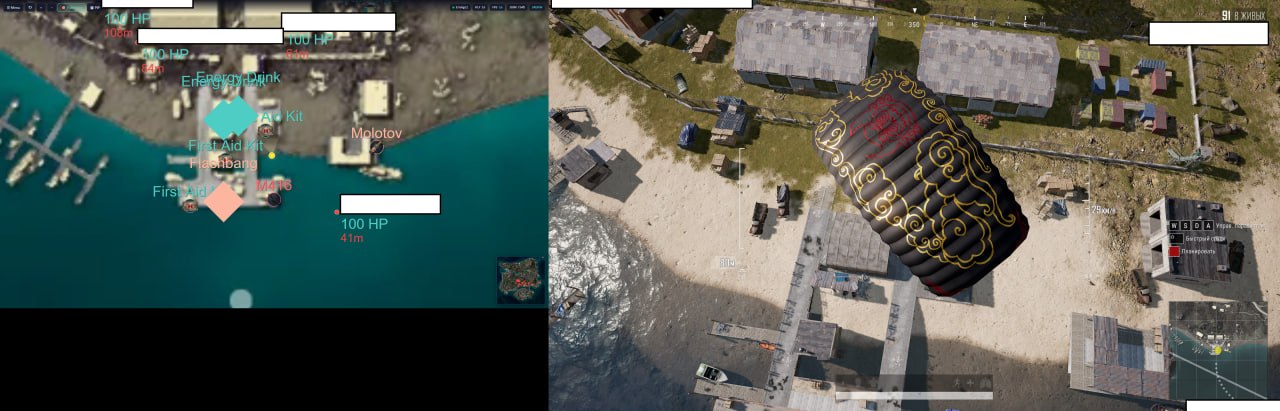
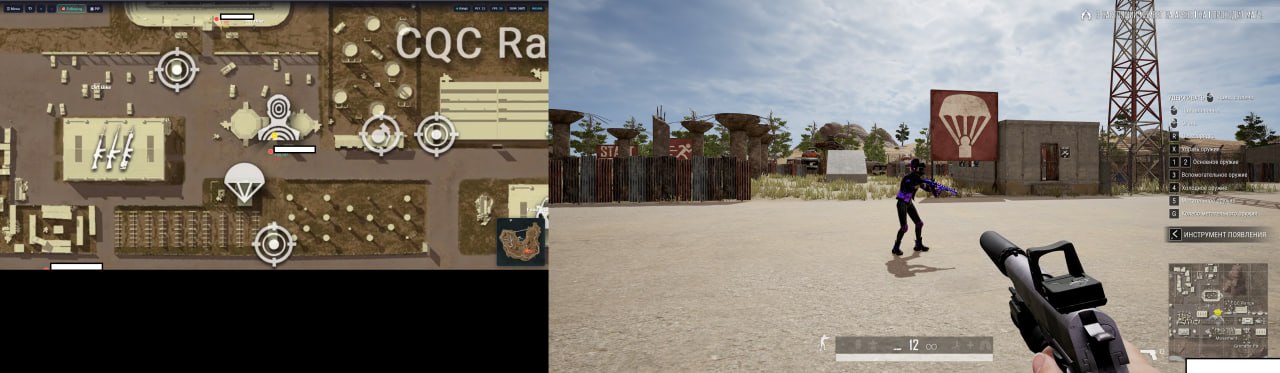
In PUBG, information matters more than reaction speed. While you run blind across an open field, someone is already lying in the grass with their scope on your head. The Memez Browser Radar puts the match map on a separate screen, a second monitor, tablet or phone. The map shows every player, bot, loot drop and vehicle in real time. You don't put anything into the game and you don't inject into the process. The radar runs through a browser, and PUBG on your PC stays clean.

The way MEMEZ works is different from classic cheats. The radar intercepts network traffic and draws the data on a separate web page. There's no overlay on the game PC, no memory edits, no injection. That makes the browser radar one of the safest options out there. The PUBG anti-cheat can't see third-party software because it isn't in the system. And the information on the map is enough for full control: names, HP, the weapon in hand, position on the map down to the meter.

Product features

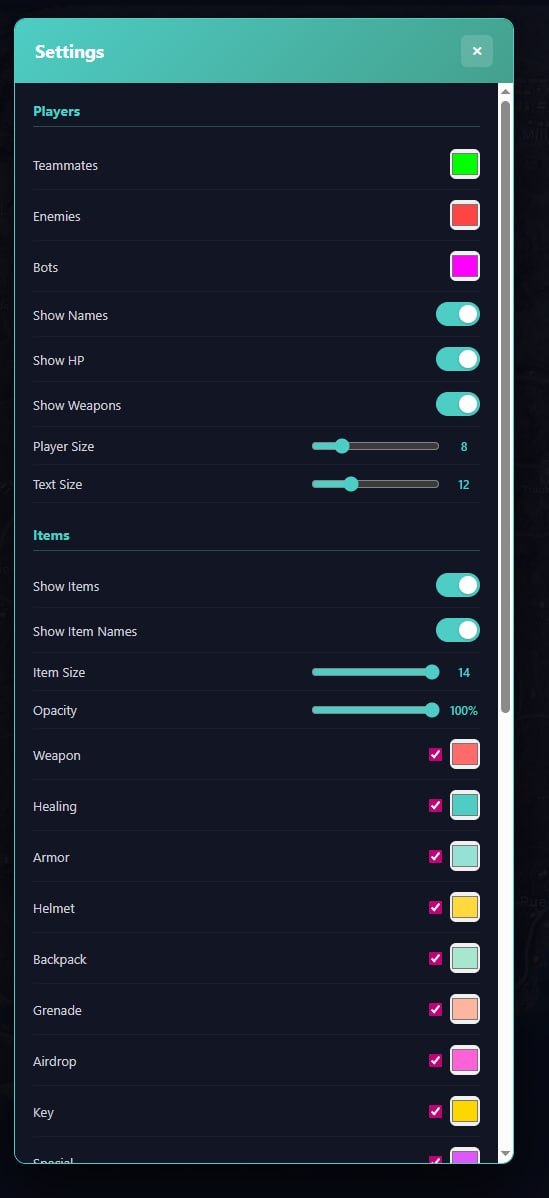
Players

Enemies

Shows every enemy on the radar map, positions update in real time

Teammates

Shows allies and teammates on the radar

Bots

Shows bots, you can turn them off so they don't clutter the map

Show Names

Player nicknames next to the icons on the map

Show HP

Each player's health, so you see who's hurt after a fight

Show Weapons

The weapon in a player's hands, so you know who has a sniper and who's running with a shotgun

Player Size

Adjust the size of player icons on the map

Text Size

Adjust the size of the text next to the icons

Items

Show Items

Turns on item display on the radar map

Show Item Names

Item names next to the icons

Item Size

Adjust the size of item icons

Opacity

Transparency of item display, lower it so loot doesn't cover players

Weapon

Shows weapons on the ground

Healing

Meds: first aid kits, bandages, energy drinks

Armor

Vests on the map

Helmet

Helmets on the map

Backpack

Backpacks on the map

Grenade

Grenades on the map

Airdrop

Airdrops, you see where the crate lands on the radar

Key

Keys and keycards on the map

Special

Special items

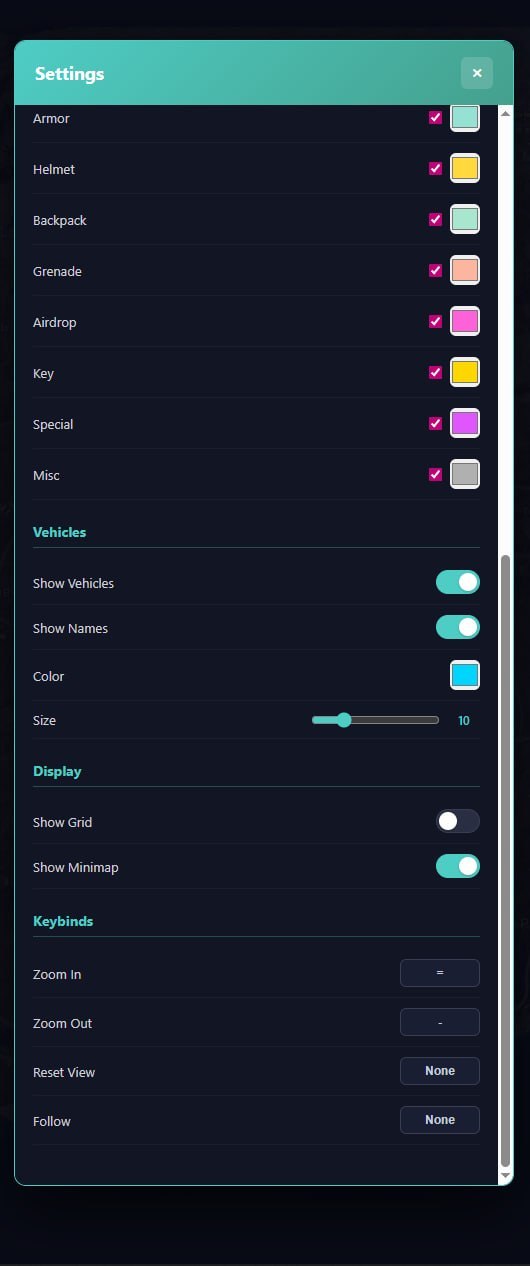
Misc

Other items

Transport

Show Vehicles

Shows vehicles on the radar map

Show Names

Vehicle names next to the icons

Color

Adjust the highlight color of vehicles

Size

Adjust the size of vehicle icons

Display and controls

Show Grid

Coordinate grid on the radar map

Show Minimap

Mini-map inside the radar

Zoom In / Zoom Out

Keys to zoom the map in and out

Reset View

Resets the camera view to default

Follow

The radar camera follows the selected player

Known issues & fixes

Real questions from our support, with the fixes that worked. Based on user requests for this product.

How do I launch the Memez browser radar for PYBG?

To launch the radar, follow these steps:

  • Download the archive and extract it , the archive password is: sordum
  • Run the application from the extracted folder
  • Click the Search button and wait for the map to load

If the file does not open, make sure you have an archiver installed (e.g. WinRAR) and re-extract.

Memez key says it has been activated the maximum number of times , what do I do?

This error appears when the key has already been activated on a different account , a common situation when a user accidentally enters the key into an old login.

Contact support and provide your key and a screenshot of your payment confirmation. A specialist will check which account the activation was tied to and help you regain access.

All issues & general troubleshooting
TARIFFS
159
BUY What happens after payment?
Got a question? Ask before you pay

We'll help you choose and sort out any launch issue. Ask us anything before buying, we're always on your side.

Support 10:00–22:00, sometimes we reply at night too
Ask a question

Available tariffs

1 day
159
START PURCHASE
7 days
990
START PURCHASE
30 days
1990
START PURCHASE
Reviews about Memez Browser Radar
35 sales on Digiseller No text reviews yet — be the first to leave one.

Your review

Reviews are published after moderation.

Join our gaming community chat

Discuss current cheats from developers and how to use them effectively in popular online games. Share tactics, exchange useful info and find like-minded players in our community.

1 900+Members
24/7Online
Join our gaming community chat

Technical support

Run into a technical issue? Our team of experts will help. We handle all requests in a live queue, so please be understanding if it sometimes takes a little wait. We guarantee that no request goes unanswered.

Availabilityfrom 10:00 to 23:00
Fast responseIn queue order
Get help
Technical support
PROCHEAT

PROCHEAT news channel

Follow product status changes, update history and important announcements.

Subscribe

Memez Browser Radar for PUBG and how it works

MEMEZ is a browser radar that shows the PUBG match map on a separate device. It works by intercepting network traffic: data on player positions, loot and transport gets drawn on a web page in your browser. Nothing is installed on the game PC, no overlay, no injection, no file edits. You open the radar page on a second monitor or tablet and see everything happening on the map. The PUBG anti-cheat works at the level of the game process, while the radar lives outside it.

PUBG radar vs classic ESP, what's the difference

Classic ESP draws boxes and skeletons over the game on the same screen. The Memez radar shows information on a separate map in the browser. The approach is different, but there's no less data. The radar shows the positions of every player, their HP, the weapon in hand and nicknames. No skeletons or boxes, but you get something ESP can't give you: the full match map from a bird's-eye view. You see not just the ones nearby, but everyone on the server. As the circle closes in, you know ahead of time who's already in the zone and who's running in from outside.

Loot and transport on the Memez radar

The radar doesn't just show players. Loot ESP shows weapons, armor, helmets, first aid kits, backpacks and grenades on the map. You land in Pochinki, glance at the radar and see which building has an AR and where there's only shotguns and bandages. Airdrops show up the moment they drop, you know the landing point before the crate even touches the ground. Keys and keycards are highlighted separately. Transport shows with adjustable icon color and size, so you find a free car in a second instead of running around the area.

Tuning the Memez radar, filters and zoom

MEMEZ tunes flexibly to your playstyle. Player Size and Text Size adjust the size of icons and text. On a small tablet screen you set them bigger, on a second monitor you shrink them. Opacity lowers the transparency of loot so items don't cover player positions. You can turn bots off with a separate checkbox. In a lobby of 100 people half are bots, and without the filter the map turns to mush. Zoom In and Zoom Out switch the scale: close-up for a nearby fight, wide view for planning a route into the next circle.

Safety of the browser radar for PUBG

The Memez browser radar works on a principle different from classic cheats. There's no injection on the game PC, no memory edits, no overlay over the PUBG process. The radar intercepts network data and outputs it in a separate browser. The anti-cheat analyzes processes and memory on the game PC, while the radar sits outside that scope. From what the store has seen, browser radars stay one of the most durable options for PUBG in terms of the balance between information and safety.

Latest updates

20.05.2026 06:42
Working
Received an update
14.05.2026 15:31
Working
Updated, time unfrozen
14.05.2026 09:17
Frozen
Sent for update, time frozen
13.05.2026 18:21
Working
Received an update
06.05.2026 05:42
Frozen
Sent for update, time frozen
Open full history
Ask a question


