



Viento for Oxide: Android cheat with ESP and auto farm

Working
V Viento
Last update 06.11.2026 This date shows when the software was last updated. An old date doesn't mean the software stopped working! Most likely the developer just had nothing new to add. If you have any doubts, you can always check the current status with our support team.
Add another cheat from this game too — to compare them.
Viento Oxide Android
Android
Menu language: Russian

User information

Check your phone before buying: you need Android 10 or newer and at least 4 GB of free storage. The APK is around 2 GB, and the rest is needed for the installed game and its additional files. No root or PC is required.

Viento is the game itself with a built-in menu, not a separate loader. Delete the original Google Play version of Oxide and reboot the phone first, otherwise the build will not install. Use Wi-Fi for the APK and wait for the download to finish.

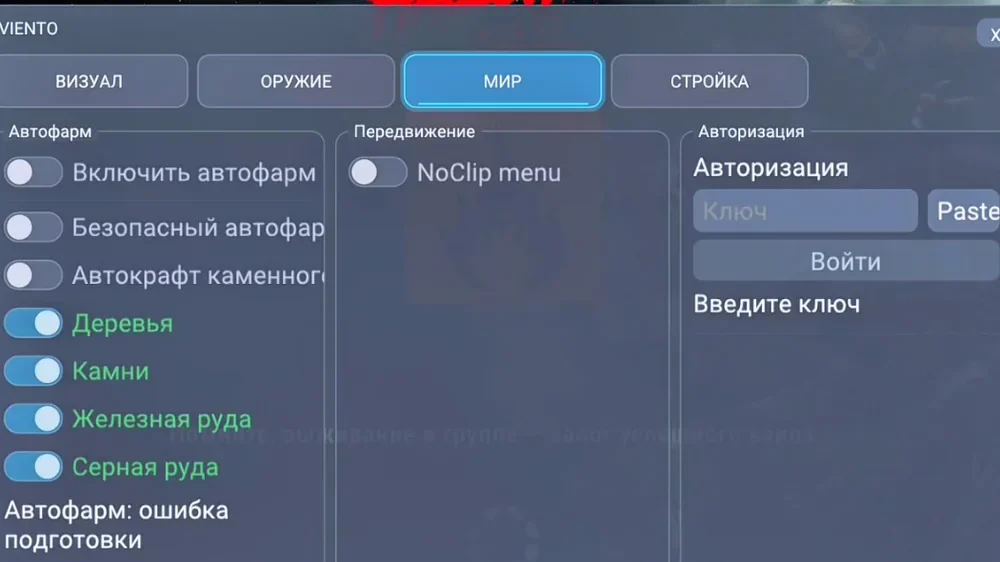
The key appears on the order page and arrives by email. Copy it before the first launch: it is normally pasted automatically, but you can enter it manually under World, Authorization, Paste, Log in. If updates fail or the key is rejected, enable automatic date and time and try a VPN.

There is no guarantee against bans. Refunds are not provided for bans or detections; if Viento will not launch despite meeting the requirements, we offer a 100% refund within 24 hours or a replacement. Pre-purchase questions are welcome in the support chat.

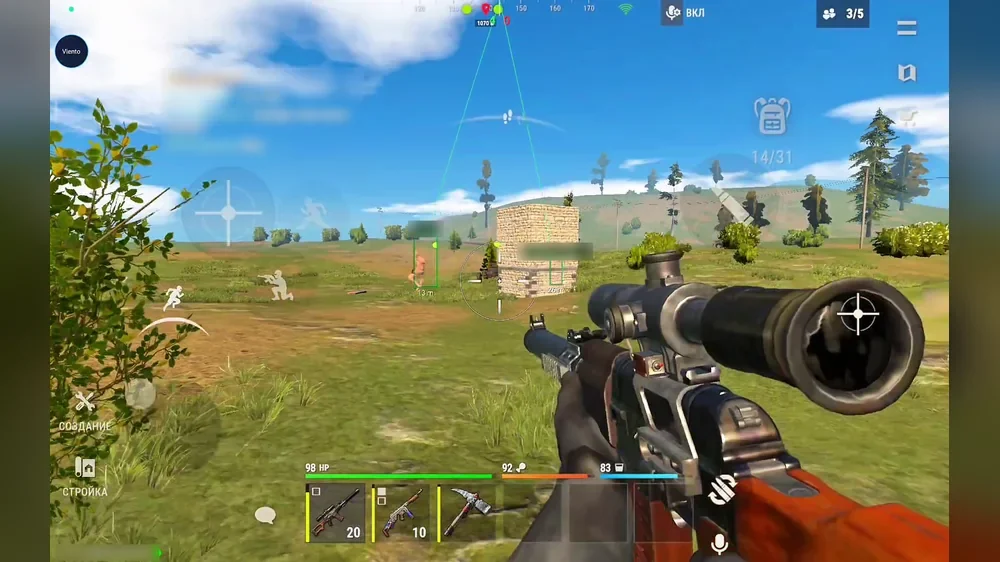
SCREENSHOTS
Description

Viento for Oxide: Survival Island is a game build with a Russian cheat menu built in. It installs from an APK on a phone or tablet running Android 10 or newer, with no root or computer needed. A round button in the top-left corner opens four tabs: Visuals, Weapon, World and Building.

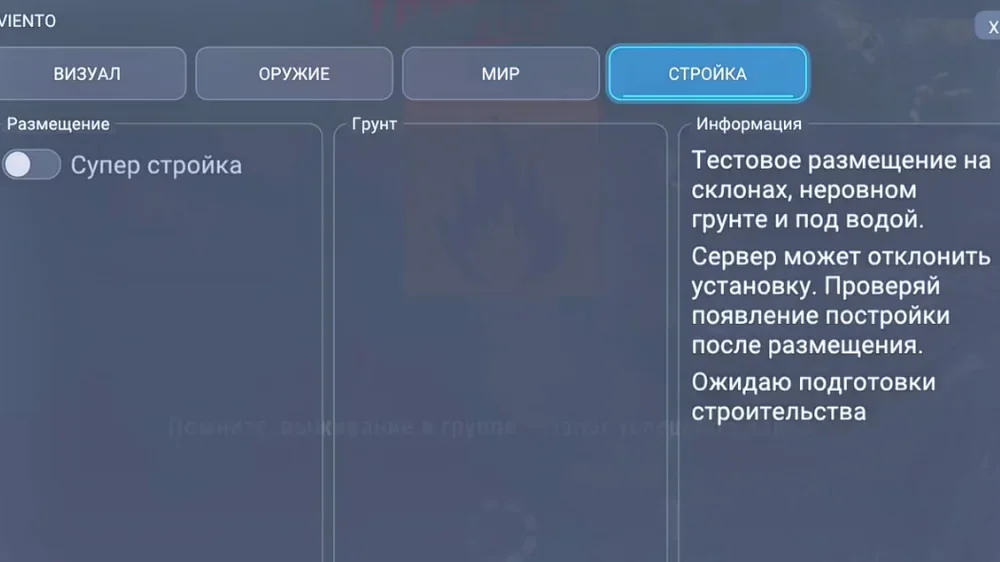
ESP shows players, resources, loot and monsters. Magic bullets and aim assist include prediction, an FOV circle and target-point selection, while recoil and spread can be disabled. Auto farm gathers wood, stone, metal and sulfur, NoClip opens a separate movement panel, and the experimental Super Building option places objects on slopes, uneven ground and underwater if the server accepts them.

There is one plan: 389 RUB for a day. The key and instruction link arrive immediately after payment.

Product features

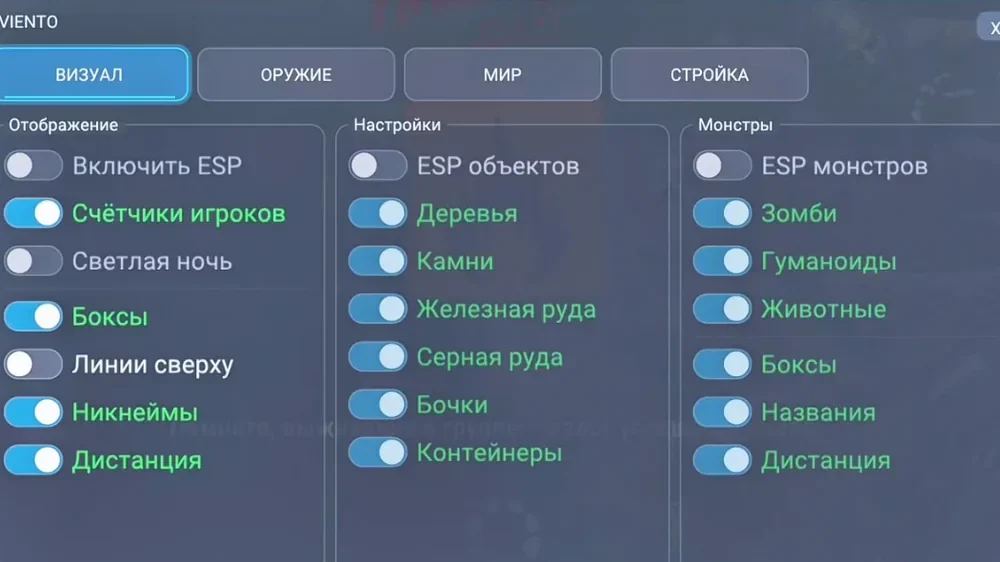
Player ESP

Boxes and names

A box around the character and the player's name, helping you tell a real opponent from a monster early.

Distance and lines

Distance in metres and lines from the top of the screen to each player.

Counters and bright night

Player counts on screen and a separate option to brighten the night map.

Resource, loot and monster ESP

Resources

Trees, stones, metal ore and sulfur ore can be enabled independently.

Loot

Barrels and containers without unnecessary overlay layers.

Monsters

Zombies, humanoids and animals with boxes, names and distance.

Aiming and weapons

Magic bullets

A separate hit mode. Strong settings are visible to other players.

Aim assist

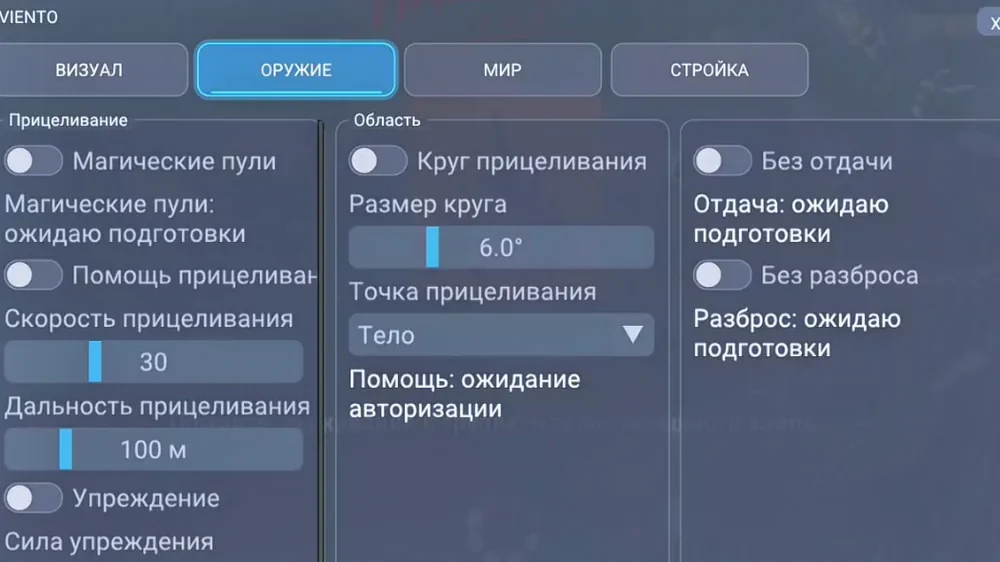
Moves the crosshair towards the target, with speed and range sliders.

Prediction and FOV

Prediction strength in percent, an aiming circle in degrees and a target point such as the body.

No recoil or spread

Bursts land where the barrel is pointed without manual correction.

Auto farm and movement

Auto farm

Gathers wood, stone, metal ore and sulfur ore with separate resource toggles.

Safe farm and auto craft

A separate safe auto-farm mode and stone-item crafting. The vendor does not describe these modes in detail.

NoClip

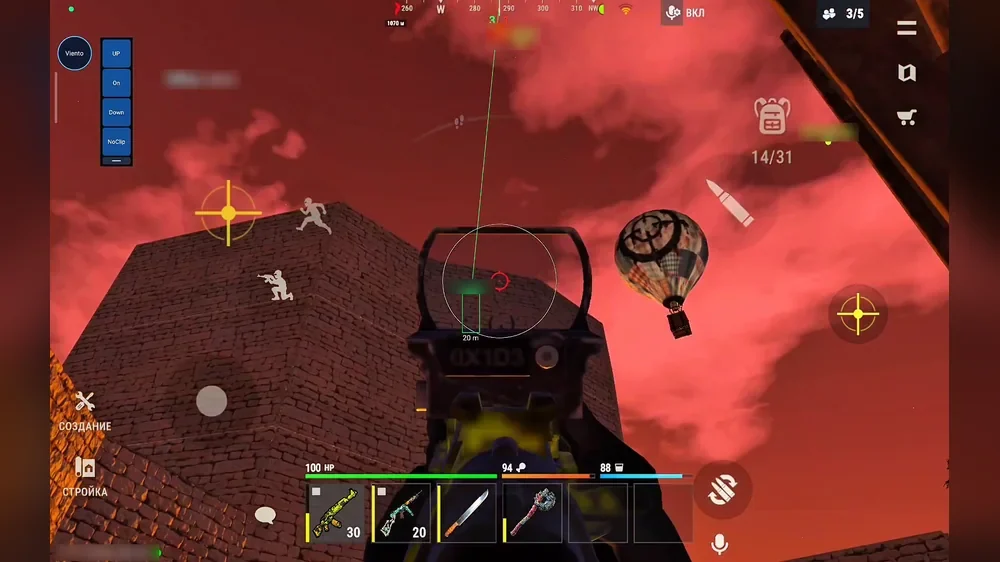
An in-game panel with UP, On, Down and NoClip buttons.

Building

Super building

Experimental placement on slopes, uneven ground and underwater. The server may reject a build, so the result must be checked.

Known issues & fixes

Real questions from our support, with the fixes that worked. Based on user requests for this product.

Which Android version does Viento require?

You need Android 10 or newer and at least 4 GB of free storage. The APK is around 2 GB, with the rest used by the game and additional files. No root or computer is required.

Why must the original Oxide be removed before installing Viento?

Viento is a standalone game build with a built-in menu, not a loader. It cannot replace the Google Play version. Remove the original, reboot the phone, and only then open the APK.

Where do I enter the Viento key?

Copy the key before the first launch and it is normally pasted automatically. Manually, use the round Viento button, World, Authorization, Paste, Log in. If updates stall or the key is rejected, enable automatic time and a VPN.

Android will not install the Viento APK

Allow installation from your browser, Files or Yandex Disk in Android settings. If Play Protect appears, choose More details and Install anyway. Also make sure the APK downloaded fully and at least 4 GB is free.

What does NoClip menu do in Viento?

The toggle opens an in-game panel with UP, On, Down and NoClip buttons. It controls movement without opening the main menu. Using NoClip is noticeable and does not protect against bans.

Does Super Building always work in Viento?

No. It is an experimental mode for slopes, uneven ground and water. The server may reject an object, so always check that the structure actually appeared.

All issues & general troubleshooting
TARIFFS
389₽
BUY What happens after payment?
Got a question? Ask before you pay

We'll help you choose and sort out any launch issue. Ask us anything before buying, we're always on your side.

Support 10:00–22:00, sometimes we reply at night too
Ask a question

Available tariffs

1 day
389 ₽
START PURCHASE
Reviews about Viento Oxide Android

No reviews yet. Be the first to leave one.

Your review

Reviews are published after moderation.

Join our gaming community chat

Discuss current cheats from developers and how to use them effectively in popular online games. Share tactics, exchange useful info and find like-minded players in our community.

1 900+Members
24/7Online
Join our gaming community chat

Technical support

Run into a technical issue? Our team of experts will help. We handle all requests in a live queue, so please be understanding if it sometimes takes a little wait. We guarantee that no request goes unanswered.

Availabilityfrom 10:00 to 23:00
Fast responseIn queue order
Get help
Technical support
PROCHEAT

PROCHEAT news channel

Follow product status changes, update history and important announcements.

Subscribe

Viento for Oxide: the menu by tab

The menu is built into the game build, so no separate loader is required. Activate your key in the World tab before enabling any features.

TabContentsWhere to start
VisualsPlayer, resource, loot and monster ESP, bright nightBoxes, names, distance and only the resources you need
WeaponMagic bullets, aim assist, prediction, FOV, no recoil or spreadModerate aim speed and a small circle
WorldAuto farm, auto craft, NoClip and authorizationEnter your key, then choose farm resources
BuildingExperimental super building on difficult ground and underwaterTest an ordinary object first, as the server may reject it

The only plan is one day for 389 RUB. The vendor offers no weekly or monthly keys. For a longer subscription, consider cry4me, which has 7 and 30-day plans.

How to install Viento on Android

Installation happens on the phone itself and takes a few minutes plus the 2 GB download. Start by deleting the original Oxide under Settings, Apps, then reboot the device. Without this step, the build cannot replace the Google Play version.

  1. Open the APK folder from the guide and download the latest file by date.
  2. Wait for the download to finish; a partial APK will not open.
  3. Run the file and allow installation from your browser, Files or Yandex Disk in Android settings.
  4. Tap Install. If Play Protect warns you, choose More details and Install anyway.
  5. Open the new OXIDE icon and wait for the additional files.
  6. Copy your key beforehand. It is normally pasted automatically; otherwise use the Viento button, World, Authorization, Paste, Log in.

If updates stall or the key is rejected, enable automatic date and time, turn on a VPN and restart the game.

Player, resource and monster ESP

The Visuals tab has three independent blocks. For players, you can enable boxes, names, distance and lines from the top. Counters show the number of targets, while Bright Night helps during night raids and ambushes.

Resources and loot are split by type: trees, stones, metal ore, sulfur ore, barrels and containers. Early in a wipe, keep wood and ore enabled; when farming loot, add containers. Zombies, humanoids and animals get separate boxes, names and distance, so you do not mistake a monster for a real player.

Magic bullets and aim assist

The Weapon tab offers two different tools. Aim assist moves the crosshair to the target: speed and range are adjustable, prediction follows movement, and the circle controls the acquisition area. The vendor screenshot shows speed 30, range 100 m, a 6° circle and the body as the target point.

Magic bullets are enabled separately and handle hits. With no recoil or spread, bursts land where the barrel points. Both modes are noticeable, especially when hits do not match the camera direction, so keep the effect restrained for subtler play.

Auto farm, auto craft and NoClip

Auto farm gathers wood, stones, metal ore and sulfur ore, with each resource enabled separately. Safe Auto Farm and stone-item auto craft sit nearby. The vendor does not explain these modes in detail, so do not leave them unattended or expect them to prevent bans.

NoClip menu opens a panel with UP, On, Down and NoClip buttons over the game. It controls movement without opening the main menu. The screenshots show a compact panel along the left edge of the screen.

Super building: experimental mode

The Building tab contains one feature: Super Building. It is designed to place objects on slopes, uneven ground and underwater, where the game normally prevents construction.

The menu explicitly marks it as experimental. The server can reject placement, so always check that the object actually appeared. Test with an inexpensive structure and do not rely on this mode when urgently building a base.

Viento, Wizard or cry4me: which to choose

Viento suits players who want an Oxide build with a Russian menu, core ESP, magic bullets and NoClip. It installs as a standalone game, so the original must be removed. Only a daily plan is available.

Wizard connects through LuLuBox and offers Magic Bullet with a debug camera. cry4me uses a separate loader and has more features: radar, chams, Skin Changer, extended auto farm and world settings. Its weekly and monthly plans make it more practical for longer play. None of these Android builds fits an iPhone or iPad.

Ban risk and Viento status

Viento has been working since November 3, 2026, but a working status does not protect your account. Magic bullets, strong aim assist, NoClip and automated farming are noticeable both to the developer and to ordinary players. There is no guarantee against bans.

Avoid maxing out effects unnecessarily and do not leave auto farm unattended. Check the product status after game updates: if the build is being reworked, do not launch it. Refunds are not provided for bans or detections.

Viento price and buying a key

One day of Viento costs 389 RUB, and the vendor offers no other durations. That is enough to test installation on your phone and try the menu. For longer access, choose another build from the Oxide category.

After payment, the key appears on the order page and arrives by email with the instruction link. No ProCheat account is needed. If the key is rejected, enable automatic time and a VPN first, then contact ProCheat support with your order number.

Viento FAQ

Does Viento require root?

No. The build installs from an APK like a regular app, and neither root nor a computer is needed.

Which Android version is required?

Android 10 or newer. You also need at least 4 GB free: the APK is around 2 GB, with the rest used by the game and additional files.

Why delete the original Oxide?

Viento is a standalone game build with a built-in menu. It cannot replace the Google Play version, so delete the original and reboot first.

Where do I enter the key?

Copy it before launch and it is usually pasted automatically. Manually: Viento button, World, Authorization, Paste, Log in.

What if the key is rejected?

Enable automatic date and time, turn on a VPN and restart the game. Make sure the whole key was copied without extra spaces.

Are weekly or monthly plans available?

No, Viento only has a one-day plan for 389 RUB. cry4me offers 7 and 30 days.

Does Viento work on iPhone?

No, this is an Android build. The catalogue has a separate iOS product for iPhone and iPad.

Is Super Building guaranteed?

No. It is experimental and the server can reject an object. Always check that the structure actually appeared.

Is there a refund for a ban?

No, refunds are not provided for bans or detections. If the build will not launch despite meeting the requirements, a 100% refund within 24 hours or a replacement applies.

from 389 ₽ Choose a plan
Ask a question