Oxide: Survival Island cheat for iOS by Wizard

Working
Last update 29.07.2026 This date shows when the software was last updated. An old date doesn't mean the software stopped working! Most likely the developer just had nothing new to add. If you have any doubts, you can always check the current status with our support team.
Wizard Oxide iOS
iOS
Menu language: English

User information

What you need before buying

  • An iPhone or iPad on iOS 17-27. Anything below 17 is not supported.
  • A signing certificate. It is not included and has to be bought separately.
  • Basic sideloading skills: trusting a developer profile in settings, allowing the install, and re-signing when a certificate gets revoked.

How the install goes

  1. After payment the key and the build link arrive at the email you entered. There is no account area on the site.
  2. The build is signed with your certificate and installed on the device.
  3. In iOS settings the developer profile has to be trusted, otherwise the app will not open.
  4. The key is activated on first launch.

An honest word on certificates

Apple revokes certificates from time to time. When that happens the app stops opening and has to be signed again. That is not a broken cheat and not grounds for a refund, it is how sideloading works. Keep it in mind when picking a subscription length.

If the key does not arrive within a few minutes, check your spam folder and message support.

VIDEO
SCREENSHOTS
Description

An iPhone and iPad build for OXIDE: Survival Island. Three working parts: ESP with full control over what gets drawn, an aimbot with a visibility check, and an info panel covering the server and your own character.

One thing to understand before buying: this installs through a certificate, and the certificate is not included. That is a real step you have to handle yourself. If you have sideloaded an app before, it takes ten minutes. If you have not, give yourself an evening and do not rush it.

Supported versions are iOS 17 through 27. Older ones will not start, and that is a limit of the build itself rather than a setting.

Product features

ESP

Player boxes

A rectangle around the enemy with colour, thickness and outline settings. Turn the outline on for bright maps, otherwise the box disappears against sand and rock.

Names and health

Nickname above the player plus current HP. Health tells you instantly who to push and who to break off from.

Snap lines

A line from your screen to the target, thickness adjustable. Useful when the enemy is behind trees and the box only shows in pieces.

Distance readout

Range shown next to each player. Helps you decide whether the shot is worth the ammo.

Render distance

A cap beyond which players stop being drawn. On a phone this is also a performance setting: less drawing means steadier frames.

Animals

Wildlife highlighting with its own distance setting. Early in a wipe that means food and hides, the first things you get after the rock.

Loot and item IDs

Ground loot highlighting with its own range and an option to show identifiers. No more running to every pile to see what is in it.

Containers

Crates and barrels with a separate render distance. You plan a farm route along marked points instead of guessing.

Stream mode

Hides the overlay from screen capture. Needed if you record clips or sit in a stream.

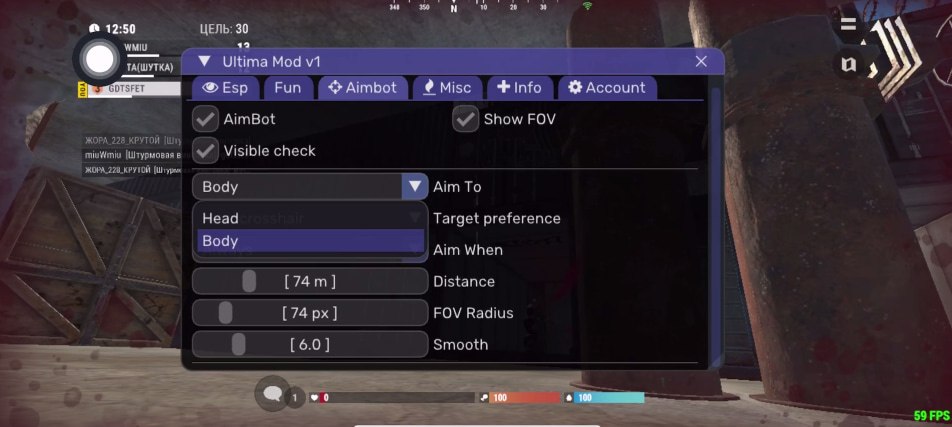
Aimbot

Target locking

Pulls your crosshair onto the enemy. On a touchscreen this is the most noticeable part of the build, since sticks never match a mouse.

Capture zone

FOV radius with an on screen indicator. A narrow zone looks natural, a wide one grabs targets you never saw.

Visibility check

Skips anyone behind a wall or a rock. Without it the crosshair twitches toward targets you cannot see, and that is the first thing a report catches.

Aim point

Head or body. Body is safer, head is faster but far more obvious from the outside.

Target priority

Nearest to the crosshair, or lowest HP first. The second mode shines in messy fights where finishing kills matters.

Activation mode

Always on, only while scoped, or only while firing. Firing only looks the most natural of the three.

Range and smoothing

Working distance and how fast the crosshair travels. Keep smoothing moderate, because an instant snap shows up in any clip.

Info panel

Server data

Server name, build number and active player count. You can tell straight away whether it is crowded or safe to farm.

Your profile

Local player, user ID, team, level and playtime in one panel.

Character state

Health, hunger and thirst as numbers. More useful than eyeballing a bar when deciding whether to push on or head home.

Refresh info

Re-reads the data without rejoining the server.

Camera and debug

Free camera

Detaches the view from your character, with adjustable speed and movement buttons. Handy for looking over someone's base without walking up to it.

KCC inspector

A debug panel for the character controller with test speed settings. This is a tool for people who like poking at things, not a ready made movement cheat.

Appearance

Menu theme

Dark or blue. A small thing, but menu readability matters on a phone.
TARIFFS
2.5$
BUY What happens after payment?
Got a question? Ask before you pay

We'll help you choose and sort out any launch issue. Ask us anything before buying, we're always on your side.

Support 10:00–22:00, sometimes we reply at night too
Ask a question

Available tariffs

1 day
2.5 $
START PURCHASE
7 days
10 $
START PURCHASE
30 days
20 $
START PURCHASE
Reviews about Wizard Oxide iOS

No reviews yet. Be the first to leave one.

Your review

Reviews are published after moderation.

Join our gaming community chat

Discuss current cheats from developers and how to use them effectively in popular online games. Share tactics, exchange useful info and find like-minded players in our community.

1 900+Members
24/7Online
Join our gaming community chat

Technical support

Run into a technical issue? Our team of experts will help. We handle all requests in a live queue, so please be understanding if it sometimes takes a little wait. We guarantee that no request goes unanswered.

Availabilityfrom 10:00 to 23:00
Fast responseIn queue order
Get help
Technical support
PROCHEAT

PROCHEAT news channel

Follow product status changes, update history and important announcements.

Subscribe

What the iPhone build gives you

The build breaks into four parts. Here is what each one covers in an actual match, without rereading the checkbox list.

Cheat sections and what they change in game
Section What is inside What it gives you
ESP Boxes, names, HP, snap lines, distance, render range You see who is nearby, how much health they have and whether the fight is worth it
Loot and world Items with IDs, containers, animals, separate distances Farming along marked points instead of running blind early in a wipe
Aimbot FOV, visibility check, aim point, priority, smoothing Makes up for what touchscreen sticks cannot do
Info Server, build, online count, your profile, HP and hunger as numbers You read the situation without leaving the game

Stream mode is worth calling out separately: it removes the overlay from screen capture. Turn it on before you start recording.

Installing on iPhone with a certificate

Apple does not allow arbitrary app installs, so the build is signed with a certificate and sideloaded. The certificate is yours to provide: it does not come with the cheat and is bought separately.

The order is: sign the build, install it, trust the developer profile in iOS settings, then activate with your key on first launch. No jailbreak needed.

Apple revokes certificates now and then. When that happens the app stops opening and has to be re-signed. That is a property of sideloading rather than a fault in the build, and it stings more on a short subscription than on a monthly one.

Settings that keep your account alive

The Oxide anticheat analyses behaviour automatically, takes in match reports and brings in human moderators. A human looking at your clip is more dangerous than the automation, so how the build looks from outside is what matters.

  • Keep the visibility check on. A crosshair tracking someone through a rock gives you away immediately.
  • Narrow FOV radius, moderate smoothing, activation while firing.
  • Body aim if you play on busy servers.
  • Keep ESP render distance short: less visible and easier on the phone.
  • Turn stream mode on before recording, not after.

Nobody can promise you will not be banned. Careful settings just remove the most obvious reasons for a report.

How to buy and what arrives after payment

Pick a subscription length, pay however suits you, and the key along with the build link arrives at the email you entered. There is no account area on the site, everything comes by email.

Check two things before paying: your iOS version and whether you have a signing certificate. Without a certificate the build cannot be installed, and the purchase will already have gone through.

If the email does not show up within a few minutes, look in spam and message support.

FAQ

Which iOS versions are supported?

17 through 27. The build will not start on anything older.

Is a certificate included?

No. The certificate is bought separately, the cheat ships without one.

Do I need a jailbreak?

No, it installs as a signed build through a trusted profile in iOS settings.

The app stopped opening, what now?

Most likely Apple revoked the certificate. The build has to be signed again, the cheat itself still works.

Is there a radar or a spoofer?

No. This build has ESP, an aimbot, an info panel, a free camera and a debug inspector. No radar and no spoofer.

Where does the key arrive?

At the email you used when paying, together with the build link and instructions.

Is the menu in English?

Yes, the interface is English. The function names are short and standard for cheats, so it is easy to follow.

Ask a question


