cry4me Oxide: Survival Island Cheat for Android: Silent Aim, ESP and Auto Farm

Working
C cry4me
Last update 20.10.2026 This date shows when the software was last updated. An old date doesn't mean the software stopped working! Most likely the developer just had nothing new to add. If you have any doubts, you can always check the current status with our support team.
Add another cheat from this game too — to compare them.
cry4me Oxide Android
Android
Menu language: English

User information

Before paying, take a minute to check your phone. In Settings open About phone and find the Android version: 7 or anything newer will do. The loader is built for 64-bit processors (arm64), which covers almost any smartphone from recent years, but a very old budget phone may not take it. No root is needed and you do not have to touch the firmware.

Emulators are not supported. If you play Oxide on a computer through BlueStacks, MSI App Player or a similar program, cry4me will not start there; you need a real phone or tablet.

The key shows up on the order page right after payment and is also sent by email. Under it there is an instruction button with a link to a folder holding the loader APK and a setup video. During install Android will ask you to allow files from an unknown source, and Google Play Protect may warn about an app from outside the store. That is how the system greets any APK from elsewhere.

SCREENSHOTS
Description

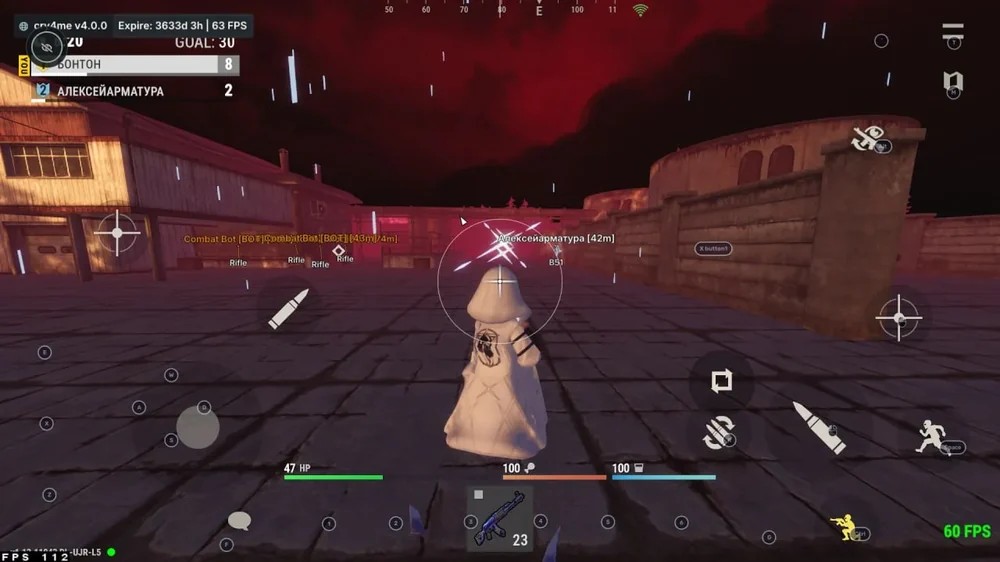
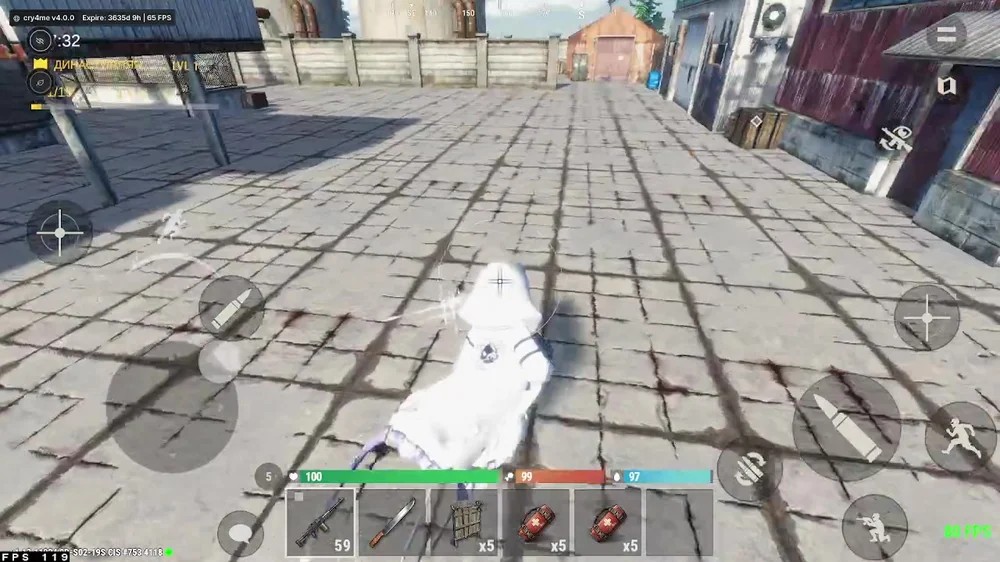
cry4me for Oxide: Survival Island installs on your phone as a separate loader app and needs no root. In game an English menu opens over the screen, split into five sections: visuals, aim, skins, auto farm and settings. A status line with the build version, the time left on your subscription and FPS stays in the corner the whole time; at the moment it joined the catalogue the build was 4.0.0.

The build is at its best in a gunfight and on the farm. Silent Aim with an FOV circle, hit chance and body part selection, legit aim with smoothing, no recoil and no spread. The ESP marks players and, on top of that, cupboards, auto turrets, sleepers, military and elite crates. Auto Farm and Magic Farm hit trees, stone, metal and sulfur on their own while the radar shows who is creeping up behind you.

You need a phone or tablet on Android 7 or newer; PC emulators will not work. A day is the cheapest plan, and the key is issued right after payment.

Product features

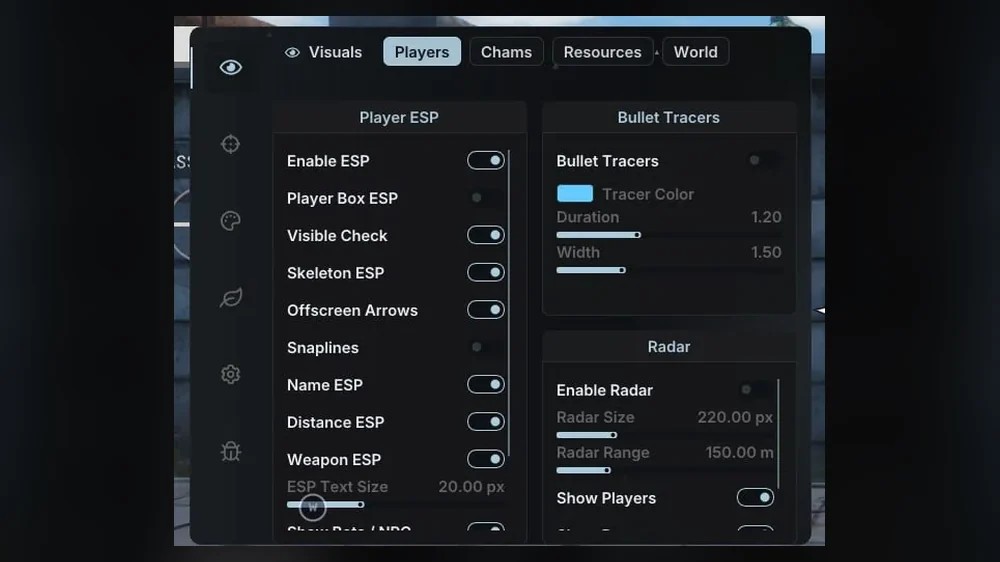
Player ESP

Boxes and skeletons

The box around a model and the skeleton switch on separately. On a small screen many players keep only the skeleton, as it covers less of the picture.

Visibility check

Tells a player in the open apart from one sitting behind a wall or a rock, so you know whether you can shoot right now.

Name, distance, weapon

A label above the model: who it is, how many metres away and what they are holding, a bow or an AK.

Lines and off-screen arrows

Lines run to players in view, arrows on the screen edge point at those outside it.

Bots and NPCs

Get their own toggle, so a bot is not mistaken for a real player.

Text size

ESP labels scale to a phone or a tablet.

Chams, tracers and radar

Chams

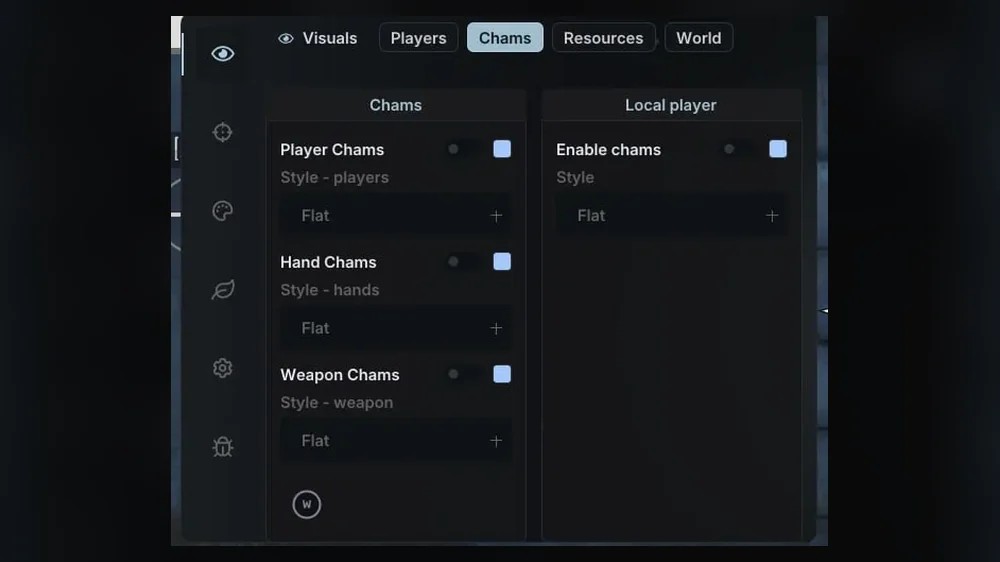
Colour fill for players, your hands, your weapon and your own character, each layer with its own style.

Bullet tracers

A shot trail with adjustable colour, duration and line width.

Radar

A mini radar with the players around you. On-screen size and range are set with sliders.

Resources, loot and bases

Ore and trees

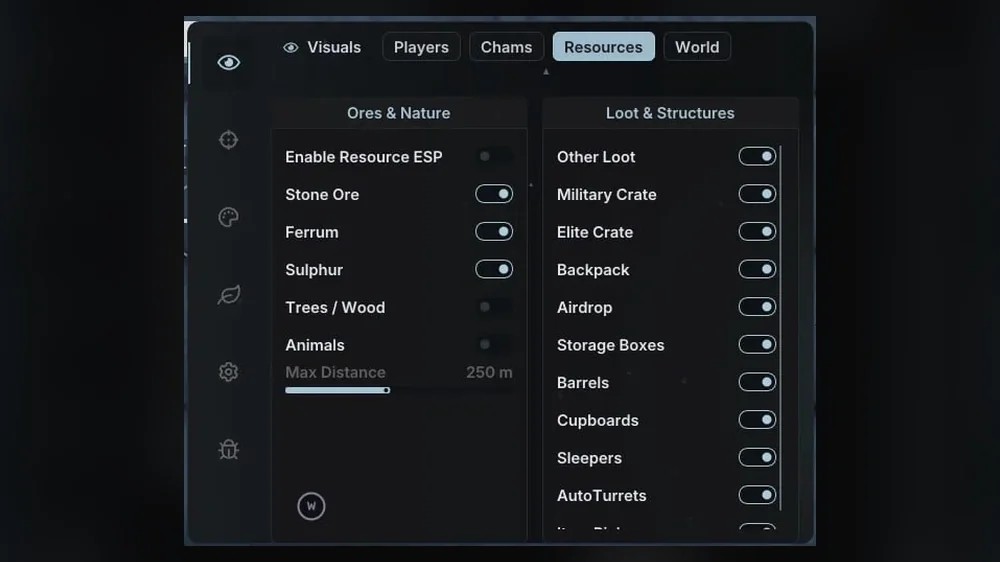
Stone, metal, sulfur and trees with a distance limit, so you see the nearest nodes instead of icons scattered over half the map.

Animals

A separate layer for hunting hides and meat.

Crates and airdrops

Military and elite crates, airdrops, death backpacks, storage boxes, barrels and other loot.

Cupboards and auto turrets

Shows where the cupboard of someone else's base stands and which turrets cover the approach.

Sleepers

The sleeping characters of players who logged off, an easy target for a quiet raid.

Aimbot

Legit aim

The crosshair is pulled to the target with adjustable smoothing, no snapping.

Silent Aim

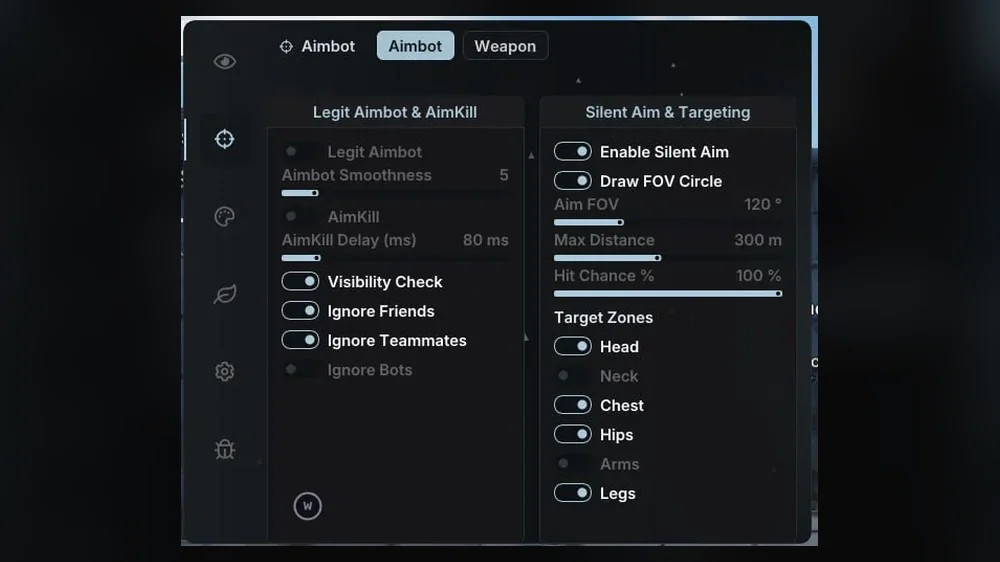
Bullets go to the target without the camera turning. You set the FOV circle, maximum distance and hit chance in percent.

Hit zones

Head, neck, chest, pelvis, arms and legs are ticked in any combination.

AimKill

Finishing shots with a delay in milliseconds.

Target filters

Visibility check and ignoring friends, teammates and bots.

Weapons and movement

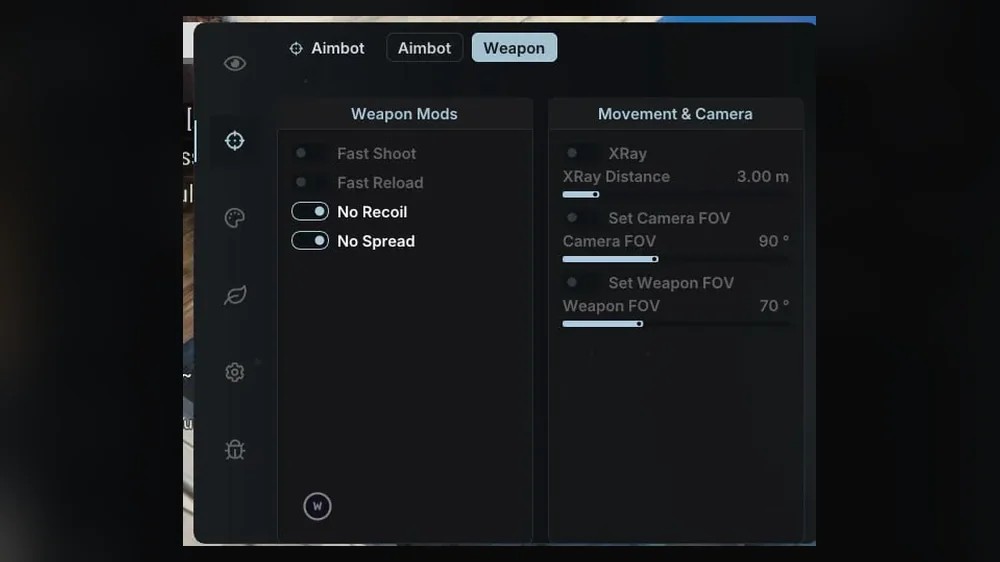
No recoil and no spread

A burst lands on one spot even from an AK at mid range.

Fast shooting and reload

Two separate weapon toggles.

Speed hack

Run faster than normal, with the speed multiplier set by hand.

No slowdowns

Your character does not slow down while hitting or reloading.

Auto farm

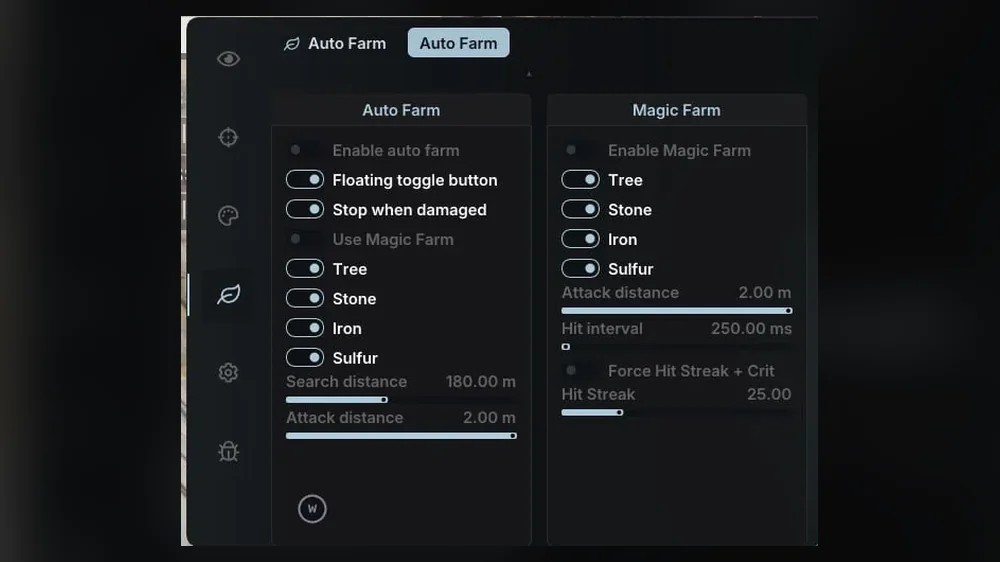
Auto Farm

A floating button over the game, resource choice, search and hit distance. Farming stops on its own when you take damage.

Magic Farm

A separate mode with its own hit interval and a hit streak with crits. It runs together with Auto Farm.

World, skins and utilities

Night vision and weather

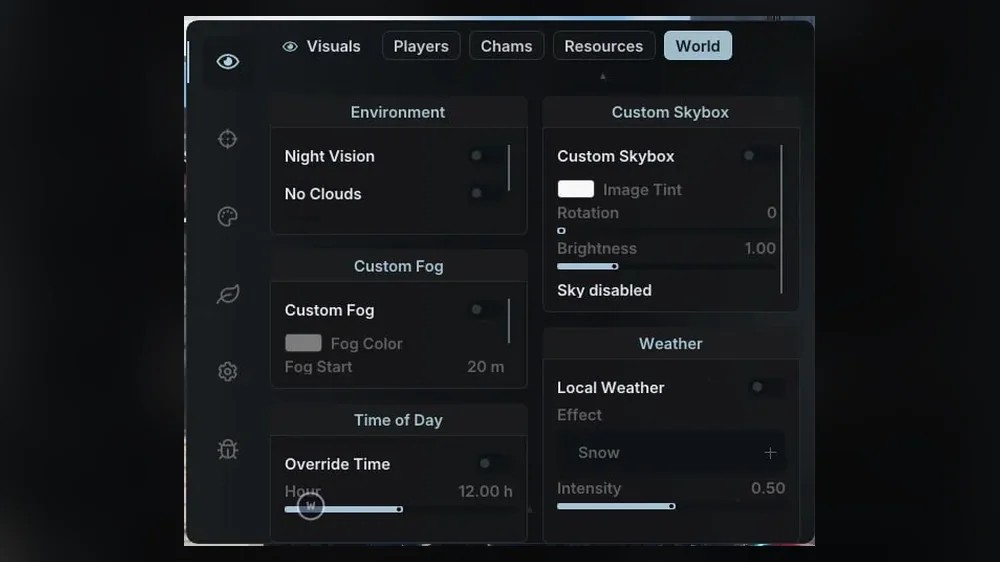
Night vision, no clouds, custom fog, time of day, a custom sky or no sky at all, snow with adjustable intensity.

XRay and FOV

XRay with a distance setting, separate FOV for the camera and for the weapon in your hands.

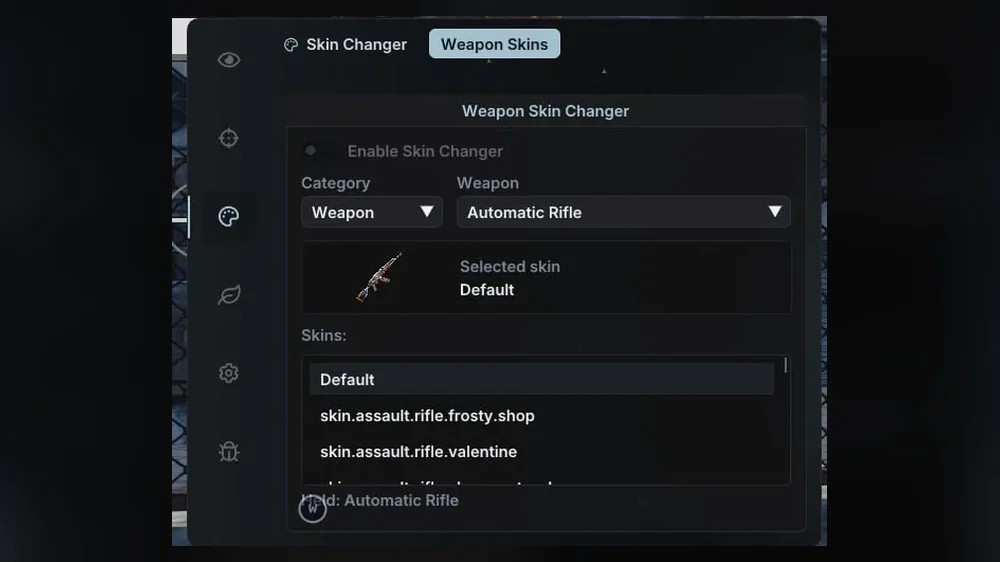
Skin Changer

Weapon skin swap: category, the exact gun and a skin from the list.

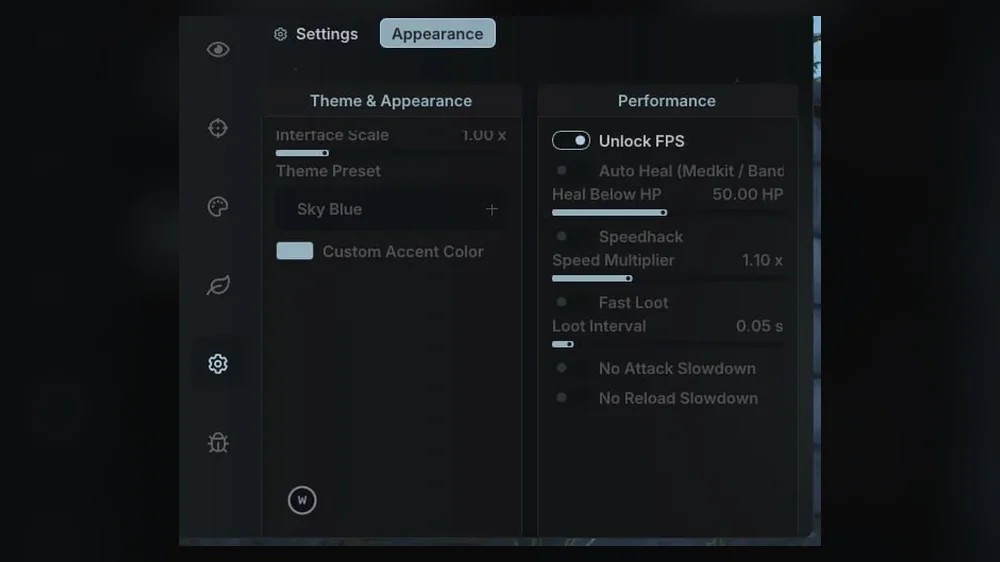
Auto heal

A medkit or bandage is used on its own once health drops below the threshold you set.

Fast loot and FPS

Faster looting with an adjustable interval and an unlocked frame rate.

Menu look

Interface scale, theme presets and your own accent colour.

Known issues & fixes

Real questions from our support, with the fixes that worked. Based on user requests for this product.

cry4me will not start in BlueStacks or another emulator

That is expected: the build does not support Android emulators on PC, BlueStacks and MSI App Player included. cry4me only works on a real phone or tablet running Android 7 or newer. If you are used to playing Oxide from a computer, cry4me will not fit that setup.

Android will not let me install the cry4me loader

The system blocks any APK from outside Google Play until you allow the install by hand. In the warning window tap Settings and turn on Allow from this source for the browser or the Files app you are opening the file from, then go back. If Google Play Protect shows up after that, choose More details and Install anyway.

The cry4me loader will not install on an old phone

Check two things. The Android version has to be 7 or newer; you will find it in Settings under About phone. The second is the processor: the loader is built for the 64-bit arm64 architecture, and on 32-bit models Android will refuse to install it. In that case only a different phone or tablet helps.

cry4me auto farm stops by itself in the middle of gathering

Most likely the Stop when damaged option in the Auto Farm tab kicked in: your character took damage and farming stopped so you could react. If the damage came from a fall or an animal and the stop gets in the way, untick that option. Farming switches back on from the floating button over the game.

Where to get the cry4me loader and key after payment

The key is shown on the order page right after payment and stays in "My purchases" on the marketplace, with a copy sent to the email from the order. Under the key there is an instruction button with a link to a folder holding the loader APK and a setup video. If you have neither the key nor the link, message support and include your order number.

All issues & general troubleshooting
TARIFFS
200₽
BUY What happens after payment?
Got a question? Ask before you pay

We'll help you choose and sort out any launch issue. Ask us anything before buying, we're always on your side.

Support 10:00–22:00, sometimes we reply at night too
Ask a question

Available tariffs

1 day
200 ₽
200 ₽ / day
START PURCHASE
7 days
750 ₽
107 ₽ / day
START PURCHASE
lowest per day
30 days
2100 ₽
70 ₽ / day
START PURCHASE
Reviews about cry4me Oxide Android

No reviews yet. Be the first to leave one.

Your review

Reviews are published after moderation.

Join our gaming community chat

Discuss current cheats from developers and how to use them effectively in popular online games. Share tactics, exchange useful info and find like-minded players in our community.

1 900+Members
24/7Online
Join our gaming community chat

Technical support

Run into a technical issue? Our team of experts will help. We handle all requests in a live queue, so please be understanding if it sometimes takes a little wait. We guarantee that no request goes unanswered.

Availabilityfrom 10:00 to 23:00
Fast responseIn queue order
Get help
Technical support
PROCHEAT

PROCHEAT news channel

Follow product status changes, update history and important announcements.

Subscribe

The cry4me menu tab by tab: what lives where

The menu opens right inside the game. The side panel has five main sections, and some of them hold further tabs. Turn everything on at once and the phone screen becomes a Christmas tree of labels, so below is where to find what and where people usually start.

Section and tabWhat is insideWhere to start
Visuals → PlayersPlayer ESP, bullet tracers, radarName, distance and visibility check. Add skeletons and lines if the picture is not too busy
Visuals → ChamsFill for players, hands, weapon and your own characterChams on players, the rest to taste
Visuals → ResourcesOre, trees, animals, crates, airdrops, cupboards, turrets, sleepersLimit the distance, or resource icons will cover half the screen
Visuals → WorldNight vision, clouds, fog, time of day, sky, snowNight vision and no clouds during the night phase
Aimbot → AimbotLegit aim, AimKill, Silent Aim, FOV circle, hit chance, zonesA hit chance under 100% and two or three zones instead of the head alone
Aimbot → WeaponFast shooting and reload, no recoil, no spread, XRay, camera and weapon FOVRecoil and spread. Fast shooting is visible to others, so switch it on only when needed
Skin ChangerWeapon skins by categoryCategory, gun, skin from the list
Auto FarmAuto Farm with a floating button, Magic FarmThe resources you need and stopping when you take damage
SettingsMenu scale and theme, FPS unlock, auto heal, speed hack, fast lootScale to your screen first, then the rest

The menu items are in English and short: Stone Ore, Ferrum for metal, Sulphur, Cupboards, Sleepers.

How to install cry4me on your phone

The whole install takes a few minutes and happens on the same phone where Oxide is installed. The folder behind the instruction link has a video showing the process from start to finish, so the text below is more of a cheat sheet.

  1. Copy the key from the order page in full, with no spaces at the ends.
  2. Open the instruction button under the key and download the loader APK from the Yandex Disk link.
  3. Run the file. Android will say installs from this source are blocked: tap Settings, allow installs for your browser or Files, and go back.
  4. If a Google Play Protect window pops up, choose More details and Install anyway.
  5. Open the loader, paste the key from the clipboard and follow the video up to launching the game.

Once it is all in place, a cry4me line with the version, time left and FPS appears in the top left corner of the game. If the line is missing, restart the loader and the game, and if that does not help, message support.

Silent Aim or legit aim

The Aimbot section offers two approaches, and they solve different problems. Legit aim pulls your crosshair towards the enemy, and the smoothing slider sets how gently. From the outside it looks like a hand that simply holds a target well, which suits long sessions.

Silent Aim works differently: the camera keeps looking where it was, while bullets fly to a target inside the FOV circle. Circle radius, maximum distance and hit chance are set separately. A hundred percent headshots from any range is obvious to anyone watching a raid recording, so people usually keep the chance lower and tick chest and pelvis alongside the head.

Shared filters apply to both modes: a visibility check so the aim does not lock onto people behind a wall, and ignoring friends, teammates and bots. AimKill with a delay in milliseconds finishes the target after the first hit.

ESP before a raid: cupboards, turrets, sleepers

Besides ore and animals, the Resources tab has items that pay off most before a raid. Cupboards show where the heart of someone else's base is and which side is closer to break through. Auto turrets are visible ahead of time, so you do not run into a burst while looking for the entrance.

Sleepers mark the characters of players who logged off. A lone sleeper at the edge of the map often means a base with nobody online. Military and elite crates, airdrops and backpacks left after other people's deaths help you decide where to run after a fight.

All layers share one distance limit. Keep it small: you see the nearest crates and bases rather than hundreds of icons across the island.

Sulfur and metal auto farm: Auto Farm and Magic Farm

Gathering in Oxide eats more time than building and raiding combined, especially in the first days after a wipe. cry4me has two modes for it.

Auto Farm switches on from a floating button right over the game, without opening the menu. Tick the resources you need, set how far to look for nodes and how close to hit from, and your character walks from rock to rock on its own. The stop on damage option ends farming the moment you get hit, so you are not standing there with a pickaxe while someone takes you apart.

Magic Farm lives separately: its own resource list, its own hit interval and a hit streak with crits. You can run it together with Auto Farm. While your hands are busy, keep the radar on; it shows players around you before they get within range.

World, camera, skins and the small settings

The World tab reshapes the picture to your taste. Night vision and no clouds help at night, when otherwise you see little more than muzzle flashes. Fog is set by colour and distance, the time of day can be locked, and the sky can be tinted, rotated or removed altogether. There is snow with adjustable intensity too, purely for atmosphere.

Aimbot → Weapon holds XRay with a distance setting and two FOV settings: a wider camera view and a different weapon size in frame. Skin Changer picks a skin by category and by the exact gun.

Settings gathers the useful small things. Auto heal uses a medkit or bandage on its own when health drops below the threshold. Fast loot speeds up moving items, and the FPS unlock lifts the frame cap on phones that can handle more. The menu scale, theme preset and your own accent colour are there as well.

cry4me or Wizard: which Android cheat to pick

There are two Android builds in the catalogue, and neither needs root. Wizard for Oxide hooks into the game through LuLuBox and offers Magic Bullet, auto fire and a debug camera that sees through walls. cry4me installs with its own loader and wins on other things: Silent Aim with hit chance and zone selection, radar, chams, ESP for cupboards, turrets and sleepers, Magic Farm, skin swaps and sky, fog and weather settings.

If base scouting and long farming sessions matter most, cry4me is the more convenient pick. If you specifically want Magic Bullet or a camera to inspect a base before a raid, look at Wizard. Neither fits an iPhone or iPad; there is a separate iOS build for that.

Bans in Oxide and how not to get caught

No Oxide cheat comes with a ban guarantee, and cry4me is no exception. The decision is made by the game's developer, and the trigger is most often not the software itself but what other players see: headshots across half the map, shooting that is too fast, running faster than anyone around.

That gives a few simple rules. Keep the Silent Aim chance under a hundred percent and add other zones to the head. Use the speed hack and fast shooting in short bursts, not for the whole session. Do not pick fights in chat; after an argument a report comes in faster than after a fair death. An account you would hate to lose is better kept away from cheats.

After Oxide updates the build gets rebuilt. During that time the status on the product page changes, and until it is cleared it is better not to run the loader.

cry4me for Oxide: price and how to buy

There are three plans: a day, a week and a month. Per day the week costs about half as much as the one-day plan, and the month about a third. People take a day to make sure the loader runs on their phone and only then decide on a longer plan.

Pick a plan, press the button and pay by card or another method from the payment page. The key is shown right away and saved in "My purchases", with a copy sent to the email from your order. If you cannot find the key or the loader link, message support with your order number.

cry4me for Oxide FAQ

Does cry4me need root?

No. The build installs as a regular loader app on a phone or tablet with Android 7 or newer, and the firmware stays untouched.

Does cry4me work in BlueStacks or another emulator?

No, PC emulators are not supported. You need a real Android phone or tablet.

Is there an iPhone version?

No, cry4me is Android only. The Oxide catalogue has a separate iOS build for iPhone and iPad.

Will an old phone do?

If it runs Android 7 or newer on a 64-bit processor, yes. The loader is built for arm64 and will not install on 32-bit models.

Where do I get the loader after payment?

There is an instruction button under the key on the order page. It holds a link to a folder with the loader APK and a setup video.

How is Silent Aim different from regular aim?

Regular aim turns your crosshair to the target. Silent Aim leaves the camera where it is and sends bullets to a target inside the FOV circle with the hit chance you set.

Why did the auto farm stop by itself?

Most likely the stop on damage option kicked in because someone hit you. It can be switched off in the Auto Farm tab.

from 200 ₽ Choose a plan
Ask a question


