


Jarvis for Oxide: Android cheat with ESP and auto farm

Working
J Jarvis
Last update 08.11.2026 This date shows when the software was last updated. An old date doesn't mean the software stopped working! Most likely the developer just had nothing new to add. If you have any doubts, you can always check the current status with our support team.
Add another cheat from this game too — to compare them.
Jarvis Oxide Android
Android
Menu language: Russian, English

User information

Before buying, install the original Oxide: Survival Island from Google Play and keep it installed. Jarvis runs through LuluBoxSuper version 2.1.2 specifically and the separate JARVIS OXIDE loader. Add both apps to LuluBox and enable SandBox for each. No root or computer is required, but the first key login needs an internet connection.

Do not confuse this with Viento: Jarvis does not replace the game with its own build and instead works on top of the official client. Launch Oxide from LuluBox through the loader rather than its normal home-screen shortcut.

Your key is delivered on the order page and by email. Paste the whole key into the JARVIS | OXIDE window on first launch and press Sign in. Settings shows when your access expires.

There is no guarantee against bans. Refunds are not provided for bans or detections; if Jarvis will not launch despite meeting the requirements, a 100% refund within 24 hours or a replacement applies. Pre-purchase questions are welcome in the support chat.

SCREENSHOTS
Description

Jarvis for Oxide: Survival Island attaches to the original game through LuluBoxSuper 2.1.2. Your Android phone or tablet needs no root, and the Google Play installation of Oxide must stay in place. A floating helmet icon opens a menu available in Russian and English.

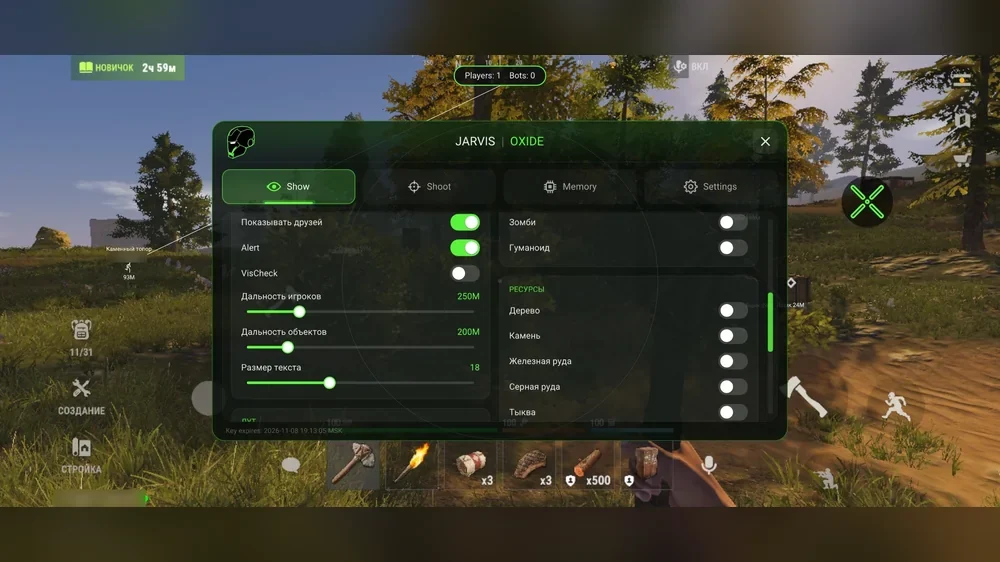
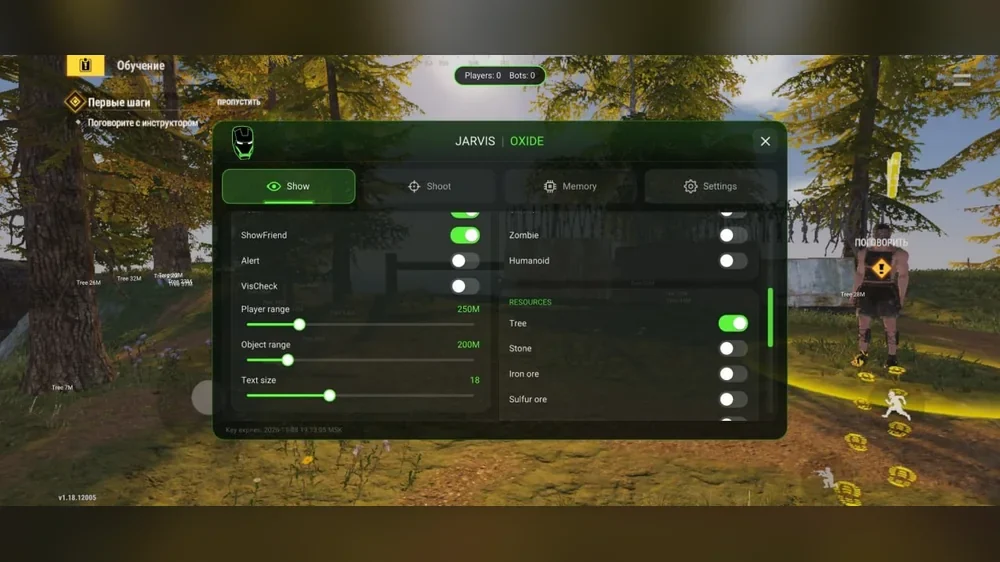
There are four sections: Show covers player, animal, resource and loot ESP; Shoot handles aim assist and friend filtering; Memory contains speed, reload, view and auto-farm settings; Settings controls appearance and subscription details. VisCheck distinguishes visible targets from those behind cover, while a separate friends list stops aim assist from locking onto teammates.

Keys are available for 1, 7 and 14 days at 210, 1200 and 2000 RUB. After payment, the key appears on the order page and arrives by email with the guide.

Product features

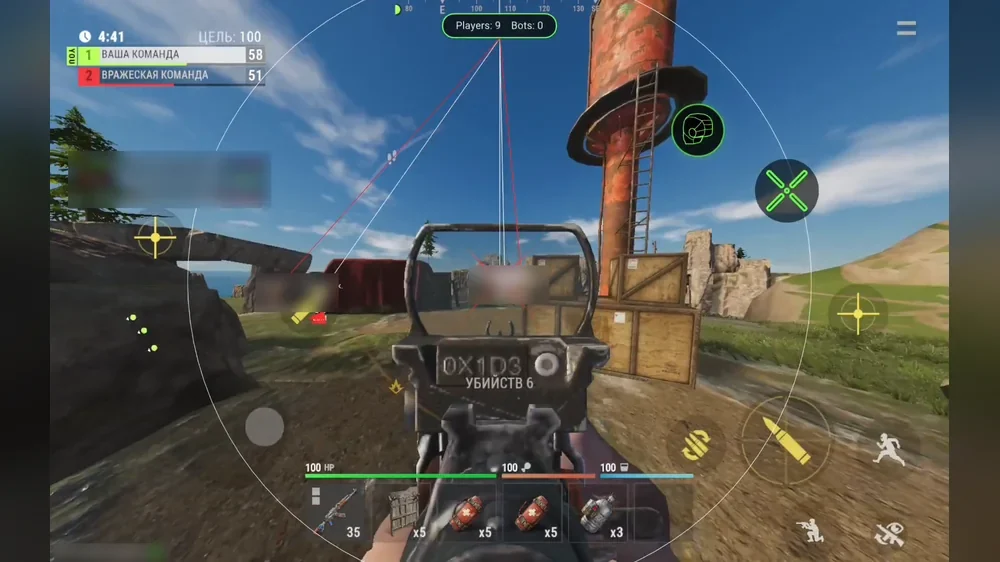
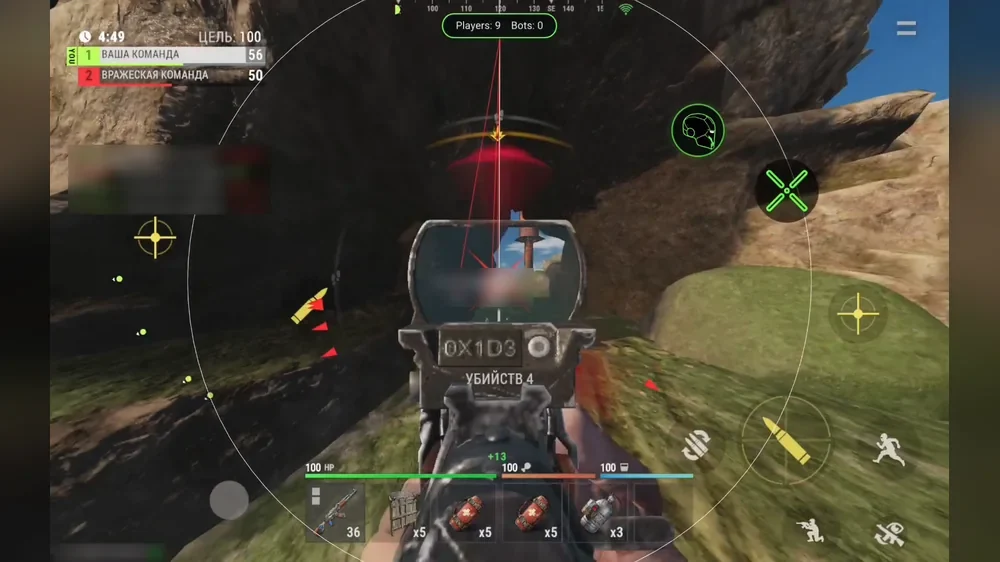
Player ESP

Boxes, lines and skeleton

A character outline, a line from the top of the screen and a skeleton help track opponents.

Name, distance and weapon

The player's name, range and the item currently held in their hands.

VisCheck and Alert

Visible targets are white and hidden ones red, while indicators point towards off-screen targets.

Range and counter

Player ESP range adjusts from 25 to 1000 m, with a player and bot counter at the top.

Animals, resources and loot

NPCs and animals

Bots, zombies, humanoids, bears, wolves, boars, deer and other animals can be enabled separately.

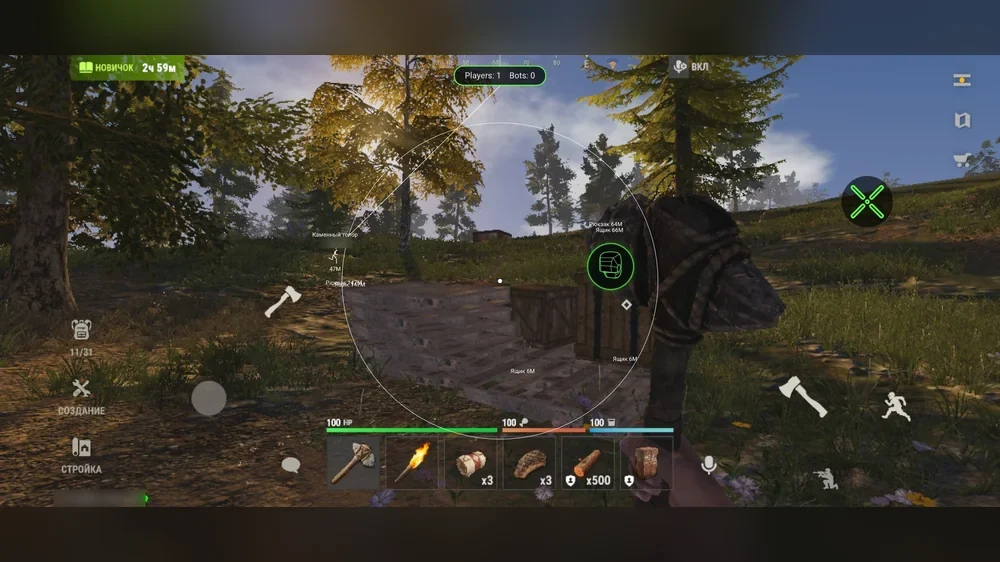
Resources

Trees, stone, metal, sulfur, pumpkins, cloth, berries, loose wood, ice and road signs.

Loot and storage

Crates, barrels, airdrops, backpacks, sleeping players, storage boxes and cupboards with range controls.

Aim assist

Floating button

A short tap toggles AutoAim during combat, and the button can be dragged anywhere convenient.

Zone, speed and target point

A radius from 10 to 600 screen units, speed from 1 to 30, and head or hip targeting.

HitRate and operating mode

Activation chance every 100 ms, always-on or ads-only operation, plus an optional circle and target line.

Friends and NPCs

A custom list of up to 64 player IDs, separate AttackFriend and AttackNPC switches, and a visibility filter.

Speed, reload and view

Speed

Movement boost with levels from 1 to 10, reaching up to 1.29 times normal speed.

ReloadHack

A reload-time multiplier from 0.05 to 1.00, where one means normal duration.

Night, FOV and FPS

Bright night, a 60 to 120 field of view and a 30 to 240 FPS limit depending on phone capability.

Auto farm

Four resources

Wood, stone, metal and sulfur have independent toggles.

Auto walk and search

Automatic approach to resources and a search range from 10 to 250 m.

Automatic hatchet crafting

A stone hatchet is crafted when needed if materials and a free hotbar slot are available.

Menu

Russian and English

Language, scale, background, accent colour and animations are available in Settings.

Hide while recording

Hide in Record removes the overlay on supported phones and recording methods; always check the result.

Status and saving

Key expiry and connection status are visible, settings save automatically and reset with one button.

Known issues & fixes

Real questions from our support, with the fixes that worked. Based on user requests for this product.

Which LuluBox version does Jarvis require?

You need LuluBoxSuper version 2.1.2 specifically. Keep the original Google Play version of Oxide installed. No root or computer is required.

Which apps need SandBox for Jarvis?

SandBox must be enabled twice: on the OXIDE (Local) page and the JARVIS OXIDE (Local) page inside LuluBox. If either switch is off, the loader will show a warning.

Where do I enter the Jarvis key?

Launch JARVIS OXIDE from LuluBox and press Install and connect. In the JARVIS | OXIDE window over the game, paste the whole key and press Sign in. The first login requires internet access.

What does HitRate mean in Jarvis?

HitRate controls the chance of aim assist activating every 100 ms, from 0 to 100%. It is not a hit percentage: lower values skip some activation moments.

How does Jarvis distinguish friends from opponents?

Team members and in-game friends are friendly automatically. FRIENDS holds up to 64 additional player IDs. With AttackFriend disabled, AutoAim ignores them; AttackNPC controls NPC targeting separately.

What should I do if the Jarvis menu does not appear?

Fully close LuluBox and Oxide. Check LuluBoxSuper 2.1.2 and SandBox for both apps, then launch JARVIS OXIDE with Play Now and reconnect. Do not use the normal Oxide shortcut.

All issues & general troubleshooting
TARIFFS
$2.19
BUY What happens after payment?
Got a question? Ask before you pay

We'll help you choose and sort out any launch issue. Ask us anything before buying, we're always on your side.

Support 10:00–22:00, sometimes we reply at night too
Ask a question

Available tariffs

1 day
$2.19
$2.19 / day
START PURCHASE
7 days
$12.49
$1.78 / day
START PURCHASE
lowest per day
14 days
$20.81
$1.49 / day
START PURCHASE
Reviews about Jarvis Oxide Android

No reviews yet. Be the first to leave one.

Your review

Reviews are published after moderation.

Join our gaming community chat

Discuss current cheats from developers and how to use them effectively in popular online games. Share tactics, exchange useful info and find like-minded players in our community.

1 900+Members
24/7Online
Join our gaming community chat

Technical support

Run into a technical issue? Our team of experts will help. We handle all requests in a live queue, so please be understanding if it sometimes takes a little wait. We guarantee that no request goes unanswered.

Availabilityfrom 10:00 to 23:00
Fast responseIn queue order
Get help
Technical support
PROCHEAT

PROCHEAT news channel

Follow product status changes, update history and important announcements.

Subscribe

Jarvis for Oxide: four menu sections

The green helmet opens the menu over the game. Enter your key and wait for the connection before enabling a section's main toggle and its individual features.

SectionPurposeInitial setup
ShowPlayers, NPCs, animals, resources, loot and storageRange, text size, VisCheck and only the objects you need
ShootAutoAim, floating button, HitRate and friends listModerate speed, a small zone, target point and friend filtering
MemorySpeed, reload, bright night, FOV, FPS and auto farmFarm resources and a sensible search range
SettingsLanguage, appearance, key expiry and diagnosticsMenu language and connection status

Plans: 1 day for 210 RUB, 7 days for 1200 RUB and 14 days for 2000 RUB. Jarvis has no monthly subscription.

Installing Jarvis through LuluBox

Installation takes place on the phone with no computer required. Keep the original Google Play version of Oxide installed. Use the channel linked in the guide to download two APKs: LuluBoxSuper 2.1.2 and JARVIS OXIDE, then allow Telegram to install unknown apps.

  1. Open LuluBoxSuper and grant the requested permissions.
  2. Use the plus button to add OXIDE and JARVIS OXIDE, then tap CLONE.
  3. Enable SandBox on each app's page.
  4. Fully close the game and open JARVIS OXIDE from LuluBox with Play Now.
  5. Press Install and connect in the loader and wait for Oxide to launch.
  6. Paste your key into the JARVIS | OXIDE window and sign in.

Always use this launch method afterwards. If the menu does not appear, close LuluBox and Oxide, check both SandBox switches and launch through the loader again.

ESP with visibility checks

Show brings visual information together in one place. Player options include boxes, lines, skeleton, name, distance and held weapon. VisCheck marks visible targets white and targets behind cover red. Alert points towards opponents outside the screen, while the top counter reports players and bots.

NPCs and animals have separate toggles: zombies, humanoids, bears, wolves, boars, deer, rats, rabbits and chickens. Beyond wood and ore, resources include pumpkins, cloth, berries, loose wood, ice and road signs. Object ESP covers crates, barrels, airdrops, backpacks, sleeping players, storage boxes and cupboards.

Player and object ranges adjust independently from 25 to 1000 m, with text sizes from 10 to 32. For normal play, limit the range and disable unnecessary categories so labels do not obscure your view.

AutoAim and friend filtering

Enabling AutoAim adds a separate button that toggles aim assist during combat. The zone ranges from 10 to 600 screen units and rotation speed from 1 to 30. You can target the head or hips, offset the head point downwards and operate continuously or only while aiming.

HitRate is not a hit percentage. It controls the chance of assist activating every 100 ms, so values below 100 make crosshair movement less continuous. The zone circle and target line are optional, and the visibility filter ignores hidden opponents.

Team members and in-game friends are friendly by default. FRIENDS can hold another 64 encountered players by ID, so a name change does not remove an entry. With AttackFriend disabled, aim assist ignores this list. AttackNPC separately controls NPC targeting.

Speed, reload and auto farm

Memory contains Speed and ReloadHack. Speed boosts running with ten levels and a maximum multiplier of 1.29. ReloadHack multiplies reload duration by 0.05 to 1.00: lower values mean faster actions. Bright night, a 60 to 120 field of view and a 30 to 240 FPS limit are in the same section. Actual frame rate still depends on the device.

AutoFarm handles wood, stone, metal and sulfur. Auto walk moves the character to the selected resource within a range of 10 to 250 m. If no suitable tool is available, auto craft can make a stone hatchet when materials and a free hotbar slot are present. Current farm status is shown in the menu.

Speed boosts, nearly instant reloads and automated routes are noticeable to others. Do not leave farming unattended or use extreme values unnecessarily.

Jarvis, Viento or Wizard: comparison

Jarvis suits players who want to keep the official Oxide installation and use detailed ESP, friend filtering, AutoAim, fast reload and auto farm. It offers two menu languages and three plans up to 14 days. Installation requires LuluBoxSuper 2.1.2 and SandBox for both apps.

Viento is a standalone game build installed after removing the original. It includes magic bullets, NoClip and experimental super building but only offers a daily plan. Wizard also connects through LuLuBox and focuses on Magic Bullet with a debug camera.

Jarvis has no NoClip, magic bullets, recoil or spread removal, or extended building. None of these Android options fits an iPhone or iPad.

Jarvis status and ban risk

At the time of addition, the vendor lists Jarvis as working since November 7, 2026. This describes the current build's operation, not a promise of undetectability. Any third-party overlay or altered game parameter can lead to an account ban.

Strong aim assist, speed boosts, fast reloads and long automated farming sessions are especially noticeable. Hide in Record only conceals the overlay during screen recording on supported devices and has no effect on anticheat systems or player reports.

Check the product status after Oxide updates and do not launch a build that is being reworked. No compensation is provided for bans or detections.

Jarvis price and key delivery

One day costs 210 RUB, a week 1200 RUB and two weeks 2000 RUB. There is no 30-day plan. A daily key is enough for the first installation: you can test LuluBox compatibility, launching and menu operation on your phone.

Payment is handled by DigiSeller. The key appears on the order page and is sent to the supplied email, with no ProCheat registration required. The guide with links to the required APKs is included.

If the key is rejected, check your internet connection and copy the code again without spaces. If the menu does not appear, check the LuluBox version and SandBox for both apps first, then contact ProCheat support with your order number.

Jarvis FAQ

Does Jarvis require root?

No. It runs through LuluBoxSuper 2.1.2 and SandBox, with no root or computer required.

Should the original Oxide be removed?

No. Keep the Google Play version installed because Jarvis runs on top of it.

Which LuluBox version is required?

LuluBoxSuper 2.1.2 specifically. Another version may fail to detect the game or loader.

Why enable SandBox twice?

It must be enabled separately for OXIDE and JARVIS OXIDE inside LuluBox.

What does HitRate mean?

It is the chance of aim assist activating every 100 ms, not a hit percentage.

Can friends be excluded from AutoAim?

Yes. Teams are handled automatically, and up to 64 player IDs can be added manually. Keep AttackFriend disabled.

Is a monthly plan available?

No. Choose 1, 7 or 14 days for 210, 1200 or 2000 RUB.

Are NoClip and magic bullets included?

No. Viento offers those, while Jarvis focuses on ESP, AutoAim, speed, reload and auto farm.

Does Jarvis work on iPhone?

No. LuluBox and this loader are Android-only.

Does Hide in Record conceal the cheat from anticheat?

No. It only hides the overlay during screen recording on supported devices and does not reduce ban risk.

from $2.19 Choose a plan
Ask a question