Byster Cheat for Mistfall Hunter: Class Aimbot and Loot ESP

Frozen
Byster Byster
Last update 12.08.2026 This date shows when the software was last updated. An old date doesn't mean the software stopped working! Most likely the developer just had nothing new to add. If you have any doubts, you can always check the current status with our support team.
Mistfall Hunter Byster
Steam
Windows support: 10: 21h1, 22h2, 23h2, 24h4; 11: 21h2, 22h2, 23h2, 24h2, 25h2
Menu language: English, Russian, Chinese
Spoofer:No
USB drive:No
BIOS:No

User information

Window mode must be fullscreen. That is not a typo or a suggestion: the build is made for fullscreen, and in windowed mode the overlay sits wrong. Most cheats want the opposite, so check the game settings before the first launch.

System: Windows 10 or 11, x64. The stated build range runs from 21H2 to 25H2. To find your version: win + R winver . AMD or Intel CPU, AMD or NVIDIA GPU, Steam client. A spoofer is not included, and the flash drive and BIOS stay untouched.

Launching is simple: open the Byster loader, press Download, and the game starts after that. The overlay finds the process and the window on its own, follows it when you switch away, and passes clicks through, so the mouse behaves normally in game.

The key and the loader link arrive at the email you entered at checkout. There is no account area on the site, so type the address carefully.

SCREENSHOTS
Description

The Byster build for Mistfall Hunter is put together around one idea: in an extraction game the player who reads the situation first wins. Hence the tilt in its settings — the visual side goes deeper than the aim, and the aim itself is split into six profiles, one per class in the game.

Two things are worth looking at here. First the filters: loot is split across eight rarity grades, treasures across ten categories, mobs separated into bosses, elites and mini-bosses. Second the ability icons with cooldowns: you see who has a dash ready and who just spent their control. In a game where one trade decides the fate of the whole bag, that beats an extra five percent of accuracy.

The menu is translated into Russian, English and Chinese, and the localisation switches itself. There is no built-in spoofer, and no flash drive or BIOS edits are needed to launch.

Product features

Aim

Aimbot

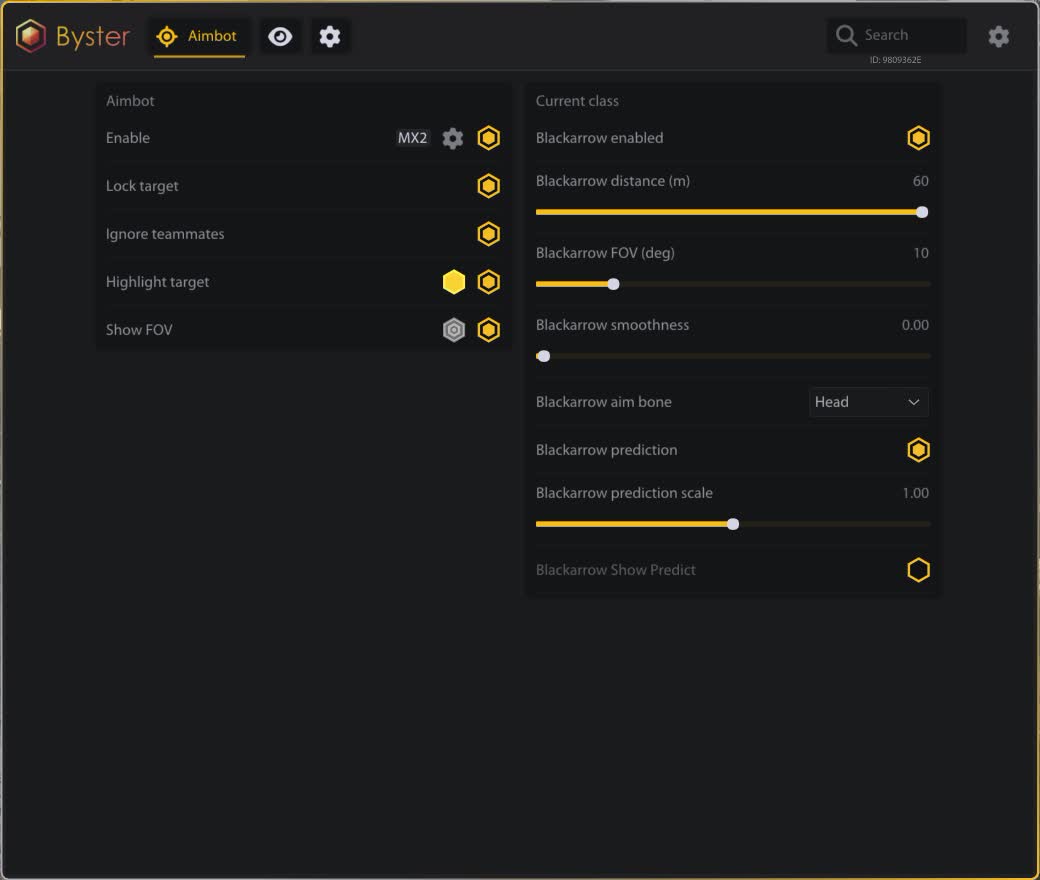
Runs on a bind of your choice and works through target lock. Ignoring teammates and highlighting the current target are separate toggles, so a trio does not shoot its own.

Aim point

Head, body or nearest bone. Smoothing, distance and FOV sit on sliders, and the FOV circle can be drawn on screen in your own colour.

Class profiles

Six separate sets: Mercenary, Sorcerer, Blackarrow, Shadowstrix, Seer, Withered Knight. The settings are not shared — the archer keeps its own distance and lead, the knight another.

Weapon prediction

The lead multiplier is derived from the weapon type, because arrows and spells take time to travel. Separate filters drop the prediction while the target strafes or jumps.

Own character

Local hero detection and an indicator, so the aim does not latch onto your own model in a scrap.

ESP — players

Frame and box

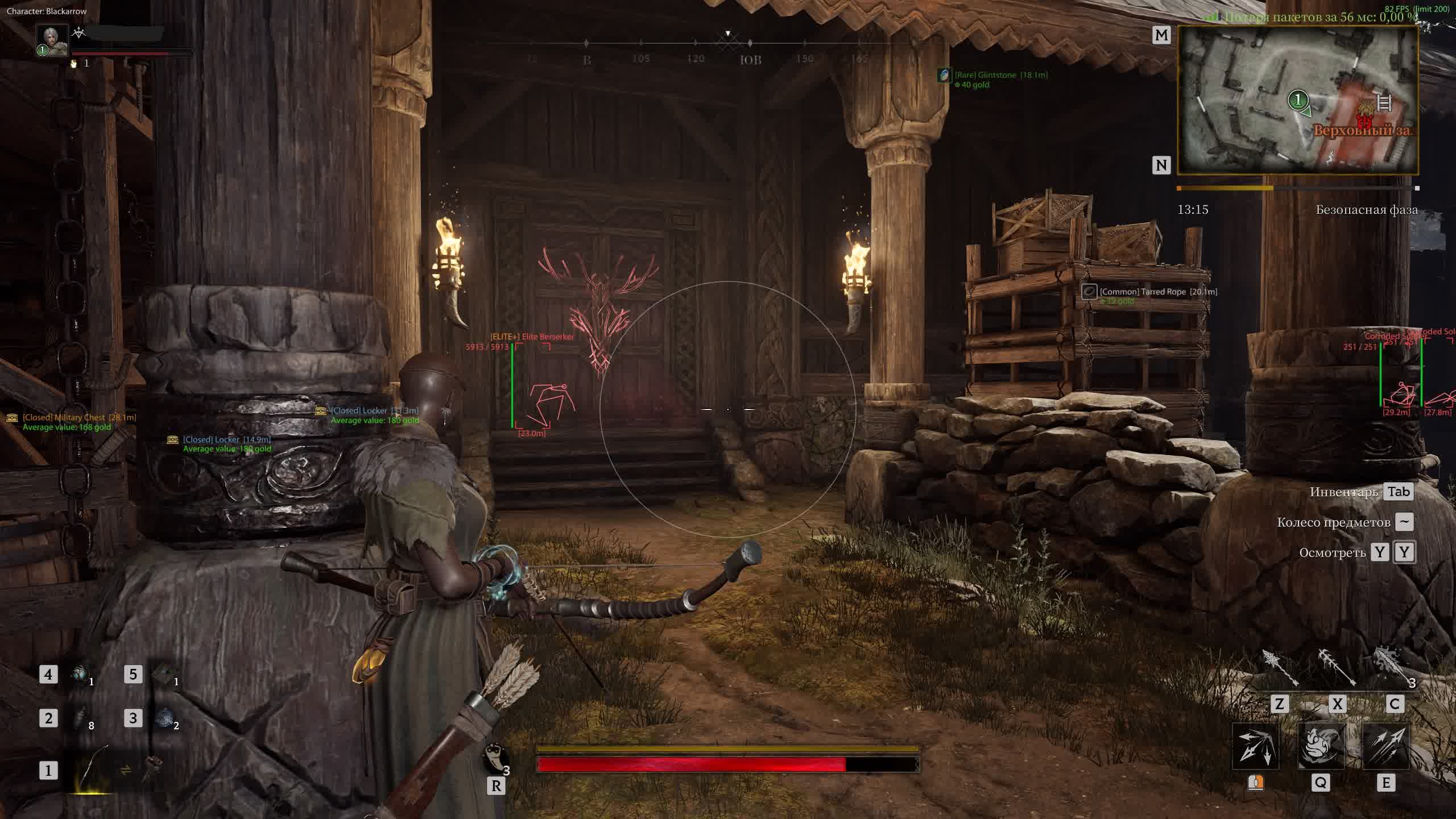
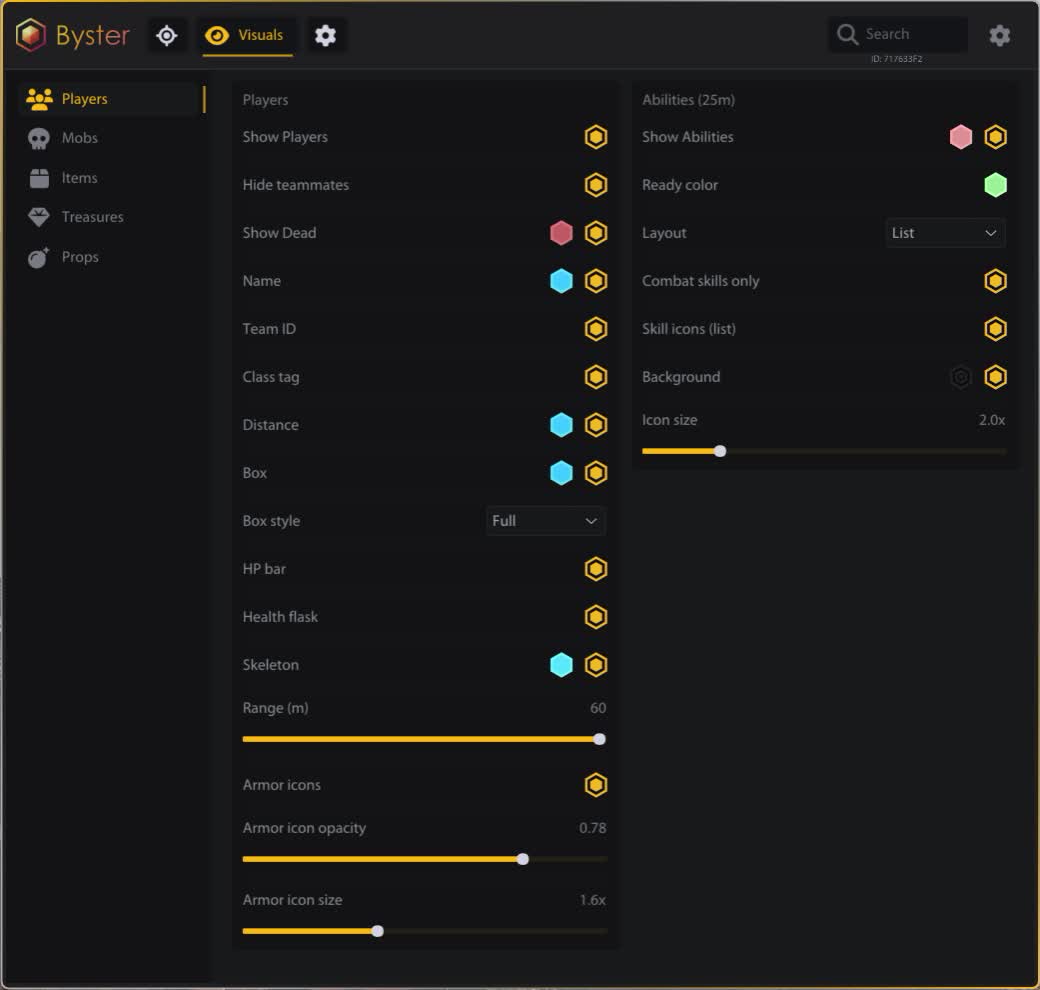
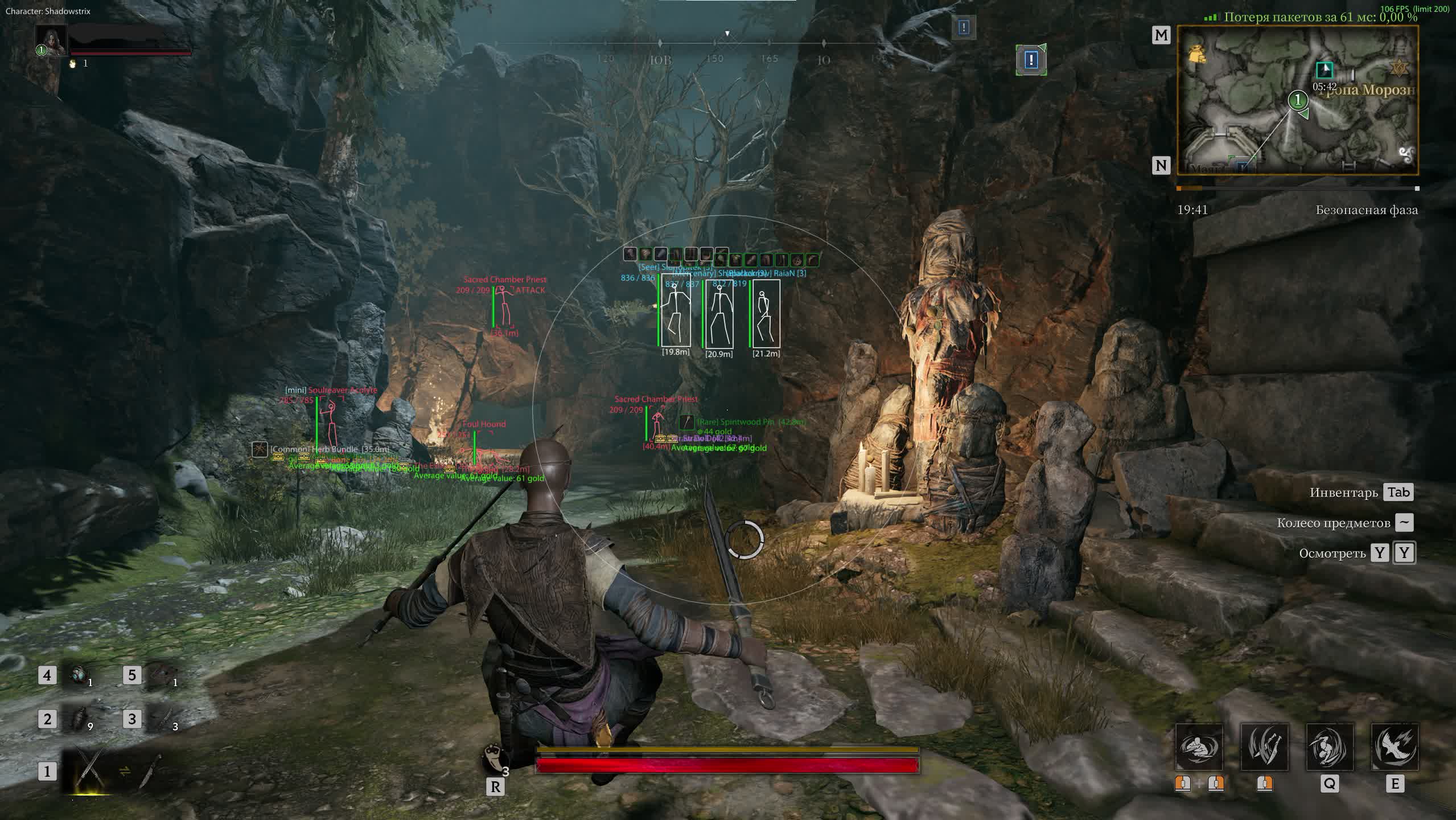
Full or corner box, skeleton, HP bar. Colours are configurable, and the current aim target gets its box and skeleton highlighted separately.

Labels

Name, class, team ID, distance. The class tag immediately tells you who can be pushed and who will eat your combo and answer.

Armour icons

Shows worn gear with rarity frames, and icon size and opacity can be dialled in. Handy when deciding whether the haul is worth the trade.

Dead and friendly

Player corpses are drawn separately and teammates can be hidden, which keeps the screen readable in a trio. Bot ESP is included.

ESP — mobs

Mob markup

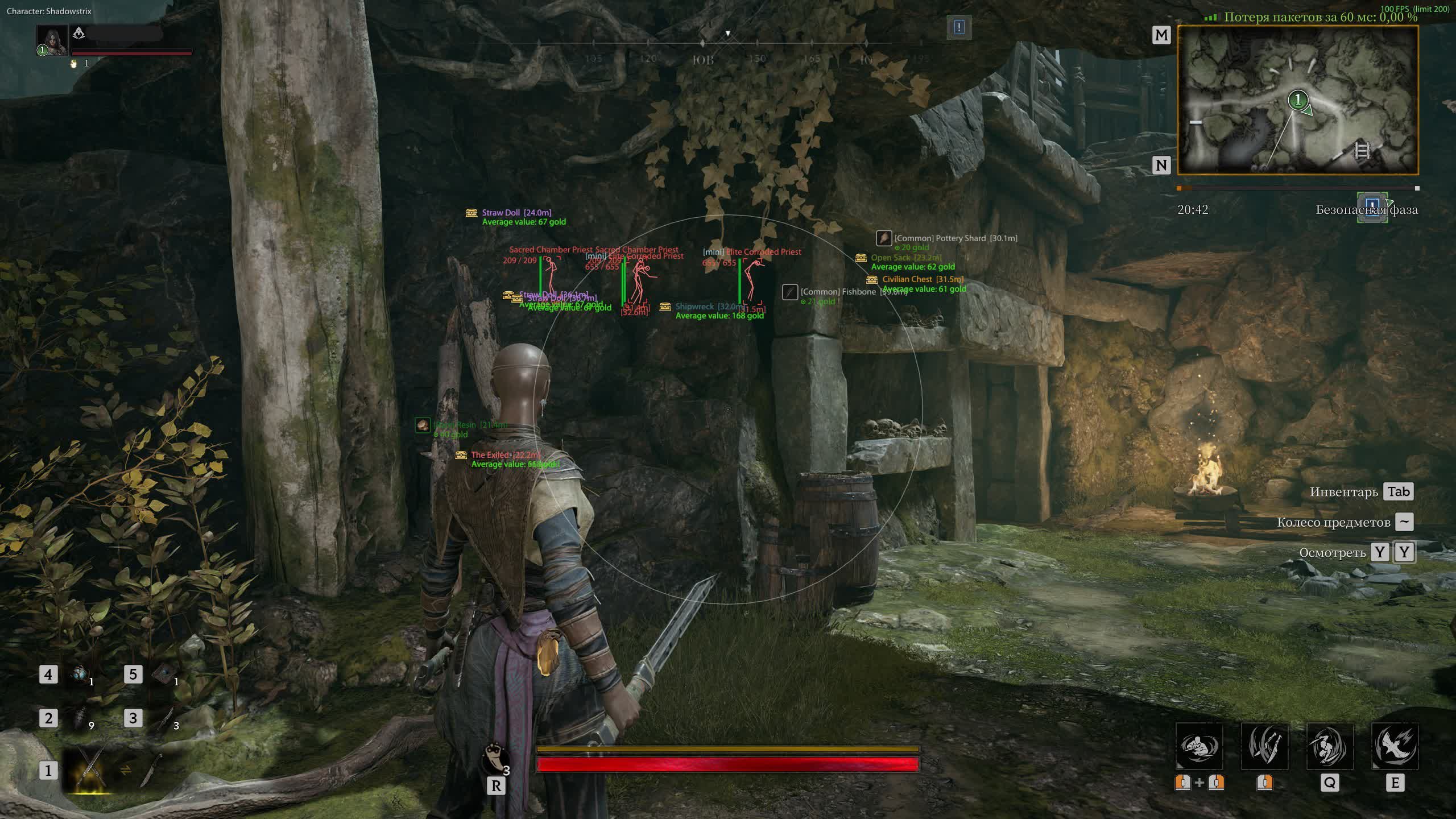
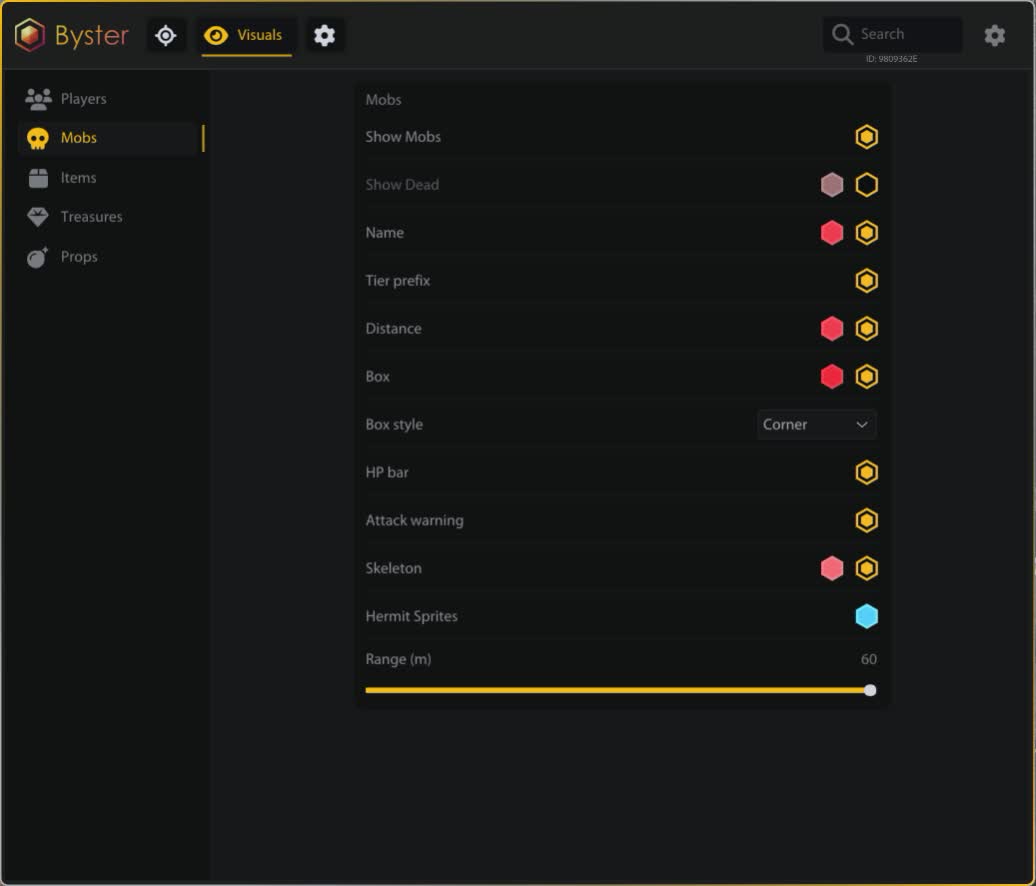
Box, skeleton, HP bar, distance, localised names. The range is set apart from the player ESP range.

Tier and role

Bosses, elites and mini-bosses filter independently. You know where an elite stands and where a regular pack sits before turning the corner.

Attack warning

The marker fires before the wind-up animation. On a class without armour that is the difference between backing off and dying.

Hermit Sprites

Detection with its own colour. Small entities you almost never spot in the mist.

ESP — loot

Rarity filters

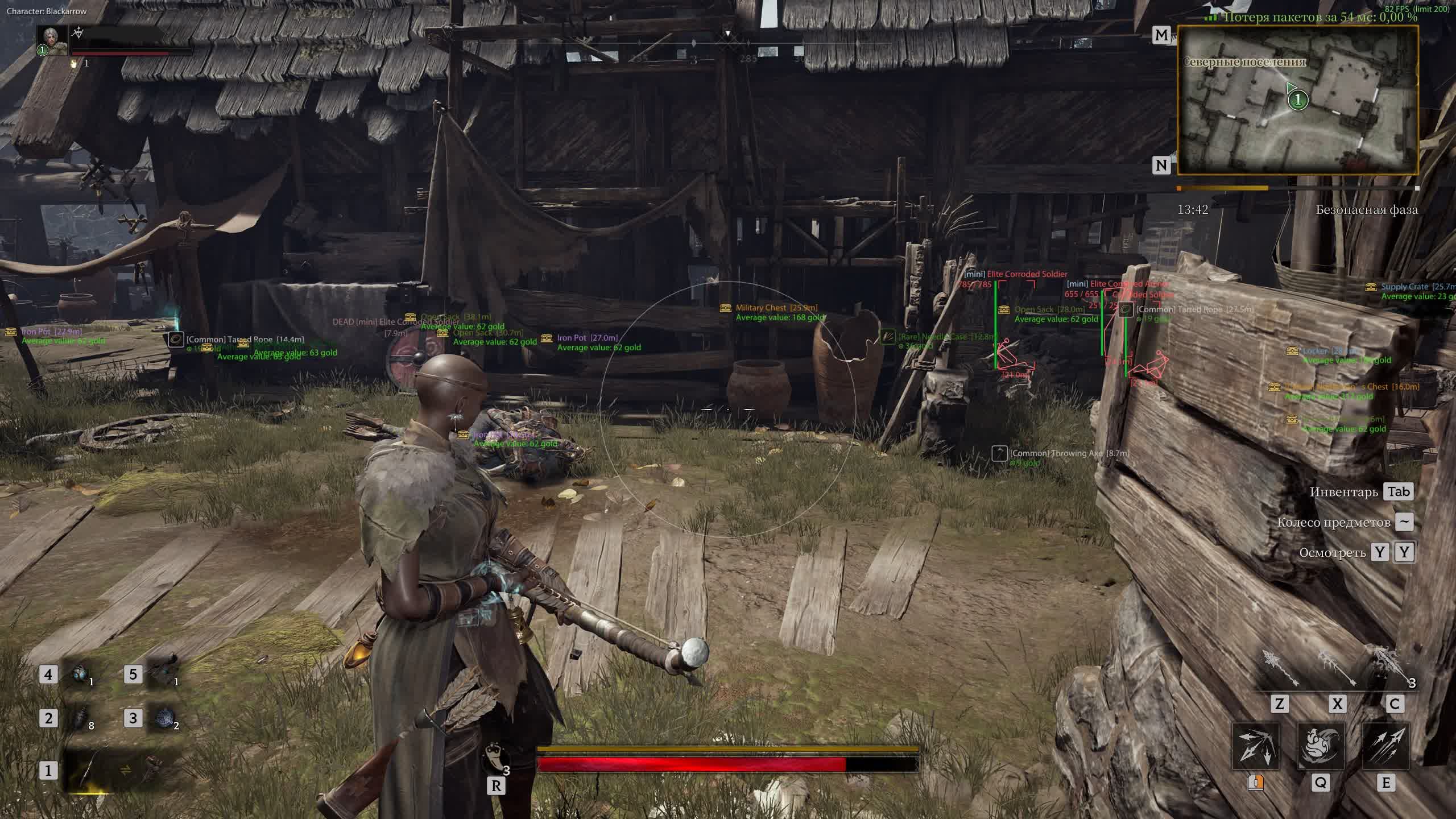
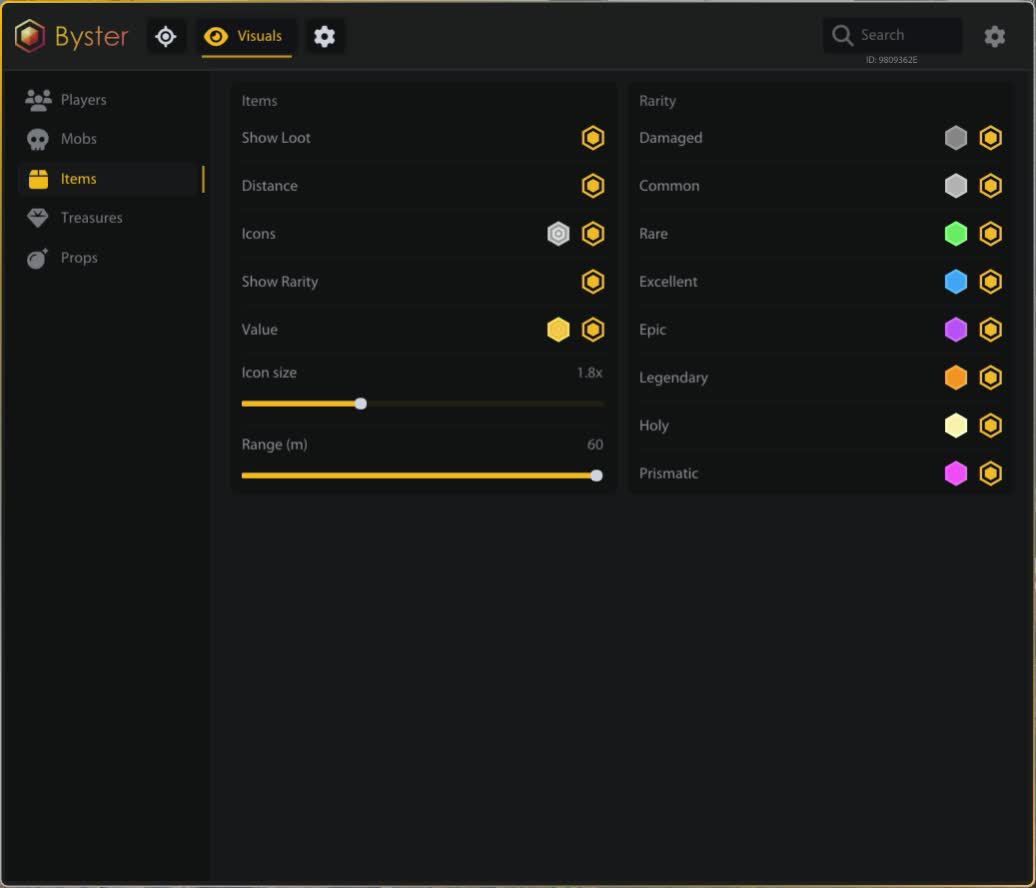
Eight grades handled separately: Damaged, Common, Rare, Excellent, Epic, Legendary, Holy, Prismatic. Junk goes off with one toggle so the screen stops flickering.

Value

Item price and stack price in their own colour, with the quantity beside them. The take-it-or-run call gets made on the move.

Item icons

Localised names, icons with size and opacity settings, distance to the item. Lootable containers are picked up separately.

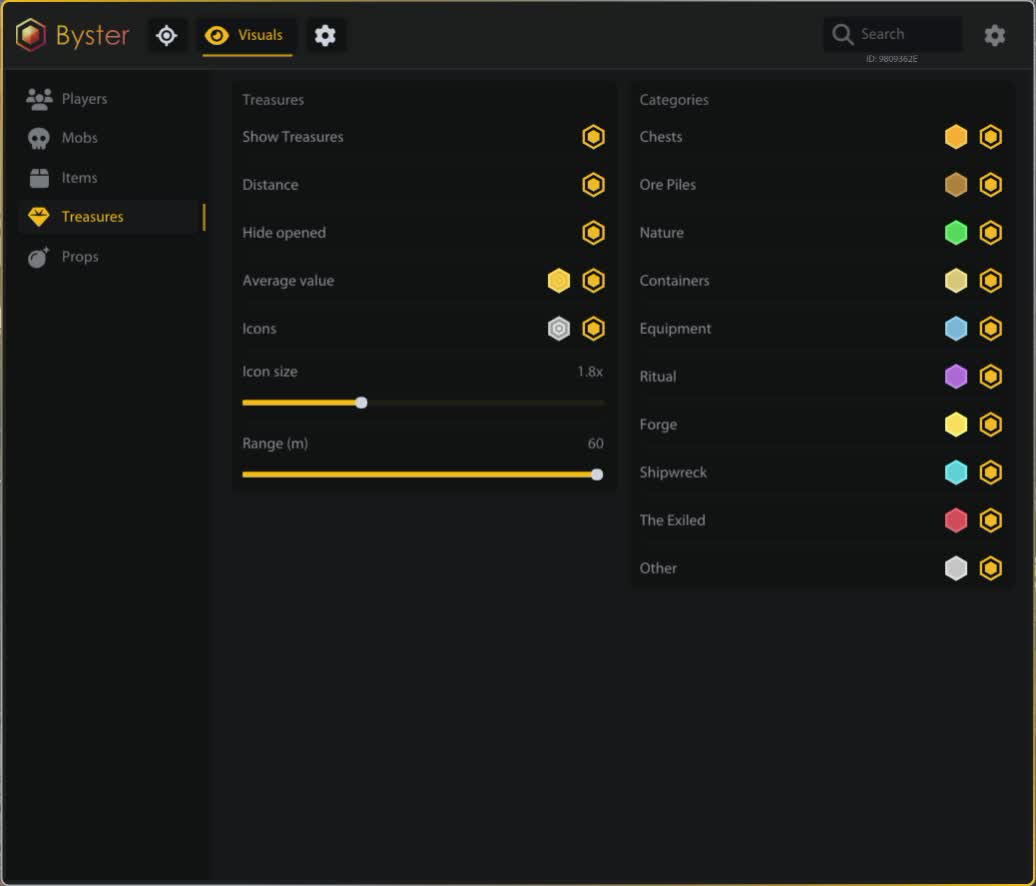
ESP — treasures

Ten categories

Chests, ore deposits, natural objects, containers, equipment, rituals, forges, shipwrecks, The Exiled and the rest. Each with its own colour and its own toggle.

Keyed chests

Separate detection and a prefix on locked ones. No more running across half the map to a chest you cannot open anyway.

Average value

Shows the expected worth of a point in its own colour, and opened treasures get hidden. The farming route can be planned before the drop.

ESP — abilities and objects

Ability panel

Enemy skill names, icons and cooldowns within 25 metres. Ready and recharging are painted in different colours, and the view switches between a list and a panel.

Skill filters

You can keep combat skills only and separately switch on teammate abilities. Icon size and background are adjustable.

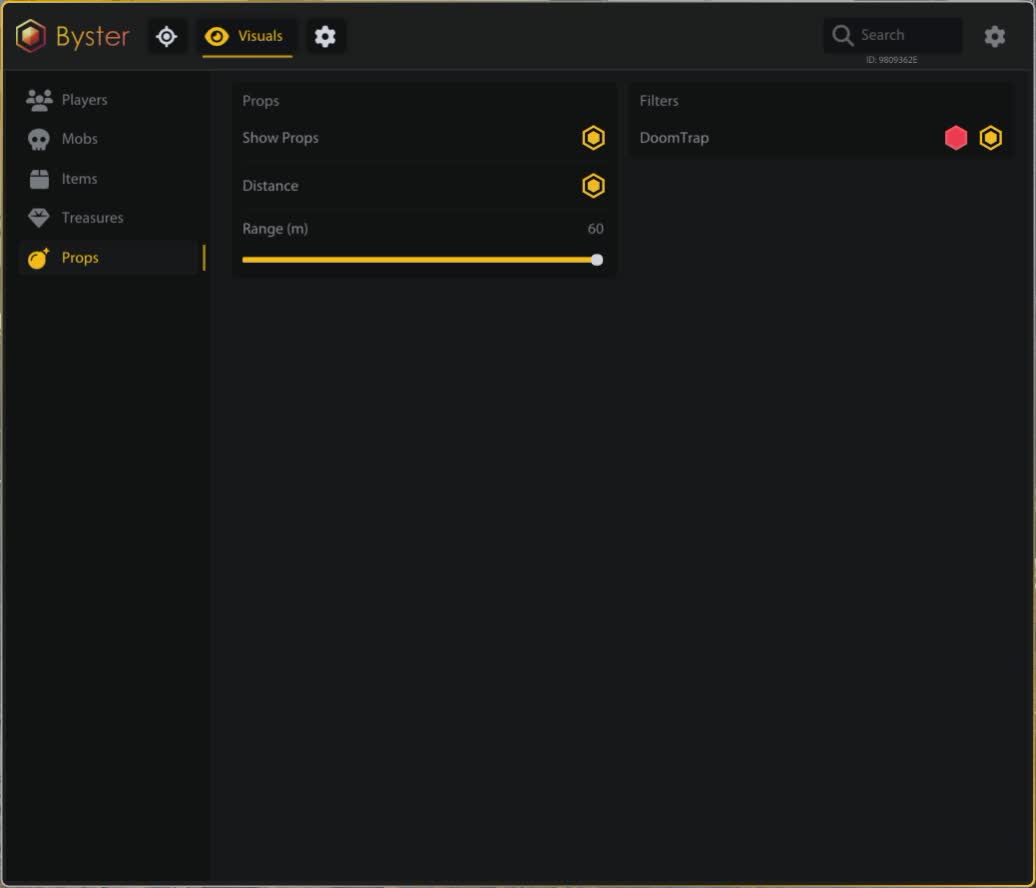
DoomTrap

Trap detection with a marker, colour and distance. It costs a lot and does not read in the mist.

Misc

Battle mode

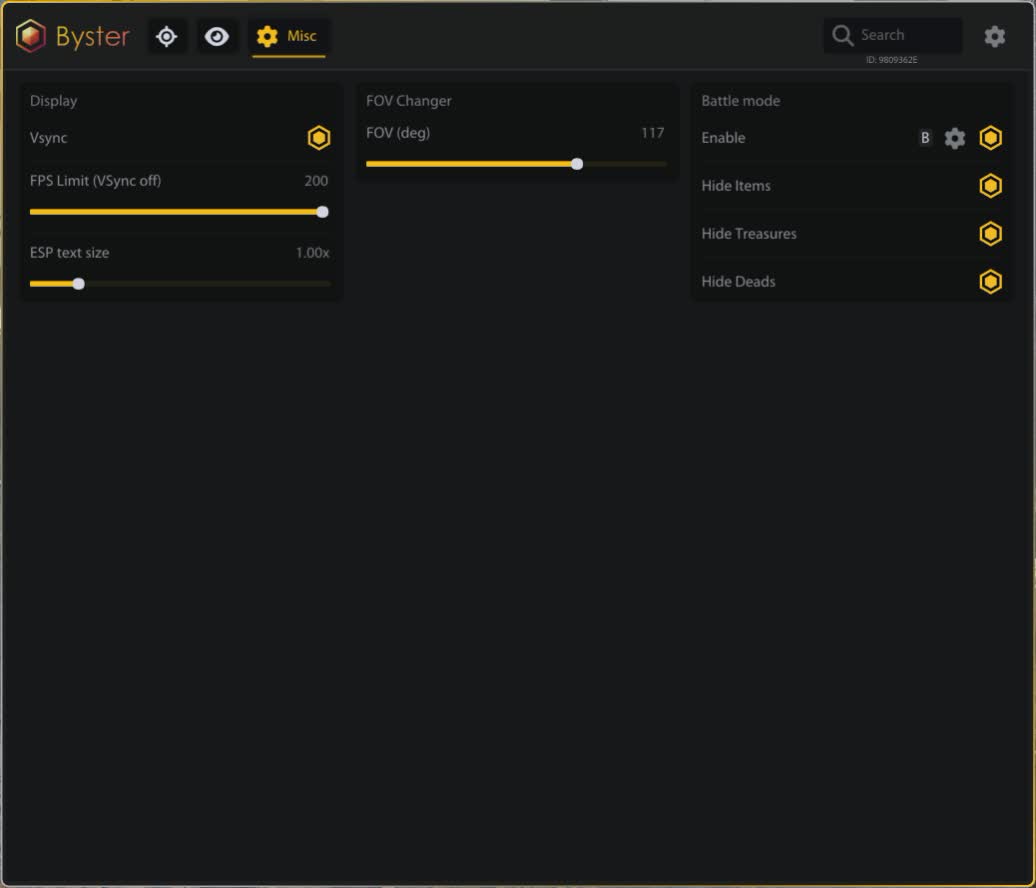
On a bind it strips items, treasures and corpses off the screen. Only players stay during a fight, and this is the most switched-on feature in the build.

Image

FOV change, VSync, frame limit and counter, refresh rate indicator, ESP text size.

Overlay

Game and window auto-detection, tracking when you switch away, click-through. Built-in icons and localisation data, with automatic switching to Russian, English or Chinese.
TARIFFS
299

Subscribe to learn when this product is updated.

Got a question? Ask before you pay

We'll help you choose and sort out any launch issue. Ask us anything before buying, we're always on your side.

Support 10:00–22:00, sometimes we reply at night too
Ask a question

Available tariffs

1 day
299
SUBSCRIBE
7 days
1199
SUBSCRIBE
30 days
2599
SUBSCRIBE
Reviews about Mistfall Hunter Byster

No reviews yet. Be the first to leave one.

Your review

Reviews are published after moderation.

Join our gaming community chat

Discuss current cheats from developers and how to use them effectively in popular online games. Share tactics, exchange useful info and find like-minded players in our community.

1 900+Members
24/7Online
Join our gaming community chat

Technical support

Run into a technical issue? Our team of experts will help. We handle all requests in a live queue, so please be understanding if it sometimes takes a little wait. We guarantee that no request goes unanswered.

Availabilityfrom 10:00 to 23:00
Fast responseIn queue order
Get help
Technical support
PROCHEAT

PROCHEAT news channel

Follow product status changes, update history and important announcements.

Subscribe

What the build shows and at what distance

Every layer has its own range and its own slider. That is not a detail: crank everything to the maximum and the screen fills with icons until it helps less than a clean picture would. Here is where to look.

ESP layers and their settings
Layer Range What it gives
Players own, up to 60 m Name, class, team ID, HP, skeleton, armour icons with rarity frames
Abilities 25 m Skill icons with cooldowns, a separate colour for ready ones, combat-only filter
Mobs own, up to 60 m Tier, bosses, elites and mini-bosses separately, attack warning, Hermit Sprites
Loot own, up to 60 m Eight rarity filters, item and stack value, quantity, containers
Treasures own, up to 60 m Ten categories, keyed chests, average value of a point, hiding opened ones
Objects own, up to 60 m DoomTrap with a marker and distance
Aim set inside the class profile Six profiles, weapon prediction, strafe and jump filters

Most people end up with the same setup: players and abilities at maximum, loot and treasures cut back to about thirty metres, junk grades switched off entirely. The rest is taste — some want ore, some only keyed chests.

Aim: six profiles instead of one slider

Classes in Mistfall Hunter fight differently, and one shared aim setting does not cover them. Blackarrow shoots arrows, Sorcerer throws spells, Withered Knight fights up close. So the build carries six separate profiles, each tuned on its own: its own distance, its own angle, its own smoothing.

The point is that you do not switch settings by hand when you change character. Build the archer profile once and it gets picked up when you go in as the archer.

Weapon prediction and movement filters

Aiming here is free-form and projectiles travel at their own speed. The aim derives the lead point from the weapon type, and the strength of that lead sits on a multiplier. The arrow goes where the target will be, not where it stands.

Two filters drop the prediction while the target strafes or jumps. The logic is simple: in those states the path is unpredictable, and the lead misses more often than it helps. Of all the settings, this is the most useful and the most overlooked.

Keep smoothing and the angle low. The game is young, the community pays attention, and a sharp snap across half the screen in a game with manual aiming reads instantly.

ESP: why the filters matter more than the overlay

Everyone can draw an overlay these days. The difference between builds sits in whether you can switch the extra off. Here you can, and in some detail: eight loot grades separately, ten treasure categories, bosses apart from elites, teammates and corpses on their own toggles.

Without that, five minutes into a zone the screen turns to soup and you stop noticing the one marker that mattered — an enemy player thirty metres out.

Players: class, armour and what they have ready

The silhouette carries a name, class, team ID, HP bar and distance. Class weighs more here than in shooters: a lone Seer and a Withered Knight at the same range call for different decisions.

Armour icons with rarity frames answer a different question: whether the trade is worth taking at all. A player in legendary gear is carrying loot worth fighting over; a player in junk will only cost you flasks and time.

The ability panel within 25 metres covers the third question. Going in on a sorcerer who just spent their control and on one with a full kit are two different fights, and the cooldown colours show the difference before it starts.

Loot, treasures and the value of a point

Loot is coloured by grade, with the item and stack value beside it. Junk grades get switched off, leaving on screen only what is actually worth stopping for.

Treasures work a layer up: chests, ore, rituals, forges, shipwrecks and the rest filter by category, a point shows its average value, and opened ones hide themselves. Keyed chests are picked up separately, and the prefix tells you straight away that walking there without a key is pointless.

All of it serves one purpose: less time inside the zone. Every extra minute over a container is a minute in which somebody heard your fight and started walking.

Battle mode, the thing people switch on most

A separate key that strips items, treasures and corpses off the screen for the duration of a fight. Players stay. It sounds dull, and in practice it is the most useful feature in the build: loot icons get in the way most during a scrap, and a scrap is exactly where it gets decided whether the bag leaves with you.

The bind is configurable, so the mode sits comfortably next to the aim key and can be held for the whole fight. FOV change, frame limit and ESP text size belong here too, small things everyone dials in for their own monitor.

Overlay, localisation and screen recording

The build draws an overlay on top of the game, finds the process and window by itself, and follows the window when you switch away. Clicks pass through, so the mouse behaves normally and nothing gets swallowed.

An overlay on top of the window ends up in the capture. If you stream or record gameplay, keep that in mind: the ESP will be in the recording, not only on your monitor. For streaming this approach does not work.

The menu is translated into Russian, English and Chinese, and the language is picked up automatically. Icons and localisation data are built in, with nothing to install separately.

Questions about this build

Is fullscreen really required?

Yes, the build is stated for fullscreen. In windowed mode the overlay lands in the wrong place. This is an unusual requirement: most cheats want the opposite. Check the game settings separately.

Do I have to set up all six aim profiles?

No, only the classes you play. The profiles are independent: build one for Blackarrow and it gets picked up when you go in as the archer.

Is the menu available in my language?

It switches automatically between Russian, English and Chinese. The translation data sits inside the build.

Do I need a spoofer?

There is none built in and none included. A flash drive and BIOS edits are not needed to launch either.

Why does it say the build is being updated?

After a game patch the developer pauses the build and rebuilds it for the new version. The status on this page changes when access opens again, and downtime is added to your period.

How far does it see?

Each layer has its own range and the slider reaches sixty metres. Abilities are read within 25 metres, which is a limit of the feature rather than a setting.

Ask a question


