Ghost CS 2 Cheat with Humanized Aim

Working
Ghost Ghost
Last update 11.08.2026 This date shows when the software was last updated. An old date doesn't mean the software stopped working! Most likely the developer just had nothing new to add. If you have any doubts, you can always check the current status with our support team.
Add another cheat from this game too — to compare them.
Ghost CS 2
Steam
Don't risk your main — grab a spare account
Windows support: 10: all builds; 11: all builds
Menu language: English
Spoofer:No
USB drive:No
BIOS:No

User information

Ghost uses the same launch routine for every build:

  1. Download the loader from the link that arrives with your key.
  2. Turn off your antivirus and Windows Defender, which flag the loader as an unknown file.
  3. Run the loader as administrator.
  4. Enter the key. On first launch it binds to your hardware.

Keep that binding in mind up front. The key lives on a specific HWID, so swapping components or reinstalling Windows means asking support to reset it. This build has no bundled spoofer: if a hardware ban has already landed on you, handle that with separate software before buying.

You need a current Windows 10 or 11 and a licensed CS 2 copy on Steam. No flash drive and no BIOS edits. The key and the instructions arrive by email at the address you enter during checkout; our site has no account area. When a build goes down for an update after a game patch, the subscription freezes and your days are not spent until it is fixed.

VIDEO
SCREENSHOTS
Description

Ghost CS 2 is a private Counter-Strike 2 build where the real work is done by how the aim hides, not by how strong it is. A humanizer with jitter, a dead zone and reaction delay moves the crosshair so that in a demo review it reads as a live player's hand. On top of that sit visibility and smoke checks, RCS, and an automatic switch to the torso once your health runs low.

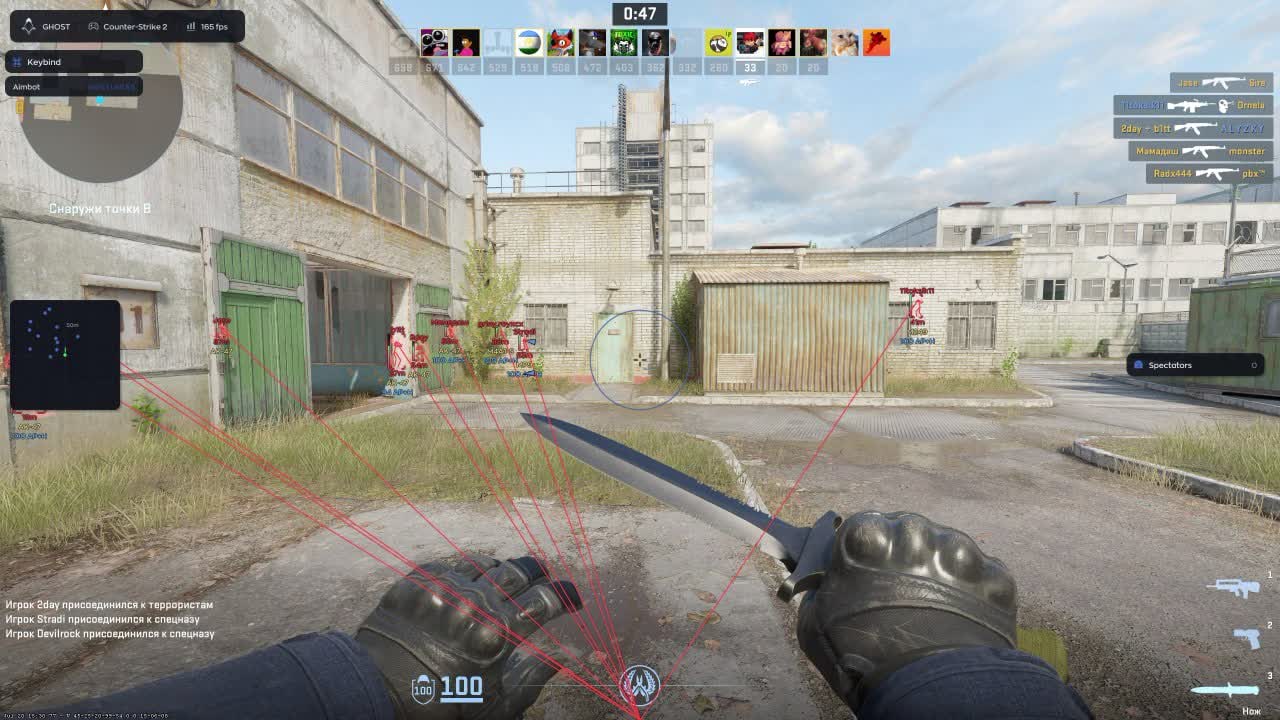
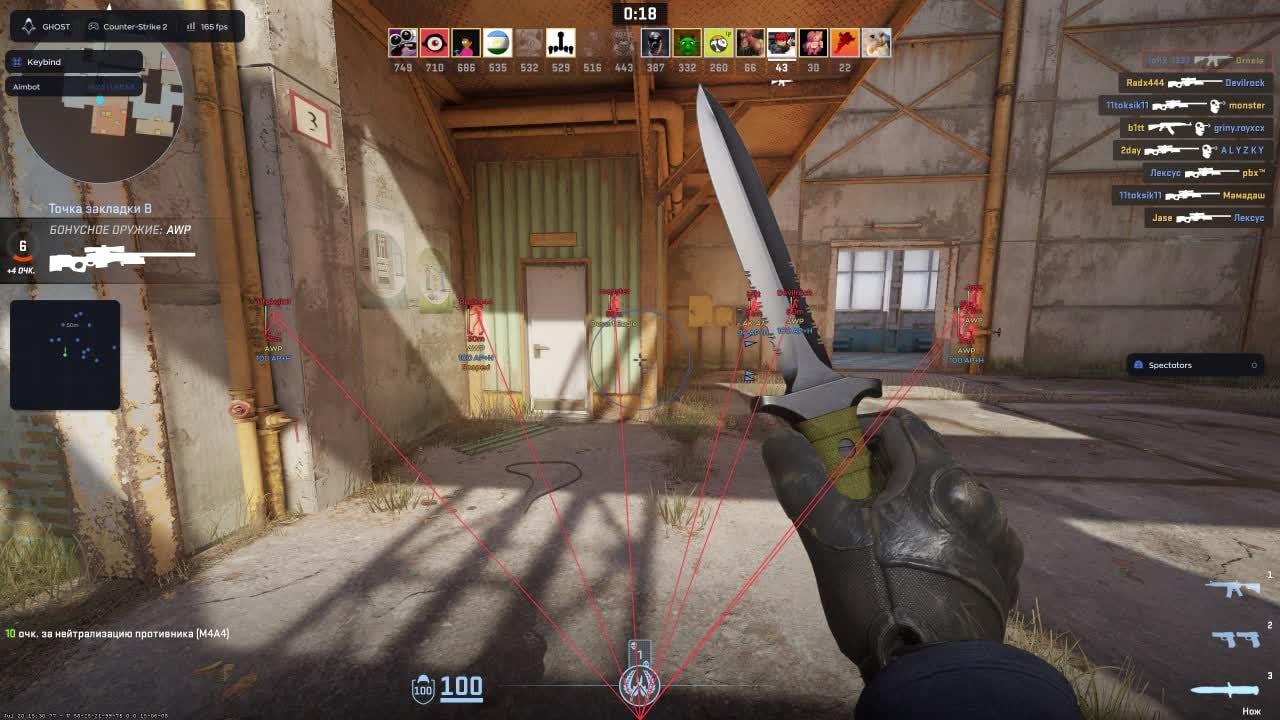
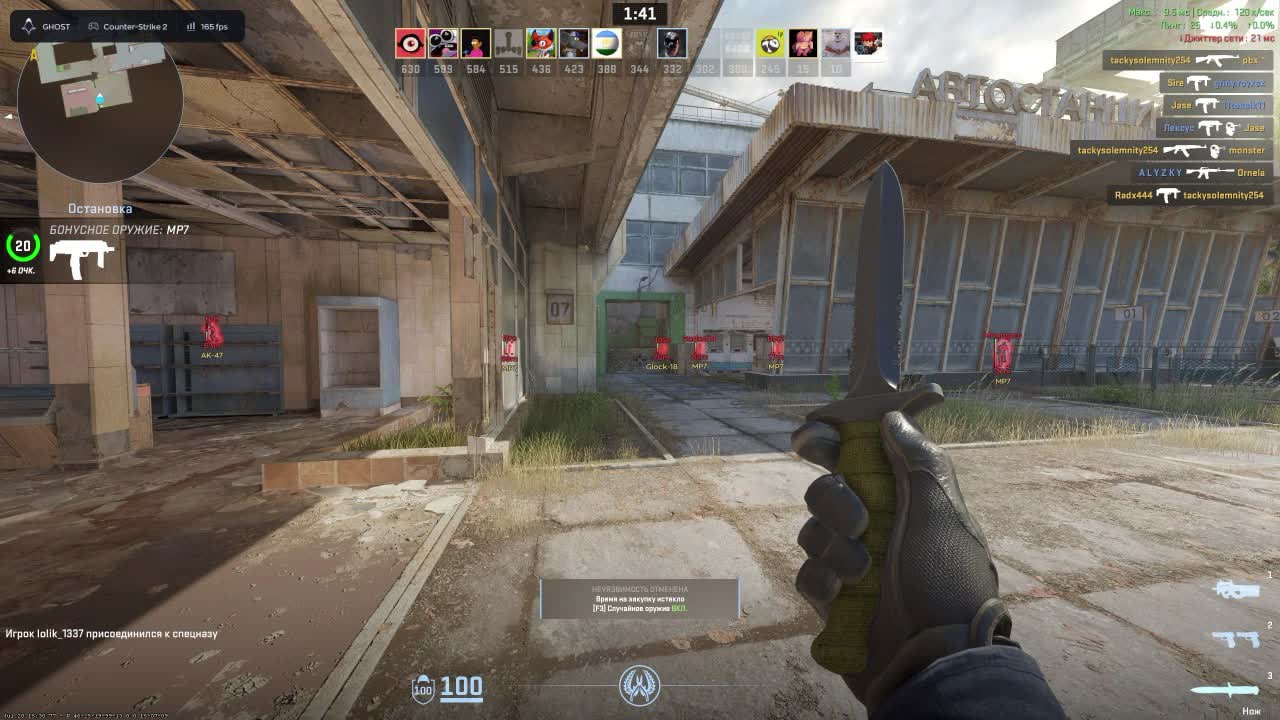
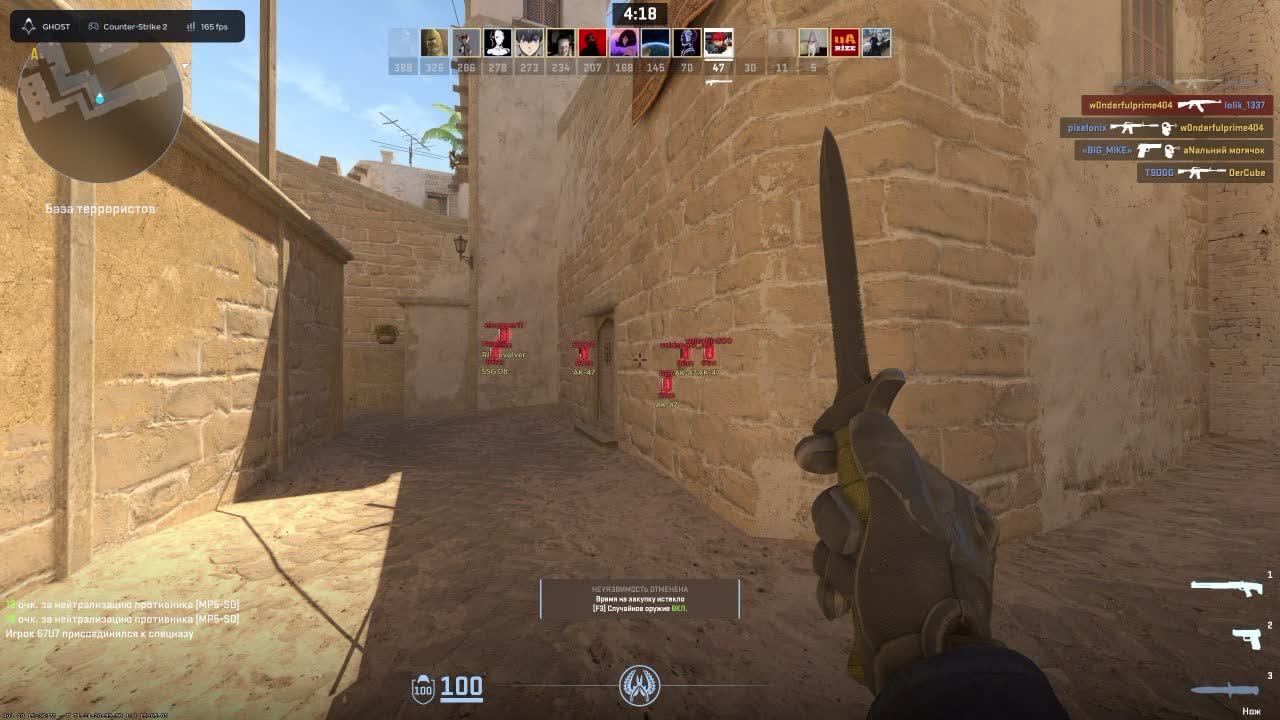
The other half of the build is information. Beyond the usual box and skeleton, the visuals show armor, money, rank, flashed and reloading flags, plus who carries the bomb and who is defusing it right now. Alongside them are a custom radar, a bomb timer, grenade prediction and a spectator list. The overlay can hide from OBS, so your clips come out with no menu in frame.

Product features

Aimbot

Aim key and binds

The aim runs on its own key and can cover the whole arsenal or only the guns you pick. AWP and AK usually get different settings.

Field of view

The capture radius sits on a slider and the circle is drawn on screen in your color. You see the working zone instead of guessing why a target was skipped.

Smoothing

Drag intensity is adjustable. A soft value moves the crosshair like a human hand; a hard one settles close-range duels.

Prediction

Compensation for bullet travel time. At long range against a moving target the aim leads the shot instead of trailing behind.

Hitbox and bones

Head, chest, stomach or nearest point. Bone mode is either fixed or random, so hits do not land on the exact same pixel every time.

Target priority

Capture goes by proximity to the crosshair or by distance. In a scramble off spawn those are two different tactics.

Visibility and smoke checks

The aim only takes targets you can actually see and ignores anyone behind smoke. No shooting through a smoke in front of the whole server.

Recoil control

RCS with adjustable strength kills the climb. A long AK spray groups tightly without manual compensation.

Auto body on low HP

When your health drops, the aim switches from head to torso. The trade goes your way instead of into a missed neck shot.

Humanizer

Micro-movements, jitter, a dead zone, reaction delay and a speed ceiling. This block is what separates a legit setup from rage in a demo review.

3D preview

A player model right in the menu: rotate it, click a bone, see the aim point immediately. A minute of setup with no live testing needed.

Player ESP

Box and skeleton

A box around the player with separate colors for visible and wall-blocked targets, plus bones. The pose tells you whether they hold an angle or run.

Name and health

Nickname and an HP bar above the model. You push a wounded opponent after a trade with confidence rather than a guess.

Weapon and distance

The gun in their hands is shown as a name or an icon, with range beside it. Whether to cross open mid against an AWP is decided before you peek.

Glow and target line

An outline on the model and a line leading to the enemy. Useful in the dark corners of Inferno and inside smoke.

Off-screen arrows

Pointers to anyone outside your view. A flank shows up before the player reaches the edge of your monitor.

Teammates and visibility filter

Teammates can be drawn or dropped, and a visible-only mode leaves nothing on screen except targets in direct line of sight.

Extra ESP

Armor and helmet

You see whether a target has kevlar and a helmet. Head or body is decided before the first shot.

Money and rank

The opponent's balance and rank above the model. Their economy tells you whether the next round is an eco or a full buy.

Bomb and defuse

Tags for carrying the bomb, defusing and holding a kit. Who plants and who is defusing right now is visible without a callout.

Target state

Separate labels for in-crosshair, flashed and reloading. You pick the moment to peek on facts instead of instinct.

Visual 3D preview

The menu model shows how labels, distance and weapon data will sit. Colors are tuned without leaving for a match.

World

Radar

A custom radar with outline, background and scale. Dot style is circle, square or cross, with size and maximum distance on sliders.

Bomb timer

A countdown to detonation on screen. Whether you make the defuse with or without a kit is calculated for you.

Grenade prediction

Throw trajectory with the landing point. Smokes and molotovs land where you want without memorized lineups.

Spectator list

Shows who is currently watching you. The moment an extra name appears in spectators, drop the heavy settings.

Misc

Anti-flash

Removes the blinding effect of a flashbang. Pushing through a flash stops being a lost fight by default.

Remove scope

Clears the sniper scope overlay. Your view while zoomed is wider than a normal AWPer's.

Radar hack

Every enemy is drawn on the in-game radar. The information reads with the same glance you already use.

FOV changer

Camera field of view on a slider. Wider peripheral vision means flanks register earlier.

Items

Dropped weapon ESP

Guns on the ground are highlighted by name or icon, with a background and adjustable font size. On an eco you know where a teammate's drop landed.

Ammo and distance

Shows remaining ammunition in a weapon and cuts markers past a maximum range. No sprinting across the map for an empty gun.

Weapon filter

Search by name and pick specific models: AK-47, AWP, M4A4, M4A1-S, AUG, FAMAS, Galil, G3SG1, M249 and the rest. Keep only what you would actually pick up.

Settings

Hide from capture

The overlay stays out of OBS and screen recordings. Streams and clips come out clean, with no menu in frame.

Configs

Create, save, load and delete presets, with search by name. One config for legit play, another for practice.

Menu and interface

Opens on Home by default and the bind is editable. DPI scale, text shadow, an active-bind indicator and a watermark are all optional.

Crosshair and language

A custom crosshair with color selection plus an interface language switcher. English is the default.
TARIFFS
100
BUY What happens after payment?
Got a question? Ask before you pay

We'll help you choose and sort out any launch issue. Ask us anything before buying, we're always on your side.

Support 10:00–22:00, sometimes we reply at night too
Ask a question

Available tariffs

1 day
100
START PURCHASE
7 days
200
START PURCHASE
30 days
600
START PURCHASE
Reviews about Ghost CS 2

No reviews yet. Be the first to leave one.

Your review

Reviews are published after moderation.

Join our gaming community chat

Discuss current cheats from developers and how to use them effectively in popular online games. Share tactics, exchange useful info and find like-minded players in our community.

1 900+Members
24/7Online
Join our gaming community chat

Technical support

Run into a technical issue? Our team of experts will help. We handle all requests in a live queue, so please be understanding if it sometimes takes a little wait. We guarantee that no request goes unanswered.

Availabilityfrom 10:00 to 23:00
Fast responseIn queue order
Get help
Technical support
PROCHEAT

PROCHEAT news channel

Follow product status changes, update history and important announcements.

Subscribe

Ghost CS 2: the menu tab by tab

The menu is laid out across six tabs, and nearly every option is adjustable on its own, down to the color of an individual label. Here is the overall map of what sits where.

Tab What is inside Why it matters in a match
Aimbot bind, FOV, smoothing, prediction, hitbox, bones, RCS, humanizer, 3D preview an aim that does not look robotic in a demo
Visuals box, skeleton, glow, name, health, weapon, distance, arrows, target line enemy positions and state through walls
Extra ESP armor, helmet, money, rank, bomb, defuse, flashed, reloading enemy economy and the right moment to peek
World configurable radar, bomb timer, grenade prediction, spectator list the whole map plus a watch on spectators
Misc anti-flash, remove scope, radar hack, FOV changer lifting the game's built-in vision limits
Items dropped weapon ESP, ammo display, model filter picking up drops on an eco without wasted runs
Settings configs, hide from OBS, watermark, DPI, crosshair, language presets for legit play and clean recordings

The humanizer: why this aim does not look robotic

The real danger for an aim in CS 2 is not the anti-cheat but other people's eyes. Opponents review demos, and a snap to the head across the map reads in a single viewing. The Ghost humanizer is built against exactly that: it adds micro-movements, jitter, a dead zone around the target, reaction delay and a ceiling on drag speed. Together the cursor reaches a head the way a hand does, not as a straight line in one frame.

Next to it sit the settings that remove the most obvious mistakes. The visibility check stops you shooting at people you physically cannot see, and the smoke check drops targets behind a smoke, two classic tells that get a cheater spotted without any software at all. Auto body on low HP shifts priority from head to torso when there is nothing left to risk. Random bone mode scatters the hits so a burst does not land on the same pixel.

Aimbot: FOV, prediction and per-weapon setup

The aim sits on a key and fires when you press it rather than running in the background. Its settings split into two groups: how it picks a target and how gently it carries one. Field of view sets the capture radius and is drawn as a circle on screen, so you can dial the value in over a single match. Target priority switches between nearest to the crosshair and nearest by distance: the first suits holding an angle, the second suits pushing into a scramble.

Per-weapon setup is not a formality here. AWP usually gets a narrow FOV and hard drag; AK gets a wide one, softer drag and RCS on, because the spray decides more than the first bullet. Prediction compensates for bullet travel time: without it, long-range shots at a moving player consistently trail behind. The 3D preview in the menu shows the selected bone on a model, so configuring it takes no test matches.

Player ESP: box, skeleton and off-screen arrows

The base visual set draws a box with separate colors for visible and hidden targets, a skeleton, a nickname, a health bar and range. The weapon shows as a name or an icon, and that decides things before you peek: cross open mid against an AWP, or wait for the smoke. The target line and the outline glow help in dark spots like banana and apartments, where a silhouette disappears into the textures.

Off-screen arrows solve a separate problem. A flank is usually noticed late, once the enemy is already in frame, while a pointer at the edge of the screen warns you earlier. Teammates can be dropped from the draw so they stop cluttering it, and a visible-only mode leaves nothing on screen but targets in direct line of sight, which is a useful setting when you want the picture closer to honest.

Extra ESP: economy, bomb and enemy state

This block gives more in CS 2 than a plain wallhack does. Enemy money and rank sit above the model, which means you work out the next round in advance: eco, full buy or force. Armor and helmet tell you where the first bullet should go, since a deagle into a helmet and an AK into a bare chest are very different trades.

The bomb tags cover team routine. The carrier tag shows who has it as they leave spawn, while defusing and defuse kit show what is happening on the site right now. Labels for in-crosshair, flashed and reloading open a window to peek: stepping out on someone mid-reload beats guessing from sound.

Radar, bomb timer and grenade lineups

The custom radar is configurable in detail: outline, background, scale, dot size and dot style, whether circle, square or cross. A maximum distance trims far targets so the map reads at a glance. Anyone attached to the stock interface will prefer radar hack from the Misc tab instead: it draws every enemy on the normal in-game radar, with no extra overlay needed.

The bomb timer counts down to detonation on screen, so the choice between running for the defuse and backing off is made on numbers. Grenade prediction draws the throw arc with the landing point, which effectively replaces memorized lineups: a smoke onto CT or a molotov into cover lands where you want it without a hundred hours on practice maps. The spectator list sits alongside for a reason: the moment an extra viewer shows up, wind the heavy settings down.

Loot ESP and the weapon filter

Dropped guns are highlighted on the ground by name or icon, with a background and adjustable font size. Remaining ammunition is shown separately, so you never sprint across the map for an empty AK. A maximum draw distance clears markers from the far side of the level.

The weapon filter is what makes the feature practical rather than decorative. Search by name and pick specific models, AK-47, AWP, M4A4, M4A1-S, AUG, FAMAS, Galil AR, G3SG1, M249 and the rest, so only what is genuinely worth picking up stays on screen. On an eco round that saves exactly the seconds you never have.

Menu, configs and clean recordings

The menu opens on Home and the bind is editable. DPI scale fits the interface to your resolution, text shadow keeps labels readable against bright textures, and a bind indicator shows what is active right now. A watermark and a custom crosshair with color selection are optional, and the interface language switches, with English as the default.

Hide from capture deserves its own mention: the overlay stays out of OBS and screen recordings. For anyone clipping matches or sitting in a Discord stream with friends, that removes the main everyday risk of accidentally showing the menu. Configs with search by name let you keep separate presets: one for quiet legit play with minimal drawing, another for the full set.

Safety: VAC, reports and HWID

An honest word on risk. The developer puts it plainly themselves: nobody offers a zero, and anyone promising a hundred percent safety is misleading you. The build's status at the time of writing is safe, and it changes on the product card whenever something goes wrong. No separate FACEIT or ESEA support is claimed on the product page, so if you play on tournament platforms, check the status with support before paying.

The practical side in CS 2 is its own thing. The main threat here is not automatic detection but reports and demo reviews by real people, which makes the humanizer, the visibility check and not shooting through smoke worth more than any promise. The key binds to your hardware on first launch, and a HWID ban hits the machine rather than the account: this build has no bundled spoofer, so an existing hardware ban has to be handled separately. One last item from the developer's own instructions: do not run the cheat alongside overlays and dubious FPS boosters.

How to buy the Ghost CS 2 cheat

The card offers two terms: a week and a month. A week is enough to work through the menu, build your own legit config and decide whether the aim behaves the way you like. A month suits people who play constantly and would rather not come back to the checkout every seven days. The current price and status are shown right here, before any promo discount.

Payment goes through from this page, and afterwards the key with launch instructions is emailed to the address you entered. We have no account area, so the message is the only channel and the address is worth double-checking. Remember the hardware binding on first launch and the fact that your antivirus has to be off: that is normal loader behavior, not a fault. If the build goes down for an update after a CS 2 patch, your paid days are frozen until it is fixed.

FAQ

How is Ghost different from the other CS 2 cheats in the catalog?

By its focus on concealment and information. The aimbot is not about raw strength but about a humanizer with jitter and reaction delay, and the visuals give what others usually skip: money, rank, armor, bomb state. There is no skin changer and no bunny hop in this build.

Is there a skin changer?

No. Ghost CS 2 is built around aim, visuals and map information. If you want skins, look at a separate product in the CS 2 section.

What does the humanizer actually do?

It imitates a human hand: micro-movements, jitter, a dead zone around the target, reaction delay and a cap on drag speed. That makes the aim harder to spot when a demo is reviewed.

Is the menu available in Russian?

The menu has a language switcher and defaults to English. Ask support for the full list of available languages.

Is a spoofer included?

No, this build has no bundled spoofer. The key binds to your hardware on first launch, and if a HWID ban already happened you need a separate spoofer.

Why does my antivirus flag the loader?

That is a normal reaction to an unknown executable. Per the developer's instructions you disable the antivirus and Defender before launch and run the loader as administrator.

Will the overlay show up on stream?

Not with hide from capture enabled: the menu and the drawing stay out of OBS and screen recordings.

What happens after a CS 2 update?

The build switches to updating status and the subscription freezes meanwhile, so your paid days are not spent until it is fixed.

from 100 ₽ Choose a plan
Ask a question


