Unnamed Chams Cheat for WARDOGS

Working
Unnamed Unnamed
Add another cheat from this game too — to compare them.
Unnamed WARDOGS Chams
Steam
Don't risk your main — grab a spare account JWT →
Windows support: 10: all builds; 11: all builds
Menu language: English
Spoofer:No
USB drive:No
BIOS:No

User information

Chams runs on Windows 10 and Windows 11, and the vendor names no build restrictions. You need a Steam copy of WARDOGS and administrator rights, because the loader only runs as admin. No USB stick is needed, no spoofer is included, and the only reason you would ever open the BIOS is if the game starts crashing (more on that below).

Two things are worth checking before you buy, or the key simply will not work. Windows Defender is switched off with the DControl utility, and you have to do it again after every reboot. FACEIT AC and any third-party antivirus must be uninstalled completely; closing them in the tray is not enough.

The plan button takes you to the Digiseller payment page. The key arrives by email right after payment, along with a button that opens the vendor's instructions. When WARDOGS ships a major patch, the build may be pulled for an update: the status on this page changes, and your paid days are frozen for that period.

SCREENSHOTS
Description

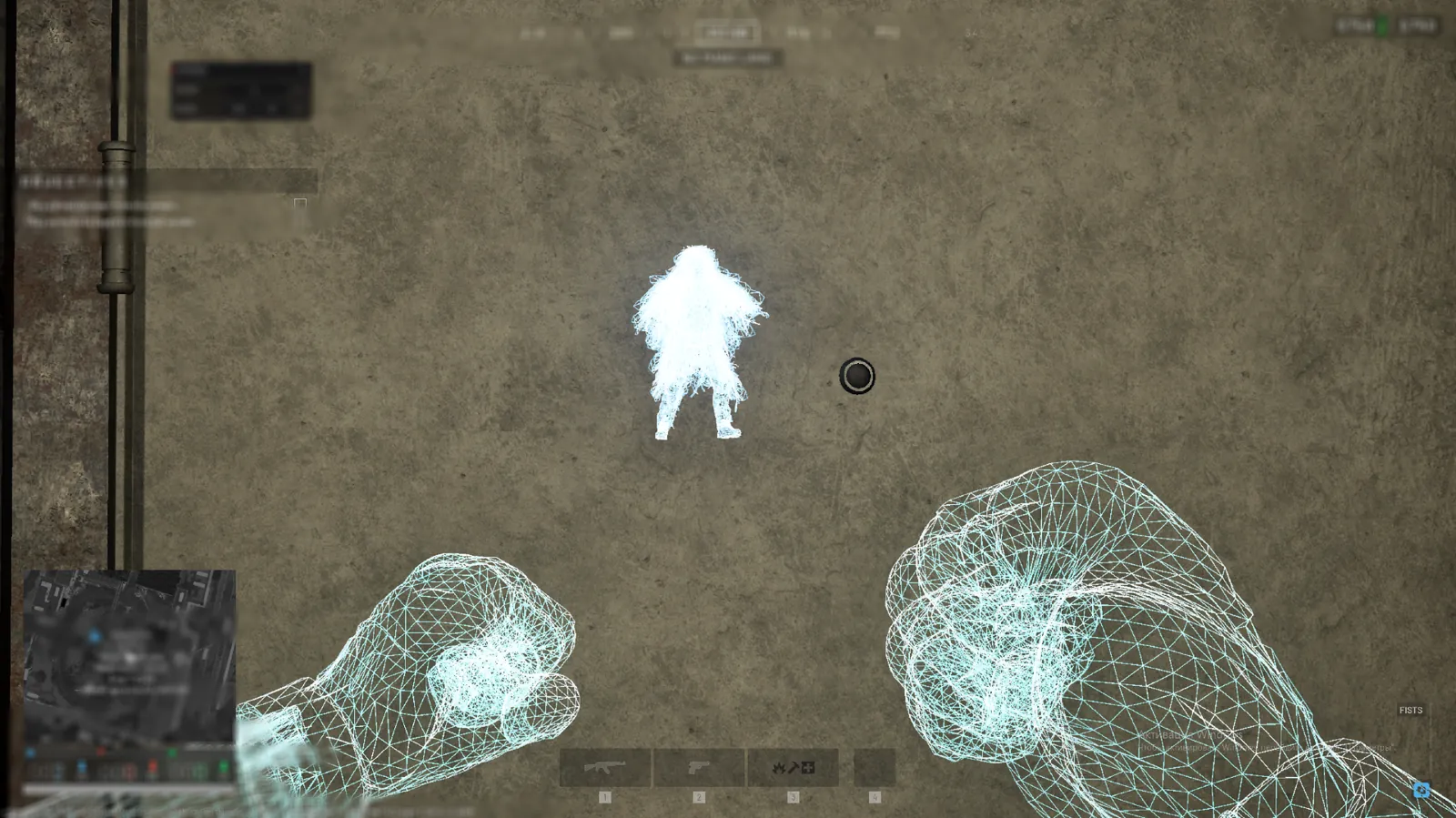
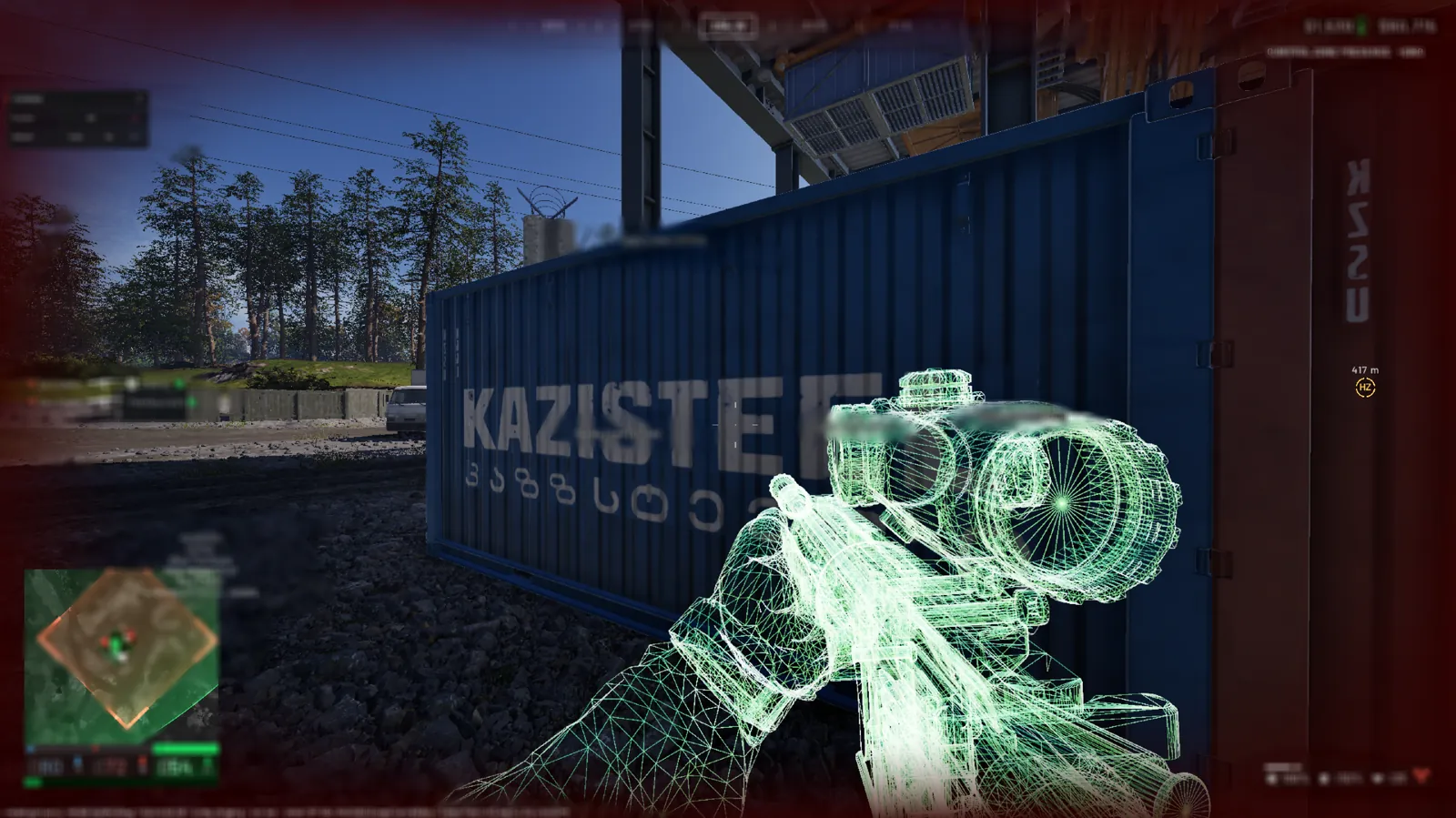
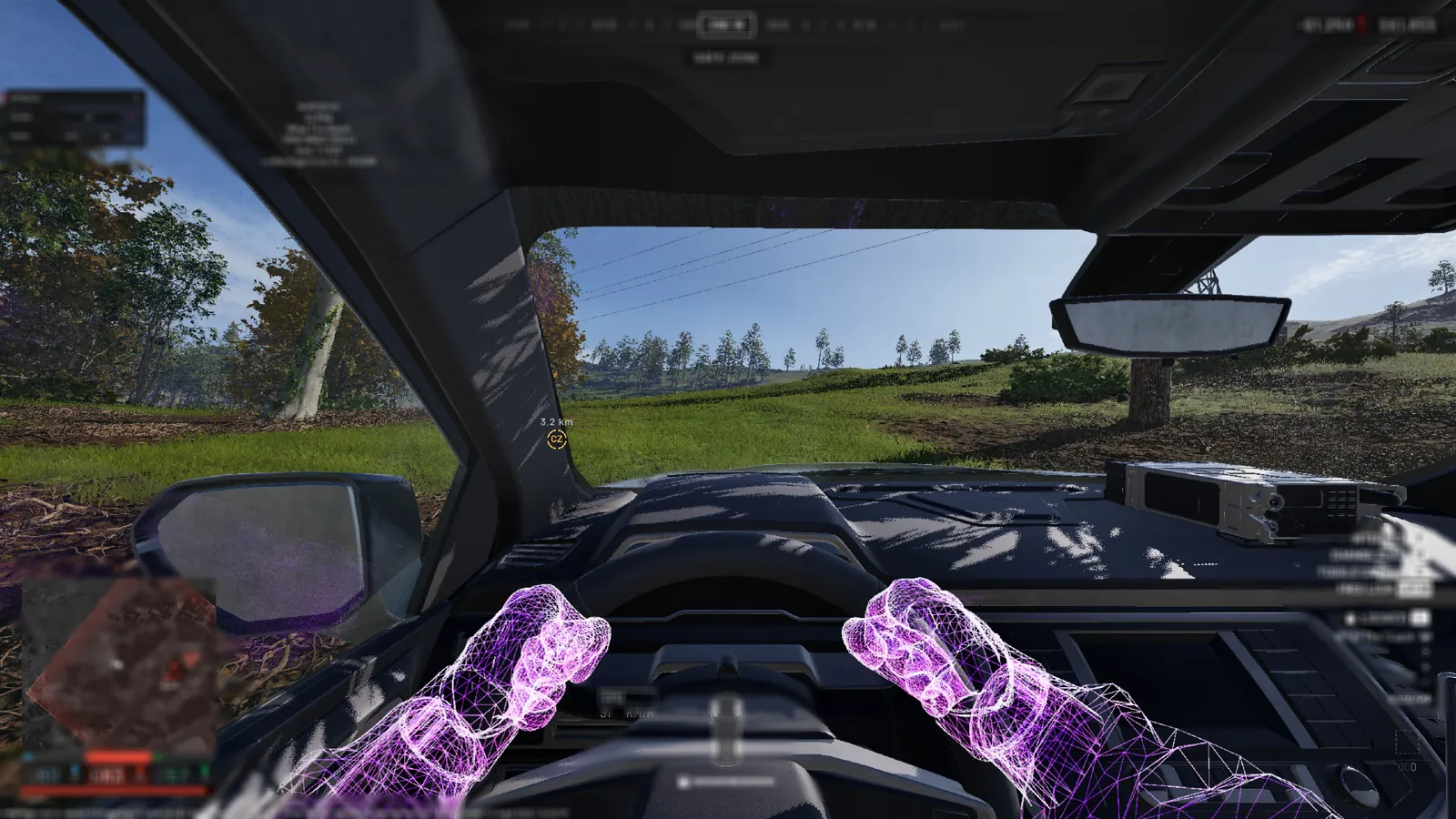
Unnamed WARDOGS Chams is a WARDOGS cheat with no menu and no aimbot. Once injected, it paints enemies within roughly 300 metres in their faction's color, and when a soldier steps into your line of sight, the silhouette turns white. You still do the shooting, but you already know who is waiting around the corner and how many of them there are.

It is a wallhack for players who have no use for sliders or aim assistance. The colors are built in: behind cover Valkyra is red, Lonestar blue and Manticore green, and anyone in plain view is white. There is nothing to configure, and Chams is the cheapest thing Unnamed sells for WARDOGS, starting at $6 a day. If you want aim, loot highlighting and no recoil, the full Unnamed WARDOGS Internal covers that.

Product features

Chams

Enemy highlight

Enemy soldiers get colored silhouettes right after injection. Players from your own faction are left alone.

Faction colors

Behind cover, Valkyra shows red, Lonestar blue and Manticore green, so you can tell whose squad is holed up in that house.

Line of sight

Once nothing stands between you, a soldier of any faction turns white. That is your moment to fire.

300 m range

Enemies light up out to roughly 300 metres. Beyond that you get the normal game picture.

Launch

No menu

There are no tabs, no sliders and no hotkey to open anything. Press F2 in the lobby, wait 10 to 20 seconds and the chams are on.

Fixed palette

Colors, range and the set of factions cannot be changed. On the plus side, there is nothing to set up before a match.

Internal build

The loader injects the cheat into the game process through its own driver, and the highlight is drawn inside the WARDOGS frame itself.

Known issues & fixes

Real questions from our support, with the fixes that worked. Based on user requests for this product.

My antivirus keeps deleting the loader files or blocking it from starting — what should I do?

This is usually caused by your antivirus or Windows built-in protection flagging the loader as a threat and deleting or blocking it.

  • Add the loader's folder to your antivirus exclusions.
  • Temporarily turn off real-time protection while you download, install, and activate.
  • Download the loader again and launch it.

If the error persists, contact support — you may need an updated version of the loader.

Loader says Invalid key / key not working

This is a server-side issue, not a mistake on your part. Contact support and provide the key that arrived in your email after payment.

The operator forwards the key to the developer, who then issues a replacement. A new key usually arrives within a few hours depending on the developer's time zone.

No additional steps are required on your end while you wait — the loader and all files are already set up correctly.

Driver Error appears after entering the key in the loader — cheat won't start

A driver error usually indicates a conflict with installed software or a system environment issue. Follow these steps:

  • Download the Sordum utility (available from technical support; the archive password will be provided by support).
  • Launch it, click Search, and wait for the scan to finish.
  • Send a screenshot of the results to the support chat — the developer will analyse the conflict and provide a fix.
After reinstalling Windows the HWID binding is lost — loader shows "HWID not found"

The key binding resets when you reinstall the OS. Contact support and provide your activation key — the operator will forward the request to the developer, who will reset the HWID on the server side. Re-enter the key in the loader after the reset is confirmed.

Note: one key works on one PC only. If your hardware has not changed, the reset is free of charge.

Loader CMD window opens and immediately closes, nothing happens

In most cases, using a VPN fixes the issue: start a VPN connection and then relaunch the loader. If your VPN has TUN mode enabled, disable it in the VPN settings and try again.

Additionally: download the Sordum utility (available from technical support; archive password: sordum), run it, click Search, and send a screenshot of the results to support — this helps diagnose what is blocking the launch.

If neither VPN nor Sordum (available from technical support) helps, contact support to escalate to the developer.

Loader shows 'under maintenance' or cheat is unavailable after a game update — how long to wait?

The loader is temporarily unavailable while the developer releases an update. This is a planned process that typically takes a few hours.

  • Monitor the status on the website and in the news channel: t.me/procheatsupport
  • Subscription time does not count down during a freeze — the timer is paused.
  • Once the update is ready, the loader will work automatically. No additional steps are needed on your end.
The site is blocked in my country and I can't download the loader

Use a VPN to access the site and download the loader. Once the loader is downloaded and the cheat has been injected, you may disable the VPN — it does not need to remain connected during gameplay.

No menu opens after F2 in Unnamed WARDOGS Chams. Is that normal?

Yes. The Chams build has no menu at all: after F2 in the lobby and a 10-20 second wait, enemy highlighting turns on by itself, there is nothing to configure.

The colour depends on the enemy faction: behind cover Valkyra is red, Lonestar is blue and Manticore is green, and any enemy in your direct line of sight turns white. It works up to roughly 300 metres, teammates are not highlighted.

If there is no highlighting at all, check that the loader said "Initialize Complete", turn off overlays (GeForce Experience, Discord, AMD Adrenalin, Steam) and try again through a VPN.

The game crashes or I get a blue screen after pressing F2. What should I do?

For a crash right after F2, the Unnamed developer suggests these steps in order:

  • Install the latest GPU driver from NVIDIA or AMD.
  • In Windows open Settings, System, Display, Graphics and turn off hardware-accelerated GPU scheduling, variable refresh rate and optimizations for windowed games.
  • Disable virtualization (Intel VT-x or AMD SVM) in BIOS and restart the PC.

If you get a blue screen (BSOD) after F2, KPTI has to be disabled with two registry keys. The commands are in the guide behind the instruction button under your key; if you would rather not edit the registry yourself, message support and we will help.

The cheat throws an error and won't work on a computer that has a virtual machine — why?

If a virtual machine is installed or running on your computer, the protection system may detect it and block the program, showing an error.

Remove the virtual machine from your computer, restart, and try launching the program again.

All issues & general troubleshooting
TARIFFS
$6.00
BUY What happens after payment?
Got a question? Ask before you pay

We'll help you choose and sort out any launch issue. Ask us anything before buying, we're always on your side.

Support 10:00–22:00, sometimes we reply at night too
Ask a question

Available tariffs

1 day
$6.00
START PURCHASE
7 days
$15.00
START PURCHASE
30 days
$35.00
START PURCHASE
Reviews about Unnamed WARDOGS Chams

No reviews yet. Be the first to leave one.

Your review

Reviews are published after moderation.

Join our gaming community chat

Discuss current cheats from developers and how to use them effectively in popular online games. Share tactics, exchange useful info and find like-minded players in our community.

1 900+Members
24/7Online
Join our gaming community chat

Technical support

Run into a technical issue? Our team of experts will help. We handle all requests in a live queue, so please be understanding if it sometimes takes a little wait. We guarantee that no request goes unanswered.

Availabilityfrom 10:00 to 23:00
Fast responseIn queue order
Get help
Technical support
PROCHEAT

PROCHEAT news channel

Follow product status changes, update history and important announcements.

Subscribe

WARDOGS chams: what each color means

The build has no menu, so all of its logic fits into one table. The color behind cover tells you which faction the enemy belongs to, and white means nothing stands between you. Chams does not highlight anyone on your own side.

Who is on screenBehind coverIn plain view
Valkyra enemyredwhite
Lonestar enemybluewhite
Manticore enemygreenwhite
Soldier of your factionnot colorednot colored
Enemy beyond ~300 mnormal modelnormal model

Prices are in dollars: $6 for a day, $15 for a week, $35 for a month. A week works out to about $2.14 a day and a month to about $1.17, almost five times cheaper per day than a one-day key. The one-day key makes a good trial: one evening is enough to see whether the loader starts on your system and whether playing by colors suits you.

No menu: the highlight switches itself on

With most cheats, the first thing you do after launch is learn the menu. This one does not have one. The loader injects the build, you press F2 in the lobby, and 10 to 20 seconds later enemies are already colored. There is no hotkey, no tabs and no configs.

Unnamed made every decision for you in advance. Only enemies are highlighted, out to roughly 300 metres, and the color depends on their faction and on whether you can see them directly. You cannot change the palette, push the range further or switch off one of the factions. Some players will call that a drawback. If you have ever bought a wallhack for a single feature and then spent half an hour fiddling with sliders, you will appreciate having nothing to fiddle with.

Faction colors and the white silhouette

Three factions fight in WARDOGS: Valkyra, Lonestar and Manticore. Chams colors them differently, yet every enemy has only two states. Either something blocks your view of them, or they are standing in your line of fire. The second state looks the same for all three factions, white, because once you can shoot it no longer matters whose soldier it is.

Red, blue, green: the enemy is behind cover

A colored silhouette means the soldier is covered by a house wall, a shipping container, a hillside or a concrete block. Red is Valkyra, blue is Lonestar, green is Manticore. Bullets fired at that target will probably end up in the obstacle, but you can see where it stands, which way it faces and when it starts moving.

The color pays off most on a big objective where different sides converge. If red figures glow behind one building and blue ones behind the next, two factions are against you there at once, and walking in between them is the worst option you have. Color also makes it easier to keep count of how many soldiers each side still has on the point.

White: the enemy is in your line of fire

A silhouette turns white as soon as there is no obstacle between you and the soldier. The faction stops mattering at that point. What matters is that you can hit them, and they can most likely hit you. White means it is time to shoot first or get your head down.

The vendor does not say how the build treats grass, bushes or smoke. If a white figure is standing in tall grass, confirm the target with your own eyes before you give your position away.

How to play with chams without giving yourself away

Only you can see the highlight, but everyone can see how you play. The most common slip is tracking an enemy through a wall with your crosshair and meeting them with a shot the instant they round a corner. A killcam or a spectator's recording gives that away at once. Keep your crosshair on the corner rather than on the colored figure, and sometimes let the other player make the first move.

Use the colors to make decisions, not to take shots. Three blue figures behind a house? Do not push them head on; flank or wait for your squad. One green who is looking the other way? Go. From the outside, this kind of play looks like good map awareness and good ears.

Remember the 300 metre limit as well. WARDOGS maps are big, and a sniper on a far ridge or a machine gunner in a window half a kilometre away will not be highlighted. If you are taking fire and the screen shows nothing, the shooter is almost certainly beyond that distance.

Chams or the full Unnamed WARDOGS Internal

Unnamed has two builds for WARDOGS, and both launch the same way: the same loader and the same F2 in the lobby. The difference is what is inside. Unnamed WARDOGS Internal is a complete cheat with a menu on Insert that includes aim, ESP, loot highlighting and no recoil. Chams does one thing, colored enemy silhouettes, and costs less.

Chams suits you if your shooting is fine and all you are missing is information: where they are, how many there are, whether they are looking your way. It is also the pick for players who would rather not have an aimbot on their account. If you want the cheat to help you hit, show loot and kill recoil, go with Internal, because Chams cannot be extended to do that.

Preparing Windows before the first launch

The build itself asks for nothing, but your system does need some preparation. The vendor says plainly that a skipped prep step is the most common cause of problems, so go through the whole list before you enter the key for the first time.

  1. Download DControl and use it to turn off Windows Defender, including real-time protection. Defender comes back on after every reboot, so repeat this before each launch of the loader.
  2. Install Visual C++ Redistributable 2015–2022 in both versions, x64 and x86, plus the DirectX End-User Runtime.
  3. Uninstall FACEIT AC, Riot Vanguard and any third-party antivirus such as Avast, Kaspersky, McAfee, ESET or Bitdefender. Uninstall, not close: while they are installed, the loader will not start even with those programs shut down.
  4. Start WARDOGS once without the cheat, set all graphics to Low, then close the game completely. Injection is more stable this way, and you can raise the quality again once everything works.

Launching: key, lobby and F2

Before you start, the game and its launcher have to be fully closed, so check the tray for anything still running. Then right-click the loader, run it as administrator and enter the key from your email. The loader replies with the line "Please Launch Wardogs And Press F2 In Main Menu".

Now open WARDOGS and wait for the lobby. In the lobby press F2 and give it 10 to 20 seconds without touching anything. The loader window should then show "Initialize Complete". After that you can join a match, and enemy silhouettes appear on their own without a single keypress.

If the highlight does not show up

Check the obvious first: have you done all four prep steps, and has Defender stayed off since your last reboot? If so, find your case below. The registry edits from the vendor's guide are best done together with support in the chat, where they will give you the exact command for your error.

No silhouettes after F2

Look at the loader window. If it says "Initialize Complete", the injection worked and something on top of the game is interfering. Turn off every overlay: GeForce Experience, Discord, AMD Adrenalin and the Steam overlay. If that does not help, connect to a VPN and launch again. If the loader shows an error instead of "Initialize Complete", contact support and include the error text.

Also check the distance. An enemy 400 metres away will not be highlighted, so test the chams on someone closer.

Crashes, blue screens and driver errors

If the game closes on launch or right after F2, start with your graphics driver and make sure it is up to date. Then go to Settings, System, Display, Graphics and turn off hardware-accelerated GPU scheduling, variable refresh rate and optimizations for windowed games. The guide also recommends a DWM registry tweak and disabling virtualization (Intel VT-x or AMD SVM) in the BIOS. Restart the PC afterwards.

Driver Error 1 or 2 is fixed under Device security, Core isolation. Turn off Memory integrity and the Microsoft Vulnerable Driver Blocklist there, check Defender once more and uninstall Vanguard and FACEIT AC if they are still around. Can't Handle Driver goes away once every Exploit protection setting is back at its default. The vendor links a blue screen after F2 to KPTI, kernel page-table isolation: you turn it off with two registry values under Memory Management and then restart.

Easy Anti-Cheat, patches and frozen days

WARDOGS is protected by kernel-level Easy Anti-Cheat, and no seller can honestly promise you will never be banned. Without an aimbot, the most visible traces such as unnatural snapping on a recording are gone, but the build still runs inside the game process. If your account matters to you, do not run the cheat on your main, and do not turn every firefight into a demonstration of what you can see through walls.

The game is in early access and gets patched often. After a major update Unnamed checks the build, and the product status on the site changes for that time. Paid days are frozen during that period, so a week bought right before a patch does not run out while the build is being updated.

Unnamed WARDOGS Chams FAQ

Can I change the colors or the highlight range?

No. The palette, the roughly 300 metre range and the set of factions are built into the release, and there is no menu for them. If you want to tune the picture to your taste, look at the full Internal build.

How do I turn the chams off mid-match?

The vendor's guide lists no key for that. The highlight stays on while the injected game is running. After you restart WARDOGS, it only comes back once you press F2 in the lobby again.

Are teammates and vehicles highlighted?

Chams never colors your own side; only enemies are highlighted. The vendor's description says nothing about vehicles or their crews, so count on soldiers being highlighted, not vehicles.

Will the chams show up on a stream or recording?

The silhouettes are drawn right in the game frame, and the vendor does not claim any capture-hiding mode. Assume that whatever you see will end up in the recording too.

FACEIT AC is closed, but the loader still will not start. Why?

Closing it is not enough; it has to be uninstalled. The same goes for Riot Vanguard and third-party antivirus software: while they are on the system, the loader will not work no matter what else you set.

Do I have to turn Defender off before every session?

Yes, if you rebooted in between. Windows turns Defender back on at startup, so keep DControl handy.

Is a one-day key worth it as a trial?

Yes. For $6 you can check that the build starts on your Windows and see whether playing by colors works for you. After that a week or a month is better value: a month comes to about $1.17 a day.

Does it work on Windows 11?

Yes, Chams runs on both Windows 10 and Windows 11. The vendor does not list any build restrictions.

from $6.00 Choose a plan
Ask a question


