Browser Radar for Rust: Wallhack on Phone and PC

Working
Courierscript Courierscript
Last update 11.06.2026 This date shows when the software was last updated. An old date doesn't mean the software stopped working! Most likely the developer just had nothing new to add. If you have any doubts, you can always check the current status with our support team.
Add another cheat from this game too — to compare them.
RUST Browser Radar
Steam
Windows support: 10: all builds; 11: 21h2, 22h2, 23h2, 24h2, 25h2
Menu language: Russian
Spoofer:No
USB drive:Yes
BIOS:No
SCREENSHOTS
Description

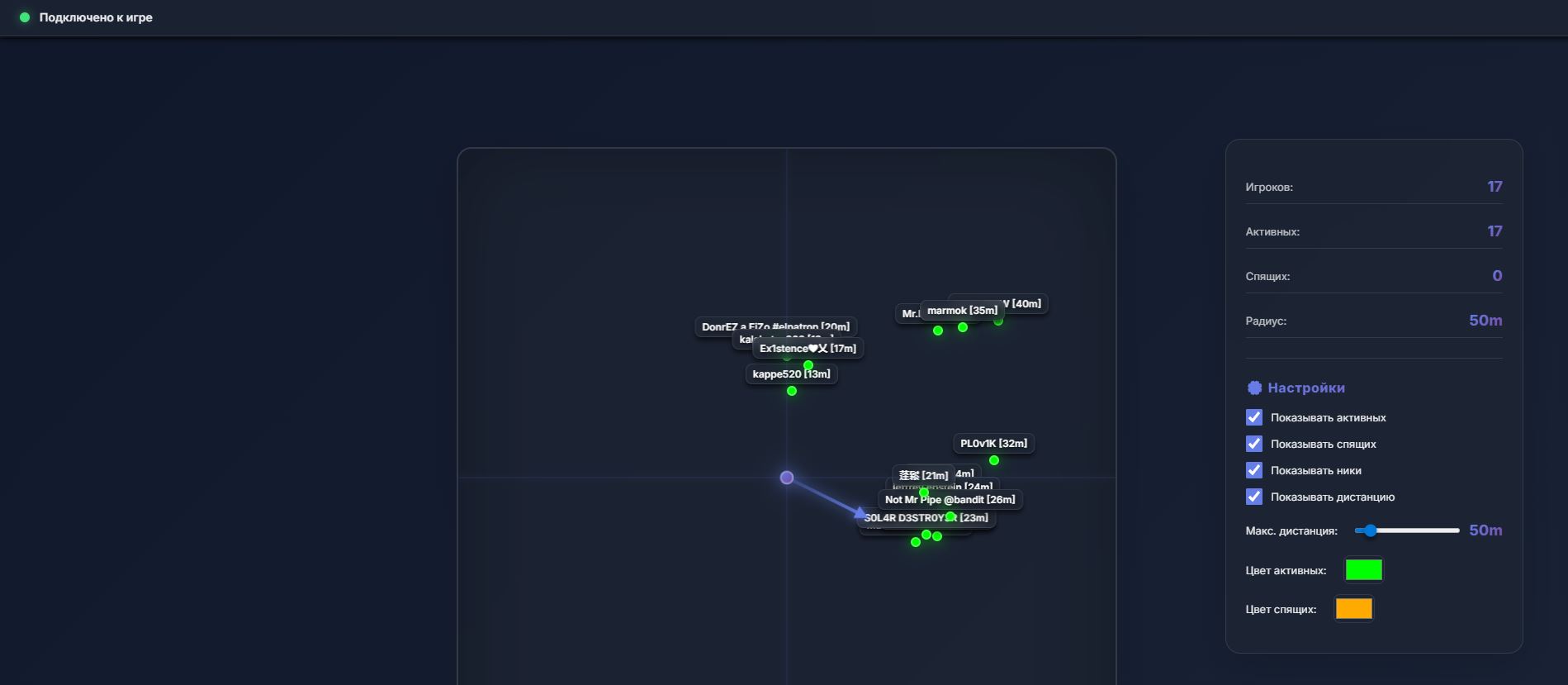
Web Radar by CourierScript is an external solution for pulling tactical info in Rust. The main difference from classic cheats is how it works: a map with enemy positions opens in a regular browser through a unique link. That lets you push the interface to any external device, whether a phone, tablet, laptop or second monitor.

This approach keeps things comfortable (your main game screen stays clean) and safe. You can set up the display of active and sleeping players, change marker colors to your liking, and even share the link with an ally so he sees the same picture of the fight in real time.

Product features

Player monitoring

Active Players

Shows the location of every active player within range.

Sleepers

Displays sleeping bodies (Sleepers) so you can find easy loot or scout offline bases.

Info

Shows nicknames and the exact distance to the target.

Settings and access

Cross-platform

Runs on any device with a browser: Android, iOS, Windows, macOS.

Share Link

Send the link to a friend to share the radar together (Team View).

Customization

Set colors for different player categories and the display range (Distance Limit).

Known issues & fixes

Real questions from our support, with the fixes that worked. Based on user requests for this product.

What is the password for the cheat archive?

The archive password is: sordum.

Radar requires disabling virtualization but Rust won't launch without it , EAC says modified bootloader

The browser radar does require virtualization to be disabled (which also disables memory integrity). Without this, EAC will block game entry with a "modified bootloader" error.

If your system cannot run Rust with virtualization off, this product is not compatible with your current Windows configuration. Consider an alternative cheat that does not require bootloader changes.

After launching the cheat monitor flickers, PC reboots, Windows gets stuck in update loop

These are symptoms of a Windows security conflict. Follow these steps:

  • Download the Sordum utility (archive password: sordum).
  • Run it, click Search and wait for the scan to finish.
  • Take a screenshot of the result and send it to support.

The loader must be run from the system drive (C:\) , moving it to a USB drive or another disk may cause incorrect behavior.

Didn't manage to use the key in time , can the subscription be extended?

If you were unable to use your subscription due to circumstances beyond your control (e.g. you did not know the archive password), contact support with your activation key. The developer can extend your current key for additional time , a new key is not issued in this case.

Browser with radar doesn't open after starting the loader

Check your Windows version: press Win+R, type winver and press Enter. Send the version and build number to support , this helps diagnose compatibility issues.

Is there a risk of getting banned for using the Rust browser radar?

As of now, there have been no reports of this product being detected by anti-cheat. The browser radar operates separately from the game process, which reduces detection risk compared to inject-based cheats.

However, no third-party software can provide an absolute guarantee against bans.

All issues & general troubleshooting

Available tariffs

12 hours
100
START PURCHASE
3 days
500
START PURCHASE
Reviews about RUST Browser Radar
52 sales on Digiseller No text reviews yet — be the first to leave one.

Your review

Reviews are published after moderation.

Join our gaming community chat

Discuss current cheats from developers and how to use them effectively in popular online games. Share tactics, exchange useful info and find like-minded players in our community.

1 900+Members
24/7Online
Join our gaming community chat

Technical support

Run into a technical issue? Our team of experts will help. We handle all requests in a live queue, so please be understanding if it sometimes takes a little wait. We guarantee that no request goes unanswered.

Availabilityfrom 10:00 to 23:00
Fast responseIn queue order
Get help
Technical support
PROCHEAT

PROCHEAT news channel

Follow product status changes, update history and important announcements.

Subscribe

A Second Screen for Tactical Edge

Using Web Radar frees up your main monitor from extra clutter. You run the radar on a phone or tablet sitting next to your keyboard. That turns the gadget into a full GPS for tracking enemies. The method doesn't block your view in the game (the way regular ESP boxes do) and lets you glance at the map now and then while keeping your focus on the crosshair in the center of the screen.

Team Coordination

The unique "Share Link" feature makes this product perfect for playing in a clan or duo. You buy one subscription, generate a link and send it to your partner. Now your teammate sees enemy movement on his phone without running any third-party software on his own PC. This keeps everyone in sync during raids or base defense, since the whole group has the same information.

Catching Sleepers and Finding Loot

In Rust, sleeping players (Sleepers) are a source of resources. The radar shows where the bodies of logged-off users are lying. You can track down sleepers hiding in the bushes with a full inventory of ore, or check whether anyone is alive inside a house through the walls just by glancing at the radar screen. This saves time on scouting and makes your runs more effective.

Versatility and Compatibility

The main advantage of Web Radar technology is that it doesn't depend on your platform. You don't need to install drivers or set up an overlay on Windows. Any modern browser (Chrome, Safari, Firefox) is enough. This solves the problem of conflicts with the game's fullscreen mode or incompatibility with certain Windows versions. The radar runs stable and smooth on any device.

Flexible Display Settings

The radar interface lets you adapt the map to your needs. You can limit the draw distance so you only see the nearest threats and don't clutter the screen with markers from the other side of the map. Color coding lets you set different shades for active enemies and sleepers, so you read the situation instantly with your peripheral vision.

Latest updates

11.06.2026 09:22
Working
Received an update
09.06.2026 12:32
Working
Received an update
31.05.2026 05:50
Working
Received an update
25.05.2026 11:26
Working
Received an update
10.05.2026 10:45
Working
Received an update
Open full history
Ask a question