Morphine: Private Cheat for Rust

Working
Morphine Morphine
Last update 10.06.2026 This date shows when the software was last updated. An old date doesn't mean the software stopped working! Most likely the developer just had nothing new to add. If you have any doubts, you can always check the current status with our support team.
Add another cheat from this game too — to compare them.
Morphine RUST
Steam
Windows support: 10: all builds; 11: 21h2, 22h2, 23h2, 24h2, 25h2
Menu language: English
Spoofer:No
USB drive:No
BIOS:Yes

User information

Requirements

- BIOS UEFI

- Hyper-V enabled
- Discord required for the overlay to work

SCREENSHOTS
Description

Morphine is a private cheat for Rust that flips the core survival rules in your favor. You see sulfur and metal through rock, know where the TC is in a stranger's base, and wipe raiders with one burst and zero recoil. From the first hour of a wipe to the final Bradley event, it works for you.

Unlike public software that Easy Anti-Cheat picks off within the first day of a wipe, Morphine runs on a closed loader and updates to match the current Rust build within hours of a forced patch. The Morphine team has been at this for more than one season. This is not a throwaway loader; it is an actively developed project.

What's inside (90+ options across 6 categories):

  • Aim - Silent Aim, Hitchance, bone/hitbox selection, Smooth, Dynamic FOV.
  • Weapon - No Recoil, No Spread, Rapid Fire, Fast/Fat Bullet, Instant Bow/Compound/Eoka.
  • Visual - skeleton, chams, loot, TC, Sleeping Bag, sleepers, Bradley, Patrol Heli, Chinook, resources (sulfur/metal/stone/hemp), safe zones, Raid ESP.
  • HUD - radar, FPS, server info, Hand/Gun Chams, Hitmarkers, rocket calculator, bullet tracers.
  • Misc - Infinity Jump, Spider, Always Sprint, Fast Loot, Silent Farm, Third Person, Zoom, time and weather control.
  • Battle Mode - hotkey that instantly hides all visual cheat modules.

Morphine does not click for you. It removes the information advantage your enemies have over you. You see the full picture: where the sulfur is, where the base is, where your neighbor is sleeping, and where the patrol is coming from. The rest is your call.

Product features

Aim

Enable

Master aimbot toggle. Activates auto-aim on the assigned hotkey. All other Aim settings do nothing while this is off.

Visible Check

Aimbot only shoots at visible targets. If the enemy is behind a rock, cliff, or base wall, it ignores them. Without this filter, shots through geometry get flagged by EAC and reported by other players.

Silent

Silent Aim lands hits without the crosshair visually moving toward the target. From the outside you look like you're shooting wide, but the hits register. Does not expose autoaim in clips or recordings.

Target NPC

Aimbot locks onto NPCs: scientists at oil rig and launch site, Bradley, and Patrol Heli. Farm events without wasting ammo or missing shots.

Smooth

Adjustable aim smoothness slider. Brings aim speed down to human levels, which matters a lot when recording clips or playing on stream.

Hitchance

Percentage chance the aimbot actually fires. At 70%, the bot skips risky shots and avoids giving itself away with obvious misses in plain situations.

FOV

Aimbot activation radius in degrees. Narrow FOV means precise priority targeting; wide FOV means it locks on in a cluster of enemies.

Draw FOV

Draws the FOV circle on screen. See exactly where the capture zone ends, handy when tuning for a specific scenario: close range, sniping, or raiding.

Line to Target

Draws a line from your crosshair to the current aimbot target. Useful in chaotic fights when three or four enemies are inside the FOV and you need to know who the bot is locked on.

Aim Bone

Pick which bone the bot aims at: head, neck, or body. Head is for one-tap bolts; body is for full-auto bursts.

Hitbox Override

Redefines the hitbox for targeting. Useful when the standard head hitbox is covered by a helmet and switching to the neck fixes the problem.

Override Bone

Forces aim at a specific bone regardless of the enemy's pose, whether they are lying down, running, or crouching. Guarantees hits exactly where you set them.

Weapon

Recoil Compensation

Recoil compensation script. AK, Custom SMG, and MP5 track like a laser at 30 meters. The barrel does not drift up a single pixel; grouping looks like a practice session.

No Recoil

Complete recoil removal. Not the same as compensation; here the visual pattern disappears entirely. Full magazine, one point of impact.

No Spread

Removes bullet spread. Every round goes exactly to the crosshair with no random deviation, which is most noticeable at long range with automatic weapons.

Shotgun No Spread

Removes pellet spread on shotguns. Pump Shotgun and Double Barrel at 25 meters work like a bolt rifle: every pellet hits exactly where you aim.

Fast Bullet

Increases bullet velocity. Less leading on moving targets; bolt-action rifles connect at 200+ meters without compensating for travel time.

Rapid Fire

Increases fire rate. Semi-autos like the SAR and Semi-Auto Rifle fire almost like full-auto. Five rounds leave in under a second.

Fat Bullet

Increases bullet hitbox. Damage registers even on a slight miss at the edge of an enemy's silhouette, especially useful when shooting at moving targets.

Always Shoot

Aimbot fires automatically when on target. No need to hold LMB. The bot's reaction is faster than any player's.

Instant Eoka

Fires the Eoka instantly with no misfire chance. Solves the weapon's core problem: 30% misfire on every pull normally.

Instant Bow

Draws the bow to full tension instantly. Arrows fly at max damage without any hold delay. The standard bow performs like a Compound at max draw.

Instant Compound

Draws the Compound Bow instantly. Rapid-fire shots at point blank, every arrow at max damage without holding LMB.

Visual

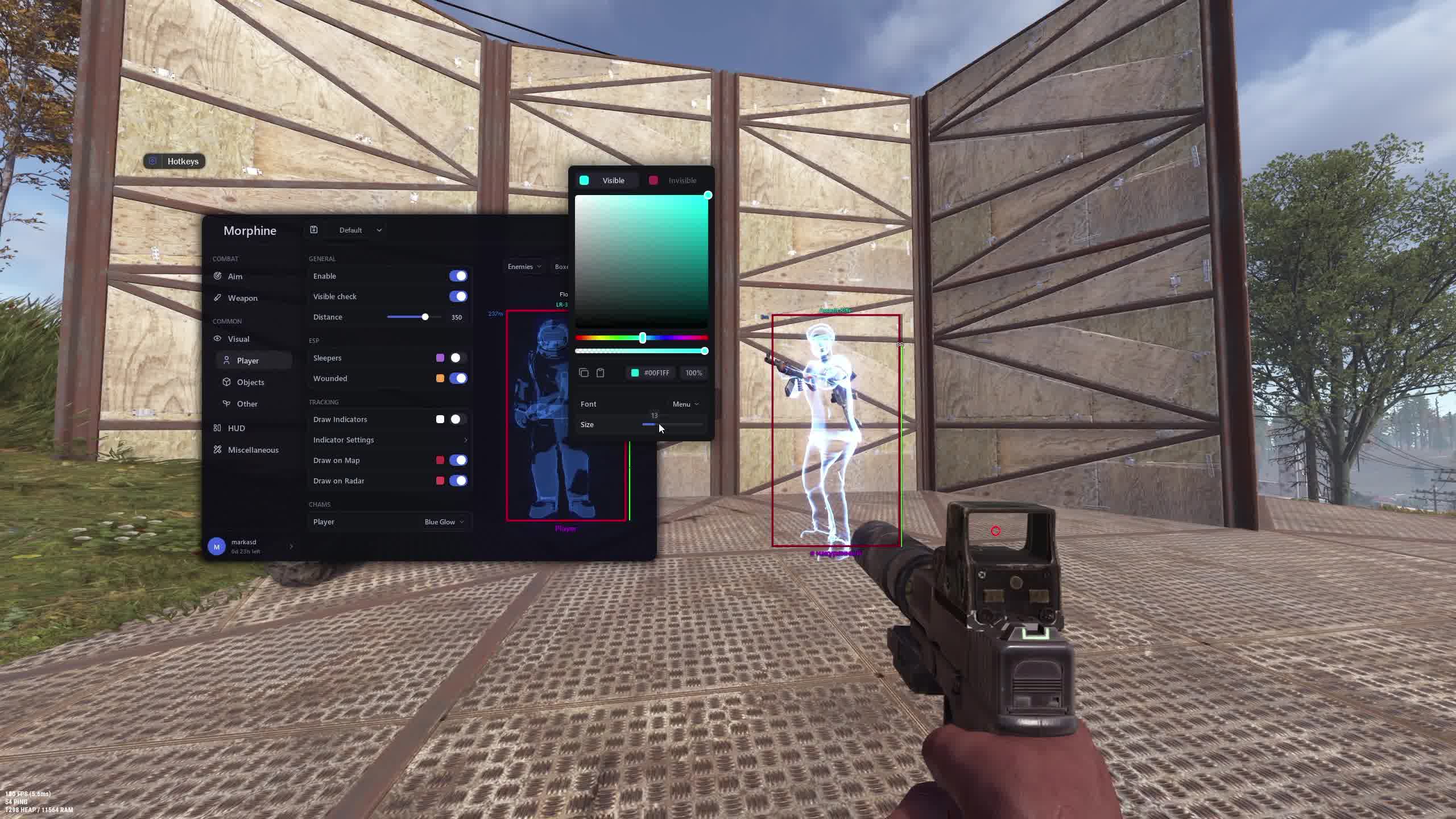
Player ESP Enable

Master player ESP toggle. Enables display of all enemies through walls and rocks.

Visible Check

Highlights only visible players. Handy at events and monuments when you need to separate players actually in line of sight from distant markers.

Distance

Distance to each player in meters. Determines weapon and tactic choice. A shotgun at 200 meters is not going to help.

Sleepers

Highlights offline players. You can see who is sleeping inside a base, which during a raid means nobody inside is going to shoot back.

Wounded

Marker for downed enemies. Instantly shows who can be finished off and who is still on their feet and dangerous.

Draw Indicators

Arrow indicators at screen edges pointing toward enemies outside your FOV. Nobody sneaks up from behind unnoticed.

Draw on Map

Displays players on the in-game map (G key). Full picture of the area around your base with a single button press.

Draw on Radar

Shows players on the built-in radar. Constant situational awareness without opening the map.

Player Chams

Solid color overlay on enemy models through walls. The silhouette glows bright, impossible to miss even in darkness.

Boxes

Rectangular box around each player. Clean target marker even in thick forest or at night.

Skeleton

Renders the player skeleton through walls. See pose: lying, sitting, standing, aiming. You know whether they are preparing to shoot or repositioning.

Health Bar

Health bar above every enemy. Know whether one more bullet finishes them or you need two or three more.

Nickname

Player name above the model. Good for tracking toxic neighbors and identifying faction teammates.

Distance Tag

Exact distance figure next to the player. Helps quickly calculate leading and choose the right weapon.

Team ID

Team identifier. Shows who is in the same group. On servers with large clans, not shooting your own ally by mistake is critical.

Flags

Status icons for enemies: online, offline, in a clan, in a safe zone. Extra context without switching windows.

Held Item

Shows what weapon the enemy is holding. See who has a bolt with a scope and who has bare fists. Target priority decided instantly.

Item Icon

Weapon icon next to the player. Faster than reading text. The eye catches the image without having to read a label.

Sleeping Bag

Highlights sleeping bags and beds within range. Shows where the nearest enemy spawn point is, so after a kill you either push or set up an ambush.

Cupboards

Tool Cupboard visible through walls. See exactly where the TC sits inside an enemy base. In a raid, pulling the TC removes building auth from defenders.

Workbenches

Highlights workbenches. Shows the enemy's crafting level. Know whether the neighbor has a Workbench Lvl 3 or is just getting started.

Gun Trap

Auto turrets and shotgun traps visible through walls. During a raid, see where the traps are before walking into a burst at the doorway.

Turret

Electric Auto Turrets within range. Spotted in advance, you can route around the base to stay out of their firing arc.

Sam Site

SAM sites through terrain. In a helicopter you know exactly where the AA guns are and fly around the kill zones.

Flame Turret

Flame turret traps highlighted in advance. No more burning to death in an unknown base doorway.

Land Mine

Mines and traps on the ground, visible through grass and terrain. No more losing limbs on the path to a farm node.

Corpses

Highlights corpses and bodies. Know where the loot from a killed player dropped even if you did not make it there immediately.

Backpacks

Drop bags with loot visible through walls and bushes. Nothing gets missed after a fight.

Dropped Items

Dropped items on the ground highlighted regardless of distance or lighting. Sulfur, ammo, medkits, weapons, all of it.

Mini Copter

Minicopters shown on the map. See every available minicopter in range, guaranteed transport after a server restart.

Scrap Heli

Scrap helicopters with pilots highlighted. Know where to grab a ride for a long run or for hauling raid materials.

Bicycle

Pedal bikes and trikes highlighted. Simple transport for fast travel across the map without engine noise.

Motor Bike

Motorbikes highlighted. The fastest ground vehicle in Rust. See every available bike within range.

Horse

Horses highlighted. Quiet transport with no fuel cost, great for raids and farming distant monuments.

Boat

Boats and motorboats on the shore. Access to oil rig and cross-map water travel.

Sulfur

Sulfur ore nodes visible through rock and ground. The main raid resource. No more circling the map hunting nodes.

Metal

Metal ore nodes visible through terrain. The road to Workbench Lvl 2 and weapons gets a lot shorter.

Stone

Stone nodes highlighted. The starting resource for any base. Know where the nearest deposit is from the moment a wipe starts.

Hemp

Hemp plants for cloth and fiber highlighted. See every bush in range. Crafting a bow and clothes without running around looking for it.

Crates

Loot crates visible through walls and buildings. All boxes at monuments marked in advance for the most efficient farming route.

Raid ESP

Highlights active raid elements: shells, charges, live C4, and rockets. See what has exploded, what has not, and where the last wall still needs to be finished.

Animals

Animals on the map: bears, wolves, boars, deer. Useful for farming meat and for a heads-up when predators are near your base.

Bradley

Bradley APC visible through terrain. See the tank before it sees you, and you have time to get out of its firing zone.

Chinook

Chinook with its locked crate highlighted. Know where it will drop and arrive at the spot first.

Patrol Heli

Patrol helicopter visible through hills. Distance and direction shown, good for dodging it or shooting it down from a prepared position.

HUD

Copy Steam Link

Copies the Steam profile of an enemy with a hotkey. Check their hours, inventory, and reports right inside the client after the kill.

Clothes

Highlights enemy clothing and armor. See at a glance whether they are in metal or rags and decide if they are worth spending ammo on.

Hotbar

Extended hotbar readout for enemies: see what is in each slot. One screen tells you what weapon they are about to switch to.

Hitmarkers

Hit markers and sound confirmation. Clear hit feedback, especially useful at long range when you cannot see the enemy's reaction visually.

Rocket Helper

Rocket trajectory calculator. A line predicts the impact point accounting for gravity. The rocket lands in the wall without wasting explosive.

Local Bullet Tracer

Tracers on your own bullets. See exactly where each round goes. Correct your aim within one shot.

World Bullet Tracer

Tracers on all bullets fired by players on the server. Trace the lines to find sniper positions and potential ambushes well before contact.

Radar Bullets

Gunshot markers on the radar with distance. Any sound around you becomes a dot on radar. Do not miss a single fight in range.

Reload Bar

Enemy reload progress bar above their model. Know when their magazine is empty. That is your window to push.

Raycasting

A ray from your crosshair with a highlight on whatever it hits. Useful for checking sight lines and calculating peek angles before you actually peek.

Hand Chams

Custom color on your character's hands. Set visibility in the dark or just style it to your preference.

Gun Chams

Custom color on your held weapon. An alternative to the default look. Weapon stays clearly visible in any lighting.

Bind Island

Bind for activating island features. One key switches all location-based functions.

Watermark

Morphine logo on screen. Turn it off for clean screenshots and recordings.

FPS Counter

Frame rate counter without opening the console. Real-time performance monitoring.

Server Info

Server info on screen: ping, ticks, player count, uptime. No need to open the scoreboard.

Radar

Built-in radar with adjustable size and scale. An alternative to opening the map. Constant overview of the situation around you.

Miscellaneous

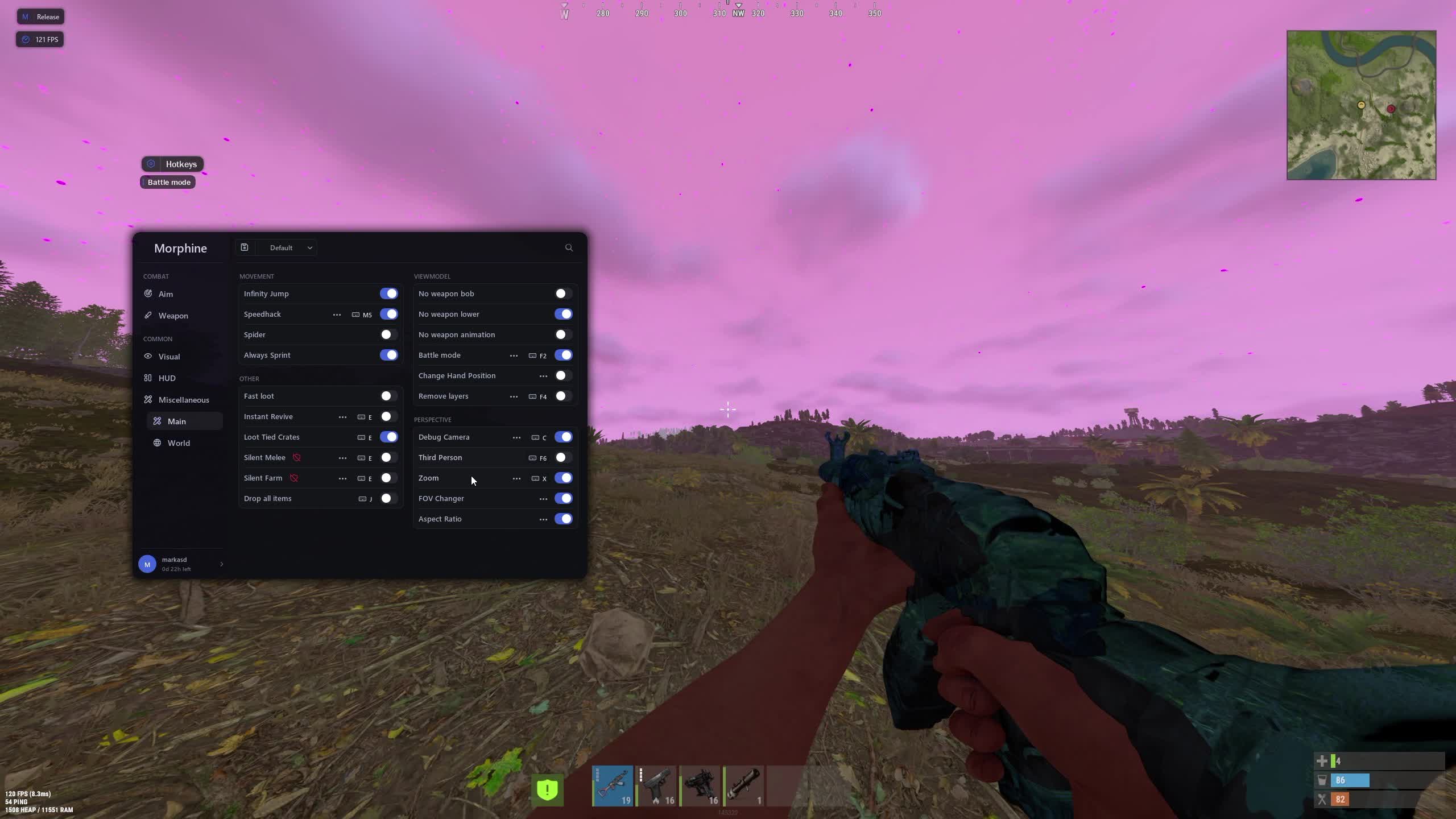
Infinity Jump

Unlimited jumps in mid-air. Reach rocks and rooftops that normal players cannot get to. Sniper positions and ambush spots that are not in any guide.

Spider

Walk on vertical surfaces. Climb base walls, cliffs, and rooftops without a build. Raid through the roof with one click.

Always Sprint

Constant sprint without hunger or thirst drain. Saves food and time on long runs for farming, events, and raids.

Fast Loot

Faster interaction with boxes and corpses. Loot a kill in half a second. No standing exposed in an open field.

Instant Revive

Instant teammate revive without the full animation. Pick up your ally and get back into the fight without the 8-second pause.

Loot Tied Crates

Loot locked and barricaded crates. Open fortified containers without needing to clear the protection first.

Silent Melee

Silent melee attacks. Rock and spear hits produce no positional sound, so you can farm quietly next to enemy bases.

Silent Farm

Silent farming on nodes. Pickaxe and hatchet swings make no noise. Neighbors will not hear you mining sulfur 50 meters from their base.

Drop All Items

Drop your entire inventory with one key. Useful before death so a teammate can recover the loot from a specific spot fast.

No Weapon Bob

Removes weapon sway while moving. Aim stays flat and the sight does not bounce. Accurate fire on the move.

No Weapon Lower

Weapon does not lower while sprinting. Always ready to fire. Those fractions of a second matter in Rust PvP.

No Weapon Animation

Disables weapon animations: reload, swap, raise. Actions are instant, no visual delay.

Battle Mode

Hotkey that instantly disables all visual cheat modules. For screenshots, clip recording, and suspicious situations. Clean screen in one press.

Change Hand Position

Adjusts hand position on screen. The aim is not blocked by the barrel, giving roughly 10-15% more of the screen clear.

Remove Layers

Removes visual layers: fog, shadows, post-processing. Clean image for better visibility at long range.

Debug Camera

Free spectator camera. Fly around the map outside your character model. Scout before a raid without leaving the base.

Third Person

Third-person view. See enemies around a corner without exposing your head. Pre-aim from uneven positions.

Zoom

Software zoom without optics. Scout distant bases and monuments in the field.

FOV Changer

Adjusts field of view without server restrictions. Wide FOV means more peripheral vision and faster reactions in close range fights.

Aspect Ratio

Custom screen aspect ratio. Stretched enemy model means more hits with automatic weapons at medium range.

Bright Ambient

Brightens dark areas of the map. See at night like it is daytime. No more silhouettes appearing from the dark with a shotgun.

Fog Color

Fog color control. High-contrast background makes enemy models stand out at any distance.

Sky Color

Sky color control. A clear skybox improves visibility of flying enemies on helicopters and minicopters.

Change Clouds

Cloud control. Full clear sky for sniping flying transport without any obstruction.

Change Stars

Star and moon phase control. Simulate a full moon for full visibility on dark nights.

Change Time

Time of day control. Force daytime for yourself even when the server clock says 2 AM.

Change Atmosphere

Atmospheric effect control: dust haze, air temperature. Clear visibility in any conditions.

Change Weather

Weather control. Rain, snow, storm, all of it goes away on demand. No fog from a storm during a critical fight.

Known issues & fixes

Real questions from our support, with the fixes that worked. Based on user requests for this product.

Failed_classes error when launching Morphine RUST , what to do?

The Failed_classes error indicates an issue with your current activation key. To resolve it, you need to obtain a new key through store support.

Contact support and provide the exact error text , a new working key will be issued to you. Replace the old key with the new one and relaunch the cheat.

All issues & general troubleshooting
TARIFFS
5$
BUY What happens after payment?
Got a question? Ask before you pay

We'll help you choose and sort out any launch issue. Ask us anything before buying, we're always on your side.

Support 10:00–22:00, sometimes we reply at night too
Ask a question

Available tariffs

1 day
5 $
START PURCHASE
7 days
25 $
START PURCHASE
30 days
50 $
START PURCHASE
Reviews about Morphine RUST
5 sales on Digiseller No text reviews yet — be the first to leave one.

Your review

Reviews are published after moderation.

Join our gaming community chat

Discuss current cheats from developers and how to use them effectively in popular online games. Share tactics, exchange useful info and find like-minded players in our community.

1 900+Members
24/7Online
Join our gaming community chat

Technical support

Run into a technical issue? Our team of experts will help. We handle all requests in a live queue, so please be understanding if it sometimes takes a little wait. We guarantee that no request goes unanswered.

Availabilityfrom 10:00 to 23:00
Fast responseIn queue order
Get help
Technical support
PROCHEAT

PROCHEAT news channel

Follow product status changes, update history and important announcements.

Subscribe

What Is Morphine for Rust

Morphine is a private cheat for Rust with a full feature set: auto-aim, player and resource ESP, weapon modifiers, and over 25 environment and movement customization options. Unlike public software, Morphine is developed by a closed team and does not get leaked on forums, which keeps the Easy Anti-Cheat detection risk lower.

The cheat connects before Rust starts via a loader. After activation each module toggles individually. You can run it with just resource highlighting and Battle Mode, no aimbot, for players who want a farming edge without the risk of aggressive use.

How Morphine Handles EAC in Rust

Rust runs Easy Anti-Cheat with a kernel-level driver and server-side checks. Public cheats for Rust get caught within the first few days of a wipe, sometimes within hours. Morphine stays alive through updates after every Facepunch build patch and a closed distribution system.

Every Force Wipe (once a month) is a potential detection event. The Morphine team updates the loader within hours, not days. Status "Updated" from the developer means you are clear to play. "Updating" means wait it out rather than burning your key on a risky session.

Aimbot and Weapon: The Main Edge on a Wipe

Morphine's Aim module has 12 settings, from bone selection (Aim Bone) to smoothness (Smooth) and fire chance (Hitchance). Silent Aim lands hits without the crosshair visibly moving toward the target. Clips do not expose autoaim, and enemies watching the recording cannot prove cheating to server mods.

The Weapon module covers Rust's biggest pain points: random bullet spread and hard recoil patterns on automatics. No Recoil turns the AK into a laser, No Spread removes the random deviation at long range, Rapid Fire speeds up semi-autos. Instant Bow and Instant Compound remove draw delay so arrows fly at max damage without holding the key.

ESP and World ESP: Full Map from Resources to Bradley

In Rust, information is currency. You do not know where the sulfur is, where the TC sits in an enemy base, where the sniper is hiding behind the rock. ESP in Morphine fills every blind spot.

Player ESP with Skeleton, Health Bar, Held Item, and Distance gives a complete picture of every enemy: pose, weapon, remaining health, range. Sleepers and Wounded highlight offline and downed players separately. In a raid that means nobody inside the base is shooting back.

Resource ESP with Sulfur, Metal, Stone, and Hemp cuts farming time drastically. On a wipe, the difference between "ninety minutes looking for sulfur" and "twenty minutes to your first C4" decides who raids first. World ESP adds events: Crates, Bradley, Patrol Heli, Chinook. All events visible in advance, no running around the map hoping to stumble onto content.

How to Buy the Morphine Cheat for Rust on Procheat

Procheat is a reseller of Morphine for Russian-speaking players. After payment the key arrives by email, usually within minutes. Plans cover a day, a week, and a month, so you can pick the right one: a single evening on a fresh wipe, a test week, or a full-season subscription.

Setup takes about 5 minutes: download the loader, enter the key, launch before starting Rust. All details on system requirements, bypass status, and configuring Battle Mode for screenshots are in the product card above. Support answers in the Telegram chat. Standard questions get a reply within an hour; technical issues within a day.

Latest updates

10.06.2026 08:16
Working
Received an update
09.06.2026 11:59
Working
Received an update
05.06.2026 11:01
Working
Received an update
05.06.2026 05:44
Working
Received an update
29.05.2026 14:14
Working
Updated, time unfrozen
Open full history
Ask a question


