Arcane - private cheat for Arma Reforger

Frozen
Top seller
Arcane Arcane
Last update 27.04.2026 This date shows when the software was last updated. An old date doesn't mean the software stopped working! Most likely the developer just had nothing new to add. If you have any doubts, you can always check the current status with our support team.
Add another cheat from this game too — to compare them.
Arma Reforger Arcane
Steam
Windows support: 10: all builds; 11: all builds
Menu language: English
Spoofer:No
USB drive:No
BIOS:No

User information

On RPG servers there may be issues, functionality is not guaranteed
Minimum RAM requirement is 12 GB

SCREENSHOTS
Description

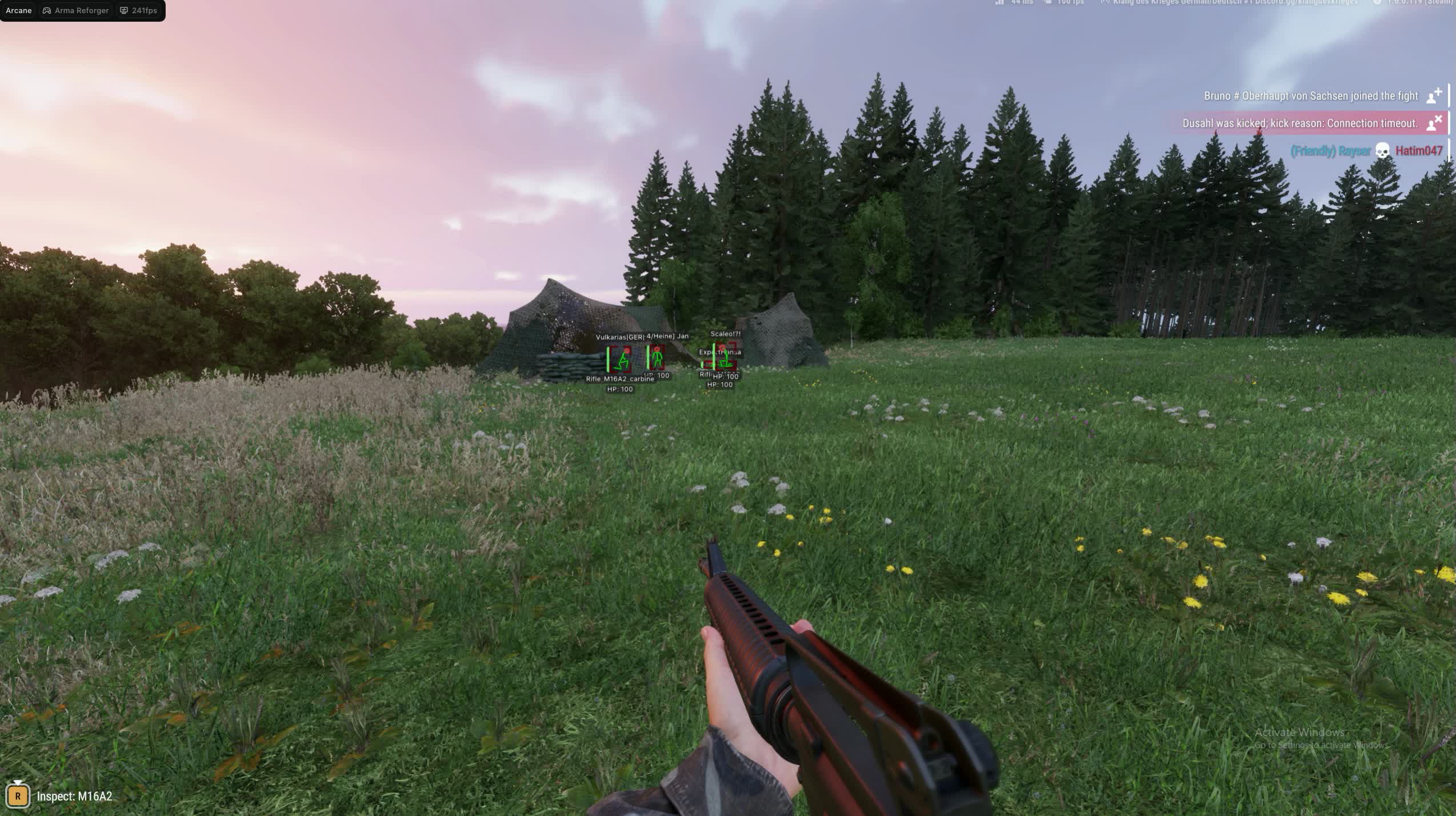
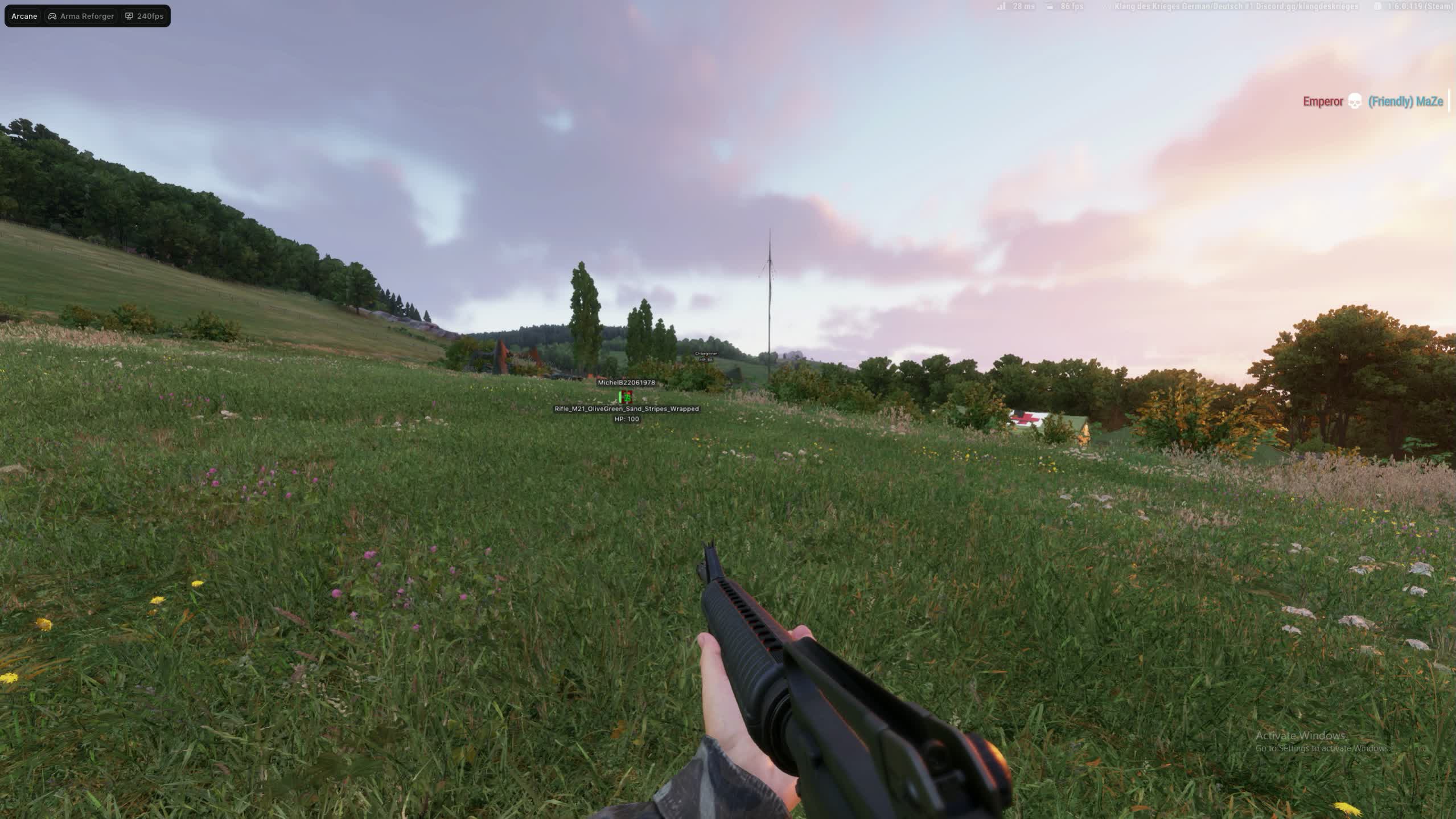
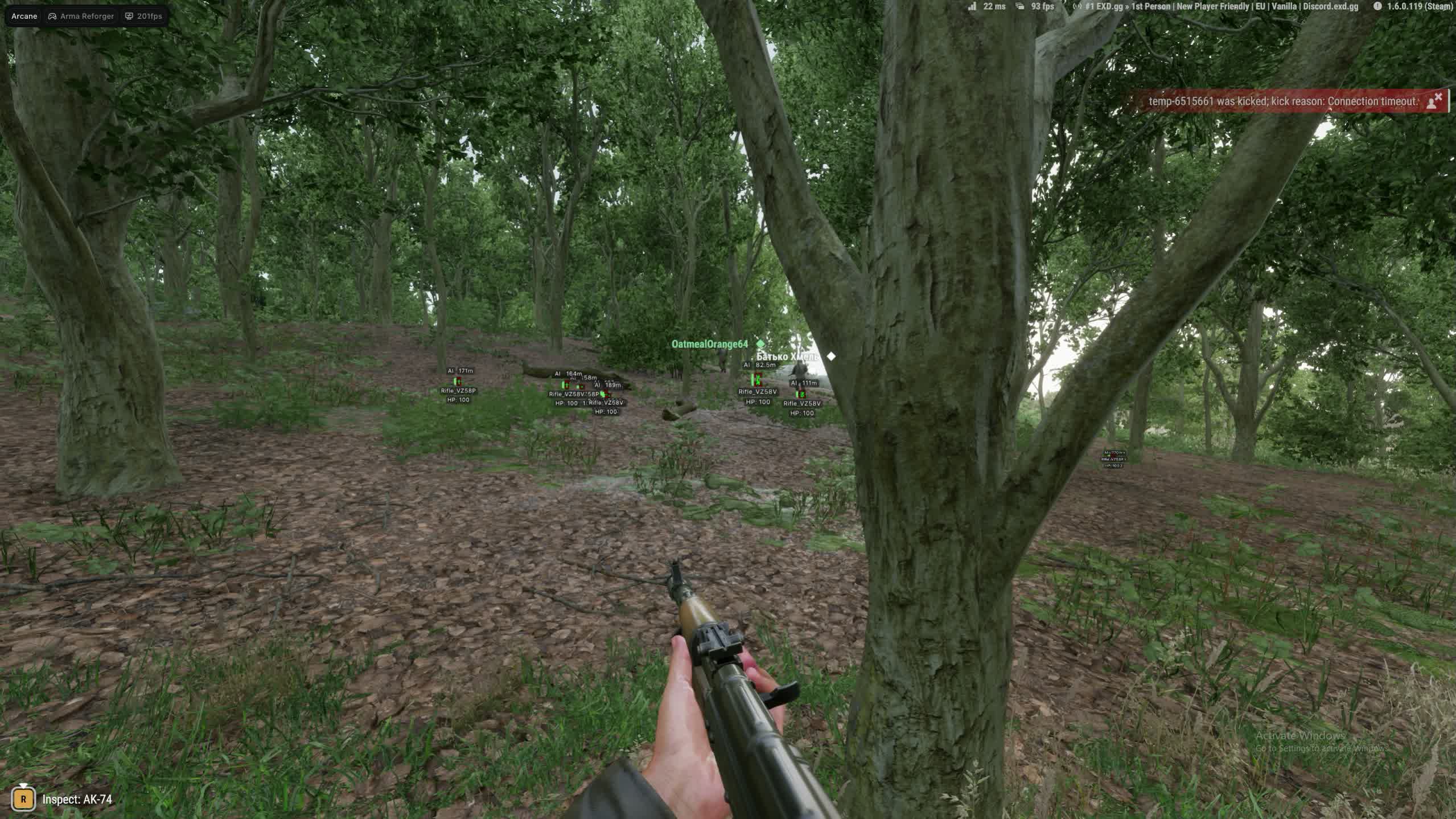
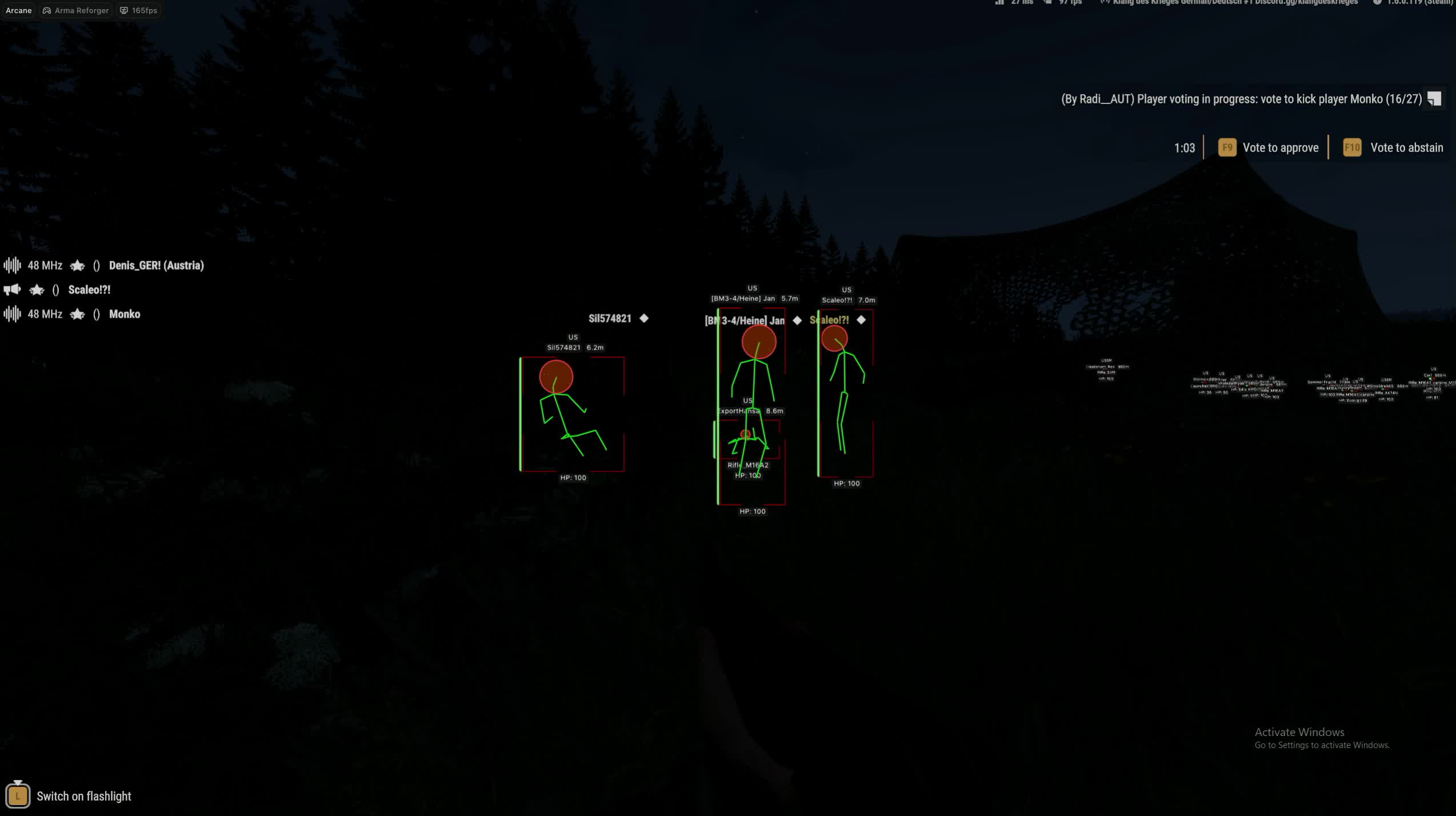
A firefight on the outskirts of the Everon forest - you're pinned behind the wall of a ruined house, the enemy somewhere in the bushes two hundred meters out. Without visual info you're guessing: is he behind the tree on the left or has he moved up to the road. Arcane for Arma Reforger removes that uncertainty: ESP highlights every player on the map with their name, weapon and health bar, while Aimbot brings your aim to the selected bone with adjustable smoothness. The external architecture runs as a separate process outside of Arma Reforger.

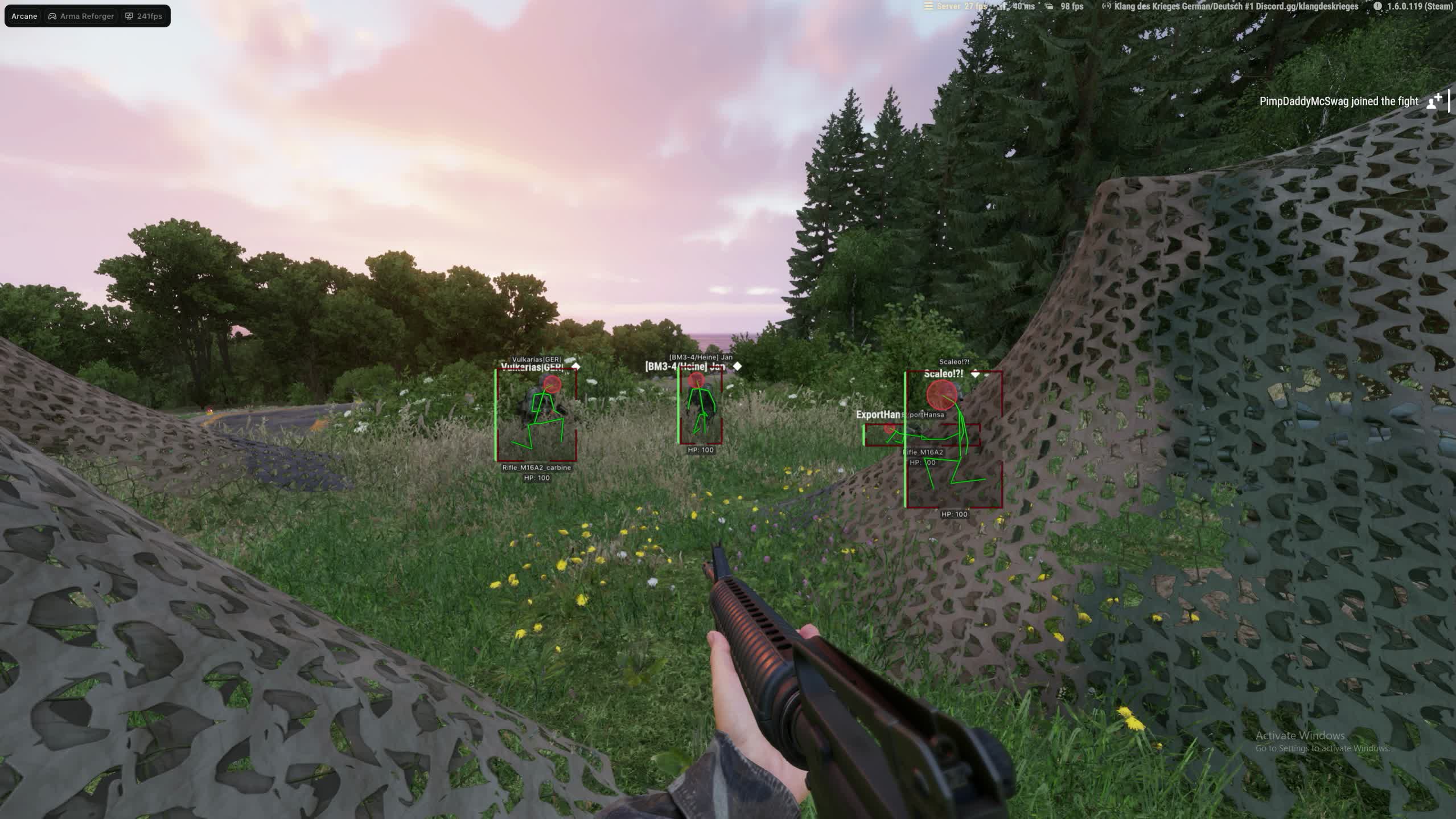
Arcane covers both basic and advanced features for a tactical edge in Reforger. ESP draws boxes, skeletons and lines to enemies with flexible style settings - from minimalist corner frames to full boxes with gradient backgrounds. Aimbot supports target bone selection and two operating modes: hold-to-aim or always-on. The interface is available in three languages and the config system saves all settings as separate presets.

Product features

Aimbot

Keybind

Assign the aimbot activation key to any button you want. Change the binding inside the cheat menu to whatever fits your playstyle and keybinds.

Target bone

Choose the aim bone: head, neck, body or pelvis. At long range in Arma Reforger aiming at the torso makes more sense due to bullet spread; up close, a headshot is an instant kill.

Type

Two aimbot modes: hold the assigned key or always-on. Hold mode gives you control over every aim engagement; always-on automatically tracks the nearest target.

Adaptive FOV

An adaptive capture circle - the aimbot only reacts to enemies inside the defined screen area. Adjust the FOV size with the slider to avoid accidentally locking onto targets at the edge of your screen.

Draw FOV

Visual display of the FOV circle on screen with an optional border and background. Helps you see the aimbot capture zone in real time and dial in a comfortable size for your playstyle.

Smoothness

Set aim smoothness from a hard snap to a soft follow. Higher smoothness values make the crosshair movement look natural; lower values are instant but more noticeable to the eye.

Max distance

Cap the maximum distance at which the aimbot locks targets. On the open maps of Arma Reforger distances can reach a kilometer - the cap cuts off targets that are too far to hit reliably.

ESP players

ESP Style

Two display styles: with a background for maximum readability on any terrain, or without a background for minimal visual noise. Toggle it with one click in the cheat menu.

Bounding box

A 2D box around every player in two variants: full box or corner frames. Corner frames take up less screen space and don't cover the enemy model in close-quarters fights.

Fill box

Box background fill: solid color or gradient. The gradient variant visually separates the box from the environment on forest and urban maps where a flat background blends with textures.

Line to enemy

Lines from your character to each enemy with color and anchor point settings. On open fields in Reforger the lines instantly show the direction of a threat even when the enemy is behind cover.

Health bar

A health bar above each player in three modes: static, color-changes-with-HP and gradient. You see how much HP the enemy has left - you know whether to push for the kill or back off from a full-health target.

Skeleton

Draws the player skeleton with adjustable line thickness and a head circle. The skeleton shows the enemy's pose behind cover: standing, crouching or prone - which affects where you should aim.

Name & Team

Displays the player's name and team name. In the team modes of Arma Reforger the Show team option additionally highlights allies - stops you from shooting your own squad in chaotic firefights.

Current weapon

Shows the weapon each player is holding. See that the enemy has a sniper rifle - you know his effective range. An assault rifle means close range, a grenade launcher means you keep your distance.

Distance

Distance to each player in meters. On the large maps of Reforger distance determines your tactic: 50 meters is an assault, 300 meters means you need a firing position and optics. The number updates in real time.

Settings

Menu keybind

Assign the key that opens the cheat menu. The default is a standard button, but you can remap it to anything so it doesn't conflict with your Arma Reforger binds.

Unload keybind

One key to instantly unload the cheat from memory. One press and Arcane fully shuts down - all visual elements disappear and the game returns to its normal state.

DPI Scale

Scales the cheat interface to match your monitor resolution and DPI. On 4K monitors the menu elements won't be tiny; on 1080p they won't take up half the screen.

FPS Limit

Cap the cheat's frame rate to reduce system load. Arma Reforger is demanding on hardware - limiting the cheat's FPS frees up resources for the game itself.

Theme & Language

Dark and light interface themes, three languages: English, Russian and Chinese. The watermark is optional - turn it off when recording or streaming.

Configs

Config system

Create, load, rename and delete setting presets. One config for aggressive assaults with snap aimbot and full boxes, another for a low-profile playstyle with minimal ESP and smooth aim tracking. Switch between them in a couple of seconds.
TARIFFS
5$

Subscribe to learn when this product is updated.

Got a question? Ask before you pay

We'll help you choose and sort out any launch issue. Ask us anything before buying, we're always on your side.

Support 10:00–22:00, sometimes we reply at night too
Ask a question

Available tariffs

1 day
5 $
SUBSCRIBE
7 days
22 $
SUBSCRIBE
30 days
40 $
SUBSCRIBE
Reviews about Arma Reforger Arcane

No reviews yet. Be the first to leave one.

Your review

Reviews are published after moderation.

Join our gaming community chat

Discuss current cheats from developers and how to use them effectively in popular online games. Share tactics, exchange useful info and find like-minded players in our community.

1 900+Members
24/7Online
Join our gaming community chat

Technical support

Run into a technical issue? Our team of experts will help. We handle all requests in a live queue, so please be understanding if it sometimes takes a little wait. We guarantee that no request goes unanswered.

Availabilityfrom 10:00 to 23:00
Fast responseIn queue order
Get help
Technical support
PROCHEAT

PROCHEAT news channel

Follow product status changes, update history and important announcements.

Subscribe

Aimbot Arcane for Arma Reforger - setup for your playstyle

Aimbot in Arma Reforger works differently than in fast-paced shooters - there's real ballistics, long distances and bullet spread while moving. Arcane accounts for this through flexible settings: target bone selection lets you aim at the head at close range and at the torso at distance, where spread makes headshots unreliable. Aim smoothness is adjustable from an instant snap to a soft follow, and adaptive FOV prevents accidentally locking onto a target behind you when there's a priority enemy in front.

ESP players Arcane - full visual picture of the fight

In Arma Reforger a single engagement can stretch into twenty minutes of shooting through a tree line where you can't see the enemy. ESP Arcane draws every player on the map: the box shows position, the skeleton shows their pose behind cover, the health bar shows their condition. Lines to enemies instantly point out the direction of a threat even without line of sight. Two display styles let you switch between an information-heavy mode with background and a minimalist one without it.

Skeletons and boxes in Arcane - why ESP customization matters

Different situations in Reforger need different amounts of information on screen. Storming urban buildings - full boxes with name, weapon and HP give you the full picture: who's behind the wall, what they're carrying, how much health they have left. On open terrain that same set clutters the screen - corner frames and distance are enough. Arcane lets you build two configs and switch between them without manually adjusting every individual setting.

Config system Arcane - presets for different tasks

In Arcane every set of settings saves as a separate config with a custom name. This isn't just a cosmetic feature - in practice players use at least two presets: an aggressive one for assault operations with maximum ESP and fast aimbot, and a low-profile one with minimal visual elements and smooth aim tracking. Switching between configs takes a couple of seconds through the cheat menu, no need to manually adjust twenty parameters by hand.

FOV setup in Arcane - controlling the capture zone

The FOV circle size determines what area of your screen the aimbot uses to lock targets. Too large and the aim jerks toward every enemy in your field of view, including ones you weren't targeting. Too small and you have to almost aim manually before the aimbot picks up the target. Arcane visualizes the FOV boundary directly on screen with a circle and optional background, so you can dial in the right capture zone size for the specific situation and engagement distance.

Health bar and distance in Arcane - making decisions mid-fight

The enemy's health bar changes your tactics in real time. You see the enemy is at fifteen percent HP - you switch to finishing him off instead of trading shots with a full-health target. Three Health bar display modes suit different preferences: static color for minimal attention overhead, dynamic color that changes with HP, gradient for quick visual reads. Distance in meters updates in real time and determines whether you push or hold your position.

Ask a question


