ABI Web Radar by Byster: Arena Breakout Infinite Radar for PC, Phone and Tablet

Working
Byster Byster
Last update 17.08.2026 This date shows when the software was last updated. An old date doesn't mean the software stopped working! Most likely the developer just had nothing new to add. If you have any doubts, you can always check the current status with our support team.
Add another cheat from this game too — to compare them.
ABI Web Radar Byster
Steam
Official
Windows support: 10: all builds; 11: 21h2, 22h2, 23h2, 24h2, 25h2, 26h2
Menu language: Russian, English
Spoofer:No
USB drive:No
BIOS:No

User information

There is nothing to install. The radar opens as a page in a browser through the link that arrives after payment: any current browser will do, and Windows 10 and Windows 11 are both fine. No drivers and no admin rights. Byster lists supported Windows builds from 21h2 to 26h2, AMD and Intel CPUs, AMD and NVIDIA graphics. It works both with the official game launcher and with the Steam version.

You do not have to drop the game into windowed mode: fullscreen ABI is fine, because the map lives in its own window or on a different device entirely. No spoofer is bundled, this is a pure radar with no hardware masking module. If your account has already collected restrictions, you will need a spoofer separately.

The radar link and login details go out by mail to the address you type during payment. ProCheat keeps no buyer dashboard, so a typo in that address costs you time: read it twice, and look into the spam folder if the letter is slow. The last update date and the software status sit on the product card, and that is where you check whether the radar went in for fixes after an ABI patch.

SCREENSHOTS
Description

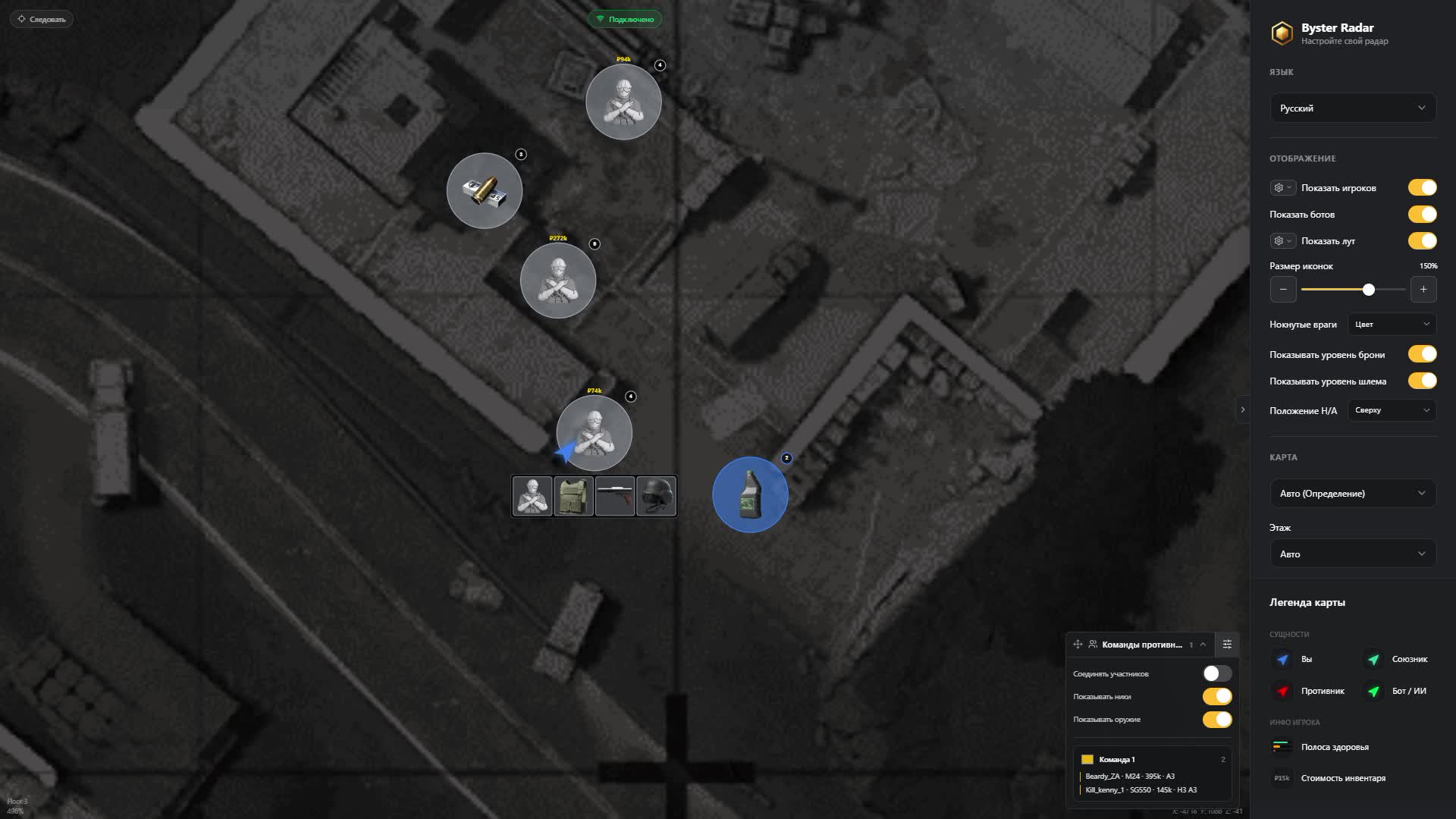
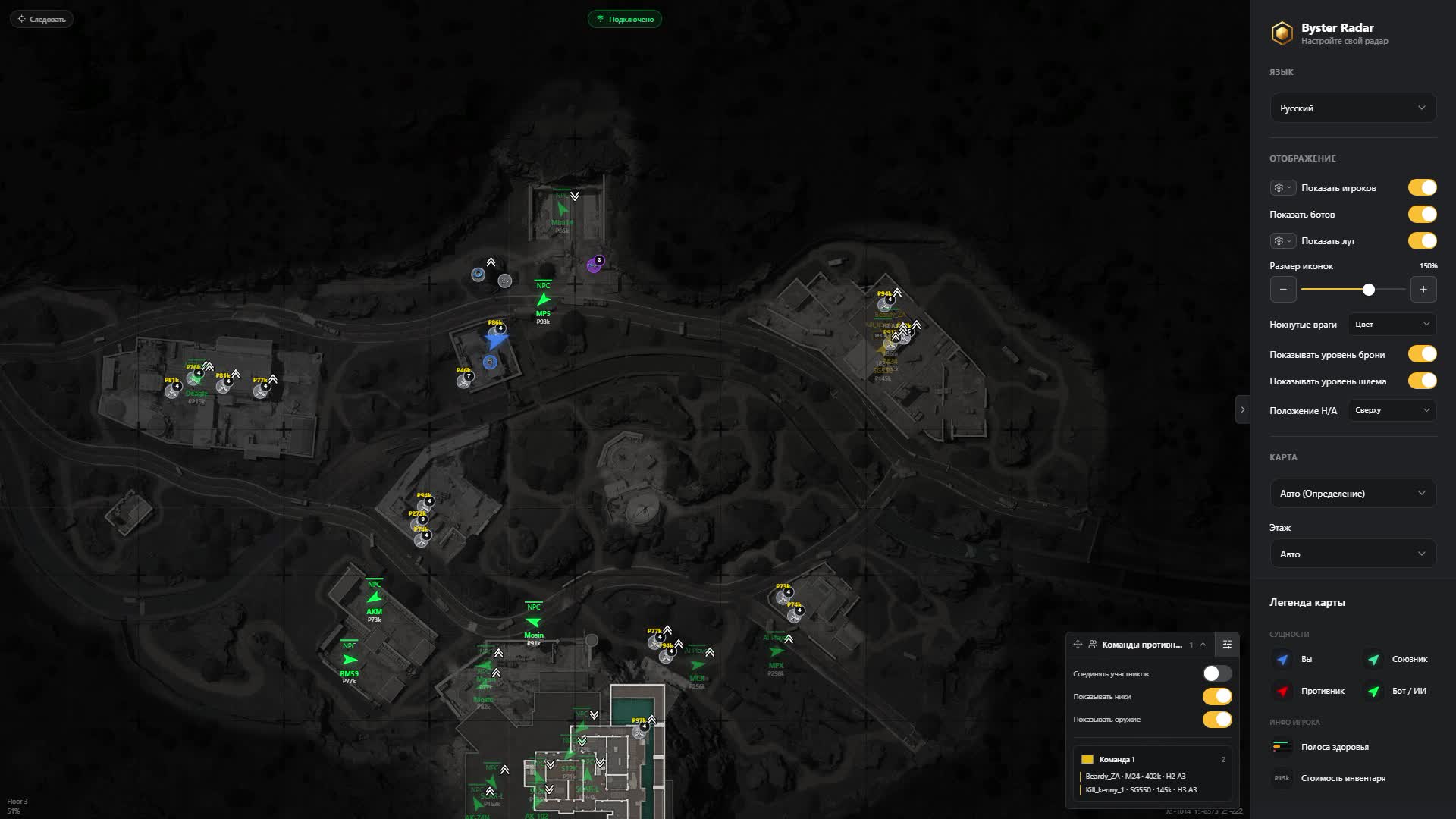
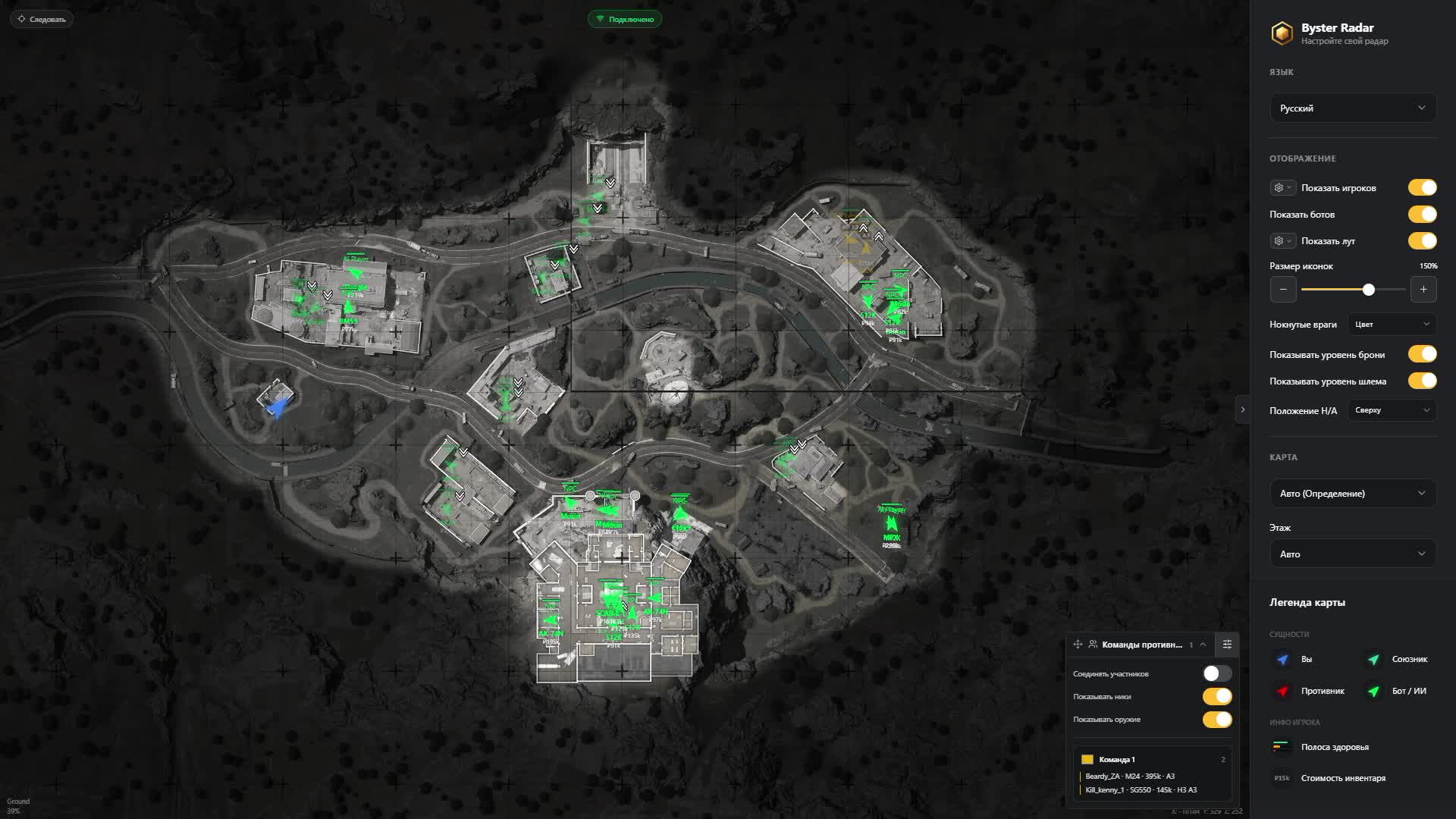
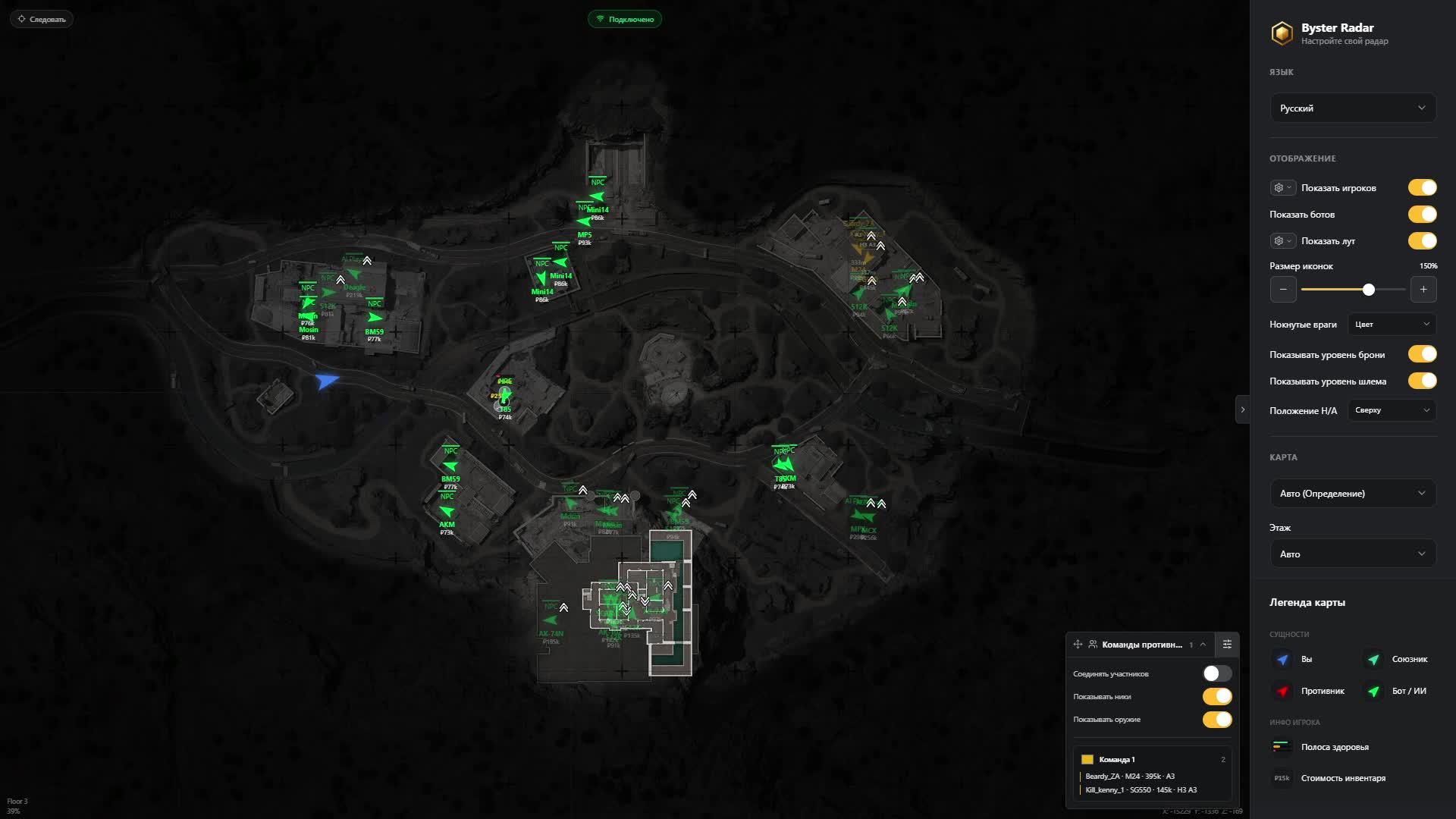
ABI Web Radar by Byster puts an Arena Breakout Infinite raid on an interactive map: where the enemies stand, where your squad went, what sits inside the containers and how much it is worth. The radar opens as a link in a browser, so you can keep it on a second monitor, on a phone next to the keyboard or on a tablet. Your game screen stays clean, without a single extra label drawn over it.

Inside you get six ABI locations split by floors, player markers with HP, weapon, helmet, armor and inventory value, separate layers for bots and AI Players, and loot sorted into six rarity tiers with a price filter. Perspective is where Byster goes a step further: you can watch the map through a chosen teammate, and then distances and the floor are counted from his position. Below we walk through the map, the markers, the squad tools, loot and the look of it.

Product features

Map

Six ABI locations

Farm, Valley, Armory, Terminal, Northridge and TV Station. Drop into a raid and the radar opens the right map, or pick it by hand.

Floors and levels

The floor is detected automatically or switched manually. Indicators tell you who is above you and who is under the floor.

Zoom and panning

Wheel and mouse on a PC, pinch and finger on a phone. Your zoom is remembered and does not reset when the map changes.

Follow mode

The map travels with your character and keeps him centered, so you are not dragging the view mid-run.

Shared map

The radar link can go to your squad so everyone reads the same picture of the raid.

Players and bots

Enemy markers

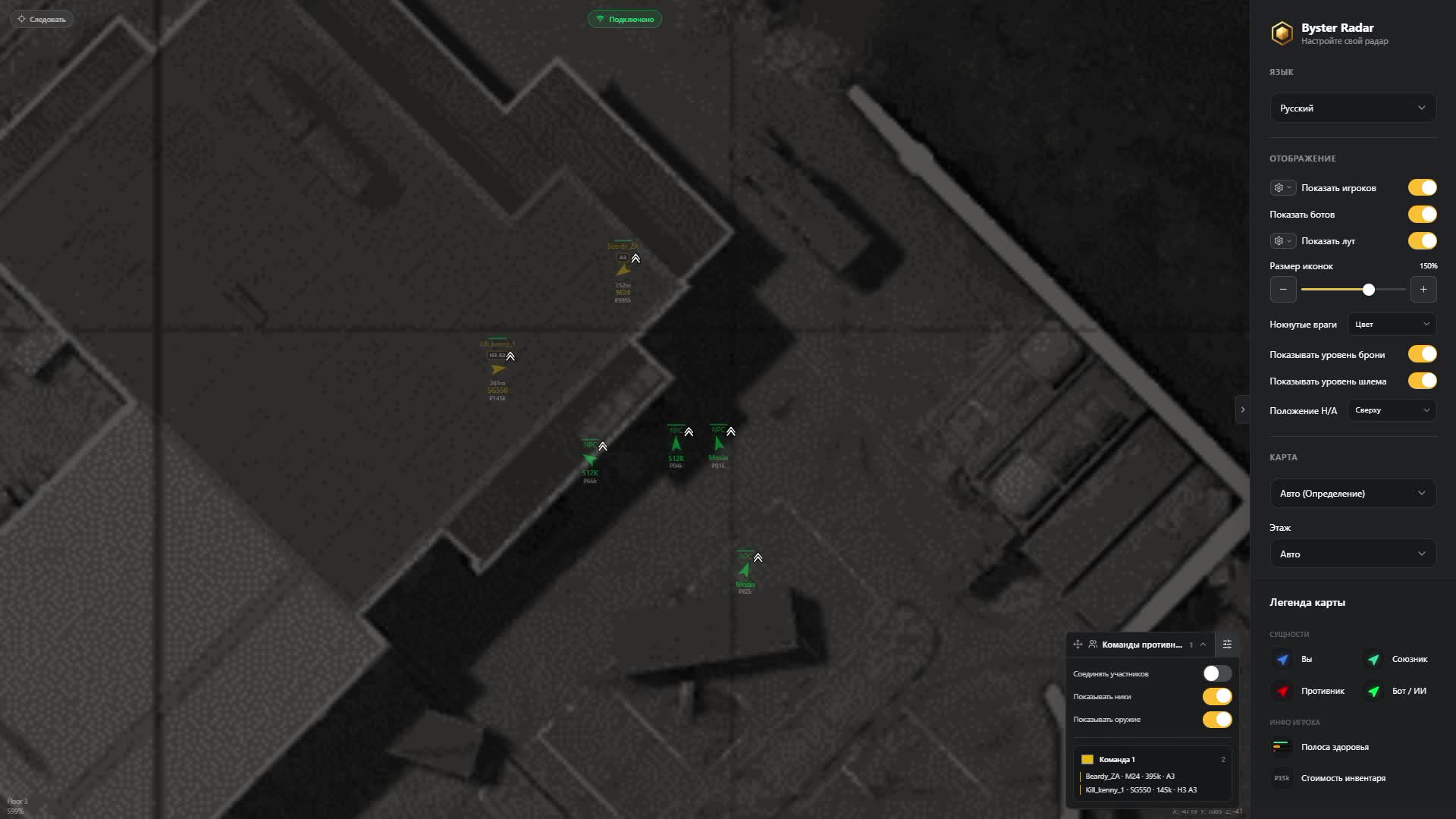
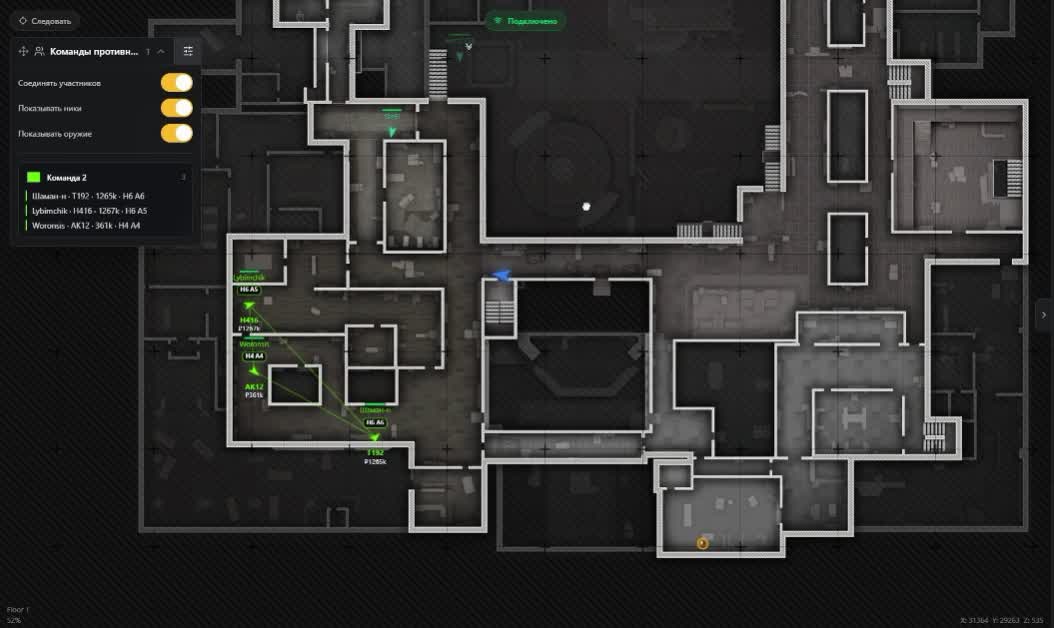
Every enemy with nickname, Team ID and range to you. You know at once whether one guy is pushing or a full squad.

Bots and AI Players

Regular NPCs and AI Players sit on separate layers, so a fake human never passes for a live opponent.

Target health

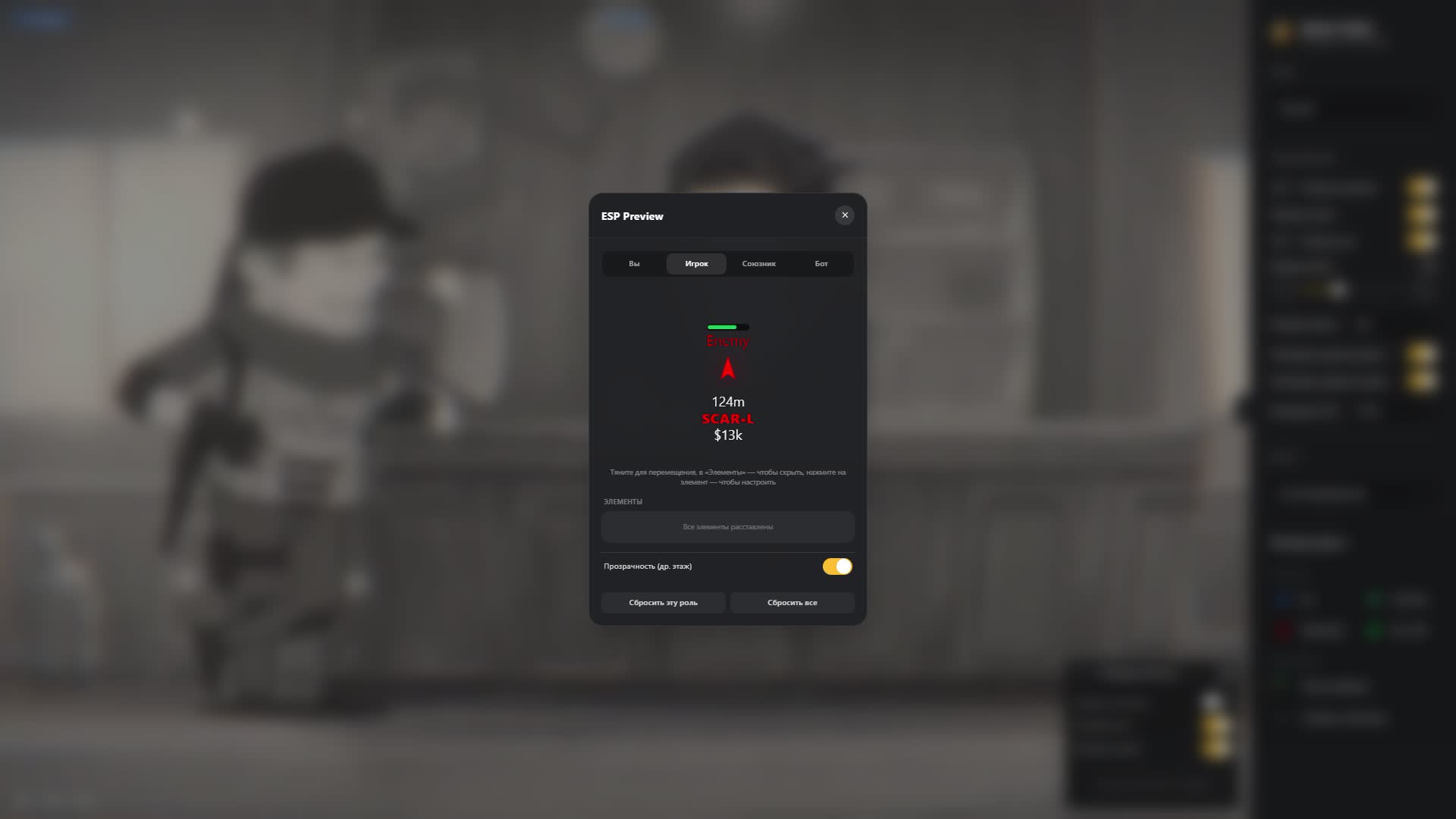
Current and maximum HP on the marker. You see who walked out of a fight beaten up and who came in fresh.

Alive, knocked, dead

Knocked targets can be marked by color, by text or by both. The map is enough to decide: finish them or walk around.

Weapon and protection

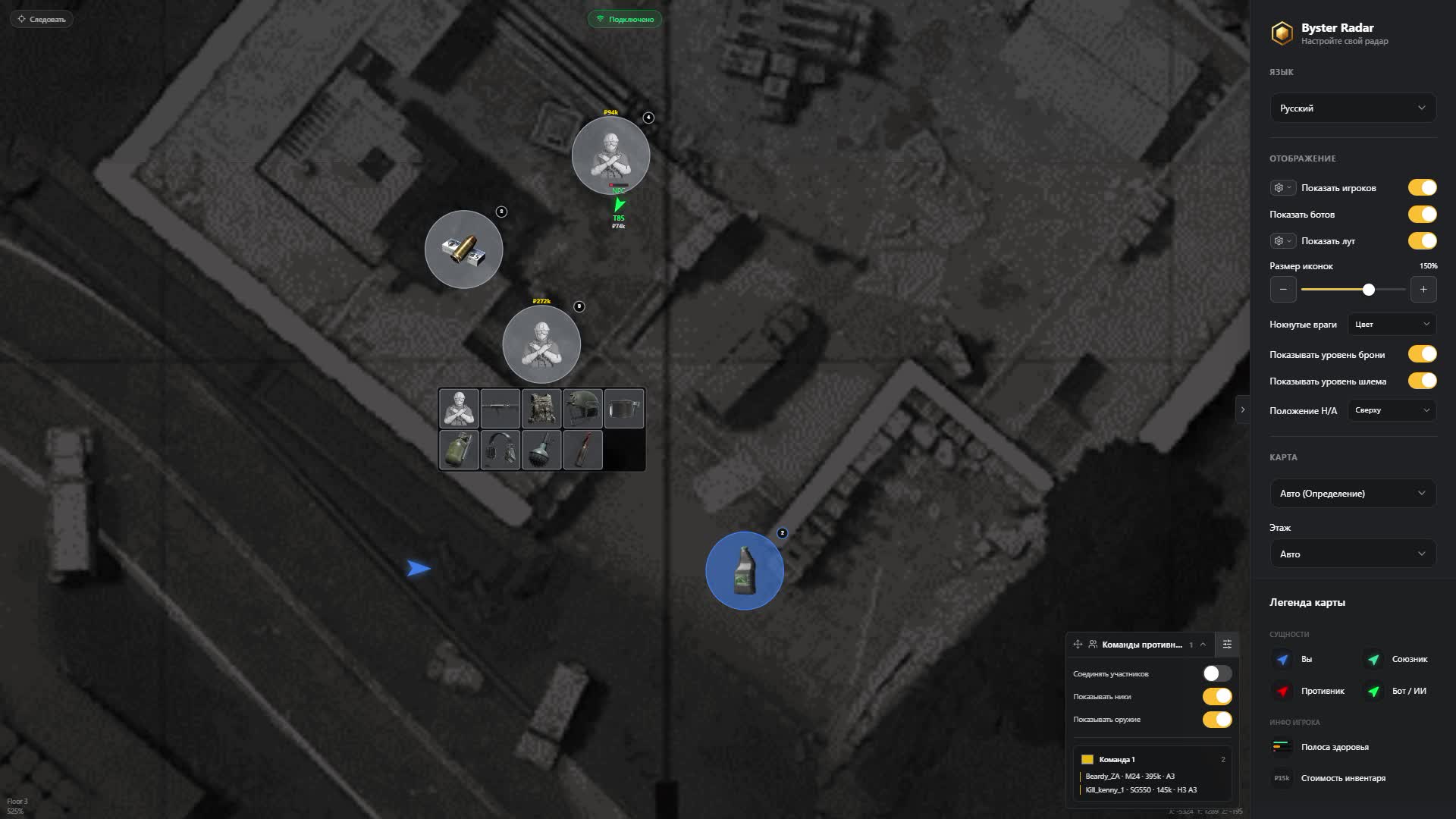
What the target holds and which helmet and armor tier he wears. That is enough to take the fight or skip it.

Inventory value

The sum a player carries sits next to his nickname. You hunt the rich runs instead of guessing.

Facing direction

Where the enemy is looking right now. You can tell whether he is tracking you or you can slip around the flank.

Teams

Grouping by Team ID

The radar collects enemies into squads on its own and paints each one its own color. Colors can be set by hand.

Squad lines

Members of one group are joined by lines, so a runner who fell behind or swung wide is obvious at a glance.

Member card

For each member of a group you see nickname, weapon, helmet, armor and inventory value.

Settings panel

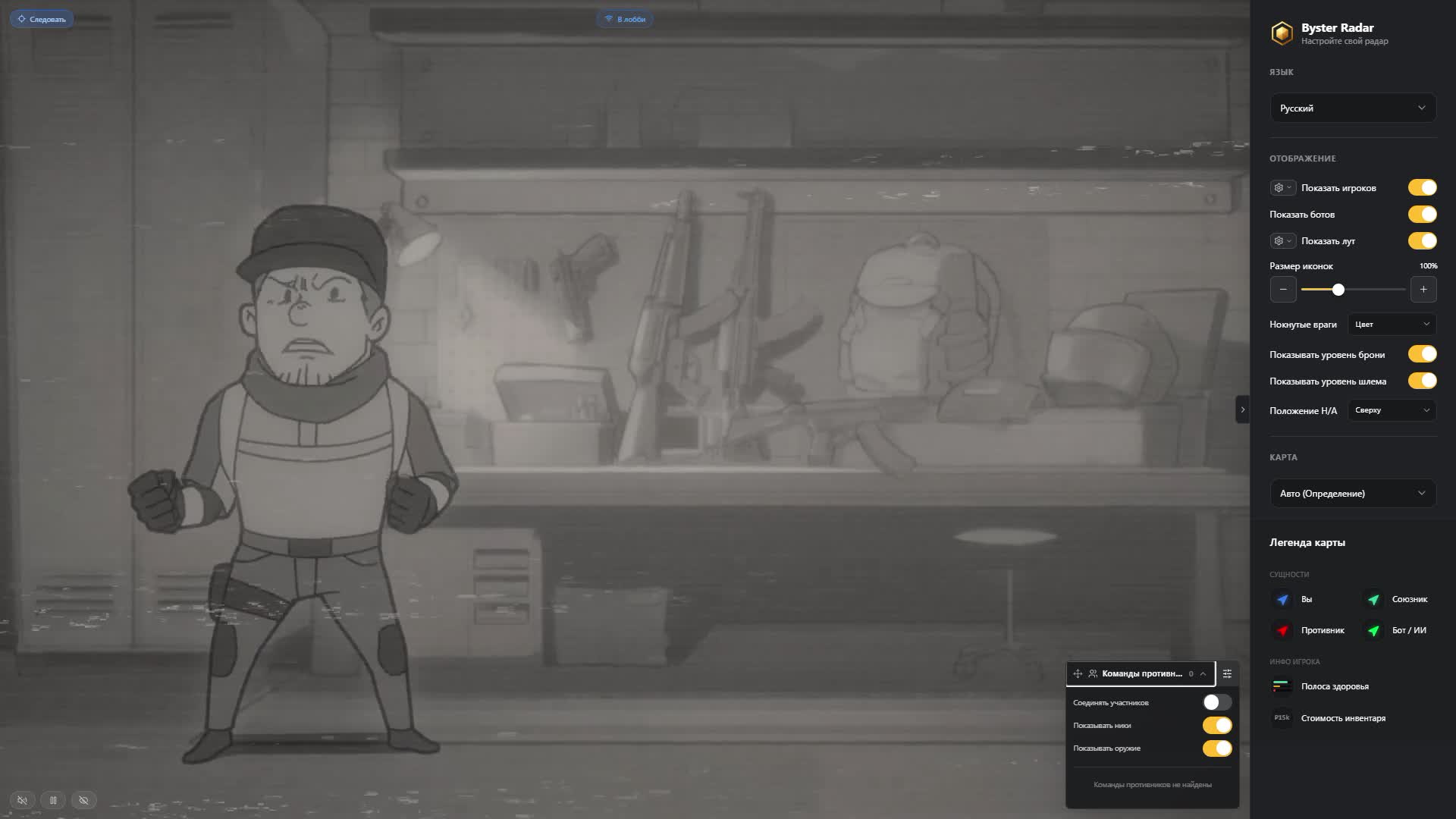
Compact, collapsible and movable into any of the four screen corners so it never covers the map.

Perspective

Teammate view

Switch the radar to an ally and read the raid through his eyes. Handy when he enters an unfamiliar building first.

Pick by marker

A teammate is chosen by clicking his marker, and you can jump back to your own character any time.

Recount from the ally

Distances and floor are measured from the chosen player, and follow mode moves to his marker too.

Choice is remembered

The selected ally carries over between matches, so there is nothing to set up again next raid.

Loot

Ground items

Name, icon, quantity and price. You know what is lying in a room before you step into it.

Six rarity tiers

Every tier has its own color, so the expensive stuff reads with peripheral vision.

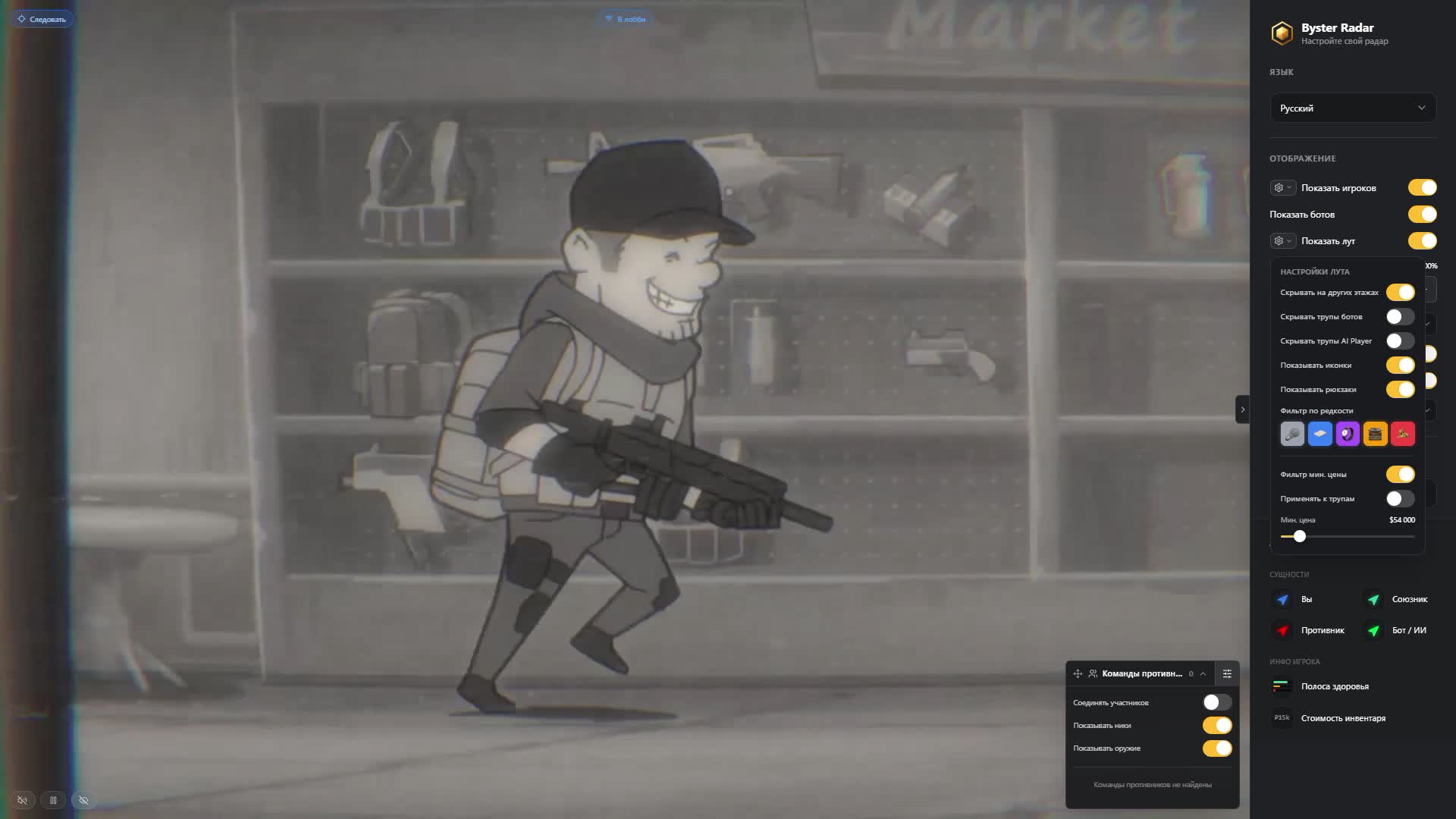
Price and rarity filters

Set a minimum value and the tiers you care about, everything else never reaches the map.

Backpacks apart

Ground backpacks show up past the rarity filter, while the ones inside corpses are kept out of that list.

Containers with contents

Crates are marked together with what is inside. You run to one container instead of checking them all.

Corpses and their loot

Bodies of players, regular bots and AI Players with contents. Bot and AI Player corpses hide separately.

Corpse value filter

A body shows only when it holds more than the sum you set. Empty ones stop cluttering the map.

Hide other floors

Loot from other levels leaves the map so your own floor stays readable.

Display

Four sets of colors

Your character, allies, enemies and bots are colored separately to match the scheme you are used to.

Element sizes

Markers, font and the health bar run on sliders. Bigger on a phone, smaller on a wide monitor.

Helmet and armor labels

Protection indicators go above, below, left or right of the marker, whichever reads faster.

Other-floor opacity

Players and bots on other levels dim down without disappearing from the map.

PC, phone, tablet

The same radar opens on all three screens and the interface fits itself to the width.
TARIFFS
459
BUY What happens after payment?
Got a question? Ask before you pay

We'll help you choose and sort out any launch issue. Ask us anything before buying, we're always on your side.

Support 10:00–22:00, sometimes we reply at night too
Ask a question

Available tariffs

1 day
459
START PURCHASE
7 days
1900
START PURCHASE
30 days
3900
START PURCHASE
Reviews about ABI Web Radar Byster

No reviews yet. Be the first to leave one.

Your review

Reviews are published after moderation.

Join our gaming community chat

Discuss current cheats from developers and how to use them effectively in popular online games. Share tactics, exchange useful info and find like-minded players in our community.

1 900+Members
24/7Online
Join our gaming community chat

Technical support

Run into a technical issue? Our team of experts will help. We handle all requests in a live queue, so please be understanding if it sometimes takes a little wait. We guarantee that no request goes unanswered.

Availabilityfrom 10:00 to 23:00
Fast responseIn queue order
Get help
Technical support
PROCHEAT

PROCHEAT news channel

Follow product status changes, update history and important announcements.

Subscribe

What ABI Web Radar Is Made Of

The radar settings are split into six sections, and each one owns its own layer of the map. Here is what lives where and why it matters in a raid.

Section What you set Why it matters
Map six locations, floors, zoom, follow mode, sharing the picture adapts to the run on its own
Players and bots nickname, Team ID, HP, weapon, helmet, armor, inventory value, range you judge a target before contact
Teams Team ID groups, colors, lines, settings panel you see a full squad versus a lone runner
Perspective teammate view, floor and distance recount you read the map through whoever leads
Loot price, six rarity tiers, containers, corpses, backpacks you go for value instead of every crate
Display colors, sizes, protection labels, floor opacity the map reads on a phone and on a monitor

The Raid Map: Six Locations and Floors

The radar knows six Arena Breakout Infinite maps: Farm, Valley, Armory, Terminal, Northridge and TV Station. The location is picked up automatically, but the switch is still there, so you can open another map and study the approaches in advance. The floor is detected too, and indicators next to markers tell you whether an enemy is above you or under the floor. In TV Station and Terminal that decides half the fights: you hear steps, know they come from the level above, and hold the stairwell instead of spinning around the room.

Controls are built for both kinds of screens. On a PC you drag the map with the mouse and zoom with the wheel, on a phone a finger and pinch do the job. The zoom level is remembered, so changing locations does not throw you back to the wide view. Follow mode keeps your character centered and scrolls the map while you run. The map link can go to your squad, and then everyone reads the same picture of the raid.

Players, Bots and AI Players on One Map

A live player marker in ABI is built from useful details: nickname, Team ID, range, current and maximum HP, the weapon in hand, helmet and armor tier, inventory value. That set lets you make the call in a second. A tier six helmet and an expensive carbine mean a head-on push is a bad idea, while a wounded guy with a pistol and a full backpack is money waiting to be taken. Facing direction adds the last piece: he is already tracking you, or you can slip behind the corner.

The radar also keeps regular bots apart from AI Players. In ABI those are different problems: an NPC makes noise and shoots predictably, while a player imitation behaves differently and passes for a human easily. On the map they sit on separate layers, so nothing gets mixed up. Target state is labeled alive, knocked or dead, and knocked ones can be marked by color, by text or by both at once. That helps when an enemy gets picked up behind your back: the map tells you whether to turn around and finish him or run for extraction.

Team ID Groups and the Teammate View

Enemies are grouped by Team ID automatically, and each group gets its own color. Colors can be changed by hand if you prefer a different scheme. Lines are drawn between members, so the map shows the formation: two hold the point, a third went around, a fourth is still walking back from the spawn. For each member you get nickname, weapon, helmet, armor and inventory value. That layout tells you in advance who carries the money and who to drop first.

The second strong part is perspective: you can watch through a teammate. Click his marker and the map moves to him, distances and floor are counted from his position, and follow mode latches onto his marker too. The choice is remembered between matches and you can return to yourself any time. The setup works when one player enters first while the other sits on the radar and calls what waits behind the door. The settings panel folds away and moves to any corner so it never covers the map.

Loot: Rarity, Price, Containers and Corpses

Loot is the point of a raid in ABI, so this is where the radar has the most settings. Ground items carry a name, icon, quantity and price, and rarity is split into six tiers with their own colors. On top of that come two filters: minimum value and tier. Set a threshold and the junk on the floor never reaches the map. Ground backpacks bypass the rarity filter, while backpacks inside corpses are kept out of that list so one does not stand in for the other.

Containers are marked together with their contents, so you plan a route around specific crates instead of all of them. Corpses come in three kinds: players, regular bots and AI Players. Contents are visible, bot and AI Player bodies hide separately, and a total value filter clears the empty ones off the map. When you work one floor, loot from other levels hides with a single switch. In the packed buildings of Northridge that is the only way to keep the map readable.

A Browser Radar and the ACE Anti-Cheat

Fair play in ABI is policed by ACE, and that is the main argument for a web radar. Nothing loads into the game client, nothing is drawn over the picture, the raid window stays clean. The map lives on a phone or on the monitor next to you, so screen sharing in Discord and streaming never give the software away. No spoofer is bundled, and the spec sheet says so plainly: if the account already carries restrictions, this radar will not lift them.

The rest depends on how you play. If every raid you run straight across half the map to an enemy squad and crack the right container on the first try, the questions come from live players rather than from ACE. Reports for suspicious behavior did not go anywhere. A calm pace, ordinary routes and sensible greed keep an account alive far better than any software.

How to Buy ABI Web Radar

The plans sit in the tariff block on this page: a day, a week and a month. People take the day to see how the radar behaves on their own map and their own phone. The week fits a run of sessions on one location, the month fits steady farming. Payment goes through Digiseller with the usual methods: cards, SBP and e-wallets.

Once a payment clears, the link and login details land in your mailbox, so read the address twice before you send it. Mail is the only delivery channel here, with no dashboard to sign into. Check the software status on this page as well: if Byster pulled the radar for an update after an ABI patch, waiting for the unfreeze is the better move. Any questions left about launching or compatibility, message support before buying.

FAQ

Do I need to install anything on my PC?

No. The radar opens as a link in a browser on Windows 10 or 11, with no install and no admin rights. It works the same from a phone or a tablet.

Does ABI Web Radar have an aimbot or in-game ESP?

No, this is a map only. No aim assistance and no highlights in the game window: all the information stays in the browser, and shooting and movement are entirely on you.

Which ABI locations can the radar draw?

Farm, Valley, Armory, Terminal, Northridge and TV Station. Location and floor are detected automatically and can be switched by hand.

Can I play in fullscreen?

Yes. The radar is not tied to the game window, so windowed mode is unnecessary. People keep the map on a second monitor, a phone or a tablet.

How does the teammate view work?

You pick an ally by clicking his marker, and the radar counts distances and floor from him. The choice carries over between matches and you can return to your own character any time.

How do I keep the map from turning into mush?

Set a minimum loot price and the rarity tiers you want, hide items on other floors, switch off bot corpses. Only what is worth walking to stays on the map.

Is a spoofer included?

No. Byster ships a clean radar with no hardware masking module. If your hardware already carries restrictions, a spoofer is bought as a separate product.

Where does access arrive after payment?

By mail, to the address given during the purchase. Delivery runs through mail only, so verify the address and glance at the spam folder if nothing shows up.

from 459 ₽ Choose a plan
Ask a question


