несколько месяцев юзаю этот чит. Плюсы: за это время давал много фидбека разрабам, отклик есть, ребята стараются. Апдейты выходят регулярно, функционал дошлифовывается для лучшей игры. Реально много функций, и самое главное - есть возможность тонко настроить аимасист, что очень важно для тех, кто не хочет словить бан. Минусы? Для меня один - у меня не всегда стабильный инжект, и довольно сложная система запуска. Это не так критично. Можно было бы сказать, что тут нет предика, норекойла, но я скорей отнес бы это к плюсам. Ну и как вы хотели за среднюю цену функционал максимального уровня? Тут кто-то писал про бан - да, ребят, если вы поставить смуф ниже порога обнаружения античита, то потом не удивляйтесь. Понятие легинтной игры никто не отменял. Кто новенький в теме - лучше хорошенько подготовиться, иначе у вас отлелит несколько аккаунтов, прежде чем вы все таки поймете как надо играть с читами, и какие настройки лучше не трогать. ----------- Итог: хороший чит от хороших разработчиков. Думаю он станет еще лучше - работа идет, я это вижу.
APEX Covcheg: private software for Apex Legends
 Covcheg

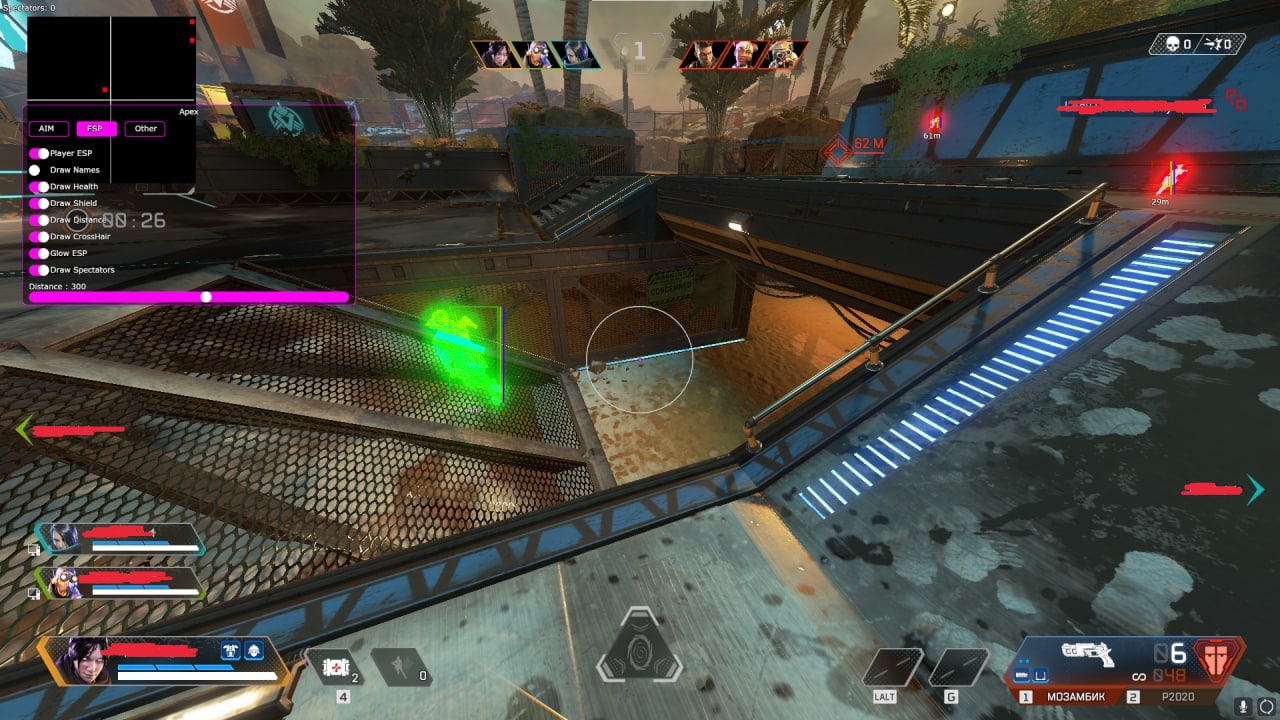
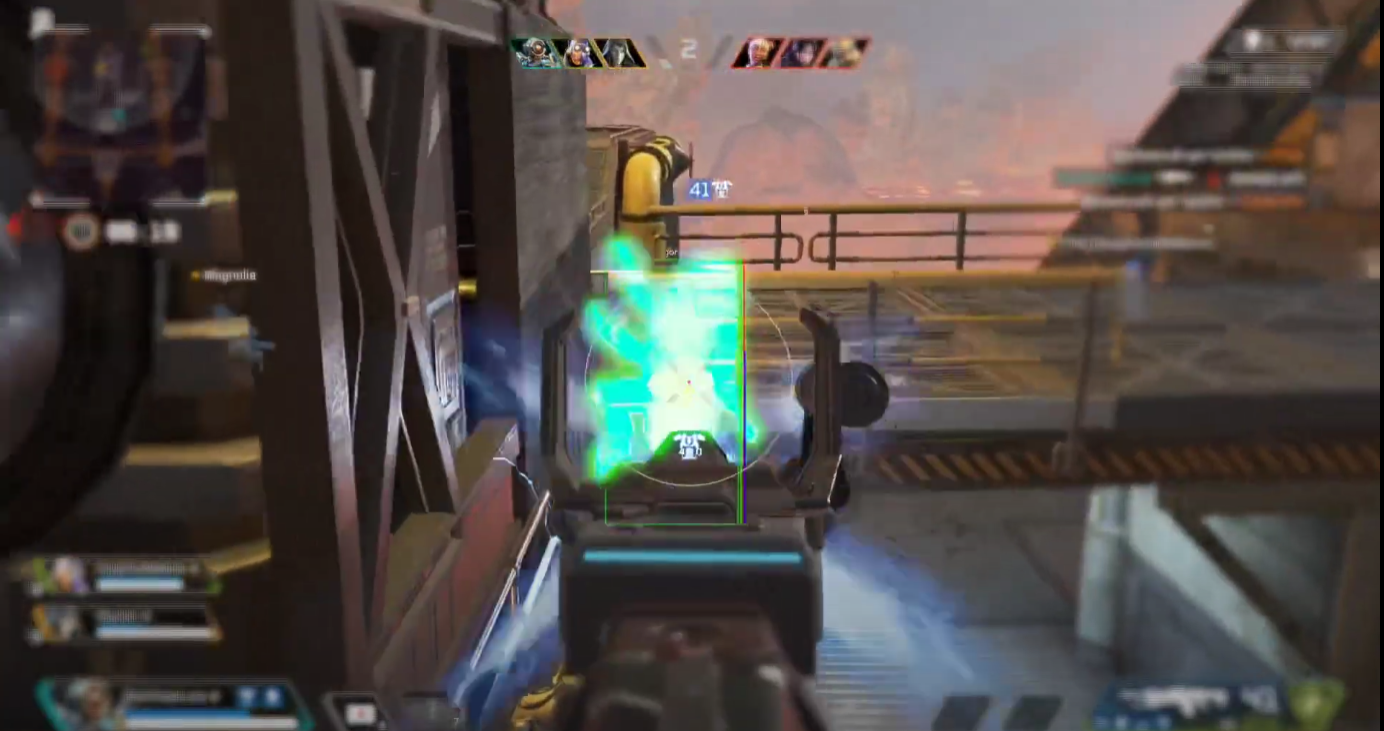
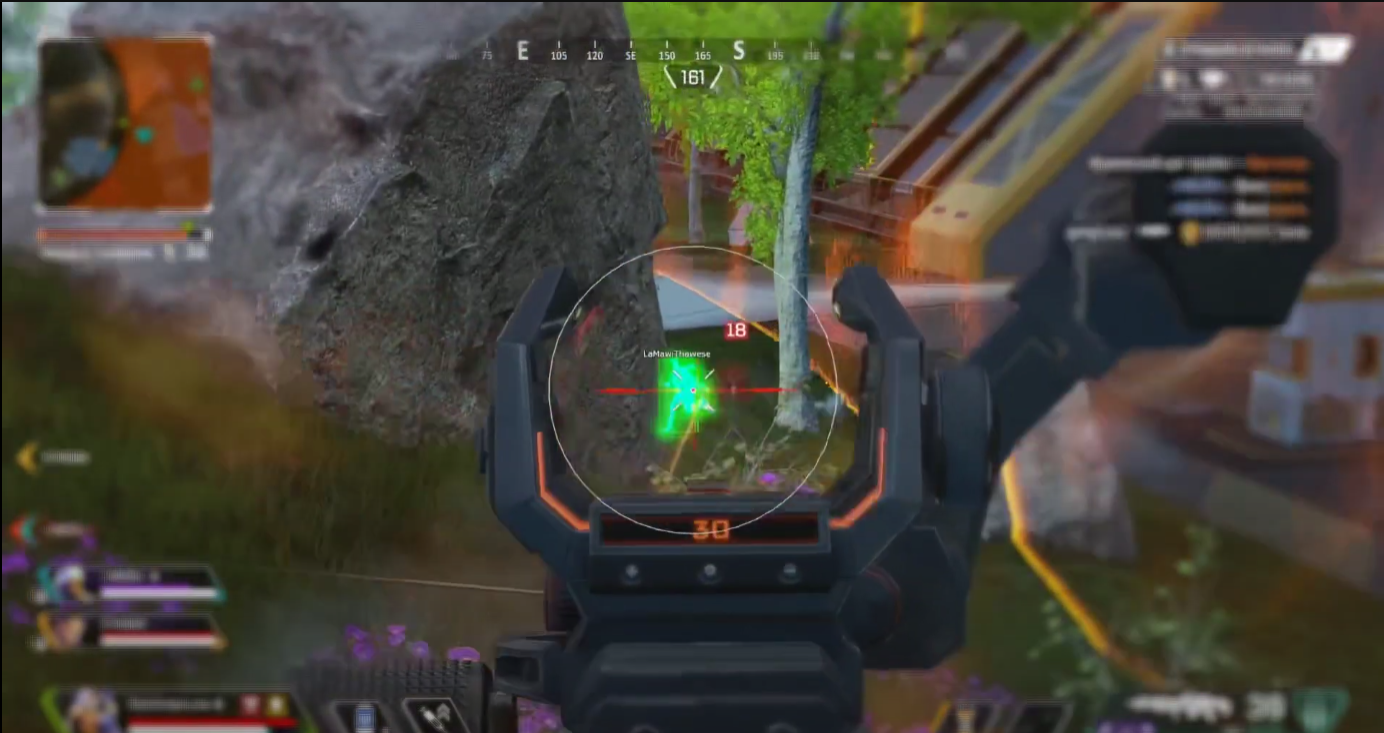
Status: APEX PREDATOR
Stop being the prey. It is time to become the hunter. The Covcheg cheat for Apex Legends is your personal upgrade to champion status. It is built for fast-paced fights and split-second decisions. The advanced Aimbot with bullet trajectory prediction lets you hit even the quickest targets, and the detailed Loot ESP saves precious seconds at the drop. This product is your key to dominating the Ring. Made by the pros at Covcheg for future legends.
Product features
AIMING SYSTEM (Stability)
Remove Sway & Recoil
Laser. Full removal of weapon sway and recoil. Your aim stays locked in even when you fire on the move.Bullet prediction & Nearest Bone
Calculation. The Aimbot leads moving targets and automatically picks the nearest bone.Settings
Comfort. Tune the smoothing (Smooth) and the radius (FOV) to match your mouse sens.TACTICAL VISOR (Control)
Boxes & Glow ESP
Style. Pick between classic boxes or bright Glow. See the enemy through smoke and chaos.Visible Check & Health
Legit. The smart mode shows only visible enemies. Health and shield bars help you pick the weakest target.LOOT SCANNER (Elite Loot)
Rarity Filter
Top Tier Only. The rarity filter clears the gray junk off your screen. Keep only purple and gold armor.OTHER MODIFICATIONS (Edge)
Enable ThirdPerson
New angle. Turn on the third-person view. Peek around corners and watch your surroundings while staying in cover.Known issues & fixes
Real questions from our support, with the fixes that worked. Based on user requests for this product.
What do Aim, Trigger, FOV, Smooth, and Humanizer mean in the cheat settings?
- Aim , automatically tracks and aims at the target while the bound key (recommended: left mouse button) is held.
- Trigger , fires automatically only when the crosshair is already on an enemy. Bind it to any key other than LMB.
- FOV , target acquisition radius. The higher the value, the wider the area the cheat scans for enemies.
- Smooth , aim movement speed. Low value snaps sharply to the target; high value tracks slowly and smoothly.
- Humanizer , simulates human mouse movement patterns. Leave the default settings as-is unless you want to fine-tune.
Cheat stopped working after an Apex Legends update , what to do?
After a game update the cheat stops working until the developer releases a patch. Check the current status in the t.me/procheatsupport channel. If you were unable to use the cheat due to an update, your key's validity period will be extended automatically , no action required on your part.
The loader can't connect to the server and shows a connection error on launch
This is usually caused by your internet provider blocking the connection, not by the program itself.
- Connect through a VPN and try a few different server locations — sometimes one specific server is also blocked.
- If the error persists, download the loader again, as the version you have may be outdated.
- Check that your computer's date and time are set correctly.
- If nothing helps, contact support with details of the error.
How to open the cheat menu in Apex Covcheg? What are the hotkeys?
Use the Insert key to open or hide the cheat menu. The keys F1,F12, Home, End, and Right Shift are also available to toggle individual features or modes.
Apex Covcheg cheat not injecting , pressing F2 and nothing happens
Make sure the game is running in windowed mode (not fullscreen). Press F2 from the game's main menu (not the lobby), then wait up to 5 minutes , injection can take time. Do not close the game before the cheat menu appears.
If the menu still doesn't appear, open cmd as Administrator and run:
DISM /Online /Cleanup-Image /RestoreHealth
sfc /scannow
Then reboot and try again.
Loader shows anticheat error on launch or crashes when starting the game
Anticheat errors and loader crashes when starting the game are typically resolved by enabling a VPN. Connect to a VPN, then relaunch the loader and the game.
Also ensure Windows Defender is disabled (e.g. via Defender Control), no third-party antivirus is running, and no unnecessary background software is active.
Loader window appears but cheat menu does not open after injection
If after injection only the loader window appears and the cheat menu never shows, follow these steps:
- Download the Sordum utility (available from technical support; archive password: sordum).
- Run it, click Search, and wait for it to finish.
- Take a screenshot of the result, then repeat the loader launch procedure.
This clears conflicting processes that prevent the menu from appearing.
What does Spectator Warning show , can I see if EA admins or anti-cheat are watching me?
The Spectator Warning feature displays an on-screen indicator when other players are spectating you (including eliminated players who keep watching). It does not detect EA admin reviews or anti-cheat system checks , this is not technically possible.
The checker tool still detects active antivirus protection even though I disabled it
If the checker keeps flagging active protection, the antivirus was likely only turned off in settings rather than fully removed — some of its services and drivers can stay behind.
- Uninstall the antivirus completely using the official uninstaller from its vendor, not just by disabling it in settings.
- Restart your computer and run the checker again.
- If it still detects protection, contact support so they can help identify what's left.
After injecting I get an error like "failed to load module" or "module not found"
This kind of error usually points to corrupted or outdated loader files, or leftover antivirus components still in the system.
- If any antivirus is still installed, remove it completely with its official uninstaller.
- Download the latest version of the loader again instead of reusing old files.
- Run the loader as administrator and try again.
- If the error keeps appearing, contact support with a screenshot of the message.
Cheat won't launch , file system type error
This cheat requires a specific file system type on the system partition. If you see an error related to the file system on launch, the fix is to reinstall Windows. Before purchasing, it is recommended to check file system requirements with support.
After installing a new cheat, Windows gets stuck in an infinite repair loop on reboot
This happens when a new cheat is installed while another cheat's hypervisor is still active , they conflict. Before installing any new cheat, fully unload the previous one and perform a clean reboot.
If the system is already stuck in a repair loop, try rolling back via a Windows restore point. If no restore point exists, a clean OS reinstall is required. Windows 22H2 is recommended for stable operation.
Built-in spoofer in the cheat , how to activate it?
The built-in spoofer activates automatically when the cheat starts , no additional steps are needed. It is designed to bypass hardware bans that were placed on previous accounts.
The cheat stopped working after a game update — what should I do?
After a major game update, the cheat's developer needs time to adapt the program to the new version — during this period the cheat may be temporarily unavailable or behave incorrectly.
- Wait for an official update notice from support.
- Do not try to run the old build against the new patch — this increases the risk of a ban.
An external cheat only launches from a USB drive — can it be switched to run directly from the PC?
No, the launch method cannot be changed: if the cheat is an external type, loading it from a separate storage device is part of its anti-detection architecture, not an optional setting.
If this launch method does not suit you, check with support whether the product has a separate internal version.
I got banned by anti-cheat — how do I get back into the game with the cheat?
If an account gets banned by anti-cheat, the hardware ID (HWID) tied to it is also considered burned, so simply activating a new license key will not fix the issue.
Before using the cheat again, it is recommended to get a separate HWID-spoofing tool — it makes the system see the hardware as new.


 Join all games chat