Ghost Fortnite Cheat: Legit Aim, ESP with Enemy Rank and AI Setup

Working
Ghost Ghost
Last update 16.10.2026 This date shows when the software was last updated. An old date doesn't mean the software stopped working! Most likely the developer just had nothing new to add. If you have any doubts, you can always check the current status with our support team.
Add another cheat from this game too — to compare them.
Ghost Fortnite
Epic Games
Windows support: 10: all builds; 11: all builds
Menu language: English
Spoofer:No
USB drive:No
BIOS:No

User information

Fortnite is protected by two anti-cheats at once, Easy Anti-Cheat and BattlEye, and Epic does issue hardware bans. So decide which account you are going to play on before you buy. A main account with years of skins is not worth putting on the line: Ghost lowers the risk, but no developer can promise zero. There is no spoofer built into this build. If your PC has already been banned in Fortnite, you will need a separate spoofer first.

How to launch after payment:

  1. An email with the key and a link to the loader arrives at the address you entered at checkout.
  2. Turn off your antivirus and Windows Defender for the launch, otherwise the loader gets deleted right after download.
  3. Run the loader as administrator and enter the key. On first login the key is bound to this PC.
  4. Start Fortnite through the Epic Games Launcher and open the menu with the Menu key.

Planning to reinstall Windows or switch computers? Message support and they will reset the binding. If Ghost shows an updating status after a game patch, your subscription days are frozen for that time.

SCREENSHOTS
Description

Ghost for Fortnite is configured in plain words: type "set up legit aim" into the menu chat and the AI assistant sets the FOV, smoothing, reaction delay and visuals for you. No other Fortnite cheat in our catalog has a tab like that, and for anyone buying private software for the first time it removes the biggest worry, which is burning the account with bad settings in the very first match.

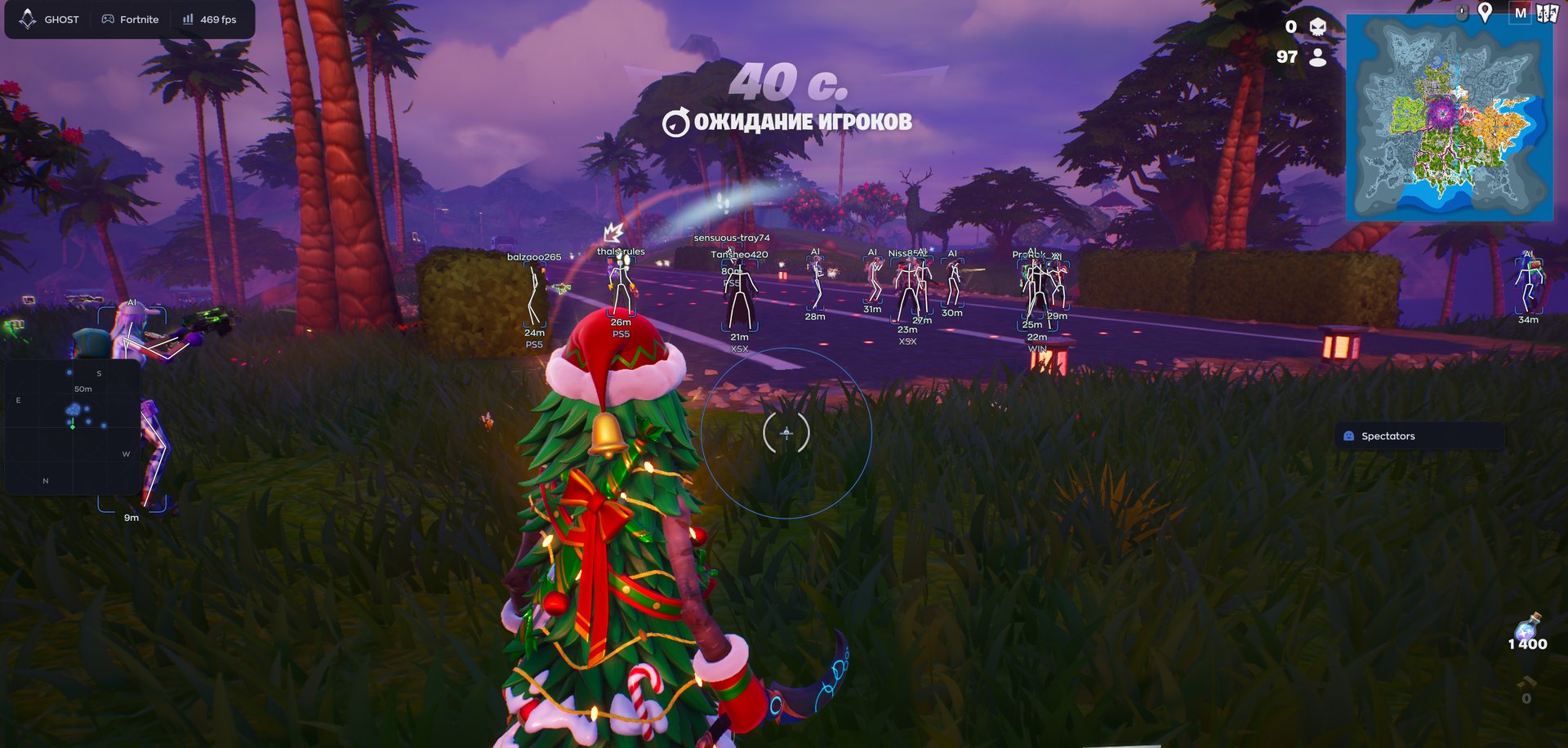
Under the hood it is a complete package. The aimbot checks visibility and locks onto a target, and next to it sits a separate Humanize block with jitter, a deadzone and randomised reaction time. ESP draws boxes, skeletons, names and distance, and on top of that the platform and rank: you can tell straight away whether you are up against a PC player or someone on PS5, and which division they brought into Ranked. Loot is highlighted by category, the radar sits in a corner with a compass bar, and the menu hides itself from recordings and streams.

It runs through the Ghost loader on Windows 10 and 11, and the key arrives by email right after payment.

Product features

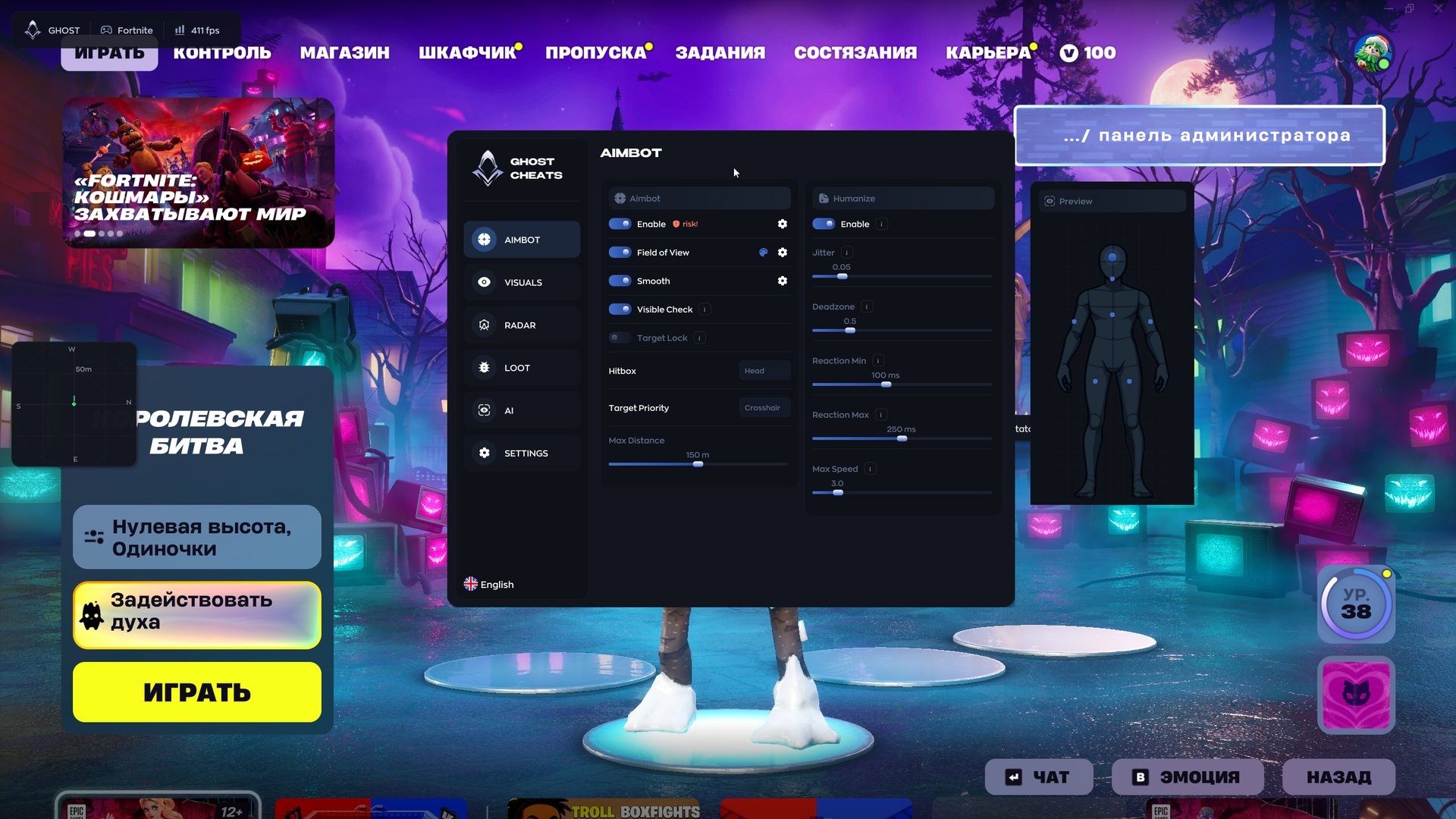
Aimbot

Aim toggle

The main switch of the tab. The developer marks it with a risk badge right in the menu: aim is still the most visible feature, so turn it on deliberately.

Field of view

Sets the radius around your crosshair where the aim picks up a target. For legit play a small circle is enough, so it only helps on players you are already looking at.

Smoothing

Smooth decides how gently the crosshair travels to the target. Higher values look more like a hand on a mouse and less like a snap.

Visibility check

Visible Check stops the aim from locking onto someone behind a wall or a build. Without it the crosshair jerks towards an enemy you cannot see, and that is the first thing people spot in a replay.

Target lock

Target Lock stays on the chosen player while they jump, build or cut a corner. The crosshair does not hop to someone else mid-fight.

Hitbox and priority

Hitbox picks the body part, Target Priority decides who goes first, for example whoever is closest to the crosshair. Max Distance ignores targets past a set range, the menu screenshot shows 150 metres.

Humanize

Human-like aiming

A separate block next to the aimbot. It adds no accuracy. Its job is to blur the machine-perfect motion that viewers and moderators recognise.

Jitter

Adds tiny deviations to the crosshair. In a recording the correction looks like a real hand on a mouse instead of a ruler-straight line.

Deadzone

Leaves an area around the target where the aim does not touch your mouse movement. While you are tracking the enemy yourself, the software stays out of it.

Reaction time

Reaction Min and Reaction Max set the delay window before the aim kicks in, for example 100 and 250 ms. A random value is picked every time, so your reaction is never the same twice.

Turn speed cap

Max Speed limits how fast the camera can rotate. Even on low smoothing the crosshair will not fly across half the screen in one frame.

Visuals

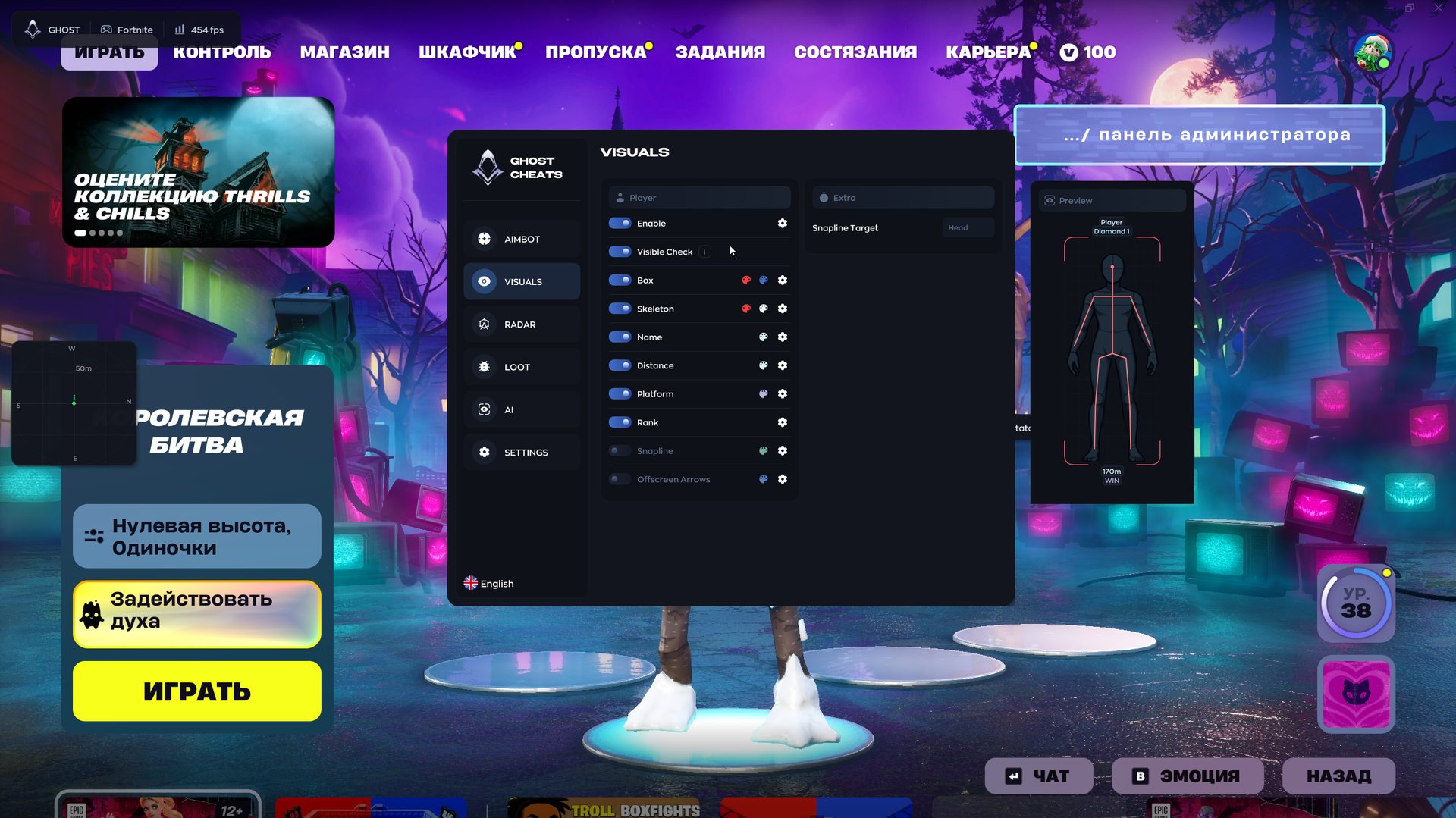
Player ESP

Enable turns ESP on, and Visible Check can limit the overlay to players in direct line of sight. Handy when you want a clean screen in a hundred-player lobby.

Box and skeleton

A frame around the enemy and their model drawn in lines. The skeleton shows whether they are crouched behind a wall, holding a ramp or already looking your way.

Name and distance

The player's name and range in metres. Distance tells you whether you have time to build up before they reach you.

Platform

A tag under the box shows where the enemy plays from: WIN, PS5, XSX and so on. In crossplay that matters, because a controller with aim assist and a PC player with a mouse fight very differently.

Rank

Rank shows the player's division. In ranked matches you know that a Diamond dropped next to you, not a random Bronze.

Snaplines and arrows

SnapLine draws a line from the bottom of the screen to the enemy, with its anchor point set separately. Offscreen Arrows point to players outside your view.

Preview

The Preview window draws a dummy with your current visuals, so colours and elements can be tuned in the menu without loading into a match.

Radar

Mini radar

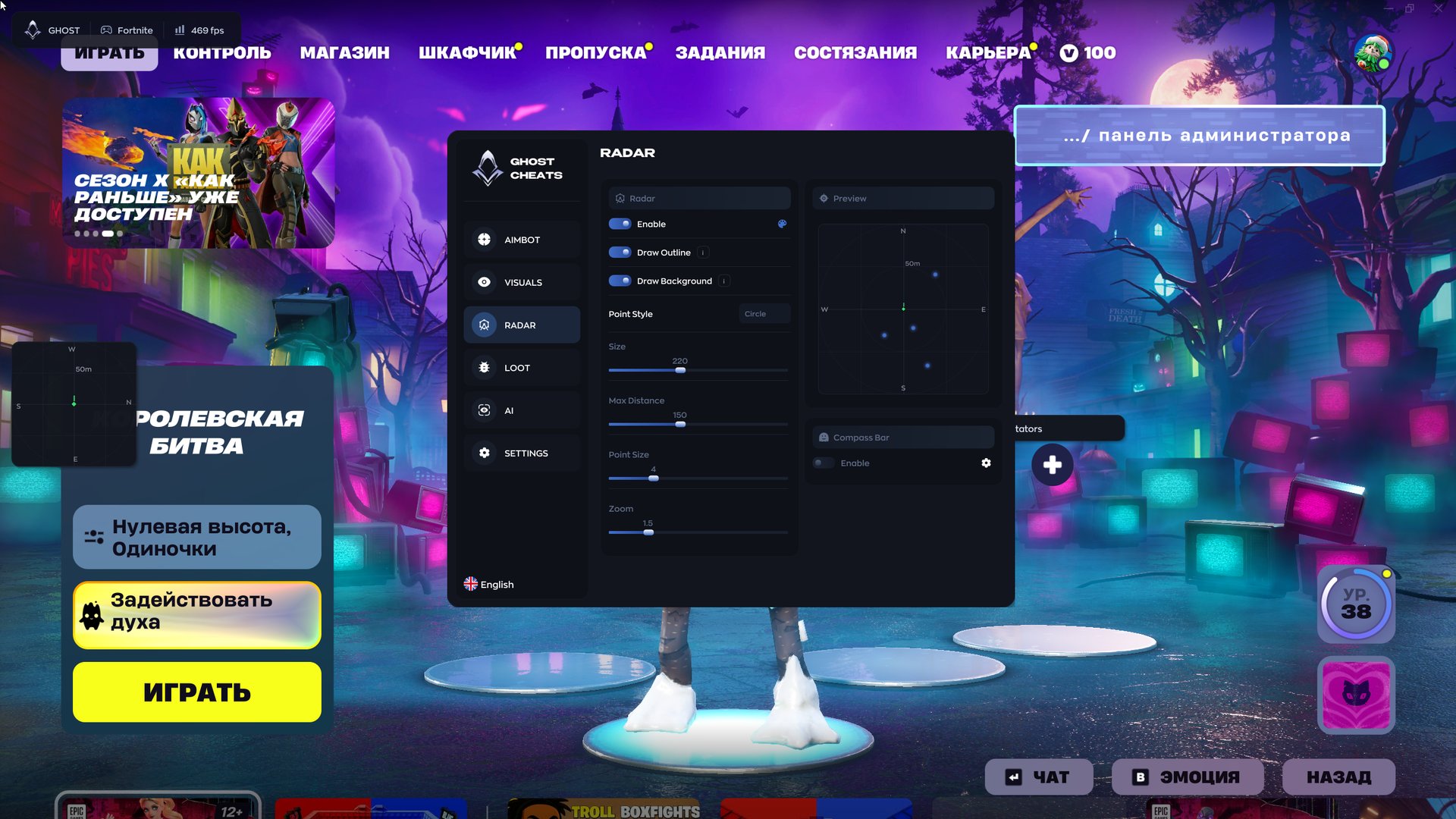
A separate panel with enemy dots. Outline and background are optional, and dots can be circles or another style.

Size and zoom

Size, Zoom and Point Size fit the radar to your resolution, Max Distance limits how far it draws.

Compass bar

Compass Bar adds a heading strip to the radar. Useful for matching a teammate's ping and knowing where the shots come from.

Loot

Weapons and ammo

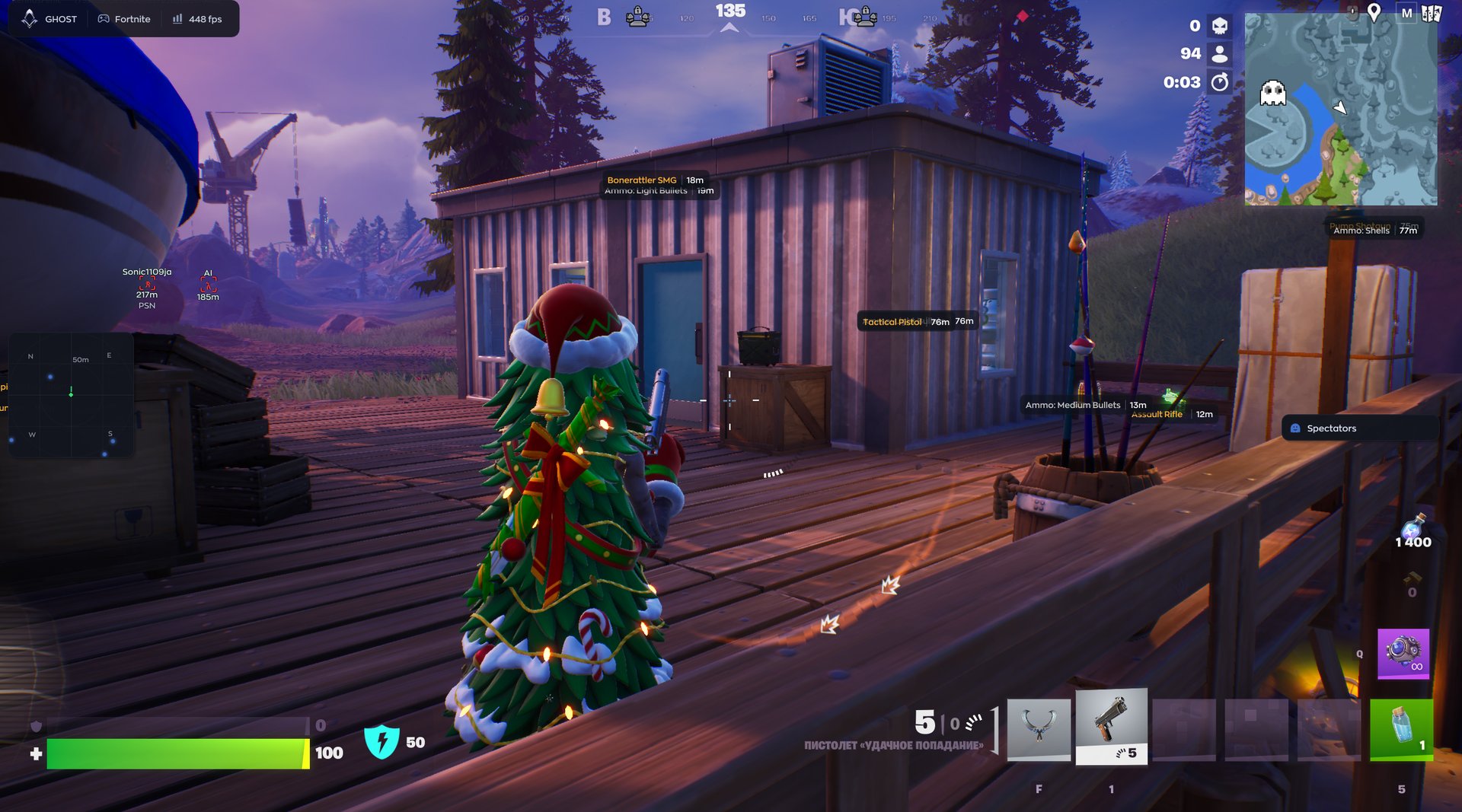
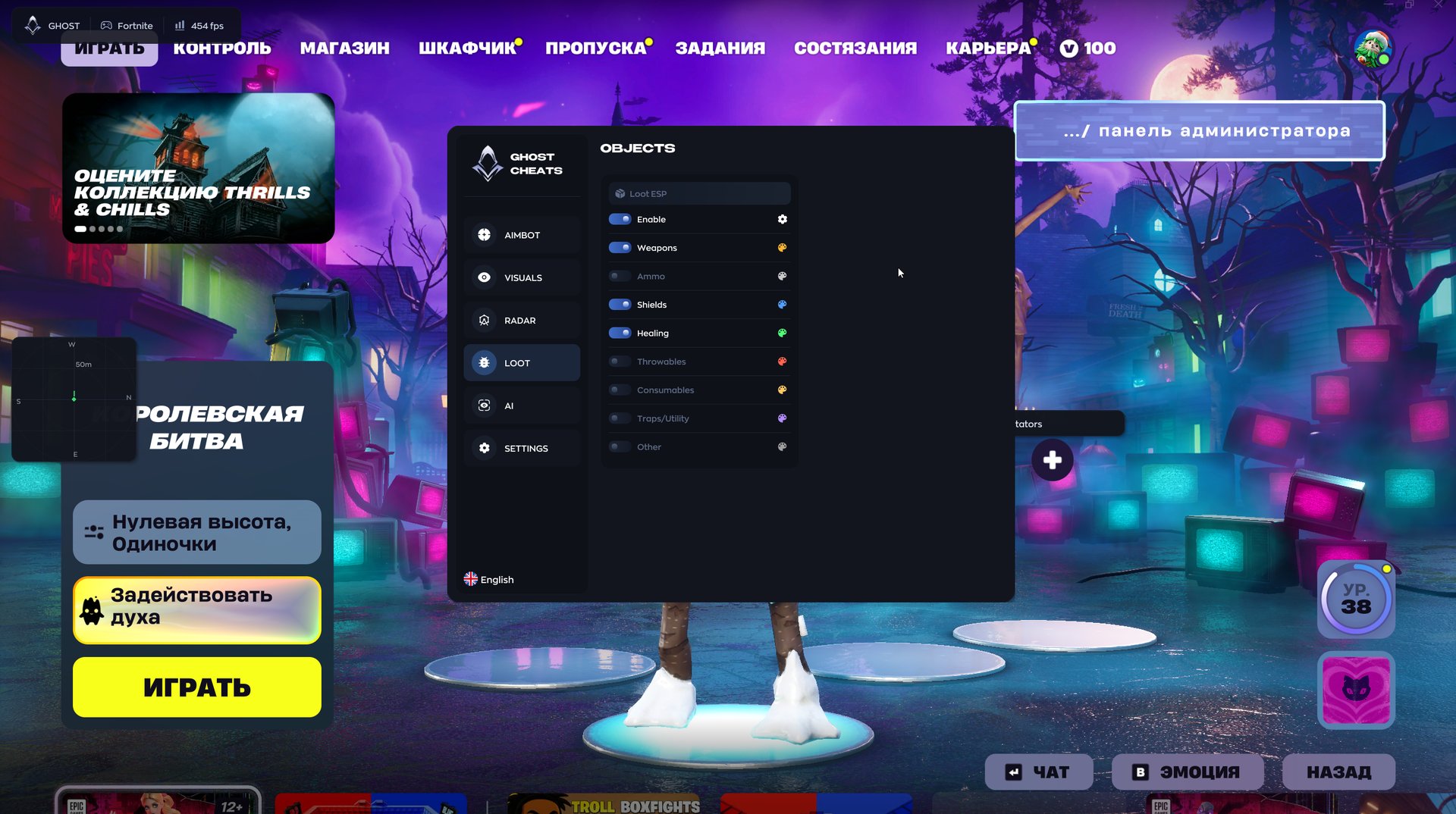
Guns and ammo have separate toggles and show name and distance. Ammo is labelled by type: light, medium, shells.

Shields and heals

Shield potions, medkits and bandages are kept apart. After a fight you do not have to search the whole house for something to heal with.

Throwables and consumables

Grenades, food like fish and bananas, traps and utility items. Anything you do not need right now can be switched off so it does not clutter the screen.

Other

Other catches items that do not fit the remaining categories.

AI assistant

Menu chat

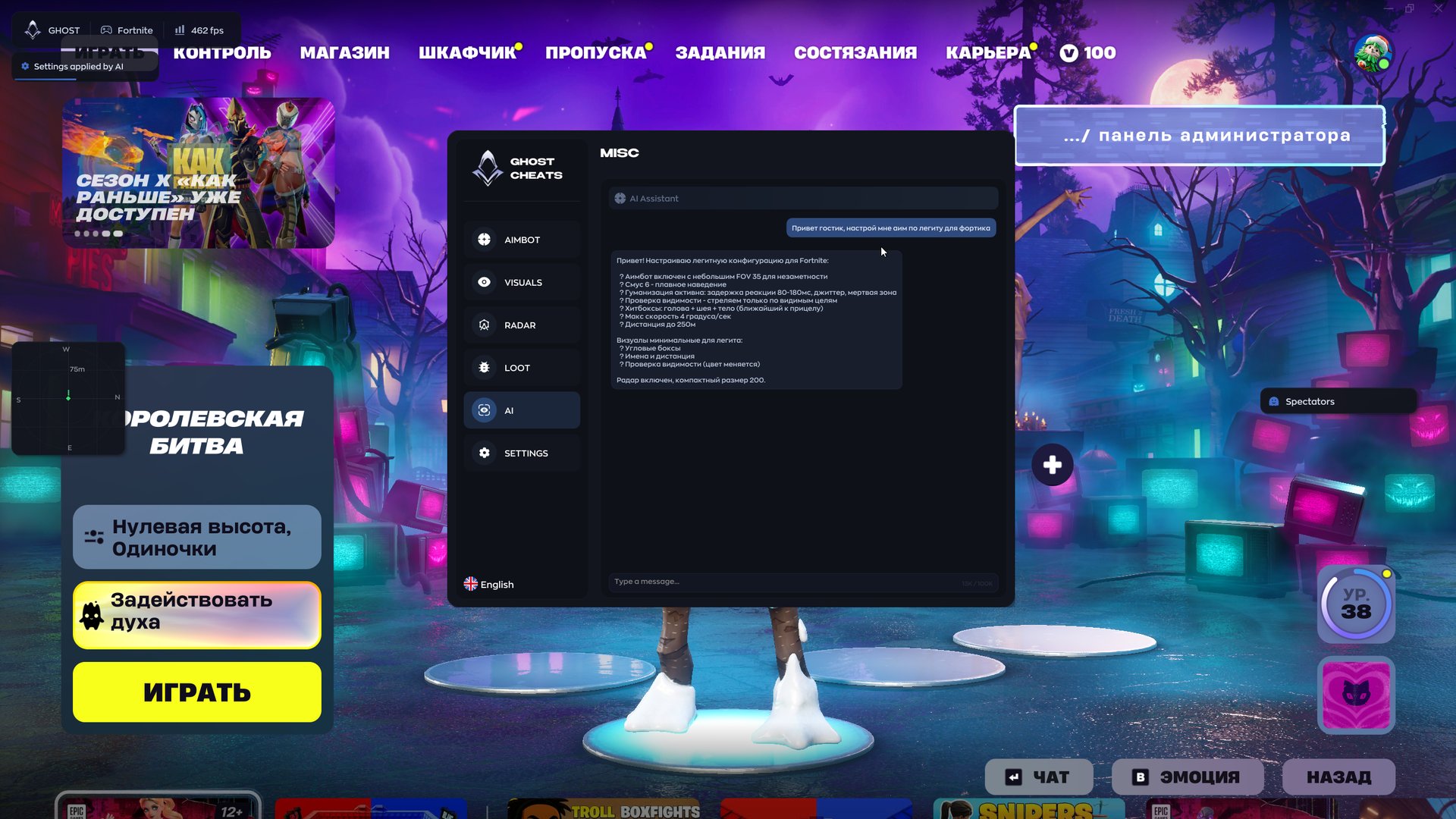
Describe what you want in plain words, for example "light config for Fortnite", and the assistant replies with a list of parameters and applies them. A Settings applied by AI note appears in the corner of the screen.

Settings

Configs

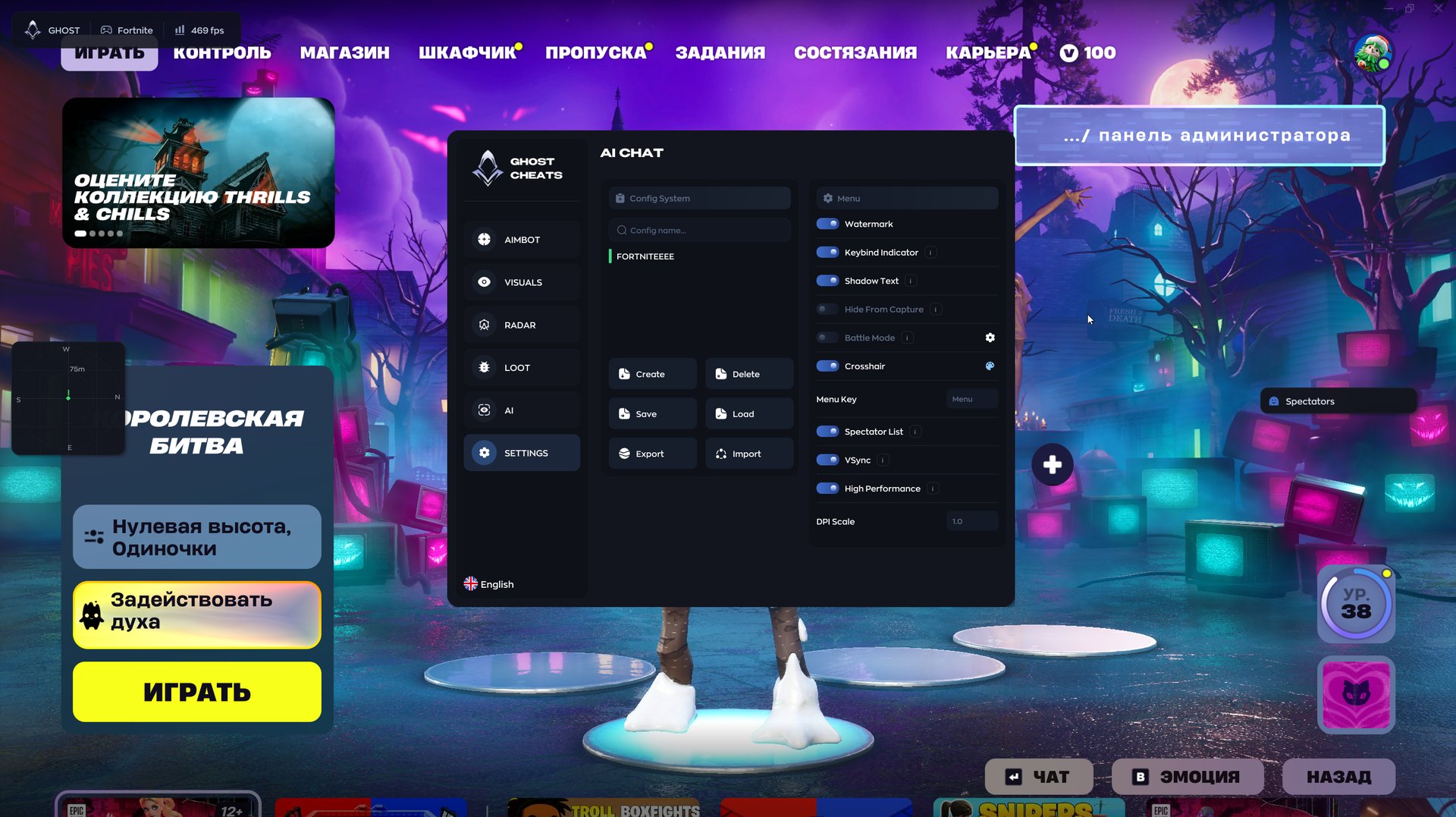
Create, delete, save and load profiles. Export and Import let you hand a finished config to a friend.

Hide from capture

Hide From Capture keeps the cheat menu out of screen recordings, streams and screenshots. You can tweak settings mid-stream.

Battle mode

Battle Mode switches off extra features while a fight is on, so the screen does not get overloaded.

Interface

Watermark, keybind indicator, text shadow, a custom crosshair, the menu key (Menu by default) and DPI scaling for your resolution.

Spectator list

Spectator List shows who is watching you after you die or in spectator mode.

Performance

VSync and a High Performance mode. In the developer's screenshots the corner counter shows over 400 FPS with ESP on.

Known issues & fixes

Real questions from our support, with the fixes that worked. Based on user requests for this product.

The download site or loader won't open, or shows a connection error — what should I do?
  • Try connecting through a VPN — access to the site or activation servers is sometimes blocked at the ISP or regional level.
  • Check your internet connection and try downloading the file again.
  • If the issue persists after using a VPN, contact support — they may ask for additional diagnostics of your system and a screenshot of the result.
My account gets banned or flagged soon after I play with the cheat — what can I do?

If your account gets flagged or banned soon after using the software, this is usually anti-cheat detection on the game's side rather than a bug in the product. Registering a new account and using the hardware-spoofing feature (spoofer), if your product version includes one, usually helps. This doesn't guarantee you won't get flagged again. If your main account is already flagged, don't count on it being unbanned — it's better to switch to a new account.

The loader says my Windows version isn't supported — what should I do?

Only officially released builds of Windows 11 are supported — beta and Insider builds (early versions of updates that haven't been officially released yet) may not be supported by the loader. The opposite can also happen: a very old, long-unupdated system can also prevent the software from launching. Update Windows to the latest officially released version (not a beta channel) and try again.

After a game update the product stopped connecting, what should I do?

If the product stops connecting right after a game update, without any error messages, this is expected: the developer needs time to adapt it to the new game version.

The update usually takes about a day, sometimes less. Wait for it and start the loader again — everything will work automatically, no reinstall is needed.

All issues & general troubleshooting
TARIFFS
$4.78
BUY What happens after payment?
Got a question? Ask before you pay

We'll help you choose and sort out any launch issue. Ask us anything before buying, we're always on your side.

Support 10:00–22:00, sometimes we reply at night too
Ask a question

Available tariffs

1 day
$4.78
$4.78 / day
START PURCHASE
7 days
$17.93
$2.56 / day
START PURCHASE
lowest per day
30 days
$35.85
$1.2 / day
START PURCHASE
Reviews about Ghost Fortnite

No reviews yet. Be the first to leave one.

Your review

Reviews are published after moderation.

Join our gaming community chat

Discuss current cheats from developers and how to use them effectively in popular online games. Share tactics, exchange useful info and find like-minded players in our community.

1 900+Members
24/7Online
Join our gaming community chat

Technical support

Run into a technical issue? Our team of experts will help. We handle all requests in a live queue, so please be understanding if it sometimes takes a little wait. We guarantee that no request goes unanswered.

Availabilityfrom 10:00 to 23:00
Fast responseIn queue order
Get help
Technical support
PROCHEAT

PROCHEAT news channel

Follow product status changes, update history and important announcements.

Subscribe

Ghost Fortnite cheat by game mode: what to turn on

Settings that carry you in regular Battle Royale look suspicious in Ranked, and in Zero Build half of the build logic is irrelevant anyway. Below is a sensible starting point for each mode. From there you tune it yourself or hand it to the AI assistant.

ModeAimVisualsLoot and radar
Battle Royale, solo and duosSmall FOV, Visible Check, Humanize onCorner boxes, name, distanceWeapons, shields, heals; radar in a corner
Ranked matchesOnly with Humanize and Target Lock, higher smoothingRank and platform, Offscreen ArrowsShields and ammo, compass for rotations
Zero BuildBody hitbox, crosshair prioritySkeleton and Visible Check to read coverHeals and throwables, radar with more zoom
Streaming or recordingAim off or minimalBetter turn ESP off, Hide From Capture for the menuRadar and loot off too

Be most careful with the last row. Hide From Capture only hides the menu from the capture, so viewers will still see boxes and the radar. Even without them your camera keeps turning to where the enemy sits, and an attentive viewer will notice.

AI assistant: a Fortnite config from one sentence

The AI tab looks like an ordinary chat. In the developer's screenshot a player types "set up legit aim for Fortnite", and the assistant replies with a ready layout: FOV 35, smoothing 6, reaction 80–180 ms with jitter and a deadzone, visibility check, head, neck and body hitboxes with whichever is closest to the crosshair, a turn speed of no more than 4 degrees per second and a range of up to 250 metres. It keeps the visuals minimal: corner boxes, names with distance and a colour change when the enemy is in direct line of sight. The radar goes on at a compact size of 200.

The Ghost menu is clear enough on its own. The problem is that a newcomer almost always cranks the FOV and speed and then wonders about the reports after their first win. The assistant gives a careful starting point right away. You can save it as a separate config and then change one parameter at a time.

The chat does not replace common sense. Ask it for "the most aggressive aim possible" and it will build that too, and the consequences will be yours.

An aimbot that holds up in a replay

In Fortnite a cheater is usually given away not by accuracy but by the replay. After your win someone you eliminated opens spectator mode and watches how you shot. If the crosshair sticks to a head through a wall and the camera turns faster than a human can, a report follows.

Ghost covers this from two sides. Visible Check keeps the aim from reacting to players you cannot see, and Target Lock stays on one opponent instead of bouncing between three enemies in the same build fight. The Humanize block works on top of that: a random reaction delay, slight jitter, a deadzone around the target and a cap on turn speed. Together the correction looks like good shooting.

The spectator list tells you when to ease off: if three people are watching you, finish the match by hand.

ESP with platform and rank: who to take a fight with

Fortnite runs on crossplay, so a single lobby mixes PC, PS5, Xbox Series and Switch. Ghost labels every opponent with their platform, and the screenshot shows WIN, PS5 and XSX tags right under the names. It matters in every fight: a controller player with aim assist is dangerous up close, while a PC player with a mouse builds faster and wins more mid-range trades.

The second label is rank. In ranked matches you know at once that a Diamond 1 landed next to you rather than a newcomer, and that decides whether you contest the spot or rotate to the next one. The Preview window in the menu shows what it will look like: a dummy with the rank label, platform and distance.

If you want a clean screen, every label can be switched off one by one, and Visible Check keeps them only on the players you can see right now.

Loot ESP and a radar with a compass

Loot in Ghost is split into eight categories, each with its own toggle. In the developer's screenshot the pier shows labels like Tactical Pistol, Assault Rifle and Ammo: Medium Bullets with the distance in metres. After landing you do not have to search every house, the route is built straight away around where the gun, shields and heals are.

The mini radar sits separately from the ESP. Size, zoom, range and dot size are adjustable, and the compass bar on top shows the headings. When a teammate calls "enemies north-east", you do not need to open the map, a glance at the corner of the screen is enough.

EAC, BattlEye and an honest word on risk

Easy Anti-Cheat and BattlEye run at kernel level in Fortnite, and no private cheat offers full protection from them. The Ghost developer does not hide that: the main aimbot switch in the menu carries a risk mark. That is more honest than the "0% ban" promises of public builds.

The usual habits lower the risk. Play on a second account, keep the aim soft, do not run ESP on stream, and watch the status on the product page: after big Epic patches the developer ships an update, and until it lands your subscription is paused. If this PC has already had a hardware ban, a new account will not last long without a spoofer.

How to buy Ghost for Fortnite

There are three terms: one day for 400 ₽, a week for 1500 ₽ and a month for 3000 ₽. A day is handy for checking how the build behaves on your hardware and in your mode. A month works out four times cheaper per day, about 100 ₽, so it makes sense once you know everything runs.

Press the button for the plan you want, pay by card, SBP or another method on the checkout page and enter your email. The key arrives there right after payment, no account is needed. If the email is missing, check spam and then contact support with your email and order number.

Ghost Fortnite FAQ

Do I need to configure anything before my first match?

You can ask the AI assistant for a light config and save it. After that change one parameter at a time and check how it looks in a replay.

Does Ghost work in Zero Build and Ranked?

Yes, the game mode does not affect the build. For Ranked it is better to keep Humanize on and smoothing higher, the table above has tips per mode.

Does Ghost include a spoofer?

No, this build has no built-in spoofer. If your PC has already been banned in Fortnite, you will need a separate spoofer first, there is one in the same category.

Is the menu visible on stream?

With Hide From Capture on, the cheat menu stays out of the capture. Viewers will still see boxes and the radar, so turn visuals off on stream.

Which system does it run on?

Windows 10 and 11. The loader is run as administrator with the antivirus and Defender switched off.

Can I move the key to another PC?

The key is bound to the PC on first login. To move it, or after reinstalling Windows, message support and they will reset the binding.

What happens to my subscription after a Fortnite update?

If Ghost goes into an update, the status on the product page changes and your subscription days are frozen until the new version is out.

from $4.78 Choose a plan
Ask a question


