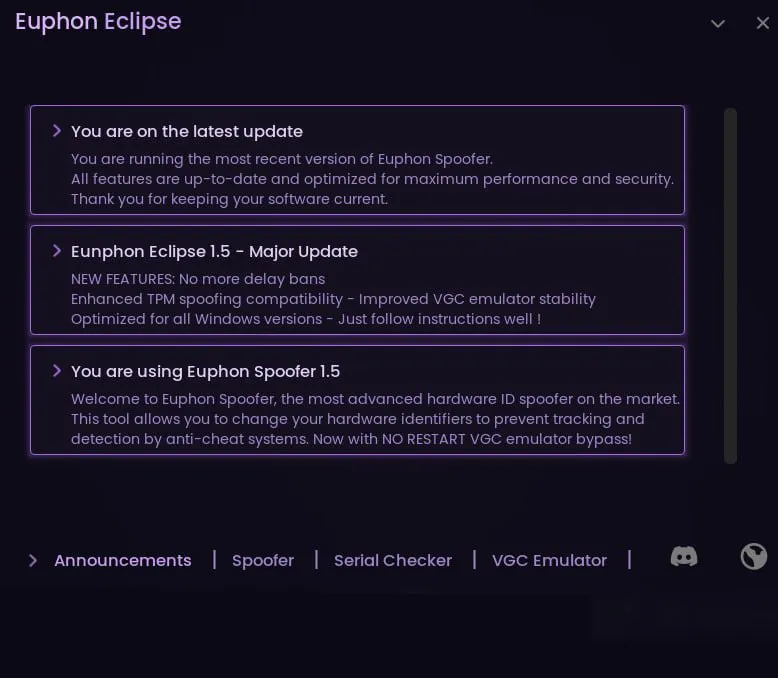
Valorant Spoofer + ByPass: hardware ban bypass

Frozen
Top seller
Last update 01.03.2026 This date shows when the software was last updated. An old date doesn't mean the software stopped working! Most likely the developer just had nothing new to add. If you have any doubts, you can always check the current status with our support team.
Add another cheat from this game too — to compare them.
Valorant Spoofer + ByPass
Riot Games
Windows support: 10: all builds; 11: all builds
Menu language: English
Spoofer:No
USB drive:No
BIOS:No

User information

If you get the VAN 152 error, you need to reinstall the system!
HVCI support
You can buy it permanently, message support
With Bypass you can get past HVCI and other BIOS features that Valorant asks for

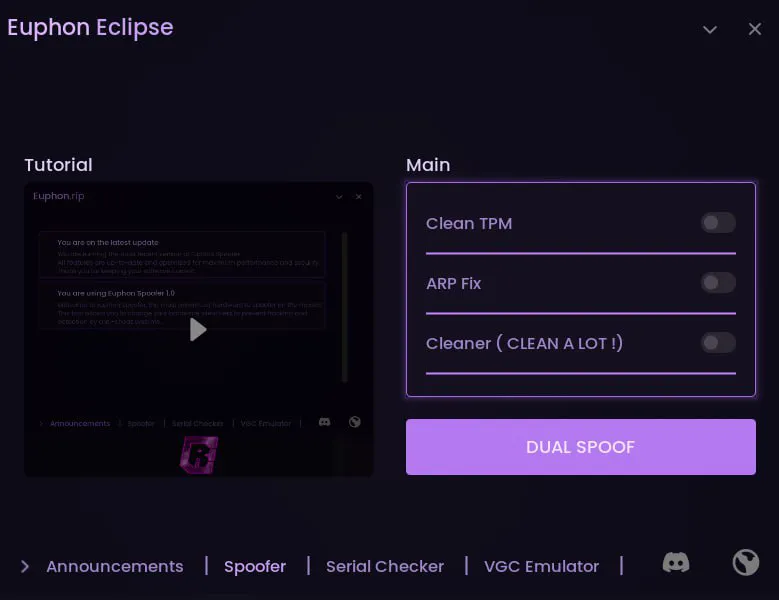
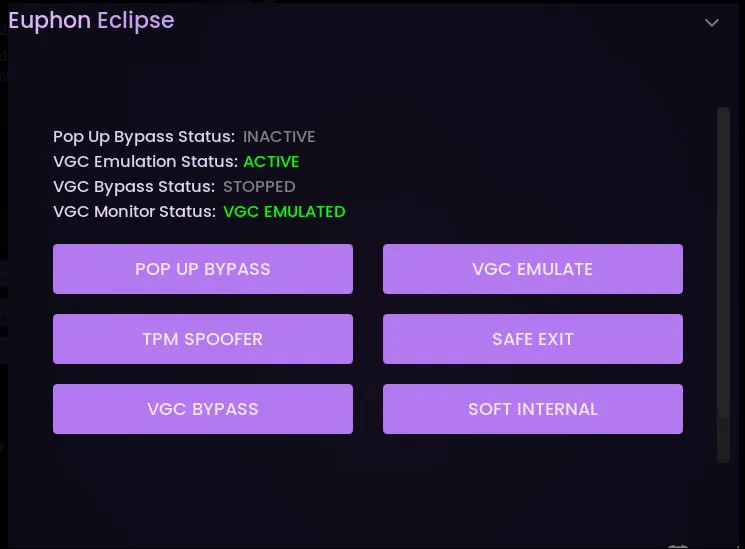
SCREENSHOTS
Description

This Valorant spoofer is built for players who ran into a hardware ban in Valorant and need a working way around the block. The Valorant spoofer changes the key identifiers of your system so the game sees your PC as a brand new device. That cuts the risk of getting re-banned and lets you safely run cheats together with the Valorant spoofer and the Vanguard anti-cheat.

If you are looking for how to bypass a hardware ban in Valorant, how to remove a hardware ban in Valorant, or how to get around a ban in Valorant at all, this HWID spoofer for Valorant is what you need. The tool works as both a temporary and a permanent spoofer, which is handy if you want to test a config first and then move to a long-term solution. This kind of Vanguard spoofer helps you get past restrictions tied to drivers and hardware checks.

For anyone who wants to buy a Valorant spoofer, we have a ready-made solution: you can buy the Valorant spoofer for one-time use (temporary spoofing) or for permanent use (permanent spoofing). It is the best option if you plan to come back to the game after a ban and do not know how to remove a ban in Valorant or how to remove a hardware ban in Valorant on your current PC. The Valorant spoofer suits players who want to keep the risks down and keep playing without reinstalling Windows or swapping out hardware.

Product features

Main features

Bypass Restrictions & Run Cheats Safely

Bypasses the main system and game restrictions so you can run cheats in Valorant more safely. The feature fully stops/emulates the anti-cheat, which literally lets you play with any free detected cheat without a ban

Permanent Spoofing

Permanent spoofing of the key system identifiers until the next reinstall or system rollback.

Temporary Spoofing

Temporary swap of the identifiers for the current session; after a reboot the system returns to its original state.

Compatibility with VGC and emulators

VGC Emulator Compatibility

Works on systems with emulators and specific configurations where Valorant Vanguard (VGC) is installed.

Restrictions Bypass

Removes a number of restrictions tied to launching the game and the anti-cheat on modified or emulated configurations.

VGC Bypass

Bypasses the protective checks of the Vanguard client (VGC) that are required to launch the game and its companion software.

Extra features (cleanup and fixes)

Clean TPM

Clears and resets TPM-related data to minimize possible traces that Valorant and Vanguard can use for a hardware ban.

ARP FIX

Fixes and updates network ARP parameters, which helps avoid network conflicts and possible network "traces" after a ban.

Cleaner (clean a lot)

Deep cleanup of the system from temporary files, logs, launcher cache, and possible traces tied to the game and the anti-cheat.

Known issues & fixes

Real questions from our support, with the fixes that worked. Based on user requests for this product.

Should TPM and Secure Boot be enabled or disabled for the Valorant spoofer?

Both must be disabled in BIOS. Before using the spoofer, enter your BIOS and turn off TPM (Trusted Platform Module) and Secure Boot. Without this the spoofer will not work correctly.

The guide on the official website is authoritative , if it conflicts with other sources, follow the site guide.

Spoofer runs but hardware serial numbers do not change , how to fix?

If serial numbers remain unchanged, follow the complete procedure in order:

  • Reinstall Windows with full formatting of all drives. Use Windows 10 22H2 (original, not a stripped build).
  • Flash BIOS twice: first update to a newer version, then downgrade to a different older version (must be versions not previously used).
  • On the clean Windows install, apply all updates and update GPU drivers via NVIDIA App.
  • Before running the spoofer, disable GPU in Device Manager and turn off all VPN/Warp. Click Dual Spoof, select your motherboard and run. After the PC restarts, confirm the driver load popup, then re-enable the GPU.
  • Install the game. After Vanguard anti-cheat requests a restart , reboot and run the spoofer again from the GPU disable step.
Spoofer stops working after a PC restart , is that normal?

Yes, this is by design. The spoofer is active until the next PC restart. You need to re-run the spoof before each gaming session.

Valorant error 152 on a new account , what to do?

Error 152 means the account has already been flagged by the anti-cheat. Create a new account with a new email address , the flagged account cannot be used.

On first login with the new account, complete the tutorial, press Safe Exit, then re-spoof before playing normally.

How to correctly use Popup Bypass and VGC Emulator in the spoofer?

If Valorant shows popup errors due to disabled TPM/Secure Boot, use the built-in tools in the VGC Emulator tab in this order:

  • Click TPM Spoofer.
  • Click Popup, launch Valorant and find a match.
  • Play one full round. At the start of the second round, click Safe Exit , the game will close.
  • Click TPM Spoof again, then click VGC Emulate and launch the game.
  • After each match, press Safe Exit and repeat the procedure.
All issues & general troubleshooting
TARIFFS
1150

Subscribe to learn when this product is updated.

Got a question? Ask before you pay

We'll help you choose and sort out any launch issue. Ask us anything before buying, we're always on your side.

Support 10:00–22:00, sometimes we reply at night too
Ask a question

Available tariffs

1 day
1150
SUBSCRIBE
7 days
2690
SUBSCRIBE
30 days
6150
SUBSCRIBE
Reviews about Valorant Spoofer + ByPass
21 sales on Digiseller No text reviews yet — be the first to leave one.

Your review

Reviews are published after moderation.

Join our gaming community chat

Discuss current cheats from developers and how to use them effectively in popular online games. Share tactics, exchange useful info and find like-minded players in our community.

1 900+Members
24/7Online
Join our gaming community chat

Technical support

Run into a technical issue? Our team of experts will help. We handle all requests in a live queue, so please be understanding if it sometimes takes a little wait. We guarantee that no request goes unanswered.

Availabilityfrom 10:00 to 23:00
Fast responseIn queue order
Get help
Technical support
PROCHEAT

PROCHEAT news channel

Follow product status changes, update history and important announcements.

Subscribe

How to bypass a hardware ban in Valorant with a Valorant spoofer

A lot of players hit the situation where they catch a hardware ban in Valorant after using cheats or breaking the rules. In that case just switching accounts does not help, because it is your computer that gets blocked. To keep playing you need a working Valorant spoofer that swaps your HWID and other system identifiers. That is exactly why an HWID spoofer for Valorant became a must for anyone who wants to get back into matchmaking without buying a new PC.

If you are looking for how to bypass a hardware ban in Valorant, you need a reliable Valorant HWID spoofer with Vanguard support. This kind of Vanguard spoofer gets past the anti-cheat check and runs before the game starts. After spoofing, Valorant sees the system as a new device and you can create a fresh account. The main thing is to use a quality Valorant spoofer, not random free tools that only make things worse and lead to new bans.

Buy a Valorant spoofer or swap hardware, which is cheaper?

When a player catches a hardware ban in Valorant, they face a choice: buy new hardware or buy a Valorant spoofer. Replacing the motherboard, drive, and network card costs a lot, especially if the system is fairly new. In that case it makes more sense to get a Valorant spoofer that changes the HWID and other IDs in software. This kind of Valorant spoofer comes out far cheaper than a new computer and lets you get back into the game fast.

For anyone asking how to remove a hardware ban in Valorant, a spoofer is the most logical answer. A reliable Valorant spoofer supports both temporary and permanent spoof, so you can handle risk and testing flexibly. When you buy a Valorant spoofer, you get a tool you can use more than once, over a long stretch of time, especially if you play with cheats and care about a stable ban bypass in Valorant.

Vanguard spoofer: why a plain HWID spoofer for Valorant does not always save you

The Valorant Vanguard anti-cheat runs at the driver level and starts with the system, so not every HWID spoofer for Valorant can get around its checks correctly. That is why you need a dedicated Vanguard spoofer that accounts for the quirks of this anti-cheat. This kind of Valorant HWID spoofer correctly swaps the identifiers that Vanguard tracks, not just the standard serial numbers.

If you want to understand how to get around a ban in Valorant and not run straight into an instant re-ban, use a Valorant spoofer that is built for Vanguard. It handles the hardware ban bypass in Valorant across the board: it changes the IDs of drives, network, system, and other parameters the game checks. Because of that the Valorant spoofer cuts the detection risk and lets you play on a new account without touching the physical hardware.

How to remove a ban in Valorant: a hardware spoofer instead of a new account

A lot of people think that removing a ban in Valorant just means making a new account. That only works with a regular account ban. But if you caught a hardware ban in Valorant, a new account will fly straight into a block. In that case there is no getting by without a Valorant spoofer. It makes the system look new, and Valorant treats you as a new player.

If you do not know how to remove a hardware ban in Valorant, the starting routine is this: spoof the system with the Valorant spoofer, restart, create a new account, and play carefully. A solid Valorant spoofer helps make the ban bypass in Valorant as safe as possible. Do not try to bypass a hardware ban in Valorant by hand through the registry and shady programs, that often leads to a point where removing a ban in Valorant becomes almost impossible even with a good spoofer.

Valorant spoofer: when you need temporary and when you need permanent spoofing

A modern Valorant spoofer usually supports two modes: temporary and permanent. A temporary HWID spoofer for Valorant changes the identifiers only until the system reboots. That is handy if you are testing a config or checking whether the hardware ban bypass in Valorant works on your PC. Permanent spoofing is useful for anyone who decided to come back to the game for good and does not want to run complex chains every time.

If you plan to buy a Valorant spoofer, think about which mode you need. For players who regularly use cheats and understand how to get around a ban in Valorant, a permanent spoof makes more sense. For anyone still figuring out how to remove a ban in Valorant and worried about breaking the system, the temporary mode fits. Either way a professional Valorant spoofer gives you flexibility and control that homemade solutions do not have, and a solid Vanguard spoofer is the key tool when it comes to "how to remove a hardware ban in Valorant".

Latest updates

01.03.2026 09:58
Frozen
Sent for update, time frozen
Open full history
Ask a question


