DayZ Radar 715TEAM: Browser Radar for 43 Maps

Working
Top seller
715TEAM 715TEAM
Last update 04.11.2026 This date shows when the software was last updated. An old date doesn't mean the software stopped working! Most likely the developer just had nothing new to add. If you have any doubts, you can always check the current status with our support team.
Add another cheat from this game too — to compare them.
DayZ Browser Radar
Steam
Don't risk your main — grab a spare account
Windows support: 10: 22h2; 11: 21h2, 22h2, 23h2, 24h2, 25h2, 26h1, 26h2
Menu language: Russian, English, Chinese
Spoofer:No
USB drive:No
BIOS:Yes

User information

The loader requires Windows 10 22H2 (build 19045) or Windows 11 builds 21H2 through 26H2 inclusive. The developer does not list other Windows 10 builds. Run winver before ordering to make sure your system is compatible.

The map itself opens in a modern browser. A second monitor is optional: keep it in a separate window on the same screen or send the link to your phone. Your key and instructions are delivered after payment. ProCheat support can help if you have trouble launching the radar.

VIDEO
SCREENSHOTS
Description

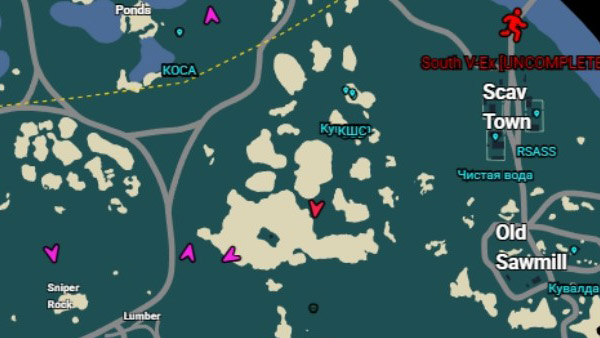
The 715TEAM browser radar puts the DayZ server on a separate map: use a second monitor, laptop, tablet or phone. Nothing is drawn over the game, so the main screen stays clean. Share the running map link with your squad and teammates can see the same picture without buying their own subscriptions.

The global update brings the total to 43 maps. Alongside Chernarus, Livonia, Sakhal and Namalsk, it adds Nasdara, Chernarus 2035, Deerisle Exp, Lux, Siberia and The Channel. The map tracks survivors, infected, animals, vehicles and loot across 11 categories. The inspector reveals a player's equipment together with the contents of backpacks, vests and pouches, while the Friends manager lists teammates with callsigns and online status.

The networking code has been rewritten to fix crashes and unnecessary PC resource usage. New map presets, custom icons and quick filters are included. Protection against server-side CFTOOLS and HunterEye (KGB) has been strengthened, but no software can remove the risk of manual checks or bans entirely. Supported systems are Windows 10 22H2 and Windows 11 builds 21H2 through 26H2.

If you need software with an aimbot and other in-game features, browse the other DayZ cheats.

Product features

Map and navigation

43 maps

Chernarus+, Livonia, Sakhal, Namalsk, Deerisle and another 38 locations with original topography and coordinate grids. The map loads according to the server.

GPS Auto-Follow

The camera follows your character automatically. Zoom with the mouse wheel or touch gestures, and drag the map to inspect another area.

Coordinates and compass

Cursor X and Y coordinates update in real time. The compass shows cardinal directions and your character's heading in degrees for accurate calls.

Quick centring

One button returns the map to the local player after manual panning.

Visual presets

Five map styles

Dark Ops for a dark interface, NVG Phosphor for night vision, subdued Muted Dim, amber Amber CRT and the regular Daylight Original.

Manual colour controls

Brightness, contrast, saturation, inversion and hue sliders adapt the map to your monitor.

Players

Survivor markers

Name, distance in metres and held item appear next to each player. Colour, icon, marker size and font are configurable independently.

View direction

See where an opponent is looking and whether they turn towards your position.

Heading Offset

A slider corrects the heading if the direction on the map differs from the game.

Hide dead players

Dead players can be removed manually or automatically so bodies do not cover live markers.

Quick player filter

A header toggle hides every survivor in one click without opening the detailed settings.

Squad and friends

Friends manager

Add a player to the squad directly from the inspector card. A separate window lists every teammate and their status.

Callsigns and status

Replace long game names with short callsigns. Online and offline states are shown in the friends list.

Friend tether line

A dashed line connects your marker to teammates, while a HUD counter shows how many squad members are on the map.

Squad colours

Friends can have their own colours and icons. The default light-blue shield keeps them distinct from opponents.

Infected and objects

Infected

Zombies have a separate layer with names, custom icons and text size. Dead infected can be hidden.

Vehicles

Cars and other vehicles appear on the map with names. Destroyed vehicles can be filtered out.

Animals

Wildlife gets its own layer. Configure its icon, colour and label size to suit your setup.

Quick toggles

Infected, vehicles and animals can be switched on or off directly from the radar header.

Loot

11 categories

Weapons, ammo, attachments, medical supplies, armour, backpacks, vehicle parts, tools, food, crafting and other items, including modded loot.

Item names

Loot names follow the language selected in the game. One master toggle hides all items from the map.

Loot appearance

Every category has its own colour, icon, marker size and font so valuable gear stands out from canned food.

Custom icons

Upload images

Upload PNG, SVG, WEBP or JPEG images through the browser and assign them to any object type.

Built-in library

Ready-made icons cover the local player, squad, enemies, infected, vehicles and every loot category.

Inspector and inventory

Target card

Click or hover over an object to open a floating panel with detailed information.

Nested inventory

See equipped gear and the contents of backpacks, vests and pouches.

Target parameters

The inspector reports X, Y and Z coordinates, distance, heading and the item in the target's hands.

Browser and system

Phone and monitor

Open the map in a browser on a second monitor, laptop, tablet or phone. The main game screen stays free of overlays.

Shared link

Send the running radar link to friends: they do not need their own subscription to view the shared map.

New network stack

The developer rewrote the networking code and fixed errors that caused crashes and unnecessary PC resource usage.

Server-side anti-cheats

The update strengthens protection against CFTOOLS and HunterEye (KGB). It cannot guarantee safety from manual checks or bans.

Development history

25.02.2025

DayZ Browser Radar by 715TEAM: Major Update — New Speed and Flexibility!

DayZ Browser Radar by 715TEAM: Major Update — New Speed and Flexibility!

The 715TEAM is proud to announce a major update to their DayZ browser radar! In this release we rearchitected the product from the ground up, achieved unprecedented latency reduction, and added a whole range of features aimed at maximum customization and ease of use for your DayZ radar.

✅ Key New Features and Improvements

  • All maps restored, including custom Steam Workshop maps.
    Our browser radar once again supports the full spectrum of game maps, giving you a tactical edge on any DayZ location — no matter how exotic.
  • Migration to a more advanced and high-performance tech stack.
    We performed a deep reengineering of both the server and client sides. This significantly reduced data transfer latency and increased radar smoothness, making object tracking maximally responsive and comfortable.
  • Feature separation is now more extensive and highly customizable.
    You can now fine-tune the display of every element on the map with even greater precision. This includes changing icon and text colors, as well as flexible size adjustments for each object type.
  • Ability to hide dead and destroyed objects with full control over visualization.
    You can now hide animal carcasses, player corpses, zombie bodies, and destroyed vehicles from the map so they don't clutter your view with irrelevant information. You also retain the option to customize icon and text colors for these if needed.
  • Added player facing direction.
    This important feature lets you see exactly which direction an enemy or ally is looking, giving you an additional tactical edge and helping you better predict their next move.
  • Auto-follow map to the local player with adjustable zoom.
    The radar can now automatically center the map on your character. You can set the zoom level for auto-follow, ensuring an ideal view based on your current needs.
  • Added the ability to save menu settings.
    All your personalized interface and display settings can now be saved, so you don't have to reconfigure everything from scratch on every launch.
  • Object name labels are now neatly displayed below the icon.
    Text label placement has been improved for a more intuitive and cleaner map readout.

⏺ Fixes and Optimization

  • Fixed bugs that caused periodic radar crashes.
    We eliminated the root causes of unstable behavior, significantly improving the browser radar's reliability and resilience.

💡 Browser Radar Overall Progress (Previously Implemented Features)

A quick reminder that our browser radar is a constantly evolving tool. The following core features have already been implemented and optimized:

  • Comprehensive map monitoring: Real-time tracking of players, zombies, vehicles, animals, and loot.
  • Broad map support: Coverage of all popular official and modded DayZ maps.
  • Unique browser-based approach: Ensuring safe use, invisibility to anti-cheats, and compatibility with any device.

This update makes the 715TEAM browser radar the fastest, most stable, and most flexible tool for your survival and tactical superiority in DayZ!

18.10.2024

DayZ Browser Radar by 715TEAM: Massive Map Expansion and Optimization!

The 715TEAM is proud to announce a major update to their DayZ browser radar! We've dramatically expanded the list of supported maps, adding the most popular modded locations, and pushed through comprehensive optimizations so your DayZ radar runs faster and more stably than ever.

✅ Key New Features and Improvements

  • Added 23 new maps, including Steam Workshop maps.
    Our browser radar now covers the vast majority of existing DayZ servers, giving you full situational awareness on virtually any map in the game. The full list of added maps is below.
  • Comprehensive software optimization.
    We significantly improved radar performance and stability, guaranteeing smoother operation and faster data loading — even when working with large, highly detailed maps.
🗺️ Added Maps (23 new)
  • Sakhal
  • Alteria
  • Anastra
  • Arsteinen
  • Banov
  • Bitterroot
  • Chiemsee
  • Deadfall
  • Deerisle
  • Esseker
  • Iztek
  • Melkart
  • NH Chernobyl
  • NukeZZone
  • Onforin
  • Pripyat
  • Ros
  • Rostow
  • TakistanPlus
  • Valning
  • Vela
  • Vis Island
  • Yipirit

💡 Browser Radar Overall Progress (Previously Implemented Features)

A quick reminder that our browser radar is a constantly evolving tool. The following core features have already been implemented and optimized:

  • Full map control: Real-time display of players, zombies, vehicles, animals, and loot.
  • Detailed display customization: Ability to customize icon sizes, fonts, and colors for different object categories (players, zombies, animals, vehicles, loot by category) and their corpses.
  • Auto-follow feature that tracks the local player with adjustable zoom.
  • Unique browser-based approach ensuring safe use, invisibility to anti-cheats, and compatibility with any device.

This update makes the 715TEAM browser radar an even more powerful and indispensable tool for your survival in DayZ!

Known issues & fixes

Real questions from our support, with the fixes that worked. Based on user requests for this product.

Does the DayZ browser radar work on Windows 11?

Yes. Since the global update, Windows 11 builds 21H2 through 26H2 are supported. On Windows 10, only version 22H2 (build 19045) is supported; the developer does not list other Windows 10 builds.

The download isn't starting or the page won't load — what can I do?

If the download page won't load or the file won't start downloading, try connecting through a VPN — sometimes the site or download server is unreachable without one. If it still doesn't work after that, contact support to get an updated working link.

Which Windows version does the program support — only Windows 10, or does Windows 11 work too?

Both are supported with restrictions: Windows 10 22H2 (19045) only, and Windows 11 builds 21H2 through 26H2. Check your exact build with the winver command before purchasing.

After launching the loader I get an error, or my PC restarts and gets stuck on the BIOS screen. What should I do?

This kind of behavior is usually caused by a system-level conflict. Contact support — they'll send you a system compatibility check utility.

  • download it using the link support provides;
  • run it and click the search/scan button;
  • once it finishes, take a screenshot of the result and send it to support for further diagnosis.
The DayZ browser radar won't download, what should I do?

Sometimes the radar file fails to download because of regional restrictions on the download server. Try connecting through a VPN and downloading again — this resolves the issue in most cases.

If the download still fails, contact support.

Does the DayZ browser radar get detected by BattlEye or other anti-cheats?

The radar does not inject into the game's memory, and the map opens in a browser. The global update also strengthens protection against server-side CFTOOLS and HunterEye (KGB). Detection or a ban can never be ruled out completely: modded servers may perform their own administrator checks.

Does the radar work on DayZ modded servers?

Yes, the browser radar works on DayZ modded servers the same as on vanilla servers.

Will I get caught for using a cheat? Does anti-cheat detect it?

The game client and the platform's protection don't detect the program, and the game's anti-cheat doesn't flag it either. Full safety can't be guaranteed — in theory it could be found during a manual inspection of your computer by an administrator, but there have been no reported cases of that happening.

All issues & general troubleshooting
TARIFFS
$5.24
BUY What happens after payment?
Got a question? Ask before you pay

We'll help you choose and sort out any launch issue. Ask us anything before buying, we're always on your side.

Support 10:00–22:00, sometimes we reply at night too
Ask a question
Update history
  • 04.11.2026 Working
    Received an update
  • 03.11.2026 Frozen
    Sent for update, time frozen
  • 02.11.2026 Frozen
    Sent for update, time frozen

Available tariffs

1 day
$5.24
$5.24 / day
START PURCHASE
7 days
$29.25
$4.18 / day
START PURCHASE
lowest per day
30 days
$48.74
$1.62 / day
START PURCHASE
Reviews about DayZ Browser Radar

This product has 3 reviews across 111 sales, only about 2.7%. Most satisfied buyers never write a review, the ones who do are usually those who ran into a question. So do not judge the product by the number or the tone of reviews alone, weigh them against how many people actually bought it.

4.3 / 5
3 reviews · 111 sales on Digiseller
How the rating is calculated

Most satisfied buyers never leave a review — people write mainly when something went wrong, so text reviews skew negative. The score is smoothed over every sale, not just the written reviews.

rating = (G + S + 10·0.9) / (N + S + 10) × 5

  • G — sum of review positivity (5★ = 1, 1★ = 0)
  • N — number of text reviews = 3
  • S = (sales − N) × 0.15 — silent satisfied buyers

3 reviews against 111 sales — only 2.7% of buyers wrote anything.

Customer Not recommended
Verified purchase · Digiseller 08.01.2026

троян

ProCheat reply

троянами не занимаемся

Customer Not recommended
Verified purchase · Digiseller 13.12.2025

Не пользовался. Качать не буду. Думал вся работа проходит на веб сервисе разработчика. На самом деле нужно качать и инжектить чит, что не безопасно.

ProCheat reply

а каким образом радару понимать какую сессию сканировать?

Customer Not recommended
Verified purchase · Digiseller 17.10.2025

Скачивается троян и компу приходит пиздец, не советую

ProCheat reply

не разобрался в инструкции, не обратился за помощью, решил что если слукавить на софт, тогда можно получить возврат

Your review

Reviews are published after moderation.

Join our gaming community chat

Discuss current cheats from developers and how to use them effectively in popular online games. Share tactics, exchange useful info and find like-minded players in our community.

1 900+Members
24/7Online
Join our gaming community chat

Technical support

Run into a technical issue? Our team of experts will help. We handle all requests in a live queue, so please be understanding if it sometimes takes a little wait. We guarantee that no request goes unanswered.

Availabilityfrom 10:00 to 23:00
Fast responseIn queue order
Get help
Technical support
PROCHEAT

PROCHEAT news channel

Follow product status changes, update history and important announcements.

Subscribe

What changed in the global radar update

The update goes beyond a redesigned menu. The developer reworked networking, expanded the location list and added tools for squad play.

Radar areaWhat is newWhy it helps
CompatibilityWindows 10 22H2, Windows 11 21H2–26H2Windows 11 is now officially supported
Maps43 locations, including Nasdara, Lux, Siberia and The ChannelMore modded servers are covered
SquadFriends manager, callsigns, status and teammate tether lineTeammates stand out from other players
ReconInspector with nested inventory and target parametersSee equipment and the contents of a player's containers
InterfaceFive presets, colour controls, custom icons and quick togglesAdapt the map to your monitor and the current fight
StabilityRewritten network stack and stronger CFTOOLS/HunterEye protectionFixes crash causes and unnecessary resource usage

All 43 maps in one radar

The list covers official locations and modded-server maps: Chernarus+, Livonia, Sakhal (Frostline), Nasdara (Badlands), Alteria, Anastara, Antoria, Arsteinen, Avalon, Azalea, Banov, Bitterroot, Chernarus 2035, Chiemsee, Deadfall, Deerisle, Deerisle Exp, Esseker, Hashima Islands, Iztek, Lux, Malvinas, Melkart, Namalsk, NH Chernobyl, Novikostok, NukeZZone, Nyheim, Onforin, PNW, Pripyat, Raman, ROS, Rostow, Sahrani, Stuart Island, Siberia, Takistan Plus, The Channel, Valning, Vela, Vis Island and Yiprit.

GPS Auto-Follow keeps your character centred, but you can release the camera to inspect another area. Cursor coordinates and the tactical compass help make precise squad calls, while quick centring returns the view to your player.

Squad tools, inspector and player inventory

Add a teammate to Friends from the player card. The squad manager lets you assign a short callsign, check their status and choose a separate colour and icon. A dashed line points towards your teammate, and the header counter shows the squad size. Squad appearance is configured independently from enemies.

The inspector opens the selected target's coordinates, distance, heading and held item. Inventory covers equipped gear and nested items inside backpacks, vests and pouches. Before an engagement, you have a clearer idea of who you are facing and what they carry.

Map appearance and custom icons

Presets change the entire map backdrop in one click. Dark Ops creates a dark high-contrast map, NVG Phosphor applies green night-vision styling, Muted Dim subdues the background, Amber CRT imitates an amber monitor and Daylight Original keeps the standard topography. Brightness, contrast, saturation and hue can also be adjusted manually.

Markers can use the built-in library or your own PNG, SVG, WEBP or JPEG files. Assign an icon to the local player, friends, enemies, infected, vehicles or a loot category. Icon and font sizes are independent, so the same scheme remains readable on a monitor and a phone.

Compatibility, stability and anti-cheats

The radar now officially supports Windows 11 builds 21H2 through 26H2. On Windows 10, only 22H2 (build 19045) is supported. The new network stack replaces the previous implementation and fixes errors that could cause unexpected crashes and increased PC resource usage.

Protection against server-side CFTOOLS and HunterEye (KGB) has also been strengthened. This is not a promise of complete invulnerability. Manual administrator checks, player reports and account bans remain possible, so a blanket no-risk guarantee would be misleading.

Latest updates

04.11.2026 14:43
Working
Received an update
03.11.2026 13:18
Frozen
Sent for update, time frozen
02.11.2026 18:10
Frozen
Sent for update, time frozen
02.11.2026 15:10
Frozen
Sent for update, time frozen
15.10.2026 14:35
Working
Updated, time unfrozen
Open full history
from $5.24 Choose a plan
Ask a question