Lacoste for Escape From Tarkov: aim, loot filter and quest helper

Working
SMG SMG
Last update 21.08.2026 This date shows when the software was last updated. An old date doesn't mean the software stopped working! Most likely the developer just had nothing new to add. If you have any doubts, you can always check the current status with our support team.
Add another cheat from this game too — to compare them.
Lacoste Tarkov Cheat
Steam
BSG Launcher
Don't risk your main — grab a spare account JWT →
Windows support: 10: 22h2; 11: 21h2, 22h2, 23h2
Menu language: Russian, English
Spoofer:Yes
USB drive:No
BIOS:No

User information

No hardware restrictions: Intel or AMD processor, NVIDIA or AMD graphics, both lines work. Supported systems are Windows 10 builds 21H2 and 22H2 and Windows 11 from 21H2 through 23H2. No USB stick, no BIOS changes. Run the game windowed or borderless windowed, exclusive fullscreen will not do.

The spoofer is part of the loader and is selected at startup, with a cleaner next to it for anti cheat traces. Screen capture is handled: the menu and overlay stay out of OBS recordings and Discord shares. The menu itself switches between Russian and English.

A note on plans. The site sells Lacoste as a 30 day plan only, and no other period is listed for payment. A day for 700 RUB and a week for 3500 RUB go out in direct messages, once per person and only to regulars who have bought from us before, so they can look the software over before a monthly subscription. Everything else is bought by the month.

The key and loader arrive by email right after payment, and there is no personal account to set up. If it does not start on the first try, message support and we will sort it out.

VIDEO
SCREENSHOTS
Description

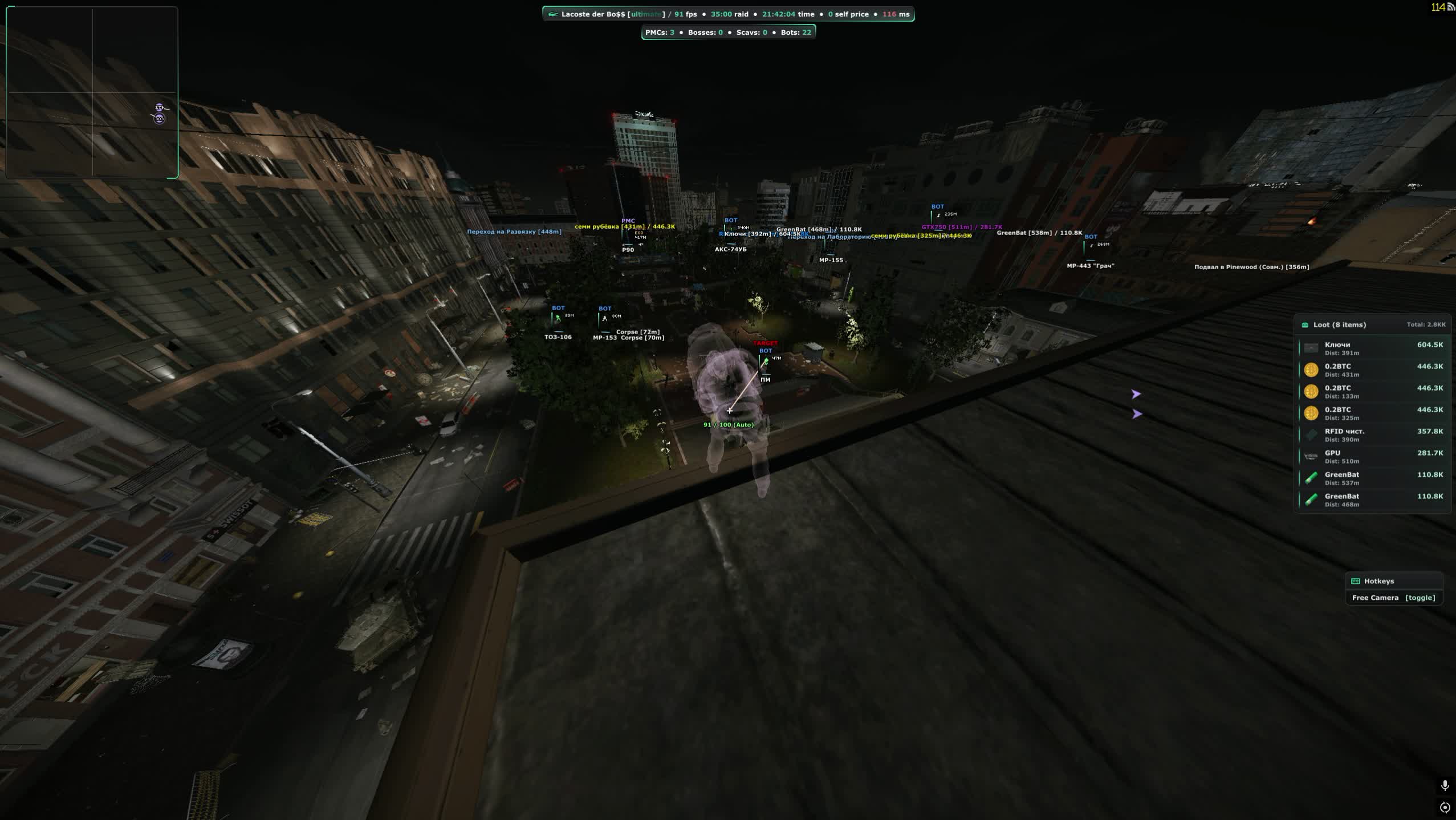
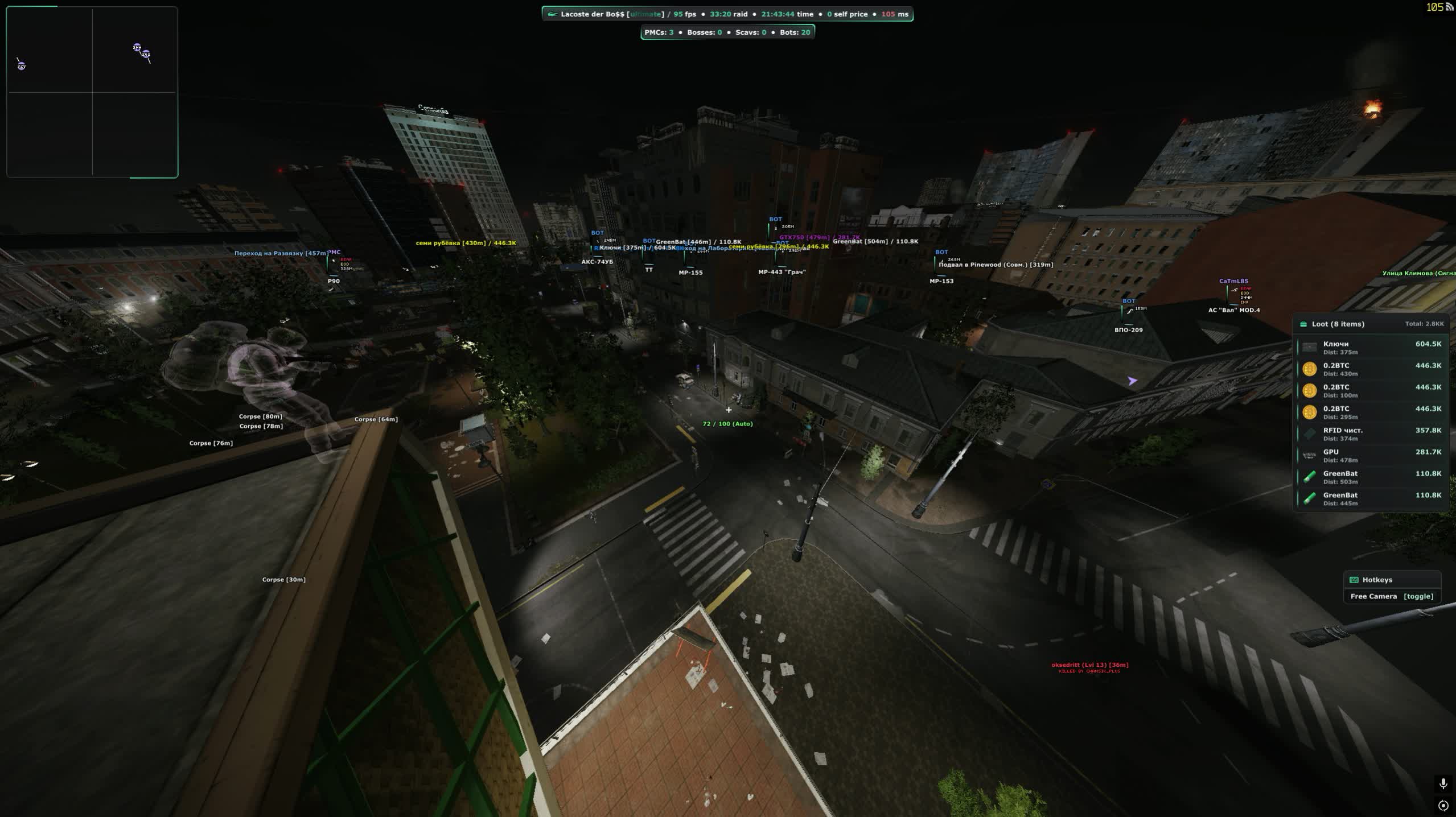
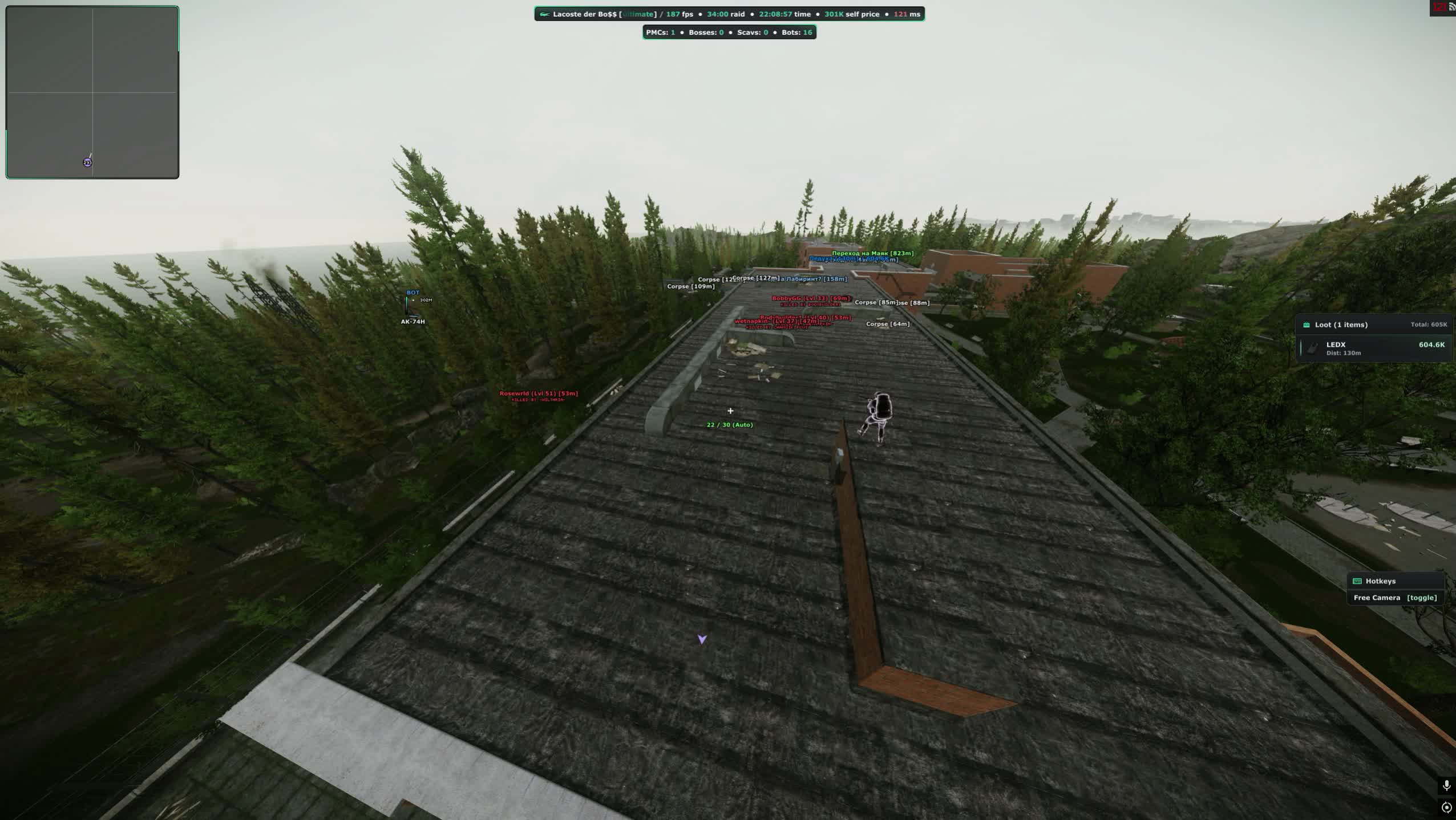
Reserve, eight minutes to extraction, somebody's stash under the stairs. Open it blind or keep moving? The Lacoste cheat for Escape From Tarkov answers that in advance: loot is labelled by category and price, PMCs, Scavs and bosses are split by colour, and off screen arrows show who is coming up behind you. The software comes from SMG, installs like a normal program, and the spoofer is picked at launch.

What separates Lacoste from a standard ESP package is that it helps outside of firefights too. Inside there is a quest helper with zone circles and task conditions, a database of players you have met that survives between raids, and client side control over time and weather, so night Factory becomes a daylight run and the downpour on Shoreline switches off with a slider. A combat mode key strips the screen down to enemies once the shooting starts.

Product features

Aimbot

Toggle and key

Bind the aimbot to any key, including a side mouse button. Keep it off while looting and only raise it when a fight starts in the Reserve bunkers or the Factory halls.

Capture radius

Set the working distance, the radius around your crosshair and the radius type. The circle can be drawn on screen so you see the active zone instead of guessing why a target is ignored.

Target selection

Filter by role: PMC, Scavs, bots, bosses. Bones are picked separately, and there are body-only and legs-only modes for the classic buckshot leg meta on Factory.

Visibility check

Aim only at targets you can actually see, with priority given to visible players. Shooting through walls is a separate switch if you want the aggressive setup.

Hit chance

The percentage of shots the aimbot commits to. Drop it below a hundred and some rounds miss, the way a live player shakes after first contact.

Auto fire

The trigger is pulled for you the moment a target is locked. Paired with instant aim it turns a corner peek in the sanatorium corridors into a one second exchange.

Instant hit

The bullet reaches the target with no travel time. At long range it removes the lead question entirely, but it looks obvious, so use it in short bursts.

Magic grenade

The grenade flies where the aimbot points, with the trajectory drawn on screen. Clearing a squad out of a room on Interchange becomes a single throw.

Bullet control

A separate key that steers the round mid flight. It saves the shot when the target ducks behind cover after you fire.

Head only

A mode for bots and bosses where the aimbot goes for the head only. Reshala with his guards or Killa go down without trading magazines into armour.

Damage and penetration

Minimum damage threshold, improved penetration and a distance cap. The aimbot stops dumping a magazine into class six armour that your ammo cannot chew through.

Target highlight

The locked player is drawn apart from the regular ESP, so you always know who the aimbot is holding when three of them are in the room.

ESP: players

Box

A frame around the enemy with a choice of drawing style, plain rectangle or corners. Pick whatever clutters the screen less on busy maps like Interchange.

Name and role

A label above the target with its own colour for PMCs, Scavs, bots and bosses. One glance tells you whether a live player or a Scav gunner is pushing you.

Health bar

Three styles, flat, gradient and animated gradient, with both colours configurable. You can see whether to finish a wounded player or he already crawled off to heal.

Ammo bar

Shows how many rounds the enemy has left, with the same three drawing styles. His reload is your best peek window.

Flags

Faction, prestige, game edition, whether the backpack holds anything, its value, hours played and K/D. You know if a PMC is worth the risk before the shooting starts.

Inventory

Full parsing of what a player carries, with an option to show it only when the crosshair is on him so the screen stays readable.

Weapon and skeleton

The gun in his hands, the bone skeleton and the look direction. You instantly see whether he faces you or is turned towards loot.

Off screen arrows

Pointers to players outside your view, coloured by role with their own distance setting. Bots can be excluded so the arrows stop flickering.

Cheater marker

A tag on a suspicious player. Not a verdict, but a good reason to avoid pushing him across open ground.

Chams

Seven fill modes: flat, fresnel, glow, wireframe, matcap, gradient and edges. Visible and hidden targets get separate colours.

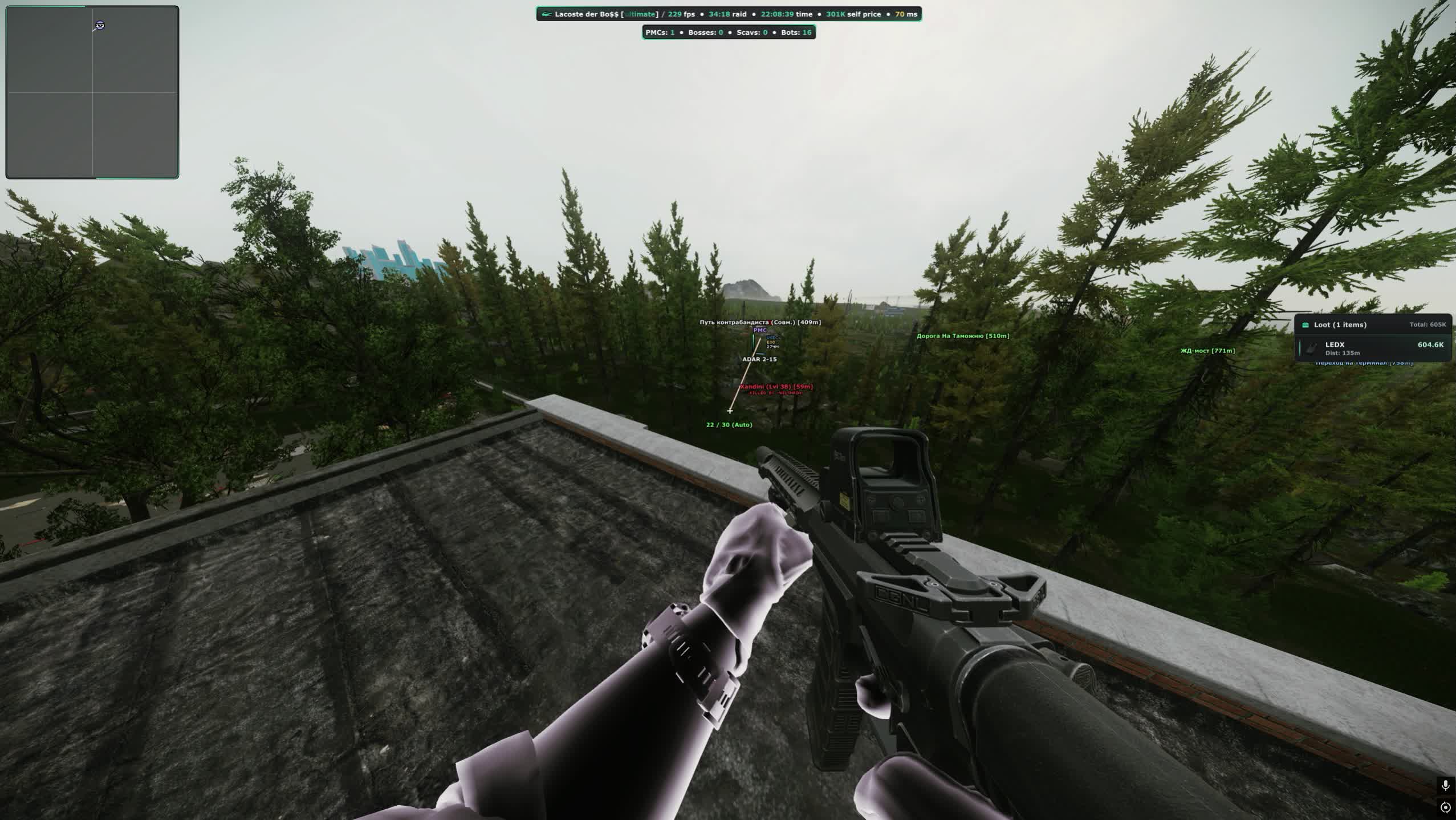
Local player chams

The same fill on your own model with its own colour. A small thing that helps you stay oriented in third person.

Draw distances

A separate cap for players and for bots, plus a global visibility check. Woods stops turning into a wall of labels.

Crosshair

A custom dot in the centre of the screen. Handy for hip fire at point blank range when there is no time to aim down sights.

Hitmarker

A hit indicator with different colours for armour blocks and ricochets. You can tell a chest hit from a round skipping off a helmet.

Damage marker and tracers

Damage numbers on impact and bullet trails in the air. The tracers give away the shooter sitting in the bushes.

Ammo counter

Your own magazine count next to the crosshair, with the ammo type shown. No more mid fight magazine checks.

Hit sound

A click on hit with separate volume for headshots and body shots. You hear whether the burst landed.

Combat mode

A key that swaps the whole drawing set: loot, extracts, transits, the BTR, quests and zones disappear and only players remain. The screen clears a second before contact.

ESP: map, loot and quests

Extracts

Evacuation points with icons, distance and a separate display for closed extracts. You know where to run while still on spawn.

Transits

Markers for transits between locations with their own icons and a distance setting.

BTR and hazards

The armoured vehicle with distance, mines and sniper zones. On Reserve and Lighthouse one wrong sprint costs the whole raid.

Quest helper

Task points with icons, conditions and a coloured zone circle. You see exactly where to sit or what to find without a wiki on a second monitor.

Quest items

Highlighting for task items and key items, with their own distance and colour for the key ones.

Bodies

Corpses with icons, a separate distance for PMC bodies and full parsing of what is inside. Loot can be shown always or only on hover.

Grenades

Incoming grenades with an icon and distance. That is the second you need to step behind the corner.

Terminals and tripwires

Code terminals and tripwires with distance settings. The lab door opens without hunting for notes first.

Loot filter

Categories

General loot, hideout materials and container contents are split apart, and every group is tuned on its own.

Short names

Items are labelled in shorthand. With a hundred entries on screen at Interchange that alone makes it readable.

Shared settings

One style applied to every category at once instead of picking colours line by line.

Custom items

Manual setup for a specific item: colour, distance, visibility. Put LEDX and graphics cards on their own colour and you stop walking past them in the dark.

Filter sharing

Export and import the loot filter as a file. A quest preset and a money preset swap between raids.

Players and encounter database

Whitelist and blacklist

Mark players in raid or add them by ID, each list with its own colour. You never confuse a friend with a stranger in a tight room.

Working with IDs

Copy your own ID, import other ones, push the current target into a list. Lists export and import as files, which is handy for a squad.

Local database

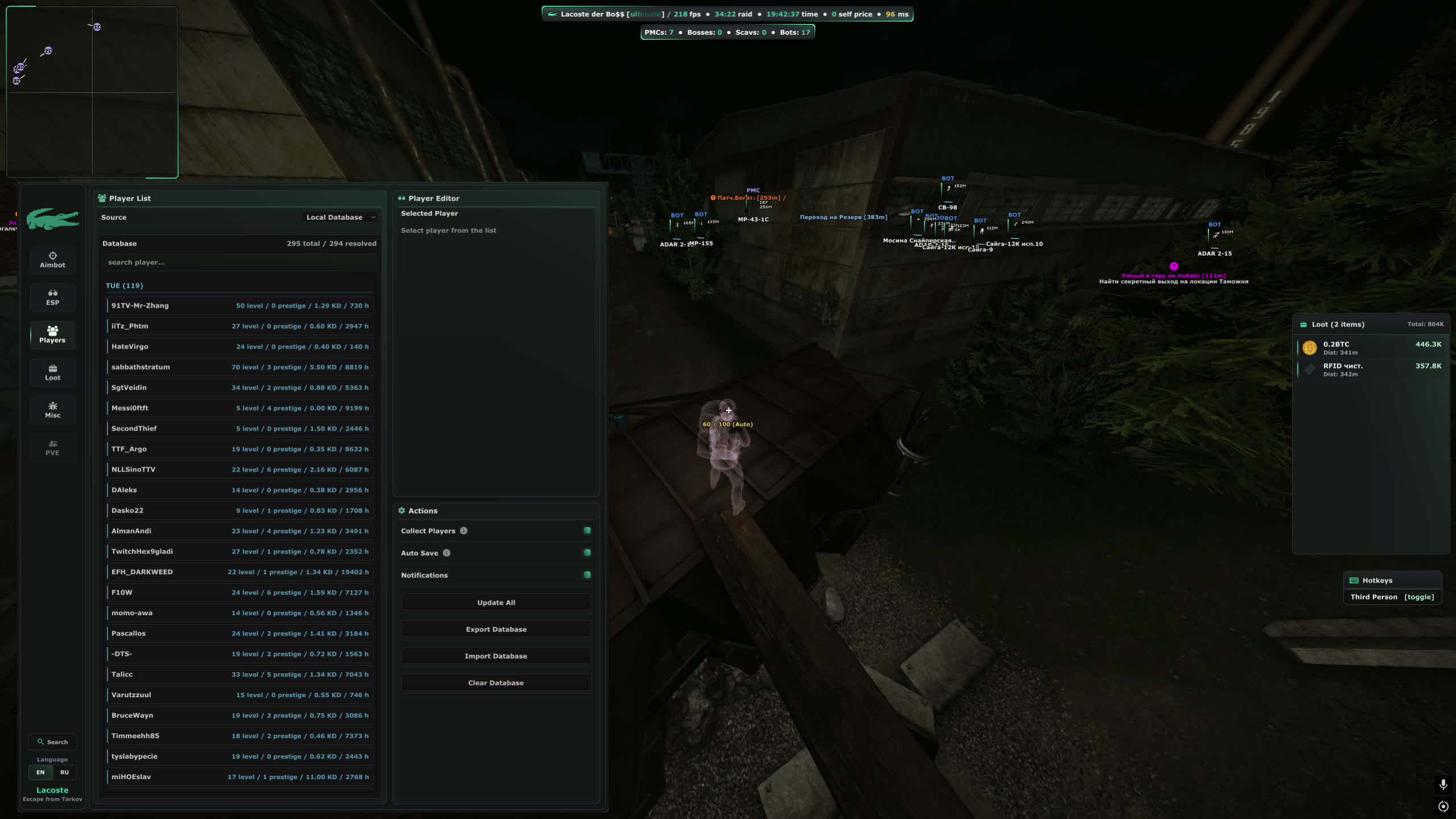
The cheat collects everyone you meet, with autosave and notifications. The database can be refreshed, exported, imported or wiped.

World, light and weather

Custom time

Set the time of day on your client. Night Factory turns into a daylight run and you can leave the flashlight and night vision at home.

Environment colours

Sky, sun, moon, rays, ground, ambience and the moon halo are all adjustable. Push the picture into high contrast and silhouettes read better.

Sun and atmosphere

Sun size, brightness and contrast, Rayleigh and Mie scattering, directionality and haze. Long sightlines on Woods stop drowning in mist.

Lighting

Separate intensity, shadows and ambience for day and night. The dark corners of the Labs become readable.

Weather

Rain, fog, cloud density, wind strength and direction. The downpour on Shoreline goes away with one slider.

Misc

Grass and shadows

Turn off vegetation and shadows. On Woods and Customs the bush camper stops being invisible, and you gain frames on top.

Medical panel

Quick healing with your meds at hand. After a fight you no longer spend ten seconds digging through the inventory.

Long reach

Doors, crates and items are used from an extended distance without walking right up to them.

No malfunctions

No jams, misfires or feed failures. A bolt stuck mid fight no longer decides the fight for you.

Looting speed

Instant container and door opening, automatic doors and no delay on picking items up. A stash is cleared before anyone can walk in on you.

Weapon handling

Fast magazine loading and unloading, quicker weapon operations, forced full auto and an instant knife strike.

Silent loot

Items are taken without sound, and the line to the item gets its own colour. Nobody on the floor hears that the stash is already empty.

Safe zones

Spots where enemies cannot reach you. Sitting out the wave until extraction becomes a real option.

Visibility

Full bright with an intensity slider, a custom light source, no effects, no flash blindness, no visor, no inventory blur and no head bobbing.

Inflated heads

Enlarged heads set separately for bosses, bots, Scavs, PMCs and whitelisted players. A long range headshot stops being a lottery.

Camera

Third person and free camera with their own speeds and sensitivity. You can look around a corner without putting your body in the doorway.

Field of view

Aspect ratio changes, FOV adjustment and zoom. A stretched screen shows you more than the enemy sees.

Movement

Infinite stamina, no inertia, long jump with levitation, high jump, fast crouch, instant lean, bunny hop, speed hack, obstacle ignore, air stall, fake duck and fly hack.

Quest items

Early access to task items and the option to plant a quest item. Some chains close without extra laps around the map.

Weapon builds

Unlocked attachments and builds. You put the gun together the way you want, not the way trader levels allow.

Menu, interface and launch

Menu

The open key is yours to pick, the ESP style switches, and there is DPI scaling, a custom menu background and seasonal theming.

Interface elements

Watermark, loot list, quest list, hotkeys and radar toggle one by one. You build the screen the way you like it.

Configs

Save, load, export and import your settings, plus search inside the menu. A Factory preset and a Woods preset swap in two clicks.

Spoofer and cleaner

The spoofer is built in and picked right at launch, the cleaner wipes anti cheat traces. No extra software to buy.

Capture bypass

The menu and overlay stay out of OBS recordings and Discord screen share. You can stream and clip without worrying.
TARIFFS
6000
BUY What happens after payment?
Got a question? Ask before you pay

We'll help you choose and sort out any launch issue. Ask us anything before buying, we're always on your side.

Support 10:00–22:00, sometimes we reply at night too
Ask a question

Available tariffs

30 days
6000
START PURCHASE
Reviews about Lacoste Tarkov Cheat

No reviews yet. Be the first to leave one.

Your review

Reviews are published after moderation.

Join our gaming community chat

Discuss current cheats from developers and how to use them effectively in popular online games. Share tactics, exchange useful info and find like-minded players in our community.

1 900+Members
24/7Online
Join our gaming community chat

Technical support

Run into a technical issue? Our team of experts will help. We handle all requests in a live queue, so please be understanding if it sometimes takes a little wait. We guarantee that no request goes unanswered.

Availabilityfrom 10:00 to 23:00
Fast responseIn queue order
Get help
Technical support
PROCHEAT

PROCHEAT news channel

Follow product status changes, update history and important announcements.

Subscribe

What the Lacoste cheat does in Tarkov

Lacoste is not built around a single module. It covers the whole raid cycle: get in, read the situation, fill the bag, reach the extract. Here is what each block handles.

What is inside the Lacoste cheat for Escape From Tarkov
Block What it gives you in raid Notable settings
Aimbot Holds the target in a firefight and finishes bosses Magic grenade, bullet control, hit chance, bones and roles
Player ESP Shows who is nearby, what he carries and how much health is left Flags with K/D and hours, inventory, ammo bar, off screen arrows
Chams Fills models so they read in the dark and in bushes Seven modes, separate colours for visible and hidden
Loot Separates value from junk before you open the crate Categories, custom items, short names, filter export
Quests Walks you through tasks without a wiki tab open Zone circles, conditions, key item highlighting
Map Keeps extracts, transits, mines and the BTR in view Icons, distances, closed extract display
World and weather Removes night, rain and fog on your side Time of day, lighting, sky colours, wind strength
Misc Speeds up looting and movement, cuts the small annoyances Stamina, silent loot, no malfunctions, third person
Launch Covers your hardware and traces, stays out of recordings Built in spoofer, cleaner, OBS and Discord bypass

All of it sits in one menu with search and config slots, so a Factory preset and a Woods preset swap between raids instead of being rebuilt every time.

Lacoste aim: from a light nudge to the magic grenade

Shooting in Tarkov comes down to ballistics. Every cartridge has its own velocity, its own drop and its own penetration, and at two hundred metres the gap between a headshot and a clean miss is a couple of degrees. The Lacoste aim covers that with prediction, and if you would rather skip the maths entirely there is instant hit, where the round arrives the moment you fire.

There are enough settings to build both a quiet profile and a loud one. Quiet: hit chance around seventy percent, visible targets only, mid torso bones, a narrow radius and a manual key. From the outside that reads as a player with good reflexes, nothing more. The loud profile is the opposite: wall shots, auto fire, head only on bots and bosses, a wide radius. The second one draws attention fast, so we suggest keeping it for specific moments such as a trade on the Labs.

Two features stand apart from most EFT software. The magic grenade throws along the aim line with the trajectory drawn for you, so a room with four players on Interchange is solved with a single toss. Bullet control steers a round that has already left the barrel, so a target that slipped behind a door frame still catches it. On top of that a role filter keeps the aim from snapping to a Scav bot while a live PMC stands behind him.

Loot filter and quest helper: what to go into a raid for

A raid is measured by what makes it to the extract, not by kills. Loot in Lacoste splits into three groups: general items, hideout materials and container contents. Each is tuned on its own, so graphics cards and LEDX can get their own colour and a longer draw distance while bandages and ammo stay in the grey pile. Names are shortened, otherwise Interchange turns the screen into a wall of text.

Presets handle the other half. Build one filter for money, another for quests, export them to files and switch between them instead of clicking through settings again. The same file goes to your squad so everyone sees the same picture.

The quest helper removes the wiki tab. Task points are labelled, zones get a coloured circle, and conditions appear on screen. Required items and keys are highlighted with their own distance, while early access to task items and the plant option shorten some chains. Bodies are parsed separately, so you know whether a corpse is worth the walk or holds one shotgun and expired chocolate.

Player database, lists and the cheater tag

Tarkov is a game with a memory. The same person shows up on Customs for weeks, and knowing something about him in advance helps. Lacoste stores everyone you meet in a local database with autosave and pings you when a familiar name appears again. The database can be exported, imported or wiped once it grows too large.

Two lists sit on top of it. The whitelist holds teammates and friends, gets its own colour and is ignored by the aimbot. The blacklist holds the people a bad trade already happened with. A player is tagged in raid or added by ID, your own ID copies with one button and other ones import in bulk. Finished lists export as files, so a squad of five works from the same markup.

The cheater tag is a separate thing. It does not hand out verdicts, it flags behaviour that stands out from the norm. The practical use is simple: do not cross open ground towards that player and do not try to out peek him fairly.

Spoofer, cleaner and streaming: the anti cheat side

Escape From Tarkov runs BattlEye plus server side checks, and bans come in waves and by hardware. That is why the Lacoste spoofer is not a separate purchase: it lives in the loader and is picked at launch. Next to it sits the cleaner, which wipes anti cheat traces from the system. Run it before you enter the game rather than after something has already gone wrong.

Streaming is its own story. The menu and every drawing element stay hidden from screen capture, so OBS recordings and Discord shares show a clean picture. Clips for friends and a small stream stop being a risk, and you never have to explain the boxes around players.

Common sense still applies. Keep it off your main account, use loud modes like wall shots and instant hit sparingly, and give the developer a day after a major patch. If the software goes on hold, subscription time is frozen. That rule is the same for every product we sell, and the current status is shown right on the card.

Plans: why the site only sells 30 days

The store page for Lacoste carries a single plan: 30 days for 6000 RUB. That is not a technical limit, it is our decision for this particular software. Short periods on a cheat like this get bought for one off jobs, support drowns in tickets and the build lands on the anti cheat radar faster. A month filters that out and leaves the people who actually play.

Regulars are the exception. If you have bought from us before and are not new to the chat, we hand out short periods in direct messages: one day for 700 RUB and a week for 3500 RUB. One time per person, purely to look the software over before committing to a month. After that it is 30 days, with no other options.

The purchase itself is ordinary. Pick the plan, pay, and the key and loader arrive by email. There is no personal account on the site, everything comes in the letter. For a short period write to support on Telegram, and the same place will help if the mail never arrived or the loader refuses to start.

FAQ about the Lacoste cheat

Why can I not buy a single day on the site?

Short periods for this software are not listed for payment. A day for 700 RUB and a week for 3500 RUB are handed out in direct messages, only to returning buyers, once each, as a trial run. Everything else is bought by the month.

Do I need a separate spoofer?

No, it is built in and selected when the loader starts. Nothing extra to buy, and the cleaner for anti cheat traces sits in the same place.

Is the cheat visible in recordings and streams?

No. The menu and the drawings are hidden from screen capture, so OBS and Discord screen share show a normal looking game.

Which display mode should the game run in?

Windowed or borderless windowed. Exclusive fullscreen will not work, the overlay does not draw there.

What hardware and system do I need?

Intel or AMD processor, NVIDIA or AMD graphics, no vendor restrictions. Supported systems are Windows 10 builds 21H2 and 22H2 and Windows 11 from 21H2 to 23H2. No USB stick and no BIOS changes.

What happens if the cheat is frozen after a patch?

Subscription time stops while the software is being updated and resumes once a working build is out. The current status is shown on the product card.

How fast does the key arrive?

Right after payment, by email to the address you provide. There is no personal account on the site. If nothing arrives within a few minutes, check spam and message support.

from 6000 ₽ Choose a plan
Ask a question


