Unnamed PUBG Internal: ESP Cheat with Chams

Working
Unnamed Unnamed
Add another cheat from this game too — to compare them.
Unnamed PUBG Internal
Steam
Windows support: 10: all builds; 11: all builds
Menu language: English
Spoofer:No
USB drive:No
BIOS:No

User information

Before you buy, check one thing people usually remember too late. The Unnamed loader does not work while FACEIT AC, Riot Vanguard or an outside antivirus such as Kaspersky, ESET or Avast is installed. Closing them is not enough; they have to be fully uninstalled. If you also play Valorant or queue on FACEIT, factor that in up front.

Otherwise the requirements are modest: Windows 10 or 11, with no build restrictions from the vendor, and PUBG on Steam. No USB stick is needed, and you only go into the BIOS if the game starts crashing after injection.

Payment goes through Digiseller. The key arrives by email right after it, with a button for the vendor's instructions in the same message. There is no spoofer in the bundle. When PUBG ships a patch, the build is sometimes taken down for an update: the status on this page changes, and your paid time is frozen for those days. The developer's other cheats are on the Unnamed page, and you can ask anything before buying in the support chat.

SCREENSHOTS
Description

Unnamed PUBG Internal is a visual cheat for PUBG: BATTLEGROUNDS. It leaves your crosshair alone. Its job is the read on the fight: where enemies are, who is knocked, what each of them is holding and which guns sit in their slots. The build is internal, so the loader pushes it into the game process through its own driver, and the markers are drawn right in the frame with no separate window over PUBG.

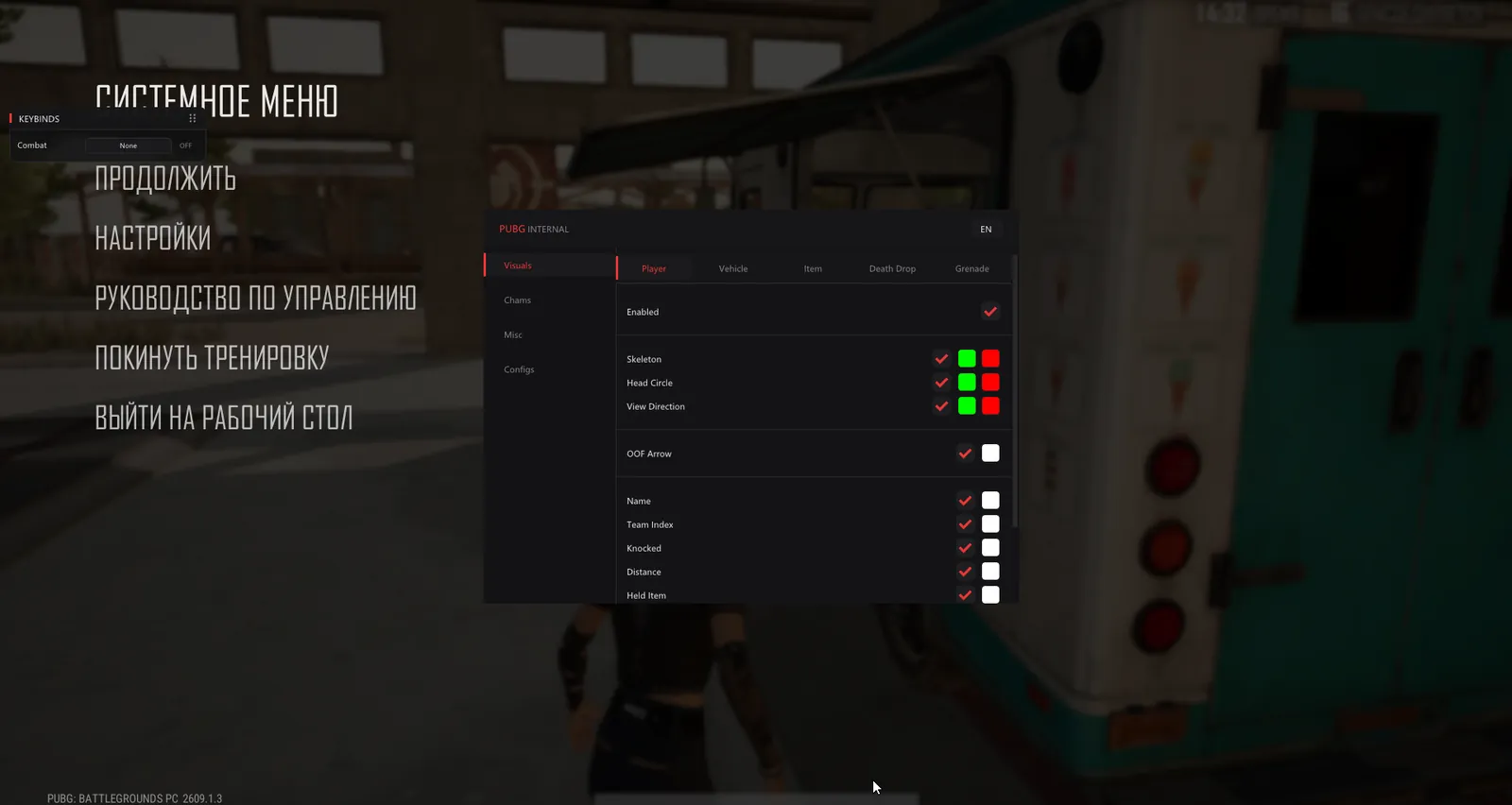
The menu has four tabs. Visuals covers player ESP, vehicles, items on the ground, death crates and grenades. Chams recolours models so you can spot them behind cover. Misc and Configs hold extra settings and presets. It is made for players who trust their own shooting. What they want is to know in advance how many people are holed up in a house, who has a shotgun and which car still has fuel in the tank.

Product features

Players

Skeleton and head circle

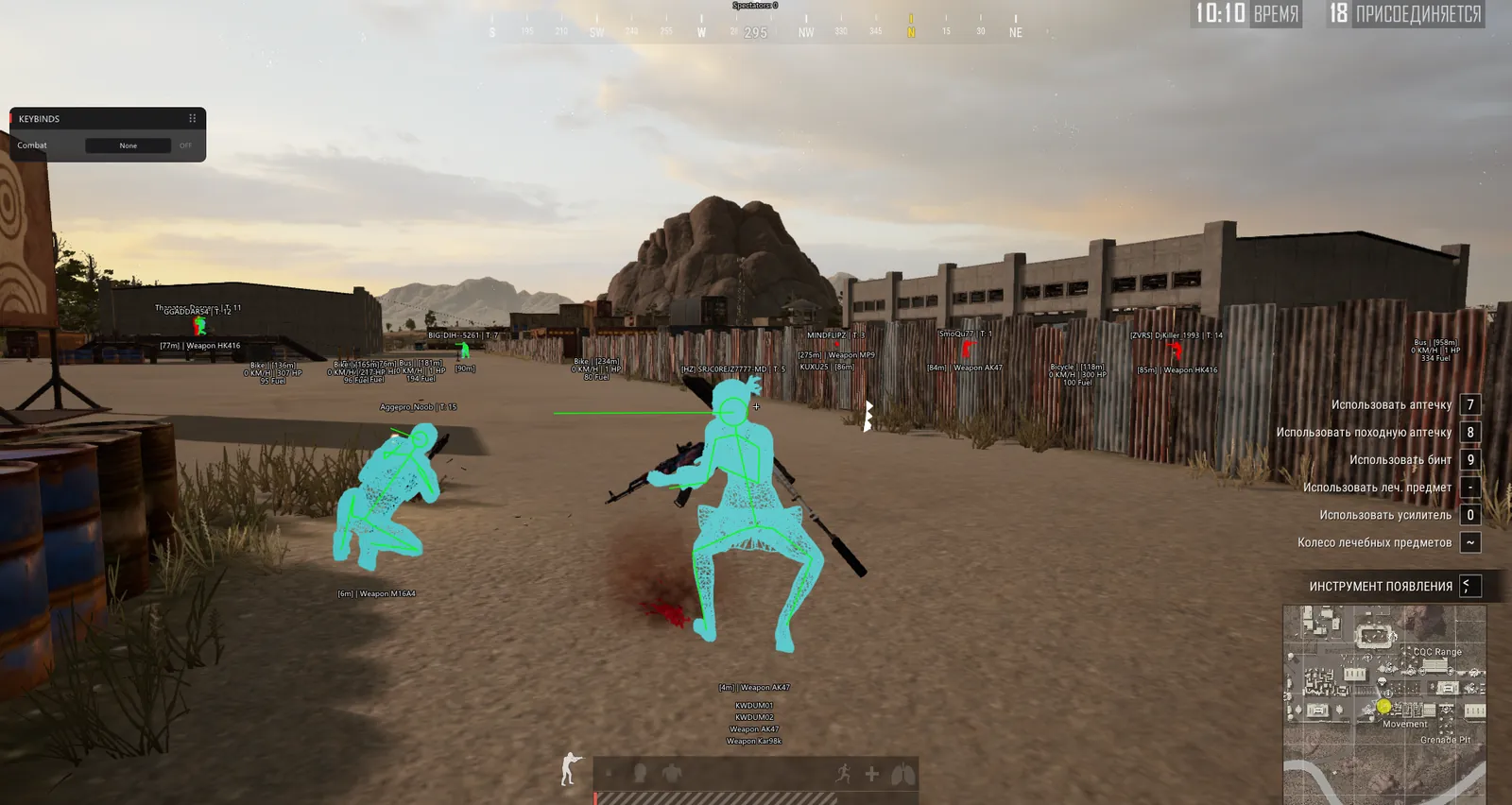
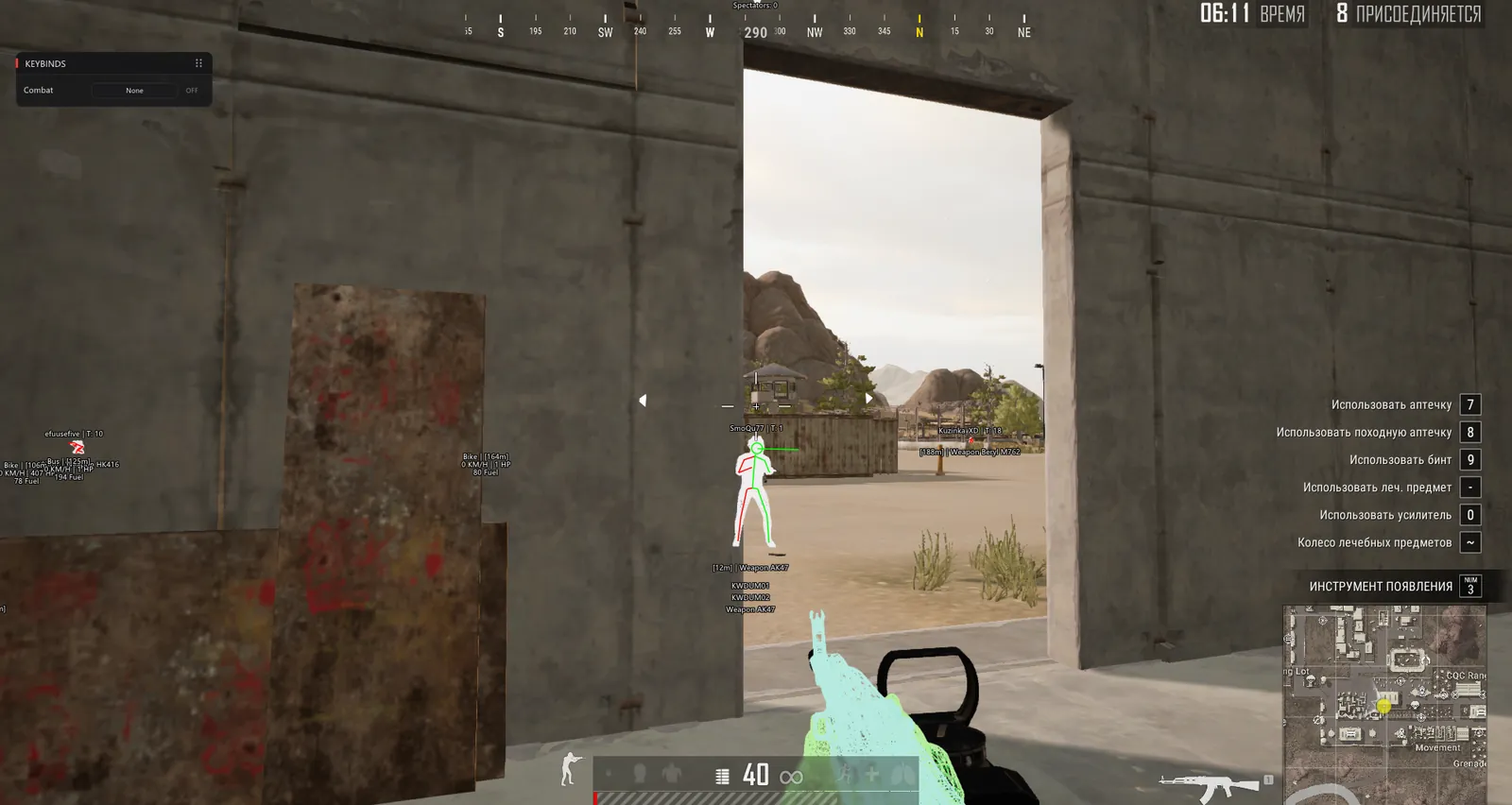
Bones and a circle on the head come in two colours: one while the enemy is in the open, the other once he is behind a wall or a crate. The defaults are green and red, and both can be changed.

View direction

A short line from the head shows where the enemy is looking, so you know whether he is holding your angle or watching a window. It has two colours as well.

OOF arrows

When an enemy moves off screen, an arrow at the edge points his way. It saves you from the player circling behind you.

Name and team

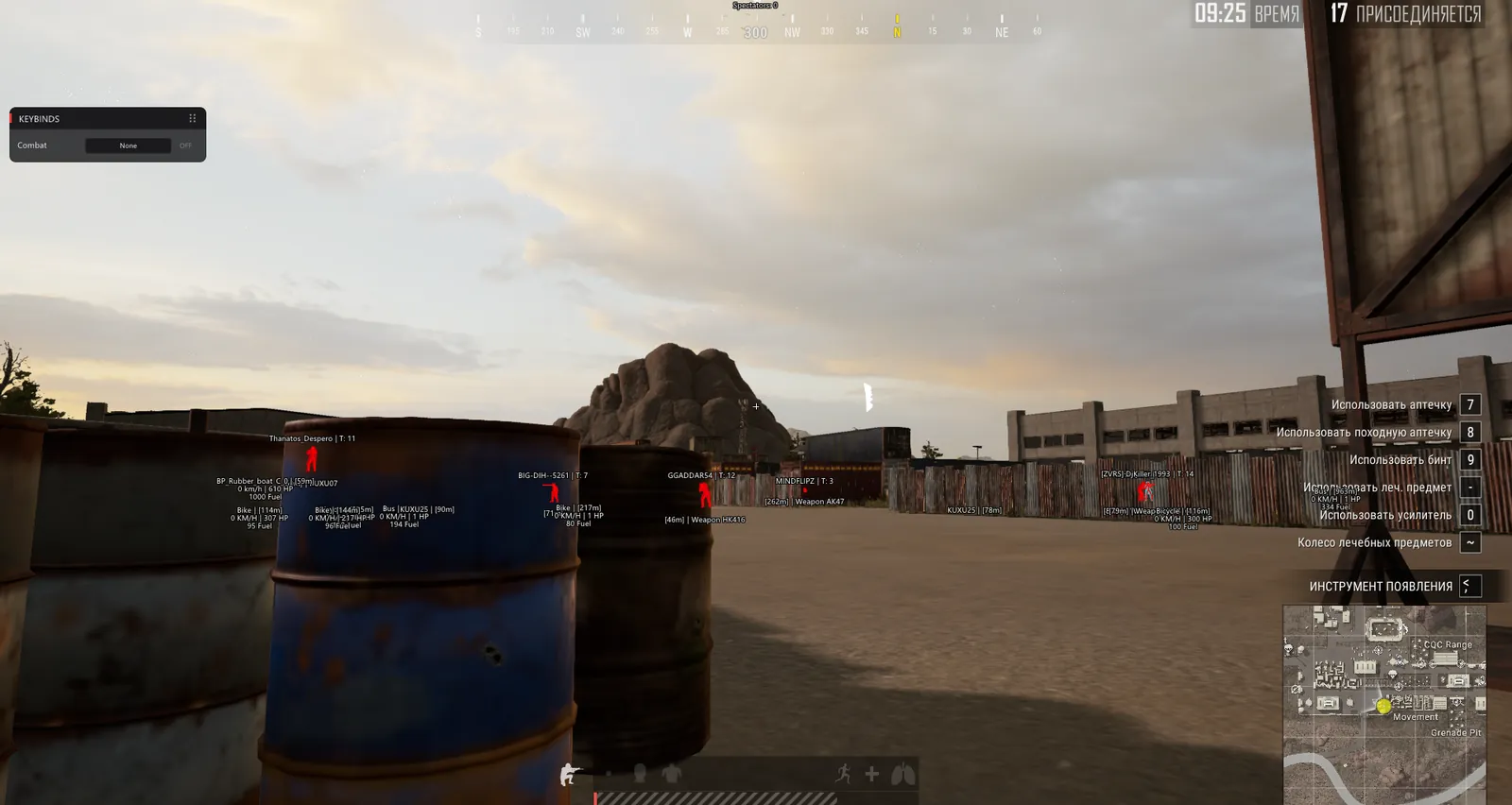
Nickname and team number above the model, written as T: 12. In squads you see at once which four players move together.

Knocked marker

Highlights anyone crawling around knocked. You decide whether to finish him now or wait and see who runs over to revive.

Range and weapon

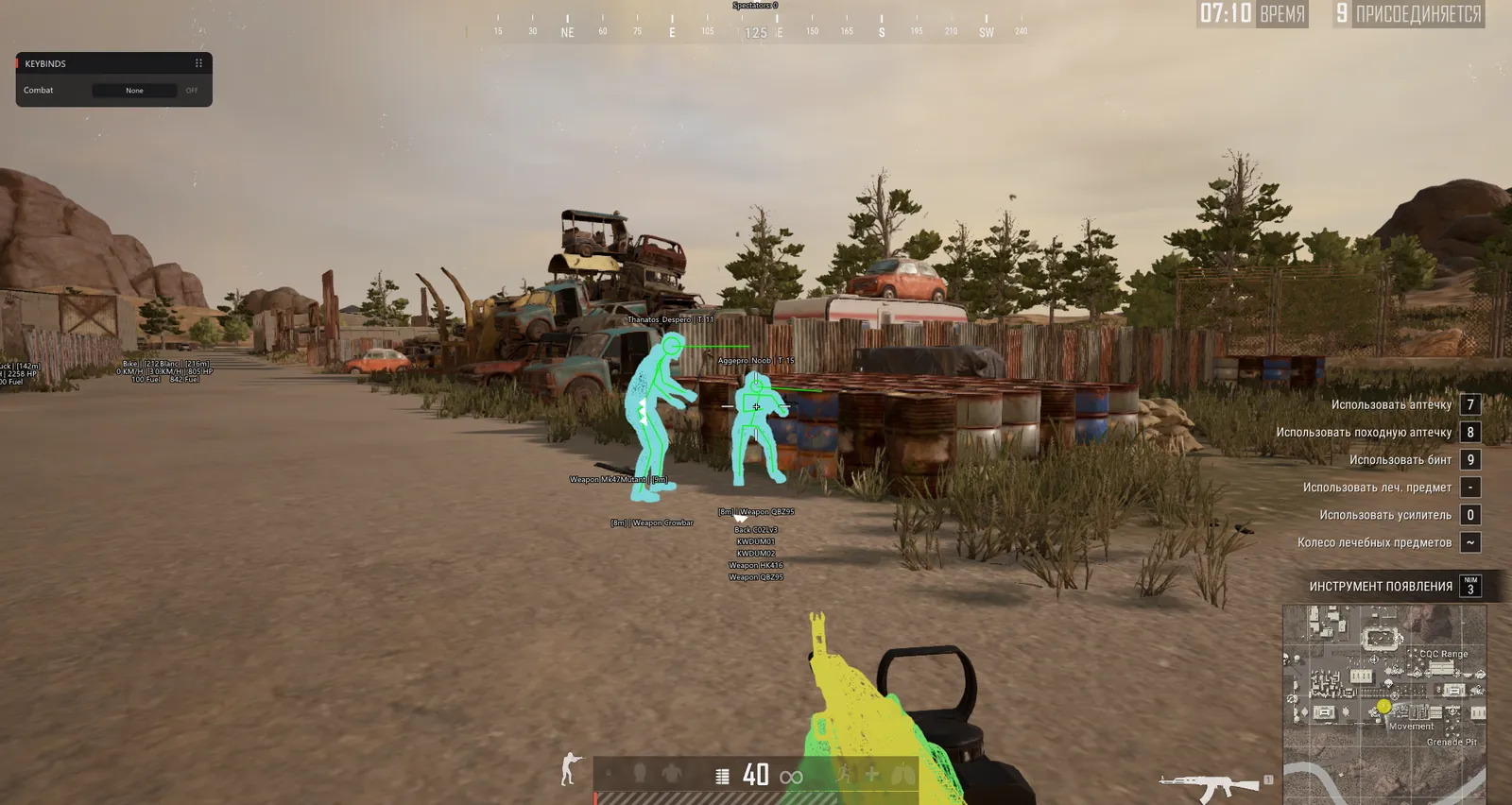
Distance and the gun in hand under the model: Weapon AK47, Weapon Kar98k, Weapon QBZ95. Names are in English, as in the game files.

Enemy gear

Loot List prints a column with everything in the enemy's slots: primary, secondary, attachments.

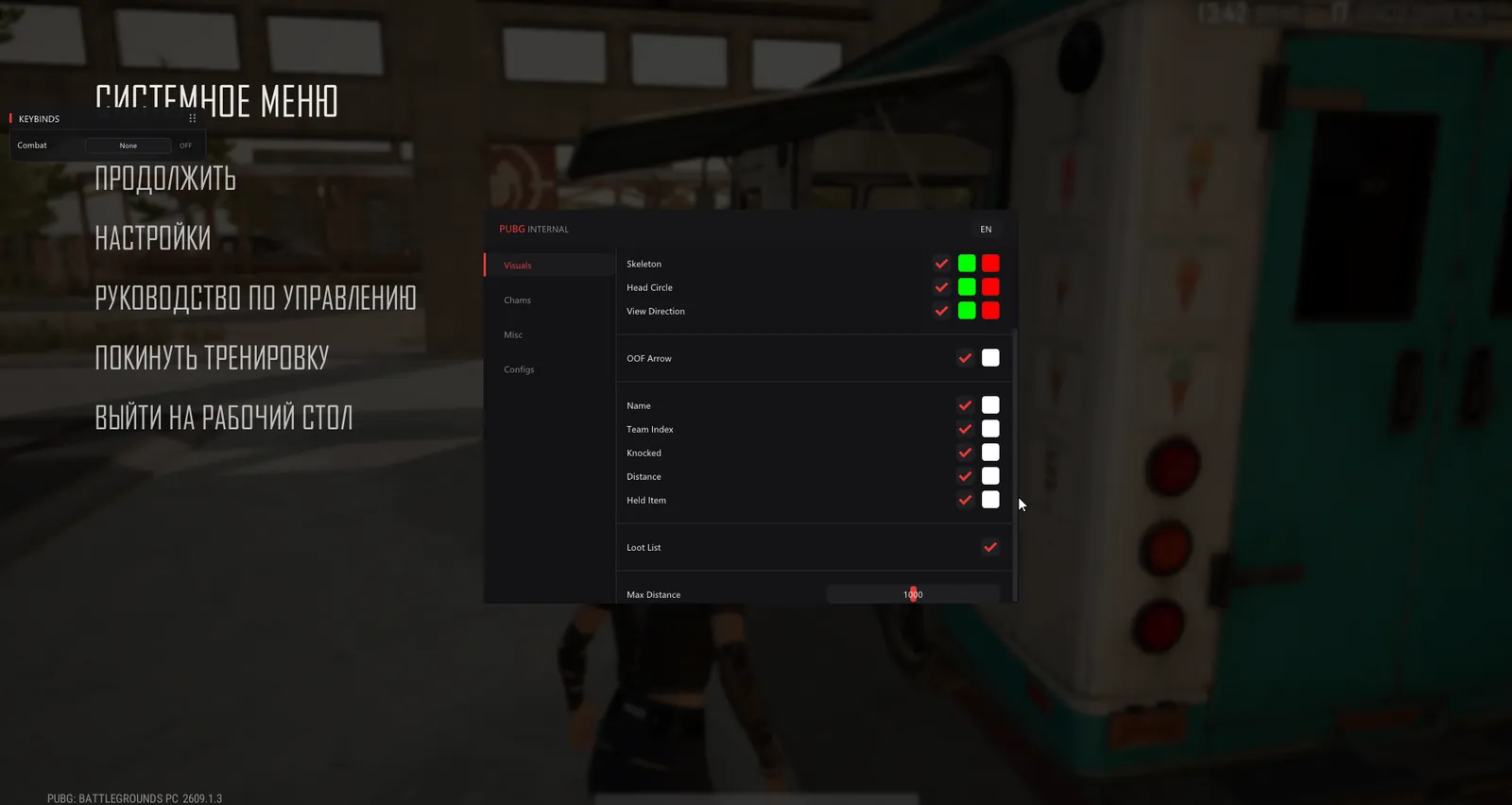
Max distance

The slider goes up to 1000 metres. On the open fields of Erangel the maximum makes sense, in the tight streets of Sanhok 300 is plenty.

Vehicles

Vehicle label

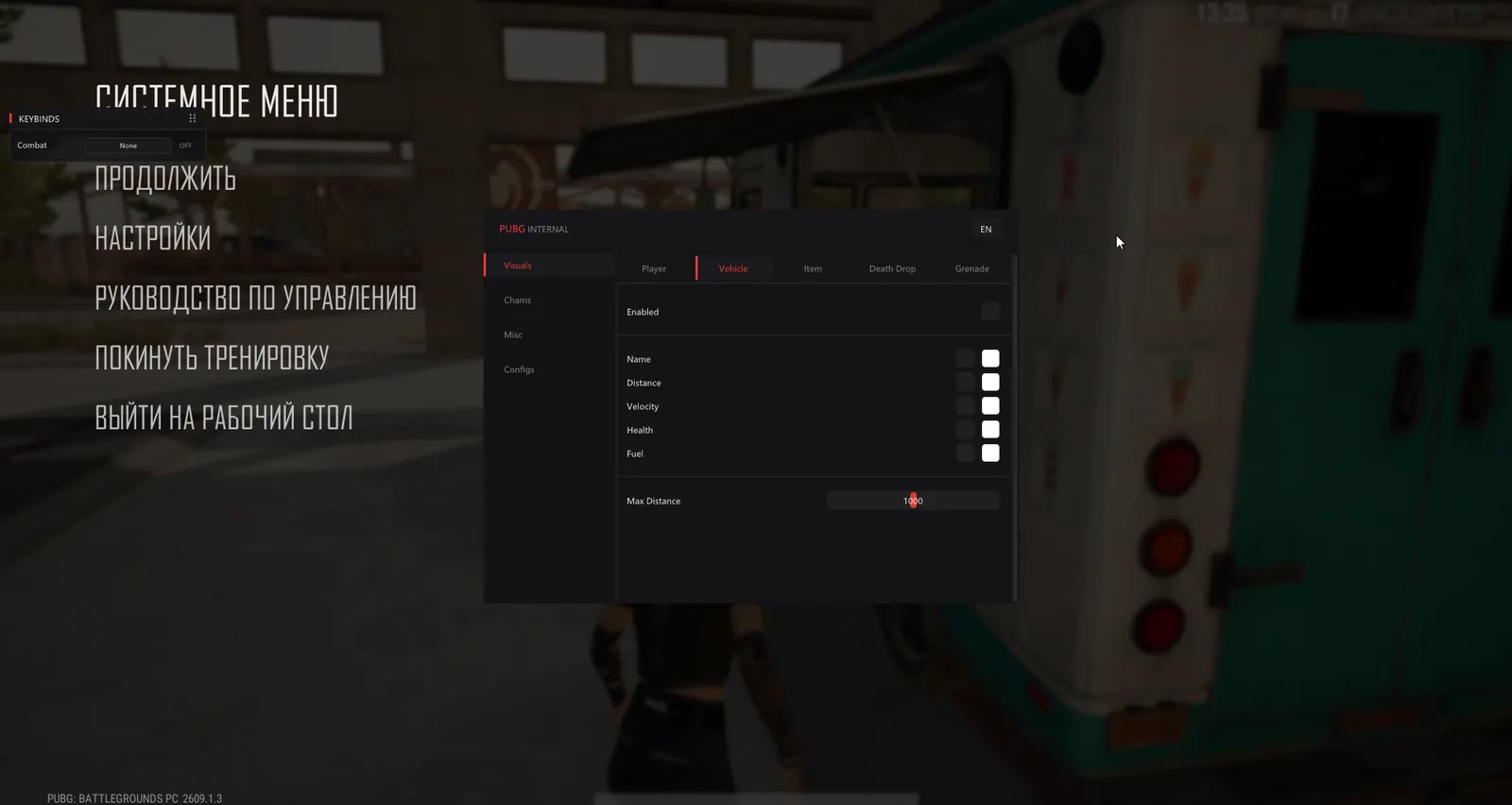
Name and distance for bikes, buses, cars and even the rubber boat.

Speed, health, fuel

Velocity in km/h, Health and Fuel. A label reads like Bike | 0 KM/H | 100 HP | 94 Fuel, so you see whether it is moving and whether it will make it to the zone.

Vehicle range

Its own limit up to 1000 metres, separate from players.

Loot

Ground items

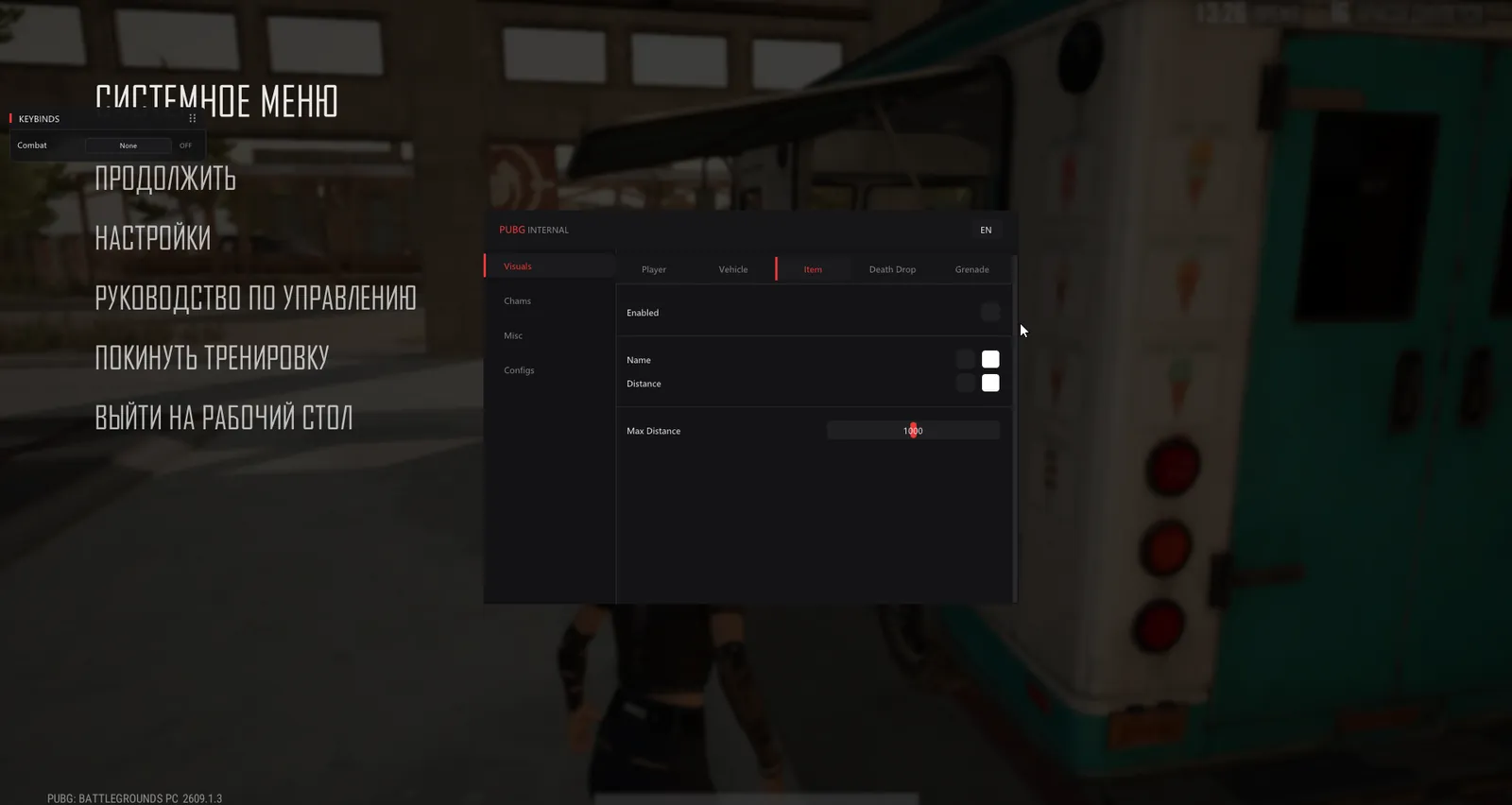
The Item subtab labels loot around you with name and distance, capped at one kilometre.

Death crates

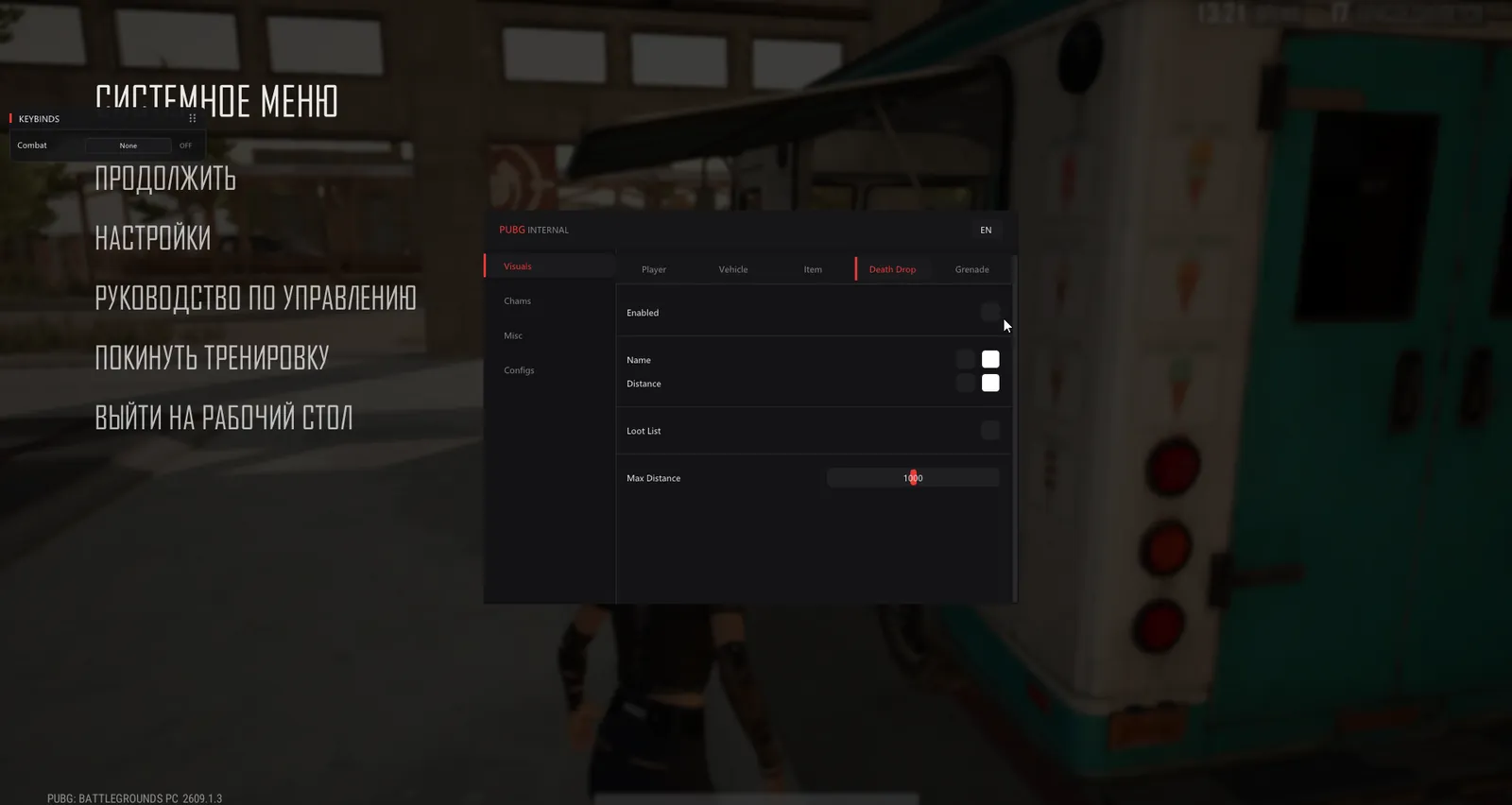
Death Drop marks the crate left behind after a kill and lists what is inside. You do not have to sprint across a field just to check for a decent scope.

Grenades

A separate Grenade subtab under Visuals for grenade ESP.

Chams

Solid fill

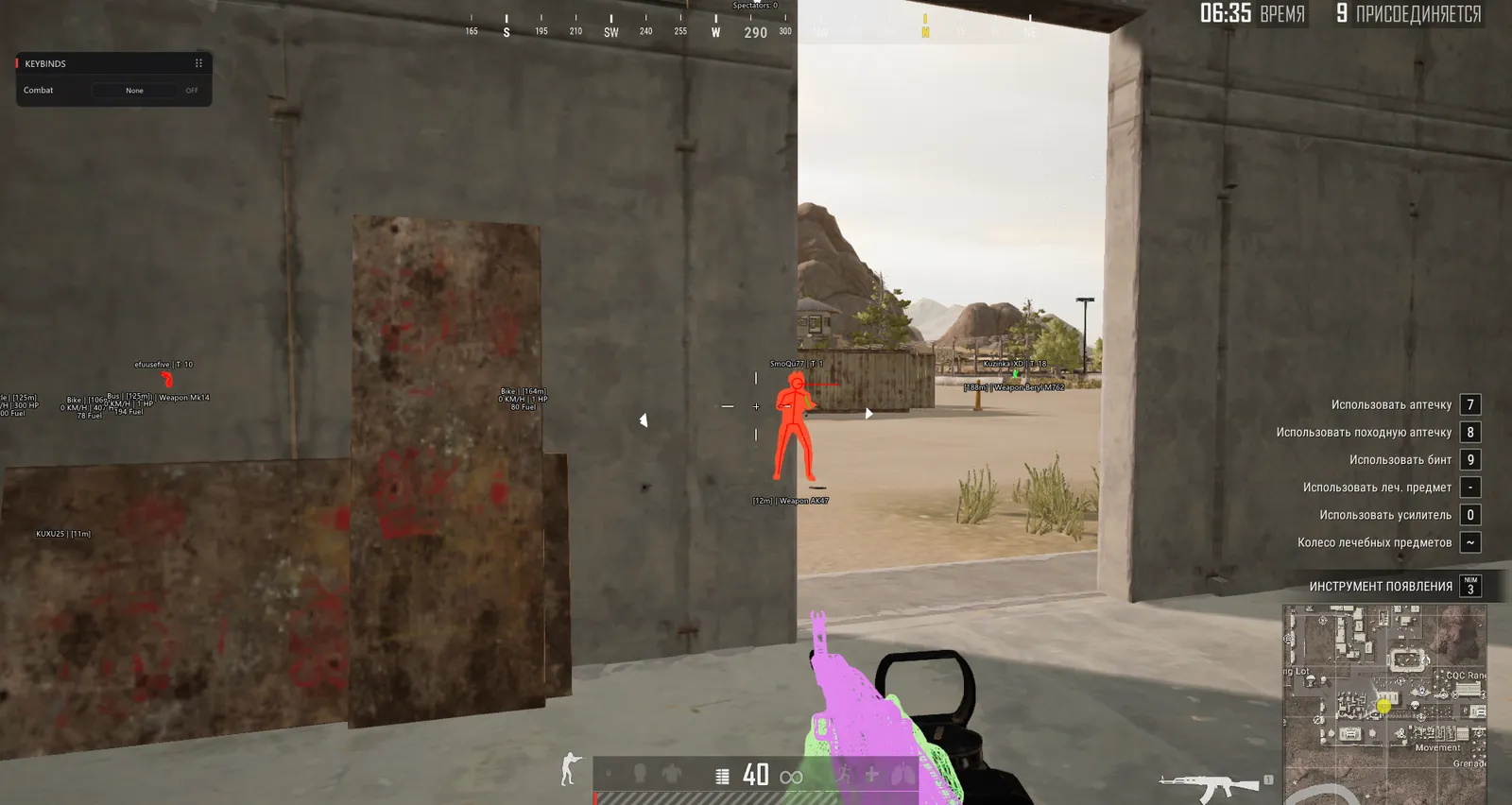
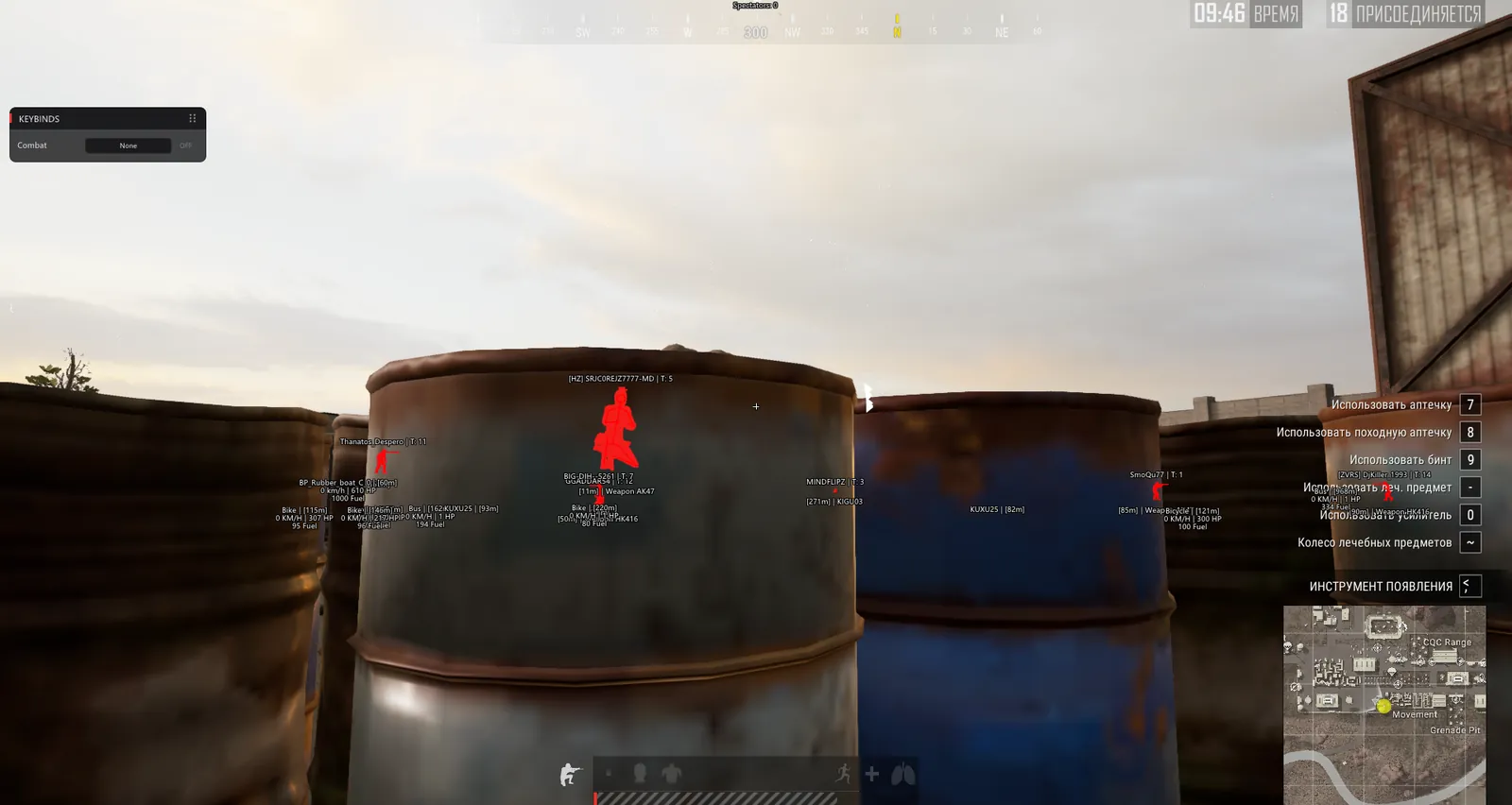
The enemy model is filled with a flat colour and shows through barrels, containers and walls. The colour switches once he steps into your line of sight.

Wireframe

A second style: a mesh outline over the model, cyan on the screenshots.

Your own weapon

The gun in your hands gets a wireframe too, shown pink, yellow or cyan in different shots.

Menu

Tabs and language

Visuals, Chams, Misc and Configs, an English interface and an EN switch in the header. Misc holds the extra settings.

Configs

A set of settings is stored under its own name. Load, Save, Delete and Refresh let you keep separate presets for solo and squad games.

Keybinds window

A small panel over the game that lists your bound keys and the Combat mode.

Known issues & fixes

Real questions from our support, with the fixes that worked. Based on user requests for this product.

My antivirus keeps deleting the loader files or blocking it from starting — what should I do?

This is usually caused by your antivirus or Windows built-in protection flagging the loader as a threat and deleting or blocking it.

  • Add the loader's folder to your antivirus exclusions.
  • Temporarily turn off real-time protection while you download, install, and activate.
  • Download the loader again and launch it.

If the error persists, contact support — you may need an updated version of the loader.

Loader says Invalid key / key not working

This is a server-side issue, not a mistake on your part. Contact support and provide the key that arrived in your email after payment.

The operator forwards the key to the developer, who then issues a replacement. A new key usually arrives within a few hours depending on the developer's time zone.

No additional steps are required on your end while you wait — the loader and all files are already set up correctly.

Driver Error appears after entering the key in the loader — cheat won't start

A driver error usually indicates a conflict with installed software or a system environment issue. Follow these steps:

  • Download the Sordum utility (available from technical support; the archive password will be provided by support).
  • Launch it, click Search, and wait for the scan to finish.
  • Send a screenshot of the results to the support chat — the developer will analyse the conflict and provide a fix.
After reinstalling Windows the HWID binding is lost — loader shows "HWID not found"

The key binding resets when you reinstall the OS. Contact support and provide your activation key — the operator will forward the request to the developer, who will reset the HWID on the server side. Re-enter the key in the loader after the reset is confirmed.

Note: one key works on one PC only. If your hardware has not changed, the reset is free of charge.

Loader CMD window opens and immediately closes, nothing happens

In most cases, using a VPN fixes the issue: start a VPN connection and then relaunch the loader. If your VPN has TUN mode enabled, disable it in the VPN settings and try again.

Additionally: download the Sordum utility (available from technical support; archive password: sordum), run it, click Search, and send a screenshot of the results to support — this helps diagnose what is blocking the launch.

If neither VPN nor Sordum (available from technical support) helps, contact support to escalate to the developer.

Loader shows 'under maintenance' or cheat is unavailable after a game update — how long to wait?

The loader is temporarily unavailable while the developer releases an update. This is a planned process that typically takes a few hours.

  • Monitor the status on the website and in the news channel: t.me/procheatsupport
  • Subscription time does not count down during a freeze — the timer is paused.
  • Once the update is ready, the loader will work automatically. No additional steps are needed on your end.
The site is blocked in my country and I can't download the loader

Use a VPN to access the site and download the loader. Once the loader is downloaded and the cheat has been injected, you may disable the VPN — it does not need to remain connected during gameplay.

I pressed F2 in the lobby but the menu did not appear. What should I check?

First look at the loader window: after F2 and a 10-20 second wait it should say "Initialize Complete". If you see an error instead, send a screenshot of it to support.

  • If it says "Initialize Complete" but there is no menu, turn off every overlay: GeForce Experience, Discord, AMD Adrenalin, Steam.
  • Still nothing? Connect to a VPN and launch again.
  • Before you start the loader, the game and its launcher must be fully closed and Windows Defender turned off (it switches itself back on after every reboot).
The game crashes or I get a blue screen after pressing F2. What should I do?

For a crash right after F2, the Unnamed developer suggests these steps in order:

  • Install the latest GPU driver from NVIDIA or AMD.
  • In Windows open Settings, System, Display, Graphics and turn off hardware-accelerated GPU scheduling, variable refresh rate and optimizations for windowed games.
  • Disable virtualization (Intel VT-x or AMD SVM) in BIOS and restart the PC.

If you get a blue screen (BSOD) after F2, KPTI has to be disabled with two registry keys. The commands are in the guide behind the instruction button under your key; if you would rather not edit the registry yourself, message support and we will help.

The cheat throws an error and won't work on a computer that has a virtual machine — why?

If a virtual machine is installed or running on your computer, the protection system may detect it and block the program, showing an error.

Remove the virtual machine from your computer, restart, and try launching the program again.

All issues & general troubleshooting
TARIFFS
$8.00
BUY What happens after payment?
Got a question? Ask before you pay

We'll help you choose and sort out any launch issue. Ask us anything before buying, we're always on your side.

Support 10:00–22:00, sometimes we reply at night too
Ask a question

Available tariffs

1 day
$8.00
START PURCHASE
7 days
$20.00
START PURCHASE
30 days
$50.00
START PURCHASE
Reviews about Unnamed PUBG Internal

No reviews yet. Be the first to leave one.

Your review

Reviews are published after moderation.

Join our gaming community chat

Discuss current cheats from developers and how to use them effectively in popular online games. Share tactics, exchange useful info and find like-minded players in our community.

1 900+Members
24/7Online
Join our gaming community chat

Technical support

Run into a technical issue? Our team of experts will help. We handle all requests in a live queue, so please be understanding if it sometimes takes a little wait. We guarantee that no request goes unanswered.

Availabilityfrom 10:00 to 23:00
Fast responseIn queue order
Get help
Technical support
PROCHEAT

PROCHEAT news channel

Follow product status changes, update history and important announcements.

Subscribe

The Unnamed PUBG Internal menu, tab by tab

Every group of markers has its own Enabled checkbox and its own colour, so you can drop what you do not need without touching the rest.

TabWhat is insideWhen it helps
Visuals: Playerskeleton, head circle, view direction, OOF arrows, name, team number, knocked status, distance, weapon in hand, gear listany fight, from peeking a window to the final circle
Visuals: Vehiclename, distance, speed in km/h, health, fuelfinding a car for a rotation and reading other squads' moves
Visuals: Itemname and distance for items on the groundlooting right after you land
Visuals: Death Dropcrates left by the dead and what is in themdeciding whether a box is worth the run after a fight
Visuals: Grenadeseparate markers for grenadesclose fights in dense buildings
Chamssolid fill and wireframe on models, colour change on line of sight, highlight on your own weaponplaying around cover: barrels, fences, containers
Miscextra settingstuning the build to your taste
Configsnamed presets, Load, Save, Delete, Refreshseparate sets for solo, duo and squad

Prices are in US dollars. One day costs $8, a week $20 and a month $50. That puts the week at roughly $2.9 a day and the month at about $1.7. A single day is a sensible first buy: one evening tells you whether the build runs on your PC without crashes, and then you can take a longer term.

You do the shooting, the build does the scouting

There is no aimbot tab in the Unnamed PUBG Internal menu. You control the gun and the spray yourself. The build takes over the other half of a fight, the scouting. Normally you do that by ear and by gut feeling: where the second player of a squad is hiding, who is already crawling around knocked. Here you simply see it.

The PUBG cheats catalogue also has full builds where ESP comes bundled with an aimbot. Those are easier to spot: replays and the Death Cam give away unnatural shooting much faster than they give away map knowledge. A visual cheat never moves your camera, so from the outside you look like a player with good ears. What can give you away is the habit of tracking an enemy through a wall with your crosshair, so drop it on day one. Nobody can promise you will never be banned, though: BattlEye catches visual builds too.

Player ESP: what shows up on each enemy

In the Player subtab you first tick the main Enabled box, then each element on its own, and every one of them has its own colour. The range limit is a slider up to 1000 metres.

In game it looks like this: a line reading name | T: 12 above the head, [12m] | Weapon AK47 at the feet, and the gear column below that. The font is small and does not block your view, even with eight enemies in the frame. OOF arrows complete the picture: if someone flanks and drops off the edge of the screen, a pointer appears at the border in his direction.

Two colours: in the open or behind cover

Skeleton, head circle and view direction are drawn in two colours. The first shows while the enemy is in direct line of sight, the second takes over once a wall, container or barrel is between you. In a fight, that answers the question of whether he can see you: a green view line pointing your way means it is time to leave that window.

The head circle earns its place at long range, where the skeleton shrinks into a single stroke. At three hundred metres across the Miramar desert it is easier to spot than the model itself.

Team numbers and knocked players

Team Index puts the team number next to each name. In squads this matters more than it seems: you can tell that the three by the fence belong to one four-stack, while the lone player on the hill is waiting for them to get into a fight with someone else.

The Knocked marker highlights anyone crawling on the ground. A knocked enemy is often bait, with his squad waiting for you to peek out and finish him. With the marker and the team number you see whether any of his teammates are still close, and the call to finish or wait takes a second.

The weapon in hand and enemy gear

Held Item shows what the enemy is holding right now. If someone has a Kar98k or a Mk14, stay off open ground; against an MP9 or a crowbar inside a house, keeping your distance is the smarter move. Yes, the crowbar is labelled on the screenshots too.

Loot List goes further and prints everything in the enemy's slots as a column under the model. Names are in English and partly internal, as in the game files, but the essentials read at a glance: Weapon HK416, Weapon QBZ95 and their attachments. Before you push a house you already know how many rifles are inside.

Vehicles: speed, health, fuel

The Vehicle subtab labels transport with name, distance, Velocity in km/h, Health and Fuel. A label reads like Bike | 0 KM/H | 100 HP | 94 Fuel. Bikes, buses, cars and boats are all covered, although some vehicles keep an internal name such as BP_Rubber_boat.

Before the blue zone moves, the label tells you which car has the fuel to get there and which one will die in the middle of a field. Speed gives away an enemy car racing towards your house before you hear the engine. Health tells you whether the car a squad is hiding behind is worth a mag: with HP near zero, a couple of bursts will blow it up.

Ground loot and death crates

Item shows ground loot with name and distance. The subtab has no type filter, only a range limit, so in Pochinki or School right after landing your screen will be full of labels. Cut the Max Distance slider to a couple of dozen metres straight away and raise it when you need to.

Death Drop handles the crate that stays behind when a player dies. Besides name and distance, the subtab has its own Loot List that shows what is in the box. After a long-range fight you can see whether anything worth having is in there, or whether the run across an open field is not worth it.

The Grenade subtab handles grenades. The developer has not shown its contents yet, so we are not promising any details.

Chams: solid fill and wireframe

The Chams tab recolours the enemy model itself. The in-game screenshots show two variants. In one the enemy is filled solid red and reads clearly through barrels, containers and fences; in the other a cyan mesh wireframe sits over the model. As soon as the enemy steps into your line of sight, the colour changes to green or white.

Your own weapon gets highlighted as well: the gun in your hands has a pink, yellow or cyan wireframe. That part is mostly cosmetic.

Chams work well together with the skeleton. The fill shows the whole silhouette behind cover, and the skeleton adds the pose: crouching, prone or peeking round a corner. In the grass of Erangel you can miss a prone player two steps away; with fill and skeleton on, he lights up like a Christmas tree.

Menu, keybinds and presets

The menu window is titled PUBG INTERNAL, the interface is in English, and there is an EN switch in the top right corner. The developer has not publicly named the key that opens it for PUBG, so check that with support. A small Keybinds window sits over the game with a list of your bound keys and a Combat mode line.

Configs keeps sets of settings under names. Create a preset, press Save, and switch between presets with Load. Delete removes one you no longer need, Refresh updates the list. Two sets are handy: a full one for solo, where every opponent matters, and a lighter one for the final circles, where the screen is crowded enough already.

Getting Windows ready before the first launch

According to Unnamed, nine tickets out of ten come from people who skipped a prep step. The order is:

  • turn off Windows Defender with the DControl utility, real-time protection included;
  • install Visual C++ Redistributable 2015-2022 in both versions, x64 and x86, plus the DirectX End-User Runtime;
  • uninstall FACEIT AC, Riot Vanguard and any third-party antivirus, whether it is Kaspersky, ESET, Avast, McAfee or Bitdefender;
  • start PUBG once without the cheat, set all graphics to Low and close the game.

Keep two details in mind. Defender turns itself back on after every reboot, so you will need DControl before each loader launch. Low graphics are there for a stable injection, and once everything works you can raise the settings again.

Launch: loader, lobby, F2

Before you start, close PUBG and Steam completely and check the system tray to make sure nothing is left running.

  1. Run the loader as administrator and paste your key.
  2. Wait until the loader asks you to launch the game and press F2 in the main menu.
  3. Start PUBG and get to the lobby.
  4. Press F2 and wait 10 to 20 seconds.
  5. When the loader shows Initialize Complete, the menu is ready.

Do not press F2 again if nothing happens after five seconds: injection takes up to twenty.

If the build will not start

The game closes right after F2. Update your graphics driver, then go to Settings > System > Display > Graphics and turn off hardware-accelerated GPU scheduling, variable refresh rate and optimizations for windowed games. The vendor also suggests changing one DWM value in the registry, and support will send you the command. The last step is to disable virtualization (Intel VT-x or AMD SVM) in the BIOS and restart.

Driver Error 1 or 2 points to a conflict with Windows security features or another anti-cheat. Under Device security, Core isolation, turn off Memory integrity and the Microsoft Vulnerable Driver Blocklist, check Defender in DControl, and uninstall Vanguard and FACEIT AC if they are still there.

For Can't Handle Driver, set every Exploit protection option back to its default and restart the PC.

No menu after F2? If the loader did not print Initialize Complete, the problem is in the launch itself, and support will help with that. If the line is there, turn off every overlay (GeForce Experience, Discord, AMD Adrenalin, Steam) and try again, including over a VPN.

A blue screen after F2 is fixed by disabling KPTI with two registry keys, which support will also send you. With any of these errors, message the procheat chat and attach the error text along with a screenshot of the loader.

What people ask about Unnamed PUBG Internal

Does the cheat help me aim?

No. The menu has four tabs, Visuals, Chams, Misc and Configs, and none of them controls your crosshair. The build only shows information; the shooting is up to you.

Which key opens the menu?

The vendor has not publicly named it for PUBG. Wait for the Initialize Complete line in the loader first, and if the key is not in the instruction email, ask support.

Do I have to set graphics to Low?

Only for the first launches: injection is more stable on low settings. Once the build is working you can turn the graphics back up.

Why did the loader stop working after a reboot?

Most likely Windows Defender came back on. It returns after every restart, so you need to switch it off in DControl again before running the loader.

Can I keep Valorant and FACEIT on this PC?

No. Riot Vanguard and FACEIT AC have to be fully uninstalled, or the loader will not work. Valorant does not run without Vanguard, so on one computer you will have to choose.

How can I tell a knocked enemy is about to be revived?

Every enemy shows a team number, and knocked players get their own marker. If a player with the same number is standing next to the knocked one, the revive is coming, and that is your chance to take both.

What if my hardware is already banned by BattlEye?

There is no spoofer in the bundle, and a visual build is no substitute for one. You will need a separate spoofer first, or a fresh account risks following the old one.

PUBG updated and the cheat will not load. What about my paid time?

After a patch the build may be taken down for an update. During that time the status on this page changes, and your paid days are frozen, not lost, until Unnamed releases a working version.

from $8.00 Choose a plan
Ask a question


