Rust Cheat GWARE

Working
GWARE GWARE
Last update 31.08.2026 This date shows when the software was last updated. An old date doesn't mean the software stopped working! Most likely the developer just had nothing new to add. If you have any doubts, you can always check the current status with our support team.
Add another cheat from this game too — to compare them.
GWARE RUST
Steam
Don't risk your main — grab a spare account
Windows support: 10: 22h2, 23h2, 24h4; 11: 22h2, 23h2, 24h2, 25h2, 26h2
Menu language: English
Spoofer:No
USB drive:No
BIOS:Yes

User information

GWARE does not ask for a top-end rig, but the list is specific: 16 GB of DDR4 or more, any Intel or AMD processor, Windows 10 or 11 on build 22H2 and newer. Virtualisation has to be on — that is SVM Mode on AMD and Intel Virtualization Technology (VT-x) on Intel.

The rest of the BIOS work: boot mode UEFI only, Legacy off, Secure Boot and TPM disabled. The disk must be GPT, MBR will not run. On the Windows side enable Hyper-V, switch off Core Isolation (Memory Integrity) and remove antivirus software along with Defender, otherwise the bypass never loads.

The key and the loader arrive by email to the address you used at checkout. Run the loader for the first time with a VPN on a European or American server — without it the loader often closes on the Inject button. If something in the requirements does not add up, ask support before you buy, not after.

SCREENSHOTS
Description

GWARE is a private Rust cheat that stays off your recordings: the overlay is hidden in screenshots, on stream and in screen share, so there is no way to flash the menu by accident. Inside you get vector and silent aim, player ESP that reads the enemy belt and clothing, highlights on ores, crates, turrets and vehicles, plus a separate raid block.

The build runs through a hypervisor, so the machine needs some prep: turn on SVM or VT-x, enable Hyper-V, convert the disk to GPT and drop Secure Boot together with TPM. After that everything sits in one menu — six fonts to pick from, your own draw sizes for players and loot, an on-screen bind bar and configs that save and load in a click.

Product features

Aimbot

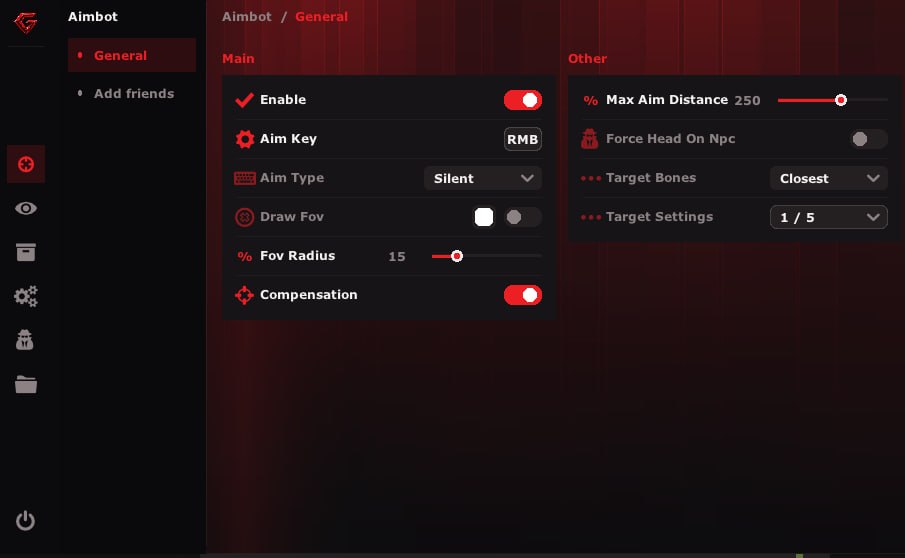
Vector and silent

Two aim modes. Vector leads the shot based on target movement, silent sends the bullet without turning the camera. A bow and an AK want different settings here.

Aim key

Aim binds to any key and can fire only while held. That way the software will not start shooting on its own while you farm a node.

Smooth and distance

The smooth slider takes the snap out of the crosshair, the distance slider sets how far out the aim bothers with a target at all.

FOV and its circle

Capture radius is a slider and it draws as a circle on screen. Narrow for mine tunnels, wide for open fields.

Bone choice

Head, neck, stomach or closest point. Closest helps when the target keeps popping behind a rock and the head sits in geometry.

Targets

Who gets locked

Separate toggles for enemies, NPCs, teammates and sleepers. People turn sleepers off so the aim does not stick to a body in a bag mid-clear.

Friend list

Your own friend list with adding and removing during the wipe. Anyone on it is invisible to the aim, so you will not clip a mate in a pile.

Friend filter

A filter on top of the list that decides who among the marked names the exception covers. Handy when the team roster changes every evening.

Player ESP

Box and corners

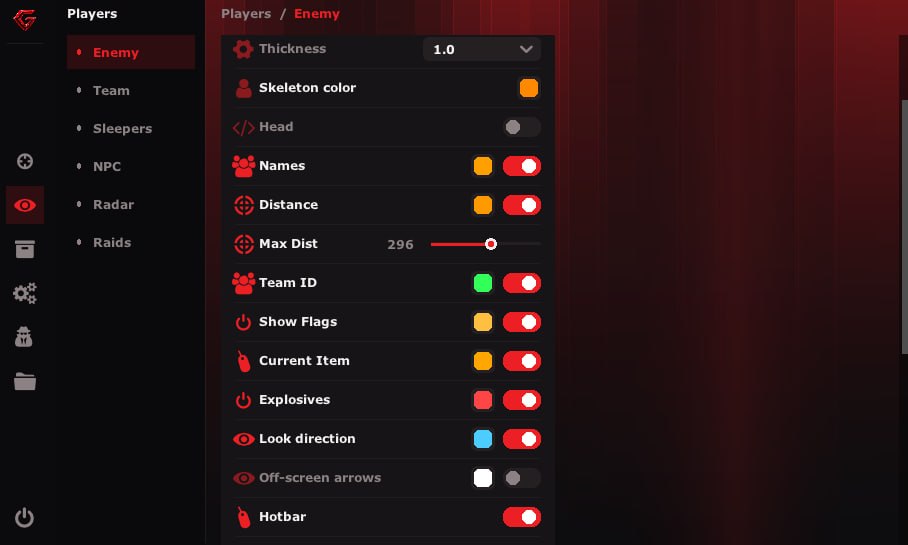
Regular box or corner style. Corners read cleaner at long range, the full box works better in close fights.

Skeleton and thickness

Skeleton with a line thickness setting. Thin lines stay out of your aim, thick ones show through bushes across the field.

Name, distance, Team ID

Nickname, range in metres and team identifier above the player. Team ID tells you straight away whether it is a solo or a group of five.

Flags and held item

Target state and whatever it is holding. You can see who is still farming with a pickaxe and who already pulled a rifle.

Explosive flags

A separate mark on anyone carrying C4, rockets or satchels. From that you know whether the raid is heading for your cupboard or past it.

Look direction

A line from the head shows where the target is looking. Walking around the back turns from luck into arithmetic.

Off-screen arrows

Arrows along the screen edges hold onto anyone who left your view. You know which side the flank is coming from.

Belt and clothing hotbar

The enemy loadout: what sits in the belt and what they wear. Check for medical supplies and a metal facemask before you commit to a trade.

Alternative hotbars

A second way to draw belt and clothing with its own sizes and FOV. Saves the day on 21:9 and on small resolutions where the default crawls onto the crosshair.

Ignore ESP filters

A toggle that cuts through your own visibility filters and shows everything. Useful when missing nothing beats keeping the screen tidy.

World ESP

Raid

Highlights on raid activity: planted explosives, blown walls and traces of someone else working on a base.

Crates and drops

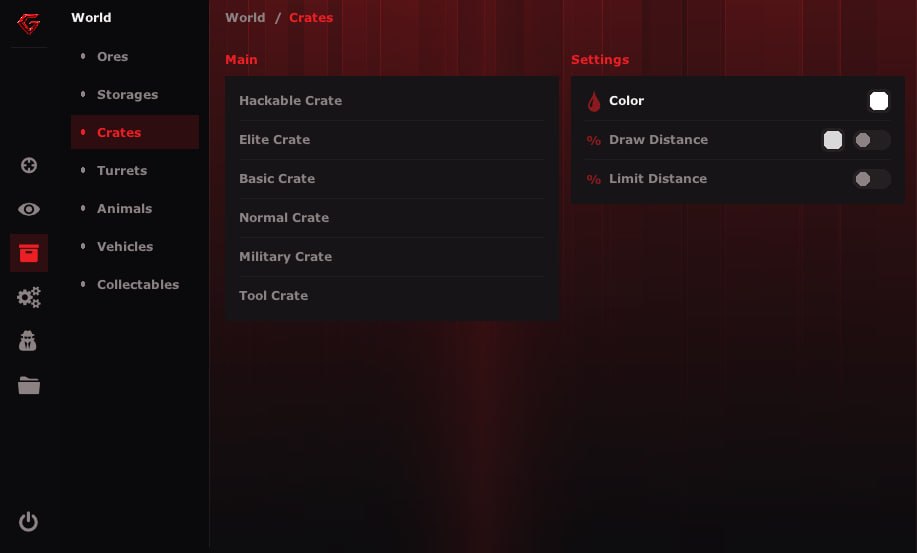
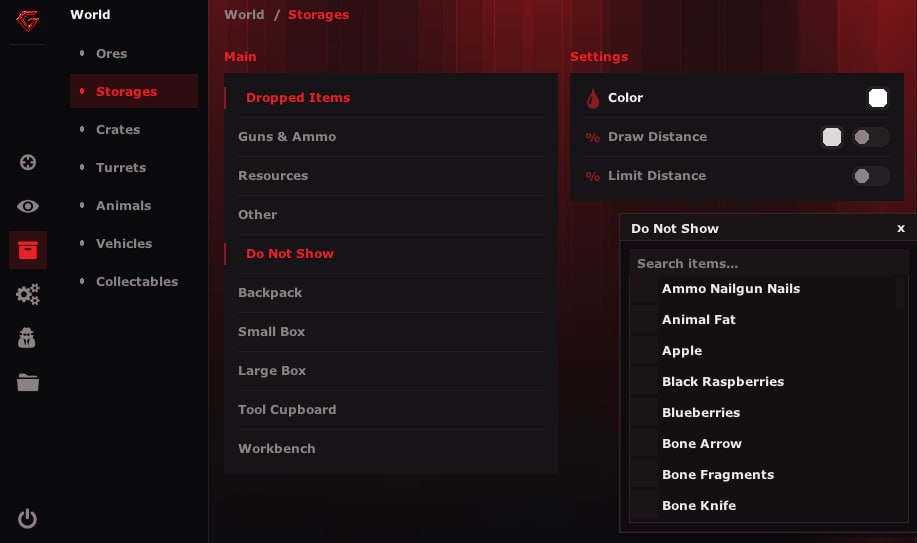
Cases, containers and dropped loot show up across the map. You go for the airdrop by marker, not by sound.

Ores

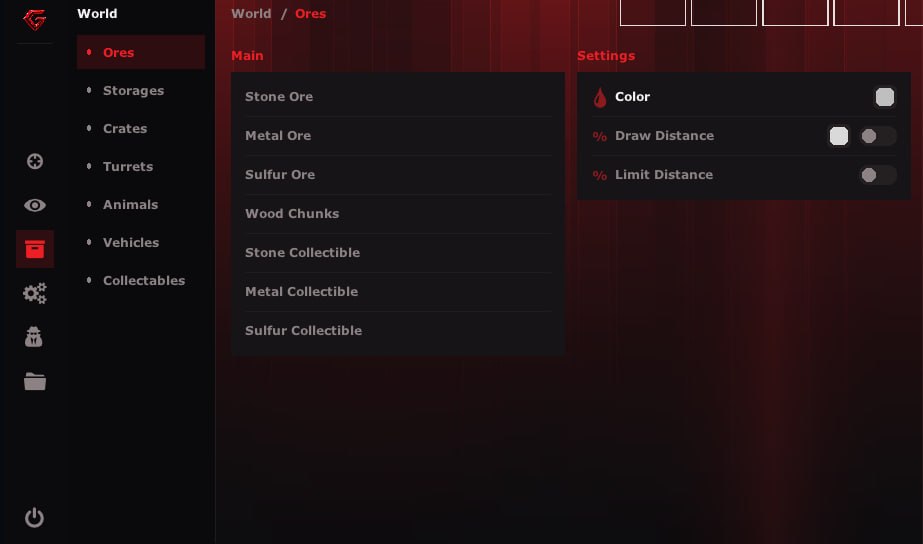
Sulfur, metal and stone nodes. Night sulfur farming before a raid stops being a lap around the island.

Vehicles and animals

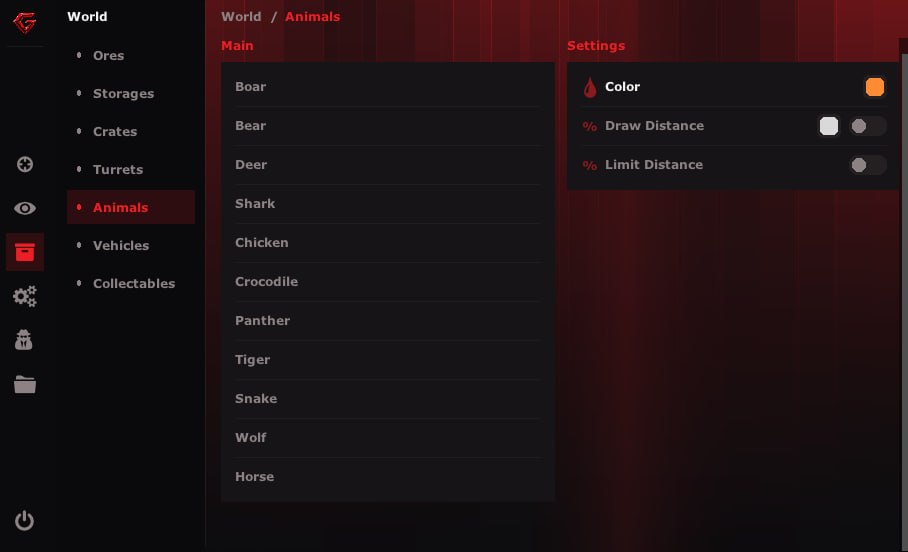
Minicopters, boats, cars, horses and predators on the map. You hear the heli and you already see where it lands.

Turrets and storage

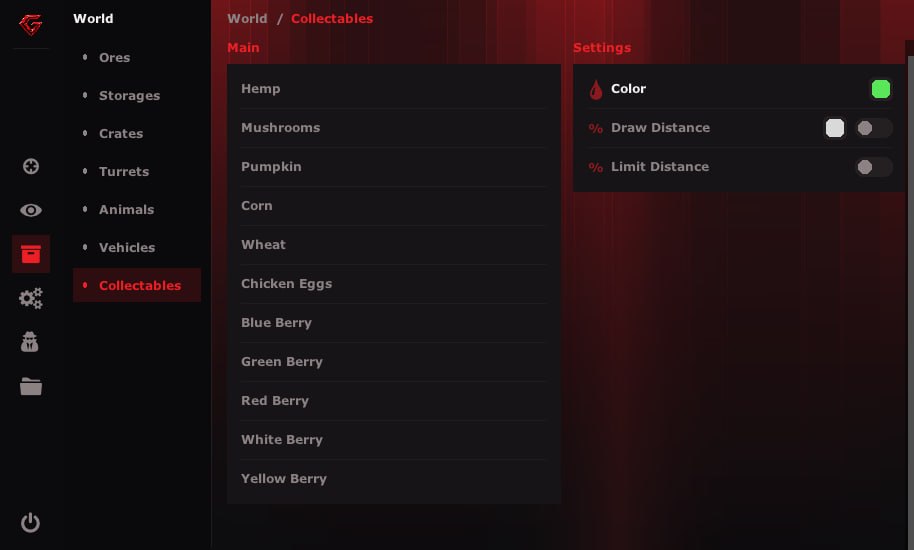
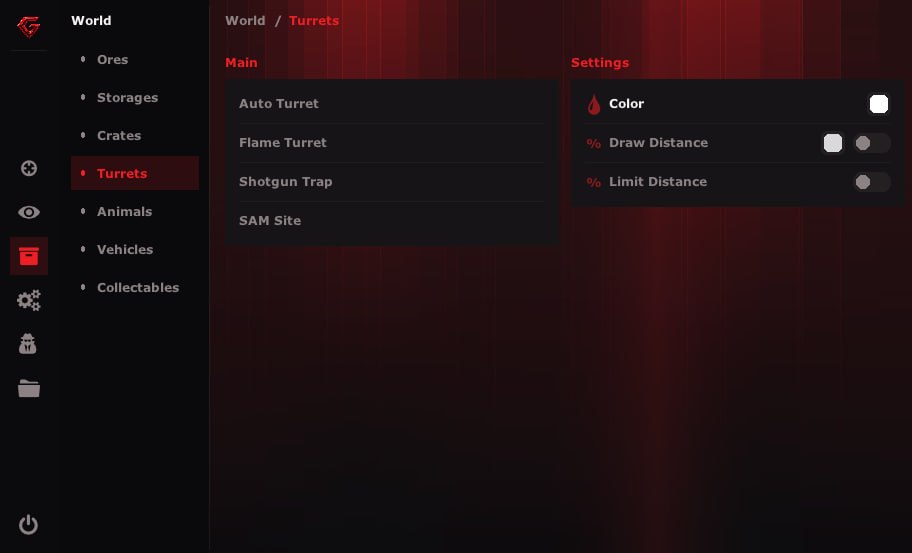
Turrets, cupboards and base boxes. Walk onto someone else's perimeter and you already know what shoots and where the goods sit.

Misc

Spider

Climb walls and get into spots that normally need a loot-height stack of boxes.

Infinity jump

Lifts the ceiling on jumping. Breaking off a chase and getting up rocks becomes easier.

Bright night

Pulls the night picture up to daylight without a torch that gives you away from a kilometre out.

Fast eoka

The spark lands on the first click. Point blank, the eoka stops being a lottery.

Force auto

Turns semi-automatics into full auto. The Semi Rifle and the Python start pouring.

Third person and zoom

Third person view, zoom and a custom FOV. Peeking a corner and reading a spot on a hill without exposing yourself.

Remove layers

Strips geometry that gets in the way: bushes, parts of builds and distance haze stop blocking the view.

Battle mode

Gathers the combat features under one switch. Farming is over, the fight started, one toggle and you are set.

Bind bar

An on-screen panel listing your hotkeys. You see what is on right now without opening the menu.

Menu and visuals

Hidden overlay

Menu and ESP stay out of screenshots, recordings and screen share. A raid clip goes to your friends with no surprises in it.

Fonts

Around six fonts to pick from for the whole interface. A small pixel one for 1080p, a large one for 2K.

Draw sizes

Separate sliders for player ESP size and dropped item size. People shrink the loot so it does not flood the screen in a warehouse.

Unload

Unload pulls the software out of the game on the fly, no restart. A friend walks over, you tab out and you are clean.

Configs

Save, load, delete

Setting presets live in the menu and swap in two clicks. One build for farming, another for raids, and the spare ones go from the same place.

Known issues & fixes

Real questions from our support, with the fixes that worked. Based on user requests for this product.

The loader crashes when you press Inject or Load Bypass

The loader talks to the product server, and from some regions that connection does not go through, so the window simply closes.

Fix: turn on a VPN before you start the loader and pick a European or American server. Launch the loader again once the region is changed.

The bypass does not activate and there is no overlay in game

The bypass will not load while the system is still protected by stock Windows features and boot settings.

Fix, step by step:

  • In BIOS: disable Legacy Mode and switch booting to UEFI.
  • In BIOS: disable Secure Boot and TPM.
  • In Windows: disable every antivirus, Windows Defender included.
  • In Windows: turn off Core Isolation / Memory Integrity under Device Security.

Reboot after the changes and inject again.

The overlay disappears or features stop working 5-15 minutes into the game

This is what a conflict with a third-party overlay looks like. SteelSeries is the usual culprit: its own layer takes over drawing and after a few minutes pushes the other one out.

Fix: close SteelSeries completely, tray processes included, open a clean game client and reinject properly. After pressing Inject use the overlay capture bind — the order is shown in the product video guide.

The loader reports a key error even though the key is correct

The key is usually not the problem. Leftovers from earlier loader versions get picked up and break the check.

Fix: delete every loader file from the PC, folders from previous versions included, empty the Recycle Bin and download a fresh copy. Then enter the key again.

Invalid HWID or Invalid License error

Both messages mean the licence is bound to different hardware or its status does not match what the loader expects. Reinstalling does not fix either of them.

Fix: message support and attach a screenshot of the error together with your key. The binding gets corrected on the product side.

All issues & general troubleshooting
TARIFFS
$3.00
BUY What happens after payment?
Got a question? Ask before you pay

We'll help you choose and sort out any launch issue. Ask us anything before buying, we're always on your side.

Support 10:00–22:00, sometimes we reply at night too
Ask a question

Available tariffs

1 day
$3.00
START PURCHASE
7 days
$20.00
START PURCHASE
30 days
$40.00
START PURCHASE
Reviews about GWARE RUST

No reviews yet. Be the first to leave one.

Your review

Reviews are published after moderation.

Join our gaming community chat

Discuss current cheats from developers and how to use them effectively in popular online games. Share tactics, exchange useful info and find like-minded players in our community.

1 900+Members
24/7Online
Join our gaming community chat

Technical support

Run into a technical issue? Our team of experts will help. We handle all requests in a live queue, so please be understanding if it sometimes takes a little wait. We guarantee that no request goes unanswered.

Availabilityfrom 10:00 to 23:00
Fast responseIn queue order
Get help
Technical support
PROCHEAT

PROCHEAT news channel

Follow product status changes, update history and important announcements.

Subscribe

Rust cheat GWARE: what is in the build

The GWARE menu is split into seven tabs, and each one covers its own part of the game. Aimbot handles trades, the two ESP blocks handle reading the enemy and the map, misc deals with movement and vision, and the interface and config tabs decide how all of it looks and switches. The table below shows what sits where.

TabWhat it coversKey settings
AimbotAiming and tradesVector, silent, aim key, bone, FOV with circle, smooth, distance
TargetsWho counts as an enemyEnemies, NPCs, teammates, sleepers, friend list and its filter
Player ESPReading the enemyBox and corners, skeleton, name, distance, Team ID, look direction, explosive flags, belt and clothing hotbar
World ESPMap, loot and raidsRaid, crates, ores, turrets, storage, vehicles, animals
MiscMovement and visionSpider, infinity jump, bright night, fast eoka, force auto, third person, zoom, remove layers, battle mode
InterfaceHow it looksHidden overlay, fonts, ESP and loot sizes, bind bar, unload
ConfigsSetting presetsSave, load, delete

None of the tabs is locked in: every module switches off on its own, and the ones you use often go onto binds and show up in the on-screen bar.

The overlay that never lands on a recording

The GWARE overlay lives on your monitor and nowhere else. A screenshot, a capture through OBS or ShadowPlay, a Discord screen share all give back clean gameplay with no menu, no boxes and no skeletons in it. The friend you send that raid clip to sees plain Rust.

That removes the dumbest way to get caught, a leaked screenshot. It does not make you immune to reports, though. If you are running across rocks on spider and dropping people through walls, questions will come with or without the picture. Hidden overlay covers screen capture, not how your character behaves.

Enemy hotbar and explosive flags

Player ESP in GWARE reads what the enemy carries. It draws the target hotbar above them: you see whether there are medical supplies in the belt, whether a metal facemask is on, what they hold right now. That set tells you the enemy tier before a single shot, and whether the trade in the open is worth taking.

Explosive flags are their own line. Anyone carrying C4, rockets or satchels gets marked, and their direction of travel tells you whose cupboard is getting broken tonight. Together with Team ID that adds up to real scouting: a solo with a satchel is going for someone's box, five players with rockets have gathered for a big base.

The hotbar can be switched to an alternative draw style with its own sizes and FOV if the default creeps onto your crosshair. On ultrawide monitors that is usually what you end up doing.

Getting the system ready for the hypervisor

GWARE loads through a hypervisor, and half the support tickets are about BIOS rather than the cheat. The order goes like this: enter BIOS, turn virtualisation on (SVM Mode on AMD, Intel Virtualization Technology on Intel), set boot to UEFI and disable Legacy, then drop Secure Boot and TPM. Check the disk in diskpart or Disk Management — it has to be GPT, MBR will not do.

On the Windows side enable the Hyper-V feature, switch off Core Isolation under Device Security and fully remove antivirus software along with Defender. Memory is 16 GB of DDR4 at minimum, because the hypervisor takes a slice for itself.

One more piece of software worth naming: SteelSeries GG has to be closed before the game starts. If the overlay disappears ten minutes into a session, that is almost always the culprit. Close it, open a clean game client and reinject.

How to buy the GWARE cheat for Rust

There are three periods: a day, a week and a month. People take the day to run one evening and find out whether their machine handles the hypervisor. A week covers the busy part of a wipe, a month is the best price per day.

Payment goes through Digiseller, after which the key and the loader land in the mailbox you entered at checkout. There is no personal account on the site, everything arrives by email. When the cheat goes down for an update after a Facepunch patch, the remaining subscription time is frozen and comes back once the new build ships.

GWARE FAQ

Is the GWARE menu visible on stream or in a recording?

No. The overlay is hidden from screen capture: OBS, ShadowPlay, screenshots and Discord screen share all show clean gameplay. The ESP picture exists only on your monitor.

Do I need a spoofer alongside GWARE?

The build has no spoofer inside. You only need one if your account or hardware already carries a HWID ban, and in that case you buy a spoofer separately from the Rust spoofer section.

Will it run on a laptop with 8 GB of RAM?

No. The hypervisor eats part of the memory, so the requirement is 16 GB of DDR4 as a floor. On eight the loader either fails to come up or the game turns into a slideshow.

Can I play with friends without the aim hitting them?

Yes, that is what the friend list is for. Mate nicknames go into the list during the wipe and the aim stops locking onto them. A filter sits on top if you want the exception to cover only part of the list.

What happens to my subscription when Rust gets patched?

The software goes down for an update and your remaining time is frozen. Once the new build ships the timer picks up from the same point, so the days are not lost.

Which Windows do I need?

Windows 10 or 11 on build 22H2 and newer, UEFI boot mode, GPT partitioning. Windows 7 and 8.1 are not supported and the software will not start on them.

from $3.00 Choose a plan
Ask a question


