Arc Raiders Full | Renthal External | ESP | aimbot

Frozen
Renthal Renthal
Last update 28.04.2026 This date shows when the software was last updated. An old date doesn't mean the software stopped working! Most likely the developer just had nothing new to add. If you have any doubts, you can always check the current status with our support team.
Add another cheat from this game too — to compare them.
Arc Raiders Renthal FULL
Steam
Windows support: 10: all builds; 11: all builds
Spoofer:No
USB drive:No
BIOS:Yes

User information

To run, you need:

- Bios UEFI

- Hyper-V enabled

SCREENSHOTS
Description

You drop onto the Rust Belt surface in a trio, backpack empty, timer set to 30 minutes. Two minutes later the scanner shows a Rollbot around the corner of a building, and two enemy raider markers blip on the radar, both moving toward the same weapon crate. Without that info you walk into the firefight blind and lose the gear you spent three raids in a row collecting. Renthal External for Arc Raiders fixes this at the level of perception: ESP highlights every player, every ARC robot and every loot container within 350 meters, and the humanized aimbot handles your accuracy in fights where it comes down to fractions of a second.

Arc Raiders punishes mistakes hard. Die and you lose everything except your safe pocket. Renthal runs on an external architecture: it does not hook into the game process, it reads data from the outside and draws an overlay on top of the window. To the anti-cheat it looks like an ordinary third-party app, not a client modification. The result is that cheat users keep their loot, control the map and consistently make it out through the evac points with a full backpack while their opponents are still guessing where the shots came from.

Product features

AIM | aiming system

Enable Aimbot (M1)

Turns the aimbot on with the left mouse button. Target lock happens instantly, and in close-quarters fights inside Rust Belt warehouses or building corridors that is the difference between a clean raid and losing all your gear.

Aim Players / Aim Enemies (M4)

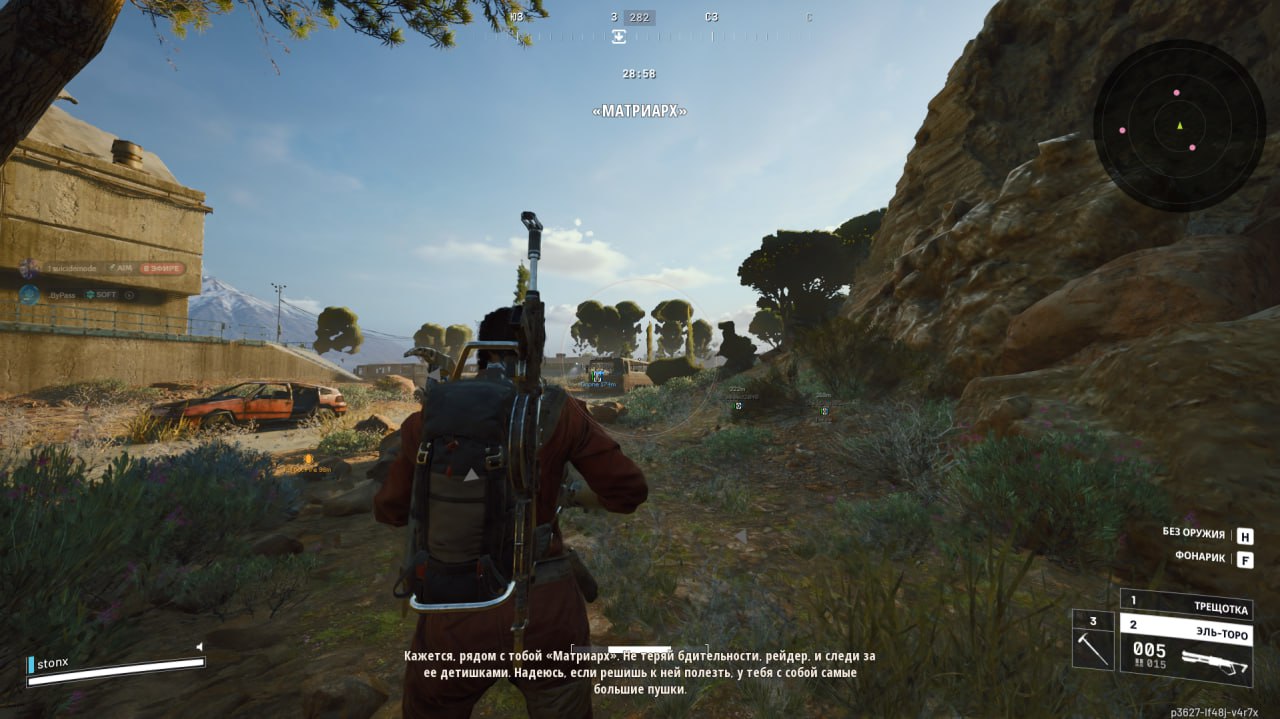
Separate aim for players and ARC robots. M1 works against raiders, M4 against the machines. Handy when both hit at once, like when a Matriarch pushes into a zone where you are already trading shots with another trio.

Aim FOV (250) / Enemy FOV (120)

Target capture radius in pixels from the center of the screen. Players get a wide cone, 250 pixels lets you grab targets during sharp turns. For robots 120 is enough: they are bigger and move more predictably.

Aim Smooth (1.0) / Enemy Smooth (3.0)

How smoothly the crosshair pulls onto the target. A value of 1.0 for players means near-instant lock for aggressive PvP. For ARC robots it is set to 3.0, a soft track that looks more natural during the PvE phase of a raid.

Humanize

Adds micro-deviations to the crosshair movement, imitating manual aim. Without humanization the aimbot moves in a perfect straight line to the hitbox. With it the path looks like a live player with good reflexes is aiming.

Aim Bones (Head)

Pick your hit point. Head targets the head for maximum damage. In Arc Raiders headshots decide the outcome of fights behind cover, when only the top half of the enemy is visible.

Draw FOV Circle / Draw Aim Line

Shows the capture zone and the aim line on screen. The FOV circle shows the radius the aimbot will grab a target in, and the line shows the current pull direction. It helps you tune your FOV to your own style without guessing.

ESP | visual information

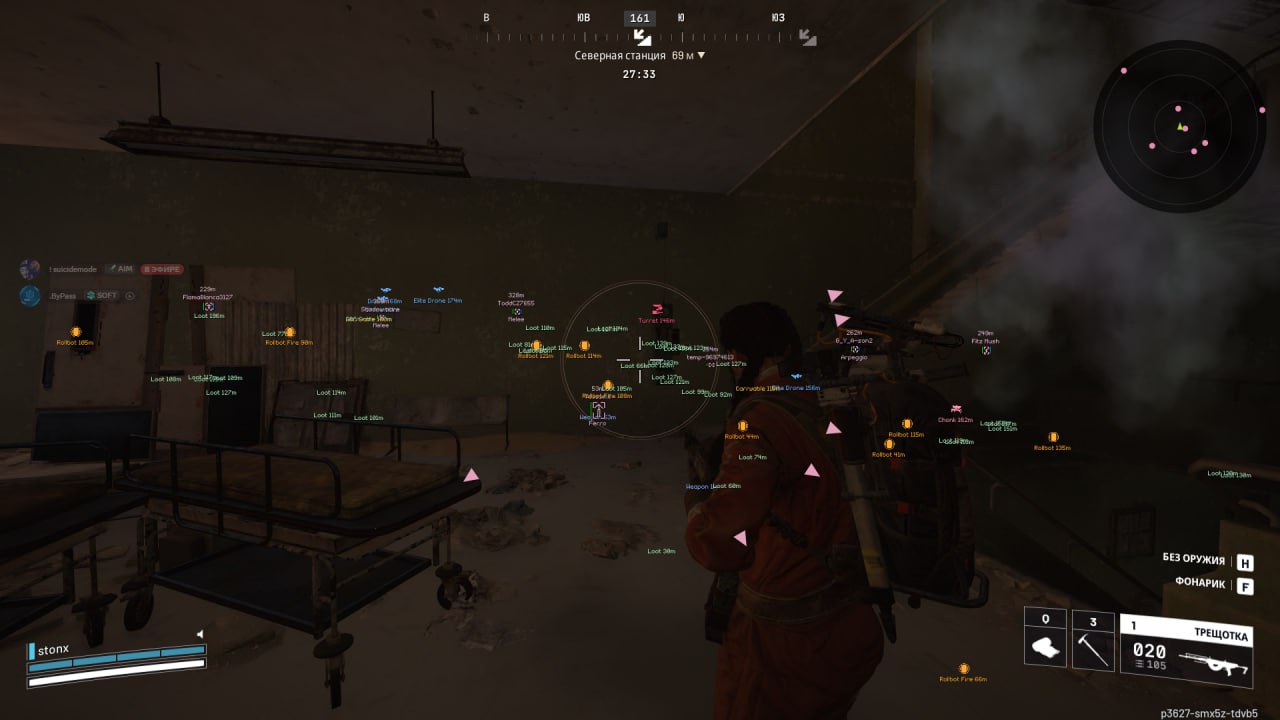
Player ESP (Max Range 350)

Highlights every live player within a 350 meter radius. On maps like Stella Montis or Dam Battlegrounds, where fights happen at mid-range between buildings, that covers almost the whole active zone around you.

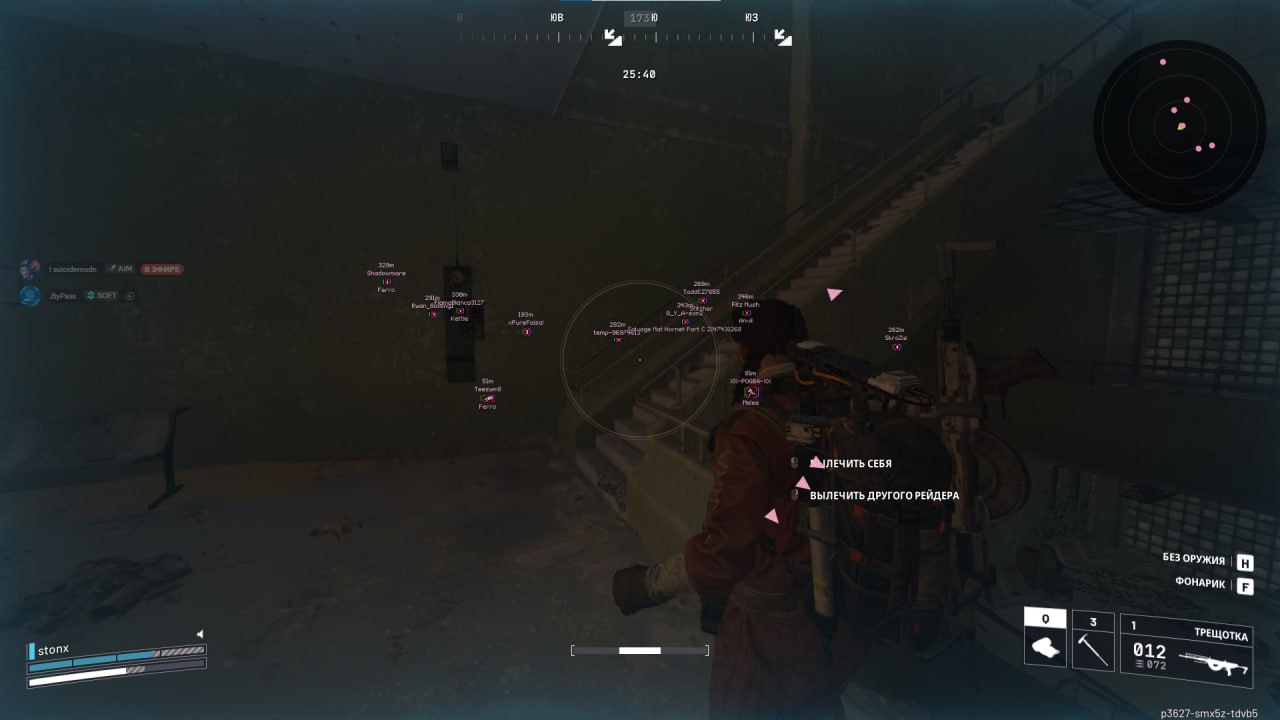
Cornered Box / Skeleton / Snaplines

Three ways to display players. Cornered Box is a frame at the corners of the silhouette, minimal clutter. Skeleton is the model's skeleton, you see the pose and movement direction. Snaplines are lines from your crosshair to the target for fast orientation in chaos.

Health Bar / Names / Distance / Active Item

The health bar shows whether the enemy is finished off after a firefight. The name helps you tell familiar players apart. Distance matters when picking a weapon: at 200+ meters it only makes sense to shoot with a rifle. Active Item shows what the raider has in hand right now.

Off-Screen Arrows (Radius 300)

Arrows at the edges of the screen point toward players outside your field of view. A radius of 300 warns you about someone approaching long before visual contact. It saves you from flank pushes, which happen constantly in Arc Raiders.

Show Dead

Displays the bodies of killed players. In an extraction shooter a dead body is information: there was a fight here, maybe the winner is standing nearby waiting for the next victim, or the loot is already taken.

ESP enemies (ARC)

Enemy ESP (Range 200)

Highlights every ARC robot within a 200 meter radius. The machines spawn in waves and can catch you off guard while you are looting crates. ESP shows them in advance, so you can avoid the group or set up a position.

Drones / Rollbots / Turrets / Ticks / Snitches / Spotters / BullCrabs / Other

Filters by ARC type. Snitches are dangerous because they raise the alarm and pull in reinforced waves, so you need to see them first. BullCrabs are a serious threat in close quarters. Turrets and Spotters control zones. Each type is highlighted separately so you can read the situation fast.

ESP loot and containers

Loot ESP (Range 200)

Highlights items on the ground within a 200 meter radius: weapons, consumables, carryables. Instead of searching every corner you see what you need right away. Raids speed up and time spent on the surface drops.

Loot Items / Loot Weapons / Carryables / Other Loot

Filters loot by category. If you only need Weapons to craft a Wolfpack, you turn off the rest and the screen does not get cluttered with icons. When farming resources for a Trophy Display you turn on Carryables and Other Loot.

Containers (Weapon / Ammo / Grenade / Storage / Salvage Crates)

Highlights every crate type with color coding. Weapon Crates are the priority at the start of a raid, when you need to gear up. Salvage Crates are the backbone of progression in expeditions. You see the route from crate to crate without wandering around randomly.

Extraction Points

Shows evac points on the map and through walls. When your backpack is full and the timer is running down, you know the exact direction to the nearest exit. Paired with Off-Screen Arrows you can tell which raiders are already heading for the same extract.

MISC | utility

Radar (Range 250, Size 260)

A mini-map with markers for players and robots. Range 250 covers the mid-range combat zone, Size 260 makes the radar big enough to read targets without staring at it. Color customization lets you separate the marker types.

Battle Mode (F1)

Switches to combat mode with one key. It strips out extra visual info and leaves only enemy data, which is handy when entering a hot zone where loot is no longer the priority and there are too many markers on screen.

ESP Font & Icons (Font Size 13, Icon Size 24)

Adjusts the ESP font and icon size. On 1440p and 4K monitors the default 13pt can be a bit small, so you can scale it up. On 1080p you scale it down instead, so the labels do not block your view.

Configs (Create / Save / Load / Delete / Refresh)

A system of setting profiles. One config for aggressive PvP with a narrow FOV and fast Smooth, another for farm raids with wide Loot ESP and soft tracking on robots. You switch between styles in a second through the menu.
TARIFFS
4$

Subscribe to learn when this product is updated.

Got a question? Ask before you pay

We'll help you choose and sort out any launch issue. Ask us anything before buying, we're always on your side.

Support 10:00–22:00, sometimes we reply at night too
Ask a question

Available tariffs

1 day
4 $
SUBSCRIBE
3 days
10 $
SUBSCRIBE
7 days
20 $
SUBSCRIBE
30 days
35 $
SUBSCRIBE
Reviews about Arc Raiders Renthal FULL

No reviews yet. Be the first to leave one.

Your review

Reviews are published after moderation.

Join our gaming community chat

Discuss current cheats from developers and how to use them effectively in popular online games. Share tactics, exchange useful info and find like-minded players in our community.

1 900+Members
24/7Online
Join our gaming community chat

Technical support

Run into a technical issue? Our team of experts will help. We handle all requests in a live queue, so please be understanding if it sometimes takes a little wait. We guarantee that no request goes unanswered.

Availabilityfrom 10:00 to 23:00
Fast responseIn queue order
Get help
Technical support
PROCHEAT

PROCHEAT news channel

Follow product status changes, update history and important announcements.

Subscribe

Why an external architecture is critical for Arc Raiders

Arc Raiders runs on Unreal Engine 5, and the game's anti-cheat tracks client modifications fairly aggressively. Patches drop every two to three weeks, and every update tightens the checks. Renthal External does not touch the files or memory of the game process: the cheat works like a separate app that reads data through system calls and draws an overlay on top of the window. To the anti-cheat it is indistinguishable from ordinary software on your desktop. From the store's experience, external solutions give you stability between updates: while internal cheats break after every hotfix, the external one keeps working without a rebuild.

How ESP changes farming in expeditions

The expedition system in Arc Raiders requires you to hit a certain stash value to take part in a wipe, which means every raid has to be profitable. Loot ESP with category filtering lets you build a route from one valuable crate to the next, skipping empty zones. Container ESP shows Salvage Crates and Weapon Crates through walls at 200 meters. Combined with Player ESP and Off-Screen Arrows you control who among the raiders is already in your area, and you steer around the fights that could cost you all the loot you collected.

Humanized aimbot in PvPvE fights

In Arc Raiders, firefights between players often break out at the same time as ARC robot attacks, with a Matriarch walking into the zone while two trios are fighting over a weapon crate. Separate aimbot setups for PvP and PvE solve this situation: players get a fast Smooth 1.0 with aim to the head, robots get a soft Smooth 3.0 with smooth tracking. Humanization adds micro-deviations to the crosshair movement, so from the outside the aim looks like a confident manual aim, not a robotic snap. According to PROCHEAT customer reviews, it is this combination that gives you the edge without giving yourself away.

Latest updates

28.04.2026 07:46
Frozen
Sent for update, time frozen
23.04.2026 07:06
Working
Updated, time unfrozen
21.04.2026 07:32
Frozen
Sent for update, time frozen
19.04.2026 16:02
Working
Updated, time unfrozen
16.04.2026 18:46
Working
Updated, time unfrozen
Open full history
Ask a question


