Neptune DMA - Private Cheat for PUBG (Base / Full)

Working
Top seller
Last update 05.05.2026 This date shows when the software was last updated. An old date doesn't mean the software stopped working! Most likely the developer just had nothing new to add. If you have any doubts, you can always check the current status with our support team.
Add another cheat from this game too — to compare them.
DMA PUBG Neptune
Steam
Epic Games
Kakao
Windows support: 10: all builds; 11: all builds
Spoofer:No
USB drive:No
BIOS:No

User information

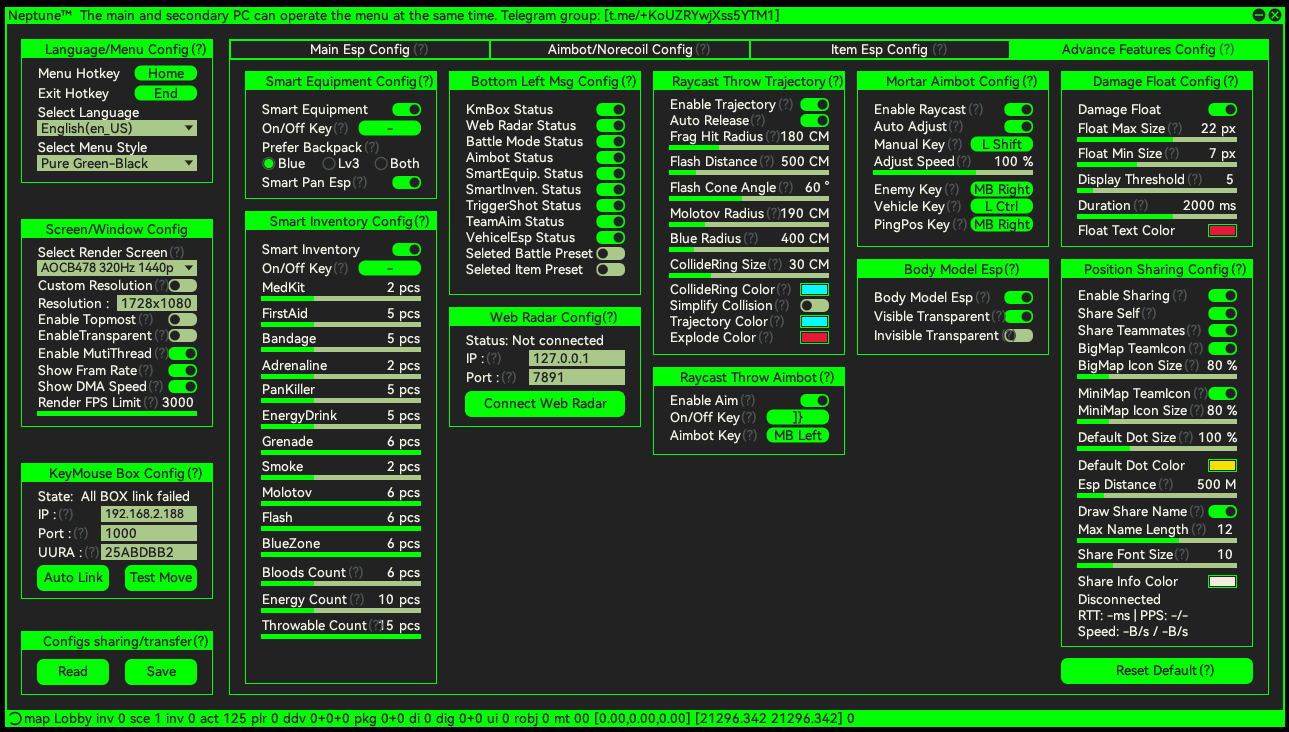
ModuleBaseFullAIM (custom FOV, smoothing, configs)✓✓Recoil Control✓✓Mortar Aimbot✓✓AutoShot✓✓Player / Loot / Vehicle / Airdrop ESP✓✓Web Radar (127.0.0.1)✓✓HID Device Support (KMBox / MAKCU)✓✓Per-weapon Configs (ARs / DMRs / SMGs / Shotguns / Pistols / Melee / Throwables)✓✓Visibility Check, ✓Triggerbot, ✓

What this means in practice:

  • Base - for tactical players and snipers: ESP + aimbot without visibility filtering. You pull the trigger yourself, the aim just guides you. Cheaper, and gives you more manual control.
  • Full - for aggressive fraggers and box-fighters: adds automatic fire on aim and a "shoot only visible targets" filter. For players where reaction time in fractions of a second matters.


  • System Requirements
    The cheat runs on a second PC with a DMA card. The main (gaming) PC stays clean - no software is installed on it.

  • ComponentMinimumDMA Read Speed4500+Second PC CPUIntel i5-6500 or equivalentSecond PC RAM8 GBSecond PC GPUNVIDIA GTX 980+ (integrated - with limitations)StorageSSD with WindowsVideo OutputHDMI 2.0 (HDMI 1.4 - limited to 1920x1080 @ 60 Hz)HID EmulatorKMBox B Pro / KMBox Net / MAKCU / CatBox / Arduino
  • A DMA card is required. Without one the software won't start - this is not a loader with a protection bypass, it's a program that works with a PCI device. If you don't have a DMA setup yet, build the hardware first, then buy the key.
VIDEO
SCREENSHOTS
Description

In PUBG, software cheats have a shelf life measured in events. Beryl with no recoil, AWM with silent aim - a couple of killcam clips and your account with Glacier and Pioneer skins gets a permanent ban with no appeal. BattlEye catches injections into TslGame.exe faster than cheat developers can patch signatures.

Neptune is a different class. A DMA cheat doesn't run on your gaming PC - it runs on a second machine with a Direct Memory Access PCI card. That second PC reads your gaming PC's memory over the DMA channel, processes data on enemy positions, loot, and vehicles, and sends back nothing but mouse movements through KMBox or MAKCU - a physical hardware emulator. From BattlEye's perspective, nothing is happening on your gaming PC: the PUBG process is clean, no drivers, no injections.

In a standard Erangel drop, that means you walk into School or Pochinki already seeing every hot-dropper through the walls with their SCAR-L. In the final circles with an AWM and 8x scope, Neptune calculates lead on a running target and holds your crosshair - hitting a headshot at 400 meters stops depending on how steady you hold Shift. Mortar Aimbot handles mortars: aim calculated along the ballistic arc, which nobody wants to work out in their head mid-match.

Neptune is premium. Expensive on the hardware side (DMA card with 4500+ read speed, a second PC, KMBox), but your account is safe: ban cases on a properly configured DMA setup in PUBG are almost non-existent. If you've already lost one account with skins on a software cheat and you're calculating the cost of starting over - DMA pays for itself in one season.

Both versions are available in the Procheat store: Base at a lower price without the Visibility Check and Triggerbot modules, and Full with the complete feature set. Which one to buy depends on your playstyle: snipers and tactical players focused on ESP are fine with Base, aggressive fraggers and streamers who aren't afraid of the killcam take Full. A detailed breakdown of the differences and system requirements is below on the page.

Product features

AIM

Custom FOV

The aimbot's active radius in degrees. Narrow FOV for a 600-meter AWM sniper shot, wide for close-quarters boxes in Pochinki with a UMP. Configurable separately via hotkeys for scoped and non-scoped use.

XY Smoothing

Separate smoothness for horizontal and vertical movement. Fewer hard flicks in the killcam - the crosshair tracks enemies like a trained player, not a robot.

FullAuto Config

A dedicated profile for automatic weapons: Beryl, M762, AKM, M416, SCAR-L. Individual FOV, smoothing, and hitchance values per weapon. Beryl with 100% recoil compensation is a laser, AKM with a lower value produces a natural-looking burst.

Sniper Config

Separate settings for Kar98k, M24, AWM, Mini14, SKS. With Mini14 - fast auto-fire to the body, with AWM - accurate single shots to the head with lead calculation based on target distance and speed.

Shotgun Config

Profile for S686, S1897, S12K, DBS. Narrow FOV and maximum tracking speed - at 5 meters in the Pecado basement, a shotgun with this config gives the enemy no window to respond.

Throw Config

Aim assist for grenades: frags, molotovs, smoke, stun. Trajectory calculation by throw force and angle - the molotov flies straight into the window your enemies' teammates are jumping through.

Recoil Control

Recoil compensation control: scale, randomization, and delay. At maximum, the gun sits like a laser. At 70% with randomization, the pattern resembles a skilled but human player. Killcam won't give it away.

Mortar Aimbot

Auto-aim for mortars in heavy weapon modes. The shell is calculated along the ballistic arc, the landing point is highlighted - shelling an enemy base or zone without needing to calculate gravity by hand.

AutoShot

Automatic fire when the target enters the crosshair. Configurable shot interval and projectile movement prediction. On the SLR and Mini14 - a series of accurate semi-auto shots without touching left-click.

Projectile Prediction

Lead calculation for slow-velocity projectiles (Kar98k, M24, grenades). Target running at 250 meters - the hit point is pre-calculated and shown in the HUD.

HID Device Support

Supports KMBox B Pro, KMBox Net, MAKCU, CatBox, and Arduino. Auto-detects the device, with manual IP and port configuration. Without a properly connected HID emulator, the aimbot won't work - it's a required part of the DMA setup.

Visibility Check [Full only]

The aimbot only fires on visible targets - if an enemy is behind a rock, cliff, or building wall, it ignores them. The Base version doesn't have this filter, which raises the risk of shooting through geometry and getting flagged by server admins.

Triggerbot [Full only]

Automatic fire the moment an enemy enters the crosshair - no finger required. Cornering in the tight corridors of Mil Base or in the final circle on Vikendi, the trigger closes the target in one frame after the angle opens. Not available in Base.

ESP

Player ESP

Enemy highlights through walls and terrain. Skeleton with configurable line thickness, separate head marker color, exact distance in meters. Peeking from a hilltop - you already see who's behind the rock at the base before your peek.

Loot ESP

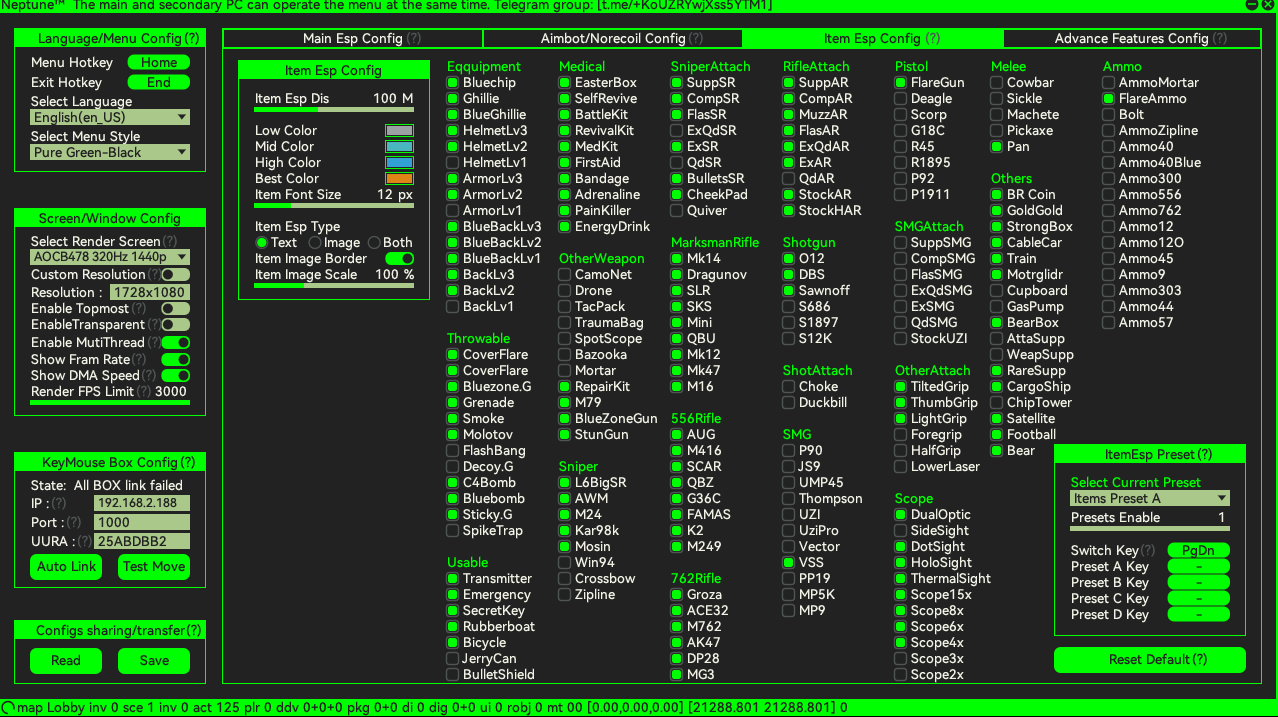
Highlights loot on the ground and in buildings: weapons, attachments, meds, armor. Hot-dropping School - you know which floor has the first AKM before the first enemy leaves the parachute.

Vehicle ESP

Shows cars, motorcycles, boats, and buggies in range. After landing at a far POI, you spot the nearest Dacia at 200 meters - saves three minutes on your rotation to the zone.

Airdrop ESP

Highlights care packages in the air. You know the landing spot before the fight over the drop starts - so you leave cover at the right moment, or you skip the guaranteed trap with two squads nearby.

Danger Warnings

Audio and visual alerts for enemies in close proximity and high-damage zones. Nobody sneaks up behind you with a suppressed pistol, and you won't miss the sniper who already zeroed in on your position.

Health Bar (gradient)

A gradient health bar above every enemy. You see exactly how much HP is left - finish them with one bullet or unload a few more rounds from the AR.

Weapon Icons

The icon of the weapon in the enemy's hands. You see who has an AWM with a scope and who only has a pistol - target priority in a firefight is decided instantly, no text to read.

Rank Indicators

Player rank tag: Bronze, Silver, Gold, Platinum, Diamond, Master, Conqueror. You know right away whether you're in a lobby with the top 1% or an average ranked pool.

Distance Labels

Exact distance number next to every enemy. Decides weapon choice and tactics: a pistol does nothing at 200 meters, a DMR works fine.

Custom Colors / Fonts

Highlight colors, fonts, and line thickness are all adjustable. Match your monitor and style: high-contrast orange-green on the bright Erangel backdrop, neutral pastels on the dark Vikendi maps.

Per-weapon ESP toggle

Separate ESP settings for each weapon type in your hands: ARs, DMRs, SMGs, Shotguns, Pistols, Melee, Throwables. With a shotgun - close range only, with a sniper rifle - the full map.

WEB RADAR

Local 127.0.0.1 Radar

The web radar runs locally on the second PC at 127.0.0.1. Open it in a second browser tab or on a separate monitor - the interface is independent of the game, puts no load on the gaming PC, and is invisible to anti-cheat.

Map Radar

Full-screen mode with PUBG's minimap. All enemies, teammates, vehicles, and crates on one screen - strategic overview that doesn't exist inside the game.

Warning Radar

Minimal mode with perimeter alerts. Low attention overhead - only signals for approaching enemies, no visual noise from loot and vehicles.

Customization

Font, icon size, and image scale configuration. The radar adapts to any second screen - from a 5-inch tablet on the desk to a 27-inch monitor above the main one.

WEAPON CONFIG (per category)

Assault Rifles (ARs)

Beryl, M762, AKM, M416, SCAR-L, Mk47, G36C, AUG. Individual recoil control, FOV, and smoothing profiles per weapon. Beryl and M762 with maximum compensation are lasers at mid-range, AKM with minimum gives a natural burst for the killcam.

DMRs

Mini14, SKS, SLR, QBU, Mk12, Mk14. AutoShot and Projectile Prediction - a series of accurate singles with no delay between shots. Mini14 at 300 meters works like a semi-sniper.

SMGs

UMP45, Vector, Tommy Gun, Micro UZI, MP5K, P90. High tracking speed for close-quarters and hallways. UMP45 with attachments and the FullAuto config locks down Pochinki at the start of the round.

Shotguns

S686, S1897, S12K, DBS, O12. Narrow FOV, instant tracking. S12K with a suppressor at 8 meters - a guaranteed two-shot finish.

Pistols

P92, P1911, P18C, R45, R1895, Skorpion. Secondary slot with its own profile - a kitted pistol stops being a desperation weapon when your primary runs dry.

Melee

Frying pan, machete, crowbar, sickle. Aim assist for melee - scans enemies within striking range, hits don't depend on how fast you swung the camera.

Throwables

Grenades, molotovs, smoke, stun. Throw Config with trajectory calculation - the molotov flies into a second-floor window without bouncing off the ledge.
TARIFFS
300
BUY What happens after payment?
Got a question? Ask before you pay

We'll help you choose and sort out any launch issue. Ask us anything before buying, we're always on your side.

Support 10:00–22:00, sometimes we reply at night too
Ask a question

Available tariffs

1 day
300
START PURCHASE
7 days
1290
START PURCHASE
30 days
3640
START PURCHASE
Reviews about DMA PUBG Neptune

No reviews yet. Be the first to leave one.

Your review

Reviews are published after moderation.

Join our gaming community chat

Discuss current cheats from developers and how to use them effectively in popular online games. Share tactics, exchange useful info and find like-minded players in our community.

1 900+Members
24/7Online
Join our gaming community chat

Technical support

Run into a technical issue? Our team of experts will help. We handle all requests in a live queue, so please be understanding if it sometimes takes a little wait. We guarantee that no request goes unanswered.

Availabilityfrom 10:00 to 23:00
Fast responseIn queue order
Get help
Technical support
PROCHEAT

PROCHEAT news channel

Follow product status changes, update history and important announcements.

Subscribe

What is a DMA Cheat and How Neptune Differs from Software Cheats in PUBG

A software cheat for PUBG is a program that injects into the TslGame.exe process, reads the game's memory, and either feeds it commands or draws overlays on the interface. BattlEye exists specifically to catch those injections - it scans memory, checks drivers, and monitors suspicious calls to the process. Any software cheat in PUBG lasts anywhere from two hours to a few weeks, and every one of those weeks it's teetering on the edge of detection.

A DMA cheat works differently. Direct Memory Access is a PCI device physically installed in a second PC. That device reads your gaming PC's memory over the DMA channel - with no operating system involvement, no process, no driver on the gaming machine. From BattlEye's side there's nothing to find: TslGame.exe is clean, Windows shows no suspicious modules, monitoring finds nothing. A twin-config with two PCs is a completely different security tier.

Neptune uses this architecture to its full potential. All processing (enemy positions, loot locations, AWM lead at 400 meters) happens on the second PC. The only thing sent back to the main machine is mouse movement through KMBox or MAKCU - a physical board that Windows recognizes as a regular USB mouse. No software, no drivers, no trace.

Why BattlEye Can't See Neptune - and Where the Risk Boundary Actually Is

BattlEye in PUBG does three things: scans processes and memory, detects custom drivers, and analyzes mouse behavior for non-human patterns. The first two protections Neptune bypasses architecturally - there's nothing to scan on the gaming PC. The third one remains.

If you enable Triggerbot in Full with zero delay and maximum aim speed without smoothing, the mouse movements in the killcam look robotic - an inhuman 12-millisecond headshot flick, identical recoil compensation patterns across matches. That's not a BattlEye issue anymore, that's a player-report issue and a manual ban from server admins.

A properly configured Neptune is not "turn everything to max." It's XY smoothing set to human-like values, recoil control with randomization on, Visibility Check to cut out shooting through walls, hitchance below 100% to skip the most obvious shots. Set up that way, even the Full version leaves no trace in the killcam, and an account with skins and hundreds of hours stays alive the whole season.

Which Guns and Modes Neptune Actually Carries

In a standard 100-player round on Erangel or Miramar, Neptune shines through two tactics: map control via ESP and long-range sniping through Sniper Config. Hot-dropping School or Pochinki, you already see which window the second squad picked up an AKM in - you come in from the bathroom window rather than the front door. In an open zone with minimal cover, an AWM and 8x scope paired with Projectile Prediction calculates lead on a running target at 350+ meters - Kar98k headshots happen without manually leading the shot.

Mortar Aimbot is its own thing in heavy weapon modes. The mortar in PUBG has complex ballistics: barrel angle, distance, gravity. Nobody wants to calculate that in their head, and landing the first shot is nearly impossible without help. Neptune highlights the shell's landing point on the radar and in the HUD - shelling an enemy base stops being a lottery.

Web Radar at 127.0.0.1 on a second monitor is a strategic overview that doesn't exist inside PUBG. You see all 100 players on the map, zone movement, vehicle positions, and care packages. In the last circles, snipers running this radar already know every surviving squad's position before anyone makes a peek.

Base or Full - Which Version Fits Your Playstyle

If you play Erangel and Miramar mostly from a sniper or DMR, hold distance, and skip hot drops - Base at €35 covers 95% of what you need. Full AIM, ESP, Web Radar, Recoil Control, mortars, AutoShot, KMBox support - all there. The only things missing are Visibility Check (shooting through walls is on you) and Triggerbot (you pull the trigger yourself).

If you're an aggressive fragger on hot drops, play from boxes and tight angles, and prefer short range with UMP and SMG - Full at €45 is worth it. Visibility Check automatically cuts out shooting through geometry (one of the main causes of DMA ban cases), and Triggerbot closes enemies in the millisecond they open an angle. Cornering at Mil Base or box-fighting on an Apartment rooftop, Full pays for itself in one match.

Streamers and players who frequently show up in other people's killcams should run Full with smoothing on, hitchance below 90%, and Visibility Check enabled - it brings the risk of a report and a manual server ban down to the level of a regular skilled player.

What You Need to Run Neptune in PUBG: Hardware, KMBox, Second PC

The DMA setup for Neptune has three components: a DMA card, a second PC, and a HID emulator. The DMA card is a PCI device with a read speed of 4500+. It goes into the second PC, connected to the gaming PC via cable. There are several proven models on the market - DMA hardware sellers typically operate in their own segment, separate from software sellers.

The second PC is a normal build: Intel i5-6500 or better, 8 GB RAM, GTX 980 or higher, SSD running Windows, HDMI 2.0 output. You don't need a powerhouse, just something stable. The gaming PC stays exactly as it was, nothing installed, nothing configured. As far as Windows on the gaming machine is concerned, you're just playing PUBG with a normal mouse.

The HID emulator is a board that receives mouse movements from the second PC and passes them to the main PC via USB. KMBox B Pro and KMBox Net are the gold standard, MAKCU is a more budget-friendly option. Without a HID device the aimbot won't work: the mouse needs to arrive in the gaming PC's Windows as a real input device, otherwise BattlEye flags the movements as programmatic.

Once the hardware is assembled, the Neptune key arrives by email after payment on Procheat - usually within a few minutes. The email includes setup instructions: software installation on the second PC, DMA connection via PCI, KMBox configuration, first launch. Support responds on Telegram - typical setup questions are resolved within an hour.

Ask a question


